

Among the best web builders in Australia, Wix is the top choice in 2026, thanks to its generous free plan, powerful AI tools, and beginner-friendly setup.
Wix coupon 50% OFFWhether you’re an Australian professional, a small business owner, or simply want to launch a personal website, choosing the right platform matters. Website builders let you create a fully functional site without coding, but not all of them are equally suited to Australian users.
When comparing the best web builders in Australia, factors like AUD pricing, .com.au domain support, and local payment integrations can make a big difference. These details are often overlooked, yet they directly impact your long-term experience.
That’s why I teamed up with the Cybernews research team to test leading providers. In this guide, I’ll walk you through the 6 best web builders in Australia and help you choose the right one for your needs.
6 best website builders in Australia
- Wix – best Australian web builder overall (Get up to 50% OFF Wix)
- Hostinger Website Builder – best website builder in Australia for beginners (Visit site >)
- Squarespace – best Australian website builder for beautiful designs (Visit site >)
- Webflow – best web builder in Australia for advanced visuals (Visit site >)
- Shopify – best Australian website builder for eCommerce (Visit site >)
- WordPress.org – best website builder in Australia for maximum customisation (Visit site >)
The 6 best website builders in Australia – detailed reviews
Below, you’ll find a detailed breakdown of each top website builder and my hands-on experience using it. I covered everything: what I liked and disliked, standout features, and minor frustrations, so you can confidently choose the one that best fits you.
1. Wix – top website builder in Australia overall

| Rating: | |
| Price: | From AU$21.00/month |
| Templates: | 2,000+ |
| AI tools: | ✅ Yes |
| Special deal: | Get Wix with 50% OFF |
Wix is a beginner-friendly website builder known for its modern templates, powerful AI tools, and generous free plan. With it, you can launch a professional Australian website in less than a day, whether you need a portfolio, business site, or online store.
Wix’s AI features make the process fast and simple:
- AI website builder. Creates a complete website based on a short description of what you want.
- AI text generator. Writes SEO-friendly website copy and product descriptions.
- AI section generator. Builds custom sections tailored to your needs.
- AI image generator. Creates unique images in your chosen style, so you don’t need stock photos.
- AI logo generator. Designs a logo that fits your brand.
- AI email composer. Generates engaging marketing emails in minutes.
Who should pick Wix
Wix works perfectly for:
- Beginners who want a quick, no-code website setup
- Australian bloggers and creatives building portfolios or personal brands
- Small businesses that need strong SEO and built-in eCommerce tools
Features and my experience with Wix
Wix offers one of the most well-rounded feature sets I’ve tested:
- Drag-and-drop editor
- 2,000+ templates
- AI website builder
- Step-by-step SEO tools
- Huge app market
- Built-in eCommerce features
What I enjoyed most when testing Wix is how easy the whole process felt. From the start, it asked me to describe the kind of website I wanted to build. I gave a short explanation, and the AI created a full site for me in just a few minutes. I barely had to lift a finger.
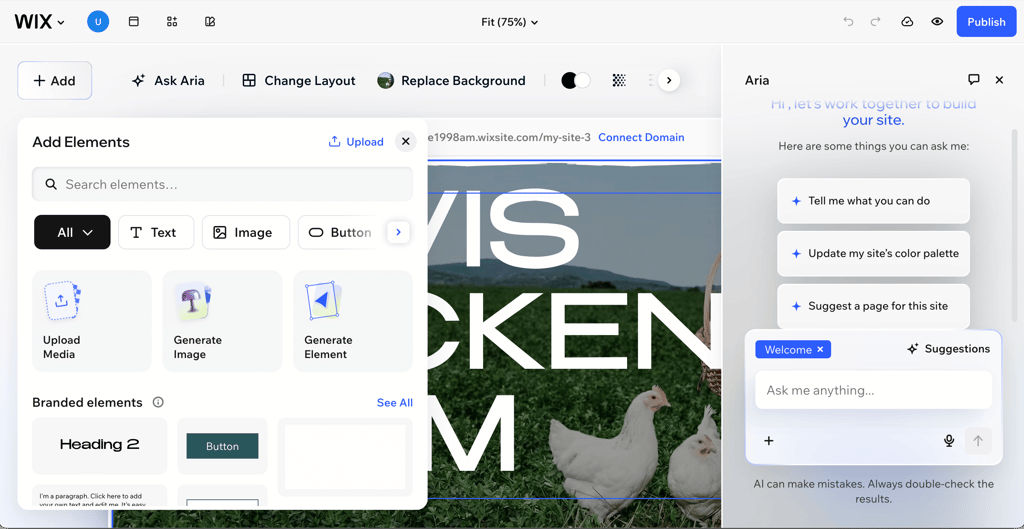
The editor ran smoothly, and it’s clear it was designed with beginners in mind. Everything felt intuitive and easy to navigate. I was impressed by its eCommerce tools and the app market.
What’s even better is that you can do almost everything on the free plan. That means you can properly test the platform and see if it’s the right fit before committing.
2. Hostinger Website Builder – beginner-friendly Australian website builder

| Rating: | |
| Price: | From AU$3.09/month |
| Templates: | 430+ |
| AI tools: | ✅ Yes |
| Special deal: | Get Hostinger Website Builder, 82% OFF + free months |
Hostinger Website Builder is a solid choice for Aussie small businesses and solo professionals who just need something that works. Its extensive AI tools do a lot of the heavy lifting, from suggesting designs to generating content and setting up your site, allowing you to get online faster.
Here are the AI tools available with the Hostinger Website Builder:
- AI website builder. Creates a complete website based on your description, making setup fast and easy.
- AI writer. Generates SEO-friendly website copy, product descriptions, and other content.
- Blog generator. Automatically creates full blog posts with structured content and headings.
- SEO helper. Provides AI-powered suggestions to improve your site’s SEO and search visibility.
- AI image generator. Creates custom images to fit your website’s style without needing stock photos.
- AI logo generator. Designs a logo that aligns with your brand identity.
- Kodee AI. Answers questions, helps to troubleshoot issues, and gives advice on web development.
Who should pick Hostinger Website Builder
Hostinger Website Builder works best for:
- Beginners and small business owners who want powerful AI tools to build a site quickly
- Budget-conscious users looking for an affordable, all-in-one solution
- Freelancers, bloggers, and small to medium businesses that need a simple but professional online presence
Features and my experience with Hostinger Website Builder
- Built-in AI SEO and visuals
- Powerful AI toolkit
- Appointment booking and analytics
- 100+ payment methods and zero transaction fees
- 430+ quality templates
- Fast hosting speeds
When I tested Hostinger Website Builder, its AI tools were what impressed me most. The AI website designer felt noticeably faster than Wix’s, and the layout it created looked just as clean and professional. I liked that AI features were built into almost every step – I could generate descriptions, images, SEO text, and even full pages. The Kodee AI assistant was especially handy. When I got stuck connecting my domain, it walked me through the process in minutes.
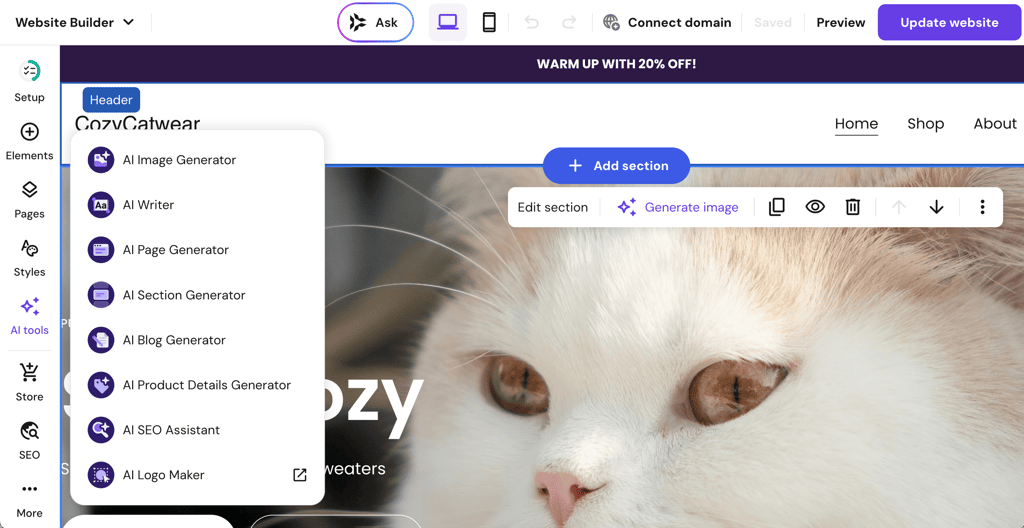
The free domain offer also caught my eye because Hostinger is already budget-friendly. That said, I was disappointed to see that .com.au domains aren’t included, so Aussie users will need to pay extra for that.
3. Squarespace – web builder in Australia for stunning website designs

| Rating: | |
| Price: | From AU$17.00/month |
| Templates: | 200+ |
| AI tools: | ✅ Yes |
| Special deal: | Get up to 50% OFF Squarespace |
Squarespace is a popular choice in Australia, particularly for creatives and service-based businesses. Everything is bundled together, including hosting, so it’s pretty straightforward to manage. The templates are genuinely beautiful, which makes it easy to build sleek and modern sites.
Here’s what AI tools Squarespace has:
- AI website builder. Builds a complete website from a short description, guiding you through design and layout choices.
- Business name generator. Suggests creative and relevant names for your business or brand.
- Domain name generator. Provides available domain name ideas that match your brand and website.
- AI writer. Generates website copy, product descriptions, and other content quickly.
- AI SEO tool. Offers suggestions and optimisations to improve your site’s search engine visibility.
Who should pick Squarespace
Squarespace works best for:
- Aussie business owners who want beautiful, high-end designs without needing design skills
- Service-based businesses that rely on bookings or appointments, such as salons, wellness studios, or consultants
- Beginners who want an easy-to-use builder with built-in marketing and eCommerce features
Features and my experience with Squarespace
- 200+ designer templates
- .com.au domain included
- Helpful AI tools
- All-in-one business suite
- Built-in blogging and eCommerce
Before reviewing Squarespace, I already knew it for its beautiful designs, and it absolutely lived up to that reputation. The templates look polished and modern, and you can choose from 195+ options without paying extra for premium themes. I liked that transparency, especially compared to builders like Shopify, where some templates cost extra.
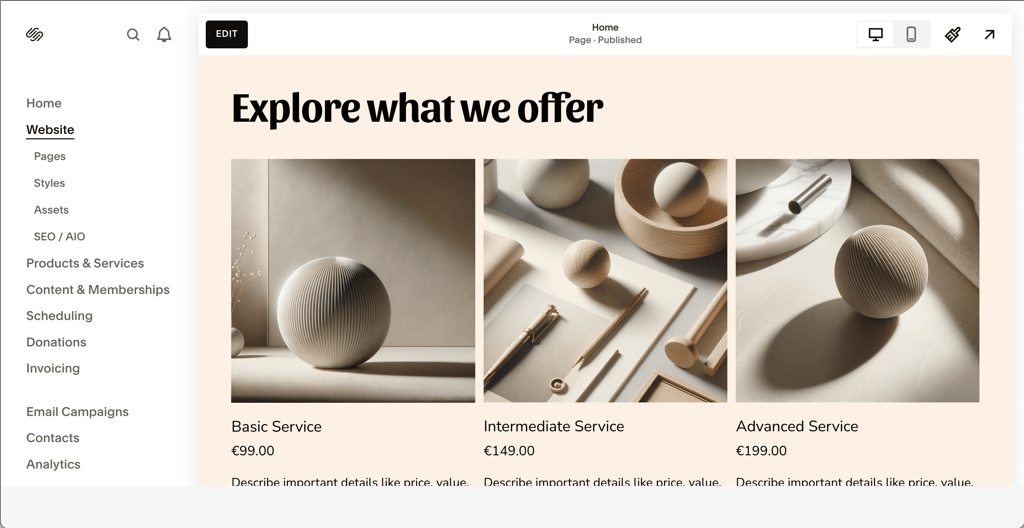
Beyond looks, Squarespace also handled business features well. The built-in analytics are clear and easy to follow, and you can connect your site to Google Analytics for deeper data. Still, the section-based editor can feel limiting if you want total design freedom or highly custom layouts.
4. Webflow – Australian web builder for advanced visual control

| Rating: | |
| Price: | From AU$19.75/month |
| Templates: | 7400+ |
| AI tools: | ✅ Yes |
| Special deal: | Get Webflow AI tools now 22% cheaper |
Webflow is designed for people who want deeper control. It lets you design visually, but you still have access to HTML, CSS, and JavaScript. If you’re working on a more custom project and want flexibility beyond standard templates, it’s a strong option.
Here are the AI tools that you can get with Webflow built in:
- AI website builder. Creates a starter website based on a short description of your project and a few guided questions.
- AI page generator. Builds complete pages, such as About, Blog, or FAQ, with layout and content included.
- AI image generator. Generates custom images directly inside the editor to match your site’s style.
- AI layout assistant. Suggests and adjusts layouts automatically to fit your content and design goals.
- AI-powered insights. Provides recommendations to improve SEO, performance, and user engagement.
Who should pick Webflow
Webflow works best for:
- Australian designers who want full creative control with a powerful visual editor
- Freelance developers building custom, visually complex client websites
- Agencies and creative professionals who need flexibility beyond traditional website builders
Features and my experience with Webflow
- eCommerce features
- 7400+ templates
- Real-time collaboration
- Webflow CMS
- Marketing and SEO tools
Using Webflow felt like the complete opposite of Squarespace. I had total control over every element on the page, and I really do mean everything. That level of freedom is impressive, but I’ll admit the interface intimidated me at first. When I opened the editor, I saw menus and panels on every side of the screen. It was clear right away that this isn’t a beginner-friendly builder.
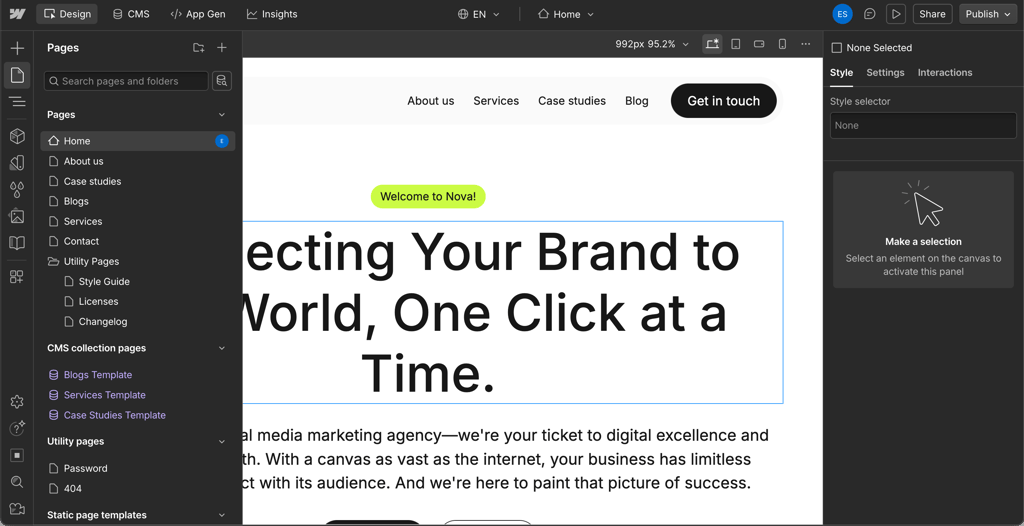
That said, Webflow isn’t trying to be one. It’s built for designers, developers, and agencies. For that audience, it delivers strong customisation, custom code options, collaboration tools, and advanced user roles.
5. Shopify – website builder in Australia for online stores

| Rating: | |
| Price: | From AU$42.00/month |
| Templates: | 1200+ |
| AI tools: | ✅ Yes |
| Special deal: | Try Shopify for 3 months for $1 |
Shopify is one of the go-to platforms for Aussie eCommerce businesses. It offers a comprehensive suite of features, including secure payment integration, inventory management, marketing tools, and strong scalability.
Here are the AI tools you can use with Shopify:
- Sidekick. A built-in personal AI assistant that helps with store management, content, and insights.
- Chatty AI Chatbot. Answers product questions, suggests items, and assists with order tracking using an advanced AI model (available through app store).
- SEOWILL. Generates SEO-optimised content, provides keyword suggestions, and fixes technical SEO issues like meta tags, alt text, and broken links to boost store visibility (available through app store).
Who should pick Shopify
Shopify works best for:
- Entrepreneurs focused primarily on building and growing an online store
- Businesses that need scalable eCommerce tools and advanced sales features
- Aussie brands selling across multiple channels, including social media and marketplaces
Features and my experience with Shopify
- Built-in SEO tools
- Inventory and order management
- Multi-channel selling
- 1200+ themes
- POS system included
Shopify is my go-to for any eCommerce store. You can pick from more than 1050 themes, and while many are paid, they look very polished. I was able to import products in bulk, which saved me a lot of setup time. With 100+ payment gateways available, including options commonly used by Australian businesses, our Shopify review showed that it’s a strong choice for online stores.
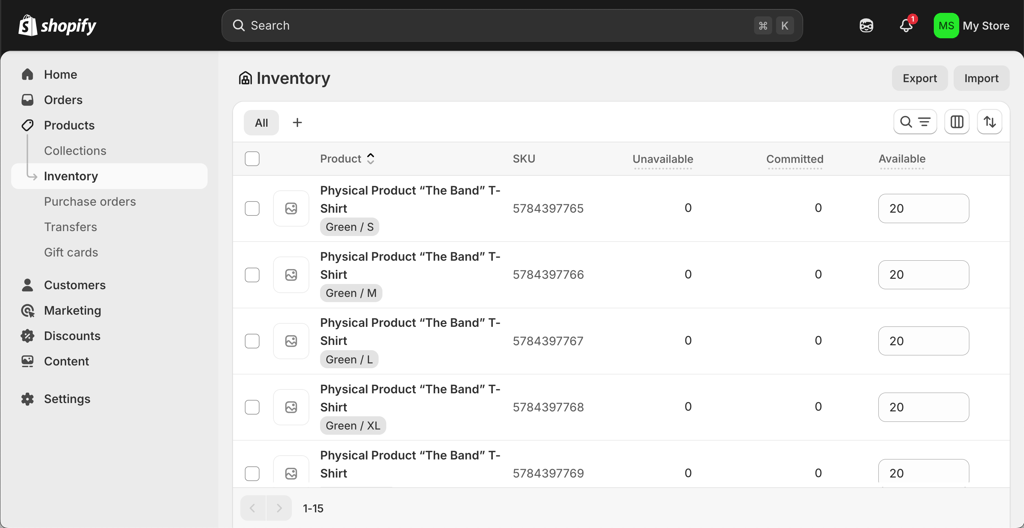
That said, pricing is where you need to pay attention. Even Shopify’s entry plan costs more than most other builders, and, unlike with Hostinger, transaction fees still apply. For small businesses, it’s crucial to weigh the cost against the potential return.
6. WordPress.org – Australian website builder for full customisation control

| Rating: | |
| Price: | Free |
| Templates: | 13,000+ |
| AI tools: | ✅ Yes |
| Special deal: | Get up to 69% OFF Wordpress! |
WordPress.org is a self-hosted content management system powering a huge share of the web. It gives granular control over every aspect of your site, along with access to a massive template library and add-ons, enabling deep customisation through themes and plugins.
WordPress.org doesn’t have built-in AI features, but you can add AI functionality through plugins. Here are some popular options:
- AI Engine. Adds AI-generated text and images, as well as chatbot capabilities.
- AI Puffer. Provides AI content generation, chatbot tools, image creation, workflow automation, and the ability to train AI on your own data.
- AISEO. Generates SEO-focused content suggestions, meta descriptions, and on-page optimisation recommendations.
- AIKO. Creates custom WordPress plugins using AI, helping you build new functionality without advanced coding skills.
Who should pick WordPress.org
WordPress.org works best for:
- Experienced users who want full control and deep customisation options
- Bloggers and content-heavy websites that rely on flexible publishing tools
- Australia-based businesses that need advanced functionality through plugins and custom integrations
Features and my experience with WordPress.org
- 13,000+ templates
- User and permission management
- Plugins and integrations
- SEO features
- AI editor
I feel like WordPress.org strikes a perfect balance between customisation and ease of use. I started with choosing a theme, which was both exciting and overwhelming since there are more than 13,000 available. Once I picked one, the editor felt straightforward and easy to navigate. What I appreciated most in my WordPress review is how much freedom it gives you. With thousands of plugins, you can expand your site in almost any direction, from improving SEO to adding eCommerce features.
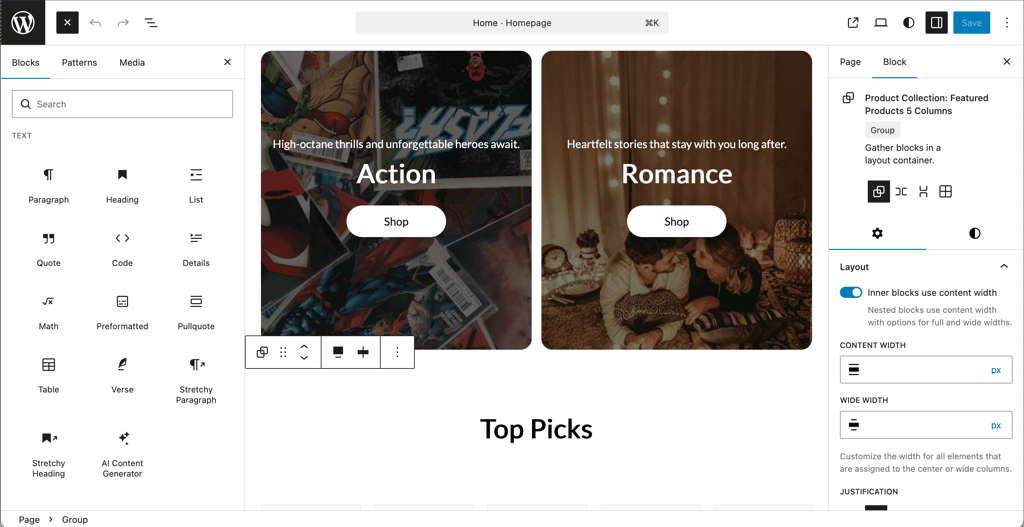
That said, it’s more hands-on than most builders. WordPress itself is free, but you’ll need separate hosting, and premium themes or plugins can quickly increase costs. You’re also responsible for updates and maintenance. That is why I prefer managed WordPress hosting, where I can build and host my site in one place.
How to choose the best web builder in Australia
When choosing a website builder in Australia, start with your goal. Are you creating a portfolio, a blog, an online store, or a business website? Your answer will shape everything that follows. Once you’re clear on what you want to build, it becomes much easier to narrow down your options.
Ease of use
If you’re a beginner, look for a simple drag-and-drop editor and clear onboarding. In my testing, the best builders guide you step by step and make it easy to customise templates without touching code.
AI tools can also save you a lot of time. Some platforms can generate a full website for you, while others help with writing product descriptions and optimising content for SEO.
Features and local optimisation
Choose a builder that matches your needs. For blogs, look for strong content management and SEO tools. For online stores, prioritise inventory management, shipping settings, and secure checkout. If you’re selling in Australia, make sure the builder supports local payment gateways, pricing in Australian dollars, and .com.au domains without hidden fees.
Performance and scalability
A good website builder should include built-in SEO tools, fast loading speeds, and mobile optimisation. These directly affect how easily customers can find you online.
Also, check that the platform can grow with you, whether that means more traffic, products, or advanced features over time.
Final thoughts
A website builder can save you serious time and money when launching a site. But if you’re building for Australia, it’s important to choose a platform that fits your goals now and as your business grows.
Here’s a quick way to decide:
- Fast setup with strong business features – Wix
- Powerful AI tools at an affordable price – Hostinger Website Builder
- Polished, design-led websites – Squarespace
- Advanced customization for developers – Webflow
- Online stores and serious eCommerce – Shopify
- Full control and maximum flexibility – WordPress

Best web builders Australia FAQ
What is the best website builder for a small business in Australia?
Wix is the best website builder for a small business in Australia. It includes strong eCommerce tools and scalable plans, making it a practical choice for Aussie business owners who want to get online quickly.
How much does it cost to have a website built in Australia?
Website costs in Australia range from AU$1000 to AU$50,000, depending on complexity and whether you hire a freelancer or agency. Using a website builder is far cheaper, with plans starting at just a few dollars per month.
What is the most trusted website builder in Australia?
Wix is the most trusted website builder in Australia. It’s easy to use, reliable, and offers strong SEO and eCommerce tools, making it a solid choice amongst small businesses, freelancers, and beginners.