How to watch Hulu in Canada


Hulu is a highly popular streaming platform in the US. Unfortunately, unless you live or travel to the US and its territories, you cannot access it without going over a few extra hurdles. But if you’re wondering how to watch Hulu in Canada, I’ve just the guide for you. By the time you complete reading, you will be able to watch The Handmaid’s Tale, Paradise, The Bear, and other popular Hulu titles without restrictions.
Before we jump right into detailed instructions, note that Hulu restricts access for users from abroad due to licensing agreements. However, if you set up a reliable VPN with servers in the US, you can easily bypass the restrictions. How? A VPN will give you access to a US-based server, which means your IP address will be registered in the country. Technically, you will be connecting from within the country, even if you’re not physically located in it. Let’s dive deeper.
How to watch Hulu in Canada with a VPN

- Choose a VPN with plenty of secure US servers. You will need a VPN that consistently works with streaming services and offers great speeds for video playback. I recommend NordVPN, now 75% OFF, because it’s fast and has 3,400+ US servers.
- Download and install the software and then connect to a server in the US.
- Head to the Hulu website or app. If you don't already have a Hulu account, note that you will need a US payment method to subscribe. You can also purchase a Hulu gift card or use a virtual credit card with a US address. This way you will be able to subscribe to Hulu without a US credit card.
- You’re all set up to stream your favorite Hulu content.
Why do you need a VPN to get Hulu in Canada?
Hulu is one of the most popular streaming services in the US, with plenty of original content, such as The Handmaid’s Tale, How I Met Your Father, and Only Murders in the Building, amongst others. However, due to distribution rights, copyright laws, and licensing agreements, Hulu isn’t available to watch in Canada, or anywhere else outside the US and its territories.
If you try to watch geo-blocked content, like Hulu, from a region where the streaming service isn’t allowed to operate, you’ll be greeted with this error message, like this one: We’re sorry, currently our video library can only be streamed within the United States.
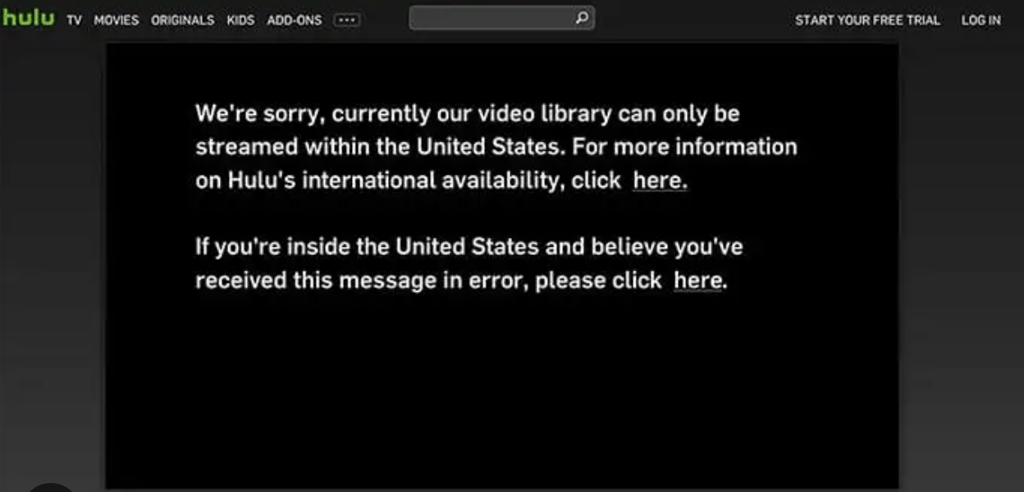
If you try to access Hulu from Canada, you may also be pushed to sign up for Disney+, with pricing starting at CA$8.99/month (Disney+ Standard with Ads plan). However, note that the Canadian library of the Disney+ platform is also subject to licensing agreements valid in the US. In short, you may not have access to all Hulu titles if you subscribe.

Fortunately, there’s an easy way around all these geographical restrictions. All you need to do is sign up for a reliable VPN and use it to connect to a server in the US. The VPN will then issue your device with a new IP address from the US, which will make Hulu recognize your traffic as coming from within the country. This will enable you to create a Hulu account and stream all your desired content.
Best VPNs to watch Hulu in Canada
- NordVPN – best VPN for watching Hulu in Canada
- Surfshark – fast Canada VPN with cheap monthly plans
- IPVanish – secure VPN with Canadian servers and impressive features
Using a VPN to unblock Hulu in Canada, or anywhere else, is so easy that you can accomplish it in just a few clicks. However, choosing the right VPN is an important step. After all, the market is overrun with VPNs that claim to be able to bypass region restrictions on Hulu and other popular streaming services. But, in all honesty, many of them aren’t strong enough to do this.
To help you avoid poor-quality providers, I’ve researched a range of solutions and can recommend 3 VPNs that can consistently unblock Hulu from outside the US. Together with expert researchers, I tested these providers to make sure they deliver strong security, demonstrate fast speeds for streaming, and have the ability to bypass regional restrictions on a wide range of content.
How to watch Hulu in Canada with a VPN on your device
You can unblock Hulu in Canada on pretty much any smart device, including a Windows PC, Mac, Android, iPhone, iPad, or streaming stick. But, although it’s easy to do, regardless of which device you’re using, the steps may differ slightly depending on the device and operating system you’ve got.
To help you out, I’ve put together simple step-by-step instructions to help you unblock Hulu in Canada on the most popular devices:
- Watch Hulu in Canada on your PC or Mac
- Watch Hulu in Canada on your Android
- Watch Hulu in Canada on your iPhone or iPad
- Watch Hulu in Canada on your smart TV
Watch Hulu in Canada on your computer (Windows, macOS)
If you have a Windows or Mac computer, you can use it to unblock Hulu in Canada in a matter of minutes by following these simple steps:
- Change your computer’s location to the US
- Download and install a VPN on your computer – my #1 choice for this is NordVPN
- If you use an Apple ID or Google account, create a new one and select the US as your country
- Head over to the Hulu website and either sign in or register for a subscription
- Enjoy all the great shows Hulu has to offer
Watch Hulu in Canada on your Android
By unblocking Hulu on your smartphone, you’ll be able to binge-watch all your favorite shows on the go. Here’s what you need to do:
- Switch your device location and your Google Play Store location to the US (you can follow our step-by-step guide to changing your location on Android)
- Download and install a VPN on your Android – I recommend NordVPN's app for this
- If you use a Google account, set up a new one and select the US as your country
- Download the Hulu app from the Google Play Store
- Log in or sign up for a Hulu subscription
- Enjoy scrolling through the great content on offer
Watch Hulu in Canada on iOS or iPad
If you’re an iOS user in Canada, you’ll be able to use your device to unblock Hulu by following these simple steps:
- Change your device location and your Apple App Store location to the US (follow these steps to change your location on iOS)
- Download and install a VPN on your phone – NordVPN is a great choice for iOS
- If you have an Apple ID, create a new one and choose the US as your country
- Download the Hulu app from the Apple App Store
- Sign up for a monthly subscription plan
- Sit back, relax, and enjoy streaming
Watch Hulu in Canada on a smart TV
As you may have already discovered, the majority of popular smart TV manufacturers, including Samsung, LG, and Apple, don’t support VPN apps. But you can get around this issue by connecting your VPN to your Wi-Fi router instead. Here’s how to do it:
- Download a VPN with plenty of secure US servers – I suggest NordVPN for this
- Connect to a server in the US
- Go to your Wi-Fi router’s admin panel and connect it to your VPN network
- Download the Hulu app on your smart TV and sign in or register for an account
- Invite your friends over to watch Hulu on your smart TV
How to get Hulu in Canada
Hulu is only available to stream in the US. Therefore, if you want to watch Hulu in Canada, you’ll need to use a reputable VPN to connect to a US server. This will bypass Hulu’s location restrictions, making the content available from outside the country.
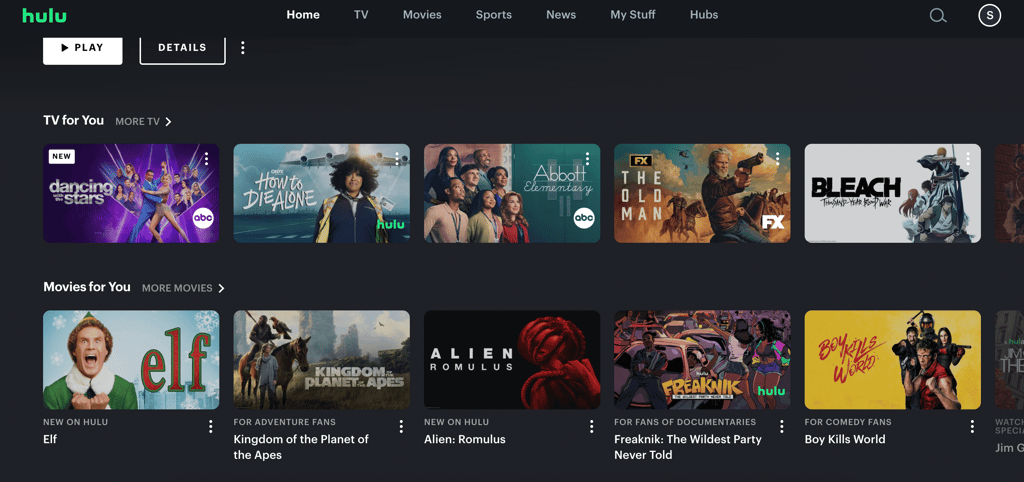
Setting up a VPN is easy, but paying for Hulu may require you to find an alternative way if you don’t have a US payment method. Fortunately, this is easier than you might think.
First, it’s worth asking any friends or relatives you have in the US if they will pay for it. If that doesn’t apply to you, your best bet would be to buy a Hulu gift card from Amazon or MyGiftCardSupply.
You could also set up a US PayPal account, get a prepaid US card, or use a virtual card and set the location to the US.
How to download the Hulu app
As we mentioned in the previous section, it’s easy to download the Hulu app if you’re in Canada or anywhere else outside the US, so long as you use a secure VPN. But you’ll still need to change your location on your device. Here’s how to do it:
Change your location on Android
If you want to change your location on Android, here’s what you need to do:
- Use a secure VPN to connect to a server in the US – I recommend NordVPN, as it has 3,400+ US servers
- Open the Google Play Store app and tap your profile icon in the top-right corner
- Go to Settings > General > Account and device preferences > Country and profiles
- Tap the chosen country and follow the on-screen instructions to add a payment method for that country
- Reload the Google Play Store, search for the Hulu app, and download it
Change your location on iOS
To change your location on your iOS device, just follow these easy steps:
- Use a reliable VPN to connect to a server in the US – my go-to is NordVPN, now 75% OFF
- Open the Settings menu on your iOS device and select your profile
- Go to Media & Purchases > View Account and verify your identity
- Select Country/Region > Change Country or Region (select United States)
- Agree to the terms and conditions
- Enter a US address and phone number (use a US address generator if you don’t have one) and tap Done
- You will now be able to download the Hulu app
How to pay for the Hulu app
To pay for the Hulu app, you’ll need a US payment method or a virtual credit card. And, if you don’t have one, your best bet would be to buy a Hulu gift card from Amazon or MyGiftCardSupply.
Once you’ve found a payment method that works for you, you’ll need to decide which Hulu package suits your needs and your budget. To make it easier for you, I have broken down the different payment plans and converted the currency into Canadian dollars to make it clear how much Hulu costs in Canada.
| Hulu subscription | Price in US dollars | Price in Canadian dollars* |
| Hulu (with ads) | $11.99/month | CA$16.71/month |
| Hulu Premium (without ads) | $18.99/month | CA$26.47/month |
| Hulu+ Live TV, Disney+ and ESPN Select bundle (with ads) | $89.99/month | CA$125.44/month |
| Hulu+ Live TV, Disney+ and ESPN Select bundle (without ads) | $99.99/month | CA$139.38/month |
*Note: US dollar prices were checked and converted to Canadian dollars in June 2026. The original pricing and conversions may be different at the time you’re reading this guide.
What is the equivalent of Hulu in Canada?
Due to licensing restrictions, Hulu doesn’t operate outside the US, which means it’s not available to stream in Canada unless you use a reliable VPN to connect to a US server and spoof your location. It’s very easy to do, and it will unlock a whole world of content in a matter of minutes.
But if you want to view content closer to home, there are some fantastic Canadian streaming services that are filled with world-class content to keep you entertained. Crave offers many great shows, including Euphoria, Love Island USA, The Big Bang Theory, or Parks and Recreation.
Alternatively, RiverTV gives you access to over 30 network and specialty channels. Its offering includes channels like CBC, CBC News Network, Adult Swim, Showcase, Lifetime, and Home Network.
Conclusion
Hulu is an attractive streaming platform due to the popular shows and movies it offers its users. And while Hulu is currently only available in the US, it’s only natural users from abroad and looking for ways to gain access too. Well, it’s easier than you think. All you need is a legitimate VPN with servers in the US, and you’re good to go.
If you’re in Canada, I recommend using a privacy-focused VPN like NordVPN. You can use one of its 3,400+ US servers to spoof your location and make Hulu think you’re actually located in the States.
On top of this, NordVPN is an excellent security tool because it encrypts your data, so cybercriminals and other third parties cannot snoop on it. Plus, you can also use a VPN to unblock all sorts of other region-restricted content, including BBC iPlayer, ESPN, and foreign versions of Netflix.
FAQ
Is Hulu available in Canada?
No, unfortunately, Hulu is geo-blocked to the US, which means it’s not available to stream in Canada. However, you can get around this issue by using a reliable VPN, such as NordVPN, to connect to a server in the US. This will unblock Hulu so you can stream it from Canada.
Why can't Hulu come to Canada?
Hulu currently has location blocks on its content, meaning it’s only available to stream in the US. This is because Hulu must comply with licensing agreements and distribution rights. But you can watch Hulu in Canada if you use a strong VPN, like NordVPN, to connect to a server in the US.
Can you get Hulu in Canada?
Yes. Although Hulu isn’t available in Canada, you can still stream Hulu from Canada if you use a reputable VPN, such as NordVPN, to connect to a server in the US. Your device will then be issued with an IP address from the US, which will unblock the content so you can watch Hulu from anywhere.
How many devices can you have on Hulu?
According to Hulu, you can download the Hulu app and activate your account on as many devices as you want. But you can only stream Hulu on two of your devices at the same time. If you try to stream it on more than two devices simultaneously, you might well be blocked by an error message.