How to use Polymarket in Australia: best VPNs for Polymarket in 2026


Polymarket is not available in Australia due to regulatory restrictions, but it can be accessed by using a VPN and connecting to a country where the platform is available, such as New Zealand or Malaysia. Based on testing I conducted with the Cybernews research team, NordVPN is the best VPN for Polymarket thanks to its fast speeds, reliable access, and strong privacy.
Polymarket is restricted in Australia, which means users may be blocked from accessing the platform when using a standard Australian internet connection. For many users, that means being unable to access markets or sign up without finding an alternative solution.
Because of this, many users look for alternative ways to access the platform. The best option is to use a VPN to connect through a country where Polymarket remains accessible. A VPN changes your IP address, allowing you to bypass location-based restrictions and access the platform.
In this guide, I’ll teach you how to use Polymarket in Australia and go over the best VPNs for this matter.
In short, based on our tests, NordVPN provided the most stable low-latency connections from Australia, especially on New Zealand servers. Surfshark performed well for budget users with consistent speeds, while Proton VPN is the best choice for privacy-focused users.
| VPN for Polymarket | Best for | Rating | Works with Polymarket in AU? | Servers in Polymarket-friendly countries | Price | Free trial |
| 1. NordVPN | Best stability with lowest latency | ✅ Yes | Thousands of servers in 225 locations, including New Zealand, Malaysia | From $4.79 /month | 3-day Android trial, 30-day money-back guarantee | |
| 2. Surfshark | Best budget option | ✅ Yes | 4,500+ servers in 100 countries, including | From $2.49/month | 7-day trial, 30-day money-back guarantee | |
| 3. Proton VPN | Best privacy option | ✅ Yes | 20,688+ servers in 148 countries, including | From $4.79/month | Free plan, plus 30-day money-back guarantee on paid plans |
Why is Polymarket blocked in Australia?
In Australia, Polymarket is not authorized to operate because it falls outside the country’s rules for online betting and trading-style platforms. As a result, it is not approved for local users, and access is restricted by location. Users can still reach it by connecting to countries where it is available, such as Canada (excluding Ontario), New Zealand, or India, using a VPN.
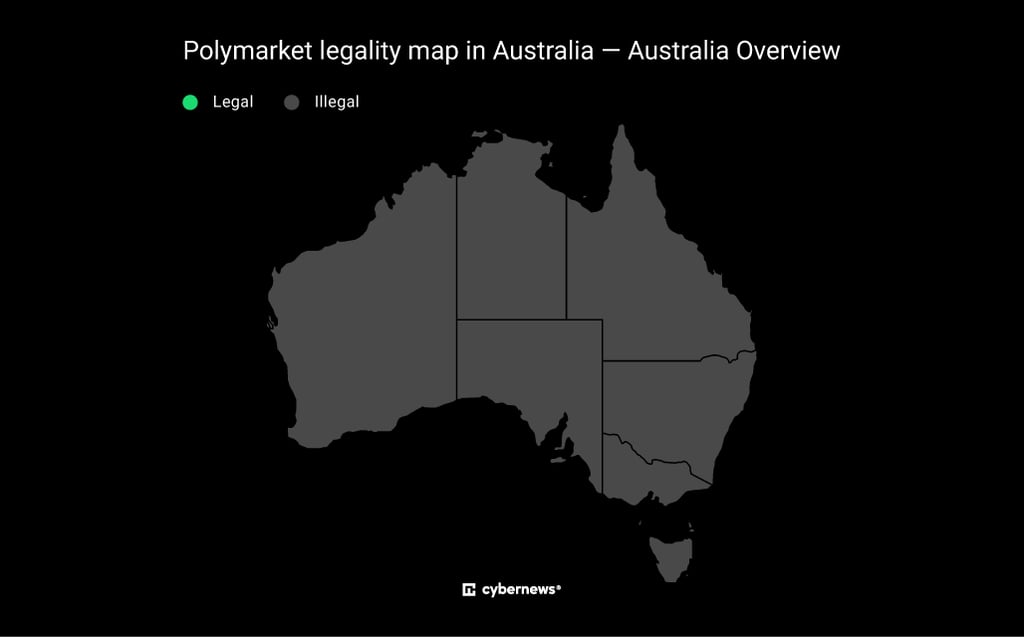
Polymarket isn’t available in many parts of the world. According to their documentation on geographic restrictions, it blocks access in several regulated markets, including Australia, the United States, the United Kingdom, France, and the Netherlands.
To access Polymarket in Australia, you’ll need a reliable VPN with a decent server pool. Simply connect to a nearby region where it’s legal, such as New Zealand, the Philippines, or Thailand, for better speeds and fewer connection issues.
| Polymarket legal countries | Polymarket illegal countries |
| Canada (excluding Ontario) | Australia |
| New Zealand | Belgium |
| India | Germany |
| Argentina | France |
| Mexico | United Kingdom |
| Malaysia | Japan |
| Indonesia | Netherlands |
| Papua New Guinea | United States |
| Venezuela | |
| Brazil |
Using a VPN is legal in Australia, but it doesn’t change Polymarket’s Terms of Service or local laws. Polymarket blocks certain locations and doesn’t allow users to hide their location. If someone tries to get around these rules, they could lose their account, have their funds frozen, or run into legal trouble under online gambling rules like those explained by GambleAware NSW.
How to use Polymarket in Australia with a VPN
To use Polymarket in Australia, you need a VPN, like NordVPN, that can connect you to a country where the platform is available, such as New Zealand or Indonesia.
The process is simple: install a reliable VPN, connect to a supported location, and open Polymarket in your browser. The more complicated part is choosing a reliable VPN that stays stable and doesn’t leak your real IP address.
Step 1. Choose a reliable gambling VPN
Polymarket is blocked in Australia, so you need a VPN with fast servers in countries where the platform is available. The key is stable connections, low latency, and reliable IP addresses that won't trigger location checks.
During testing, NordVPN performed best on nearby servers, such as New Zealand, while some other locations occasionally required reconnecting before Polymarket loaded properly.

Step 2. Download a VPN app to your device
After subscribing, download the VPN app from the official website or your device’s app store. Once installed, sign in with your account details and make sure the app is up to date.
Always download VPN apps from official sources, such as https://nordvpn.com/, to avoid fake or modified versions that could put your data at risk.
Step 3. Connect to a server in Polymarket-friendly countries
Polymarket is available in many countries, including New Zealand, Canada (excluding Ontario), and India. Once you open your VPN, connect to a server in one of these locations to get a local IP address.
Best regions for Australian users:
- Auckland (New Zealand)
- Singapore
- Mumbai (India)
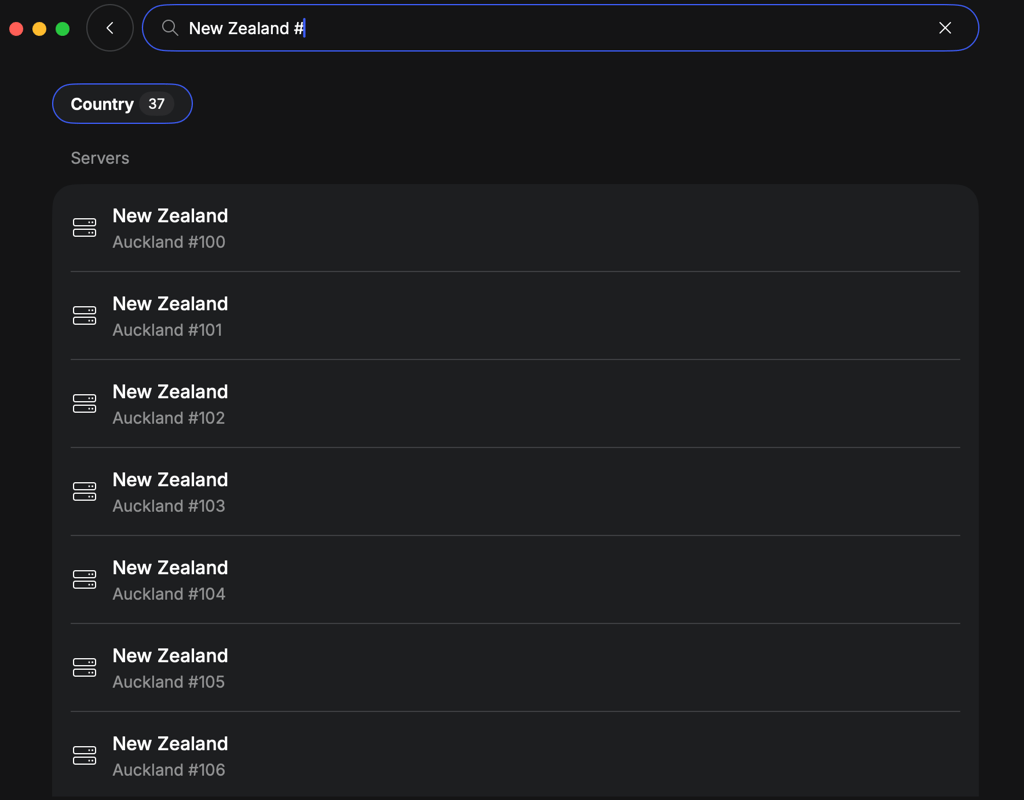
These locations are the closest to Australia, which can help reduce lag and provide a smoother connection than locations farther away.
Step 4. Visit Polymarket.com and start playing
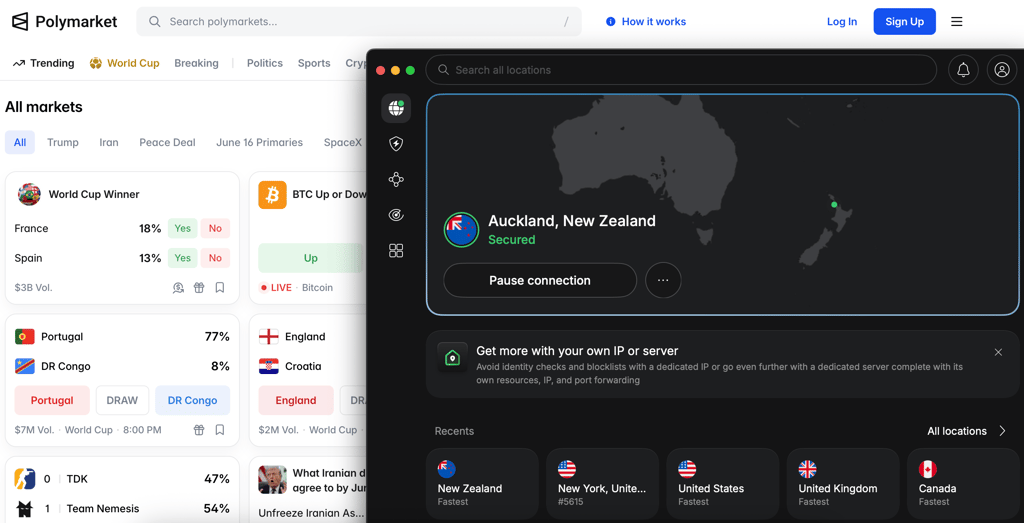
After connecting to a supported location, open Polymarket and sign in. If everything is set up correctly, the platform should load without any location-related errors.
If Polymarket isn't working, try these quick fixes:
- Switch to a different server in the same country
- Clear your browser cookies and cache
- Check for IP or DNS leaks
- Enable obfuscated servers if your VPN offers them
In testing, switching to a different New Zealand server usually fixed connection issues within seconds.
Can you use Polymarket in Australia with a VPN?
You can use Polymarket in Australia with a VPN. Since the platform blocks Australian IP addresses, you'll need to connect through a country where Polymarket is available before you can access it.
That said, results can vary. In our testing, some servers worked immediately, while others needed a quick reconnect before Polymarket loaded properly. If you run into issues, switching to another server in the same country is usually enough to get things working again.
Using a VPN is legal in Australia, but it doesn't change Polymarket's terms of service or any local rules that may apply.
Overall, using a VPN can help you access Polymarket from Australia, but the quality of your connection often comes down to the VPN and server you use.
Best VPNs for Polymarket in Australia
To play Polymarket in Australia, you need a VPN with servers in countries where the platform is available, along with a stable connection and fast speeds to avoid loading issues. The key is being able to switch locations easily without getting blocked or slowed down. After testing multiple VPNs, NordVPN, Surfshark, and Proton VPN stood out as the best options for Polymarket in Australia.
1. NordVPN - best overall VPN to use Polymarket in Australia

| Starting price: | From $4.79/month |
| Servers: | Thousands of servers in 225 locations |
| Unblocks Polymarket in AU: | ✅ Yes, with servers in New Zealand, Papua New Guinea, and Indonesia |
| Current deal: | Get 75% OFF NordVPN + 3 months free |
NordVPN is the best VPN for Polymarket in Australia because it combines speed, stability, and reliable access in one package. It was easy to switch locations when needed, and I had no trouble accessing Polymarket through nearby servers.
NordVPN worked on most of the servers I tested, with about a 95% success rate in accessing Polymarket across different locations. The best results came from Auckland, Port Moresby, and Jakarta, which all connected quickly and stayed stable during use.
Best NordVPN servers for Polymarket in Australia:
- Auckland (New Zealand)
- Port Moresby (Papua New Guinea)
- Jakarta (Indonesia)
During NordVPN testing, it maintained 86.1% of my original 940 Mbps connection speed, which was more than enough for a smooth experience on Polymarket. It loaded quickly, pages refreshed fast, and I didn't notice any slowdown while browsing. NordVPN also performed better than Surfshark and Proton VPN on more distant server locations.
I also checked for leaks by switching servers multiple times and running IP and DNS tests throughout the process. My real location never appeared, and NordVPN's kill switch instantly cut the connection when I simulated a VPN drop.
Starting at $4.79/month, NordVPN is the best VPN for Polymarket in Australia if you want the most reliable experience. It worked consistently throughout testing and includes a 3-day free trial and a 30-day money-back guarantee if you want to try it risk-free.
2. Surfshark - budget-friendly Polymarket VPN with strong unblocking

| Starting price: | From $2.49/month |
| Servers: | 4,500+ servers in 100 countries |
| Unblocks Polymarket in AU: | ✅ Yes, with servers in New Zealand, Indonesia, and India |
| Current deal: | Now up to 85% OFF Surfshark + 3 months FREE |
Surfshark is the best budget VPN for Polymarket in Australia because it offers reliable access at a lower price while still handling most connections. It worked well on nearby servers, though a few locations needed a reconnect before Polymarket loaded properly.
Surfshark delivered around a 90% success rate during testing, with most servers in supported regions loading Polymarket without major issues. The best results came from New Zealand and Indonesia, while India was a bit less consistent and sometimes needed a quick reconnect before the site opened.
Best Surfshark servers for Polymarket in Australia:
- Auckland (New Zealand)
- Jakarta (Indonesia)
- Mumbai (India)
During Surfshark testing, it maintained 79.5% of my original 940 Mbps connection speed, which was still enough for smooth browsing on Polymarket. Pages loaded at a steady pace, but not quite as quickly as NordVPN, especially when switching between active markets.
I didn’t run into any IP leaks, even after switching between different servers a few times. Most of my connection stayed stable, and when I forced the VPN to disconnect, Surfshark cut off traffic immediately so the browser didn’t fall back to my real IP.
Starting at just $2.49/month, Surfshark is a strong budget VPN for Polymarket in Australia. It’s not quite as consistent as NordVPN, but it’s cheaper, easy to use, and offers a 7-day free trial and a 30-day money-back guarantee, making it a low-risk option to test.
3. Proton VPN - privacy-focused VPN for Polymarket in Australia

| Starting price: | From $4.79/month |
| Servers: | 20,688+ servers in 148 countries |
| Unblocks Polymarket in AU: | ✅ Yes, with servers in Malaysia, Indonesia, and Papua New Guinea |
| Current deal: | Get up to 70% OFF Proton VPN |
Proton VPN is a good option for Polymarket in Australia if your main focus is privacy rather than speed. It worked reliably in most cases, though connections sometimes took a bit longer to set up than with NordVPN and Surfshark.
Proton VPN delivered around an 85% success rate in accessing Polymarket across the tested locations. The strongest performances came from Malaysia, Indonesia, and Papua New Guinea.
Best Proton VPN servers for Polymarket in Australia:
- Kuala Lumpur (Malaysia)
- Jakarta (Indonesia)
- Papua New Guinea (Port Moresby)
During Proton VPN testing, it maintained 80.8% of the baseline speed, which was still enough for smooth browsing on Polymarket. Pages loaded at a steady pace, but it felt a bit slower than NordVPN, especially when switching between active markets.
Proton VPN felt a bit more careful when connecting compared to the other two. Some servers didn’t open Polymarket straight away and needed a second attempt, but once the connection went through, it stayed steady and didn’t drop during use.
Starting at around $4.79/month, Proton VPN is a solid privacy-focused VPN for Polymarket in Australia. It’s not the fastest, but it’s dependable, offers a free plan, and includes a 30-day money-back guarantee, making it a good pick if privacy matters more than speed.
How to deposit in Polymarket Australia?
Depositing on Polymarket from Australia is simple once your account is set up and you're using crypto. Keeping a clean browser session and a stable connection can help avoid login or loading issues.
- Open Deposit. Log in to your Polymarket account and click the Deposit button in your dashboard. This will open your available funding options.
- Choose Method. Select your preferred crypto option (such as Ethereum, USDT, or another supported token). Pick the correct blockchain network, as each one uses a different deposit address.
- Copy Wallet Address. Your account will generate a unique deposit address linked to your profile. Copy it carefully and always double-check that it matches the selected network before sending any funds.
- Send Funds. Transfer crypto from your personal wallet to the copied address. It’s recommended to start with a small test amount to ensure everything works correctly.
- Confirm Deposit. After the transaction is confirmed on the blockchain, refresh your Polymarket account. Your balance should appear automatically. Smaller deposits may stay pending until they meet the minimum requirement.
Is Polymarket legit and safe?
Polymarket is a real prediction market, but don't expect bank-level protection. It runs on blockchain and USDC, so transactions are out in the open, but you're fully responsible for your own money, and if something goes wrong, there's no one coming to bail you out.
Across 568 Trustpilot ratings, it averages just 1.3 stars, the most common complaints about Polymarket are locked funds, failed deposits, and withdrawals that take forever. Some users do report smooth, trouble-free trading, so it's not all bad, but the overall picture leans negative.
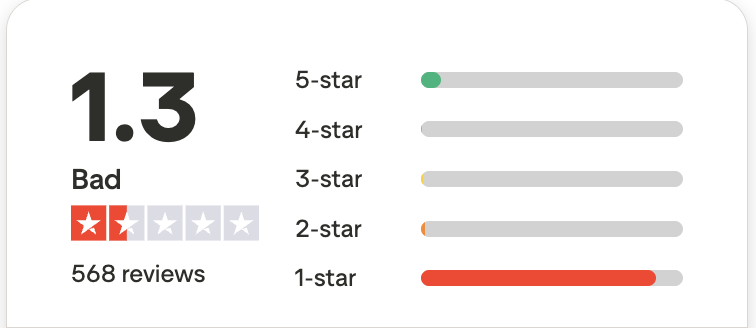
This doesn’t look like a platform that cheats users. But it offers no protection either. If your funds get locked or your account gets restricted, you have no real way to fix it.
Final tips for using Polymarket in Australia
After testing Polymarket with different VPNs, I found that connecting to nearby locations worked best. New Zealand was the most reliable overall, while Indonesia and Papua New Guinea also worked well without adding much delay.
If Polymarket doesn't load straight away, don't panic. In most cases, switching to another server or opening the site in a private browser window was enough to get things working again.
One last thing: always double-check wallet addresses before sending crypto and consider starting with a small test deposit first. It's a simple step, but it can save you from making an expensive mistake later.
FAQ
Is Polymarket legal in Australia?
No, Polymarket is not authorized to operate in Australia. The platform restricts Australian users due to local regulations, which is why many people use a VPN. like NordVPN to connect through a country where Polymarket is available.
Why is Polymarket banned in Australia?
Polymarket is banned in Australia because it doesn't meet local regulatory requirements. For that reason, the platform restricts access from Australian IP addresses.
How to use Polymarket in Australia?
To use Polymarket in Australia, you'll need to connect to a country where the platform is available using a VPN, such as New Zealand or Indonesia. Once connected, open Polymarket in your browser and log in.
How to deposit in Polymarket Australia?
To deposit funds into Polymarket, open the Deposit section, choose your preferred cryptocurrency, copy your wallet address, and send funds from your crypto wallet. Once the transaction is confirmed, the balance will appear in your account.
Where is Polymarket available?
Polymarket is available in New Zealand, India, Malaysia, Indonesia, and Canada (excluding Ontario), among others. Availability can change over time, so it's worth checking the platform's latest restrictions before signing up.