Hostinger email review 2026
Our in-house experts conduct internal independent, hands-on testing and transparent reviews of web hosting providers by using custom-built tools or utilizing industry-recognized tools and methods to ensure impartial and evidence-based assessments.
Using the same criteria for all services, we share our detailed methodologies and practices to help customers make informed hosting decisions.
Learn more
When I looked at Hostinger’s email included with hosting instead of as a standalone plan, I found it’s basically the same. The email included with hosting plans gives you the same features as a Starter Business Email plan – you just get a free one-year trial. It's a good fit for smaller businesses or personal projects, while large businesses might want to consider other options. Get 82% OFF + 3 FREE months
For this Hostinger email review, I tested the service to see if this low-cost business email solution, available with hosting or as a standalone plan, can really replace Google Workspace for professional work. I used Hostinger's email to compare the bundled hosting option with the paid standalone plan, and to share my firsthand experience. I explain the differences between the two options, highlight which use cases each is best for, and point out any limitations I noticed.
What is Hostinger email hosting?
Hostinger email hosting lets you create professional email addresses on your own domain and access them via webmail, mobile apps, or desktop clients. With a custom domain email address, your emails will look more professional. When you buy a Hostinger web hosting plan, you get free email hosting for the first year included in the price. Paid Hostinger email plans, such as Starter Business Email or Premium Business Email, give you much more storage, higher daily sending limits, and larger inboxes.
- Free email with hosting: included for the first year with a Hostinger web hosting plan, this gives you basic email hosting with limited storage (1GB per mailbox) and low daily sending limits tied to your hosting account. After the free period, you'll need to upgrade to keep using it.
- Paid Hostinger email plans: these standalone plans (like Starter Business Email or Premium Business Email) offer much larger storage (10GB or 50GB per mailbox), significantly higher sending limits, and more professional email features geared toward business use. You can buy them on their own, without hosting.
Hostinger email interface
Setting up a Hostinger email was very easy. First, I logged in to my Hostinger account, then went to the Email section in hPanel, where the Overview subsection showed my plan details and limits. I then pressed Mailboxes to discover the Create mailbox button and the number of mailboxes I had left. Once I was in the right place, creating the mailbox was simple, and Hostinger guided me through choosing my domain and entering the login details. I did it swiftly because everything was clear.

Once I opened the interface, it felt familiar and easy to navigate. The inbox layout is straightforward, with standard menus for reading and composing messages. Writing and sending new messages is simple, as the New Message button is easy to spot thanks to its purple color. I also noticed that you can change the basic settings of an interface, like display language, layout type (row or column), and theme (light or dark), which came in handy for me personally.
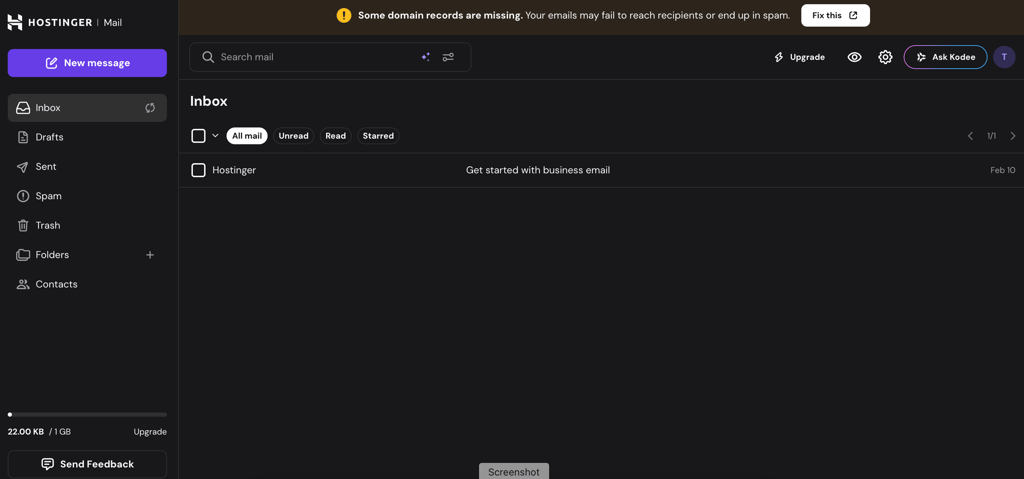
Overall, the Hostinger email interface looks clean and functional. It does what you expect an email client to do without unnecessary complications, which makes it easy to use. I did not feel like anything essential was missing, and it works well for everyday communication.
Hostinger email security
Hostinger email includes several built-in protections that help keep your inbox secure. Below are the main security features you get to help protect your email from spam, phishing attacks, and other threats:
- Spam and virus protection: all email accounts are shielded from spam, viruses, malware, and phishing attempts as part of Hostinger's threat protection, while Premium Business Email provides advanced protection.
- Authentication: all email accounts at Hostinger have SPF, DKIM, and DMARC enabled by default, which help verify that your emails come from your own domain and protect against spoofing and abuse.
- Encryption: emails use SSL/TLS encryption as they travel between servers and devices, helping keep message content safer.
- Account access protection: you can enable two-factor authentication on your Hostinger account to add an extra layer of protection.
Overall, Hostinger's email security setup is solid and covers all the basics most users need. Each Hostinger email account is protected against spam, viruses, malware, phishing attempts, and other security risks. For typical business and personal use, this security is more than enough to keep your inbox safe.
Hostinger email pricing and features
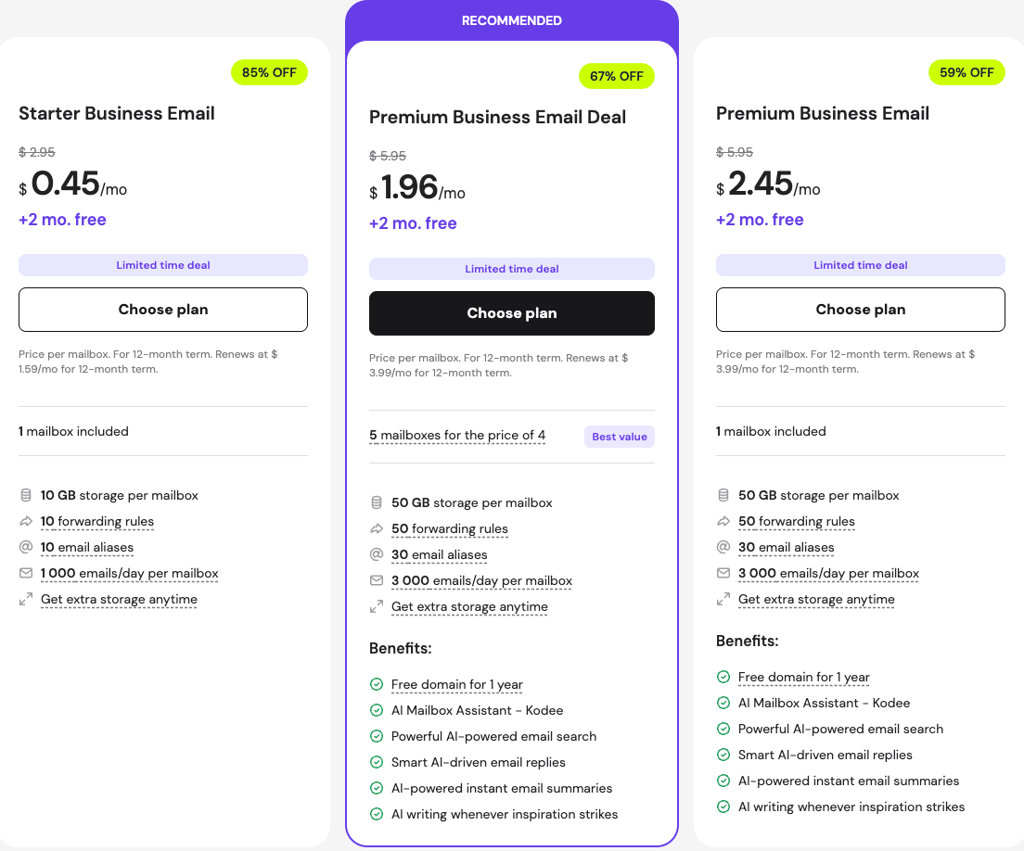
Hostinger has 2 business email plans: Starter Business Email and Premium Business Email. They differ in their features and limits. I compare them below.
Starter Business Email:
- 10GB storage per mailbox
- Limit of 1000 messages per day
- 10 email aliases
Premium Business Email:
- 50GB storage per mailbox
- Limit of 3000 messages per day
- 30 email aliases
- AI tools for email writing, suggestions for replies, search, and summaries.
Starter Business Email is included with all web hosting plans as a 12-month free trial, including 2 mailboxes. If 2 aren’t enough, you can always add more. The cost of each additional mailbox is calculated following this formula:
Additional mailbox price = [ (Number of months purchased × Monthly price) / ( Full plan time in months ÷ Time left in months until plan expiration) ] × Number of extra email accounts
There is a limit to the number of mailboxes you can have with a free-trial email plan. Depending on the hosting plan you’ve chosen, you can have 1 to 10 mailboxes per account. The limit applies only to free-trial email accounts, while paid standalone plans have no limits.
How I tested Hostinger email
I tested Hostinger email by setting up accounts through both the email included with hosting and the standalone paid plan. Getting started was simple, while sending, receiving, and managing messages worked consistently. The webmail interface is clear and easy to navigate, and syncing it with mobile devices was smooth. During testing, I contacted support and had to go through the chatbot before reaching a real agent – I would have preferred speaking to a person right away. Overall, I found the service reliable and easy to use for daily business email.




Our in-house research team and expert writers work hand in hand to regularly test hosting services and provide accurate and fact-checked information. Discover the ins and outs of how we test and evaluate website hosting providers.
Final verdict
Hostinger email provides reliable, professional email services with a simple webmail interface, smooth mobile syncing, and straightforward setup. Paid plans offer decent storage, higher sending limits, and built-in security features like SSL and spam protection.
However, the service doesn't include advanced collaboration tools, such as built-in document editors, shared calendars, or simultaneous editing. Support also starts with a chatbot before reaching a human agent.
Hostinger email is the right choice for businesses and solo professionals who want a branded email at an affordable price, while teams needing full collaboration features should consider upgrading to Google Workspace, which is available through Hostinger.

Hostinger email review FAQ
Is Hostinger email free?
No, Hostinger email is not permanently free. However, it is included with no extra cost for the first year with most Hostinger web hosting plans. After that period ends, you need to upgrade to a paid plan to continue using it.
Is Hostinger email secure?
Yes, the free-trial plan includes security features, such as spam and virus protection. Standalone business email plans also add SSL encryption and two-factor authentication, helping protect your inbox.
Can I use Hostinger email for my business?
Yes, you can use Hostinger email for your business. It lets you create professional email addresses on your own domain, manage inboxes easily, and access them via webmail, mobile, or desktop. For advanced collaboration needs, you can upgrade to Google Workspace.