Best cheap VPS hosting in September 2026
Our in-house experts conduct independent, hands-on testing and transparent reviews of VPS hosting providers by using real server environments, and industry-recognized benchmarking methods to ensure impartial and evidence-based assessments
Using the same criteria for all VPS services, we share our detailed methodologies and testing practices to help customers compare performance, reliability, scalability, and overall value before choosing a virtual private server.
Learn more

VPS hosting is a type of hosting that works best for growing websites, online stores, and projects that need more control and resources than shared or WordPress hosting can handle. It gives you dedicated resources on a shared physical server, which is why VPS hosting usually costs more than basic hosting.
I’ve been using VPS hosting for 5 years now, and from experience, paying more doesn’t always mean getting more. Cheap VPS hosting can still be reliable, fast, and perfectly capable if you choose wisely.
Together with the Cybernews research team, I reviewed 64 hosting providers and put together my list of the 7 best cheap VPS hosting options that provide solid performance and value.
7 best cheap VPS hosting providers in 2026
- IONOS VPS ($2.00/month)– most affordable entry-level cheap VPS hosting (Get up to 94% OFF IONOS)
- Hostinger VPS ($5.84/month) – AI-based cheap VPS hosting (Get up to 73% OFF Hostinger VPS)
- Bluehost VPS ($2.09/month) – best VPS hosting with one-click app deployment (Get Bluehost VPS with 55% OFF)
- Kamatera VPS ($4.00/month) – most flexible cheap cloud VPS hosting (Visit site)
- Liquid Web VPS ($5.00/month) – cheap VPS hosting for growing businesses (Visit site)
- Vultr VPS ($2.50/month) – performance-focused cheap VPS hosting (Visit site)
- DigitalOcean VPS ($4.00/month) – developer-friendly cheap VPS hosting (Visit site)



Our in-house VPS research team and expert writers work together to regularly test VPS hosting services across different use cases and provide accurate, up-to-date insights. Learn more about how we test and evaluate virtual private servers.
-
Many VPS hosting providers offer cheaper entry plans before raising the price for future use.
-
Other hosting providers allow you to scale your resources as needed, with no long-term commitments.
-
The best hosting providers offer quality-of-life features like 1-click installation and robust control panels.
-
The hosting providers on this list offer plans suitable for individuals, small businesses, and freelancers. Some offer scalable plans that will also work for larger organizations.
What makes a VPS cheap (yet reliable)
There are a few factors that make a VPS cheap and reliable. Here’s a quick breakdown:
- Low starting prices ($2.00–6.00/month)
- Transparent renewal policies (so you don’t get surprised after the initial period ends)
- Reliable uptime guarantees (99.9% or higher)
- Fast loading times (LiteSpeed or optimized servers)
- Easy-to-use control panel (like cPanel, hPanel, or DirectAdmin)
Simple deployments (with software like Docker)
My top 7 cheap VPS hosting services – practical review
Together with the Cybernews research team, I evaluated the best VPS hosting services to find the cheapest VPS hosting options that don’t cost more than $5.00/month for an entry plan. From there, I selected my 7 top providers for further testing. We evaluated them based on their price-to-value ratio, available resources, scalability options, ease of use, and customer support.
In the detailed reviews below, you’ll find a breakdown of what each provider offers, how they performed in testing, what kind of projects they’re best suited for, and whether there are any extra costs you should be aware of.
1. IONOS – best entry-level cheap VPS in 2026

| Rating: | |
| Starting price: | From $2.00/month |
| Money-back guarantee: | ✅ Yes, 30-day |
| Storage: | 10GB NVMe SSD |
| CPU: | 1 core |
| RAM: | 1GB |
| Best deal: | 🔥 Get up to 94% OFF IONOS 🔥 |
Starting at $2.00/month, IONOS is the cheapest VPS provider on this list. It’s designed for small projects that need more resources than shared hosting, without paying for power they won’t use. Despite the low price, IONOS backs its service with a 99.99% uptime guarantee and no setup fees.
Features. The entry-level VPS XS plan includes 1 vCPU, 1GB RAM, 10GB NVMe SSD storage, unmetered traffic, full root access, and full virtualization. Data centers are available in the US, UK, Germany, and Spain.
Performance. IONOS uses NVMe SSD storage and guarantees 99.99% uptime, which is impressive for a VPS at this price point.
Ease of use. Plans are very minimal, making them best suited for small websites or lightweight projects upgrading from shared hosting.
Support. IONOS includes 24/7 customer support and a 30-day money-back guarantee.

Read the full IONOS review to learn more about the provider's pricing and plans.
IONOS VPS plans and pricing
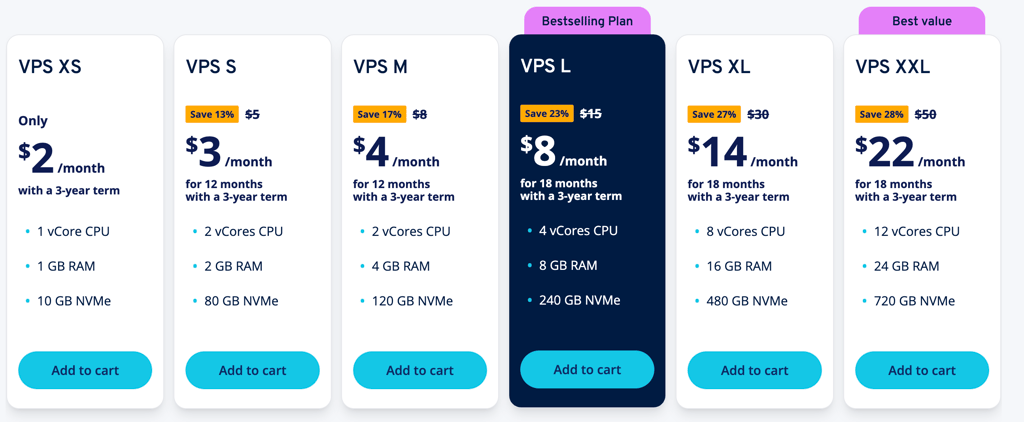
IONOS offers 6 VPS plans, and below are the four cheapest options, all fully self-managed and designed for small to medium projects.
IONOS offers 6 VPS plans. Before I compare the 4 cheapest, I'll give you a breakdown of the 2 best deals:
- VPS XS starts at $2.00/month and offers 1 CPU vCore, 1GB RAM, and 10GB NVMe storage.
- VPS M starts at 4.00, and renews at $8.00/month. It offers 2 vCPU cores, 4GB RAM, and 120GB NVMe storage.
Here's a full breakdown of the 4 cheapest plans:
| Plan | Starting price | Storage (GB) | CPU (vCores) | RAM (GB) |
| VPS XS | $2.00/month | 10GB NVMe SSD | 1 | 1 |
| VPS S | $3.00/month | 80GB NVMe SSD | 2 | 2 |
| VPS M | $4.00/month | 120GB NVMe SSD | 2 | 4 |
| VPS L | $8.00/month | 240GB NVMe SSD | 4 | 8 |
Does IONOS VPS have any hidden costs?
No, IONOS VPS does not hide any costs. However, it’s important to note that the plan doesn’t include a cloud backup and recovery option – you need to select one for an additional fee. Prices start from 6.5 cents per GB/month and can go from $7.00 up to $100.00, depending on the amount of storage and the number of devices you want to back up.
Domains and additional IPv4 addresses are optional, with $5.00/month per IPv4 address. There are also no free website migration services provided.
2. Hostinger – cheap VPS hosting with AI functionalities

| Rating: | |
| Starting price: | From $5.84/month |
| Money-back guarantee: | ✅ Yes, 30-day |
| Storage: | 50GB NVMe SSD |
| CPU: | 1 vCPU core |
| RAM: | 4GB |
| Best deal: | Get up to 73% OFF Hostinger VPS |
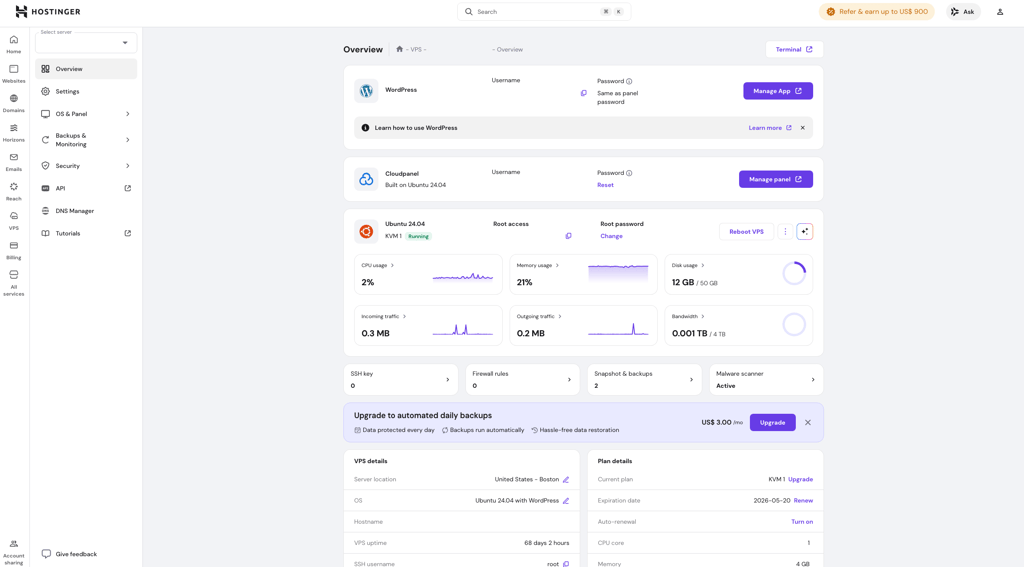
Starting at $5.84/month, Hostinger is one of the cheapest VPS providers (and one of the cheapest Linux VPS) with beginner-friendly AI tools. It’s aimed at users who want to experiment with VPS hosting without a steep learning curve, while still getting strong performance.
Features. Hostinger VPS plans include NVMe SSD storage, KVM virtualization, Linux OS support, and worldwide data centers. AI tools like an AI assistant and AI-powered firewall are included, although their impact on VPS management is limited.
Performance. Testing during our Hostinger VPS review showed 100% uptime, 99.95% reachability, no HTTP failures under load, and an ultra-fast 29.5ms response time, which is excellent for budget VPS hosting.
Ease of use. Hostinger is clearly built for beginners, with step-by-step tutorials covering server creation, security setup, and app deployment. Even first-time VPS users can get started quickly.
Support. Hostinger support is available 24/7 via live chat, but assistance can feel too laid-back, often redirecting users to the knowledge base for VPS issues. Fortunately, the knowledge base is thorough.
Hostinger VPS plans and pricing
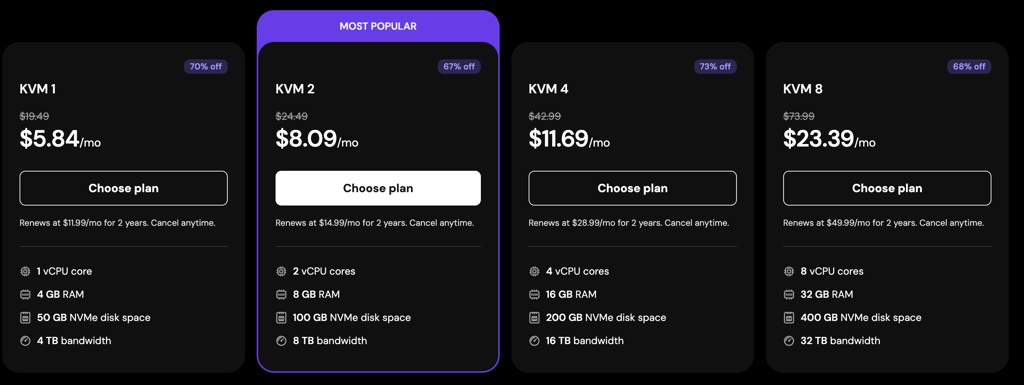
Hostinger has 4 VPS hosting plans with varying resources, all of which are self-managed. Here are the 2 best offers:
- The KVM1 plan starts at $5.84/month and renews at $19.49/month. It offers 1 vCPU core, 4GB RAM, 50GB NVMe storage, and 4TB of bandwidth.
- The KVM 2 plan starts at $8.09/month and renews at $24.49/month. It offers 2 vCPU cores, 8GB RAM, 100GB NVMe storage, and 8TB of bandwidth.
Below is an in-depth look at VPS plans and their pricing.
| Starting price | Storage (GB) | CPU (Cores) | RAM (GB) | |
| KVM 1 | $5.84/month | 50GB NVMe SSD | 1 | 4 |
| KVM 2 | $8.09/month | 100GB NVMe SSD | 2 | 8 |
| KVM 4 | $11.69/month | 200GB NVMe SSD | 4 | 16 |
| KVM 8 | $23.39/month | 400GB NVMe SSD | 8 | 32 |
Does Hostinger VPS have any hidden costs?
No, Hostinger’s pricing is clear with no hidden costs. However, keep in mind that only weekly backups are included for free. Daily backups cost $3.00/month, which is an additional $64.80 on a 24-month plan. Taxes are calculated after you provide your billing address, so the total price may vary from user to user.
Hostinger’s KVM 1 pricing is especially attractive when you choose a longer billing cycle, as other billing periods tend to be slightly pricier. Committing to the longest possible option and paying $5.84/month for 2 years upfront gives you the biggest discount, saving you over $200.00. However, the renewal price increases to $9.99/month.
3. Bluehost – best budget VPS for easy app deployment

| Rating: | |
| Starting price: | From $2.09/month |
| Money-back guarantee: | ✅ Yes, 30-day |
| Storage: | From 50GB NVMe |
| CPU: | From 1 vCPU core |
| RAM: | From 2GB |
| Best deal: | Get Bluehost VPS with 55% OFF |
Bluehost has undergone a big revamp of its VPS service recently, now delivering strong performance with some of the lowest price tags you can find. It starts at $4.13/month on a monthly basis, but you can get it even cheaper ($2.09/month) if you don’t mind committing to a 2-year term. Bluehost VPS servers run on Oracle Cloud Infrastructure and are available in Virginia, Arizona, Toronto, London, and Amsterdam.
Features. The entry-level NVME 2 plan includes 1 CPU core, 2GB RAM, 50GB NVMe storage, unmetered bandwidth, and 1 dedicated IP address. Bluehost VPS also supports multiple operating systems, including AlmaLinux, Debian, Rocky Linux, CentOS, Fedora, and Ubuntu.
Performance. Bluehost VPS uses NVMe storage and Oracle Cloud Infrastructure, which helps support fast storage access, scalable performance, and better global availability across North America and Europe.
Ease of use. Bluehost’s one-click template library makes the setup process simpler for common workloads. Templates include LEMP, LAMP, Portainer.io, Docker, n8n, and WordPress, so users can deploy development, automation, or CMS environments faster.
Support. Bluehost VPS includes self-managed server control, but 24/7 priority support is only included in the managed plans.
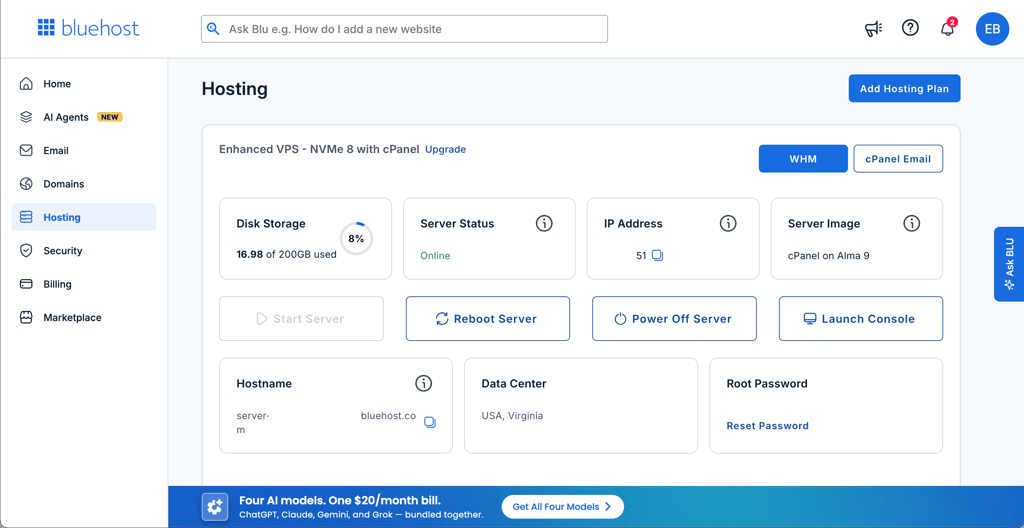
Read the full Bluehost review to learn more about the provider's pricing and plans.
Bluehost VPS plans and pricing
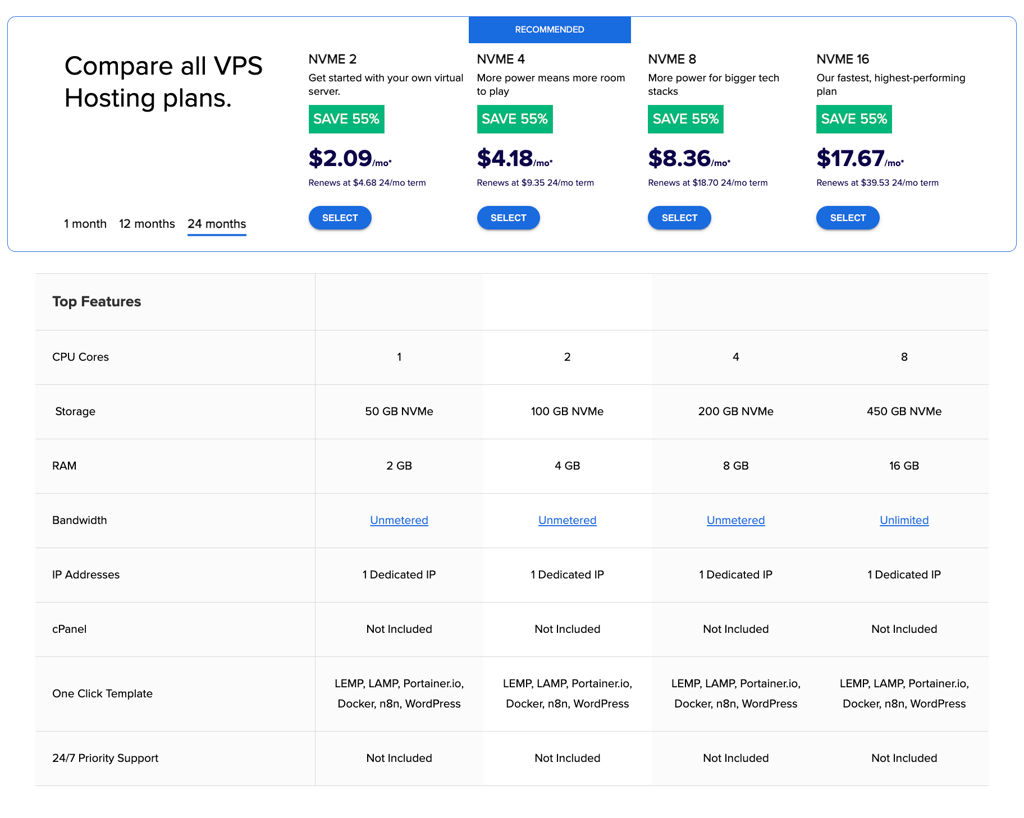
Bluehost offers 4 self-managed NVMe VPS plans designed for users who want low-cost hosting with full server control, NVMe storage, and one-click app templates. Here's a breakdown of the 2 cheapest deals:
- NVME 2 starts at $4.13/month on monthly billing, or $2.09/month with a 24-month term. It offers 1 CPU core, 2GB RAM, 50GB NVMe storage, unmetered bandwidth, and 1 dedicated IP.
- NVME 4 starts at $4.18/month with a 24-month term and renews at $9.35/month. It offers 2 CPU cores, 4GB RAM, 100GB NVMe storage, unmetered bandwidth, and 1 dedicated IP.
Here's a full breakdown of the 4 VPS plans from Bluehost:
| Plan | Starting price | Storage (GB) | CPU (vCPU) | RAM (GB) |
| NVME 2 | $2.09/month | 50GB NVMe | 1 | 2 |
| NVME 4 | $4.18/month | 100GB NVMe | 2 | 4 |
| NVME 8 | $8.36/month | 200GB NVMe | 4 | 8 |
| NVME 16 | $17.67/month | 450GB NVMe | 8 | 16 |
Does Bluehost VPS have any hidden costs?
No, Bluehost VPS pricing appears clear, with no hidden costs on its self-managed NVMe plans. Each plan includes NVMe storage, unmetered bandwidth, 1 dedicated IP address, and one-click templates for apps like Docker, n8n, WordPress, LAMP, and LEMP.
The main thing to note is renewal pricing. Bluehost’s cheapest VPS price applies to the initial 24-month term, so the price increases after renewal. For example, the NVME 2 plan starts at $2.09/month and renews at $4.68/month.
4. Kamatera – flexible low-cost cloud VPS hosting

| Rating: | |
| Starting price: | From $4.00/month |
| Money-back guarantee: | ❌ No |
| Storage: | 20GB NVMe SSD |
| CPU: | 1 core |
| RAM: | 1GB |
| Best deal: | Get Kamatera now, starting at only $4.00/month |
Starting at $4.00/month, Kamatera is a flexible cloud VPS provider built for users who want full control over their server setup. It’s best suited for developers and experienced users who value customization and global coverage over simplicity. Instead of flat plans, Kamatera uses a pay-as-you-go model, letting you scale resources up or down at any time.
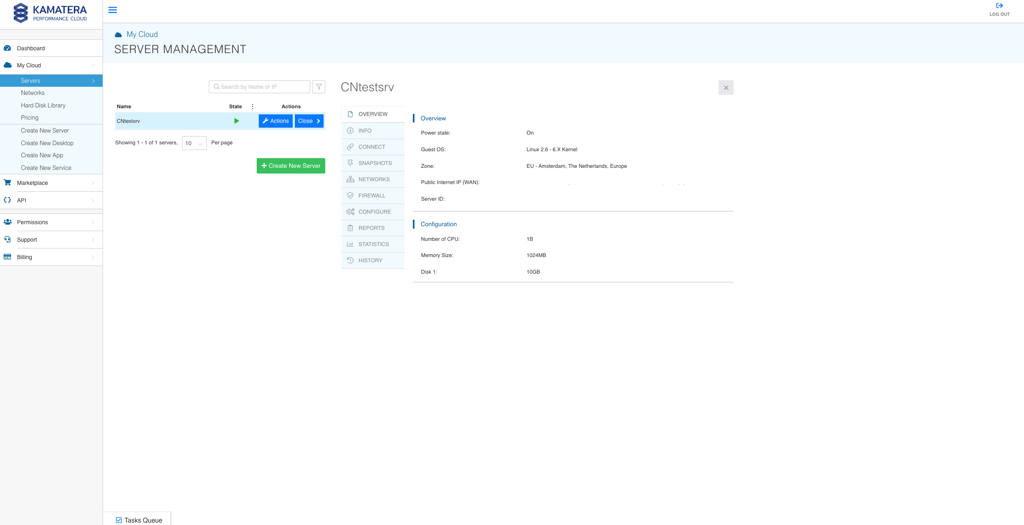
Features. Kamatera offers a highly customizable VPS with configurable vCPU, RAM, SSD storage, OS options (Linux and Windows), and add-ons like firewalls and control panels. It operates 24 data centers across North America, Europe, Asia, and the Middle East.
Performance. During testing, Kamatera delivered excellent speed and stability, with real-world uptime reaching 100% and consistently fast response times, outperforming its 99.95% uptime guarantee.
Ease of use. The platform is not beginner-friendly. Server setup requires technical knowledge, and most features must be configured manually.
Support. Kamatera provides 24/7 support via live chat, phone, email, and tickets, though responses can feel brief and more technical than guided.
If you want to learn more, you can read our in-depth Kamatera review.
Kamatera VPS plans and pricing
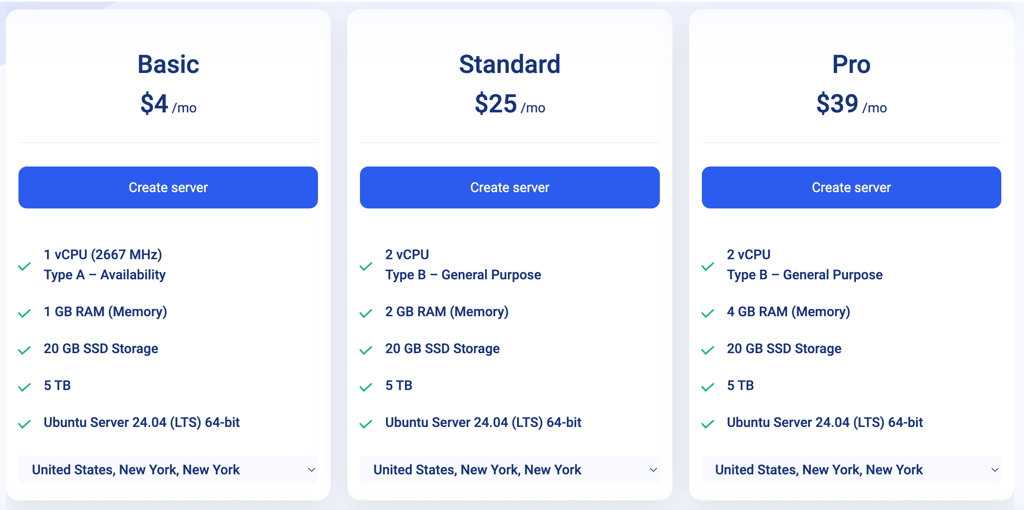
Kamatera offers flexible, self-managed VPS plans with pay-as-you-go pricing. You can choose from preconfigured plans or fully customize your server resources. Below is a look at Kamatera’s cheapest VPS plan:
- Basic starts at $4.00/month. It offers 1 vCPU core, 1GB RAM, and 20GB NVMe SSD storage.
Kamatera also offers some customizable plans. Here are a few combinations you can try out:
| Plan | Starting price | Storage (GB) | CPU (vCPU) | RAM (GB) |
| Basic | $4.00/month | 20GB NVMe SSD | 1 | 1 |
| Custom VPS 1 | $6.00/month | 20GB NVMe SSD | 1 | 2 |
| Custom VPS 2 | $12.00/month | 30GB NVMe SSD | 2 | 2 |
| Custom VPS 3 | $19.00/month | 40GB NVMe SSD | 2 | 4 |
Does Kamatera VPS have any hidden costs?
No, Kamatera does not have hidden costs. However, it’s important to know that some features are optional and billed separately. For example, backups, cloud firewalls, load balancers, and managed services are not included in the base plan and will increase your monthly bill if you choose them.
Control panels like cPanel or Plesk are also optional and require additional monthly licenses. Since Kamatera uses pay-as-you-go pricing, costs can grow depending on the resources and add-ons you select. The 30-day free trial (up to $100 in usage) helps you test everything and see the full cost before committing.
5. Liquid Web – low-cost VPS hosting for growing projects

| Rating: | 4.4 |
| Starting price: | $5.00/month |
| Money-back guarantee: | ✅ Yes, 30-day |
| Storage: | 30GB SSD |
| CPU: | 1 vCPU core |
| RAM: | 1GB |
| Best deal: | Get up to 77% OFF Liquid Web VPS |
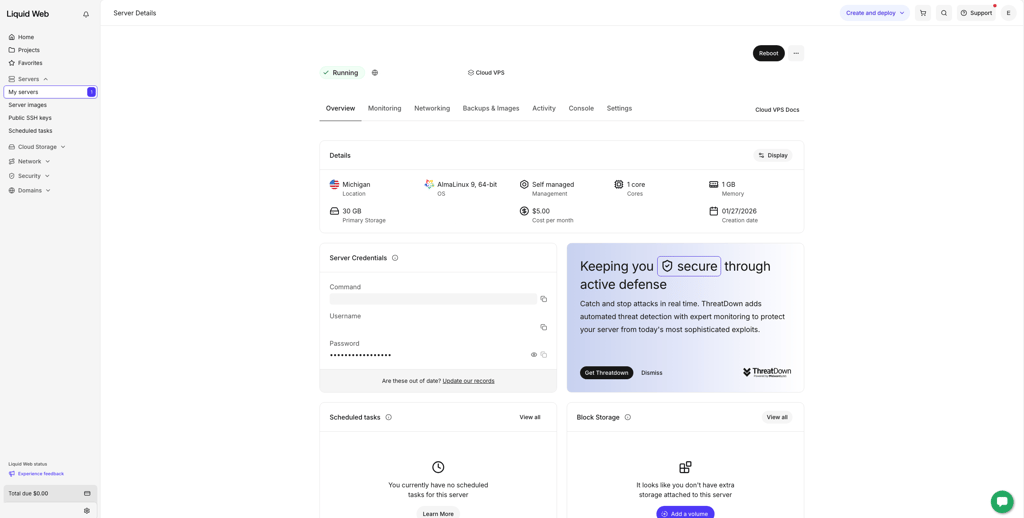
Starting at $5.00/month, Liquid Web is the best cheap VPS hosting for growing businesses that need strong performance and reliability. While it’s still more expensive than basic VPS providers, Liquid Web’s VPS plans deliver reliable uptime and speed with flexible billing that can be more cost-efficient over longer terms. This makes it a solid choice for businesses scaling traffic and resource needs.
Features. Liquid Web’s entry plan includes 1 vCPU, 1GB RAM, 30GB SSD storage, 1 TB bandwidth, and support for optional control panels, such as InterWorx, cPanel, and Plesk. It’s self-managed and provides full root access and essential security features, including multi-level DDoS protection.
Performance. During testing, Liquid Web delivered 100% uptime and availability, handled high request loads with zero HTTP failures, and maintained low response times, making it one of the top performers among VPS hosts.
Ease of use. Setup is fast, and the interface is clean, but the entry plan is self-managed and better suited to users with technical experience.
Support. Liquid Web offers 24/7 support via live chat, phone, and tickets. Response times are quick, though the quality of help can vary.
Read the full Liquid Web review.
Liquid Web VPS plans and pricing
Liquid Web provides both managed and self-managed cloud VPS plans with flexible billing. Besides, the price drops significantly with longer terms. Below are the cheaper self-managed plans:
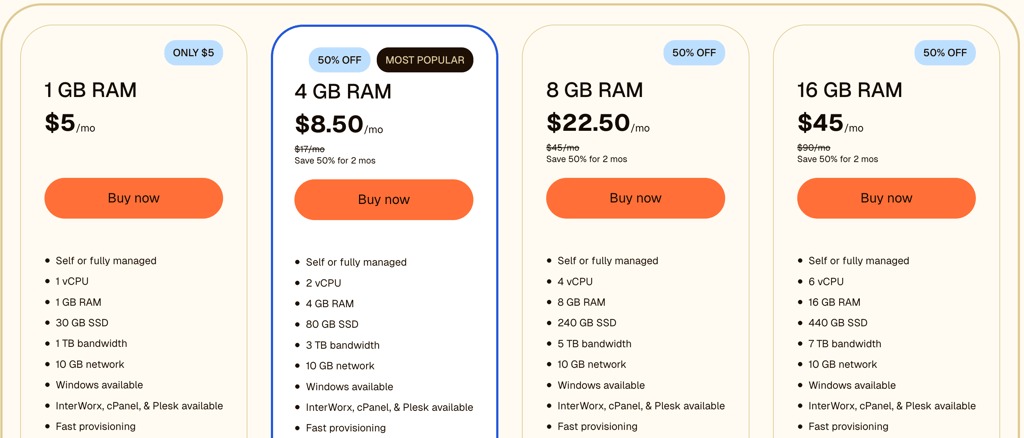
- Liquid Web's 1GB RAM plan starts at $5.00/month, and offers 1 vCPU core, 1GB RAM, 30GB SSD storage, and 1TB bandwidth.
- Liquid Web's 4GB RAM plan starts at $8.50/month, and renews at $17.00/month after 2 months. It offers 2 vCPU cores, 4GB RAM, 80GB SSD storage, and 3TB bandwidth.
Here's a breakdown of all of Liquid Web's budget plans:
| Plan | Starting price | Storage (GB) | CPU (vCPU) | RAM (GB) |
| 1 GB RAM | $5.00/month | 30GB SSD | 1 | 1 |
| 4 GB RAM | $8.50/month | 80GB SSD | 2 | 4 |
| 8 GB RAM | $22.50/month | 240GB SSD | 4 | 8 |
| 16 GB RAM | $45.00/month | 440GB SSD | 6 | 16 |
Does Liquid Web VPS have any hidden costs?
No, Liquid Web doesn’t have hidden fees, but several features are optional and cost extra. Control panels such as InterWorx, cPanel, and Plesk require separate licenses. Managed support is also optional, with Core-managed starting at $21.00/month and fully managed at $39.00/month.
Automatic daily backups cost $0.05 per GB/month. Standard DDoS protection comes with every plan, but advanced DDoS protection costs $111.00/month. You can also purchase additional IPs for $6.00/month.
6. Vultr – affordable VPS focused on performance

| Rating: | 4.4 |
| Starting price: | From $2.50/month |
| Money-back guarantee: | ❌ No |
| Storage: | 10GB NVMe SSD |
| CPU: | 1 vCPU |
| RAM: | 0.5GB |
| Best deal: | Available now for only $2.50! |
Starting at $2.50/month, Vultr is a performance-focused cheap VPS hosting provider that delivers strong speed, reliable uptime, and a wide global footprint. Its cloud VPS instances are powered by high-performance NVMe storage and are easy to scale, making Vultr a solid choice for apps, blogs, eC-commerce sites, and projects where performance and price both matter. With numerous data centers around the world, you can place your server closer to your audience for better latency.
Features. Vultr offers a broad range of cloud VPS plans, including entry-level instances and higher-capacity options. All plans include NVMe SSD storage, a public IPv4 address, DDoS protection, and access to a simple control panel and API. You can deploy popular Linux distributions or one-click apps like WordPress and Docker.
Performance. Thanks to NVMe storage and modern CPUs, Vultr delivers consistently strong performance across its VPS lineup. Loads are handled efficiently, and uptime is reliable, which is why it’s often chosen for performance-sensitive hosting without premium pricing.
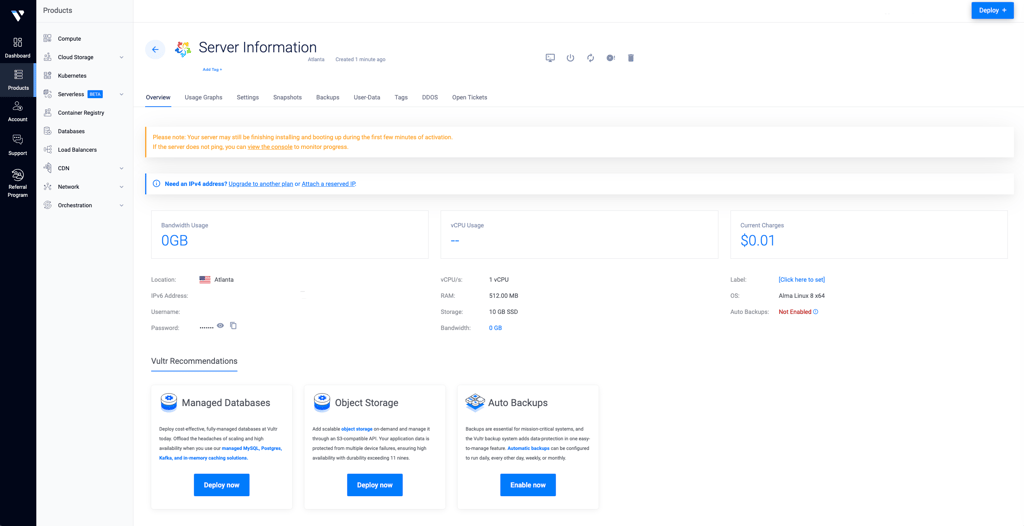
Ease of use. The control panel is clean and straightforward, and provisioning a server only takes a few clicks. Like most cloud VPS providers, it’s self-managed, so you’ll need basic server knowledge for setup and maintenance.
Support. Support is available via tickets and community resources, but live support options are limited, and managed VPS options are scarce compared with some other hosts.
Vultr VPS plans and pricing
Vultr provides flexible, self-managed cloud VPS hosting with straightforward pricing. Below are some of the entry-level instances:
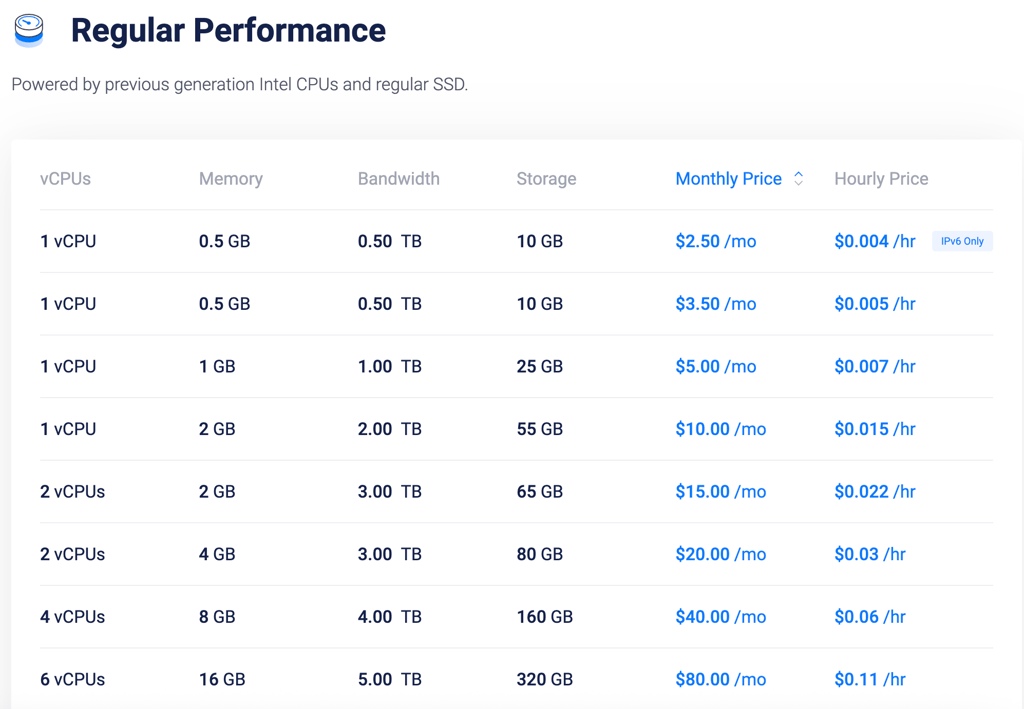
- Vultr Cloud Compute Starter starts at $2.50/month and offers 1 vCPU, 512MB RAM, 10GB of storage, and 1TB of bandwidth.
- Vultr Cloud Compute Standard starts at $5.00/month and offers 1vCPU, 1GB RAM, 25GB of storage and 1TB of bandwidth
| Plan | Starting price | Storage (GB) | CPU (vCores) | RAM (GB) |
| Vultr Cloud Starter | $2.50/month | 10GB NVMe SSD | 1 | 0.5 |
| Vultr Cloud Standard | $5.00/month | 25GB NVMe SSD | 1 | 1 |
| Vultr Cloud Pro | $10.00/month | 55GB NVMe SSD | 1 | 2 |
| Vultr Cloud High Frequency | $15.00/month | 65GB NVMe SSD | 2 | 2 |
Does Vultr VPS have any hidden costs?
No, Vultr’s pricing is transparent. The base VPS price covers your server’s resources and bandwidth. Optional add-ons like additional IP addresses, snapshots, block storage, and managed services are billed separately if you choose them.
7. DigitalOcean – affordable VPS hosting for developers
| Rating: | 4.2 |
| Starting price: | From $4.00/month |
| Money-back guarantee: | ❌ No |
| Storage: | 10GB NVMe SSD |
| CPU: | 1 vCPU |
| RAM: | 512MB |
| Best deal: | Available now for only $4.00! |
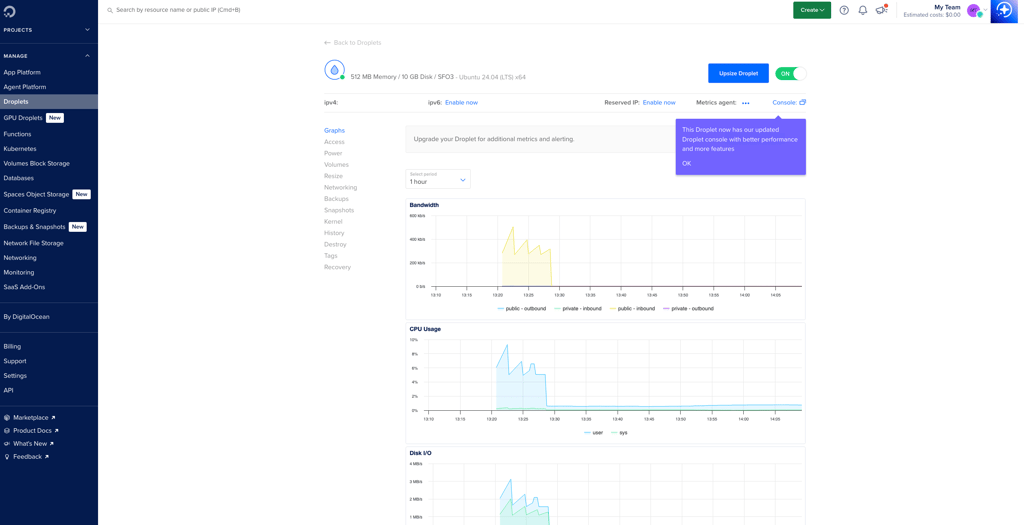
Starting at $4.00/month, DigitalOcean offers lightweight cloud VPS hosting called Droplets, which are built primarily for developers. It’s a strong choice if you’re running apps, APIs, or scalable projects. DigitalOcean is best suited for developers who want full control and predictable pricing.
Features. DigitalOcean’s Basic Droplets let you choose your CPU, RAM, and SSD storage, with Linux-based OS options and support for Docker, Kubernetes, and one-click app deployments. The platform also offers managed databases, load balancers, firewalls, and backups as optional add-ons. Data centers are available across North America, Europe, and Asia.
Performance. DigitalOcean provides reliable performance for small to mid-sized workloads. It’s a dependable option for development projects and production apps, as it provides SSD storage, strong network infrastructure, and consistent uptime.
Ease of use. While the interface is clean and easy to navigate, DigitalOcean is not beginner-oriented. Server setup, security, and maintenance are handled manually, so basic Linux and server knowledge is expected. The control panel is well designed, and you can deploy a server in minutes and scale resources as your project grows.
Support. Support is available through tickets and a detailed documentation library. There’s no live chat or phone support, which is a drawback if you need immediate help.
DigitalOcean VPS plans and pricing
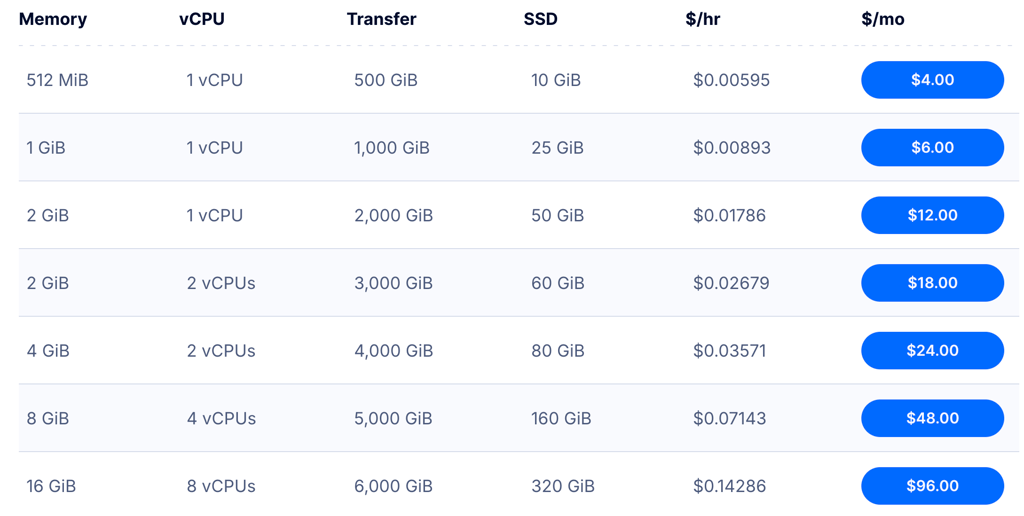
DigitalOcean offers preconfigured plans or fully customizable resources to fit your project’s needs. Below is a look at the entry-level plans and their pricing.
- Droplet 1 costs $4.00/month and comes with 1 vCPU core, 512MB RAM, and 10GB NVMe storage.
- Droplet 2 costs $6.00/month and includes 1vCPU core, 1GB RAM, and 25GB NVMe storage.
Here's a breakdown of DigitalOcean's other plans:
| Plan | Starting price | Storage (GB) | CPU (vCores) | RAM (GB) |
| Droplet 1 | $4.00/month | 10GB NVMe SSD | 1 | 0.5 |
| Droplet 2 | $6.00/month | 25GB NVMe SSD | 1 | 1 |
| Droplet 3 | $12.00/month | 50GB NVMe SSD | 1 | 2 |
| Droplet 4 | $18.00/month | 60GB NVMe SSD | 2 | 2 |
Does DigitalOcean VPS have any hidden costs?
No, DigitalOcean has no hidden fees. Droplet pricing is transparent. Optional extras like backups, load balancers, managed databases, and block storage are billed separately if you use them. The base monthly price covers all other resources included in the plan.
Comparison of the top cheap VPS services and their prices
| Provider | Starting price | Storage | RAM | CPU |
 | $2.00/month | 10GB NVMe SSD | 1GB | 1 vCPU core |
 | $5.84/month | 50GB NVMe SSD | 4GB | 1 vCPU core |
 | $2.09/month | 50GB NVMe | 2GB | 1 vCPU core |
 | $4.00/month | 20GB NVMe SSD | 1GB | 1 vCPU core |
 | $5.00/month | 30GB SSD | 1GB | 1 vCPU core |
 | $2.50/month | 10GB NVMe SSD | 1GB | 1 vCPU core |
 | $4.00/month | 10GB NVMe SSD | 512MB | 1 vCPU core |
Best cheap VPS hosting 2026: ranking methodology
To identify the best VPS hosting services, together with the Cybernews team, I began by reviewing 64 hosting providers and selected those that offer VPS hosting within the range of $2.00/month to $5.00/month. Each provider was assessed based on criteria relevant to VPS hosting, such as resource allocation, management features, and security. I narrowed this initial pool down to the best 6 providers for further review. Here's how I evaluated them:
- Price-to-value ratio (25%). I selected the cheapest VPS options that offer the best value for your money.
- Resources and scalability (20%). I analyzed the storage, RAM, CPU cores, and bandwidth each cheap VPS plan offers to ensure they meet varying project requirements and allow for easy scaling.
- Control panel usability (20%). I tested the usability of control panels (cPanel, custom dashboards), focusing on user-friendly interfaces, root access, and the availability of pre-installed panels.
- Security features (20%). I examined the security measures, including SSL certificates, firewalls, DDoS protection, and data privacy policies, to ensure strong protection for your projects.
- Management options (10%). I compared the availability of unmanaged, semi-managed, and fully managed services to match users' technical expertise and support needs.
- Support (5%). I reviewed the quality of customer support, analyzing the availability, responsiveness, and helpfulness of the support teams.
Based on these factors, I ranked the providers from 1 to 7 to ensure you get reliable and secure VPS hosting recommendations.
Do you need a VPS?
VPS is essential for projects that need more control and resources than shared hosting can offer. Root access is a key feature, allowing users to configure the server environment to fit specific needs – whether that’s installing custom software (like Apache, MongoDB, or UFW), running web applications, or managing databases.
Projects like eCommerce sites or high-traffic websites will benefit most from VPS, as it provides dedicated CPU, RAM, and storage resources, ensuring your site runs smoothly even during peak traffic times. VPS is also ideal for users who need to manage multiple domains, handle sensitive data, or require more security than shared hosting can offer. Additionally, resource-heavy applications like game servers, private email systems, or project management tools thrive on VPS due to its scalability and enhanced performance capabilities.
Why is VPS so expensive?
Simply put, VPS hosting is more expensive than shared hosting because it provides you with more resources. These include dedicated CPU cores, RAM, storage, and root access, among other features. This ensures better performance, higher security, and more control over your dedicated server environment.
VPS is ideal for growing websites that are receiving more traffic or have content that demands additional resources.
Final thoughts
Finding a reliable cheap VPS can be hard, especially if you’re a beginner. Luckily, there are excellent budget options out there, guaranteeing strong uptime, fast loading speeds, and excellent usability.
- Best budget deal, good performance – IONOS
- Most beginner-friendly hosting with excellent introductory offers – Hostinger
- Affordable VPS with easy one-click app deployment – Bluehost
- Customizable and scalable for beginners and advanced users – Kamatera
- Cheap VPS for growing businesses – Liquid Web
- Performance-focused affordable hosting – Vultr
- Lightweight hosting for apps and APIs – DigitalOcean

FAQ
Can I get VPS for free?
Fully free VPS is rare, but some providers offer money-back guarantees or free trials. Hostinger can be considered as a free VPS that allows you to test its services with a 30-day money-back guarantee, making it risk-free to try.
Is VPS better than dedicated?
VPS hosting is an affordable option that provides a good mix of performance and cost-efficiency. While the server resources are shared, virtualization ensures each VPS operates independently with its own dedicated resources. On the other hand, dedicated hosting delivers maximum capacity and control, but this comes with a significantly higher cost.
What is the price of VPS?
VPS pricing varies, with low-cost options starting around $2.00/month for unmanaged plans. Fully managed plans range from $10.00 to $100.00/month, depending on the provider.