Best Palworld dedicated server hosting 2026

When Palworld first launched, I immediately jumped in with a few friends. All of us grew up playing Pokémon, so we liked the idea of creature collecting in an open world with a twist of traditional co-op survival gameplay. After spending hours playing together, I started looking into the best Palworld server hosting options.
We started on public servers, but quickly decided to move to a private world (mainly because of griefers and random players were damaging our bases and taking resources we had collected). I also tried self-hosting the server on my PC, but keeping it running while also playing became too demanding. On top of that, my friends could only play when my computer was online.
With Palworld 1.0 adding new regions, more Pals, and additional content in 2026, having a stable server matters even more for a long-term world. That's why I started testing dedicated Palworld hosting providers.

I put these providers through hands-on testing and compared them with our research team to see which ones are actually worth your time and money. I looked at factors such as server reliability, resource options, mod support, customization, security, and overall value. After narrowing down the options, I compiled this list of the top 10 Palworld server hosting providers to help you find a server that fits your playstyle and budget.
10 best Palworld server hosting providers in November 2026
- Hostinger – Palworld server hosting for fast, beginner-friendly setup
- Contabo – Palworld server hosting for maximum resources
- IONOS – Palworld server hosting for advanced server control
- Host Havoc – Palworld server hosting for US users
- Shockbyte – easy-to-set-up Palworld server hosting
- DatHost – Palworld server hosting for Europe
- Streamline Servers – Palworld server hosting for large player bases
- BisectHosting – Palworld hosting with easy server customization
- GTXGaming – affordable Palworld hosting with advanced customization
- Nitrado – simple Palworld server hosting
What are the minimum requirements for Palworld server hosting?
If you’ve ever tried hosting a co-op game on your PC, you’ve probably noticed how Palworld is more demanding than many other survival games. As your world grows with larger bases, more Pals, and additional players, server resources become increasingly important for stable performance. According to Pocketpair's official Palworld 1.0 server guide, a dedicated server should have at least the following components:
| Component | Recommended requirement |
|---|---|
| CPU | 4 CPU cores or more |
| RAM | 16GB (32GB+ for larger servers) |
| Storage | Fast SSD |
| Operating system | 64-bit Windows or Linux |
| Network | Port forwarding (UDP 8211 by default) |
While the server can boot with 8GB of RAM, Pocketpair warns that this significantly increases the risk of crashes caused by insufficient memory. If you're planning to host more than 6 players, build large bases, or install mods, consider upgrading to 32GB of RAM or more for a smoother experience.
Palworld server hosting – detailed list
In my search for the best Palworld server hosting solution, I researched 63 leading providers. My top 10 selections outranked the remaining products in terms of ease of use, resources, performance, server location, and pricing. Here’s what made my top 10 Palworld server hosting providers stand out.
1. Hostinger – best Palworld server hosting for easy setup

| Rating: | |
| Palworld hosting price: | From $9.49/month |
| Instant setup: | ✅ Yes |
| Control panel: | Hostinger Game Panel |
| RAM: | 8–32GB |
| Mod support: | ✅ Yes |
| DDoS protection: | ✅ Yes |
| Money-back guarantee: | ✅ Yes, 30 days |
| Best deal: | Get up to 62% OFF Hostinger Game Panel |
Hostinger is my top recommendation for semi-managed Palworld server hosting because it makes setting up and managing a Palworld 1.0 server easy. Its Game Panel handles the basics for you, so you don’t need to use command-line tools to set up your server, manage updates, or configure essential settings. Security features and server management tools are also already set up, while you still get control over your server when you need it.
On top of that, it’s one of the most affordable options out there compared to other game hosting providers. You also get plenty of useful features and strong performance, making it an excellent choice for smooth and reliable Palworld 1.0 playthroughs with your friends.
What will you get with Hostinger’s Palworld hosting?
- Easy-to-use game panel. Hostinger provides a simple dashboard with pre-installed server tools, making it easy to manage your Palworld settings.
- Global server locations. You can choose from 10 countries to host your server for better performance based on your region.
- Automatic backups. Your game progress is saved regularly, so you won’t lose any data.
- DDoS protection. Built-in security helps keep your server safe from attacks and running smoothly.
- Easy mod installation. Hostinger lets you drag and drop .pak files for easy mod installation.
Thanks to Hostinger's pre-built instances, I set up a Palworld server with Hostinger and got it running in less than 10 minutes without any tech headaches. All I had to do to create the server was head to the admin panel, create a new instance, and select Palworld as the game I wanted to host. However, if you want more customization, you can make a Palworld server using Hostinger's Game Panel.
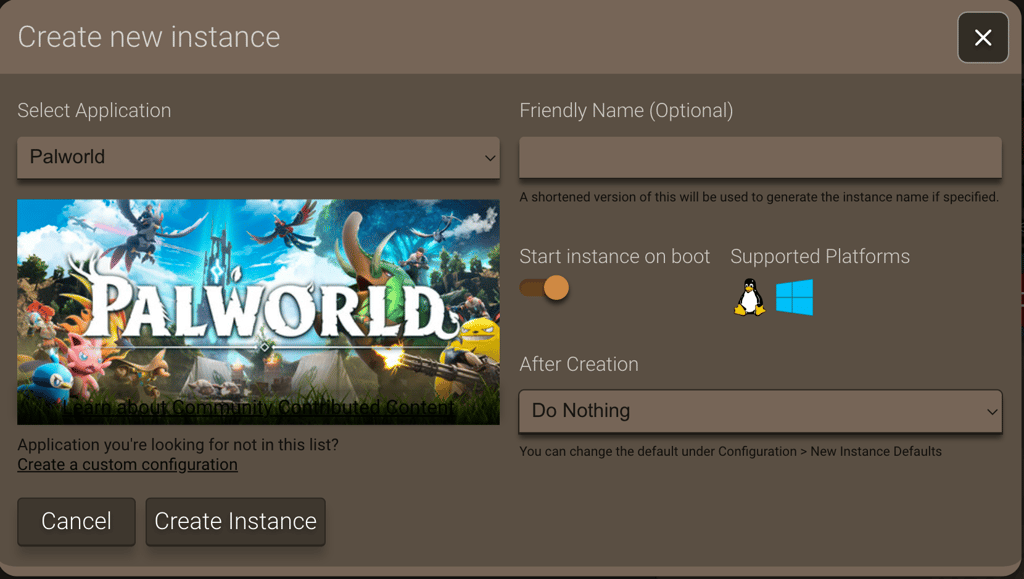
While configuring my server, I especially liked how intuitive Hostinger's dashboard was. It allowed me to track the server usage statistics, such as CPU, memory disc, and bandwidth. Also, since Hostinger supports PAK mods for Palworld servers, I easily modded my server without struggles.
What I lacked with some other providers was a wide selection of server locations. Hosting your server close to your player base is key for low ping and smooth gameplay, but many hosts don't offer enough options. Hostinger, on the other hand, really surprised me with data centers spread across the globe, including Europe, Asia, South America, and the US, which made a big difference in performance.
2. Contabo – Palworld server hosting for maximum resources on a budget

| Rating: | |
| Palworld hosting price: | From $5.28/month |
| Instant setup: | ❌ No (manual VPS deployment) |
| Control panel: | Contabo Customer Control Panel (general VPS, not game-specific) |
| RAM: | 8–96GB |
| Mod support: | ✅ Yes |
| DDoS protection: | ✅ Yes |
| Money-back guarantee: | ✅ Yes, 14 days |
| Best deal: | Get Contabo for just $5.28/month! |
Contabo is great for Palworld players who want the maximum server resources for their money. Unlike managed game hosts, Contabo sells general-purpose VPS and dedicated servers – but its specs stand out from most gaming-specific hosts by a wide margin at the same price point. You're getting enterprise-grade hardware (NVMe SSD storage, full root access, unlimited or very high bandwidth caps) without paying a premium for a pre-built game panel.
However, setup effort is something you need to factor in. There's no one-click Palworld installer – you're deploying a Linux (or Windows) VPS and installing the Palworld Dedicated Server files yourself via SSH. That makes Contabo a better fit for players who don't mind a bit of command-line work in exchange for significantly more RAM and CPU headroom than they'd get from a similarly priced managed host.
What will you get with Contabo's Palworld hosting?
- High resource allocations for the price. Entry-level plans start at around 4 vCPUs and 8GB of RAM, which is enough to comfortably meet Palworld's recommended minimums, with higher tiers scaling to 24GB+ of RAM for larger, more heavily modded worlds.
- DDoS protection is included free. Every VPS and dedicated server plan ships with built-in DDoS mitigation at no extra cost.
- Full root access. You get complete control over the server environment, so you can configure firewall rules, install mods manually, and tune settings exactly how you want.
- NVMe storage across most plans, offering faster disk performance than traditional SSD/HDD storage.
- Global data center coverage. With 11 locations worldwide, Contabo gives you the flexibility to pick a region close to your player base.
Since Contabo doesn't offer a dedicated game panel, I had to install mods manually. Fortunately, there’s a detailed server setup guide, following which I connected to the server over SFTP using FileZilla and uploaded files to one of two folders depending on the mod type: PAK mods went into the Paks directory, while LUA/UE4SS script mods went into a separate Mods folder. Get the path wrong, and the mod just silently fails to load, so I made sure to double-check each one before restarting the server.
It's more hands-on than a managed host, but having full root access meant I could install UE4SS for script mods and dig into the server logs myself when troubleshooting conflicts. This kind of control you just don't get on more locked-down panels, and I appreciated having it with Contabo.
3. IONOS – advanced Palworld server hosting

| Rating: | |
| Palworld hosting price: | From $6.00/month |
| Instant setup: | ❌ No |
| Control panel: | Plesk Web Host (not dedicated to games) |
| RAM: | 8–24GB |
| Mod support: | ✅ Yes |
| DDoS protection: | ✅ Yes |
| Money-back guarantee: | ✅ Yes, 30 days |
| Best deal: | Get up to 94% OFF IONOS |
IONOS is an excellent choice if you’re an experienced user who wants more control over your Palworld server. Unlike managed game hosting providers, IONOS gives you an unmanaged VPS environment where you can configure the server, install the required software, and adjust settings exactly how you want. This makes it a better fit for users who are comfortable with server management and want more flexibility. Additionally, it offers excellent performance and sufficient resources – when I tested it, the server ran smoothly with low ping and remained online the whole time.
What will you get with IONOS Palworld hosting?
- Full server access and control. IONOS gives you full access to the server, so you can set it up and manage it exactly how you like. It is great for advanced users who want more freedom.
- Flexible VPS resources. You can choose from multiple VPS configurations and scale your resources as your server grows. For Palworld 1.0, look for at least 4 CPU cores and 16GB of RAM for a smoother experience.
- Multiple server locations. You can host your server in the US, the UK, Germany, or France to get better speed for players in those areas.
- Strong security. IONOS includes firewalls and DDoS protection to keep your server safe from cyberattacks or unwanted access.
- Helpful Palworld guides. IONOS offers easy-to-follow tutorials on how to set up Palworld servers and use admin commands.
Creating a server with IONOS requires more technical knowledge. Since IONOS doesn't provide a dedicated gaming panel, I had to manually configure everything to create my own Palworld server, including installing the Palworld Dedicated Server files and adjusting server settings. So, if you're an absolute beginner, I believe Hostinger is a better option.
However, if you want more control over your server environment and don't mind handling the technical setup, IONOS is a strong option. It offers many helpful guides, which I found especially useful when setting up my server.
Once everything was set up, though, I got a lot of freedom. For example, I could alter firewall rules, open and forward ports, install updates, and customize the server environment to match my needs. So, I can easily recommend IONOS to more technical users who want complete control over their Palworld server.
4. Host Havoc – Palworld server hosting with plenty of US servers

| Rating: | |
| Palworld hosting price: | From $12.00/month |
| Instant setup: | ✅ Yes |
| Control panel: | Customized TCAdmin v2 |
| RAM: | 16–32GB (assigned automatically) |
| Mod support: | ✅ Yes |
| DDoS protection: | ✅ Yes |
| Money-back guarantee: | ✅ Yes, 72 hours |
Host Havoc is an excellent choice for managed Palworld server hosting in the US. It has servers in 7 locations across the country, so you can choose a server close to your players for lower latency and smoother gameplay.
What will you get with Host Havoc Palworld hosting?
- Easy server setup. Host Havoc has a simple control panel with a 1-click setup, easy settings, and helpful guides to manage your Palworld server and restarts.
- Flexible player slots. You can start with 4 players and upgrade to 32 as your group grows.
- Global server locations. Host Havoc offers locations in North America, Europe, and Asia-Pacific, so you can choose a region closer to your players for better performance.
- Mod support and file access. You can install mods and manage server files through available tools such as FTP access, giving you more control over customization.
- Powerful hardware. Host Havoc uses modern server hardware with SSD storage and powerful CPUs to provide stable performance for Palworld servers.
When I tested Host Havoc to set up a Palworld server, the whole process was quick and beginner-friendly. The setup was instant, so I could start playing almost right after purchasing the server, with no manual steps required. What I liked most was the control panel – it was clean and easy to use and made managing the server simple. Mod installation was just as smooth, thanks to the one-click mod installer, which saved me a lot of time. For those who prefer more control, Host Havoc also provides full FTP access, allowing you to manage server files however you like manually.
What I liked most was the control panel – it was clean and easy to use and made managing the server simple. Mod installation was just as smooth, thanks to the one-click mod installer, which saved me a lot of time. For those who prefer more control, Host Havoc also provides full FTP access, allowing you to manage server files however you like manually.
I especially recommend Host Havoc for US players because it offers 7 server locations across the country, making it easy to choose one close to you or your player base. This helps reduce lag and ensures a smoother gameplay experience. It’s also an excellent option for players outside the US, with additional server locations in Europe, Asia, and Australia, providing solid performance worldwide. Choosing a server location close to your players is especially important for Palworld 1.0, where larger worlds and busier bases can place more demand on server resources.
5. Shockbyte – beginner-friendly Palworld server hosting

| Rating: | |
| Palworld hosting price: | From $16.49/month |
| Instant setup: | ✅ Yes |
| Control panel: | Custom panel |
| RAM: | 8–10GB |
| Mod support: | ✅ Yes |
| DDoS protection: | ✅ Yes |
| Money-back guarantee: | ✅ Yes, 72 hours |
Shockbyte is an excellent choice for anyone new to managed Palworld server hosting, thanks to its easy-to-use custom control panel. It simplifies server management, making it easy to configure settings, manage files, and customize your world even if you have little hosting experience.
What will you get with Shockbyte Palworld hosting?
- Instant setup. Your Palworld server is ready to use right after you buy it, so you can start playing within minutes.
- Instance Management. This feature lets you effortlessly switch between different server setups, all within a single hosting environment.
- Mod support and customization. You can install supported mods and change all settings to customize your Palworld experience.
- Easy control panel. Shockbyte uses a simple dashboard with a one-click setup, file uploads, and easy settings management.
When I set up a Palworld server with Shockbyte, the whole process was super easy, especially for someone who isn't experienced with server hosting. As soon as I bought the server, it was ready to use – I jumped right into the control panel and liked that I could install mod packs and plugins with just a few clicks. I didn't have to mess around with server files or do anything complicated.
One of the best features for me was the Instance Management tool. It let me switch between different server setups without starting over, which made testing and tweaking simple. The mod installer also saved me a ton of time – I could customize my server and install mods without any technical skills.
Shockbyte also has a vast knowledge base, which helped me figure things out quickly. When I had questions, the built-in AI chatbot gave me fast, accurate answers about using the control panel, and I didn't even need to contact live support. So, if you're new to hosting and want something simple and beginner-friendly for Palworld, Shockbyte is a great place to start.
6. DatHost – Europe-based Palworld server hosting

| Rating: | |
| Palworld hosting price: | From $7.97/month |
| Instant setup: | ✅ Yes |
| Control panel: | Custom panel |
| RAM: | 16GB |
| Mod support: | ✅ Yes |
| DDoS protection: | ✅ Yes |
| Money-back guarantee: | ✅ Yes, 14 days |
DatHost is an excellent option for managed Palworld hosting if you're in Europe. It has 14 server locations, including 4 in Europe, so you can pick one close to you for a better connection and less lag. It's also easy to use and offers many helpful features, such as instant setup, automatic updates and backups, and a one-click mod installer.
What will you get with DatHost Palworld hosting?
- Quick setup and easy control panel. DatHost’s user-friendly dashboard makes setting up and managing your Palworld server fast and simple, even for beginners.
- Europe-focused server locations. With Palworld servers in 4 European countries, DatHost is ideal for players looking for low-latency gameplay across Europe.
- Game-switching feature. You can switch between different hosted games (like Palworld and Valheim) without losing progress or paying for a second server. This is useful if you and your friends regularly play different survival games.
- Mod support and server customization. DatHost supports mod installation and provides tools to adjust your server settings and customize your gameplay experience.
When I used DatHost to set up my Palworld server, the process took just a few minutes, thanks to the user-friendly dashboard and control panel. DatHost also offers global server locations, including in 15 European countries, making it an ideal choice for those looking to host a Palworld server in that region.
A very useful feature that DatHost offers is game-switching. If you’re anything like me, you play a lot of different games and sometimes feel like playing something else. DatHost allows you to easily change the game your server is running with a few clicks. For example, if you and your friends need a Valheim dedicated server, you can freeze your Palworld server, activate one for Valheim, complete a biome, and then switch back to Palworld. What’s great is that both servers will keep all your data and progress, and you won’t need to pay for an additional instance.
7. Streamline Servers – high-performance Palworld hosting

| Rating: | |
| Palworld hosting price: | From $5.40/month |
| Instant setup: | ✅ Yes |
| Control panel: | Custom panel |
| RAM: | 8–32GB |
| Mod support: | ✅ Yes |
| DDoS protection: | ✅ Yes |
| Money-back guarantee: | ✅ Yes, 48 hours |
Streamline Servers is built for players who need high-performance managed hosting and want more control over their Palworld server resources. It uses powerful hardware and customizable configurations – suitable for larger communities or users who want to fine-tune their server setup. Server management is handled through a custom TCAdmin panel, which simplifies common administration tasks.
What will you get with Streamline Servers Palworld hosting?
- Instant server setup. Servers are ready to use just minutes after payment, so you can start quickly.
- Performance upgrades. You can customize your server with additional RAM and higher CPU priority options to better handle larger worlds, more players, or heavier workloads.
- Global server locations. Servers are available across the Americas, Europe, Asia, and Oceania, with top performance in Australia and New Zealand.
- Security and backups. All servers include automatic backups and DDoS protection for safety and reliability.
Thanks to instant deployment, I had access to the server minutes after my payment. Unfortunately, the panel doesn’t offer 1-click modding, meaning you’ll need some technical knowledge to install Palworld mods. I was also disappointed with the knowledge base, which doesn’t include any Palworld modding guides that would simplify the process for beginners.
What Streamline Servers lacks in ease of use, it makes up for in terms of performance and server customizability. The provider offers three server lines: Normal, with CPUs clocking up to 4.5GHz; High-Performance Gaming Server (HPGS) with clock speeds up to 5.0GHz; and HPGS Plus, clocking in at over 5.3GHz. You can also pay extra for higher CPU priority and extra RAM. Every server comes with automatic backups and DDoS protection to ensure maximum security.
Additionally, Streamline Servers offers servers in the Americas, Europe, Asia, and Oceania, meaning you’re likely to find a low-latency option near you. Since Streamline Servers is based in Australia, some of its best servers are located there and in neighboring New Zealand.
8. BisectHosting – Palworld hosting with extensive server customization

| Rating: | |
| Palworld hosting price: | From $17.99/month |
| Instant setup: | ✅ Yes |
| Control panel: | Custom panel |
| RAM: | 8–48GB |
| Mod support: | ✅ Yes |
| DDoS protection: | ✅ Yes |
| Money-back guarantee: | ✅ Yes, 3 days |
What I appreciate about BisectHosting is that it offers managed Palworld servers with plenty of customization options without a complicated setup process. You get plenty of control over your server, including mod support and manual configuration options, while still keeping things beginner-friendly with a simplified control panel.
What will you get with BisectHosting Palworld hosting?
- Fast server setup. BisectHosting gets your Palworld server running quickly, so you can start configuring your world without spending too much time on the installation process.
- Mod support and customization. You can install mods and customize your server settings based on your gaming preferences.
- Automatic and manual updates. BisectHosting can automatically apply server updates after new Palworld patches while also allowing you to manage updates manually if you prefer more control.
In my testing, I found the BisectHosting setup process quick and straightforward. In its control panel, I could easily manage my server and adjust settings without needing profound technical knowledge. I also liked having both automatic updates and manual controls, as it gave me flexibility depending on how much control I wanted over server maintenance.
Another thing that users sometimes overlook is customer support. Having 24/7 assistance is useful for a game like Palworld, where updates, mods, and configuration changes can sometimes cause issues. Instead of spending hours troubleshooting alone, I could get help when needed.
9. GTXGaming – Palworld hosting that balances affordability and customization

| Rating: | |
| Palworld hosting price: | From £9.99/month (~$13.44/month) |
| Instant setup: | ✅ Yes |
| Control panel: | Custom panel |
| RAM: | 10–32GB |
| Mod support: | ✅ Yes |
| DDoS protection: | ✅ Yes |
| Money-back guarantee: | ✅ Yes, 24 hours |
Similar to BisectHosting, GTXGaming is great if you want managed Palworld hosting with more control over your server without an overcomplicated setup process. Unlike many providers that only offer fixed plans, GTXGaming lets you choose the amount of RAM, player slots, CPU priority, and storage. From my experience, GTXGaming is best suited for players who expect their Palworld to grow over time or plan to use mods.
What will you get with GTXGaming Palworld hosting?
- Flexible server customization. You can configure your own RAM, storage, player slots, and CPU priority instead of choosing from preset plans.
- Custom control panel. You can manage your server, upload worlds, edit files, schedule backups, and change settings from a beginner-friendly dashboard.
- Built-in mod support. Install UE4SS and PalDefender with one click, so you can easily run modded Palworld servers.
- Reliable hardware. Every plan includes DDR5 RAM, NVMe storage, DDoS protection, and automatic backups for stable performance.
When testing GTXGaming, what stood out to me most was the customization options. I appreciated the fact that I didn’t need to choose a fixed package – I could decide exactly how much RAM, storage, and CPU priority I wanted. It makes it much easier to size a server for different player counts or heavier modded worlds. You might also enjoy its fast setup process and not overly complicated server management.
On top of that, GTXGaming doesn't treat advanced features as paid extras. Installing UE4SS and PalDefender takes just one click, and the control panel includes useful tools like file management, world uploads, scheduled backups, and migration from another host. While the number of configuration options may feel overwhelming if you're hosting your first server, I think GTXGaming strikes a good balance between ease of use and flexibility for anyone who wants more control over their Palworld server.
10. Nitrado – best cross-platform Palworld server host

| Rating: | |
| Palworld hosting price: | From $17.79/month |
| Instant setup: | ✅ Yes |
| Control panel: | Nitrado Server Panel |
| RAM: | Unspecified |
| Mod support: | ✅ Yes |
| DDoS protection: | ✅ Yes |
| Money-back guarantee: | ✅ Yes, 14 days |
If you want to play Palworld with friends across different platforms – Nitrado is your best bet. It offers both PC and Xbox servers and supports crossplay between Steam, Xbox, and even Mac, so everyone can join the same server no matter where they're playing. This makes Nitrado perfect for mixed-platform friend groups looking for a smooth and shared Palworld experience.
What will you get with Nitrado Palworld hosting?
- Cross-platform support. Thanks to full crossplay compatibility, you can play with friends across Steam, Microsoft Store, Xbox, PS5, and Mac using one server.
- Custom server panel. Manage your server through Nitrado’s control panel, which is easy to use for basic settings and tasks.
- Game switching feature. You can easily switch between up to 5 games, and your progress is saved for each.
- Community support. While official modding guides are limited, Nitrado has an active Discord community that can help with questions.
Nitrado allows you to control your servers using the custom Nitrado Server Panel, which I found handy and relatively easy to use. Thanks to that panel, I could launch my server minutes after purchase. Unfortunately, the panel doesn't support 1-click mod installation. This means modding requires a bit of technical expertise, and while Nitrado doesn't offer any guides, it has a Discord server with an active community that can assist you.
Also, Nitrado offers simple game switching, allowing you to rotate between 5 game servers. Any game server you have launched will be saved, so your data and progress will be saved if you ever decide that you want to play some ARK: Survival Evolved, for example.
Compare Palworld server hosting
| Provider | Pricing | vCPU | RAM | Player slots | Bandwidth |
| Hostinger | From $9.49/month | 2–8 | From 8GB to 32GB | Up to 32 | Unspecified |
| Contabo | From $5.28/month | 4–18 | From 8GB to 96GB | Up to 32 | Unmetered |
| IONOS | From $6.00/month | 6–12 | From 8GB to 24GB | Up to 32 | Up to 1Gbps |
| Host Havoc | From $12.00/month | Not specified | From 16GB to 32GB (assigned automatically) | From 4 to 32 | Up to 10Gbps |
| Shockbyte | From $16.49/month | Not specified | 8–10GB | From 10 to 32 | Unmetered |
| DatHost | From $7.97/month | Unrestricted CPU | 16GB | Unlimited | Unspecified |
| Streamline Servers | From $5.40/month | Not specified | From 8GB to 32GB | Up to 32 | Unspecified |
| BisectHosting | From $17.99/month | Not specified | From 8GB to 48GB | Up to 32 players | Unmetered |
| GTXGaming | From £9.99/month (~$13.44/month) | Not specified | From 10GB to 32GB | Up to 32 players | Unmetered |
| Nitrado | From $17.79/month | Not specified | Not specified | Up to 32 | Unmetered |
Palworld server hosting testing and ranking methodology
Together with our researchers, I followed a careful testing methodology to decide which Palworld server hosts are worth using. I started by evaluating 63 different providers, looking at pricing, features, and whether they properly support Palworld servers. From there, I narrowed it down to the 10 most promising ones and tested each further based on these aspects:
- Palworld server ease of use (30%). I assessed the ease of server setup and considered the availability of a dedicated control panel and clear tutorials. I evaluated how technical and complex the process is and scored each provider based on the difficulty level. I also contacted each provider’s customer support team to assess its responsiveness and expertise in helping to set up a Palworld server.
- Included features (30%). A good-quality Palworld server host must have many features to ensure a secure and trouble-free gaming experience. For example, it should include mod support, DDoS protection, and excellent uptime to allow you to game for as long as you want.
- Palworld server performance (20%). Over a period of 2 weeks, I monitored performance and played Palworld myself to get an overall feel and experience. Crucial aspects of my testing included determining whether there’s any latency or ping and if there’s a way to back up files in case the server crashes.
- Resource availability (10%). I researched each provider’s offerings and determined whether they offer enough resources for Palworld server hosting. This included researching whether providers offer at least 8GB RAM, 4 CPUs, and fast SSD storage. I also evaluated the possibility of scaling resources when the player bases grow.
- Price-to-value ratio (10%). I then evaluated each provider’s pricing and plans to see if they offer enough resources for Palworld server hosting. I rated each provider based on affordability, favoring hosting solutions that provide enough resources without breaking the bank.
Can you make a free Palworld server?
While free Palworld server hosting might seem tempting, I do not recommend it. Free hosting providers often cap resources, prioritize paid customers, and oversubscribe their servers. This can significantly compromise player capacity, performance, and responsiveness.
Worse, free hosting services have weak security and lack proper protection against threats like DDoS attacks and hacking attempts. Moreover, many free hosts tend to display intrusive ads that could disrupt the gaming experience.
A better alternative is to take advantage of reputable providers’ free trials and money-back guarantees. For instance, Hostinger has a 30-day money-back guarantee. This means you can test Hostinger’s VPS hosting for Palworld before committing to the service long-term.
If you have the technical skills, you could also try self-hosting on personal hardware, such as a spare server or a powerful gaming PC. However, bear in mind that your internet connection upload speed and bandwidth could be limiting factors.
How to migrate an existing Palworld server to a new host
Moving your Palworld server to another provider is easy – you need to copy over a few key files. The most important ones are your saved game files, which include the world data and player progress. You'll also want to transfer any custom configuration files that control your server settings (like difficulty or server rules), and if you've been using mods, make sure to grab the mod folders, too.
Also, before migrating, put your in-game items into the chests. The character data sometimes doesn't transfer perfectly, especially when moving between different operating systems. Storing your items in chests is an easy workaround, guaranteeing you won't lose any progress.
Additionally, be sure your new hosting provider supports the newest 1.0 Palworld version and any mods you were using. Running an outdated or incompatible setup can lead to broken saves or even corrupted worlds, so double-checking this before migrating will save you a lot of headaches later.
To start migrating, you can use an FTP tool like FileZilla or the file manager inside your host's control panel to get these files from your old host. Some providers also offer an option to create a backup, which you can download in one go.
Once you've saved everything locally, you'll upload those files to your new host – again using FTP or their built-in file manager. Just make sure you upload the files into the correct folders and keep the folder structure the same so nothing breaks.
After uploading your data, don't forget to check your server settings on the new host. Your server name, player limit, mod paths, and custom rules must be re-entered or reconfigured manually.
Palworld mods: popular examples + host compatibility
The Palworld modding community continues to grow, especially after the Palworld 1.0 update introduced major changes to the game’s systems. Many popular mods have been updated for 1.0, while new quality-of-life additions continue to appear. The Creative Menu mod lets you spawn Pals, edit their stats, and access any item. Pal Analyzer shows a Pal's stats before you catch it, helping you find stronger ones. Other mods improve everyday gameplay – Less Restrictive Building removes some building limitations, Better Gliders improves movement, and Fast Travel from Anywhere makes exploration more convenient.
However, the process of installing mods on your server differs for each provider. Generally, you have to upload the .pak files to the Paks folder on your server, but how you do that is a different topic.
With modding-friendly providers like Hostinger, you can use their Game Panel, which supports drag-and-drop .pak file uploads, making modding easy for beginners. Contabo and IONOS, on the other hand, offer powerful VPS hosting, but the mod setup is manual – you'll need to use remote tools like SSH or RDP.
Remember that mods don't work on Xbox or Game Pass servers, and updates to the game may break mods until creators update them. Additionally, always back up your server before installing or updating mods so you don't lose your game progress.
Is server hosting allowed under Palworld TOS?
Yes, server hosting is allowed under Palworld's Terms of Service. The official website and community guides show that the game supports private and dedicated servers, and no rules ban players from running their own. You can use tools like SteamCMD to set up a server and many third-party providers – such as Hostinger, Contabo, and IONOS.
Mods are also supported on private servers. You can install custom content using .pak files to change gameplay, add new features, or improve performance. However, mods are not allowed on official servers, and using them could get you banned.
Speaking of monetization, as of August 2026, Pocketpair hasn't officially stated whether you can monetize private or community servers. Nothing on the Palworld website or documentation allows or bans it. Still, it's best to check the official site, Discord, or Steam page if that changes.
Conclusion
If you're looking for a Palworld server, there are many options that will depend on your needs and technical expertise. My top pick is Hostinger – I found it the easiest to use. Plus, it supports PAK mods, includes automatic backups, and meets the needs of most Palworld players.
If you don't mind a bit of manual setup in exchange for more raw power, Contabo is a strong alternative. It offers generous RAM and CPU allocations, DDoS protection included on every plan, and full root access. Of course, all other options on my are worth considering, and your ultimate choice will depend on whether you need to install mods and how many people you want to play with.
FAQ
Can you buy a dedicated server for Palworld?
Yes, you can buy a dedicated server for Palworld. However, the cost of a dedicated server can be really high, so I wouldn't advise doing this unless you're running a really large community server.
How much does it cost to host a server on Palworld?
The cost of hosting a Palworld server depends on the hosting provider you choose. Contabo's price-to-value ratio is exceptional since entry plans start at $5.28/month with full root access and control over your server.
Where can I host a Palworld server?
You can opt for a hosting provider or self-host your Palworld server. Since self-hosting requires splurging on resources and technical knowledge, I suggest choosing a reputable Palworld server host that has the best price-to-value ratio and simplifies Palworld server hosting setup.
Can I customize my Palworld server with mods and plugins?
Yes, you can customize your Palworld server with mods and plugins. Most Palworld mods are distributed as .pak files, which you need to upload to the correct directory on your server.
Is there a way to back up and restore my Palworld server easily?
This will vary from provider to provider. That said, most of the providers on our list offer backups. For example, Hostinger and Host Havoc provide automated backup solutions for files, databases, and home directory content restoration.