Hostinger review 2026: hands-on testing and findings
Our in-house experts conduct internal independent, hands-on testing and transparent reviews of web hosting providers by using custom-built tools or utilizing industry-recognized tools and methods to ensure impartial and evidence-based assessments.
Using the same criteria for all services, we share our detailed methodologies and practices to help customers make informed hosting decisions.
Learn more

I’ve been an avid Hostinger user for over four years. I used it for my personal websites and other projects. Throughout the years, I saw it evolve, each year with new features and functionalities added and interfaces redesigned. However, the time has come to review Hostinger once again – is it still as good as I remember?
For this Hostinger review, I started from scratch – I bought a Business plan, went through the whole onboarding process again, and created a brand new website to test. Below, I discuss my personal experience honestly, including everything that I liked and all the things I thought could’ve been better.
In addition to my hands-on experience, I will also discuss Hostinger’s pricing and what other users say about it. My aim here is to give you a full-picture review, not just scratch the surface. So, continue reading to find out if Hostinger is the right choice for you.
Hostinger review 2026: the verdict
Hostinger is a great provider for beginners and WordPress websites because of its affordable plans, intuitive control panel, WordPress features, and free tools, such as the AI website builder and AI content creation tools. However, if you need dedicated server hosting or HIPAA-compliant hosting, you should look into other web hosts, for example, Liquid Web or ScalaHosting.
| ⭐ Rating: | |
| 💵 Price: | From $2.69/month |
| 📑 Uptime guarantee: | 99.9% |
| ⚙️ Hosting types: | Shared, WordPress, VPS, cloud, and email hosting |
| 🌎 Server locations: | The US, the UK, the Netherlands, France, Germany, Lithuania, Brazil, Indonesia, Malaysia, India, Singapore |
| 👨💻 24/7 live support: | Yes |
| 🔥 Coupons: | Hostinger coupon 82% OFF |
Hostinger pros and cons

Hostinger plans and pricing 2026
Hostinger is one of the most affordable hosts overall, especially for entry plans and long-term subscriptions. Plus, it offers a variety of different hosting types and other services:
| Hosting type | Monthly price | Yearly price | Best for |
| Shared hosting | $2.69/month | $32.28/year | Beginners and small personal sites |
| WordPress hosting | $2.69/month | $32.28/year | WordPress websites |
| Cloud hosting | $7.19/month | $68.28/year | Large eCommerce sites, web applications, medium-sized businesses |
| VPS hosting | $5.84/month | $70.08/year | Large businesses, computing-heavy web apps, SaaS projects, AI hosting |
| Website builder | $2.69/month | $32.28/year | Beginners and WordPress sites |
Since web hosting pricing is a very broad topic with a lot of nuance, I suggest checking out our article covering Hostinger pricing only.
As one of the most affordable hosting providers, Hostinger’s shared hosting, WordPress hosting, cloud hosting, and website builder plans include similar free features:
- Free domain registration (for 1st year)
- Free SSL certificates (unlimited)
- Free email marketing for 1 year
- Weekly or daily backups
- Migration services
- AI website builder
VPS hosting plans are a bit different, since this hosting type is a bit more technical, usually unmanaged, and best suited for large projects and advanced users. However, they still include some free features:
- Root access
- 1Gbps network speed
- Weekly backups
- Firewall management
- Public API
- AI Web terminal
- Free .cloud domain for 1 year
Beyond the plans listed above, Hostinger offers a lot of case-specific hosting subscriptions, such as hosting for WooCommerce, Minecraft and other gaming servers, and VPS plans for Docker and AI hosting.
Like many other hosting providers, Hostinger does not lock you in with no way back. There is always a 30-day money-back guarantee available. That way, you are free to try how the service is working for you and get a refund if you’re not satisfied. Plus, requesting the refund is really easy – as long as the 30-day period has not passed yet, you can request your money back via the payment history page on hPanel.
Ease of use: my experience with Hostinger
This is where I tell you my personal experience with Hostinger – from start to finish. I will discuss buying a Hostinger Business plan, the hosting plan setup and onboarding, creating a WordPress website, and navigating the hPanel. Spoiler alert – Hostinger is a really easy-to-use host.
1. Buying a Hostinger plan
Buying a Hostinger plan is quite easy and straightforward. Once you select your plan and billing period, you’ll need to create a Hostinger account. Then, you can add the payment details and complete your purchase. Overall, the purchase process itself is very smooth and easy. There are no upsells, and I didn’t need to worry about missing any features – I found that I can easily add them to my plan from the hPanel later.
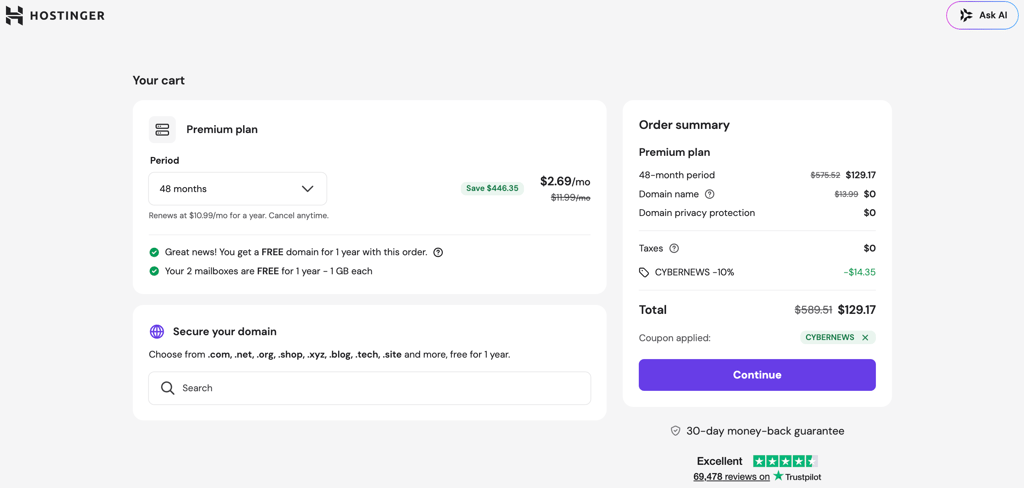
My payment was confirmed in just a few minutes via email. From the email, I followed the link to hPanel and could begin setting up the plan and building my site.
2. Setting up a hosting plan
What I really like is that the Hostinger hPanel is ready to use almost immediately after the payment confirmation.
- To start setting up my hosting plan, I first clicked on the Setup button in the account actions banner visible on the Home page of hPanel. Clicking this button starts the hosting provisioning process, which takes only a few minutes.
- Then, I was given the option to either migrate a website or create a new one. I chose to create a new website and clicked Next to proceed. Hostinger offers two ways to create a new website – with WordPress or with the Hostinger Website Builder. I chose WordPress.
-
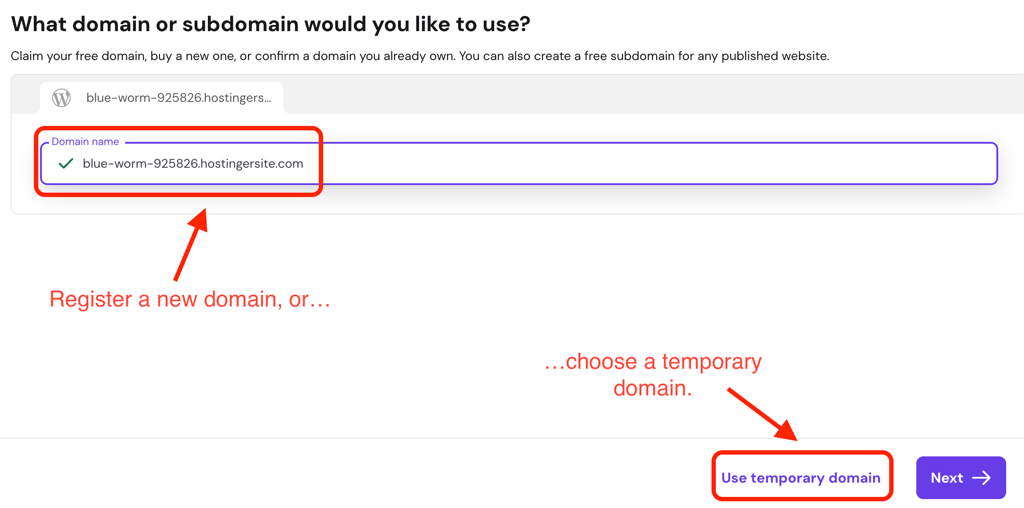
To use WordPress for my new website, first I had to choose a domain for my new website. At this point, you can either claim the free domain that comes with every Hostinger plan, use a temporary domain, or transfer a domain you already own. However, keep in mind that transferring a domain requires pointing it to Hostinger’s servers and changing the nameservers via DNS settings in hPanel. You can either do this later or before you build a site.
-
Domain registration is one thing that takes a bit of time. You need to provide your personal details for registration and verify the domain via email. The overall DNS propagation process usually takes up to 24 hours, but you can still continue setting up your plan with a temporary domain while you wait. Fortunately, I didn’t have to wait that long – my domain was registered within an hour.
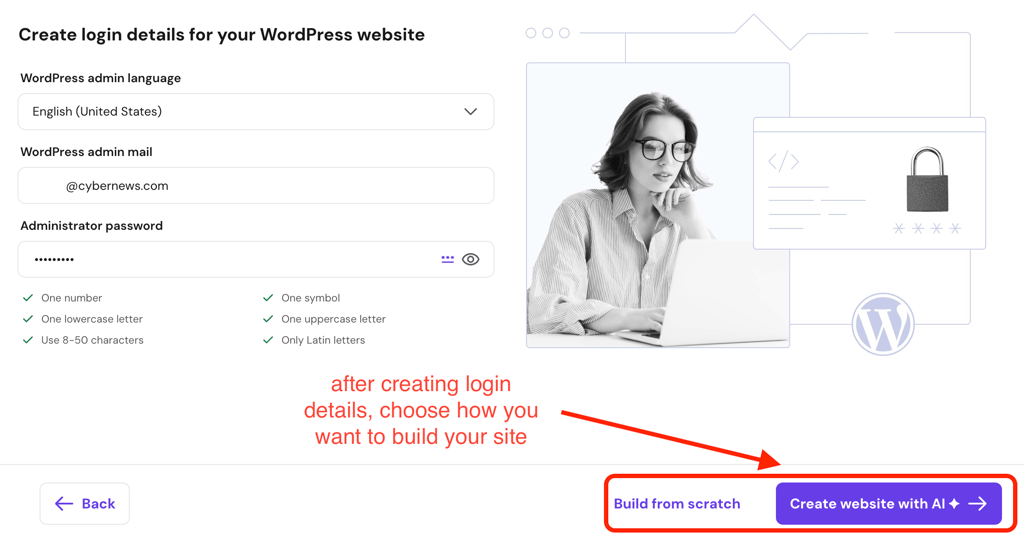
- After choosing the domain, I was prompted to create the login details for the WordPress admin dashboard. Then I could proceed to either build my site with AI tools for design and content or build it completely from scratch.
- After this, the onboarding was nearly done. The WordPress installation took around 2 minutes, and after that, I could begin building my site.
3. Creating a website with Hostinger
The Hostinger Business plan includes an AI website builder for WordPress. However, I decided to build the website myself – a personal writing and modelling portfolio for my friend Jenny. To do that, I first headed to Appearance in the WordPress admin dashboard side panel and selected Themes.
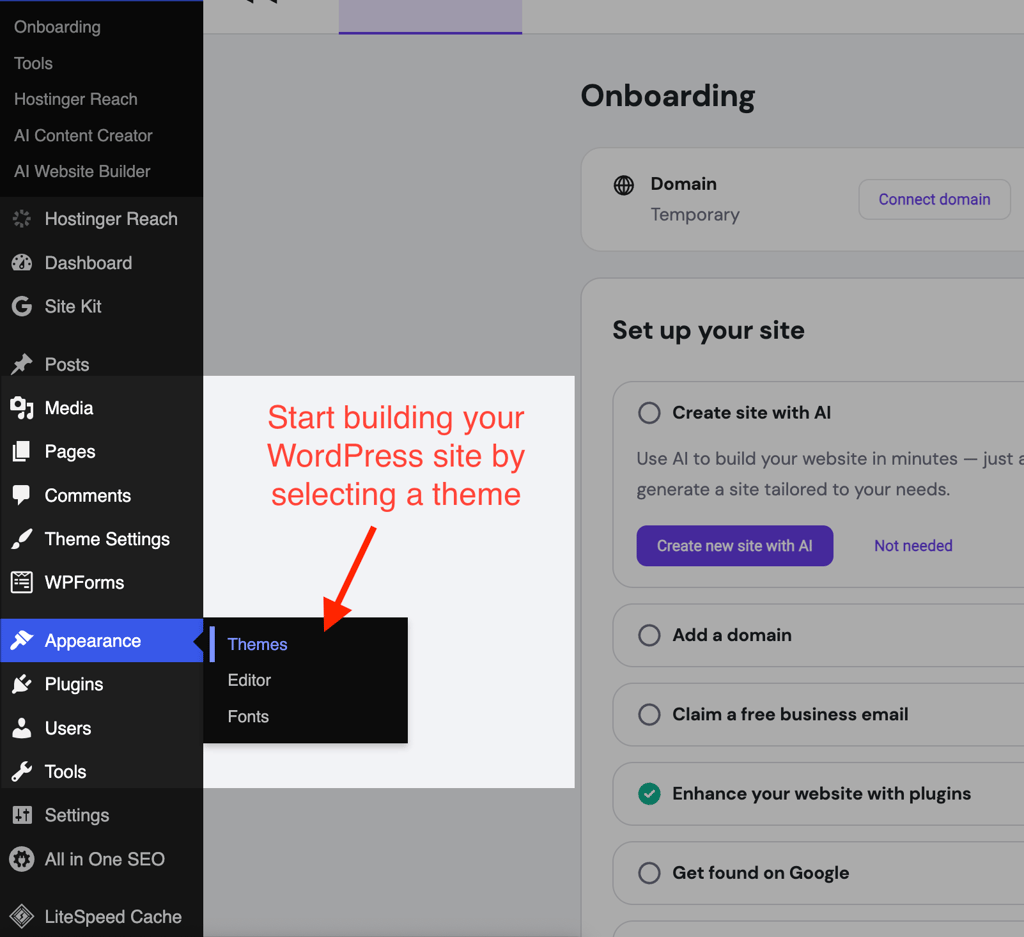
Once I found a theme that I liked, I installed it on WordPress. After activation, the theme appeared in the themes page, and I could start customizing my website.
To be fair, the WordPress site editor takes some time to get used to. It is a block-based editor, which means you add features to your site via a sidebar. Personally, I enjoy dragging sections and elements around the website more than fiddling with checkboxes to find the optimal location for my menus.
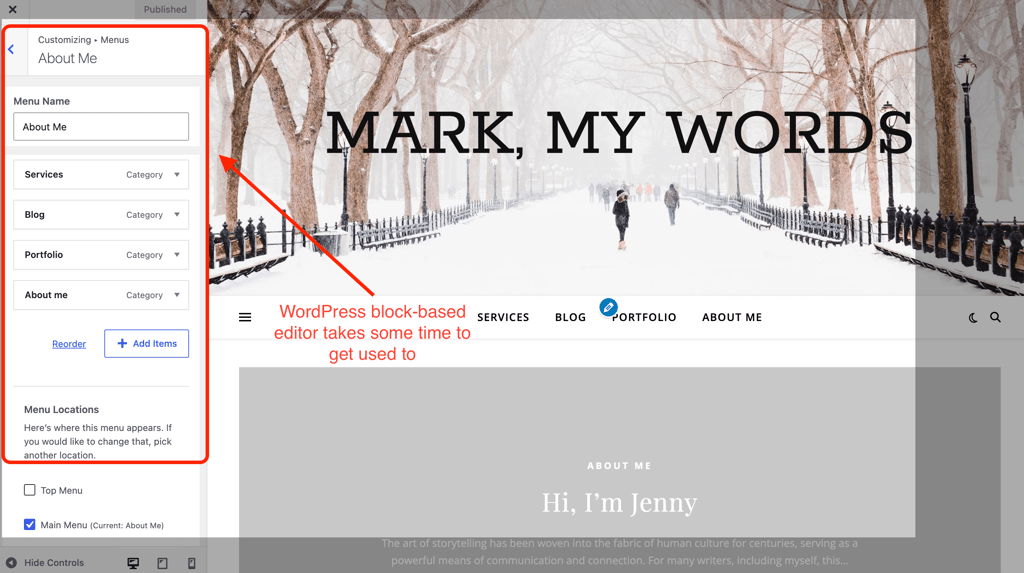
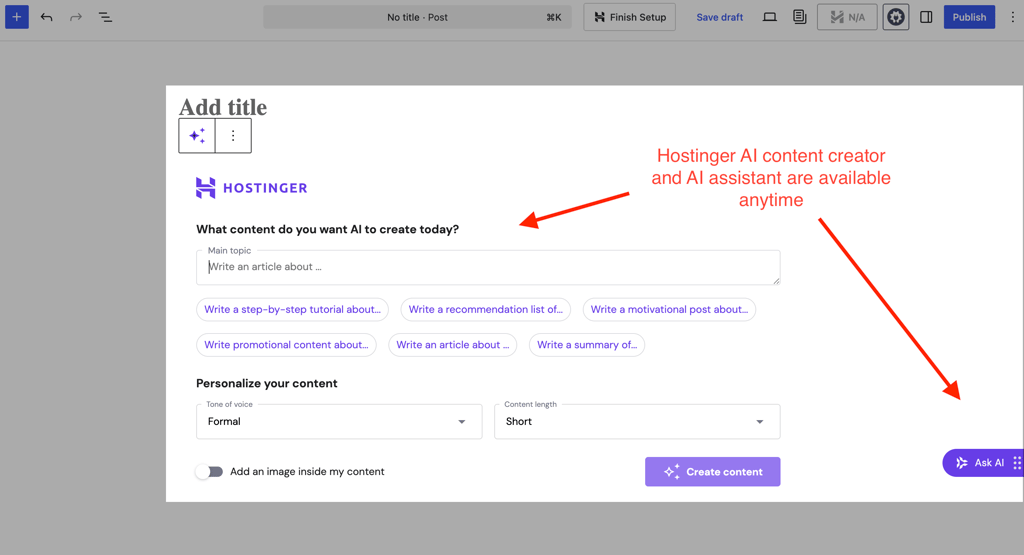
However, this is how I feel about the WordPress editor. If I had chosen to use the Hostinger Website Builder, I’m sure it would have gone faster. Plus, I really liked that even though I decided to build my site from scratch, I could still access free Hostinger tools for site building, such as the content and image generator. The option to build my site with AI also did not disappear – I could change my mind anytime. It’s nice to have that option.
4. Navigating Hostinger’s hPanel
I found Hostinger’s hPanel well-designed and easy to navigate, especially for beginners. It is organized around different dashboards, such as website, domain, and email overviews. Additionally, you can access other services and Hostinger apps from the hPanel as well.
What makes hPanel so easy to navigate is the logically organized side-panel with expandable menus. For example, if you click on websites, hPanel automatically loads the website dashboard from which you can navigate to your websites to manage them. The same goes for domains. On the side panel, you can also access the WordPress dashboards, migration environment, and website builder.
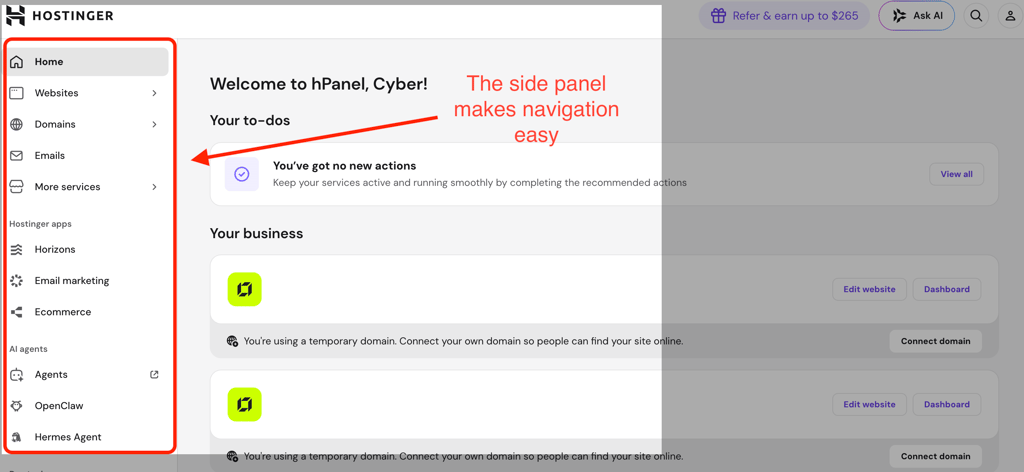
The account information, such as your personal details, subscriptions, security, and billing, is all available via the account icon on the top right corner. Personally, I appreciate that these settings are separate from the overall hosting management. It makes it easier to get an overview of the hosting plans I have, as well as global account settings, rather than individual or domain information.

Hostinger security
Hostinger’s shared hosting plans come with website security features for secure hosting. Here’s what you can find:
- Unlimited free Let’s Encrypt SSL certificates
- Malware scanner that scans your whole hosting plan for vulnerabilities
- Standard DDoS protection
- Web application firewall
- Cloudflare protected nameservers
- Secure access manager – if you need to share your hosting account with collaborators, this feature lets you control what they can access and do
- WHOIS domain privacy (value of $9.99, with the 1st-year free domain)
Overall, I find Hostinger’s security setup really comprehensive. The fact that you do not need to pay extra for essential security like DDoS protection or malware scanners makes Hostinger a really competitive host in the market overall and its pricing really attractive. For comparison, some providers such as GoDaddy offer free SSL certificates only for the first year, while Hostinger includes them for as long as your hosting remains active.
Hostinger performance (server locations, speed, and uptime tests)
The Cybernews research team and I continuously and periodically test hosting providers’ performance. Hostinger is not an exception. Here, I discuss Hostinger server locations and the latest speed and uptime test results from June 2026.
Hostinger’s server locations
Hostinger is one of the best options if you need a wide server location choice. It has servers across 4 continents, while other big web hosts, such as Bluehost or GoDaddy, cover only North America and Europe.
Overall, Hostinger has servers in these continents and countries:
- North America (Phoenix (USA), Boston (USA), Asheville (USA))
- Europe (France, Germany, Lithuania, the United Kingdom, the Netherlands)
- Asia (India, Indonesia, Singapore, Malaysia)
- South America (Brazil)
Speed testing results
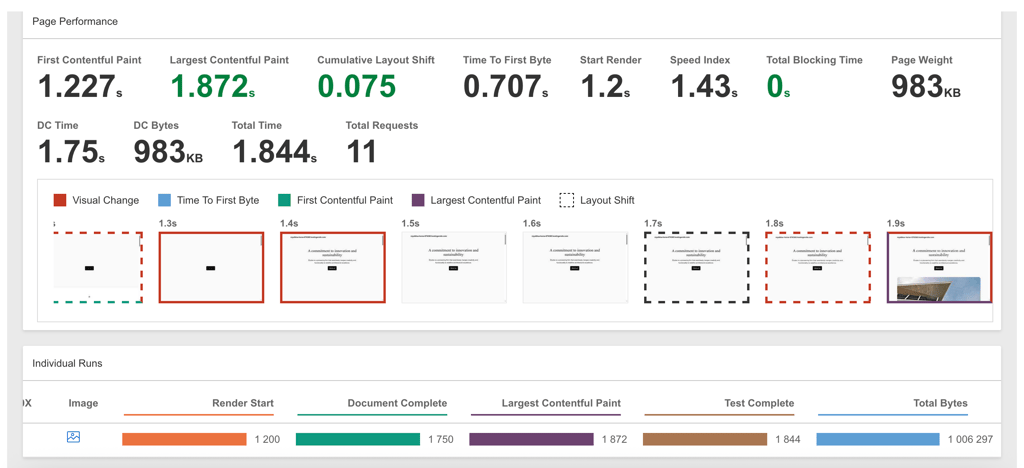
The latest speed and uptime tests for Hostinger were carried out in June 2026 by the Cybernews research team. The team uses webpagetest.org and the PageSpeedInsights from Google for testing site speed.
For speed testing, we use the Speed Index, also known as Fully Loaded Time, with 0–3.4s being a good range. It’s worth noting that website speed generally depends on a lot of factors, such as how “heavy” a website is, server location, and whether it uses any CDN services. Therefore, it’s good to always keep in mind that speed testing results will be different for different users and use cases.
Here are the latest June 2026 Hostinger speed testing results:
- Speed Index: 1.43s
- LCP: 1.872s
- TTFB: 0.707s
Overall, the results are great. The speed index is within the excellent range of 0–3.4s. LCP and TTFB have improved from the last tests. LCP took 1.87s instead of 2.38s, and the TTFB is also almost two times faster: 0.707s in June 2026 compared to 1.208s in December 2025.
Uptime testing results
Uptime testing lasts over two weeks, with the latest testing results being from December 2025. The Cybernews research team monitors the overall uptime, as well as server response time, reachability, and latency in different locations. For monitoring uptime, the research team used Grafana k6 by Grafana Labs.
These are the latest Hostinger uptime testing results:
- Uptime – 100%
- Server response time – 246.19ms
- Average latency (New York) – 295ms
Overall, these are great results, showing that Hostinger is a reliable provider.

Overall, Hostinger shows good performance. It had an overall 100% uptime, with a good server response time of 246.19ms and average site load speeds. This shows that, in general, Hostinger is a reliable host – provided you optimize your site with LiteSpeed caching and a CDN for better site load speed.
Customer support: my recent interactions
Hostinger’s customer support has changed a bit over the years. Lately, I’ve been noticing a more laid-back attitude from its live-chat agents, which can be a bit frustrating if you’re dealing with an urgent issue.
Overall, in my latest interactions with customer support, a simple interaction took around 5 minutes, which is okay. I was a bit frustrated to have to check whether the agent was still there and active. Another thing I noticed is that support nowadays tends to redirect users to tutorials rather than providing direct assistance. Maybe this makes sense with the introduction of Kodee, an AI assistant, but I personally think a more personal approach is better.
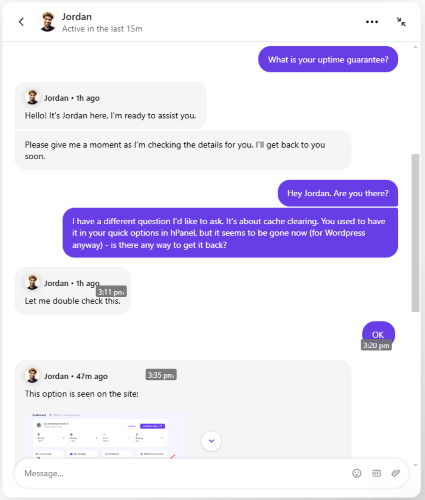
On the other hand, the knowledge base and the Kodee AI assistant can still be of great help, especially when it comes to learning the ins and outs of website hosting as a beginner.
Hostinger’s customer support seems to have outsourced most of its functions to the AI assistant Kodee and the knowledge base. While it’s still possible to connect with a human support agent via live chat or email, the overall experience is not as fast and personal as it used to be.
Hostinger reviews and reputation
Hostinger has a bit of a polarized reputation in the web hosting industry. On major review aggregators like Trustpilot, the provider consistently holds high ratings, frequently in the 4.4–4.7 range. There, users often praise Hostinger’s intuitive hPanel, affordable and competitive pricing, and beginner-friendly onboarding.
However, on technical forums like Reddit, user communities offer a more nuanced and often a bit of a critical perspective. A lot of people acknowledge Hostinger’s strong performance for personal projects. However, more experienced users and developers often say that Hostinger’s performance might not be the best for large eCommerce sites, with some experiencing resource throttling on shared hosting plans.
Some other criticisms include Hostinger’s turn toward AI-driven support (which I also discuss in my support review above) and confusing renewal pricing structure. For example, many users express frustration over not being able to reach human agents, especially when dealing with technical issues.
Overall, the user reviews show that Hostinger is regarded as a good “starter” host, especially if you’re looking for ease of use and affordability. On the other hand, performance issues for larger sites, renewal pricing, and AI-driven support might not be the best fit for everyone.
Video review
If you prefer video over reading, a detailed Hostinger review is included right below.
Final thoughts: is Hostinger a good option for you?
Hostinger is a great option if you’re looking for budget-friendly hosting with good performance and a full-featured, easy experience. Hostinger’s control panel is easy to use and navigate, and the provider includes a fully equipped security suite. Plus, you get an impressive range of WordPress plugins and features, one-click installations for various add-ons (such as AI agents), and AI-enhanced customization and optimization. Overall, Hostinger has all you need to start hosting your personal or business site.
| Feature | Rating | Review |
| Pricing | Hostinger is affordable, with shared hosting plans starting at $2.69/month. To get similar features with other providers, the price would be noticeably higher. | |
| Ease of use | Hostinger is easy to use. Its hPanel is well designed and easy to navigate and includes a fully guided onboarding for new users. However, some features hide behind multiple sidebar menus, which can be confusing. | |
| Performance | In the latest June 2026 tests, Hostinger showed excellent performance results. | |
| Security | Hostinger provides a comprehensive security feature suite, including but not limited to DDoS protection, unlimited free SSLs, and advanced malware protection. Other providers often charge for the security features that Hostinger includes in the baseline cost. | |
| Support | Hostinger offers a number of different support channels. However, the live chat support usually resorts to tutorial pages instead of personalized support, and with the introduction of Kodee, it’s harder to reach a human support agent in case of urgent issues. |




Our in-house research team and expert writers work hand in hand to regularly test hosting services and provide accurate and fact-checked information. Discover the ins and outs of how we test and evaluate website hosting providers.
FAQ
Is Hostinger legit?
Yes, Hostinger is legit. It's a well-established and popular web hosting provider that has been around for over two decades. It is an officially recommended host by WordPress.org and provides a full range of reliable services from shared hosting to VPS, catering to millions of users worldwide.
Is Hostinger easy to use?
Yes, Hostinger is very easy to use, especially for beginners. It features a custom-built control panel called hPanel, which is known for its intuitive design, clear navigation, and useful features like one-click CMS installation (e.g., WordPress). The control panel includes easy-to-understand explanations and is supported by the Kodee AI assistant to help users with questions and troubleshooting.
Is Hostinger VPS good?
Yes, Hostinger's VPS hosting is a solid option, particularly for users who need more control, scalability, and resources than shared or cloud hosting can offer. The plans are competitive, starting at $5.84/month, and include features like a 1Gbps network, weekly backups, and an AI assistant. It's best suited for developers, large businesses, computing-heavy applications, and gaming servers, as it requires a bit more technical knowledge than other Hostinger plans.
Is Hostinger good?
Yes, Hostinger is a good web host in 2026, offering an excellent combination of low long-term pricing, solid performance (100% uptime in the latest tests), and an intuitive, feature-packed user experience via its custom hPanel. It is particularly strong for beginners, WordPress users, and small to medium personal or business projects looking for a budget-friendly but reliable solution.
How much is Hostinger per month?
Hostinger's monthly pricing depends heavily on the type of plan and the billing cycle you choose. For shared hosting, initial long-term subscriptions (24 months or more) can start as low as $2.69/month. However, if you choose a 1-month term, the price will be significantly higher, often around $10.00 to $15.00 per month, plus a setup fee. Cloud and VPS plans start at higher initial rates. The lowest prices always require a longer commitment upfront.
Is Hostinger good for eCommerce?
Yes, Hostinger can be a good option for eCommerce, especially for small to medium-sized online stores using platforms like WooCommerce or PrestaShop. Its Business shared hosting and cloud hosting plans are optimized for performance, offering LiteSpeed caching, a free SSL certificate, daily backups, and good uptime, which are crucial for online shops. However, very large, high-traffic stores might eventually need to scale up to a dedicated or more robust cloud provider.