DreamHost review 2026: good, but not enough
Our in-house experts conduct internal independent, hands-on testing and transparent reviews of web hosting providers by using custom-built tools or utilizing industry-recognized tools and methods to ensure impartial and evidence-based assessments.
Using the same criteria for all services, we share our detailed methodologies and practices to help customers make informed hosting decisions.
Learn more

DreamHost is one of the most established names in web hosting, known for its affordable plans, strong performance, and beginner-friendly setup. It powers over 1.5 million websites and serves around 400,000 users globally. Whether you’re launching a personal blog or running a small business, DreamHost offers a range of hosting options, including shared, WordPress, VPS, dedicated, and cloud hosting.
But is it the right choice for your site in 2026? I ran hands-on tests to find out – from speed and uptime to ease of use and support quality. In this DreamHost review, I’ll break down what it does well, where it falls short, and who it’s best suited for.
DreamHost review 2026: the verdict
DreamHost is a reliable pick for bloggers and small business owners who want affordable hosting with solid uptime and WordPress support. But if you're planning for rapid growth or need built-in extras like malware removal or phone support, it may fall short – key security features and advanced support are locked behind paid upgrades, and global performance depends heavily on enabling a CDN. Below is a quick summary of what DreamHost has to offer.
| ⭐ Rating: | |
| 💵 Price: | From $1.99/month |
| 📑 Uptime guarantee: | 100% |
| ⚙️ Hosting types: | Shared, WordPress, VPS, cloud, and dedicated hosting |
| 🌎 Server locations: | The US and the Netherlands |
| 👨💻 24/7 live support: | Yes |
| 🔥 Coupons: | Dreamhost coupon 83% OFF! |
DreamHost pros and cons




Our in-house research team and expert writers work hand in hand to regularly test hosting services and provide accurate and fact-checked information. Discover the ins and outs of how we test and evaluate website hosting providers.
DreamHost pricing and plans
At $1.99/month, DreamHost’s shared hosting is one of the most affordable options around – cheaper than SiteGround for similar resource limits. VPS hosting starts at $10.00/month, which is competitive considering the RAM and storage included. Overall, DreamHost offers strong value, especially for smaller sites and early-stage businesses, but there are still providers with cheaper pricing, like Bluehost or Hostinger. Here are all of the DreamHost plans and their starting prices:
- Web hosting – from $1.99/month
- VPS hosting – from $10.00/month
- Managed WordPress hosting (DreamPress) – from $19.99/month
- Dedicated hosting – from $165/month
- Cloud hosting – from $4.50/month

Shared hosting plans come with a 30-day money-back guarantee – that’s about the same as many rivals offer, though other DreamHost hosting tiers don’t include the extended 97-day refund period.
In short, DreamHost keeps pricing straightforward and fairly accessible. Whether you’re just getting started or need scalable performance, it’s an averagely priced option, especially if you're US-based and don’t mind paying extra for things like phone support or advanced security tools. For more details and tips on how to choose a DreamHost plan for your website, check out our DreamHost prices and fees overview for 2026.
DreamHost management – is it easy to use?
DreamHost uses its own custom control panel instead of the more common cPanel, which may take some adjustment, especially for beginners. But from my experience, the setup process is quick, and the interface is clean and easy to navigate. Below, I’ll walk you through the setup process, control panel layout, and how DreamHost handles WordPress management.
DreamHost setup
Setting up my site with DreamHost was smoother than I expected. The custom dashboard walked me through each step, and I didn’t need any technical knowledge to get started. I chose a shared hosting plan, registered a domain, and launched WordPress – all in under 10 minutes.
The interface was clean and beginner-friendly. Each step came with clear instructions, and I never felt lost. Even transferring an existing domain was painless – it synced up without issues. Installing WordPress was easy too, though I did notice the process lag slightly during setup. Nothing deal-breaking, but something to keep in mind.
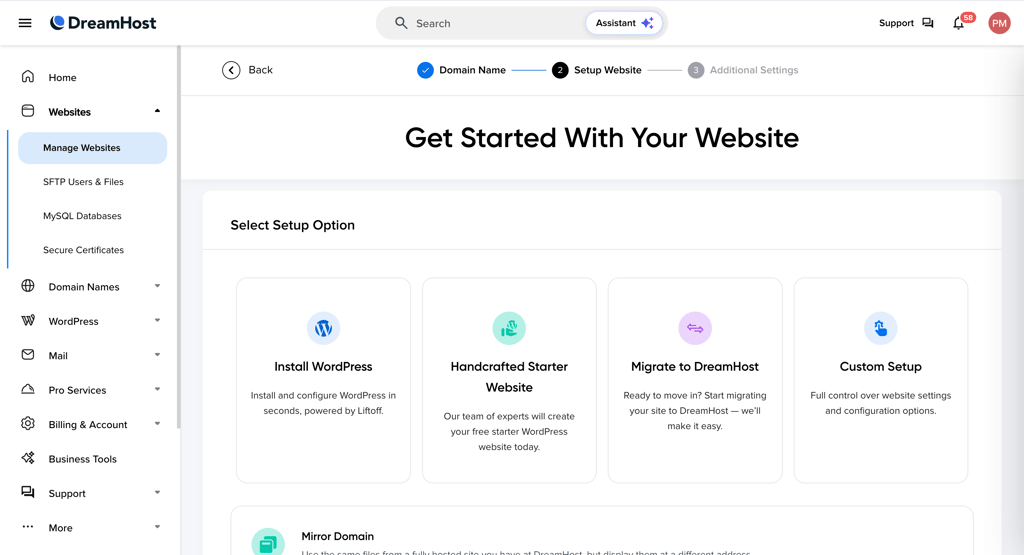
What I liked most was the built-in AI site builder. It offered simple layout suggestions that helped me get a basic site live quickly. I also appreciated having access to popular tools like Elementor, Yoast SEO, and WooCommerce right out of the gate.
From my experience, DreamHost makes website setup feel unintimidating, whether you’re launching your first blog or managing a small business site.
DreamHost control panel
DreamHost uses its own custom-built DreamHost Panel, which replaces the more common cPanel found with many other providers. It’s designed for simplicity, and in my experience, it delivers. The layout is clean, and everything is easy to find, even if you’re brand new to web hosting.

Inside the DreamHost Panel, you can manage:
- Website files and folders
- Databases
- Domain names (register, transfer, renew)
- Email accounts (with Titan or Google Workspace integration)
- SSL certificates
- AI business tools for content, marketing, and productivity
- Hosting plan details and upgrades
There’s also a Domain Overview section that provides per-site controls, which I found helpful for managing multiple websites.
What I liked most was how intuitive and well-organized the panel is – I found clear tutorials for nearly every feature. It’s a great fit for beginners thanks to its simplicity and organization. That said, if you’re used to more advanced platforms like cPanel or Plesk, the DreamHost Panel might feel a bit basic. The frequent upsell prompts were a slight annoyance, but not a dealbreaker. Overall, it’s a solid, beginner-friendly control panel that covers all the essentials without overwhelming you.
DreamHost for WordPress websites
DreamHost is one of the few providers officially recommended by WordPress, and it shows – the platform offers a solid range of WordPress-specific features designed to simplify setup, enhance security, and support long-term site growth.
During setup, you can install WordPress with a single click directly from the DreamHost Panel. I appreciated that it also lets you choose plugins right away and even use an AI-powered website builder that builds a starter layout based on a short questionnaire. It’s a quick way to get something functional online without needing design skills.
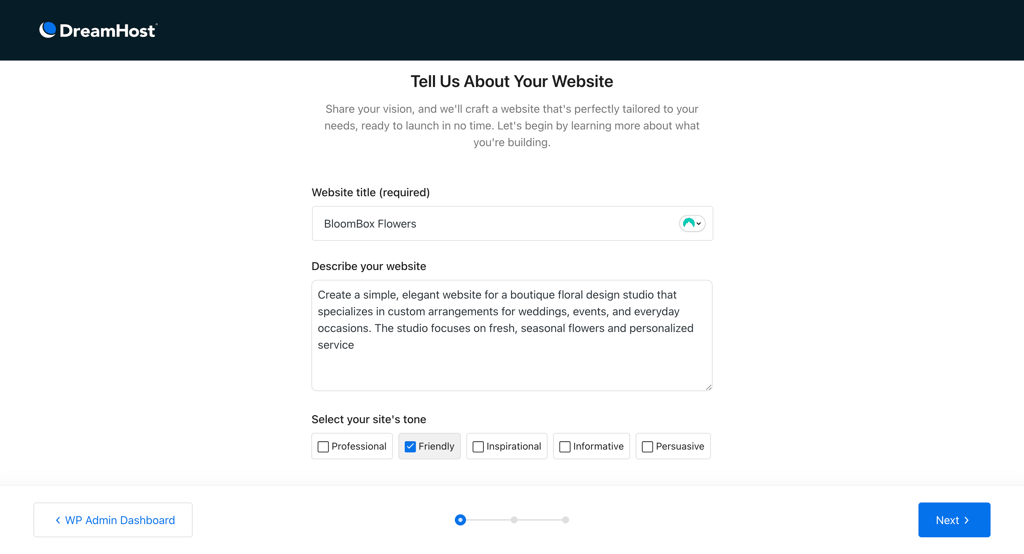
Beyond setup, DreamHost takes care of automatic WordPress updates, including core updates, backups, and security patches – all essential for keeping your site secure. SSL certificates are included for free, and there’s 24/7 WordPress-specific support available if you hit technical issues. For security, DreamHost offers DreamShield malware scanning, though it’s a paid add-on.
One thing that could be improved is the WordPress installation speed. When I tested it, the install process took over 20 minutes – much longer than with providers like Hostinger, which usually finish in a few minutes.

All in all, compared to most hosting providers in 2026, DreamHost offers a well-rounded WordPress experience that’s beginner-friendly and secure. It’s not the fastest to set up, but the built-in tools are more than enough to get started.
DreamHost email hosting
DreamHost includes email hosting for free with most of its plans, but not all. If you're on a Shared Unlimited or DreamPress Plus/Pro plan, email is included at no extra cost. Otherwise, it costs $1.67/month per mailbox. Each mailbox comes with 25GB of storage, IMAP access, spam filtering, and webmail access through a clean, minimal interface that’s easy to use.
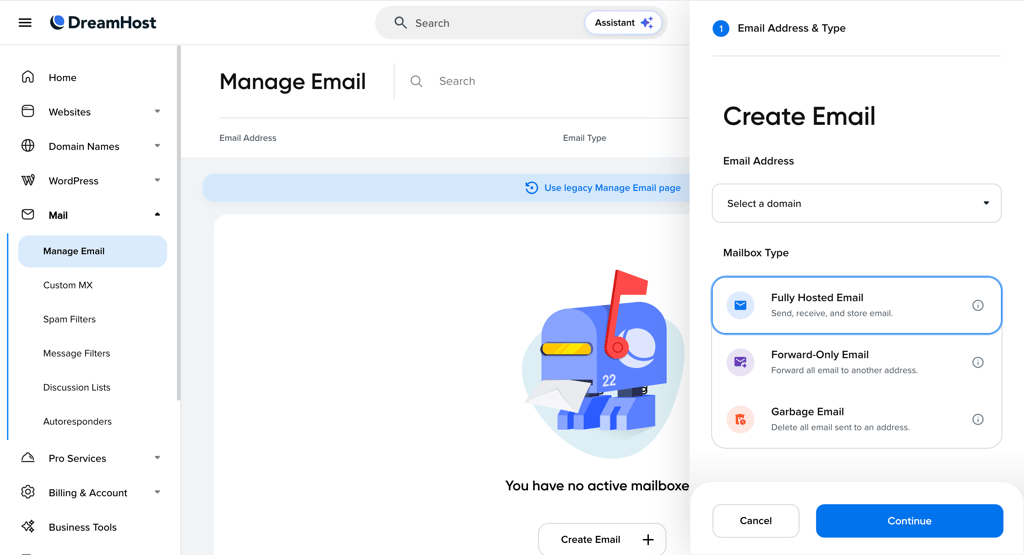
During testing, I found the email setup process simple and quick. You can create addresses directly from the DreamHost Panel by choosing a domain and setting mailbox details. There’s also optional integration with Titan Email and Google Workspace if you need a more advanced or business-focused inbox.
Overall, DreamHost’s email hosting is reliable and accessible, though the extra cost on some plans may be a drawback if you're running multiple accounts on a budget.
DreamHost's performance
DreamHost is one of the fastest providers I’ve tested, and its performance easily puts it in a high position for 2026. In this section, I’ll walk you through the key results from our speed and uptime tests, the technologies that power DreamHost’s performance, and how well it handles real traffic under stress.
DreamHost server locations
Server location plays a big role in how fast your website loads – the closer the server is to your visitors, the quicker the content reaches them. This directly affects user experience and SEO performance. Current DreamHost server locations are in:
- United States (Ashburn, Virginia)
- United States (Hillsboro, Oregon)
- The Netherlands (Amsterdam)
That’s it – DreamHost has main data centers in the US and one in Europe. While that’s fine, especially for US-based sites, having only one data center to cover all of Europe, Africa, and Asia means that international visitors may experience slower load times.
In comparison, many competitors like SiteGround and Hostinger offer global server options across Europe, Asia, and South America. DreamHost’s setup is solid for US traffic, but if your audience is global (outside of the US/EU), you’ll want to enable its CDN or consider a host with broader coverage.
DreamHost uptime and response time
DreamHost is perhaps the only budget-friendly host that is brave enough to offer a 100% uptime guarantee and deliver it 99.99% of the time. The Cybernews research team checked whether DreamHost delivers reliable performance in the long run. Throughout the entire month of testing, DreamHost showed a 100% uptime, with 99.95% reachability, which means that the site was up and accessible to visitors at all times.
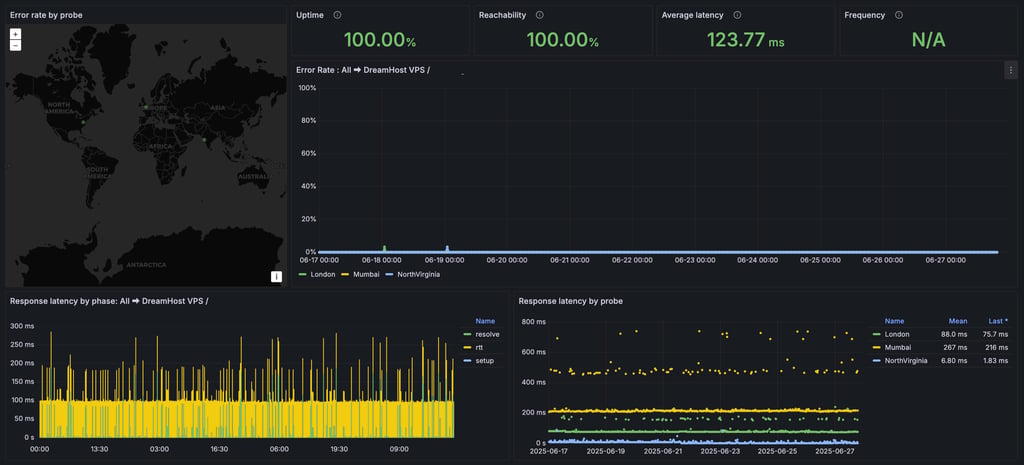
The average DreamHost server response time was 123.77ms. While the web hosting industry standard is around 600ms, DreamHost’s results are really good. Overall, the results showed that DreamHost delivers in terms of reliability.
DreamHost speed testing
Site load speed, or page load speed, is an important metric to consider, as it tells you how fast a website loads for your visitors.
On average, the fully loaded time of DreamHost was 1.7s, which is below the Google-recommended 2.5s. This is a good result, although some other hosting providers like Hostinger show even better speeds.

DreamHost stress testing
I also did stress testing to measure how well DreamHost can handle user traffic.
Heavy traffic puts a significant load on the server, often causing it to slow down or, in some cases, shut down completely. We tested DreamHost with 50 virtual users over 5 minutes.

DreamHost handled traffic quite well in our latest stress tests. During a 5-minute test with 50 virtual users, the server processed around 5900 requests without a single error. The average request rate was 19.6 per second, peaking at 39 – and most responses remained fast and consistent. The 95th-percentile response time hit just 303ms, showing that even under load, DreamHost stayed stable and responsive. These results confirm that DreamHost can reliably support moderate traffic levels, making it a strong choice for personal websites, small businesses, and growing projects.
Overall, DreamHost’s performance was very good. It was fairly reliable, fast, and could handle the traffic rather well – that’s what we’re all looking for.
DreamHost security
In terms of security, DreamHost covers the basics and includes some more advanced stuff. I like that all plans include SSL certificates, firewalls, daily backups, and domain privacy.
- Free Let’s Encrypt SSL certificates – these certificates provide encryption for your website's traffic, protecting your visitors' data.
- Web application firewall – the WAF filters incoming traffic to your website for malicious activity, such as SQL injection and cross-site scripting attacks.
- Automated backup – DreamHost automatically backs up your website every day, so you can easily restore it in the event of data loss or corruption.
- Domain privacy protection – DreamHost hides your personal information associated with your domain name, such as your address and phone number.
- Server-side security measures – DreamHost uses a variety of server-side security measures to protect your website, including intrusion detection systems, malware scanning, and firewalls.
- Monitoring – DreamHost monitors its servers and infrastructure 24/7 to identify and address any security threats.
- Users and password overview – DreamHost allows you to create multiple different users and passwords for managing your site and its data. For example, a Mail user will only be able to access and change Mail properties. This introduces more security if you need someone else besides you to help troubleshoot specific issues with your site.
This is a good set of security measures. Unfortunately, one important feature is paid. DreamHost has developed its own malware removal tool DreamShield. It costs roughly $36.00/year or $3.00/month. It’s a useful thing to have, as malware is very common, but I would like to see it included in its plans – one thing that would definitely set DreamHost apart from others.
Overall, DreamHost offers a robust set of security features that can help protect your website from a variety of threats. While it’s a bummer that malware protection is a paid feature, it can be replaced by third-party alternatives. Overall, DreamHost is a good choice for businesses and individuals who are looking for a secure web hosting provider.
DreamHost customer support
When it comes to customer support, I like that DreamHost provides multiple channels that allow you to get in touch with an agent. You have access to the 24/7 live chat, email support via tickets, phone support (paid), and the comprehensive Knowledge Base.
| Support | DreamHost |
| 24/7 live chat | ✅ Yes |
| ✅ Yes | |
| Ticketing system | ✅ Yes |
| Phone line | ✅ Yes (3-5 free callbacks with Dedicated Server and Dreampress plans, and $9.95 for one callback or $14.95 for 3 callbacks/month with all other plans) |
| Knowledge Base | ✅ Yes |
DreamHost’s Knowledge Base is a really good and up-to-date center of resources, full of tutorials and explanations. It is the best place to go when you have questions about what certain features do, or how to change or troubleshoot something. For example, if you have a question about how to add a DreamHost email address to Outlook, there’s a dedicated page with a tutorial and useful links to other questions you might have. The community forum is also a good resource. It’s active, and many helpful users are willing to answer questions. However, the replies are not too active, so you may need to wait a few days for a reply.
To test the support, I submitted a support ticket with a question about how to set up a custom email address. I received a response within 24 hours, and the solution was helpful and easy to follow.
Phone support is available, but you can’t call in. It works as a call-back service only. Dedicated server and DreamHost plans include from 3 to 5 callbacks every month. However, users with other plans need to choose between paid options: a one-time callback for $9.95 or 3 callbacks every month for $14.95/month. I thought it was quite expensive, especially when there were other free support options available.
Overall, DreamHost has good customer support. The Knowledge Base and community forum are both great resources, and the ticket support is fast and efficient. I also like that the live chat support offers help in different languages. However, I’m slightly disappointed that after submitting a ticket, it might take a while to get a response, and that phone support is paid.
Video review
If you want to see DreamHost in action and find out whether it’s the right hosting provider for you, check out our full DreamHost review video below.
DreamHost review: final thoughts
DreamHost is an excellent web hosting solution thanks to the variety of plans available and wallet-friendly prices. While DreamHost is great for different-sized projects, it is one of the best web hosting providers for small businesses thanks to such benefits as free domain names, SSL certificates, and a user-friendly website builder.
| Feature | High-quality hosting on a budget | |
| Pricing | DreamHost is a budget-friendly solution, with prices starting at $1.99/month for web hosting plans. Plus, the provider offers a 30-day money-back guarantee with web hosting plans, which ensures you have time to test it thoroughly risk-free. | |
| Ease of use | DreamHost’s custom control panel is clean and beginner-friendly, with all key features easy to access. However, more advanced users might find it a bit limited. | |
| Performance | DreamHost is one of the top-performing hosting providers. It demonstrates excellent uptime, average response time, and speed results. | |
| Security | Free SSL certificates, a firewall, automatic backups, and other advanced security features are available with DreamHost hosting services. On the downside, DreamShield costs extra. | |
| Support | DreamHost offers a variety of support options. However, phone support costs extra. Plus, you cannot call directly. To contact a support agent by phone, you need to request a callback first. |
Who do I recommend DreamHost to, and who should avoid it?
DreamHost may not be the ideal solution for resource-intensive websites or those requiring specific server locations outside of the United States. However, DreamHost provides competitive pricing, diverse features, and reliable performance.
DreamHost is a great option for beginner users as well as small business websites. The Web Hosting Launch plan is best for personal websites, while the Web Hosting Scale one offers the best value for professional use.
More web hosting reviews from Cybernews:
Bluehost Review: exploring reliable hosting solutions for your website
HostGator review: discover hosting excellence and unmatched support
Hostinger review: navigate affordable and reliable hosting solutions
GoDaddy review: elevate your online presence with trusted hosting services
DreamHost vs A2Hosting: compare which host is more suitable for you
DreamHost FAQ
Does DreamHost allow NSFW content?
Yes, DreamHost allows NSFW content with all its plans except for web hosting. In the Acceptable Use Policy, DreamHost states that you cannot “run a banner exchange, free adult tgp (thumbnail gallery post), or free adult image galleries on your website.” If you’re looking for other hosting providers for NSFW, check out our top hosts for adult websites.
Does DreamHost support WordPress?
Yes, DreamHost is one of the four recommended WordPress hosts. It also offers managed WordPress hosting plans called DreamPress, but you can host WordPress sites with any DreamHost plan.
Is DreamHost HIPAA compliant?
No, DreamHost is not HIPAA compliant. Check out the HIPAA-compliant hosting list for DreamHost alternatives.
Does DreamHost allow users to add MX DNS records?
Yes, you can add MX DNS records with DreamHost. In fact, if your domain is hosted at DreamHost, the MX records will already be configured. And if your domain is not at DreamHost, you can add the MX records easily.
Can you build a website with DreamHost?
Yes, DreamHost offers a WordPress website builder with all of its hosting plans, as well as AI web building features. It is a good option for beginner users and includes a drag-and-drop editor, pre-made templates, eCommerce support, and basic SEO tools. However, it doesn’t offer as many features as some other best website builders on the market.