GoDaddy hosting review 2026: why I would avoid this host
Our in-house experts conduct internal independent, hands-on testing and transparent reviews of web hosting providers by using custom-built tools or utilizing industry-recognized tools and methods to ensure impartial and evidence-based assessments.
Using the same criteria for all services, we share our detailed methodologies and practices to help customers make informed hosting decisions.
Learn more

GoDaddy’s main strength is convenience, but service is overpriced. For $4.99/month, it offers 1 website, 25GB NVMe, and free SSL. Instead, I’d pick an alternative, such as Hostinger. It starts at $2.24/month, supports 3 websites, 20GB storage, a free domain, SSL, weekly autobackups, and an AI website builder.
Get Hostinger, now 83% OFF!GoDaddy is well known for being one of the largest domain registrars in the world. However, it’s also a popular and reliable hosting provider, offering different plans including shared, WordPress, and VPS hosting. Its strength is convenience – you can manage your domain, hosting, and website tools in one place, making it pretty straightforward to get started.
In this GoDaddy review 2026, I go over its features, performance, pricing, and support options, so you can decide for yourself if GoDaddy is a good option for you.
GoDaddy review 2026
| ⭐ Rating: | |
| 💵 Price: | From $4.99/month |
| 📑 Uptime guarantee: | 99.9% |
| ⚙️ Hosting types: | Shared, WordPress, VPS, and dedicated hosting |
| 🌎 Server locations: | The US, the Netherlands, and Singapore |
| 👨💻 24/7 live support: | Yes |
| 🔥 Coupons: | GoDaddy coupon 66% OFF |




Our in-house research team and expert writers work hand in hand to regularly test hosting services and provide accurate and fact-checked information. Discover the ins and outs of how we test and evaluate website hosting providers.
GoDaddy pros and cons
Not sure if GoDaddy is good for you?
Answer 3 quick questions and we'll help you find a hosting provider that matches your needs.


Find web hosting match
Three simple questions. We’ll point you the right pick. No email, no sign up.
What type of website are you building?
What matters most to you?
How experienced are you with web hosting?
Best web hosting pick for you

Hostinger
Launch your site quickly with beginner-friendly tools, strong performance, and easy management. A solid choice for business websites and online stores that need speed without extra complexity.
Best web hosting pick for you

WordPress.com
Build and manage your WordPress site without worrying about much of the technical setup. You get a streamlined platform for publishing, updating, and growing your WordPress site from one place.
Best web hosting pick for you

IONOS
A strong choice if you want hosting at a very low starting price. It gives users plenty of flexibility while still keeping the core setup relatively straightforward.
GoDaddy web hosting pricing
GoDaddy starts at $4.99/month. However, the catch is that you get this price only when subscribing for a 3-year term. It offers several hosting types for beginners, small businesses, and growing websites, and all plans include a 30-day money-back guarantee, so you can try the service without risk. Its pricing structure is simple, making it a convenient choice if you want hosting and domains managed under one provider. Here are GoDaddy’s main plans:
- Shared Web Hosting: starts at $4.99/month, allows 1 website, and includes 25GB NVMe storage, a free SSL, a free domain for a year, and free email.
- Managed WordPress Hosting: starts at $4.99/month and includes 1 website and 10GB NVMe storage.
- VPS Hosting: starts at $8.99/month and includes 1vCPU core, 2GB RAM, 40GB NVMe SSD storage, snapshot backups, and global data centers.
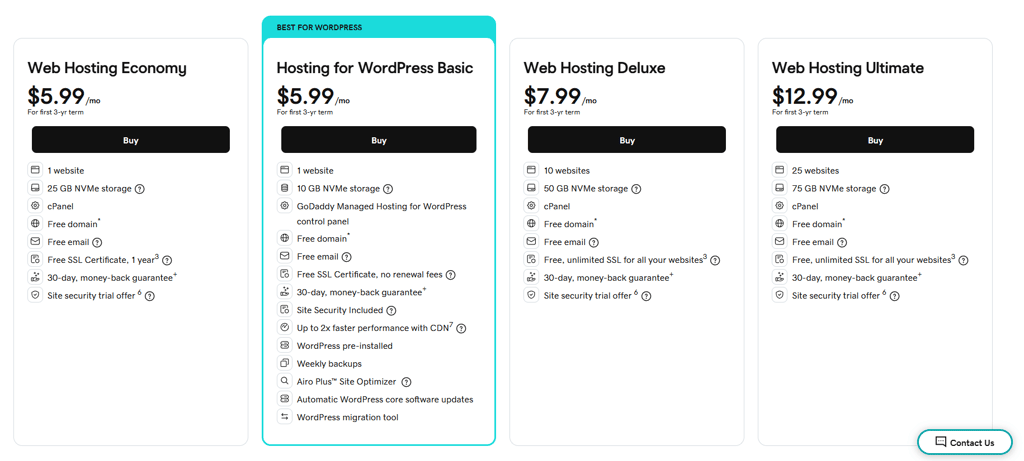
What’s more, it has a lot of paid features, including WAF, email and privacy protection, a malware scanner, daily backups, and 1-click restore. Also, GoDaddy’s starting prices are higher than what some budget-focused providers like Hostinger or IONOS offer, which have plans starting at $1.00–$2.00/month.
GoDaddy’s pricing is a broad topic, as the provider has various different plans and commitment periods, which also affect the price. We have a separate guide on GoDaddy pricing if you want to compare each plan more in-depth.
GoDaddy management – is it easy to use?
GoDaddy's management interface is user-friendly, catering to beginners and experienced users. It offers an intuitive dashboard and features, especially in the Deluxe plan, simplifying website and hosting management. Despite its ease of use, it's worth noting that GoDaddy does not appear on our list of the best hosting providers.
Getting started with GoDaddy
I found the setup with GoDaddy to be simple and straightforward. Let's take a look at how to create an account and build your new website with GoDaddy:
-
After creating an account, GoDaddy offers a choice of services, including a domain purchase, email services, and a website builder. I chose the GoDaddy website builder, as it is free and suits my current needs.

- The platform asked me for the features required for my website, for example, whether I will use eCommerce or booking tools. At this point, I simply chose the Something else option.
-
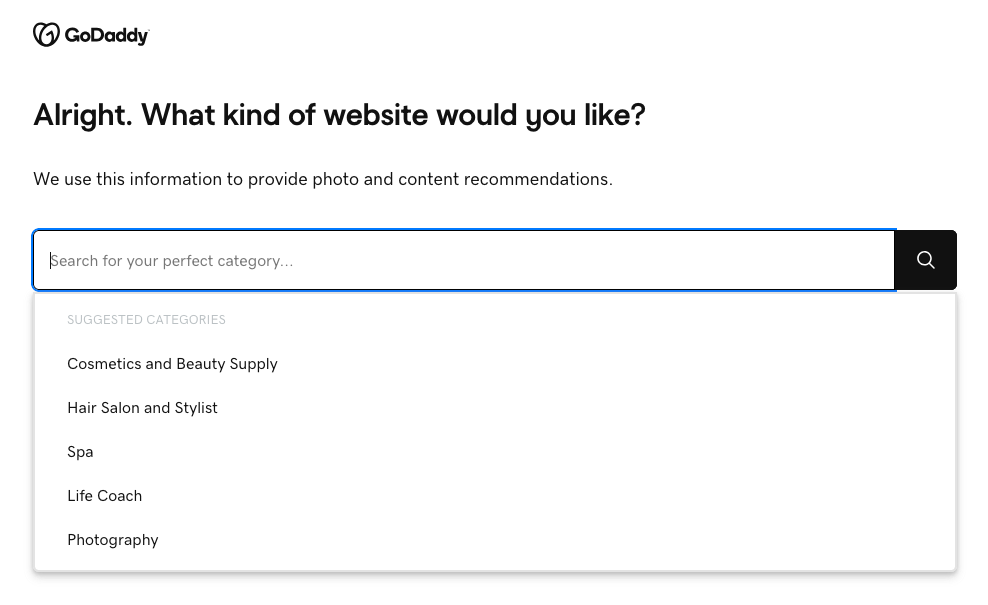
In this step, I had to choose the category for my website, so the website builder could choose the content accordingly. I chose to create a portfolio site.
-
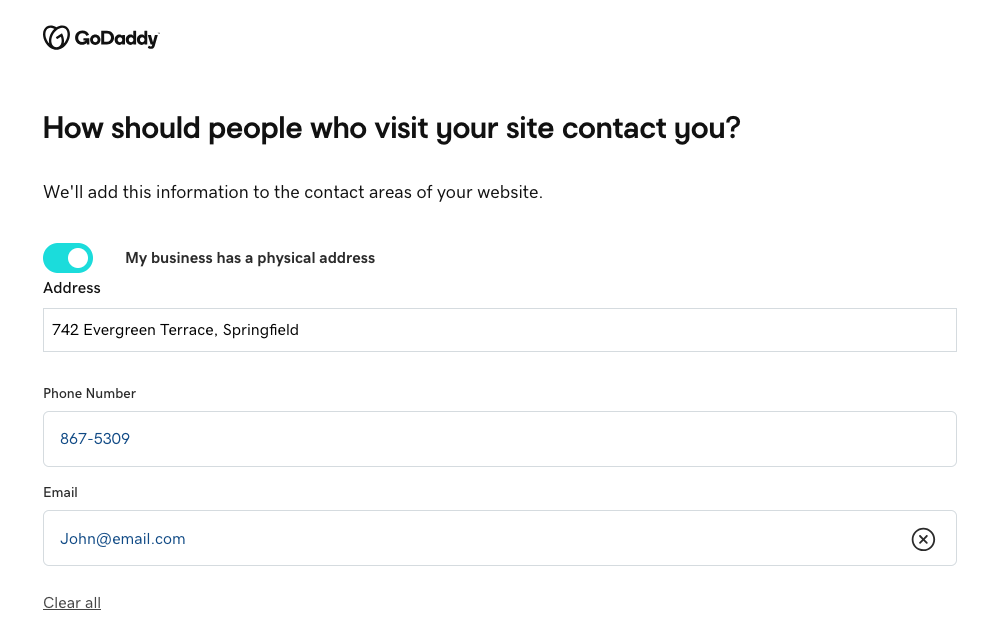
Next, I had to choose a name for my website and add my contact information.
-
Finally, the GoDaddy AI required me to describe my website, so it could create a draft based on my prompt.

- The platform created an initial version of my website, which I then edited to suit my further needs.
I had no issues getting started with GoDaddy. The process was easy and straightforward. The experience reminded me of Hostinger’s web builder. However, setting up a website with Hostinger was faster. I didn’t have to answer so many questions, as I only typed in a description of my website, and Hostinger’s website builder did the rest.
It’s worth mentioning that GoDaddy introduced a new feature called GoDaddy Airo in late 2025 to help you get your site online even faster. It is its first Agentic AI, which can handle many of the initial steps of getting a small business online.
By providing prompts about your website, you can automatically generate a whole set of materials, like a domain name, a logo, a complete website draft, product descriptions, and social media posts, and even fill out paperwork. But while it is a solid, helpful feature, its prices start from $26.99/month, so you need to evaluate whether you can stretch your budget or can handle it all manually.
GoDaddy’s control panel
Whether you use cPanel or not depends on the hosting plan you choose. For example, Linux-based shared hosting and VPS plans typically include cPanel, while Managed WordPress and Website Builder plans use GoDaddy’s own interface.

If your plan includes cPanel, you’ll get access to tools, such as:
- Installatron. In case you don’t want to use WordPress or need to add a second website, head there. Installatron is a one-click installation library similar to Softaculous or QuickInstall. It has hundreds of different apps you can build your website on.
- Email accounts. You can create a professional email address with your domain name in this section for free for one year; after that, it costs extra.
- Addon domains. If you have a domain hosted with another domain name registrar but want to use it for your GoDaddy website, go ahead and add it there. Just don’t forget to point it to GoDaddy.
- Backup. You can manually back up the whole cPanel (with files and databases). This is a tool of precaution or for website migration. I found this tool very useful since it can save you if you break your website or want to move it elsewhere.
All in all, GoDaddy is easy to use and functional. Its cPanel is another invaluable tool when it comes to managing your website.
GoDaddy WordPress integration
GoDaddy offers managed WordPress hosting starting from $4.99/month, and the setup is very beginner-friendly. WordPress is automatically installed, and the platform handles routine maintenance when needed, so you don’t need to worry about updates or security patches piling up. Here’s what each plan includes:
- Automatic WordPress installation, updates, and migration. You don’t need to manually install WordPress or handle essential updates. GoDaddy also provides a migration tool if you’re moving from another host.
- Airo Site Designer. This is one of GoDaddy’s standout additions in 2025. The updated Airo Site Designer is now fully integrated into managed WordPress plans. It builds a full website from simple prompts in under a minute, and you can continue refining everything within the WordPress editor.
- WordPress-specific performance optimizations. You get built-in caching and a CDN option, which helps speed up loading times globally, but these features aren’t as robust or customizable as what some competitors offer.
For most users, especially beginners and small businesses, GoDaddy’s feature set is enough to run a secure, visually appealing, and strong WordPress site. The plans cover all the main security needs, and the Airo Site Designer provides a fast, modern way to build a website.
GoDaddy website builder
GoDaddy offers a website builder, which is a completely separate tool from the website hosting solution. You need to pay an additional cost to use it, and its prices start at $9.99/month.
It’s a reliable option if you want a simple and professional website without too much hassle. The website builder includes AI tools, which speed up the site creation process and a fair amount of customization options, so you can edit the AI-generated site to fit your vision. If you’re interested in the website builder, we have a more in-depth GoDaddy Website Builder review to check out.
GoDaddy email hosting
Another essential feature included with your GoDaddy web hosting plan is its professional email hosting. The whole setup process is straightforward – just choose a mailbox name and set a secure password.
With the free trial, you receive an email mailbox, dedicated storage for email contacts, and an online calendar. Depending on your chosen plan, you can access between 10GB and 50GB of email storage. GoDaddy also provides free cPanel email with its hosting packages. On top of that, higher-tier plans offer added security features like spam, malware, and phishing protection. If you activate the service, it will automatically renew at the standard rate based on your plan.
GoDaddy’s performance
For web hosting, consider GoDaddy, known for its speed, reliability, and ability to handle high web traffic volumes. Our detailed testing, performed using the Astra WordPress theme and a Tech Startup template, has provided insights into its performance:
GoDaddy’s server locations
Where your website’s server is located can make a noticeable difference. The closer it is to your visitors, the faster your site will load, which also helps with performance and SEO. GoDaddy runs multiple data centers worldwide. The main locations are:
- North America: United States (Arizona, Virginia, and more)
- Europe: Netherlands, UK
- Asia Pacific: Singapore
For most websites, these locations are enough to keep things running smoothly. That said, some competitors, such as Hostinger or SiteGround, have more global data centers, which can be useful if your audience is based on a different continent.
GoDaddy uptime and response time
Our research team tested GoDaddy for two weeks, and it maintained 100% uptime with no noticeable outages. This result exceeds its 99.9% uptime guarantee, ensuring strong reliability for website availability.
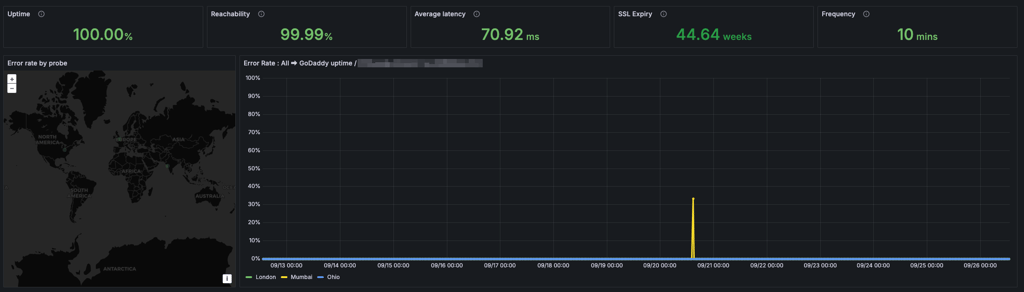
The standard uptime guarantee, backed up by a Service Level Agreement (SLA), is 99.9%, so GoDaddy is significantly better. For example, 99.9% means 43m 49s of potential monthly downtime.
This tool also checks the server response time every minute. GoDaddy averages at 70.92ms, while the shared hosting average is around 600ms.
GoDaddy hosting speed
For the next tests, we ran a website with a standard WordPress theme to perform a speed test from 3 different locations – the US, the UK, and India.
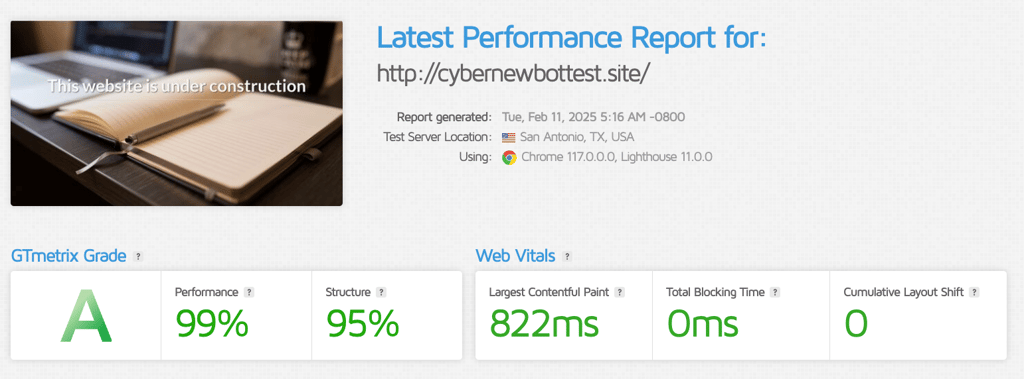
As expected, GoDaddy was great in the US, where it is hosted. What we are looking at is the Largest Contentful Paint (LCP) metric, which measures the perceived load speed of a webpage. LCP indicates the point in the page load timeline when the main content has likely loaded. For optimal user experience, LCP should ideally be lower than 2.5s. In our testing, GoDaddy achieved an impressive LCP of 822ms in the US.
However, performance outside the US may vary. Unlike providers such as Hostinger, which uses LiteSpeed web servers and a global CDN, GoDaddy lacks advanced server optimization for international audiences. This means that while GoDaddy is an excellent choice for US-based users, those targeting a global audience may experience slower speeds in other regions.
The UK visitors would experience an LCP of 752ms, while those in India would see 2.1s, staying within acceptable performance ranges.
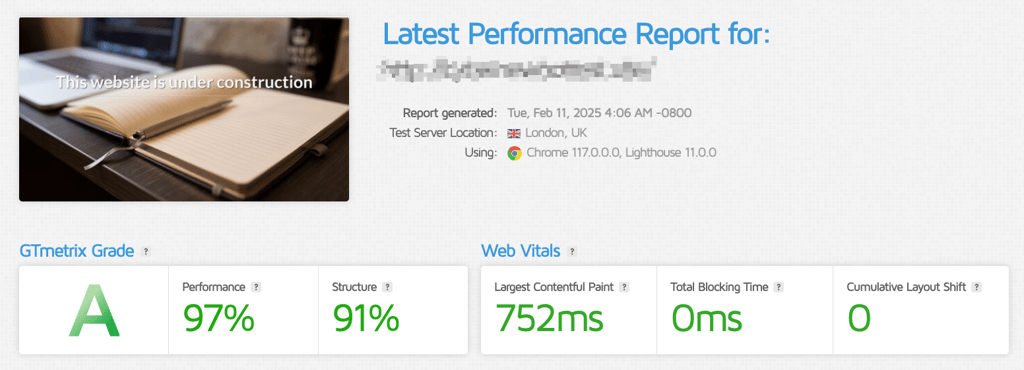
This makes perfect sense, as data needs to travel longer distances than in the US.
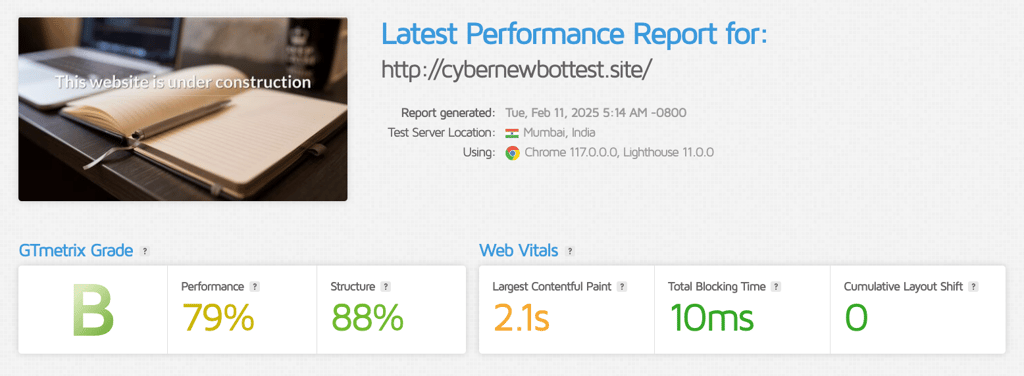
But even with this, the website fits into the recommended 2.5s limit with a margin to spare.
On the other hand, providers like Hostinger and SiteGround load this theme in under a second because they have advanced optimization measures in place, contrary to GoDaddy.
GoDaddy stress testing
Now, for the last test, the Cybernews research team sent 50 virtual visitors (bots) to the website. This puts big pressure on the server and lets us see how much traffic GoDaddy can handle.
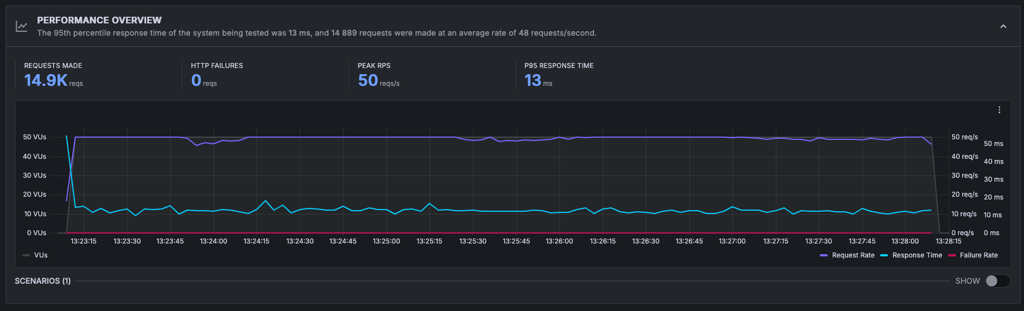
Looking at the numbers, GoDaddy can handle high peaks of traffic.
All in all, this part of the GoDaddy review showed that the provider is great when it comes to performance. It checks all 3 boxes – reliability, speed, and stability.
Is GoDaddy secure?
As far as security is concerned, GoDaddy requires paying for more security features. Standard plans have basic security features such as fraud, virus, and spam protection. Email privacy and protection are also included with a free trial. Here’s an overview of GoDaddy’s security features:
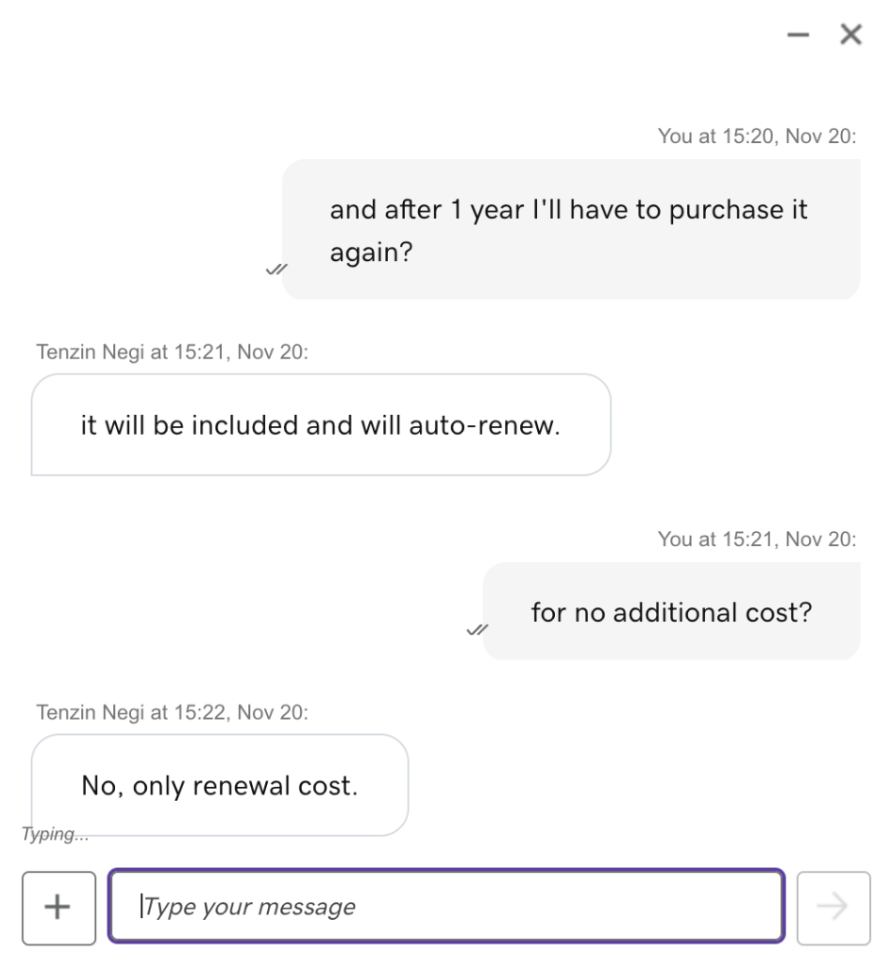
- SSL certifications. GoDaddy offers an SSL for only 1 year if you pick one of its Economy plans. But if you pick one of its higher-tier plans, there’s a free, unlimited SSL for all your websites as long as you have a hosting plan. I’d prefer if the SSL was free on all plans since it provides crucial security for your website. GoDaddy also includes DDoS protection that’s monitored around the clock.
- Email and privacy protection. GoDaddy uses 256-bit AES encryption that you can get as an extra. The provider includes a trial once you purchase a plan, so you can test the secure email service for free.
- WAF (Web Application Firewall). While this security feature is excellent in protecting web applications and monitoring your traffic, you have to purchase it separately.
- Malware scanner. Again, this feature comes at an extra cost, but it helps protect your site from vulnerabilities caused by malware. Ideally, I’d prefer this to be a free tool to protect websites and visitor data. However, GoDaddy does include a free trial for site security with every plan, allowing users to test its protection before committing to a paid option.
Overall, GoDaddy offers basic security, but you have to pay to add extra safety measures to your website. It doesn’t offer a completely free SSL certificate with cheaper plans; therefore, it isn’t as security-oriented as other providers.
This is a big drawback from GoDaddy, since many premium web hosting providers offer security features included in the plan price already. For example, Hostinger doesn’t charge extra to protect your website and its visitors.
GoDaddy customer support
| GoDaddy | |
| 24/7 live chat | ✅ Yes |
| ❌ No | |
| Phone line | ✅ Yes |
| Knowledge base | ✅ Yes |
If you run into a problem or need an answer to a question, GoDaddy offers reliable customer support to help you out with any issues you may encounter.
The options include live chat support, which starts as a chat with a bot. If you’re dissatisfied with the help, you can ask to be directed to a human agent. You can also contact GoDaddy via phone support, which has a list of countries with contact numbers. The call doesn’t cost you anything, unless you call from a different country.
Lastly, GoDaddy comes with a comprehensive help center that includes how-to guides and videos to help with all the questions that may arise if you decide to host with this provider. Moreover, if you can’t find what you’re looking for, GoDaddy refers to its award-winning support.

GoDaddy offers 24/7 live chat support for all customers. To reach a live agent, you first go through a chatbot, then request to be transferred. It took about 2 minutes to connect. Once I was with an agent, responses were fast, but I did find the conversation too salesy.
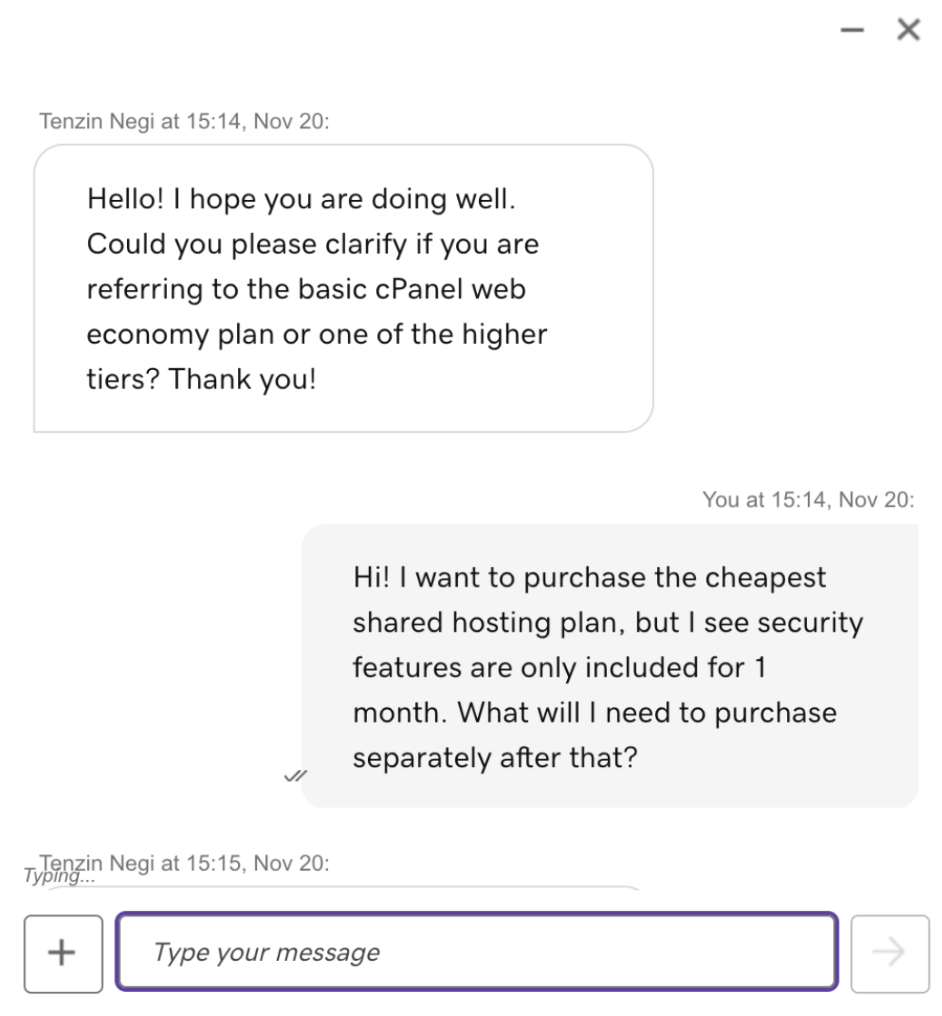
However, in the end, I received all the needed information based on my requests.
GoDaddy review – is it a good provider?
Throughout this GoDaddy web hosting review, I noted that this provider offers an intuitive interface and decent performance results. However, the security features are expensive, so ensuring your website’s protection will require you to increase your budget.
Here’s how I marked all the features available with a GoDaddy subscription:
| Feature | Rating | Review |
| Pricing | GoDaddy’s prices are very average, starting at $4.99/month for shared hosting. Occasional discounts may lower that price, which is a good deal to start a website. | |
| Ease of use | From signing up to having a WordPress website working, it takes as little as 5 minutes. Every essential feature can be set up directly from the dashboard, while cPanel also has its perks. | |
| Performance | In the performance department, GoDaddy did a good job. It handled reliability and speed tests great. Also, it proved to be capable of supporting big surges of traffic. | |
| Security | GoDaddy provides a free SSL with most plans, 24/7 DDoS monitoring, and spam protection. Unfortunately, advanced security features are more expensive than hosting plans. | |
| Support | GoDaddy support agents are helpful, fast, and proactive. There’s also a big support center with how-to guides and a community forum. |
Who do I recommend GoDaddy to?
GoDaddy offers various options that are suitable for a wide range of websites. Shared hosting is well suited for blogs, news, and small business websites.
Who do I not recommend GoDaddy to?
While GoDaddy can accommodate many website needs, it may not be the best fit for large-scale eCommerce platforms or websites with exceptionally high traffic demands.
Video review
For a closer look at how GoDaddy hosting handles real-world WordPress testing, feel free to watch the video review below:

FAQ
What is GoDaddy used for?
GoDaddy is mostly used for domain registration and management services. It also has a wide range of web hosting plans, a website builder, and several built-in marketing tools. To sum this up, GoDaddy is a giant in the online services market and is used for building an online presence.
Is GoDaddy good for professional email?
Yes, GoDaddy is good for professional email because you get a name that matches your domain, lots of storage, a calendar, and other perks relevant for emailing. For the first year, you can get it for free with all plans.
Can I get a free domain with GoDaddy?
Yes, you can get a free domain with GoDaddy when you purchase web hosting or website builder services. A free domain is included in all of its plans. You can pick from .com, .biz, .club, co.uk, .net, .org, .co, .info, .rocks, .spce, and other popular top-level domains.
Is GoDaddy safe?
Yes, GoDaddy is generally safe to use and provides basic protections against fraud, viruses, and spam. More comprehensive security, including daily backups, DDoS protection, malware scanning, and faster performance, is available through paid Website Security plans. You’ll need one of these plans to get full protection and peace of mind.
What is the reputation of GoDaddy?
GoDaddy’s reputation is controversial. During our tests, it showed speed and uptime rate as high as 100%, making it a trustworthy hosting provider that you shouldn't experience any performance issues with. Meanwhile, Reddit users revealed that they’re unsatisfied with GoDaddy due to its allegedly unethical domain registration practices, plans, pricing, and unhelpful customer support.
How does GoDaddy work?
GoDaddy is a website hosting platform that lets you do all things hosting related. This includes choosing (and buying) a domain name from various TLDs. You can then manage it using GoDaddy’s interface and easily create a fully functioning website.
Why not go with GoDaddy?
GoDaddy has higher renewal prices and charges extra for essential security features. While it’s user-friendly, other providers offer better performance and value for the price.