Best VPNs for Mac users in 2026
Our in-house cybersecurity experts and journalists, renowned for major reports like The Mother of All Breaches, conduct transparent, unbiased VPN testing and in-depth analysis.
With 750+ articles crafted based on real-world research, we empower readers to make informed purchasing decisions through first-hand expertise.
Learn more

Macs have a reputation for strong security, but they’re not invincible. While macOS includes built-in protections, it doesn’t encrypt your internet traffic by default. That means when you connect to public Wi-Fi in cafés, airports, or hotels, your data can still be exposed. A virtual private network adds that missing layer of protection.
Mac users often assume they don’t need extra security tools, but privacy risks affect every device connected to the internet. A VPN secures your connection, hides your IP address, and helps prevent tracking, throttling, and data interception. If you care about safeguarding personal data, accessing geo-restricted content, or working remotely, choosing the best VPN for Mac becomes essential.
To find the top options, our research team and I conducted hands-on testing on macOS devices. We evaluated speed retention, Apple silicon app optimization, security features, ease of use, and overall reliability to determine which services truly perform best on Mac.
Best VPNs for Mac in 2026 at a glance
- NordVPN – strongest all-around VPN for Mac users in 2026
- Surfshark – high-speed Mac VPN that keeps pricing competitive
- Proton VPN – solid free VPN option for macOS
- IPVanish – reliable choice for Mac and Safari users
- CyberGhost – budget-friendly premium VPN for Mac




We spare no effort to test the products & their features. All information is gathered by our in-house research team & fact-checked by our team of experts. Discover the ins and outs of our testing procedures.
Why do you need a VPN for Mac?
Apple and its OS products tend to be quite secure, but unless you have a built-in antivirus, there are still plenty of cyber threats that malicious agents can exploit. A VPN is not just for avoiding busy internet traffic on your server, accessing foreign streaming service libraries, or staying safe while using public Wi-Fi. It can increase the degree of your Mac security and protect your privacy in an era of trading customer data as currency.
A virtual private network adds privacy and network-level protection that macOS does not provide by default. Key VPN benefits for Mac users include:
- Encrypts internet traffic – protects your data from interception
- Secures public Wi-Fi connections – reduces risk on café, airport, or hotel networks
- Hides your IP address – limits tracking by ISPs, advertisers, and websites
- Helps prevent ISP throttling – stabilizes streaming and downloads
- Enables access to geo-restricted content – useful when traveling
- Adds privacy abroad – protects browsing on unfamiliar networks
Best VPNs for Mac in 2026 – full analysis
Our research team and I evaluated more than two dozen VPN services to identify which ones truly perform well on macOS. We focused specifically on how each provider’s Mac app runs in real-world conditions rather than just reviewing feature lists.
From there, we narrowed the selection to the top five by testing security standards, speed retention, system compatibility, including Apple silicon optimization, and overall ease of use. The result is a shortlist of VPNs that are not only secure, but also genuinely well optimized for Mac users.
1. NordVPN – Mac’s strongest option for privacy, speed, and seamless streaming

| macOS supported versions: | macOS 12 and later |
| Servers and locations: | 8,000+ servers in 149 countries |
| OS compatibility: | Windows, macOS, Linux, Android, iOS |
| Current deal: | Get 75% OFF NordVPN + 3 months free |
NordVPN stands out as the leading VPN for macOS in 2026. It combines advanced security and privacy features with consistently strong performance, particularly for streaming, where it reliably delivers fast speeds and stable access across major platforms.
I value NordVPN primarily for its strong privacy and security standards. Its no-logs policy has been independently audited six times, reinforcing its credibility. In our testing, its next-gen antivirus (formerly Threat Protection) detected and removed most sample malware. In fact, AV-Comparatives certified next-gen antivirus, which is available with Complete and Prime plans, for phishing protection. It also includes Meshnet, which lets you create secure private networks for file sharing and remote access.
NordVPN’s dedication to security should not overshadow its streaming unblocking capabilities. At least with Netflix, I personally never found any faults for at least 3 years. Our research team also has yet to encounter any difficulties or latency issues when attempting to unblock major streaming services like Disney+, Max, and Hulu or even smaller platforms like Fubo and TVNZ.
In-house VPN speed tests confirm this VPN’s stability and speed. The latest OOKLA test showed that NordVPN has a speed retention of over 90% (compared to baseline network speed of 500Mbps). It means that on a daily basis, you shouldn’t notice a drop in connection speed with a VPN on, except maybe an occasional increased loading times when downloading large files.
As for the part that most users will encounter first, I find the NordVPN Mac app very intuitive and easy to navigate. While the setup process could be slightly more streamlined, for example, there could be less back-and-forth between the app and website; it’s not complicated to install. There’s no difference between Mac and Windows app designs, as both provide clearly laid out features and information.
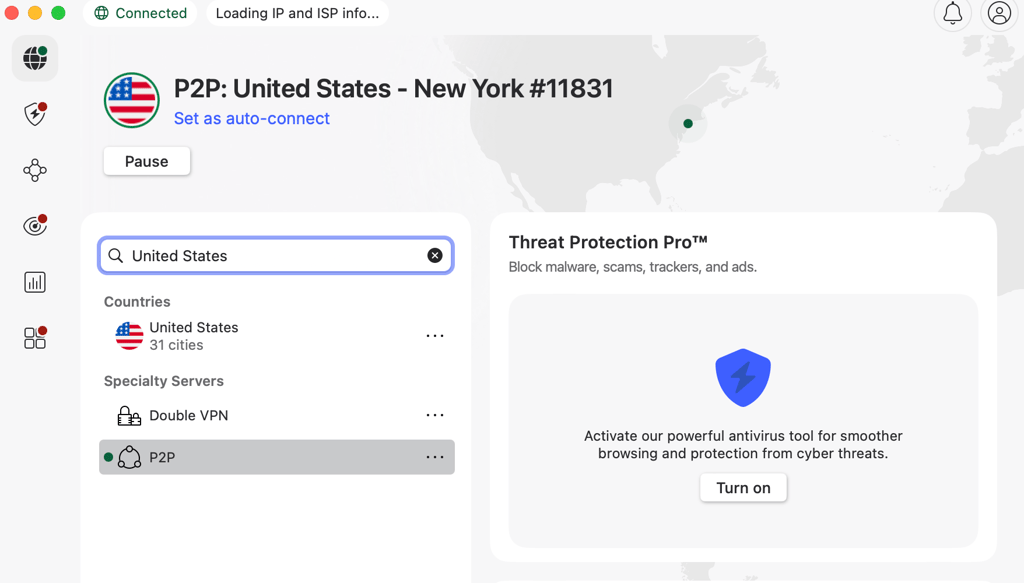
NordVPN’s pricing may be a consideration for some users. Plans start at $3.49/month on long-term subscriptions, with higher-tier options unlocking additional security features. While the entry plan covers core VPN functionality, more advanced tools are reserved for pricier tiers. That said, you can reduce costs by choosing longer plans, using promotional discounts, or relying on the 30-day money-back guarantee. There’s also a 3-day free trial available on Android, which can then be used across other compatible devices after activation.
Overall, I would recommend NordVPN for those Mac users who value privacy and security, as well as those who want to access their favorite content in other streaming service locations. While it’s not the cheapest VPN on the market, there are ways to save on subscriptions, and the price-quality ratio speaks for itself. Having privately used NordVPN, I never found its price to be too steep compared to what it has to offer.
2. Surfshark – fastest Mac VPN with wallet-friendly pricing

| MacOS supported versions: | macOS 12 and later |
| Servers and locations: | 4,500+ servers in 100 countries |
| OS compatibility: | Windows, macOS, Linux, Android, iOS |
| Current deal: | Now up to 85% OFF Surfshark + 3 months FREE |
Surfshark is a strong choice for Mac users who want top-tier speeds without paying premium prices. It consistently delivers fast performance, making it ideal for streaming, browsing, and everyday use. Even though it’s positioned as a budget-friendly option, Surfshark doesn’t compromise on privacy or security features, offering a well-rounded experience at a lower cost.
Similarly to NordVPN, Surfshark’s One and One+ plans include an antivirus feature, which our research team confirmed to be effective against malware, and AV-TEST certified it for top-notch security. But even with the cheapest plan, you get ad and pop-up blockers that can improve your virtual security.
Having tested Surfshark’s ability to unblock streaming services, I did not notice much difference between it and NordVPN either. There were no sudden drops of connectivity and no latency issues, and it was able to unblock all tested streaming services, like Netflix, Hulu, Max, Disney+, Prime Video, and BBC iPlayer. While I personally used NordVPN for longer, I still tested Surfshark for multiple weeks, and throughout this time, there were no issues with streaming on Mac.
Great streaming performance is, without a doubt, linked to Surfshark’s speed test results. Our OOKLA test showed its download speed as 466Mbps and upload as 320Mbps on the US server (compared to the 500Mbps baseline). Overall, Surfshark’s average speed retention is 93%, which is very high. A stable and fast VPN connection is the main factor that prevents lagging and buffering down the line.
Surfshark’s Mac app, while not as interactive as NordVPN’s (no map view, for example), still has a clearly defined layout with all necessary features being readily accessible. A nice feature is the ability to quickly select favorite server locations, which will then be always readily available or automatically turned on. In general, all Surfshark apps are user-friendly.

In addition to being simple to navigate, fast, and reliably secure, Surfshark is also very affordable. With the most affordable plan costing just $2.49/month, Surfshark is cheaper than NordVPN. However, plans that include antivirus and other advanced features, such as One and One+, cost more. But there’s a free iOS trial lasting 7 days and a 30-day money-back guarantee, so there are ways to test out Surfshark without significant investment.
I recommend Surfshark for Mac if you want to get similar quality to NordVPN without spending as much. Out of all cheap VPNs, Surfshark shows the best speeds, nearly rivaling NordVPN's performance. It also has notable security features and a simple interface, making it a safe and user-friendly Mac VPN.
3. Proton VPN – the premium free Mac VPN

| macOS supported versions: | macOS 10.12 and later |
| Servers and locations: | Free servers in 10 countries, paid 20,700+ servers in 149 countries |
| OS compatibility: | Windows, macOS, Linux, Android, iOS |
| Current deal: | Get up to 70% OFF Proton VPN |
Proton VPN stands out as the strongest free VPN option for Mac, thanks to its simple setup and solid security foundation. Unlike most free services, it maintains reliable privacy standards and can even access certain streaming platforms, which is rare in the free VPN space.
A lot of free VPNs cannot be trusted because they sell user data to advertisers. But Proton is ad-free and follows a strict no-logs policy, which has been confirmed by third-party audits. Additionally, Proton does not require any personal details other than email to create its free version account. When I was testing Proton, it even created a password for me, so, if you want, you can use Proton VPN with minimal effort and in less than 5 minutes.
In testing, Proton VPN’s free plan managed to access major streaming platforms like Netflix, Disney+, and Max. While we noticed occasional dips in video quality, overall playback remained stable. The main limitation is server selection – the free version assigns a location automatically, and attempting to manually choose a server prompts an upgrade to the premium plan.

While I still consider Proton VPN to be a great free option for Mac, there’s no denying that its premium plans have more to offer. Proton Plus costs $2.99/month and includes a 30-day money-back guarantee, so you can test the difference yourself. But, overall, I’d suggest only getting the free version for Mac if you don’t mind fewer streaming opportunities or the lack of ability to connect to many different countries.
4. IPVanish – feature-rich Mac VPN with advanced control options

| macOS supported versions: | macOS 13 and later |
| Servers and locations: | 3,400+ servers in 112 countries |
| OS compatibility: | Windows, macOS, Linux, Android, iOS |
| Current deal: | Now up to 84% OFF IPVanish |
IPVanish offers a highly customizable app for Mac users. You can switch between different VPN protocols depending on your location or streaming needs, and the app displays real-time server load data, making it easier to choose a less congested server for smoother streaming or gaming performance.
Similarly to NordVPN, IPVanish also has a threat protection feature in its Mac app, which, when turned on, blocks ads, trackers, and malicious websites. I attempted to visit some questionable sites and IPVanish issued a warning. As for ad blocking, I’d say IPVanish successfully blocked about 40% of them, with more complex advertisements bypassing threat protection tracking.
Testing IPVanish's ability to unblock streaming services also had its ups and downs. While the quality of streaming services on any of the tested servers remained very high, and there was no noticeable lagging or buffering, it took a few attempts to unblock Amazon Prime Video and Hulu. But at least with Netflix and Disney+, it was pretty much smooth sailing.
Good streaming quality can be explained by IPVanish protocol options. This VPN allows its users to pick between 5 protocols, but I found WireGuard, the same as Surfshark’s, to be the fastest and most compatible with streaming. Overall, IPVanish has a speed retention rate of 80%, which is pretty high.
Installing IPVanish on Mac was easy. After purchasing a plan, I created an account, downloaded the app, and was ready to connect within minutes. If you plan to use it with Safari, you’ll still need the full app installed, since Safari doesn’t support standalone VPN extensions. The only minor drawback I noticed was slightly slower interface loading compared to NordVPN or Surfshark – for example, the map view can take a few seconds to appear.

IPVanish subscription costs $2.39/month and includes a 30-day guarantee for you to try it out risk-free. Those who have iOS or Android smartphones can also claim a 7-day free trial. In general, IPVanish is pretty affordable, so it’s a great alternative if you want a more hands-on VPN.
Overall, I would recommend IPVanish to more experienced VPN users and those who want to be in control of the app and its settings. While having minor flaws, IPVanish is still a great streaming-friendly and secure VPN for Mac.
5. CyberGhost – low-cost premium VPN

| macOS supported versions: | macOS 10.13 and later |
| Servers and locations: | Servers in 100 countries |
| OS compatibility: | Windows, macOS, Linux, Android, iOS |
| Current deal: | Watch Live Sports Securely, now with 83% OFF CyberGhost + 2 months FREE |
CyberGhost ranks among the most affordable premium VPNs available, with long-term plans starting at just $2.19/month. Plus CyberGhost offers an extensive server network and a variety of features, which is what make this VPN a great option for Mac users.
While it doesn’t have strong security features like NordVPN or Surfshark, CyberGhost is still very safe, having an optional ad and tracker blocker, a kill switch, and market-leading data encryption. CyberGhost also has an independently confirmed no-logs policy, so there’s nothing to indicate that it’s any less private than other VPNs. The in-app privacy settings let you block malicious DNS domains.
CyberGhost is very streaming-friendly, too, offering a selection of servers that are highly suitable for watching online content. With these servers on, I did not encounter any issues when testing CyberGhost with popular streaming platforms. Additionally, like IPVanish, CyberGhost shows server load percentage, so you can manually pick less-crowded servers for streaming.
Speed test results revealed that, while not as fast as NordVPN or Surfshark, CyberGhost still has a pretty good speed retention rate of 91%. As it also has WireGuard protocol, you shouldn’t encounter any major latency issues. Personally, while I noticed that CyberGhost effortlessly unblocks major streaming services, it does have minor video quality issues, but those clear up if you just wait a little longer.
The CyberGhost Mac app was very easy to set up. The whole process, minus the purchase, took me about 5 minutes or so. Out of all tested providers, CyberGhost takes the least amount of time to connect to a server, so I appreciated how streamlined the whole process was. Overall, while less feature-rich than NordVPN, in terms of the Mac app interface, I would place CyberGhost on par with Surfshark and IPVanish.

CyberGhost has only one plan option, you can pick its duration between 1 and 6 months, or 2 years. The 2-year plan has by far the best long-term value, as it comes with various deals and promotional offers and costs just $2.19/month. Besides, CyberGhost also has a 45-day money-back guarantee – that’s longer than most VPNs.
All in all, CyberGhost is great for budget-conscious Mac users. While not as advanced as NordVPN, it has all the essentials, plus uniquely streaming-oriented servers, to offer its users great service. Whatever flaws CyberGhost has does not lessen its overall value for money.
Best Mac VPNs compared
| VPNs | App Store rating | Availability on other platforms | Price | 24/7 customer support | Money-back guarantee | Simultaneous connections | Average speed retention and (baseline 500 Mbps download & upload) | Unblocked streaming services |
|---|---|---|---|---|---|---|---|---|
| NordVPN | 4.7 | Windows, macOS, Linux, Android, iOS | From $3.49/month | ✅ Yes | ✅ Yes (30-day) | 10 | 93.6% download, 84.6% upload | Netflix, Hulu, BBC iPlayer, Disney+, and more |
| Surfshark | 4.8 | Windows, macOS, Linux, Android, iOS | From $2.49/month | ✅ Yes | ✅ Yes (30-day) | Unlimited | 93.3% download, 64.1% upload | Netflix, Disney+, Amazon Prime Video, Hulu, and more |
| Proton VPN | 4.6 | Windows, macOS, Linux, Android, iOS | From $2.99/month or free | ❌ No (only on paid version) | ✅ Yes (with paid version, 30-day) | 1 free or 10 paid | 85.7% download, 85.3% upload | Netflix, BBC iPlayer, YouTube, HBO Max, Disney+ |
| IPVanish | 4.5 | Windows, macOS, Linux, Android, iOS | From $2.39/month | ✅ Yes | ✅ Yes (30-day) | Unlimited | 91.8% download, 58.6% upload | Netflix, BBC iPlayer, YouTube, Disney+, Hulu, and more |
| CyberGhost | 4.2 | Windows, macOS, Linux, Android, iOS | From $2.19/month | ✅ Yes | ✅ Yes (45-day) | 7 | 91.2% download, 74.6% upload | Netflix, Hulu, BBC iPlayer, Disney+ |

Do Macs have a built-in VPN?
Mac devices do not have a built-in VPN. The closest to it that Macs can offer is iCloud Private Relay, which encrypts your web traffic, but it has two notable downsides. First, it only works on Safari, so other browsers and apps would show your IP address. Second, it does not allow you to change your virtual location, so it’s not suitable for streaming.
As for security, Mac has Privacy & Security settings that allow you to permit downloads only from the App Store, which isn’t very convenient. These settings can also permit only Apple-registered and identified app developers, but again, they are quite limiting. Besides, these settings will not protect you from online threats like phishing, ransomware, and other types of malware.
A third-party VPN app is the only way to get the privacy that a VPN service provides. It includes the ability to switch virtual locations and guarantees security that encompasses all downloads, apps, and browsing activity. VPNs like NordVPN and Surfshark even have features that can legitimately deal with malware.
VPN for Mac – buying guide
If you’re looking for a VPN for your Mac, you can check for several features that would indicate that your chosen service is worth getting. These features are key to ensuring that a VPN is truly private and secure. For example, the easiest way to know that your chosen VPN provider respects your privacy is by checking for a no-logs policy.
An independent audit is a sure way to get confirmation that the VPN’s no-logs policy is valid. Most VPNs make the results of these audits accessible to the public, and you can view them on their official websites. For example, you can read Surfshark’s audit results with the original Deloitte (auditor) verdict included.
The main security features that separate good quality VPNs from lesser ones are tracker blocking, a kill switch, and leading data encryption, such as AES-256, ChaCha20, and so on. Blocking trackers helps protect your identity and activity privacy; the kill switch prevents your true IP from leaking in case of a VPN signal drop; and currently, there is no better encryption than AES-256.
If you keep in mind these security and privacy features, any VPN that you’ll end up choosing will effectively protect your device and identity.

How to install a VPN on Mac
Setting up a VPN on your Mac is quick and straightforward. In just a few steps, you can secure your internet connection, protect your privacy, and start browsing safely. Follow the simple guide below to get started:.
- Choose a VPN provider. Start by selecting a reliable VPN that offers a dedicated macOS app, strong security features, and good performance. Make sure it fits your budget and supports the features you need.
- Download and install the app. Go to the provider’s official website or the Mac App Store, download the macOS app, and follow the installation prompts to set it up on your device.
- Log in or create an account. Open the app and sign in with your credentials. If you’re using a free VPN like Proton VPN, you may be able to skip the payment step and, in some cases, even account creation.
- Connect to a server. Choose a server location from the list and click Connect to secure your connection. Once connected, your traffic will be encrypted and your IP address hidden.
Can I use a VPN on my MacBook Air or MacBook Pro?
If your chosen VPN service is compatible with macOS, you’ll be able to use it on all Mac devices. The most important thing is to check that your MacBook Air or MacBook Pro has the operating system that the VPN supports. Other than that, you should encounter absolutely no difference in app functionality and interface between different macOS devices.
There is a difference, however, between iOS and macOS VPN apps, as iOS VPNs are adapted for smaller devices, like smartphones and tablets. But if you’re interested in a VPN for your Mac device only, then this difference is not going to be relevant to you at all. So, as long as you have the App Store, feel free to download your chosen VPN to any of your Mac devices.
Video review
If you'd like a different point of view, our team prepared a video overview of the best Mac VPNs:
Final thoughts
Using a VPN on Mac is about closing the gaps that built-in security does not cover. macOS is well protected against many threats, but it does not encrypt your internet traffic or hide your IP address. In our hands-on testing, the best VPN for Mac combined strong security, stable speed retention, and a polished macOS app that felt native and easy to use.
NordVPN stood out overall thanks to its excellent speeds, advanced security features, and reliable streaming performance on Mac. Its app is intuitive, fast, and packed with useful tools like next-gen antivirus. If you want a more budget-friendly option, Surfshark is a solid alternative that still delivers strong performance without sacrificing core security features.
FAQ
Which VPN should I use for my Mac?
The best VPN for Mac should have an audited no-logs policy, a functional kill switch, enough servers and locations to access foreign streaming content, and basic security features to safeguard online activity. Based on this criteria, NordVPN is the best VPN for Mac. It has a 4.7 out of 5 rating on the App Store, so other Mac users found it reliable, too.
Is NordVPN for Mac good?
Yes, NordVPN is a Mac-compatible VPN with all the necessary privacy and security features. It has a high Apple Store rating of 4.7/5, which indicates the level of trust by macOS and iOS users. NordVPN has a next-gen antivirus feature that can eliminate ads, trackers, and basic malware, securing Mac devices. It also hides users’ IP addresses and has an audited no-logs policy for complete online privacy.
Is my Mac connected to a VPN?
If you don’t have a third-party VPN app, then no, your Mac does not have an integrated VPN to be connected to it. But if you do, then there are a couple of ways to check if your VPN works. First, you can visit websites like IPLeak to check if your IP address matches the one on a selected VPN server. Another way to check is by visiting streaming services, like Netflix, and see if the library selection changed. Finally, you can simply trust your VPN provider and check the app’s main page to see if you have selected another server and if it shows an assigned IP.
Does a VPN give you a different Mac address?
Yes. Because a VPN can assign you a new IP address every time you change your server location. For example, if you connect to a server in a different country, the displayed IP address on your device will change, and web trackers will see not your true IP but the one in another country, granting you access to local content. It also means that malicious agents won’t be able to see your true IP and even identify your physical location.