Bitdefender vs Norton: which antivirus is better?
Backed by leading cybersecurity experts and investigative journalists, we deliver independent, real-world antivirus testing and analysis, guaranteeing objective evaluations without undue influence or bias from outside parties.
Our transparent and consistent methodologies ensure objective, up-to-date reviews, empowering readers to make well-informed decisions.
Learn more
The rivalry between Bitdefender and Norton spans nearly two decades, and both are our top-rated antivirus providers. If you’ve narrowed your search to these two, you’re not alone – they consistently dominate top lists and compete for the #1 spot.
Finding an unbiased review can be difficult as both products are very popular. Therefore, I worked together with the Cybernews dedicated research team to perform our own in-house testing of both Norton 360 Deluxe and Bitdefender Total Security. We then combined our results with data from independent antivirus labs to create a full report. This process allows me to give you a clear answer on which software is the better choice for you.
Let’s dive into the results to find out whether Bitdefender or Norton comes out on top in terms of security, usability, compatibility, and pricing.
Bitdefender vs Norton at a glance
After in-depth testing, I found it was a close call, but Bitdefender delivered slightly better results overall. Both Bitdefender and Norton performed strongly in our in-house tests, offering solid protection and reliable performance. Bitdefender blocked more threats in real time (80% vs 60.67%) and detected more malware samples during full scans. On the other hand, Norton 360 was faster at performing the full system scan.
| Bitdefender Antivirus | Norton Antivirus | |
| ⭐ Rating: | ||
| 🥇 Overall rank: | #1 out of #30 | #2 out of #30 |
| 🔥 Coupons: | Bitdefender coupon 78% OFF | Norton coupon 60% OFF |
| 💵 Price: | From $12.99/year | From $29.99/year |
| ✂️ Free version: | Yes | No |
| 🖥️ Platforms: | Windows, macOS, Android, iOS | Windows, macOS, iOS, Android |





Our team of researchers thoroughly tests antivirus software following a well-established testing process. In unison, our experts combine in-house and independent testing lab findings with first-hand experience to help you make informed decisions about each product. Learn how we test antivirus software.
Pricing and plans
Both Bitdefender and Norton offer a variety of subscription options. For a single antivirus subscription, Bitdefender Antivirus Plus starts at $12.99/year, which is well below the standard market price of around $30.00/year for a basic antivirus license. Norton AntiVirus Plus costs $29.99/year, which is roughly in line with the market average. Below are the prices compared side-by-side.
| Plan | Bitdefender | Norton 360 |
| Free | $0.00 | – |
| Antivirus Plus vs AntiVirus Plus | $12.99/year | $29.99/year |
| Total Security vs Standard | $19.99/year | $39.99/year |
| Premium Security vs Deluxe | $64.99/year | $49.99/year |
| Premium | – | $59.99/year |
| Get our discount | Get our discount |
For users who need protection on multiple devices, both Bitdefender and Norton offer higher-tier plans with broader coverage. Bitdefender Total Security supports 3 devices on a single account, while Premium Security covers 5 devices and costs $64.99/year.
Norton 360 also provides multi-device options: the Standard plan protects 3 devices, Deluxe covers 5 devices, and Premium secures up to 10 devices. These plans add advanced features and extra protections, making them ideal for families or users with multiple devices. In addition, Norton offers a 60-day money-back guarantee, which is twice as long as Bitdefender’s.
Independent lab test scores
According to the Malware Protection Test by AV-Comparatives conducted in March 2026, Bitdefender demonstrated 97.6% offline and online threat detection rates and an excellent 99.94% online protection rate. The antivirus listed 4 false alarms during the test.
Norton’s offline detection rate of 96.3% was slightly lower, and the antivirus detected 9 false positives. However, Norton 360 redeemed itself with excellent 98.7% online detection and 99.97% online protection rates. AV-Comparatives awarded both providers the ADVANCED+ rating.
According to AV-TEST malware protection test results conducted in February 2026, both Bitdefender and Norton 360 prevented 100% of zero-day malware attacks and discovered 100% of widespread and prevalent malware, earning themselves 6.0 out of 6.0 Performance scores. When it comes to Protection and Usability, both providers achieved a perfect 6.0 score, earning AV-TEST’s TOP PRODUCT certification.
As for SE Lab results, the last time the lab tested Bitdefender was in April 2023, and the antivirus demonstrated 100% protection against general and targeted attacks. Norton 360 was tested in December 2024 and also received a 100% score.
I also looked into MRG Effitas’ Consumer Assessment & Certification Programme In-the-Wild malware test results from March 2026. Bitdefender achieved a perfect 100% detection rate by autoblocking 69% of 300 ITW samples and dealing with the remaining 31% via behavior blocking. While Norton autoblocked even more threats – 77.67% – its total detection rate was lower at 98.67%, with 1.33% of ITW samples missed. As a result, Bitdefender is MRG Effitas’s Level 1 certified, and Norton holds a Level 2 certification.
To put things into perspective for you, I gathered all the scores from these independent lab reports and combined them into a single aggregate score for each provider. Bitdefender averaged 9.82 out of 10, while Norton is only slightly behind with 9.80. As you can see, both providers are top-tier options with Bitdefender holding a very narrow edge overall.
Hands-on test scores
Both Bitdefender and Norton 360 are known for their strong real-time protection, which is also reflected in recent AV-Comparatives Real-World Protection Test results from February–March 2026. To see how both tools perform outside lab conditions, I teamed up with the Cybernews research team to run our own in-house tests.
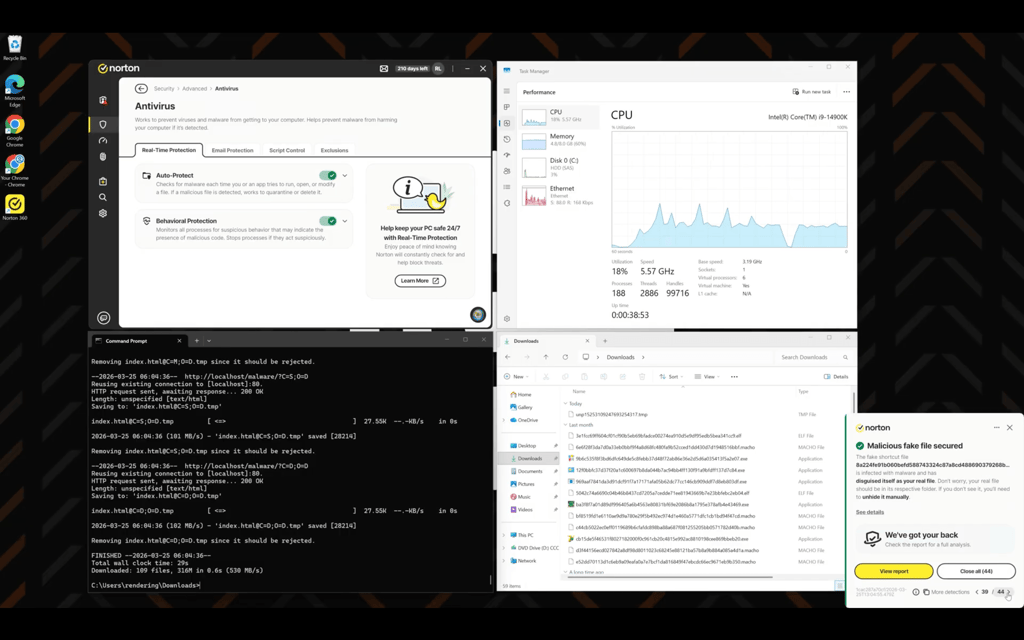
For the real-time protection test, we downloaded 150 malware samples onto a Windows 10 system and monitored how effectively each antivirus detected and blocked threats as they appeared.
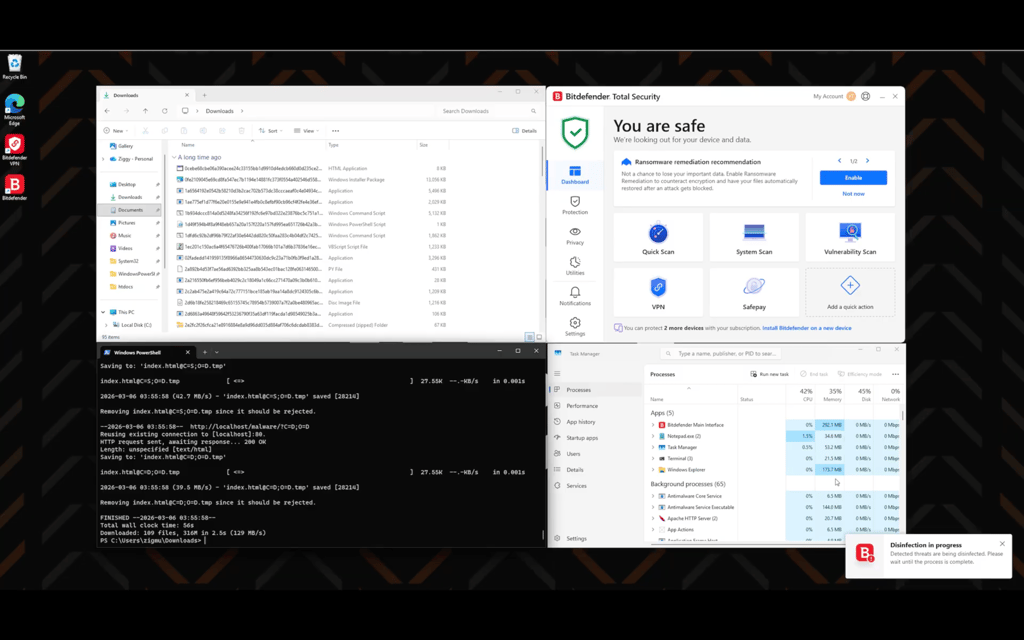
During the test, Bitdefender detected and blocked 120 out of 150 malware samples, resulting in a 80% detection rate. While the full scan took 1 hour 38 minutes 13 seconds to complete and caused noticeable CPU usage (29–100%) during active protection, it resulted in an 89.3% detection rate.
Norton quarantined 91 out of 150 samples (60.67%) during the real-time protection testing, which is a worse result not only compared to Bitdefender but also to its own performance during our previous tests. Similar to Bitdefender, Norton also showed increased CPU usage (34–100%) while handling real-time threats. Norton completed the full scan in 1 hour 4 minutes and 29 seconds, with a detection rate of 70.667%, which is better than its real-time result but still worse than Bitdefender.
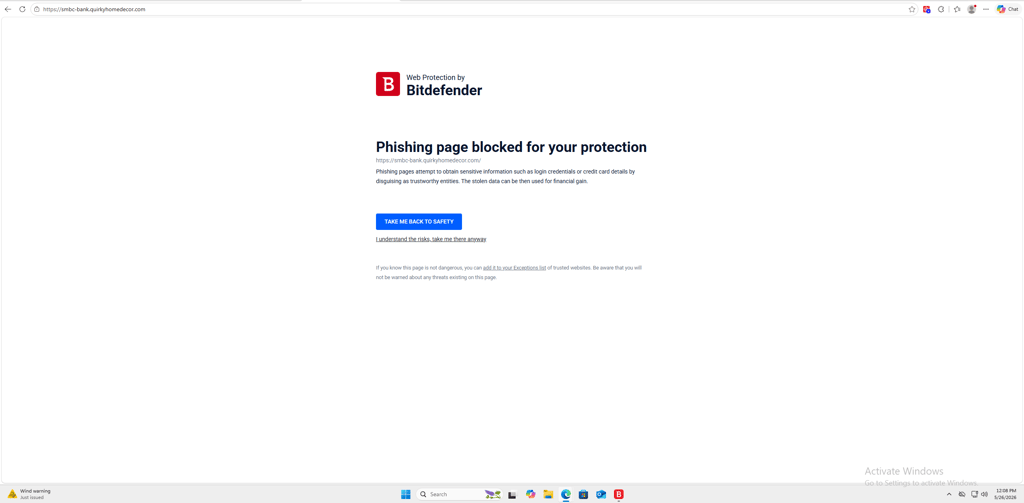
Apart from full-scan detection, Bitdefender also did better in several other areas, including ransomware detection (90% vs Norton’s 50% samples detected) and phishing URL blocking (80% vs Norton’s 60%).

Malware protection
Whichever service you pick, you'll have a reliable means to prevent malware from landing on your device. That is because you get comprehensive internet security suites with both Norton 360 and Bitdefender. Both providers use online threat databases that are kept up to date and react to dangerous threats in real time.
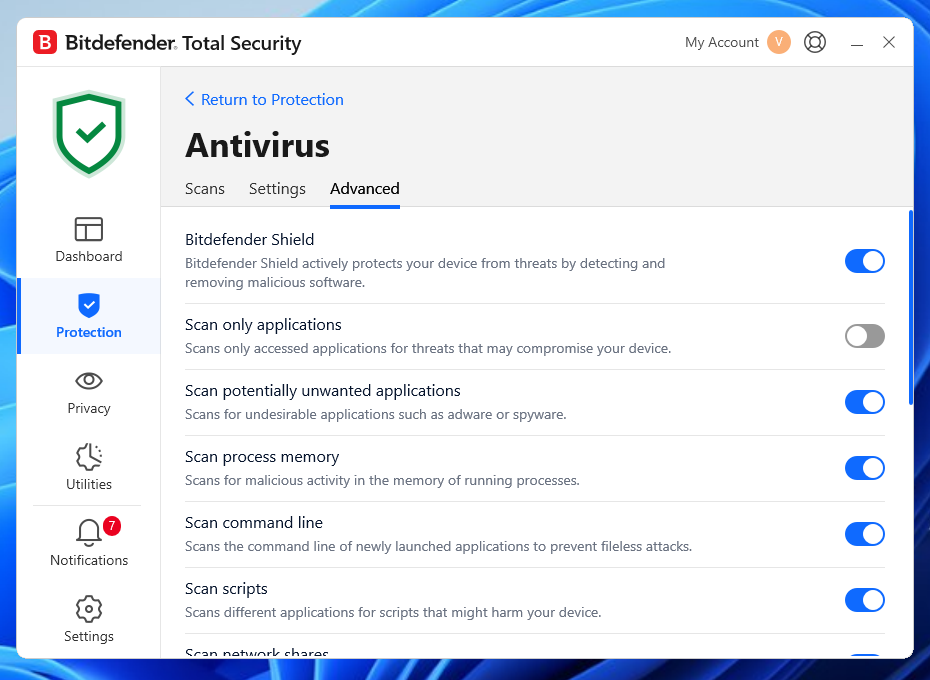
Bitdefender Shield uses this data, along with behavioral learning tools, to identify threats that haven't yet been added to the database. It's one of the most advanced methods for malware detection, and it's expected that most leading antiviruses will employ AI even more for detecting malware in the future.
Bitdefender has also recently introduced its Cryptomining Protection feature, which is now a standard across its plans. It protects against “leech” software that runs on your system without your knowledge.
Norton 360 has incorporated AI into its LifeLock – included in certain subscription plans – as well as malware removal. With the help of advanced machine learning, Norton 360 can detect and remove malicious files, thus ensuring multi-layered protection.
Scanning
If you regularly perform manual system scans, you'll be delighted with both service providers. Norton 360 provides a lot of customization options, while Bitdefender provides several scanning types. You can even scan for potential vulnerabilities with suggestions on how to make your system safer. Of course, there are also informative scanning screens that update you on how many threats were found and resolved.

Norton 360 provides plenty of scanning options. In fact, Norton’s scans appear deeper than Bitdefender’s. That said, Bitdefender also offers great malware scanning options.

Firewall protection
One of the best Norton 360 features is the Smart Firewall. It includes its unique Intrusion Prevention System, which intercepts incoming data packages, blocking online attacks in their tracks. Additional benefits include uncommon protocol filtering and various customization options for network protection. When connected to an unfamiliar network, you can toggle content tampering, DNS spoofing, and other detections.
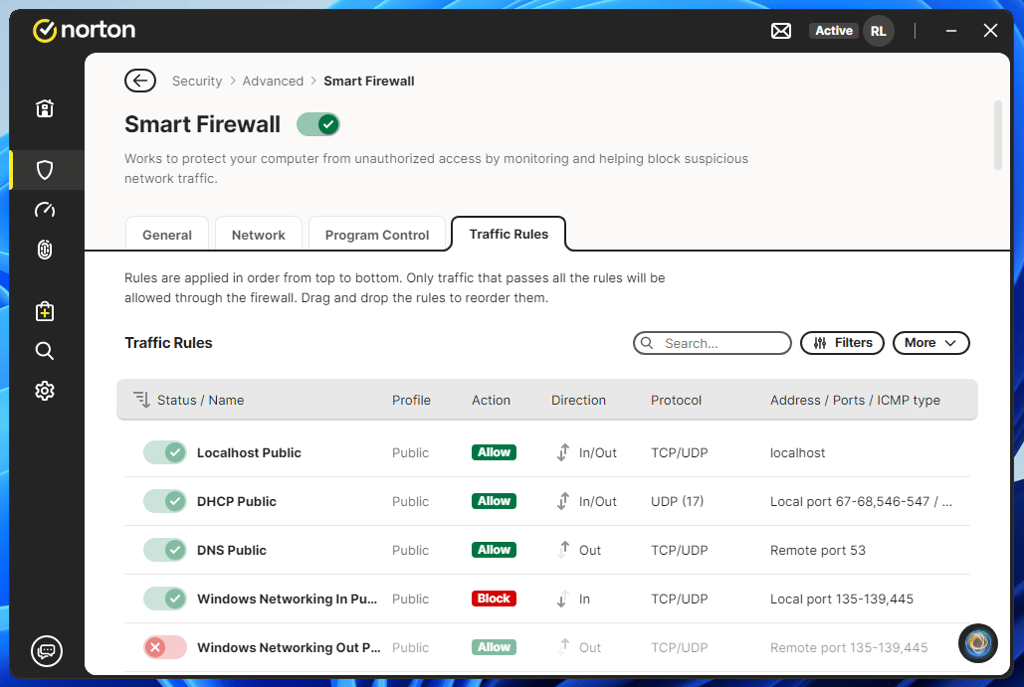
Norton’s Smart Firewall includes a Traffic Rules section, which controls exactly what network traffic is allowed through your firewall. Only connections that meet all the specified rules are permitted.
You can also create custom rules by clicking More in the top-right corner to define details such as rule name, action, protocol, direction, address, and more. This level of customization gives you granular control over your network security, letting you tailor firewall behavior to your needs.
While equally as impressive, Bitdefender has fewer customization sliders. You can configure application access, rules, network adapters, and settings.
One of the most notable additions is Port scan protection, which blocks port-scanning attempts across the network. Many malicious hackers on public Wi-Fi use software to identify which devices on the LAN have open ports and exploit them as an attack vector. With Bitdefender, you can stay safe even against those threats.

Which has better features: Norton or Bitdefender?
Norton 360 offers a broader and more consistent feature set than Bitdefender, especially across mid- and high-tier plans. While both antiviruses provide solid core protection, Norton bundles more extras by default, whereas Bitdefender offers premium tools with higher-tier plans.
Here’s what I found during hands-on Bitdefender vs Norton testing:
| Bitdefender | Norton | |
| VPN | ✅ Yes | ✅ Yes |
| Firewall | ✅ Yes | ✅ Yes |
| Password manager | ✅ Yes | ✅ Yes |
| Parental Control | ✅ Yes | ✅ Yes |
| File Shredder | ✅ Yes | ❌ No |
| File encryption | ❌ No | ❌ No |
| Secure browser | ✅ Yes | ✅ Yes |
| Secure cloud storage | ❌ No | ✅ Yes |
| Money-back guarantee | ✅ Yes | ✅ Yes |
Norton includes a password manager and firewall with every plan. Its VPN is unlimited starting from the Standard tier, and all plans come with secure cloud backup (from 2GB), which helps with ransomware recovery and file protection.

Norton also stands out for customization. Firewall controls and scan options are more flexible, and extras like Dark Web Monitoring, a 100% Virus Protection Promise, and AI-powered scam protection are built in. Earlier, you could also get LifeLock identity protection with higher-tier plans, but if you want to turn Norton into a full all-in-one security suite now, you’ll need a separate Norton 360 with LifeLock subscription.
Bitdefender’s strength is flexibility. It offers one of the best free antivirus plans for Windows, with real-time malware protection and anti-phishing. That said, advanced features like a firewall, VPN, and password manager require upgrading.

Bitdefender Total Security adds behavioral malware detection, a firewall, anti-tracker tools, and system optimization. Privacy features such as webcam and microphone protection, Scam Copilot, and Deepfake Protection are strong, but unlimited VPN access and the password manager are only included with the Premium Security plan. Bitdefender also includes a file shredder, which Norton lacks.
Norton and Bitdefender both offer identity protection, but in different ways. Norton includes it in Norton 360 with LifeLock plans or as a standalone service. Bitdefender includes data breach detection in its antivirus plans but sells Identity Theft Protection separately.
| Bitdefender Identity Theft Protection | Norton 360 with LifeLock (with Identity Protection) | |
| Dark web monitoring | ✅ Yes | ✅ Yes |
| Identity theft insurance | ✅ Yes | ✅ Yes |
| Credit monitoring | ✅ Yes | ✅ Yes |
| 401(k) and Investment Activity Alerts | ❌ No | ✅ Yes |
Apps and interface: which is more user-friendly?
When choosing antivirus software, a clean, intuitive interface can make all the difference in everyday use. Let’s see how Bitdefender and Norton 360 compare in terms of app design and user experience.

Bitdefender is still very easy to use, even for beginners, but it also has broader customization options if you want more control over how the antivirus engine behaves, scans files, and uses system resources. I found it pretty straightforward to set up, and it even has a free version for Windows, though its features are limited. There’s also a free trial option, so you can try the service out before committing to it.
The desktop apps are easy to navigate, with everything organized into separate sections, which can be further customized. The mobile experience follows the same logic, although, in my experience, the iOS version feels lacking compared to Android. That’s mostly because iOS doesn’t allow the same antivirus-style scanning that Android does. As a result, iPhone security apps are usually limited to features like phishing protection, VPNs, Wi-Fi alerts, and scam blocking.

Norton 360's setup is much more complex – the desktop app acts essentially as a launchpad for different services. However, once I got past the setup, the experience became smoother, especially since the Windows app offers a variety of network-related settings to fine-tune. These include Smart Firewall Traffic Rules for controlling connections by port ranges, IP segments, and ICMP types. In the end, having separate apps for separate functionalities turned out to be a pro rather than a con for me.
Overall, neither option has massive drawbacks in terms of user-friendliness, so I’m calling it a draw.
Desktop apps
Bitdefender's desktop app is very straightforward. The UI isn't cluttered, has no strange design choices, and is easy to navigate. There's a customizable dashboard where you can add quick-access shortcuts. Everything else is grouped into six categories: Dashboard, Protection, Privacy, Utilities, Notifications, and Settings.
When you click on a category, you're greeted by the available features. From there, you can toggle them on or off or tinker with the settings. I found this setup very convenient, as it makes the app easy to figure out for everyone, including beginners.
Norton’s application has eight categories in total: Home, Security, Performance, Privacy, Identity, Store, Search, and Settings. To access the antivirus screen, I had to go into the Security section. As with Bitdefender, you can tweak your settings here. It's also possible to do it through the separate settings tab, so there are a few ways to do the same thing.
Otherwise, when I got used to it, I found Norton's app slick and easy to use, albeit at first, it can appear more cluttered than Bitdefender.

Mobile apps
Norton 360 is geo-blocked in some Google Play Store versions, so you might need to install the .apk file yourself. Bitdefender is more widely available, so you shouldn't encounter such issues.

The iOS apps are less useful on both Bitdefender and Norton 360. There are fewer opportunities for malware to end up on your device, but Norton offers more iOS security options. I used it to scan my local network, run a vulnerability assessment, enable web protection against phishing websites, add identity monitoring on the dark web, and set up a VPN.
Conversely, Bitdefender has only a device security scan, Web Protection, Scam Alert, dark web monitoring, and a VPN.

Both the Bitdefender and Norton Android versions have more functionalities. Norton adds Smart Scan, ransomware recovery, and even an App Advisor to stop you from installing sketchy apps from the Google Play Store. Bitdefender's Android app is just as impressive with Anti-Theft solutions, App lock, malware scanners, and other web protection measures.
PC performance
Together with the research team, I performed comprehensive in-house tests to assess how small or big Bitdefender’s and Norton’s loads are on system resources. We installed both antivirus programs and monitored their behavior at different stages.
In our tests, Norton felt a bit lighter and more consistent overall, especially when it came to boot impact testing. Against a default average boot time of 47,230ms, Norton averaged 64,386ms, while Bitdefender averaged 149,948ms. However, it’s important to note that Bitdefender’s result was thrown off by one very slow run, and without it, its boot times were much closer to Norton’s.
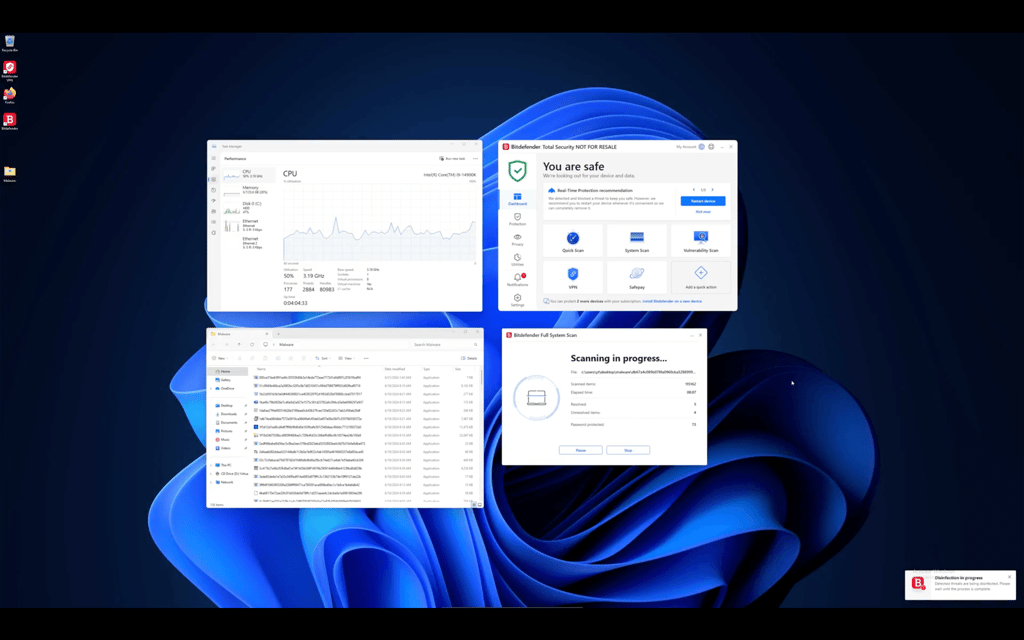
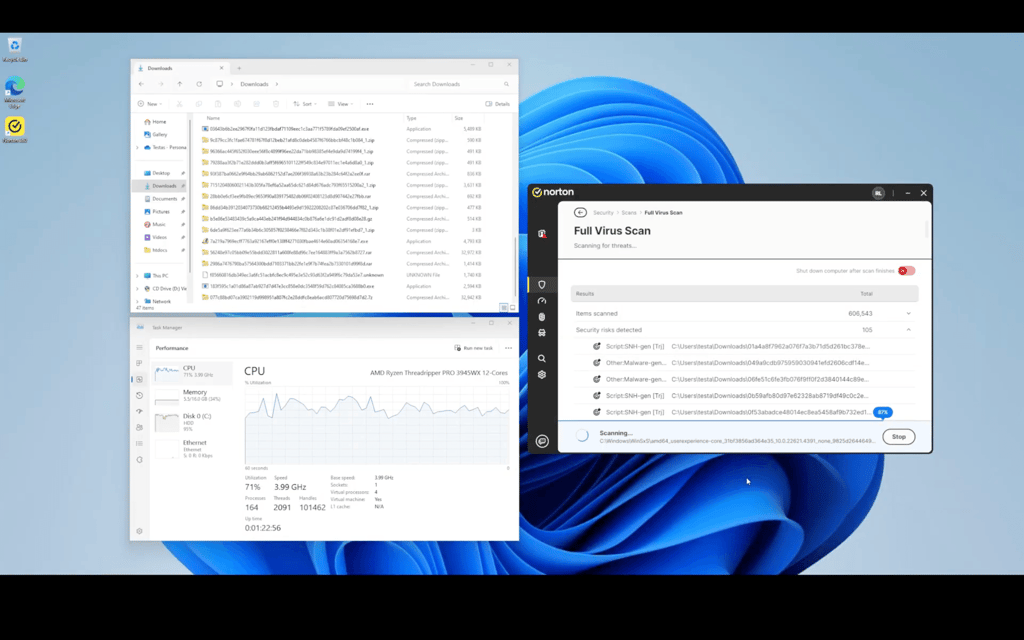
Scan results were mixed as well: Bitdefender finished the quick scan faster but had a 0% detection rate compared with Norton’s 59.33%, while Norton wrapped up the full scan more quickly but had a lower detection rate than Bitdefender.

User reviews and brand reputation
To see how user opinions have changed over time, I reviewed the most recent Trustpilot feedback and Reddit discussions and compared them with reviews from roughly 4 months ago. Recent user reviews create a mixed impression of both providers.
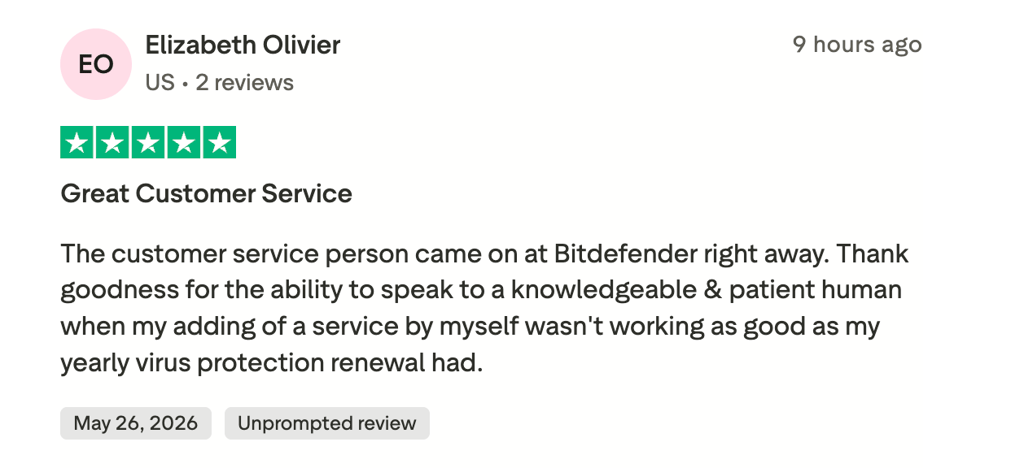
For Bitdefender, users continue to praise its unobtrusive protection, intuitive interface, and excellent customer support, but newer feedback mentions difficulties with subscription management. Several recent Trustpilot reviews report issues, including trouble adding devices to multi-device licenses, confusion about subscription status and package names, and occasional pop-ups promoting additional services.
Reddit users generally regard Bitdefender as a top-tier antivirus with strong malware detection, but performance and pricing remain among the more common concerns.
For Norton 360, recent Trustpilot reviews remain overwhelmingly positive, with users praising the product’s reliability, ease of use, and excellent long-term support. At the same time, the most common complaints haven’t changed much and still center on higher renewal costs, persistent requests for add-ons, and occasional account management issues.
On Reddit, sentiment is far harsher: while a few users acknowledge Norton’s strong detection engine, many criticize it as intrusive, complain about undisableable pop-ups even on paid plans, and condemn its aggressive billing and refund practices.
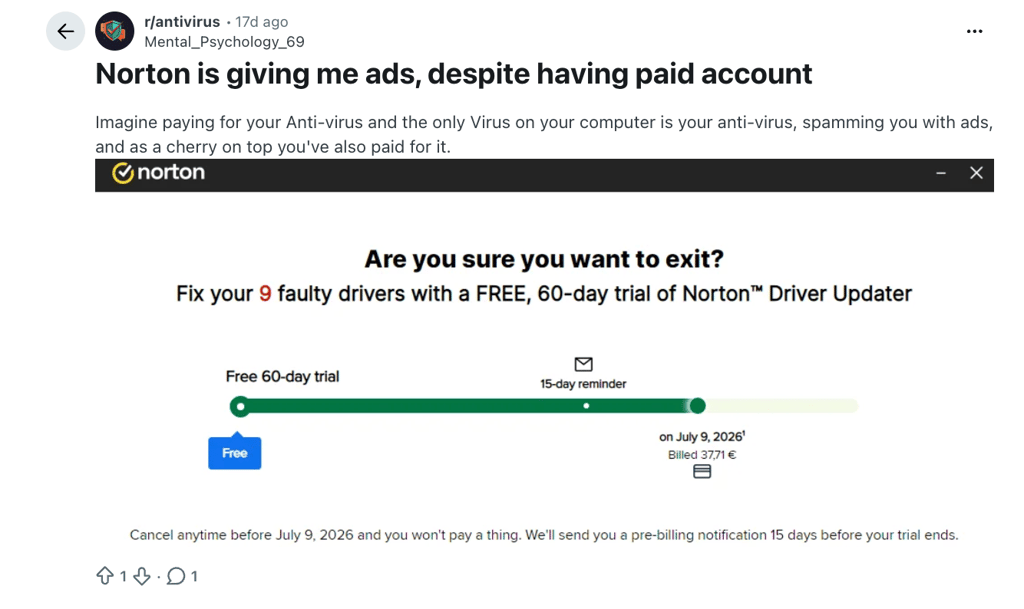
On Trustpilot, Bitdefender’s rating has increased from 3.5/5 to 4.0/5, based on over 10,800 reviews. While most feedback is positive, around 20% are 1-star reviews mentioning renewal pricing, package naming clarity, and issues with multi-device licenses. Norton 360 kept its rating at 4.7/5, with over 73,300 reviews. Most praise its protection and features, though 1-star reviews, which take up around 6%, still point out pop-ups and upselling.
According to our evaluation of the best antivirus software and user reviews across multiple platforms, Norton 360 and Bitdefender average scores are 4.475 and 4.35 out of 5, respectively. These numbers show that both providers are trusted by users, with Norton slightly ahead in popularity.
Customer support
When it comes to customer support, both Bitdefender and Norton 360 appear equal and provide multiple support channels. Here’s what kind of assistance you can get from both.
| Bitdefender | Norton 360 | |
| ✅ Yes | ❌ No | |
| 24/7 live chat | ✅ Yes | ✅ Yes |
| Phone line | ✅ Yes | ✅ Yes |
| Social support | ✅ Yes | ✅ Yes |
While Norton provides chat, phone, social media support, and a user community, it does not offer email support or a ticket request form – an issue some customers have also highlighted in forums. Since Norton is a paid-only service, the queue times aren't long, so you can reach out to a customer support agent quickly.
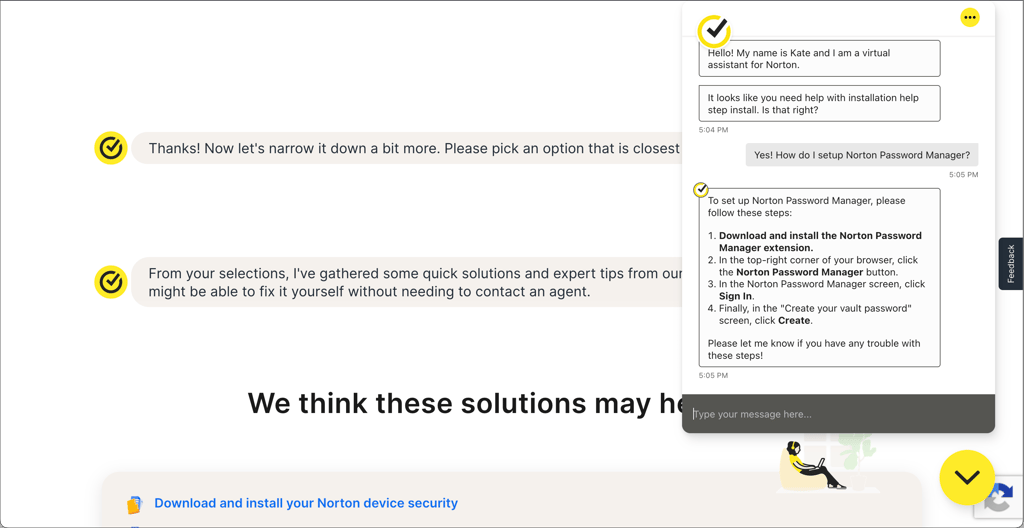
When I tested Norton 360's live chat option, I found the experience to be quick and easy. I was first connected to an AI assistant but could reach an agent in under a minute, and the response was professional and helpful.
Bitdefender offers customer support even to the free plan users, which is quite a unique benefit. You can contact Bitdefender’s customer support team via live chat, phone, or email. You can also find the FAQ and other guides on the official support page.
I tested Bitdefender’s live chat support and found that the wait times are similar to those of Norton. So, with either option, you won't be left alone if something doesn't work as it should.
Video review
If you want to see how Norton and Bitdefender compare side by side in video format, a full breakdown is included right below.
Final verdict: both are solid choices, but Bitdefender comes out ahead
Overall, Bitdefender is the stronger pick for 2026, as it’s generally more affordable, offers a free version, and showed superior detection rates in our in-house tests and excellent lab results. Out of six categories, Bitdefender leads in pricing and both our in-house and independent lab tests, Norton wins in PC performance, while ease of use and customer support are tied. Still, both are strong choices – your decision should come down to which features matter most, whether it’s Bitdefender’s top-tier security or Norton’s broader feature set.
FAQ
Is Bitdefender or Norton better?
Bitdefender is better than Norton 360. Both providers are reliable options, but Bitdefender offers better value for users focused on core protection, especially with its lower entry price and solid free Windows plan.
Does Norton 360 offer a free trial?
Norton 360 offers a 7-day free trial, but it asks for your payment details, so you have to be careful about canceling the subscription in time. That said, there’s a 60-day money-back guarantee you can use as well.
What are the downsides of Norton 360?
Norton 360’s downsides are its higher cost, renewal prices, and intrusive pop-ups even on paid plans, compared to more affordable competitors like Bitdefender. Some features, such as LifeLock identity protection, are also limited by region and only available in higher-tier plans.
Is Bitdefender really the best antivirus?
Bitdefender is one of the best antivirus solutions, especially for malware detection and system performance. It consistently scores highly in independent lab tests and offers a strong free plan. However, many advanced features, such as an unlimited VPN and password manager, are locked behind its more expensive plans, so it may not be the best fit for everyone.