Best VPN for Android for 2026
Our in-house cybersecurity experts and journalists, renowned for major reports like The Mother of All Breaches, conduct transparent, unbiased VPN testing and in-depth analysis.
With 750+ articles crafted based on real-world research, we empower readers to make informed purchasing decisions through first-hand expertise.
Learn more

Smartphones now handle almost everything, from banking and shopping to social media and work apps. On Android devices, your internet provider, advertisers, and even hackers on public WiFi can track your activity. A reliable VPN helps protect you by masking your IP address, encrypting traffic with AES 256 encryption, and preventing DNS or IP leaks.
Many people choose a free VPN on Android, but free services often lack a strict no logs policy, strong encryption protocols like WireGuard or OpenVPN, and proper leak protection. Some even expose users to malware or data collection risks. If you care about privacy and security, a premium VPN offers far better protection and performance.
At Cybernews, we have tested VPNs for over five years. For this guide, I evaluated leading providers based on Android app quality, speed, kill switch reliability, server coverage, and overall security. Below are my top 6 VPNs for Android.
Top 6 best VPNs for Android
- NordVPN – best VPN for Android in 2026 overall
- Surfshark – budget-friendly VPN for Android
- Proton VPN – Android VPN with a focus on privacy
- IPVanish – reliable Android VPN with unlimited connections
- ExpressVPN – premium VPN for Android
- Hide.me – basic free VPN for Android


We spare no effort to test the products & their features. All information is gathered by our in-house research team & fact-checked by our team of experts. Discover the ins and outs of our testing procedures.
Based on our tests, NordVPN is the top choice for Android users
After using NordVPN on Android during our tests, it’s clear that NordVPN is the best VPN to use on Android. With high speeds, strong encryption, and a user-friendly app, NordVPN is ideal to use on the go. Most importantly, during our in-house tests, it easily bypassed geo-restrictions and unblocked international content.
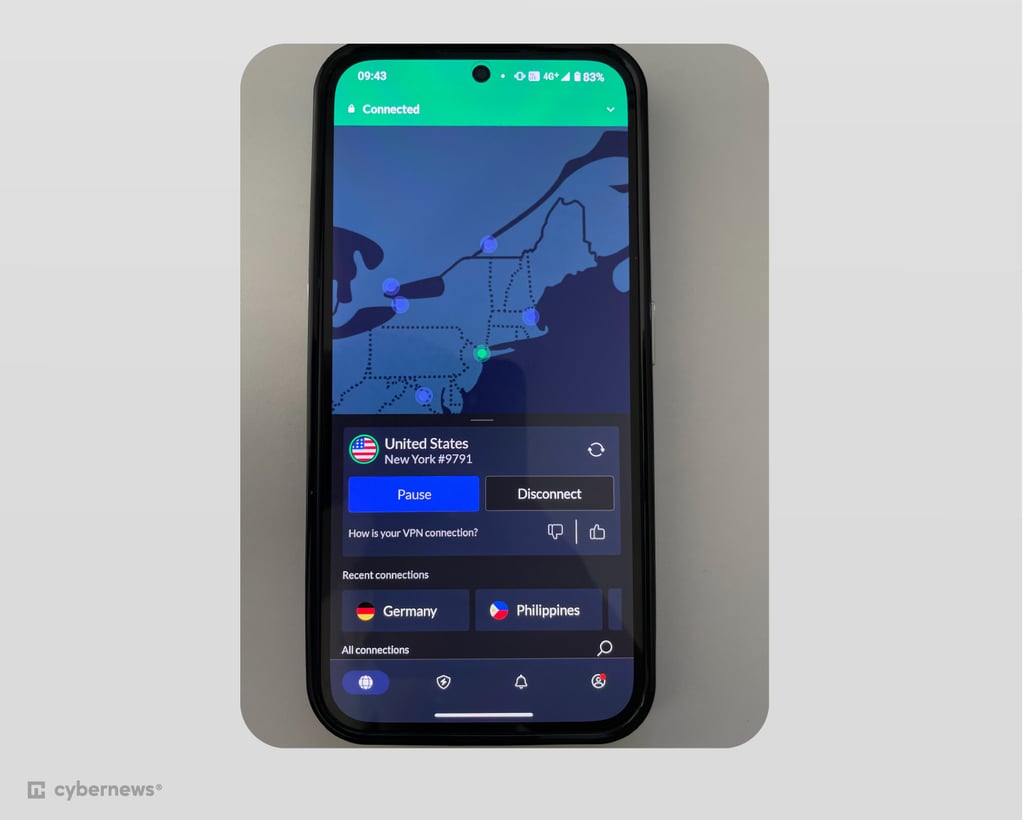
If you’re looking for more budget-friendly options, Surfshark offers an affordable VPN service without compromising on app performance and overall speeds. Proton VPN and Hide.me are excellent choices for those looking for a free and secure option.
Here’s a short overview of the best VPNs for Android.
| NordVPN | Surfshark VPN | Proton VPN | |
| ⭐ Rating: | 4.9★★★★★ | 4.7★★★★★ | 4.5★★★★★ |
| 🥇 Overall rank: | #1 out of #41 | #2 out of #41 | #3 out of #41 |
| 🖥️ Servers: | Thousands of servers in 225 locations | 4,500 servers in 100 countries | 20,700 servers in 149 countries |
| 📖 No logs policy: | No logs | No logs | No logs |
| 💵 Price: | From $3.49/month | From $2.49/month | From $2.99/month |
| 🔥 Coupons: | NordVPN coupon 75% OFF | Surfshark coupon 85% OFF | Proton VPN coupon 70% OFF |
| 🔒 VPN protocols: | OpenVPN, WireGuard (NordLynx), NordWhisper | WireGuard, OpenVPN, IKEv2 | WireGuard, OpenVPN, IKEv2/IPsec |
| 🍿 Streaming services: | Netflix, Hulu, BBC iPlayer, Disney+, and more | Netflix, Disney+, Amazon Prime Video, Hulu, and more | Netflix, BBC iPlayer, YouTube, HBO Max, Disney+ |
| 🖥️ Platforms: | Windows, macOS, Linux, Android, iOS | Windows, macOS, Linux, Android, iOS | Windows, macOS, Linux, Android, iOS |
| 📥 Simultaneous connections: | 10 | Unlimited | 10 |
| 💁🏻 Support: | Knowledge base, FAQs, email, 24/7 live chat | Knowledge base, 24/7 live chat, email support | Guides, FAQs, support tickets, subreddit |
Best Android VPN apps for 2026 – detailed list
If you’re looking for a VPN to protect you from tracking, stop ISP throttling, unblock geo-restricted content, and keep your online activities private, check out our top VPN apps for Android phones with their specifications compared side by side.
1. NordVPN – overall best VPN for Android for 2026

| Rating: | |
| Supported platforms: | Windows, macOS, Linux, Android, iOS |
| Servers: | 8,000+ servers in 149 countries |
| Simultaneous connections: | 10 |
| Current deal: | Get 75% OFF NordVPN + 3 months free |
Why I chose NordVPN
NordVPN is my top pick for Android thanks to its excellent performance in tests and easy-to-use app. It also unlocks every major streaming platform, making it a solid all-around choice. I managed to access Netflix, Disney Plus, Hulu, and BBC iPlayer, with little to no buffering.
My experience with NordVPN
What NordVPN impressed me the most with, are its security and privacy features. It uses industry-standard AES-256 encryption, and enforces a strict no-logs policy, which has undergone six independent audits, with the latest in December 2025 by Deloitte. It also further guarantees privacy through a very reliable kill switch, which kept my data safe with no leaks whenever I encountered connection problems.
On top of that, NordVPN adds Call Protection specifically for Android, which helps block scam calls globally and flags suspicious links or messages before you interact with them.
NordVPN’s security didn’t compromise its speed, either. NordVPN retained an average of 87.78% of its download speed during our tests, making it one of the fastest VPNs on the market. This, along with its 59.18% upload speed retention is more than enough for day-to-day Android use.
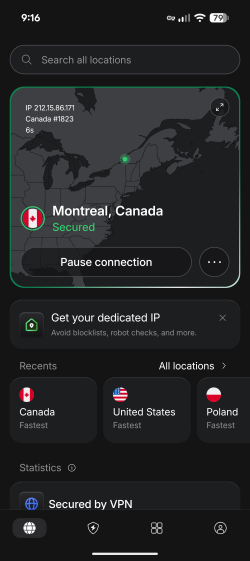
Our NordVPN review showed that the app itself is very simple to use and practical. Split tunneling allowed me to set the VPN to only work with certain apps, like Netflix or my browser. The one issue I really saw with NordVPN was that the app did get pretty slow on older devices. I also enjoyed its next-gen antivirus (formerly Threat Protection), which blocked malicious and phishing domains, as well as some of the more annoying ads. Unfortunately, it didn’t provide the malware protection the feature provides on desktop.
Streaming-wise, NordVPN offers 8,000+ servers in 149 countries, and was by far the most reliable VPN for streaming on the list, unlocking virtually every streaming service I tried during my tests.
Who should pick NordVPN
With impeccable speed and overall performance, NordVPN is ideal for those who regularly watch TV shows and movies on their Android devices. For a reasonable price of $3.49/month, you’ll get a robust VPN, but I recommend the Complete package, which includes a comprehensive cybersecurity suite with a password manager for $4.49/month.
2. Surfshark – budget-friendly VPN for Android

| Rating: | |
| Supported platforms: | Windows, macOS, Linux, Android, iOS |
| Servers: | 4,500+ servers in 100 countries |
| Simultaneous connections: | Unlimited |
| Current deal: | Now up to 85% OFF Surfshark + 3 months FREE |
Why I chose Surfshark
Surfshark is one of my other top picks for Android, thanks to its security, reliability, unlimited simultaneous connections, and very low price. What’s better, you can get it even cheaper by using Surfshark promo code “OFFCN”.
My experience with Surfshark
Surfshark offers an audited no-logs policy, along with its CleanWeb feature which will protect your device from ads, trackers, phishing websites, and malware. I felt really secure when using Surfshark, which was strengthened by its brand new self-healing Everlink feature, which kept my connection stable and secure at all times.
Speed-wise, Surfshark is one of the fastest products we have tested. During our Surfshark review it scored an impressive 84.42% download and 52.26% upload speed retention. These results made using Surfshark on Android very easy, letting me stream and browse without any slowdowns.
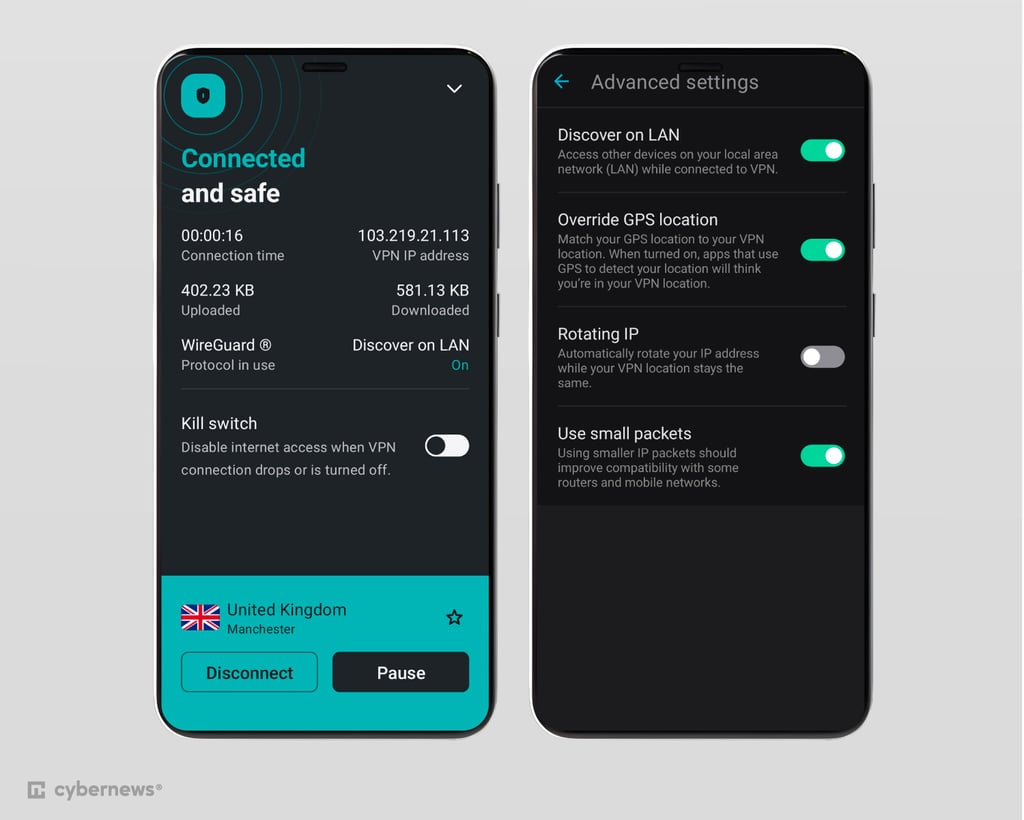
The app itself is also very easy to use. The interface is clean, and connecting to a VPN server or accessing settings only takes a few taps. A feature I particularly enjoyed was GPS override, which allows you to not just spoof your IP address, but your GPS location too, getting through even the toughest geo-blocks.
This reliability is helped by Surfshark’s fleet of 4,500+ servers in 100 countries. While it’s smaller than NordVPN’s, it’s definitely enough for day-to-day Android use, and I had no trouble connecting to various streaming websites thanks to its server obfuscation technology.
Who should pick Surfshark
At just $2.49/month, Surfshark is the top pick for anyone who wants to protect an unlimited number of devices with one subscription without spending too much. In addition, its GPS override feature makes it a great VPN for streaming on Android.
3. Proton VPN – privacy-focused VPN for Android

| Rating: | |
| Supported platforms: | Windows, macOS, Linux, Android, iOS |
| Servers: | 20,700+ servers in 149 countries |
| Simultaneous connections: | 10 |
| Current deal: | Get up to 70% OFF Proton VPN |
Why I chose Proton VPN
I picked Proton VPN because of its affordable pricing, reliable speeds, and industry-leading privacy features. What’s more, Proton VPN is also my pick for the best free Android VPN, offering basic VPN functionalities without impacting your privacy.
My experience with Proton VPN
The first thing that became obvious when I launched Proton VPN was its focus on privacy. It is based in the privacy-friendly Switzerland and offers specialized Secure Core servers, which filter your traffic to make it harder to monitor your VPN activity.
Speed-wise, Proton VPN is on par with other top VPNs. During our Proton VPN review, it retained 83.22% of the original download speed and 58.9% of the upload speed. That was more than enough to guarantee reliable streaming and day-to-day browsing on Android.
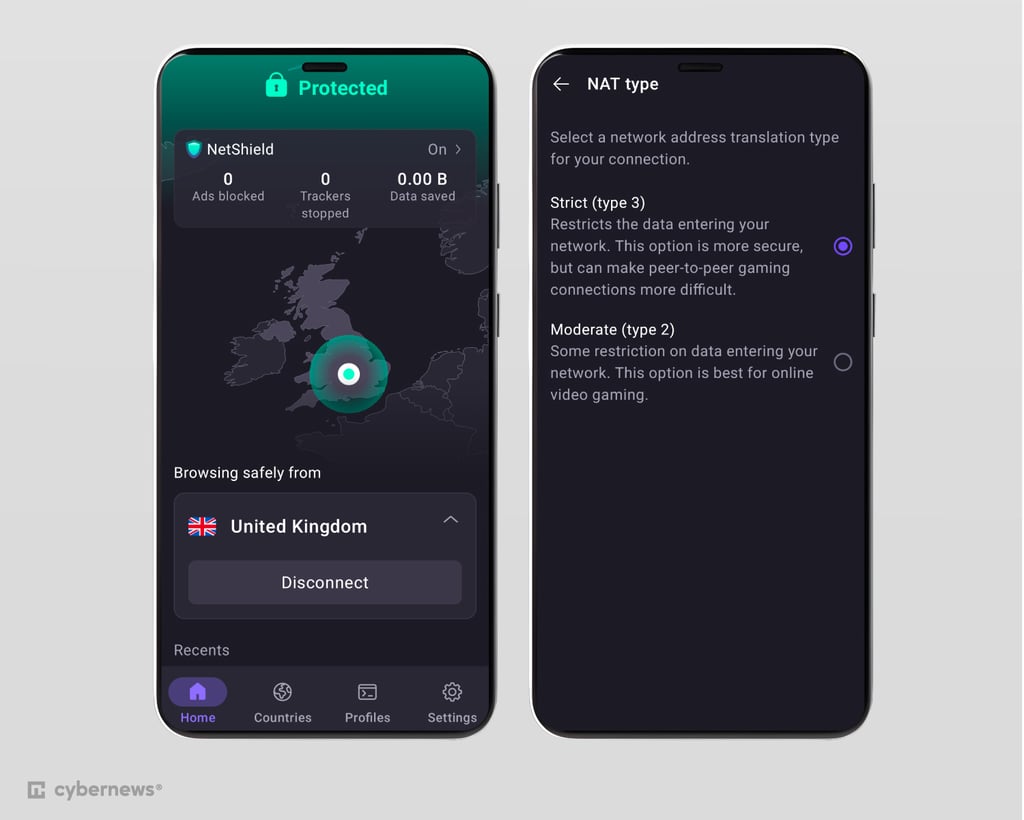
Proton also offers P2P-optimized servers, as well as NetShield, a malware, tracker, and ad blocker. Unfortunately, while it does block a lot of ads, it doesn’t work on YouTube ads on Android.
Proton’s streaming performance was very reliable, thanks to its massive network of over 20,700 servers in 149 countries. Even if a given server didn’t work, switching to another one usually solved the issue, giving me access to most streaming sites.
Feature-wise, Proton VPN is oriented around enhancing privacy. It includes all of the essential VPN features and is one of the few VPNs that support port forwarding. However, this feature is only available on Windows and Linux devices. The Android app isn’t as visually pleasing as NordVPN’s or Surfshark’s, but it does its job. I had no issues navigating the app, finding specialized servers, or modifying the settings.
Who should pick Proton VPN
If you’re concerned about privacy but have a tight budget, Proton VPN is the best free VPN for Android. The provider’s free version will cover all of your basic privacy needs, but it may not work for streaming or torrenting. In that case, I recommend the $2.99/month paid version, which also comes with the NetShield malware and ad blocker.
4. IPVanish – basic VPN for Android with unlimited devices

| Rating: | |
| Supported platforms: | Windows, macOS, Linux, Android, iOS |
| Servers: | 3,400+ servers in 112 countries |
| Simultaneous connections: | Unlimited |
| Current deal: | Now up to 83% OFF IPVanish |
Why I chose IPVanish
IPVanish is an affordable, security-focused Android VPN with basic functionalities. It doesn’t offer many additional features, but it offers excellent speeds and reliability, and will add an extra layer of security to your Android smartphone.
My experience with IPVanish
IPVanish is what I consider to be a no-nonsense VPN. Focusing on core features, the only non-standard feature is a very useful Threat Protection suite which protected my Android device well from malware, trackers, and ads. However, despite using AES-256 encryption and offering an audited no-logs policy, the fact that IPVanish is based in the US is a bit concerning. It may expose some of your data to government institutions due to its participation in surveillance alliances.
Speed-wise, IPVanish is the fastest VPN on our list. During our IPVanish speed tests, it retained 88.78% of download speed and 51.98% of upload speed. This is an excellent result that should guarantee blazing-fast Android speeds.
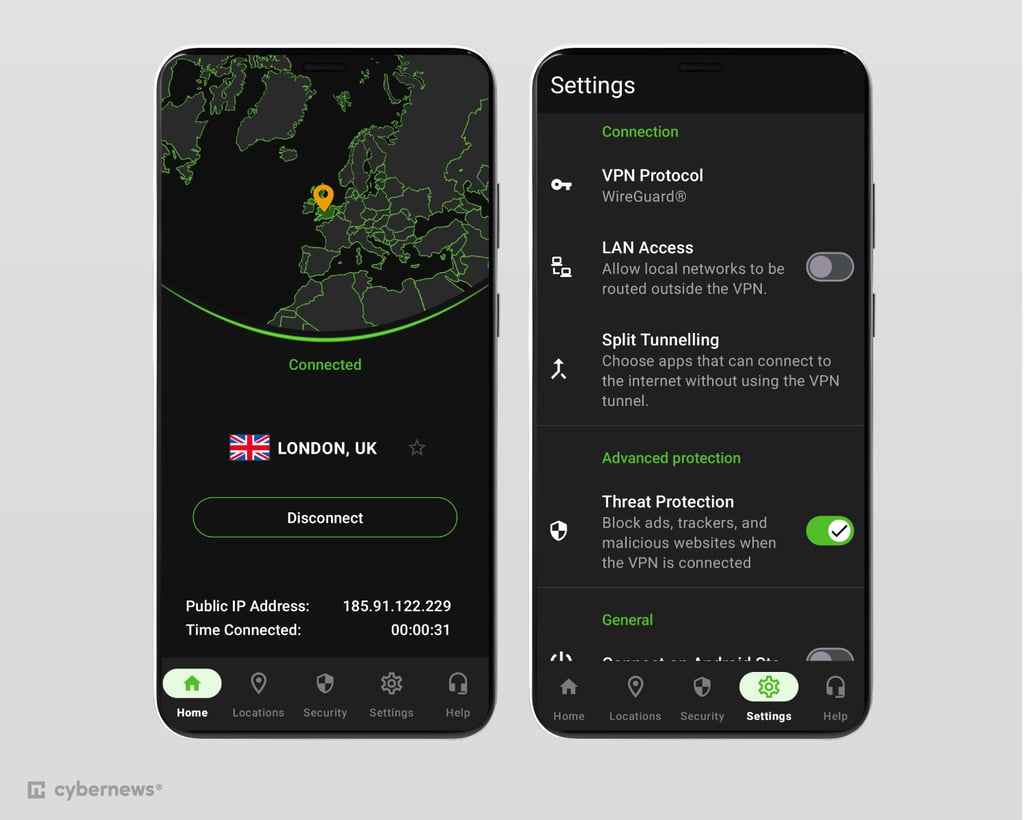
Unblocking streaming platforms wasn’t a problem, despite IPVanish boasting a lower server count than NordVPN or Proton VPN at 3,400+ servers in 112 countries. I managed to access basically every larger platform like Netflix or Disney+ without any issues.
As for features, IPVanish takes a laid-back approach and includes VPN essentials like auto-connect, a kill switch, and split tunneling. Unfortunately, I couldn’t set up domain-specific split-tunneling. What I liked was that you can connect to double- VPN and obfuscated servers. I liked its unique On Demand feature, which allows you to set rules for your VPN connection, giving you more control over your VPN on Android. The app itself is also simple to use, and I appreciated the fact that it supported Android 5.1, making it great for older devices.
Who should pick IPVanish
IPVanish is a great pick for Android users looking for a fast and affordable VPN. At just $2.49/month, IPVanish is perfect for those who need basic protection without extra privacy features like NordVPN, Surfshark, or Proton VPN offer.
5. ExpressVPN – highly secure VPN for Android

| Rating: | |
| Supported platforms: | Windows, macOS, Linux, Android, iOS |
| Servers: | Undisclosed number of servers in 113 countries |
| Simultaneous connections: | 14 |
| Current deal: | Now up to 80% OFF ExpressVPN + 4 months FREE |
Why I chose ExpressVPN
I picked ExpressVPN due to its premium, privacy-oriented features along with high-speed performance, excellent unblocking capabilities, and robust Android app. Despite its features, it also remains one of the most user-friendly Android VPNs.
My experience with ExpressVPN
ExpressVPN provides high-quality protection along with an online security suite that features an ad blocker, identity protection tools, and a password manager. It employs the industry-standard AES-256 encryption algorithm, had overall 23 third-party audits, and has passed my DNS leak tests without any issues. It also uses RAM-only servers providing additional privacy and security.
Unlike every other VPN on this list, ExpressVPN doesn’t disclose the exact number of servers it has. However, we know that these servers span across 113 countries, and during my ExpressVPN tests, I didn’t have trouble accessing any streaming websites.
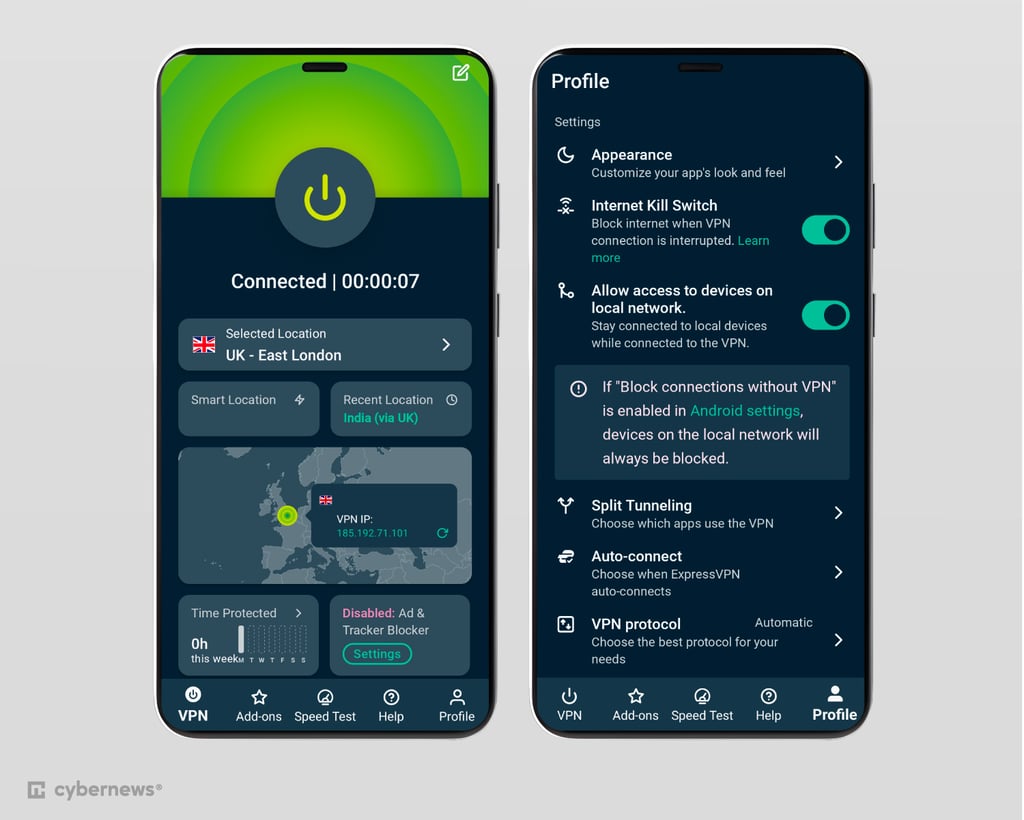
In terms of user interface, the apps are modern and easy to use across all devices, including Android. All of the features you’ll find on its desktop version are available on the Android app, including a password generator. You can now even run a speed test and view VPN usage stats directly in the app. It’s also by far the most customizable app on the list, letting you change the theme and app icon. While there aren’t any Android-exclusive features, recent updates have made the app feel more tailored and powerful.
Who should pick ExpressVPN
ExpressVPN’s pricing starts at $2.99/month. It’s ideal for those who want a lightweight VPN and air-tight daily security.
6. Hide.me – reliable and minimalist free Android VPN

| Rating: | |
| Supported platforms: | Windows, Mac, Linux, Android, and iOS |
| Servers: | Undisclosed number of servers in 91 locations |
| Simultaneous connections: | 10 |
| Current deal: | Get Hide.me VPN, now 73% OFF + 2 months FREE |
Why I chose Hide.me
Hide.me is a safe free Android VPN that prioritises user privacy and anonymity. While its free version is limited, allowing you to choose from only 8 server locations, it’s a good tool if you need a free VPN that protects your data.
My experience with Hide.me
Hide.me utilizes industry-standard AES-256 encryption and a no-logs policy that was independently audited in 2024. Unlike other providers on the list, hide.me doesn’t offer much in terms of security beyond the basics, although it does feature an ad blocker for some added privacy.
During my speed testing, hide.me retained 60% of the initial internet speed on average, making it the weakest VPN on the list. However, this should be enough for basic streaming and browsing on Android. The free version also limits hide.me’s speed further, making it far less useful.

Hide.me has an average server fleet that consists of servers in 91 locations. However, with its free version, I was limited to 8 server locations. The streaming performance of the free version wasn’t the most reliable, but I didn’t have any trouble with the paid version.
Hide.me Android version’s user interface is minimalistic, so most of the prompts are borrowed from default Android elements. It features all the VPN basics, including a kill switch and split tunneling.
During Hide.me tests, the most frustrating part of my experience was the app disconnecting from the VPN server every time I closed it. This can be a problem, especially if you’re on a slower device, or like me, you have a tendency to regularly shut down all the apps on your device.
Who should pick Hide.me
As a free VPN, Hide.me is a great choice for those who are on a tight budget but don’t want to compromise on their privacy and anonymity. It also offers paid services, with an affordable starting price of $2.69/month.
How we tested the best VPNs for Android
Here at Cybernews, we follow a comprehensive VPN testing process. To find the best VPNs for Androids, I started by collaborating with our research team and evaluating more than 20 VPNs. Then, I selected the top 6 for further testing. These VPN apps were tested on Google Pixel 9, running on Android 14. Here’s what we considered:
- Speed and performance (25%). Our research team tested the internet download and upload speed loss for each provider. I added the VPNs with the best results.
-
Security (20%). I looked for advanced security measures such as a kill switch, split tunneling, and more. We also performed DNS and IP leak tests.

- Android-specific features (20%). Many VPNs don’t offer the same features on mobile apps. I looked for VPNs that offer the essential features and more on Android apps.
- Geo-unblocking for streaming(17%). One of the main reasons why people use VPNs is for streaming. Our research team checked how well each VPN unblocks geo-restricted content on Android devices.
- Plans and pricing (10%). VPNs should be accessible to everyone. I added VPNs that offer an excellent price-to-value ratio.
- Compatibility (8%). I selected VPNs that support both the latest and older Android versions.
Why should I use an Android VPN on my phone?
You should use a VPN on your Android phone, especially if you’re concerned about privacy.
It’s particularly useful on public Wi-Fi, which is often not secured. Connecting to a VPN server before joining a public network makes it much more difficult for cybercriminals on the same network to access your sensitive information.
In addition, if you’ve noticed speed drops on your home network, your internet service provider may be throttling your internet connection. Connecting to a VPN on your Android can help you stop ISP throttling. VPN hides your internet traffic from your ISP, so it won’t be able to distinguish what you’re doing.
Besides privacy and security reasons, using a VPN on your Android can help you bypass geo-restrictions. It opens the doors to international content that’s locked to a specific region, such as international Netflix libraries.
How to install a VPN on an Android phone
Before you install a VPN on your phone, you need to consider where you’ll buy your subscription. There are two options: go to Google Play and install the app first, or go to the official website, for example NordVPN's and purchase the plan there. One of the main advantages of going to the app store is that you can try out the VPN service completely for free, as most VPN services include a free trial for Android devices.
Please note that you’ll be subject to Google Play’s terms of service, but the 30-day money-back guarantee still applies.
Do we recommend a free VPN for Android?
Using a free VPN is better than using no VPN, therefore we recommend free VPN services. However, free VPNs from unknown sources can be risky. That’s why we recommend reputable providers, like Proton VPN or Hide.me. Using a trusted free VPN will add to your safety online, but if you want full protection, it’s best to choose a premium VPN provider. I recommend NordVPN, as it’s not only affordable but also offers exceptional security and great performance.
Video review
Check out the video below if you’d rather watch than read about the best VPN for Android. It highlights the top options, their key features, and what makes each one a great choice.
Final thoughts
NordVPN is the best VPN app for Android due to its strong security, fast speeds, and ability to unblock all major streaming platforms.
It also offers a simple, reliable app that's easy to use on any Android device.
That said, other options are worth considering. Surfshark, for example, includes a kill switch on Android – something NordVPN lacks. Proton VPN stands out as a great free choice for users on a tight budget. Each provider has its own strengths, so it's worth comparing them to see which one fits your needs best.
FAQ
How to choose the best Android VPN?
When choosing the best Android VPN, check user and independent lab reviews, compatibility with older Android versions, how intuitive the Android app is, and advanced security features. If your primary concern is streaming, choose a VPN with a massive server network, such as NordVPN.
What does a VPN do on Android?
A VPN on Android increases online privacy, adds an extra layer of security, and allows you to access geo-restricted content. It can even improve your internet connection if your ISP is throttling your internet speed. Plus, it’s a great way to add an additional layer of security when connecting to public Wi-Fi.
Can I use VPN on older devices?
Yes, you can use a VPN on older Android devices, such as old Samsung phones. However, it all depends on the VPN service provider since not all VPN apps support older Android versions. If you have an older device, I recommend using Surfshark. It’s one of the few VPN providers that supports the oldest Android version, starting from Android 5.0 and up.
Does Samsung have a built-in VPN?
No, Samsung doesn’t have a built-in VPN. However, it has a Samsung Secure Wi-Fi feature, which encrypts some of your internet traffic, but doesn’t have all the functionalities of a VPN. So, if you want the benefits of using a VPN, like enhanced privacy and the ability to unblock geo-restricted content, you’ll have to go for a third-party VPN app, like NordVPN or Surfshark.
Can an Android VPN help with streaming?
Yes, using a VPN on your Android can help you unblock geo-restricted content on Netflix, Disney+, Max, and other popular streaming platforms.