Mullvad vs NordVPN: which VPN is better?
Our in-house cybersecurity experts and journalists, renowned for major reports like The Mother of All Breaches, conduct transparent, unbiased VPN testing and in-depth analysis.
With 750+ articles crafted based on real-world research, we empower readers to make informed purchasing decisions through first-hand expertise.
Learn more
NordVPN is a feature-rich, user-friendly option with broad appeal, while Mullvad focuses on privacy and anonymity above all else. Each has clear strengths, making the choice depend on what you value most in a VPN.
To create this NordVPN vs Mullvad comparison, I evaluated both services based on key factors like security, privacy policies, performance, features, and overall ease of use. I also considered real-world usability to highlight how each provider performs in everyday scenarios.
Read on to discover how these two VPNs compare in detail and which one is the better fit for your needs.
NordVPN vs Mullvad VPN: overview
NordVPN stands out as a high-performance, feature-rich provider that often ranks amongst the top VPNs, while Mullvad takes a minimalist, privacy-first approach. NordVPN focuses on speed, advanced security tools, and extra features, whereas Mullvad prioritizes anonymity and simplicity, even allowing account creation without an email.
| NordVPN | Mullvad VPN | |
| ⭐ Rating: | ||
| 🥇 Overall rank: | #1 out of #41 | #15 out of #41 |
| 🖥️ Servers: | Thousands of servers in 225 locations | 580+ servers in 50 countries |
| 📖 No logs policy: | No logs | No logs |
| 💵 Price: | From $3.49/month | From $5.00/month |
| 🔥 Coupons: | NordVPN coupon 75% OFF | Cybernews VPN Coupons |
| 🔒 VPN protocols: | OpenVPN, NordLynx, NordWhisper | WireGuard |
| 🍿 Streaming services: | Netflix, Hulu, BBC iPlayer, Disney+, and more | Netflix, Hulu, Disney+, and BBC iPlayer |
| 🖥️ Platforms: | Windows, macOS, Linux, Android, iOS | Windows, macOS, Linux, Android, iOS |
| 📥 Simultaneous connections: | 10 | 5 |
| 💁🏻 Support: | Knowledge base, email, 24/7 live chat | Knowledge base, email |





We spare no effort to test the products & their features. All information is gathered by our in-house research team & fact-checked by our team of experts. Discover the ins and outs of our testing procedures.
Recent Updates
Key differences between NordVPN and Mullvad
NordVPN and Mullvad take very different approaches to VPN services. NordVPN focuses on performance, features, and versatility, while Mullvad prioritizes privacy and simplicity. Your choice depends on what you value most in a VPN.
Choose NordVPN if:
- You want top-tier speed and performance. NordVPN’s NordLynx protocol consistently delivers faster speeds than standard WireGuard setups, making it a better choice for streaming, gaming, and large downloads.
- You need wide server coverage. With thousands of servers across far more countries, NordVPN gives you better access to global content and more stable connections.
- You want more features and flexibility. NordVPN includes advanced tools like next-gen antivirus, Meshnet, Double VPN, and more subscription tiers, so you can tailor the service to your needs.
- You use multiple or diverse devices. It supports more simultaneous connections and works across a wider range of platforms, including smart TVs and routers.
For a deeper dive into its features, check out our comprehensive NordVPN review.
Choose Mullvad if:
- Privacy and anonymity are your top priorities. Mullvad lets you create an account without an email address and minimizes data collection, making it one of the most privacy-focused VPNs available.
- You prefer simple, transparent pricing. Its flat monthly rate is straightforward and ideal if you don’t want long-term commitments or tiered plans.
- You value a minimal, no-frills experience. Mullvad avoids feature overload and focuses on core VPN functionality with tools like Multihop and Shadowsocks.
- You want a privacy-first ecosystem. Extras like the Mullvad Browser are designed specifically to enhance anonymity rather than convenience or entertainment.
For an honest breakdown of pros and cons, visit our Mullvad review.
Speed, performance, and streaming
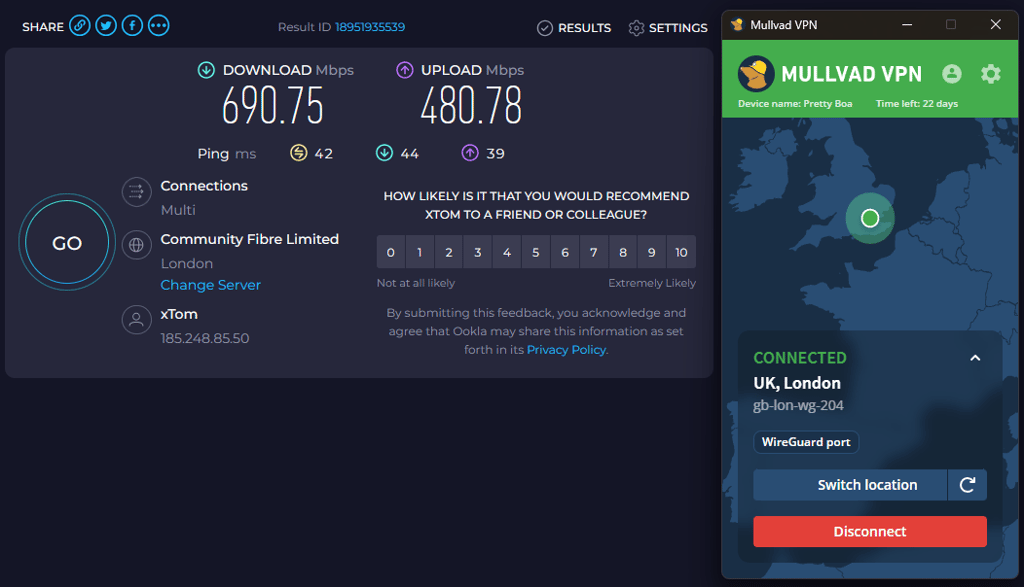
VPN speed performance depends on multiple variables, one of which is the tunneling protocol. NordVPN’s fastest protocol is its proprietary NordLynx, while Mullvad’s speediest option is WireGuard. We tested the two providers' fastest protocols across various countries to see which one is faster overall.
- Baseline: 1 ms/900Mbps download/900Mbps upload
| NordLynx/WireGuard | NordVPN | Mullvad VPN |
| Download average | 783.9Mbps | 684.8Mbps |
| Upload average | 286.1Mbps | 250.3Mbps |
| Ping average | 127ms | 150ms |
As you can see, NordVPN was faster than Mullvad on average in terms of upload and download speeds. That said, Mullvad VPN wasn't too far behind NordVPN, which I was pleasantly surprised by.
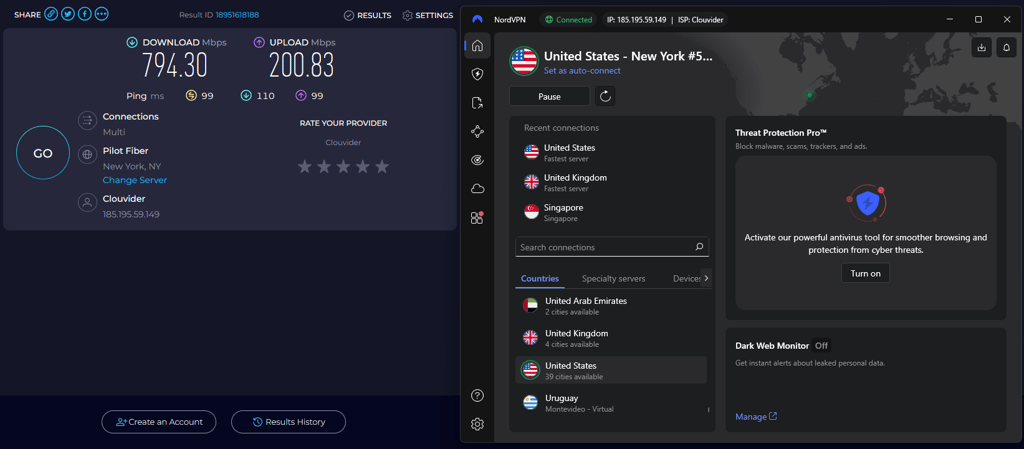
Overall, both VPNs are very fast with their modern tunneling protocols. However, NordVPN’s worldwide server network, which can accommodate more traffic and allow users to find optimal servers for their needs, clearly delivers better results.
Netflix and streaming performance
Unblocking foreign streaming content is a popular VPN use case. Simply connect to a server in another country, open the streaming service, and you’ll see movies and TV shows usually unavailable in your country. However, while the process sounds simple, VPNs don’t always work with streaming services, necessitating some hands-on testing.
| Platform | NordVPN | Mullvad VPN |
| Netflix | ✅ Yes | ❌ No |
| BBC iPlayer | ✅ Yes | ❌ No |
| YouTube | ✅ Yes | ✅ Yes |
| Hulu | ✅ Yes | ❌ No |
| HBO Max | ✅ Yes | ❌ No |
| Amazon Prime Video | ✅ Yes | ❌ No |
If you look at the table above, you can probably see that NordVPN is excellent at unblocking various popular streaming platforms. I had no problems watching Netflix US and other libraries and accessing BBC iPlayer, Max, or Hulu.
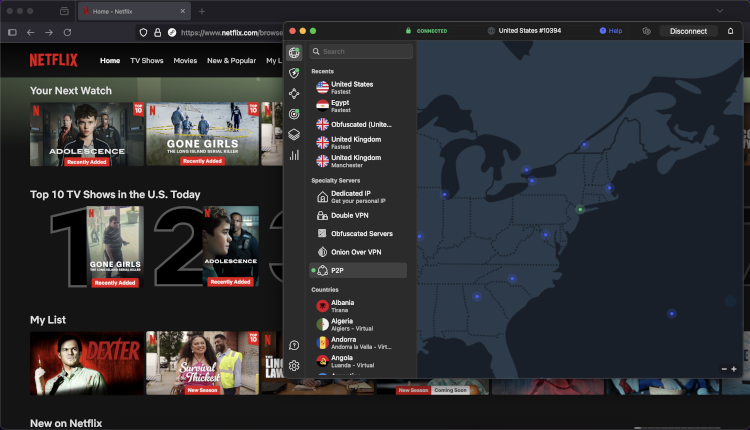
Additionally, NordVPN has a beneficial Smart DNS technology that allows you to unblock content on devices that don’t even support VPN apps. So, you can easily set it up and watch your favorite shows on your smart TV with friends and family.
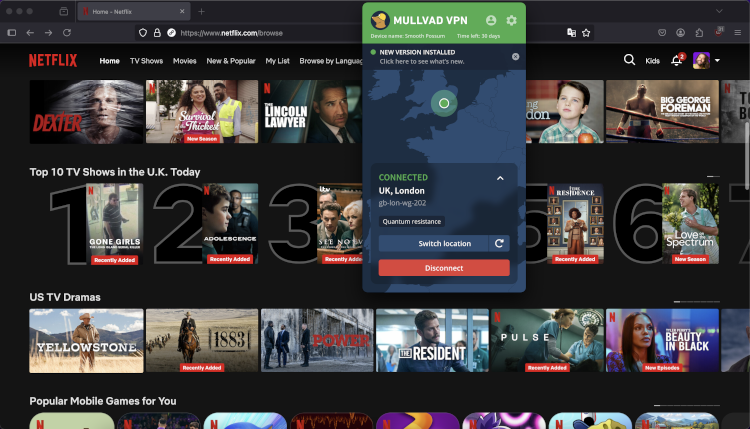
In contrast, Mullvad has delivered underwhelming streaming results even after multiple tests. We managed to unblock region-specific videos on YouTube, but that’s about it. Streaming platforms like Netflix, Max, and Disney+ did not budge to Mullvad’s servers. I think these subpar results are because Mullvad doesn’t have any technology similar to NordVPN’s SmartPlay or a vast server fleet that has enough different IP addresses.
Torrenting
Mullvad and NordVPN both support torrenting. The main difference between the two is that NordVPN has dedicated P2P servers that are optimized specifically for torrenting. Additionally, if you start torrenting with NordVPN on a regular server and get detected, it automatically connects to the specialty server to ensure your protection. So, you get terrific speeds and security at the same time.
Even though Mullvad doesn’t have dedicated P2P servers, it claims all of its servers are P2P friendly. I have tested both VPNs, and the results are great – good connection speeds and no throttling.
Mullvad vs NordVPN price comparison
NordVPN offers multiple subscription options where lengthier commitments grant more significant discounts. Conversely, Mullvad offers a single flat monthly rate regardless of the subscription duration, meaning its pricing structure is unique in the VPN industry.
| Plan | NordVPN | Mullvad VPN |
| One month | $14.99/month | $5.00/month |
| One year | $5.49/month | $5.00/month |
| Two years | $3.49/month | $5.00/month |
| Current deal | Get 75% OFF NordVPN + 3 months free | Get Mullvad today! |
- Note. Pricing was last checked in October 2026.
NordVPN has multiple subscription options. The cheapest is Basic, which costs $14.99/month when paid monthly, $5.49/month when paid annually, and $3.49/month when committing to the two-year plan. With this plan, you get the VPN and its essential features, such as split tunneling and Meshnet. Other subscription options are Complete and Prime, which unlock numerous extra cybersecurity perks like next-gen antivirus (formerly Threat Protection), NordPass, and NordLocker.
With Mullvad, you must pay $5.00/month for as long as you use the service. It doesn’t have any other pricing plans. Additionally, it’s important to mention that the payments are made in Euros (€5.00/month) as it’s the only currency it accepts.
When comparing the pricing plans, Mullvad VPN is cheaper than NordVPN only if you want to use the services for a single month. However, if you’re looking for a long-term plan, both 1-year and 2-year NordVPN subscriptions cost less.

Server network
NordVPN offers 8,000+ servers in 149 countries, thus outshining Mullvad’s network of 580+ servers across 50 countries. Regarding similarities, both providers utilize RAM-only technology to ensure user data can’t be stored for the long term.
| NordVPN | Mullvad VPN | |
| Servers | 8,000 | 580 |
| Countries (total) | 149 | 50 |
| RAM servers | ✅ Yes | ✅ Yes |
| Specialty servers | ✅ Yes (Double VPN, Onion over VPN, P2P, obfuscated) | ✅ Yes (Multihop) |
NordVPN also has specialty servers, such as dedicated IP, obfuscated, double VPN, P2P, and onion over VPN servers. Each of them are optimized for a specific activity. For example, its obfuscated servers help to bypass restrictions in extreme censorship cases. Meanwhile, Mullvad includes Multihop specialty servers, although you have to enable them separately in the settings menu.
Features
Both VPNs have the essential attributes, like split tunneling and an in-built ad blocker, which you get with the subscription.
However, NordVPN goes the extra mile to improve user experience and provides additional features, like dark web monitoring, specialty servers, and SmartPlay. These extras add value to the overall service, and I would definitely call it a winner.
| Features | NordVPN | Mullvad |
| Double VPN | ✅ Yes | ✅ Yes |
| Dedicated IP | ✅Yes* | ❌ No |
| Tor over VPN | ✅ Yes (Onion over VPN) | ✅ Yes |
| Split tunneling | ✅ Yes | ✅ Yes |
| Stealth VPN | ✅ Yes (Obfuscated servers) | ✅ Yes (Shadowsocks) |
| Web filters | ✅ Yes (next-gen antivirus)* | ✅ Yes |
| Meshnet | ✅ Yes | ❌ No |
| Data breach monitoring | ✅ Yes | ❌ No |
| Invisibility on LAN | ✅ Yes | ❌ No |
| Cyber protection | ✅ Yes* | ❌ No |
The asterisk (*) near some names indicates features not included in the provider’s introductory subscription plan (NordVPN’s Basic). If you need those perks, you must subscribe to the appropriate plan. I’ll mention the necessary plan when discussing the features separately below.
Double VPN
NordVPN and Mullvad allow users to route their traffic through multiple servers if they want extra encryption and security. The two providers include this feature with all of their dedicated apps.
With NordVPN, you can do so using the Double VPN server category. One downside is that you can’t manually choose your preferred exit and entry locations.
Meanwhile, Mullvad’s Multihop feature must be enabled separately in the settings menu. Once enabled, you can choose your entry and exit location when choosing a VPN server.
Dedicated IP
As of March 2026, only NordVPN offers dedicated IPs to its customers, while Mullvad doesn’t. A dedicated IP grants an IP address that’s exclusive to you, thus making it less likely to get blocked for overuse.
NordVPN customers can pick IP addresses from 28 countries, some of which are further segmented by cities. The feature’s price depends on your chosen subscription duration and will vary between $8.99/month and $4.19/month. You can also get a dedicated IP directly through the NordVPN browser extension, which adds more flexibility for users who would like to only use a VPN on certain websites.
Dark web monitoring and scam protection
NordVPN includes a Dark Web Monitoring feature that scans leaked databases and the dark web for your personal data and alerts you if your credentials are exposed. It has also been expanded with Dark Web Monitor Pro, which tracks additional sensitive details like credit cards, national IDs, Social Security numbers, and phone numbers, while also providing more detailed breach alerts. You can even check for leaks through a web scanner widget without opening the app.
On Android, NordVPN goes even further with Call Protection, which helps block scam and spam calls, and a Scam Checker tool that identifies suspicious links and messages before you interact with them. Mullvad does not offer any dark web monitoring or scam protection features, which leaves a noticeable gap in this area.
Tor over VPN
Tor over VPN is an excellent feature that is available from both providers. It combines the benefits of a VPN with the Onion Network for greatly improved anonymity. Your connection will travel through multiple independent Tor nodes while encrypted by the VPN. However, this process significantly impacts connection performance.
You can enable this perk using NordVPN’s Onion over VPN server category, which is available on all of the provider’s apps. On the other hand, Mullvad users must configure this feature manually, which can be daunting to less tech-savvy users.
Split tunneling
Split tunneling is designed to help you manage which apps should use the VPN connection and which shouldn’t. It’s helpful if you want to watch geo-restricted content on a streaming platform and download files simultaneously without any loss of speed.

NordVPN offers split tunneling for Windows, Android, and Android TV users. The Windows app allows you to enable or disable the VPN for specific applications. So, they’d connect to the VPN automatically every time you open the app.
Its Android version, on the other hand, offers an inverse split tunneling feature – you can only disable the VPN for individual apps. What’s worth mentioning is that this attribute is currently not available for macOS, Linux, and iOS users.
Mullvad VPN also supports split tunneling, so you can select which apps to exclude from the VPN connection and route them directly through your ISP. However, it’s only available on Windows, Linux, macOS, and Android.
Stealth VPN
The term Stealth VPN usually describes features that mask your VPN traffic and make it appear as typical HTTPS traffic. It’s an excellent tool for bypassing network restrictions in places with heavy internet censorship.
NordVPN provides this benefit with its obfuscated server category, while Mullvad combines Shadowsocks proxies with its protocol to achieve the same results. Both providers are solid options for circumventing common network restrictions like DPI (deep packet inspection).
Web filters
NordVPN and Mullvad have web filtering capabilities to improve user security when browsing the web. NordVPN includes a next-gen antivirus and DNS filtering, while Mullvad has a DNS content blocker.
Next-gen antivirus is a powerful feature that can scan your device for malware, block ads, trackers, and prevent you from visiting malicious websites. Unfortunately, the feature’s complete version isn’t included in NordVPN’s cheapest Basic plan, which is pretty disappointing. At least those customers get DNS filtering.
Conversely, Mullvad includes DNS content blocking capabilities, which restricts domains known for distributing malicious content. You can customize the feature’s filtering scope in the app’s settings menu.
Security overview: Mullvad vs NordVPN
NordVPN and Mullvad prioritize security and include plenty of robust features to grant users solid online protection. Regarding essentials, both providers utilize AES-256 and ChaCha20 encryption and come with reliable kill switches to prevent IP leaks. Moreover, they’ve conducted numerous independent audits to showcase their commitment to transparency.
| Provider | NordVPN | Mullvad |
| Encryption | AES-256-CBC, ChaCha20 | AES-256, ChaCha20 |
| Hash | SHA-512 | SHA-512 |
| RAM servers | ✅ Yes | ✅ Yes |
| Outside Fourteen Eyes jurisdiction | ✅ Yes | ❌ No |
| Independent audits | Audited in December 2025 | Audited in February 2026 |
| Kill switch | ✅ Yes | ✅ Yes |
| DNS leak protection | ✅ Yes | ✅ Yes |
Infrastructure
To ensure security, NordVPN and Mullvad have upgraded many of their servers to run on RAM-only hardware. In simple terms, they don’t use hard drives to store usage logs.
Instead, the servers use volatile memory for operational data, which is completely wiped if the system reboots. Unlike hard drives, RAM-only servers are significantly harder to breach and can be remotely wiped up, initiating a restart if there’s a threat to the security of stored data.
Privacy
Mullvad and NordVPN both use market-leading AES-256 and ChaCha20 encryption. This encryption is known as the golden standard in the industry because it’s immune to brute-force attacks and virtually unbreakable. Thus, your information is always safe from third parties.
Apart from that, NordVPN is located in privacy-friendly Panama, which doesn’t have intrusive legislation. Mullvad, on the other hand, stays in a Fourteen Eyes country, Sweden. Yet, the company takes impressive measures to protect its users’ information.
For example, you can create a Mullvad account completely anonymously, as it doesn’t require your email address and even accepts cash payments. Additionally, both VPNs support cryptocurrency payments if you want an anonymous transaction. Thus, I am really impressed by the efforts of both NordVPN and Mullvad to maintain the highest level of privacy standards.
Independent audits
It’s essential that the VPN services you choose don’t collect your sensitive information. Luckily, Mullvad and NordVPN operate under strict no-log policies to ensure your data is safe. Additionally, both VPNs are examined by independent auditing companies to make sure that their privacy claims are valid.
NordVPN’s no-logs policy has been audited six times as of March 2026. The latest was by Deloitte Audit Lithuania in December 2025. The previous audits were also conducted by Deloitte, as well as PwC (PricewaterhouseCoopers). As far as I know, NordVPN plans to conduct these audits annually.
As for Mullvad, its latest security audit was done in February 2026. This audit was conducted by Assured Security Consultants and it verified that the GotaTun feature is secure.
Platforms, interface, and ease of use
NordVPN and Mullvad have the basics covered regarding device compatibility. Both have feature-rich desktop and mobile apps and a few enticing extras. Speaking of which, NordVPN works with significantly more devices than Mullvad and supports more simultaneous device connections per account. So, if you need a VPN that’s more flexible, NordVPN is the way to go.
| NordVPN | Mullvad VPN | |
| Supported OS | Windows, macOS, Linux, Android, iOS | Windows, macOS, Linux, Android, iOS |
| Browser extensions | Chrome, Firefox, Edge | Firefox |
| Other devices | Routers, Android TVs, Fire devices, tvOS, consoles | Routers, Android TVs, Fire devices |
| Simultaneous connections | 10 | 5 |
Both VPNs have dedicated extensions to help you secure your browsing experience. NordVPN extension is compatible with Firefox and Chrome, while Mullvad only supports Firefox.
Additionally, NordVPN has apps for Android TV, Amazon Fire TV, and Apple’s tvOS. If that isn’t enough, you can set up the service on a router to cover your entire household. Additionally, Smart DNS enables you to unblock content on devices that don’t support VPN apps. On the other hand, Mullvad only works with routers, Android TV, and Fire TV devices.
Desktop apps
NordVPN has very user-friendly desktop applications which are intuitive to use. Windows users get the ability to enjoy all of its features, like split tunneling, kill switch, next-gen antivirus, and Meshnet.
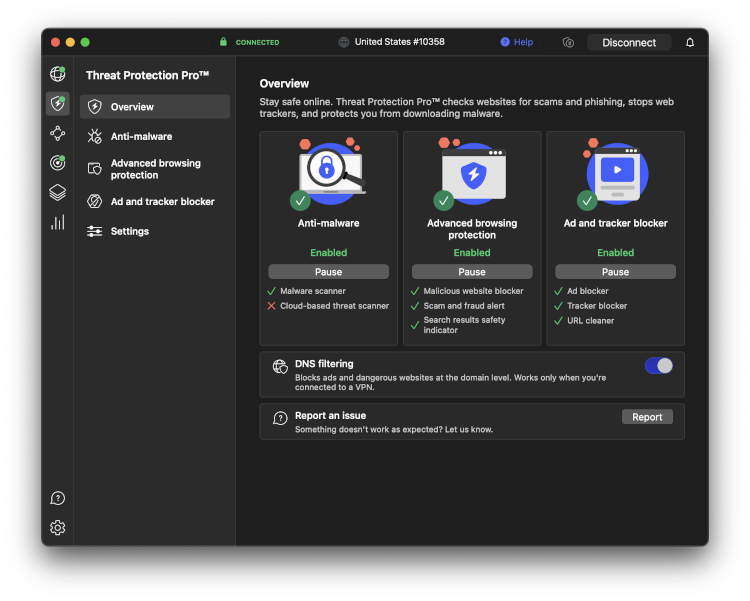
It’s quite common for MacOS users to get a slightly limited version of the VPN. This is mostly because of Apple's strict security regulations. Luckily, the NordVPN Mac version includes the most essential features, like the kill switch, a next-gen antivirus, and Meshent, yet it lacks split tunneling.
Mullvad’s desktop apps are also straightforward to use. You can quickly access Preferences or Settings, as well as select the desired country and server. Similarly to NordVPN, its Windows version is less limited than that of MacOS.

Comparing the VPN desktop apps, I would say that even though they provide pleasant experiences, the interface of Mullvad’s apps seem slightly outdated. They haven’t changed the interface in any way in the last few years. However, this opinion might differ from person to person.
Mobile apps
NordVPN has dedicated apps for iOS and Android devices that are visually identical. Using them is very intuitive – you can quickly enable/disable the VPN connection, choose servers, and access the settings.
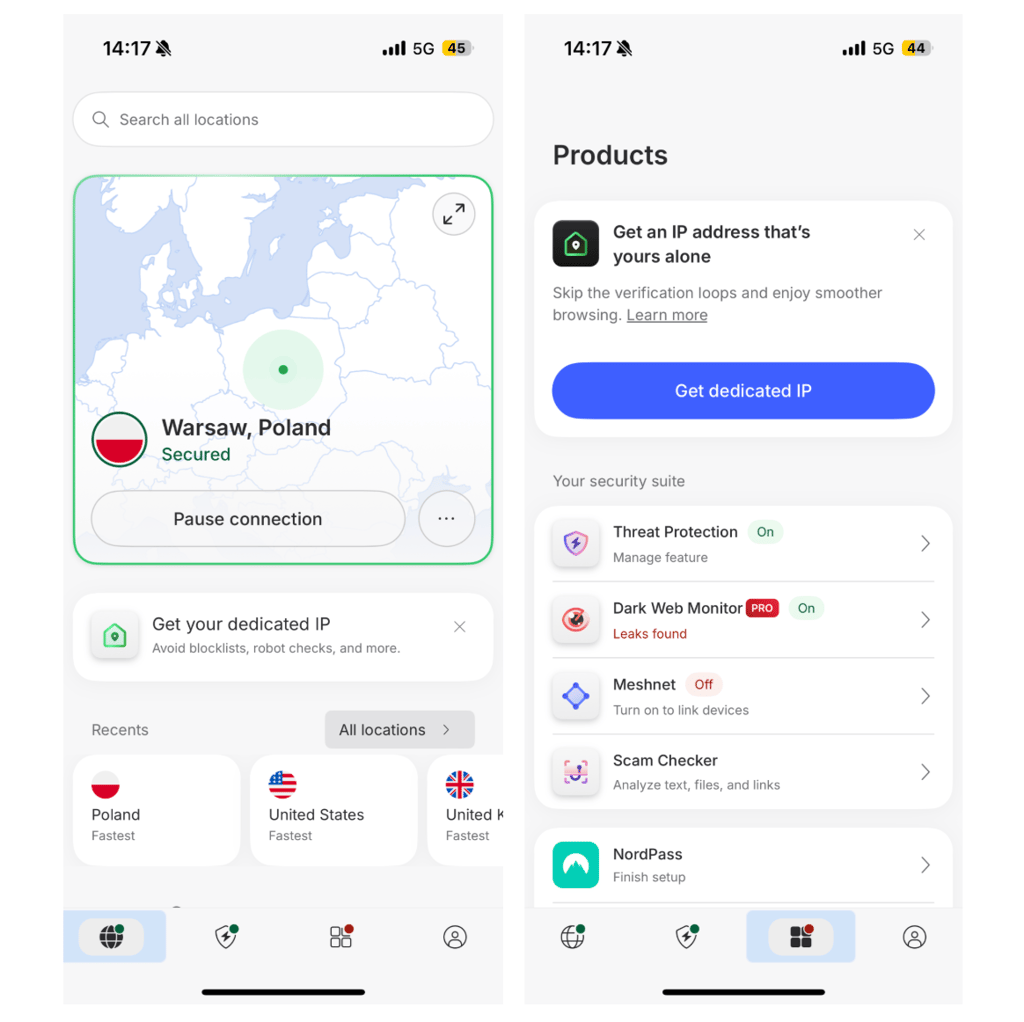
It’s worth mentioning that the iOS version doesn’t support split tunneling and doesn’t have a customizable kill switch. Thankfully, Android and iOS users gain Dark Web Monitoring to be notified quickly about any leaking issues.

Mullvad also supports both operating systems and has user-friendly apps. Even though they’re easy to navigate, I would say that the interface seems slightly outdated, just like the desktop versions. Its iOS version is also limited compared to Android, as you can’t use the split tunneling feature.
Customer support
Excellent customer support is a highly important factor of a premium VPN service. With NordVPN, you have several different methods of getting help.
| Provider | NordVPN | Mullvad |
| 24/7 live chat | ✅ Yes | ❌ No |
| Phone line | ❌ No | ❌ No |
| ✅ Yes | ✅ Yes | |
| Guides | ✅ Yes | ✅ Yes |
NordVPN offers one of the fastest and most popular options among users – 24/7 live chat. You can ask a question and receive a response from a support agent within a few minutes, which is precisely what happened during our latest tests.
If you have a generic question about how to set up the VPN or how to use one of its features, you can find useful how-to guides, articles, and FAQs on its website.
In contrast, Mullvad has fewer customer support options since it's a smaller company. There’s no live chat or phone line to get quick support. Instead, your only options are various FAQs, guides, and a dedicated support email address. We didn’t wait long for an answer, but I think in most cases, finding a guide will be quicker.
Video review
Watch our video review comparing Mullvad and NordVPN, where we break down their features, security, and overall performance to help you decide which VPN is the better choice.
Mullvad vs NordVPN – which one wins?
NordVPN comes out on top for speed, streaming, features, and overall versatility, making it ideal for most users. Mullvad excels in privacy and anonymity, with a unique no-email signup and transparent approach. While both are highly secure, NordVPN’s broader capabilities and better real-world performance make it the stronger all-around choice.
All in all, NordVPN is the winner, especially if you want a fast, feature-rich VPN that works across more use cases.
| Feature | NordVPN | Mullvad VPN | Verdict |
| Pricing | Mullvad offers simple flat pricing, but NordVPN is cheaper long-term and more flexible, making it the better overall value for most users. | ||
| Speed | NordVPN delivers faster speeds thanks to NordLynx and a larger server network, while Mullvad remains solid but slightly behind in performance. | ||
| Privacy | Both providers excel in privacy with strong no-logs policies, but Mullvad stands out with anonymous accounts and minimal data collection. | ||
| Features | NordVPN offers a much richer feature set, including advanced tools and customization, while Mullvad focuses on essential functionality with fewer extras. | ||
| Streaming | NordVPN easily unblocks major streaming platforms, while Mullvad struggles with most services, making NordVPN the clear winner for streaming. | ||
| Torrenting | NordVPN has an edge with dedicated P2P servers and faster speeds, though Mullvad performs well with torrenting across all servers. | ||
| Support | NordVPN provides 24/7 live chat and more support options, while Mullvad relies mainly on email and guides, making NordVPN more accessible. |
FAQ
Is Mullvad VPN better than NordVPN?
No, NordVPN is better than Mullvad VPN since it has more servers, better customer support, unblocks Netflix and other streaming platforms, and has more flexible pricing plans. Even though Mullvad has a relatively decent server fleet, it’s not capable of unblocking popular streaming services and has only one subscription option.
Is Mullvad good for gaming?
Yes, Mullvad is a good VPN for gaming as it supports both WireGuard and OpenVPN (TCP/UDP) tunneling protocols and provides great speeds. So, you can definitely enjoy playing games without throttling.
Is Mullvad better than ExpressVPN?
No, Mullvad is not better than ExpressVPN because it has a smaller server fleet and doesn’t unblock streaming platforms. ExpressVPN offers more security features, better device compatibility, and faster connection speeds.