Bitdefender VPN vs NordVPN: which VPN is better?
Our in-house cybersecurity experts and journalists, renowned for major reports like The Mother of All Breaches, conduct transparent, unbiased VPN testing and in-depth analysis.
With 750+ articles crafted based on real-world research, we empower readers to make informed purchasing decisions through first-hand expertise.
Learn more

At first glance, Bitdefender VPN and NordVPN are entirely different providers. NordVPN is one of the most reliable VPNs on the market, offering a wide range of features and strong privacy protections, while Bitdefender VPN is a simpler option, mainly for those who want basic online security alongside their antivirus.
To compare them fairly, I tested both across speed, streaming, security, privacy, and ease of use. I used the same devices and scenarios for each VPN to see how they perform in real-world conditions, not just on paper.
If you’re deciding which VPN to choose, this breakdown will show you which might be the better fit for your needs.
NordVPN vs Bitdefender VPN: overview
In short, Bitdefender VPN is often cheaper, so it’s a more attractive option for anyone who needs just basic security. However, NordVPN offers significantly better value with faster speeds and thousands more servers for just a few cents more. Here’s how they compare when put side by side:
| NordVPN | Bitdefender VPN | |
| ⭐ Rating: |
4.9★★★★★
|
3.9★★★★★
|
| 🥇 Overall rank: | #1 out of #41 | #13 out of #41 |
| 🖥️ Servers: |
Thousands of servers in 225 locations
|
3,000 servers in 112 countries
|
| 📖 No logs policy: | No logs | No logs |
| 💵 Price: |
From $3.49/month
|
From $2.50/month
|
| 🔥 Coupons: |
NordVPN coupon 75% OFF
| Bitdefender Premium VPN coupon 57% OFF! |
| 🔒 VPN protocols: | OpenVPN, WireGuard (NordLynx), NordWhisper | Catapult Hydra |
| 🍿 Streaming services: | Netflix, Hulu, BBC iPlayer, Disney+, and more | BBC iPlayer, Netflix, Hulu, Disney+ |
| 🖥️ Platforms: | Windows, macOS, Linux, Android, iOS | Windows, macOS, Android, iOS |
| 📥 Simultaneous connections: | 10 | 10 |
| 💁🏻 Support: | Knowledge base, FAQs, email, 24/7 live chat | Knowledge base, FAQs, live chat, email, phone |

Recent Updates
Key differences between NordVPN and Bitdefender VPN
NordVPN and Bitdefender VPN both protect your online activity, but they differ in key ways. NordVPN excels in speed, streaming, and advanced security features, while Bitdefender VPN focuses on simplicity and affordability. Here’s a closer look at who each VPN is best for.
Choose NordVPN if:
- You want top speeds. Its NordLynx protocol and large server network ensure fast and stable connections, ideal for streaming, gaming, or torrenting.
- Privacy is your priority. NordVPN has a strict no-logs policy, strong encryption, and advanced features like Double VPN, Onion over VPN, and next-gen antivirus
- You need global access. NordVPN has 9000+ servers across 130 countries, making it easier to bypass geo-restrictions for content from around the world.
To explore all the details, visit our NordVPN review.
Choose Bitdefender VPN if:
- You prefer simplicity. The VPN is straightforward to set up and use, especially for beginners or those already using Bitdefender security products.
- You want basic protection at a low cost. It’s often included with Bitdefender Antivirus or available as an affordable standalone option.
- Your needs are casual. It’s suitable for browsing, public Wi-Fi protection, and unblocking basic websites without advanced features or a massive server network.
For a complete overview, check our Bitdefender VPN review.
Speed, performance, and streaming
For this NordVPN vs Bitdefender VPN speed comparison, I tested both VPNs in locations where speed data is available for both providers. Below are NordVPN Speed Results
| Location | Download | Upload | Ping |
| Australia | 747.73Mbps | 91.37Mbps | 220ms |
| Japan | 618.56Mbps | 76.20Mbps | 278ms |
| UK | 859.51Mbps | 493.05Mbps | 38ms |
| Canada | 804.79Mbps | 187.61Mbps | 105ms |
In my tests, NordVPN had an average download speed of 757.65Mbps and an average upload speed of 212.56 Mbps.
In the table below, you can see how Bitdefender performed in the same locations.
| Location | Download | Upload | Ping |
| Australia | 675.91Mbps | 88.81Mbps | 223ms |
| Japan | 578.25Mbps | 71.62Mbps | 285ms |
| UK | 824.27Mbps | 514.80Mbps | 37ms |
| US | 762.17Mbps | 199.24Mbps | 98ms |
Bitdefender had an average download speed of 710.65Mbps and an average upload speed of 218.12Mbps.
Overall, NordVPN delivers higher download speeds, making it the better option for streaming and heavy browsing, while Bitdefender VPN is slightly ahead in average upload speed but less consistent across locations.
Streaming performance
Most people get a VPN to watch geo-blocked movies and shows. I tested Bitdefender VPN and NordVPN with various streaming platforms to determine which is actually better for streaming.
| Bitdefender VPN | NordVPN | |
| Netflix | ✅ Yes | ✅ Yes |
| HBO Max | ✅ Yes | ✅ Yes |
| Disney+ | ✅ Yes | ✅ Yes |
| Amazon Prime Video | ✅ Yes | ✅ Yes |
| BBC iPlayer | ✅ Yes | ✅ Yes |
| Hulu | ✅ Yes | ✅ Yes |
| YouTube | ✅ Yes | ✅ Yes |
NordVPN is one of the best VPNs for streaming. This service is almost unbeatable in bypassing geo-blocks imposed by streaming platforms. It unblocks most Netflix libraries (US and UK included), BBC iPlayer, Hulu, YouTube, and other popular streaming services.
While Bitdefender VPN can unblock many popular streaming platforms, some users report inconsistent access to Netflix and others, meaning results may vary depending on the server you choose. On the bright side, the service has improved noticeably – during our 2024 tests, it only managed to unblock BBC iPlayer and YouTube.
Torrenting
Bitdefender VPN and NordVPN both support torrenting, but NordVPN is clearly the stronger option for P2P use. While Bitdefender VPN allows torrenting at acceptable speeds, it lacks specialized tools for secure file sharing.
In contrast, NordVPN offers dedicated P2P servers, a SOCKS5 proxy for faster downloads, and advanced protection features like a reliable kill switch and threat blocking. These additions make NordVPN better suited for frequent or privacy-conscious torrent users, whereas Bitdefender VPN is more appropriate for occasional, low-risk P2P activity.

Plans and value
Regarding pricing, it’s pretty apparent that Bitdefender is less expensive. It includes a cheaper monthly plan, and its yearly subscription costs less per month than NordVPN’s two-year plan. Moreover, NordVPN offers multiple subscription tiers, which will further increase the starting price. On the other hand, you have more flexibility when more plan options are available. Most users will likely choose the Basic plan, which includes just the VPN and its features. Meanwhile, subsequent tiers unlock the next-gen antivirus (formerly Threat Protection), NordPass, NordLocker, and other perks.
| Plan | Bitdefender VPN | NordVPN |
| 1-month | $6.99 | $14.99 |
| 1-year | $2.50/month | $5.49/month |
| 2-year | – | $3.49/month |
However, note that NordVPN sometimes gives you 3 months for free if you buy the longest subscription. Also, the second year of using Bitdefender VPN will cost you $69.99 instead of $34.99.
It’s worth mentioning that Bitdefender VPN has a free 7-day trial you can use on any device. Meanwhile, NordVPN’s 7-day trial can be claimed only on Android devices.
Besides the trials, both services have a 30-day money-back guarantee for evaluating the VPNs without a commitment.

Servers
Even though NordVPN offers more countries and servers than Bitdefender VPN, Bitdefender’s coverage of 3,000 servers and 112 countries is still quite impressive, especially for an antivirus VPN (in comparison, Avast VPN offers only 700 servers in 74 countries).
| Bitdefender VPN | NordVPN | |
| Servers | 3,000 | 8,000 |
| Countries | 112 | 149 |
However, it’s apparent that NordVPN is the clear winner in this category. For starters, NordVPN has more servers overall, covers more countries, and has specialty server options. Secondly, all of the provider’s servers utilize RAM-only technology, meaning any data on the hardware gets deleted when it’s unplugged or rebooted.
Features overview
NordVPN is the clear winner when compared to Bitdefender VPN in terms of features. It not only offers the same features as Bitdefender VPN (split tunneling and auto-connect), but also has a few unique offerings like a malware blocker via the next-gen antivirus and Smart DNS.
Split tunneling
Split tunneling is one of the most useful features a VPN can have, as it allows you to exclude certain apps or websites from the VPN connection. This means you don’t have to turn off the VPN when you need to use a banking website or just want to watch your country’s Netflix.

Bitdefender offers split tunneling on Windows, Android, and iOS applications, and lets you exclude websites and domains.
Meanwhile, NordVPN’s split tunneling feature is available on Windows, Android, Android TV, and browser extensions. You can select whether you’d like to exclude apps or websites.
Auto-connect options
Both Bitdefender VPN and NordVPN offer auto-connect options. With Bitdefender, you can make the VPN turn on automatically in the following cases: on startup, when connected to an unsecured Wi-Fi network, or when using P2P clients (like BitTorrent). Additionally, you can manually select applications and websites whose launch would trigger the VPN to connect to one of its servers.

As for NordVPN, the feature is simpler: the VPN can be automatically launched only when you connect to Wi-Fi. It also allows you to make a list of trusted Wi-Fi networks.
SmartPlay
NordVPN has a useful feature called SmartPlay. It lets you securely watch geo-blocked streaming content, which would otherwise be unavailable. It improves the connection when you try to access blocked content by using an additional pool or IP addresses. SmartPlay helps bypass censorship and access different content worldwide.
Specialty servers
This is yet another feature reserved only for NordVPN users. Aside from its regular server list, NordVPN has a bunch of specialized servers that will come in handy in particular cases:
- Onion over VPN. When using these servers, your connection also goes through the Onion network before reaching the internet, adding an extra layer of security.
- Double VPN. Your connection goes through two VPN servers instead of one. You can find this option when the OpenVPN protocol is selected.
- Obfuscated servers. These servers make your VPN traffic appear like regular traffic, which increases your chances of successfully using a VPN in oppressive countries like China.
- P2P servers. In other words, these are servers for torrenting, which are optimized for P2P traffic.
It’s also worth mentioning that NordVPN allows you to choose the same server every time you connect to the VPN, which means you can use the same IP without the need to buy a dedicated IP address.
Next-gen antivirus
NordVPN’s next-gen antivirus provides an impressive array of cybersecurity benefits. Firstly, it scans your downloaded files to ensure none of them include malware. Moreover, it grants browsing protection to block any malicious websites that distribute malware and other harmful content. Lastly, you can enjoy a more pleasant browsing experience since the feature blocks online ads and trackers. The tool is best equipped for Windows and Mac apps, while mobile apps and browser extensions have weaker variants.

Meanwhile, Bitdefender VPN includes a system-wide ad blocker to remove unwanted advertisements on most apps. It’s a great addition, but not as well-rounded as NordVPN’s offering.
Privacy and security
Security is a crucial aspect of any VPN – you don’t want your private information leaked or sold to third parties. You can be confident that’s the case if a VPN service is based in a privacy-friendly country, has an audited no-logs policy, and has a clean reputation in general. Naturally, you also shouldn’t overlook technical aspects, such as encryption, DNS leak protection, and available tunneling protocols.
Encryption and tunneling protocols
Both Bitdefender VPN and NordVPN use the same encryption cipher – AES-256. Banking websites and even the military use this type of encryption, so you don’t have to worry about its security.
The main difference between NordVPN and Bitdefender VPN lies in tunneling protocols. Bitdefender offers only one protocol, while NordVPN supports multiple.
The protocol used by Bitdefender is called Catapult Hydra, a proprietary tunneling protocol developed by Hotspot Shield. It has won multiple awards for fast speeds, but there isn’t a lot of information about its security. Meanwhile, NordVPN offers the following protocols:
- NordLynx. A proprietary protocol developed by NordVPN, NordLynx is based on WireGuard. For this reason, it’s incredibly fast.
- OpenVPN (TCP/UDP). This protocol is a staple in the VPN world. Keep in mind that the TCP variation is more stable, while the UDP option is faster.
- IKEv2/IPsec. Fast and secure, this tunneling protocol is best used with mobile devices thanks to its stability.
Logging
It’s essential to know what kind of information the VPN service collects about you. It’s also important to take the tool’s country of origin into consideration, as different countries have different data retention laws.
When it comes to Bitdefender, its logging policy isn’t completely spotless. While it promises not to share any of your data with third parties, it still claims to temporarily collect timestamps and the websites visited. This isn’t something I would like to see a VPN do.
In contrast, NordVPN doesn’t collect any logs. Even better – its privacy policy has been independently audited five times by companies like PricewaterhouseCoopers and Deloitte. This gives the service much more credibility regarding user privacy.
Both VPNs are based in privacy-friendly countries. NordVPN is based in Panama, while Bitdefender’s country of origin is Romania.
Kill switch
A kill switch is a security feature that shuts down your internet in case your VPN connection is compromised, for example, if a VPN server suddenly shuts down. This is done to prevent your real IP address from leaking.
So, the kill switch of NordVPN is twofold. You can either choose to disable the internet connection altogether or simply choose certain applications that should close when you get disconnected from the VPN.
Meanwhile, the kill switch of Bitdefender VPN is only system-wide. Also, it failed one of our tests – when VPN background processes were manually disabled, the VPN didn’t shut down the internet connection.
User experience
To test these products, I opted for Bitdefender VPN’s and NordVPN’s Basic plan. I purchased them from the official websites and installed them on my Mac. Both NordVPN and Bitdefender VPN were easy to install, with clear guidelines.
Bitdefender VPN has a clear and intuitive interface. You can find most features available, including split tunneling (but only for websites, not apps) and an ad blocker. However, keep in mind that the macOS version has slightly fewer customization options than Windows. Overall, the app was pretty straightforward and easy to use.
When it comes to NordVPN, I appreciate its simple, minimal, and easy-to-understand interface. All apps – from next-gen antivirus to Meshnet – are cleverly organized, so you won’t have to search far if you need anything. However, I noticed that, similar to Bitdefender VPN, its Windows version is more feature-rich than the macOS one.
In terms of compatibility, NordVPN is compatible with significantly more devices than Bitdefender VPN. Firstly, it works with all popular desktop (Windows, Mac, Linux) and mobile (Android, iOS) operating systems. Meanwhile, Bitdefender VPN only works with Windows, macOS, Android, and iOS. Both services permit 10 simultaneous connections per account, but you can also install NordVPN on routers, browsers, and various home entertainment devices like Android TV and Apple TV. Bitdefender VPN is only available on Android smart TVs and Amazon Fire TV.
| Bitdefender VPN | NordVPN | |
| Supported OS | Windows, macOS, Android, iOS | Windows, macOS, Linux, Android, iOS |
| Other software and devices | Android smart TVs, Amazon Fire TV | Routers, Kodi, Android TV, Amazon Fire TV, Apple TV, gaming consoles, Kindle Fire, Oculus Quest, Apple Vision Pro, Google TV Streamer |
| Browser extensions | – | Chrome, Firefox, Edge |
| Simultaneous connections | 10 | 10 |
Desktop apps
All Bitdefender apps look fairly similar – you won’t see many differences even between desktop and mobile applications, including the shape of the window. I really like the design, especially because of how intuitive the applications are.

So, the Windows app of Bitdefender offers all the features you’ve read about in this article, including split tunneling, auto-connect options, and a kill switch. On the other hand, the macOS version is somewhat lacking, offering no split tunneling or most auto-connect options.
Meanwhile, NordVPN’s Windows and macOS applications are more united. Most of the features, like specialty servers, are still included in the macOS version. In the past, NordVPN had an interactive server list, which I really liked. However, it was replaced by a search bar instead.
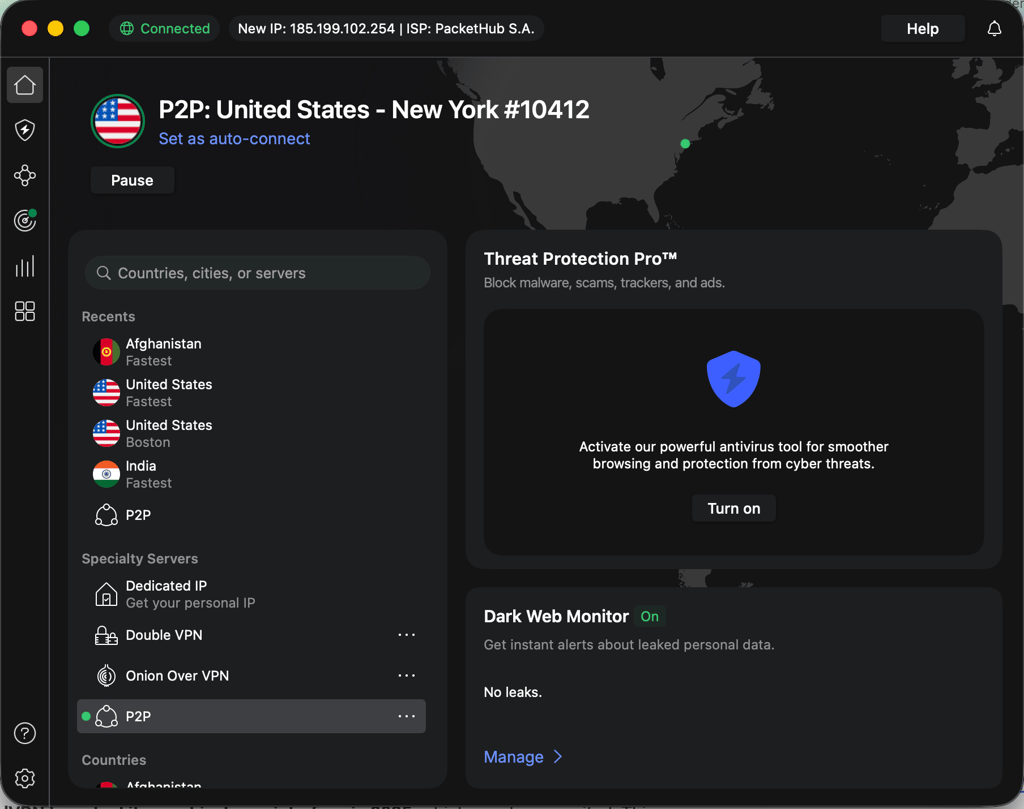
In terms of Linux support, you have a convenient graphical user interface. This will make your safer browsing easier to enjoy, especially compared to the old version of command line terminal.
Mobile apps
The Android app of Bitdefender VPN is pretty similar to its Windows counterpart. It even has an extra feature that blocks local network traffic, making your phone invisible to other users connected to the same Wi-Fi network.
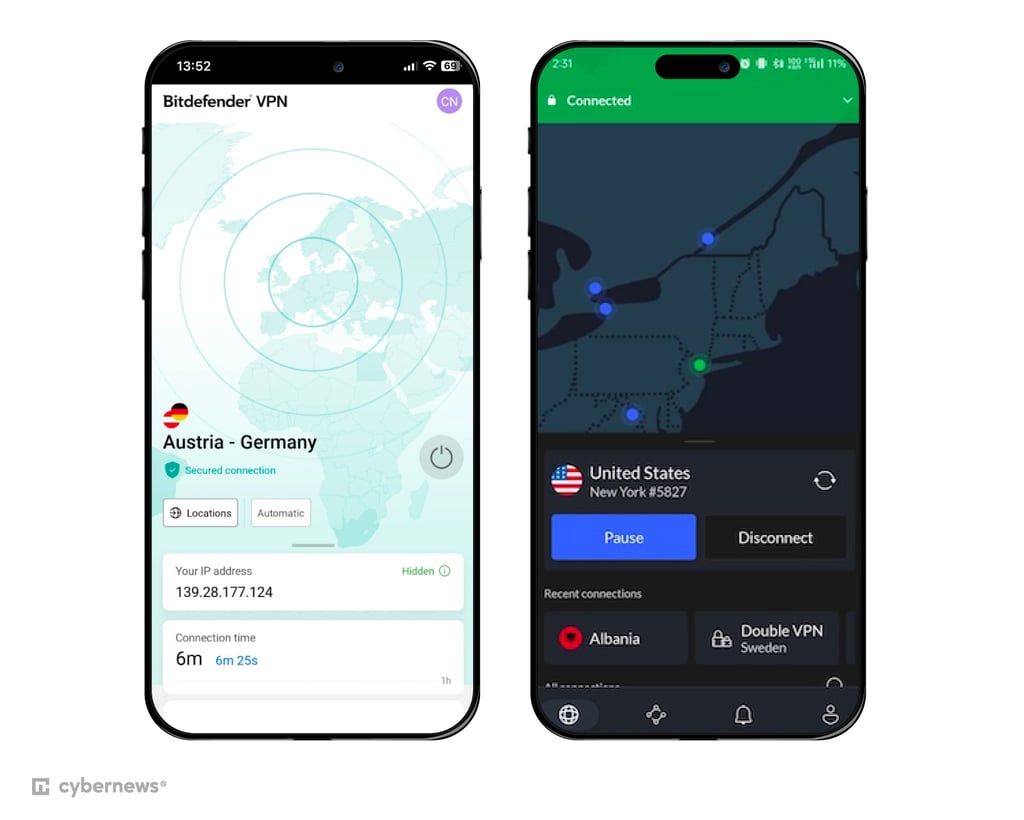
It was nice to learn that Bitdefender’s iOS app also offers a couple of features (usually, VPN apps for iPhone lack in this department). For example, it lets you use split tunneling, but you can only choose websites instead of applications. The app also has a kill switch and has some limited auto-connect options.
NordVPN’s mobile apps are also worth downloading, boasting a user-friendly design. There are some slight differences between the two – the Android application has split tunneling and auto-connect options, while the iOS version doesn't.
Customer support
NordVPN and Bitdefender VPN offer similar customer support options. Both have a 24/7 live chat and a knowledge base filled with FAQs. You also have the option to write an email, no matter which service you use. However, Bitdefender also offers phone support.
| Bitdefender VPN | NordVPN | |
| 24/7 live chat | ✅ Yes | ✅ Yes |
| ✅ Yes | ✅ Yes | |
| Knowledge base | ✅ Yes | ✅ Yes |
| Phone line | ✅ Yes | ❌ No |
Final verdict
Here’s a quick side-by-side comparison of NordVPN and Bitdefender VPN, showing key categories, ratings, and which provider performs better overall.
| Feature | NordVPN | Bitdefender VPN | Verdict |
| Pricing | Bitdefender VPN wins for affordability | ||
| Speed | NordVPN wins for faster and more consistent speeds | ||
| Privacy | NordVPN wins for stronger privacy and audits | ||
| Features | NordVPN wins for more advanced features | ||
| Streaming | NordVPN wins for reliable streaming | ||
| Torrenting | NordVPN wins for P2P support | ||
| Servers | NordVPN wins for global coverage | ||
| Ease of use | NordVPN wins for device compatibility and app design | ||
| Customer support | Tie – both offer solid support, though Bitdefender has a phone line |
FAQ
Is Bitdefender VPN better than NordVPN?
No, NordVPN is actually better than Bitdefender VPN. It offers faster speeds, unblocks more streaming platforms, and includes a wider range of tunneling protocols to choose from. To find out more, read our full NordVPN review.
Is Bitdefender VPN good enough?
Yes, Bitdefender VPN is a solid choice if you only need to unblock basic websites. However, it struggles with streaming services, so keep that in mind if you’re looking to watch Netflix or Hulu.
Does Bitdefender VPN come with antivirus?
Yes, Bitdefender VPN does come with antivirus, but with limitations. If you install Bitdefender Antivirus, the VPN is included by default, though it’s capped at 200MB of daily data. That said, Bitdefender VPN is also available as a standalone app if you don’t want the antivirus suite.