Bitdefender Premium VPN review 2026
Our in-house cybersecurity experts and journalists, renowned for major reports like The Mother of All Breaches, conduct transparent, unbiased VPN testing and in-depth analysis.
With 750+ articles crafted based on real-world research, we empower readers to make informed purchasing decisions through first-hand expertise.
Learn more

Bitdefender Premium VPN is developed by a well-known cybersecurity company. In recent years, it has improved and is no longer just a basic add-on VPN. The service now offers a larger server network, better streaming access, and more stable performance.
This Bitdefender review covers a VPN that now provides over 3,000 servers in more than 112 countries. It includes core features such as a kill switch, split tunneling, and Double Hop. In our recent tests, performance was strong and suitable for browsing and streaming. Compared to earlier versions, it’s also better at bypassing geo-restrictions.
Bitdefender Premium VPN works best for casual users and those already using Bitdefender products. However, it doesn’t support Linux and recently dropped its Catapult Hydra protocol. To evaluate this VPN, I examine its performance, features, pricing, and security to see how it compares today.
Bitdefender Premium VPN at a glance
| ⭐ Rating: | |
| 🥇 Overall rank: | #13 out of #41 |
| 📖 No logs policy: | No logs |
| 💵 Price: | From $2.50/month |
| 🖥️ Servers: | 3,000+ servers in 112 countries |
| 🍿 Streaming services: | BBC iPlayer, Netflix, Hulu, Disney+ |
| 🔥 Coupons: | Bitdefender Premium VPN coupon 57% OFF! |




We spare no effort to test the products & their features. All information is gathered by our in-house research team & fact-checked by our team of experts. Discover the ins and outs of our testing procedures.
Bitdefender VPN pros and cons 2026
Bitdefender Premium VPN offers a secure and reliable experience, especially when bundled with Bitdefender’s antivirus. Though it’s also available as a standalone service. It features simple pricing, a 30-day money-back guarantee, and practical tools like split tunneling and Double Hop for everyday use.
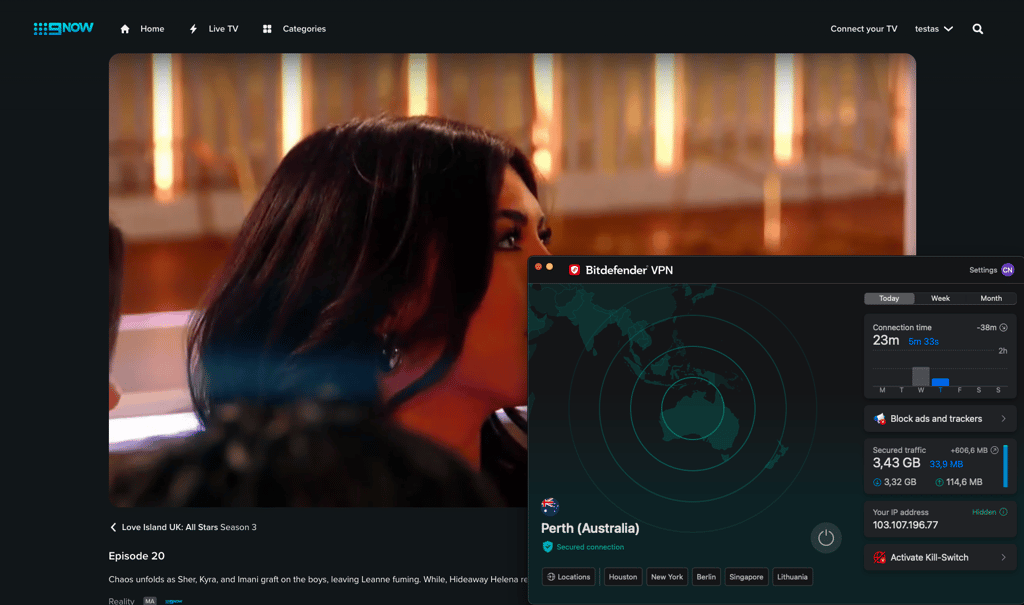
The biggest improvement since earlier testing is streaming reliability. Where it previously struggled with geo-blocked platforms, recent tests show it now consistently unblocks popular streaming services. Performance has also stabilized, with strong download speeds in Ookla tests, making it well-suited for browsing and streaming.
That said, Bitdefender has dropped the Catapult Hydra protocol and still doesn’t offer native Linux support. While clearly improved since the last review, these limitations prevent it from competing with best standalone VPNs.

Recent Updates
Bitdefender Premium VPN review: key takeaways
Bitdefender VPN is a solid choice for users seeking fast speeds, strong security, and seamless streaming, especially when bundled with Bitdefender’s security suites. However, privacy concerns and a lack of advanced features keep it from competing with the very best VPNs:
- Privacy and security – 6/10. Bitdefender VPN uses strong AES-256 encryption and supports reliable protocols (WireGuard, OpenVPN, IPSec/IKEv2). It includes a functional kill switch and double-hop feature for extra security. Additionally, its no-logs policy was independently audited in 2025. However, it lacks anonymous payments, doesn’t stick to RAM-only servers, and has limited leak protection outside Windows.
- Value for money – 7/10. A standalone plan starts at $2.50/month if you commit to a 1-year subscription – and even though this introductory pricing is competitive, renewal rates are higher than the industry average. Bundled plans (with antivirus) offer better overall value.
- Speed and performance – 8/10. In our tests, Bitdefender Premium VPN demonstrated decent speeds, with average speed loss of 29% decrease). This is excellent for streaming, gaming, and torrenting due to high speeds and stable connections. Its double-hop feature can slow speeds but is optional.
- Server network – 8/10. Bitdefender VPN shows recent growth in server locations, now covering over 112 countries, which is twice as many as it offered a year ago.
- Features and functionality – 6/10. This provider offers split tunneling, an ad blocker, an anti-tracker, a kill switch, and double-hop but lacks advanced features like RAM-only servers and comprehensive leak protection. The number of features available doesn’t change depending on the plan you choose.
- Compatibility – 7/10. Bitdefender Premium VPN supports Windows, macOS, Android, and iOS but has no native Linux or router support. It allows up to 10 simultaneous connections and has user-friendly apps with a simple interface.
- Customer support – 7/10. Customer support agents are responsive to basic queries, while the Support page provides helpful documentation, although I think the knowledge base could be more extensive. In my experience, getting to the live agent and handling my request took less than 15 minutes.
Bitdefender Premium VPN pricing and plans 2026
Bitdefender Premium VPN is one of the more affordable VPNs on the market, so it’s best for users with basic privacy needs who don’t want to spend too much on the service. Its pricing beats the industry average for monthly VPN plans – generally around $9.00–$10.00/month – and compares well with budget options. Though ultra-low long-term deals from providers like Surfshark can still be cheaper.
| Version | Monthly price | Annual price |
| Monthly | $6.99/month | $83.88 |
| Yearly | $2.50/month | $29.99 for the first year, $69.99 upon renewal |
For comparison, some competitors like Surfshark offer multi-year plans at rates as low as $2.49/month, while NordVPN’s long-term pricing typically lands around $3.49/month depending on promotions.
If you’d like to try the Bitdefender Premium VPN, there’s a 7-day free trial and a 30-day money-back guarantee. There’s also a limited free version with a daily 200MB cap and no server choice, but it isn’t sufficient for streaming or heavy use. Bitdefender supports payment via major credit cards, PayPal, and wire transfer, but cryptocurrency isn’t accepted.
Overall, Bitdefender Premium VPN is budget-friendly for general privacy and everyday use, though heavy streamers or long-term bargain hunters might find cheaper long-term deals elsewhere.
My experience with Bitdefender Premium VPN: streaming, gaming, and torrenting
Bitdefender Premium VPN aims to cover all the basics, from streaming and torrenting to gaming and everyday browsing. Together with our research team, I tested it across different platforms and real-world scenarios, and the results show a VPN that’s easy to use and generally fast, but with a few clear limitations you should be aware of.
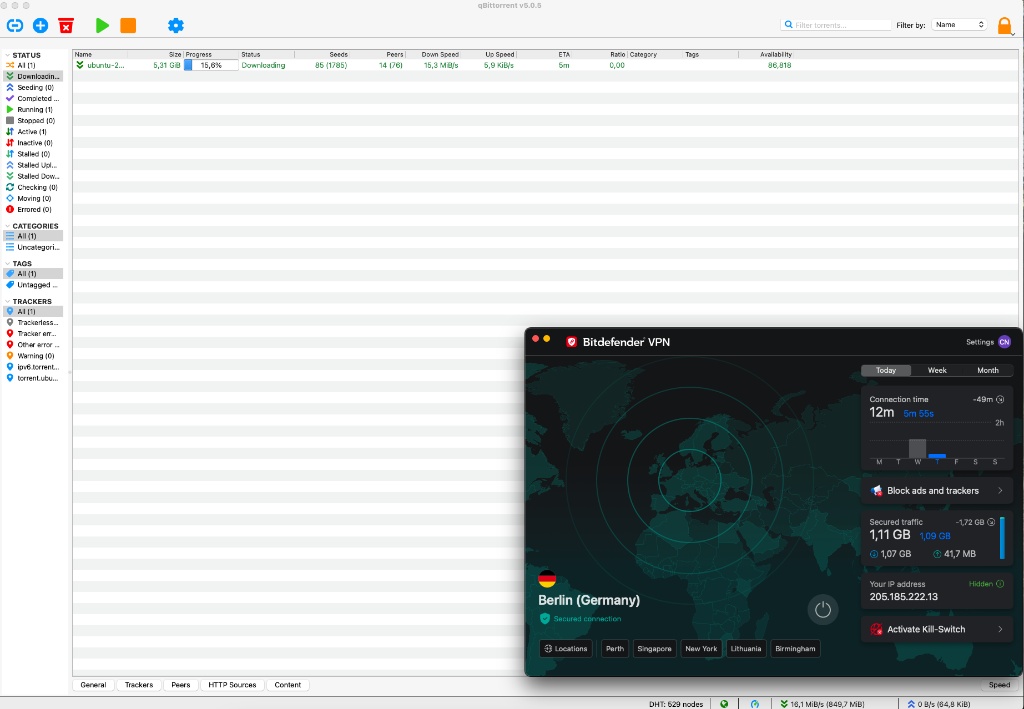
Although torrenting with a VPN is already much safer than without, you still need to ensure that your service keeps you protected. Bitdefender Premium VPN allows torrenting and uses adequate protection measures to keep you safe. All servers tested supported P2P traffic, even though the website doesn’t explicitly advertise torrenting support.
I didn't experience any slowdowns from my testing compared to the regular traffic. The downloads were fast and stable, which is how I like them. The Windows app includes an auto-connect feature that can trigger the VPN when a torrent client is launched, which is useful for privacy.
That said, it doesn't help that Bitdefender VPN doesn't add port forwarding, so there's no room to improve your speeds. However, the good news is that the service includes a kill switch, which helps ensure peace of mind. Remember that it's not enabled by default, so turning it on should be the first thing you do if you're torrenting.
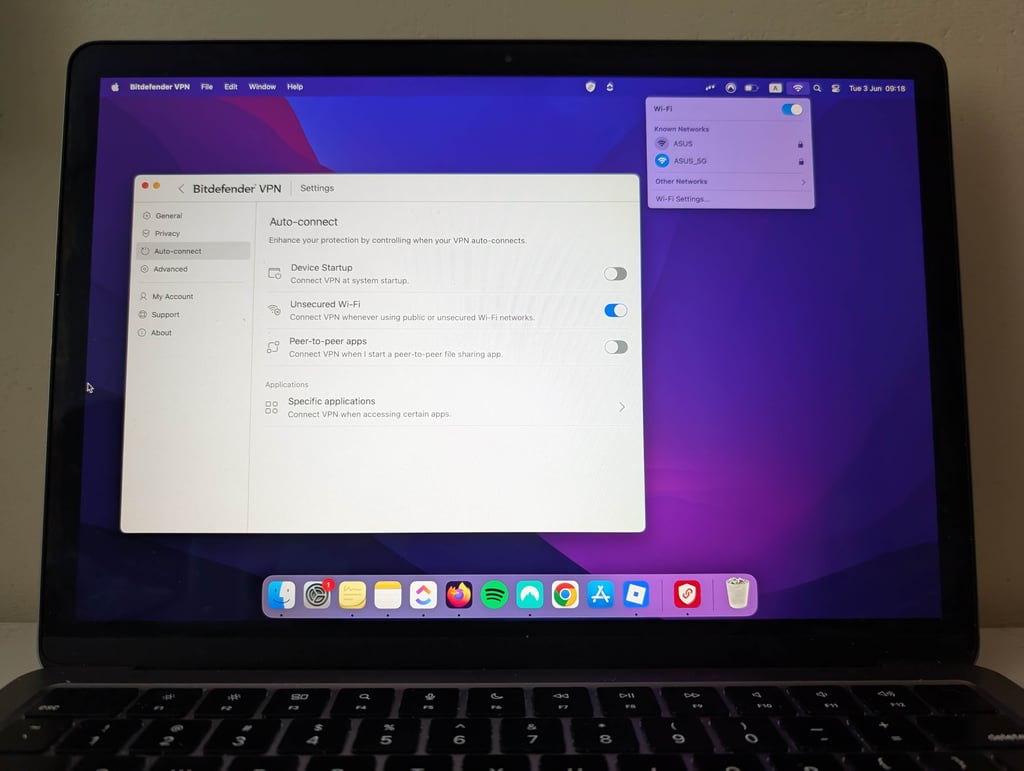
In my experience, using Bitdefender Premium VPN on public Wi-Fi provided a strong sense of security and reliable performance. Connection speeds were consistently fast, with only minor slowdowns compared to my regular traffic, making everyday browsing through social media smooth and uninterrupted.
The VPN’s kill switch and robust encryption offered extra peace of mind against potential threats on unsecured networks, though I made sure to manually enable the kill switch before connecting. Overall, Bitdefender VPN proved to be a trustworthy companion for staying safe and maintaining privacy on public hotspots.
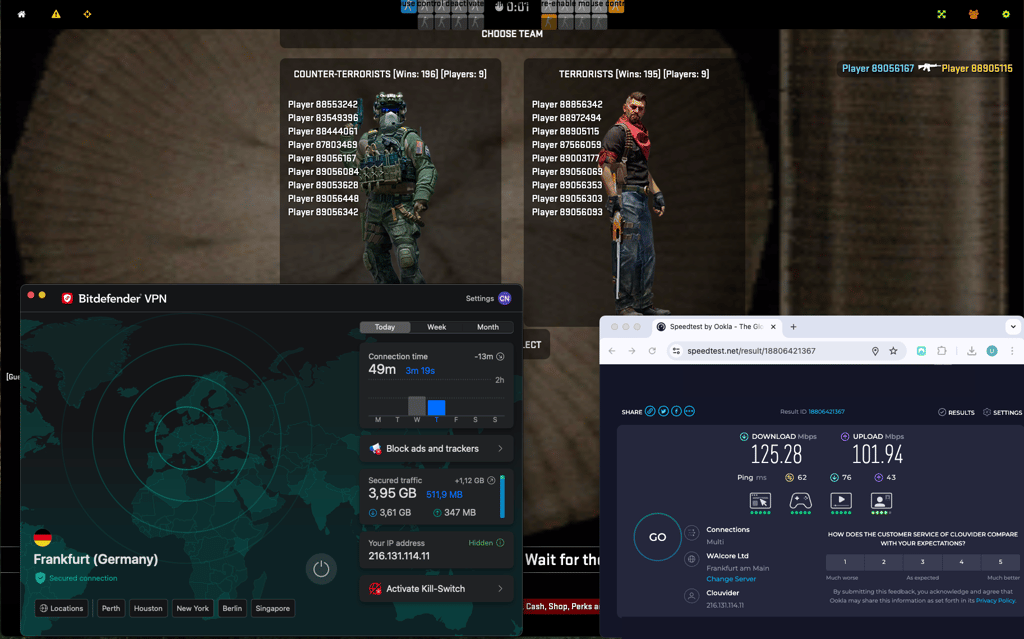
Bitdefender Premium VPN offers satisfactory gaming performance for casual gamers, especially when connected to local servers where latency increases are minimal, ensuring smooth gameplay. Using Bitdefender’s WireGuard protocol helps improve speed and connection stability, which benefits gaming sessions. Before, we tested Roblox on its proprietary Hyder Catapult protocol, but that protocol is no longer available.
One thing to note is that you can experience latency spikes when connecting to distant servers, potentially causing lag that may affect competitive gaming. Some users report high ping and lag issues, which may be mitigated by enabling Bitdefender’s Game Profile to reduce system resource usage and excluding games from antivirus scans, though results vary.
Overall, Bitdefender VPN is suitable for casual gaming, but it is not a VPN tailored for gamers, so it won’t meet the demands of competitive players.
Bitdefender Premium VPN privacy overview and leak test results
Bitdefender Premium VPN is technically secure and reliable for everyday privacy, but it doesn’t fully satisfy power users who want maximum security and anonymity. Its encryption, protocols, and Romania-based jurisdiction are solid, yet the lack of anonymous payments and some kill switch inconsistencies hold it back from top-tier VPN status.
| Privacy aspect | Details |
| Jurisdiction | Romania |
| Encryption | AES-256 with SHA-256 authentication, ChaCha20 with WireGuard |
| Tunneling protocols | WireGuard, OpenVPN (UDP/TCP), IPSec/IKEv2 |
| Kill switch | ✅ Yes, but showed inconsistencies in advanced failure tests |
| Split tunneling | ✅ Yes (Windows, macOS, Android, iOS) |
| No-logs policy | ✅ Yes, independently audited in 2025 |
| Ad and tracker blocking | ✅ Yes, included on all major platforms |
| Anonymous payments | ❌ No |
Jurisdiction
Bitdefender Premium VPN operates under the jurisdiction of Romania, with its headquarters in Bucharest. This is generally favorable for privacy, as Romania isn’t a member of the Five, Nine, or Fourteen Eyes intelligence-sharing alliances and doesn’t have mandatory data retention laws for VPN providers. The country’s privacy laws are also reinforced by the European Union’s General Data Protection Regulation (GDPR). Bitdefender states it complies with local regulations and processes user data accordingly.
However, while Romanian jurisdiction is privacy-friendly, Bitdefender’s privacy policy does allow for cooperation with legal investigations if required by Romanian authorities. The company collects some user data, including IP addresses and account details, which could be shared if legally compelled. Furthermore, Bitdefender doesn’t publish transparency reports or warrant canaries, and its no-logs policy has not been independently audited.
Overall, Romania’s legal environment is a plus, but Bitdefender’s data collection practices and lack of audit are important considerations for privacy-focused users.
Encryption
Like most reputable providers, Bitdefender Premium VPN relies on the Advanced Encryption Standard. It uses a 256-bit version of it, which is impenetrable even to the most powerful modern computers. With the WireGuard implementation, ChaCha20 encryption has also become available.
It's further reinforced with the RSA algorithm and SHA-256 hash functions, so you shouldn't worry about the technical aspects. Bitdefender’s approach to encryption and protocol selection is on par with leading VPN providers, so you can be assured that your VPN connections are secure.
Tunneling protocols
Unlike many VPNs bundled with antivirus software, Bitdefender Premium VPN doesn’t rely on a single tunneling protocol. While it previously used the proprietary Catapult Hydra protocol, this option has been fully discontinued and is no longer available. Now, Bitdefender Premium VPN focuses on widely trusted, industry-standard technologies.
WireGuard is now the primary protocol on Windows, macOS, iOS, and Android, delivering strong security with noticeably better speeds than older options. OpenVPN (UDP/TCP) remains available on Windows and Android, while IPSec/IKEv2 is supported on iOS and macOS, giving users flexibility depending on their device and network conditions.
Because Catapult Hydra is no longer part of the service, concerns around its proprietary nature and limited transparency are no longer relevant. Instead, Bitdefender now relies entirely on open, well-audited protocols that are widely used across the VPN industry.
That said, there’s still a clear limitation: Bitdefender Premium VPN doesn’t offer obfuscation or stealth protocols for bypassing heavy censorship. As a result, it’s not well-suited for users in highly restrictive regions or those needing reliable access behind strict firewalls. For standard privacy use, the protocol lineup is solid, but advanced anti-censorship support remains an area for improvement.
Kill switch
During our tests, we also check whether the VPN includes a kill switch and how it works in real life. The first test involves using a router to block particular IPs when the app is in use to simulate disruption in the network. It gives a pretty good idea of how an app would respond if the VPN server you're connected to goes down. Meanwhile, the second test involves closing important system processes and checking whether the app detects that something isn't working as it should.
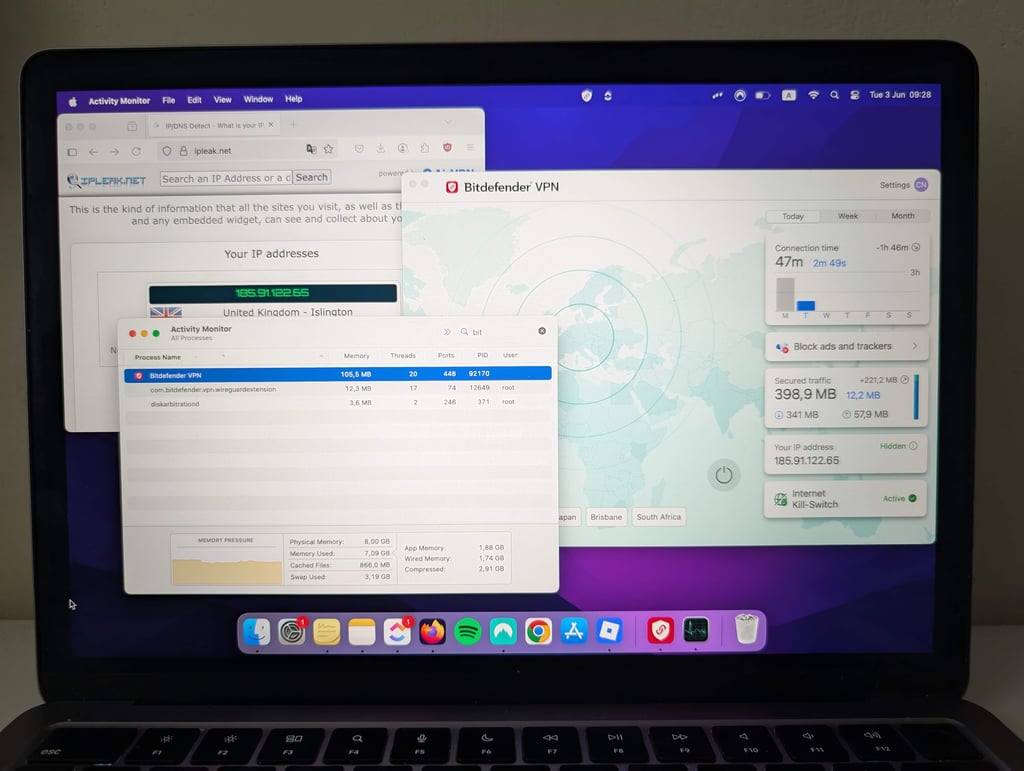
The firewall block test failed since blocking entry and exit IP addresses seemed not to affect the app or the device's traffic. Everything was still encrypted. So, it's inconclusive to say that it would or wouldn't be triggered during your regular usage. But this may be the fault of the test unit rather than the VPN.
However, when I closed the VPN background process, all my traffic was unencrypted and went through my regular connection. Sadly, the app failed to notice that the link was compromised and continued to show that I am still connected and that my connection is secure.
Based on the gathered data, the only real flaws were detected during the process killing test. We have no data on how it performs when the connection to its servers is shut down. In any case, if you're handling very sensitive data and privacy is of major importance, this VPN might not be the best pick.
Split tunneling
Bitdefender Premium VPN offers split tunneling – a useful feature that allows you to choose which apps or websites use the VPN connection and which use your regular internet connection. This is especially handy if you want to access local services, such as banking or streaming platforms, without disconnecting from the VPN for other activities like torrenting or browsing international content.
Split tunneling is currently available on Bitdefender’s main consumer apps for Windows, Android, macOS, and iOS, but not on Linux or routers. The very fact that Bitdefender VPN has this feature makes it something of an outlier among antivirus VPNs, as most of them don’t offer it.

The feature is easy to configure: you simply select the apps and websites you want to exclude or include in the VPN tunnel from the settings menu. This flexibility helps optimize both speed and convenience, as only selected traffic is encrypted and routed through the VPN, reducing unnecessary load and potential slowdowns.
No-logs policy
As mentioned above, Bitdefender is based in Romania, which puts it under the European Union legislature. This means that it’s not only dodging the Five Eyes alliance but is also subject to EU policies that could affect your data. The Romanian Constitutional Court actually declared that data retention laws (that the EU was pushing) aren't constitutional. So, location-wise, the company is in a safe spot.
Like many online products, Bitdefender must store and collect some information about its customers to provide its service. A glance at its privacy policy shows this data is minimal and properly secured. Here’s an excerpt:
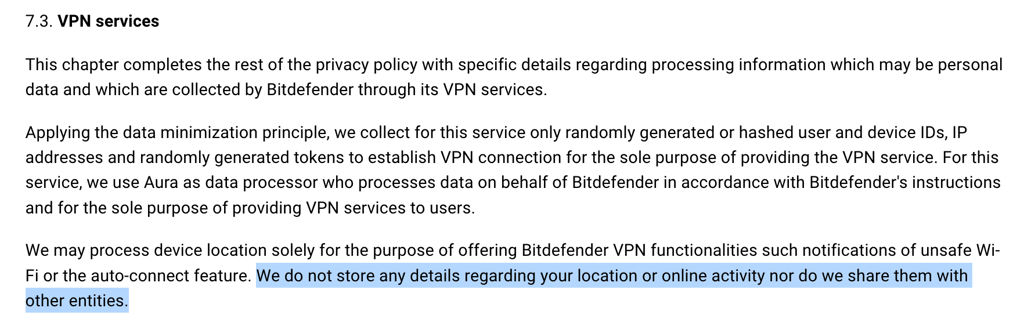
Here’s a table summarizing what data Bitdefender VPN requires:
| Data | Does Bitdefender Premium VPN store it? | Notes |
| IP address | Yes | Collected as part of technical data for fraud prevention, service operation, and security |
| Customer’s email address | Yes | Collected if you fill in forms, subscribe, or contact support |
| Customer’s encrypted password | Yes | Stored securely for account authentication (standard practice, not detailed, but required for login management) |
| Payment data | Yes (indirectly) | Collected for purchases, but processed primarily by payment providers, not Bitdefender directly |
| Browsing history | No | No indication that full browsing history is collected, technical data may include URLs for security, but not history |
| Session information | Yes (technical) | Technical data like session time, device info, and IP may be collected for security and service improvement |
| User bandwidth | No | Not mentioned as collected or logged |
| Network traffic | No | No indication that actual network traffic or content is monitored or stored |
While this isn’t excessive, it’s more than privacy-centered VPNs like Mullvad require. Additionally, Bitdefender Premium VPN doesn’t offer anonymous payment options, and although its no-logs policy was independently audited in 2015, there hasn’t been a more recent verification. Therefore, I can conclude that this VPN isn’t among the best options for complete anonymity.
Ad blocker
Bitdefender Premium VPN features a system-wide ad blocker that removes pop-ups, banners, video ads, and other intrusive advertising across all apps and browsers on your device. This ad blocker operates at the network level, filtering out ads before they reach your device, which can also help reduce bandwidth usage and improve page load times.
Complementing the ad blocker is an anti-tracker feature, which prevents advertisers and third parties from monitoring your online activity: device type, location, web queries, shopping preferences, and similar. Both tools can be easily toggled on or off, and you can whitelist trusted domains if certain websites don’t function properly with ad blocking enabled.

The ad blocker and anti-tracker are available on the Windows, macOS, Android, and iOS versions of Bitdefender VPN.
Bitdefender Premium VPN server network
Bitdefender Premium VPN has continued to grow its global footprint. According to their site, it now provides access to 3,000+ servers in over 112 countries, up from the more limited coverage of last year, helping ensure broader location choice, improved speeds, reliability, and better potential for bypassing geo-blocks.

The network is strongest in Europe, Asia, and the Americas, while Africa and the Middle East are still less fully covered compared with other regions:
| Location | Download speed, Mbps | Upload speed, Mbps |
| US | 433 | 459 |
| UK | 443 | 459 |
| Germany | 460 | 451 |
| Japan | 395 | 77 |
| Australia | 444 | 91 |
While this expanded server count and global reach are impressive for a VPN bundled with antivirus software, Bitdefender still trails leading standalone VPNs (like NordVPN or Surfshark) in both sheer server scale and advanced feature set. That said, its network is larger than many antivirus-based VPNs and some smaller standalone services.
Bitdefender Premium VPN speed test and performance
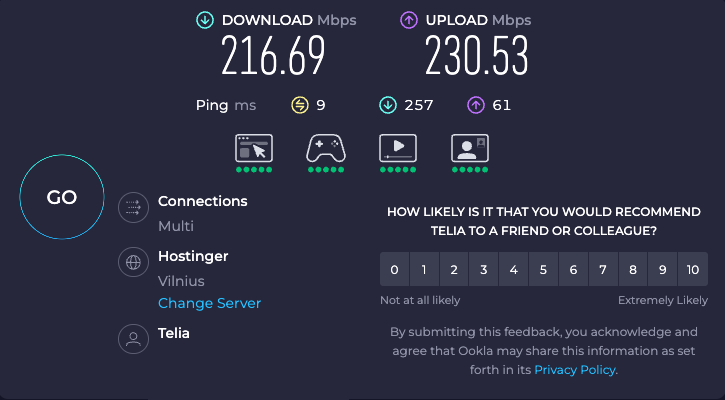
To evaluate Bitdefender Premium VPN’s performance, I conducted speed tests using Ookla Speedtest. All results were measured on the same connection, first without the VPN (baseline) and then while connected to Bitdefender Premium VPN servers in different locations. My baseline internet speed without a VPN was 217Mbps download, 231Mbps upload, and 9ms ping.
Testing Bitdefender Premium VPN speed connected to a local server
Testing Bitdefender Premium VPN on a local server shows how well it works for daily use, where fast speeds and low delay are important for browsing, streaming, and general online activity.
Using Ookla Speedtest, I compared baseline speeds of 217Mbps download and 231Mbps upload with results on a local VPN server. Download speeds reached 80Mbps and upload speeds 84Mbps, retaining 36% and 37% of the baseline. In practice, this means Bitdefender Premium VPN delivers smooth browsing and streaming with minimal slowdown, making it well-suited for daily privacy use.
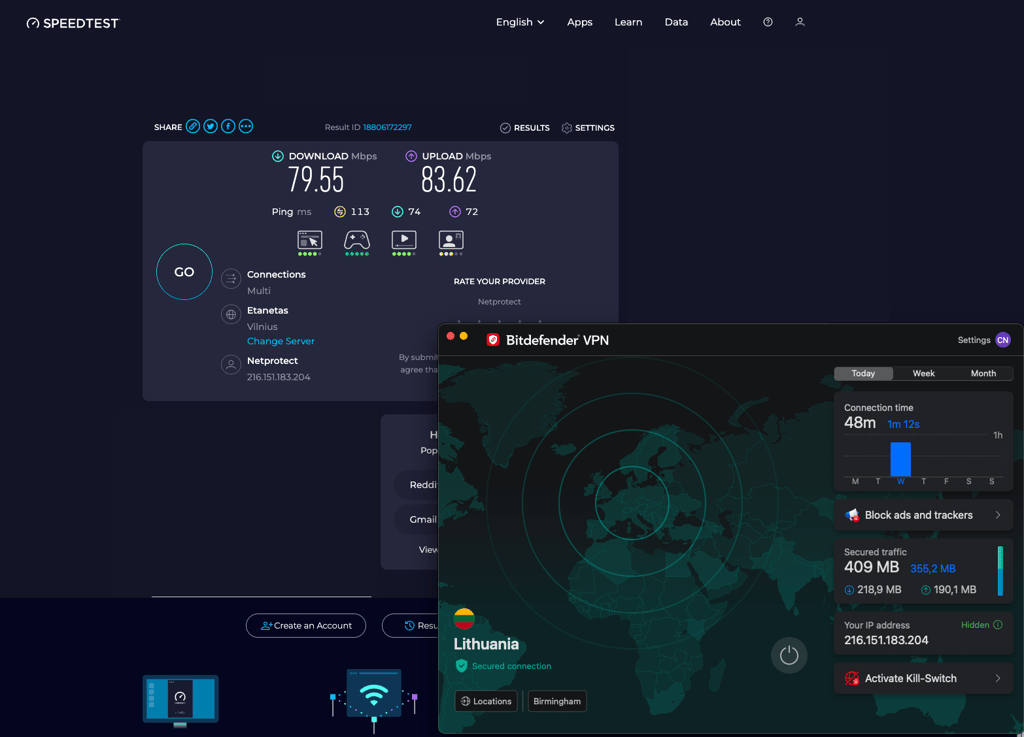
Below you can see the summary of the speed results I got:
| Download speed, Mbps | Upload speed, Mbps | Ping, ms | Download speed retention, % | |
| Baseline connection speed | 217 | 231 | 9 | - |
| Bitdefender VPN (with WireGuard) | 80 | 84 | 113 | 37 |
Testing Bitdefender Premium VPN speed in different locations
I wanted to see how distance affects Bitdefender Premium VPN’s latency and performance, so I tested it across different locations. Local and nearby servers usually deliver the best results, while distant locations reveal how well a VPN handles long-range connections. This is important for activities like streaming, browsing, gaming, and maintaining privacy without excessive slowdowns.
All tests were conducted using Ookla Speedtest, comparing baseline speeds without the VPN to results when connected to Bitdefender Premium VPN servers in five locations:
| Server location | Download speed, Mbps | Upload speed, Mbps | Ping, ms | Download speed retention, % |
| Local server | 80 | 84 | 113 | 37 |
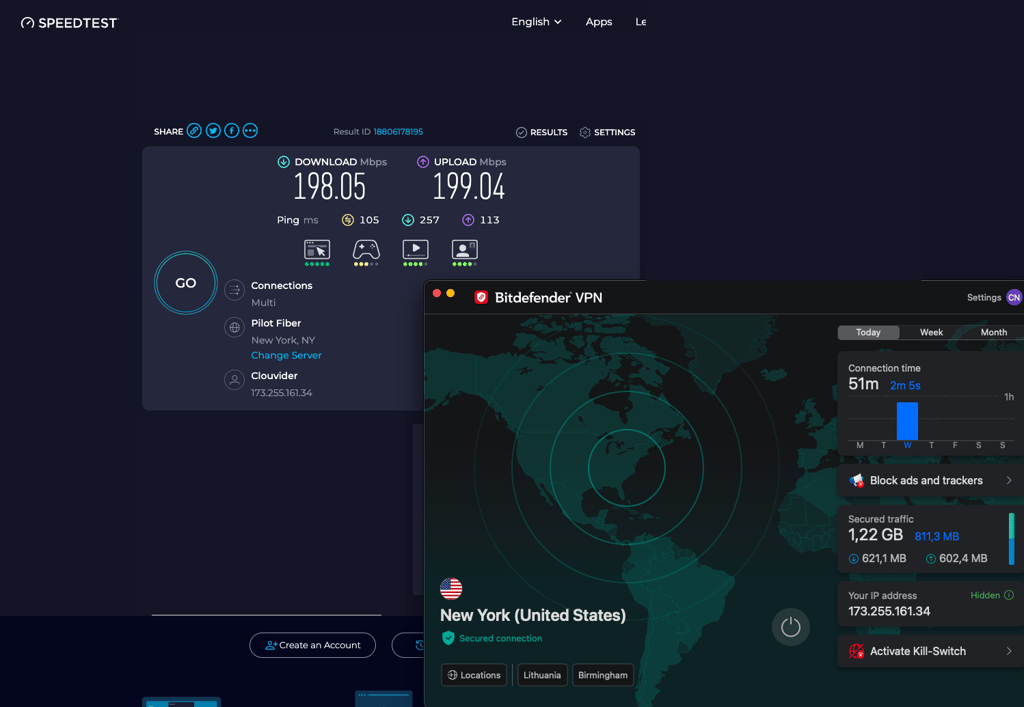
| New York | 198 | 199 | 105 | 91 |
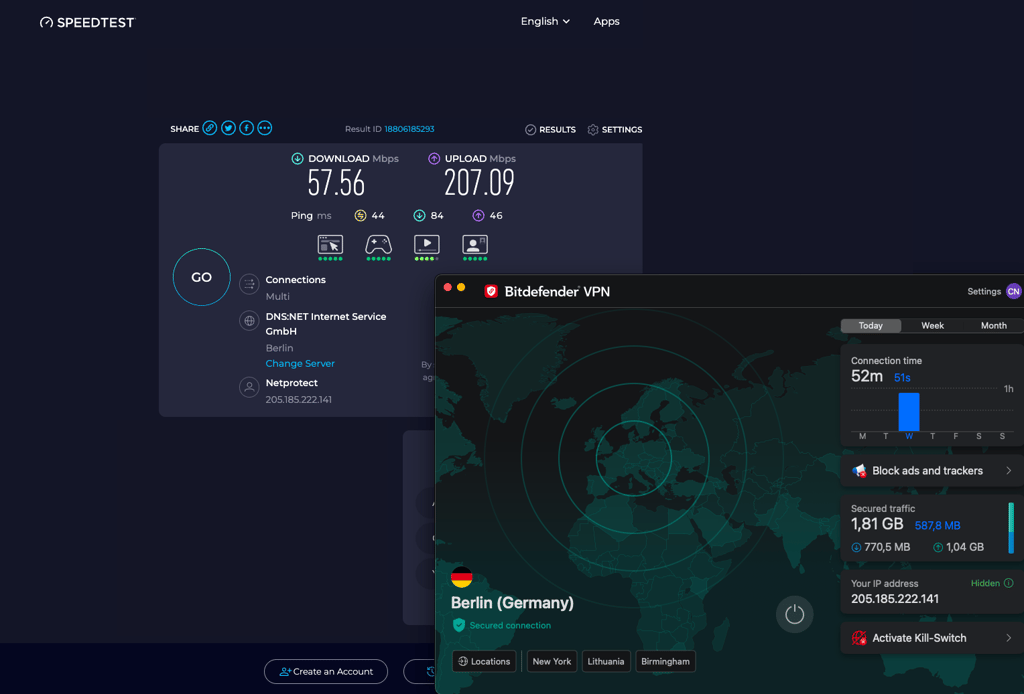
| Berlin | 58 | 207 | 44 | 27 |
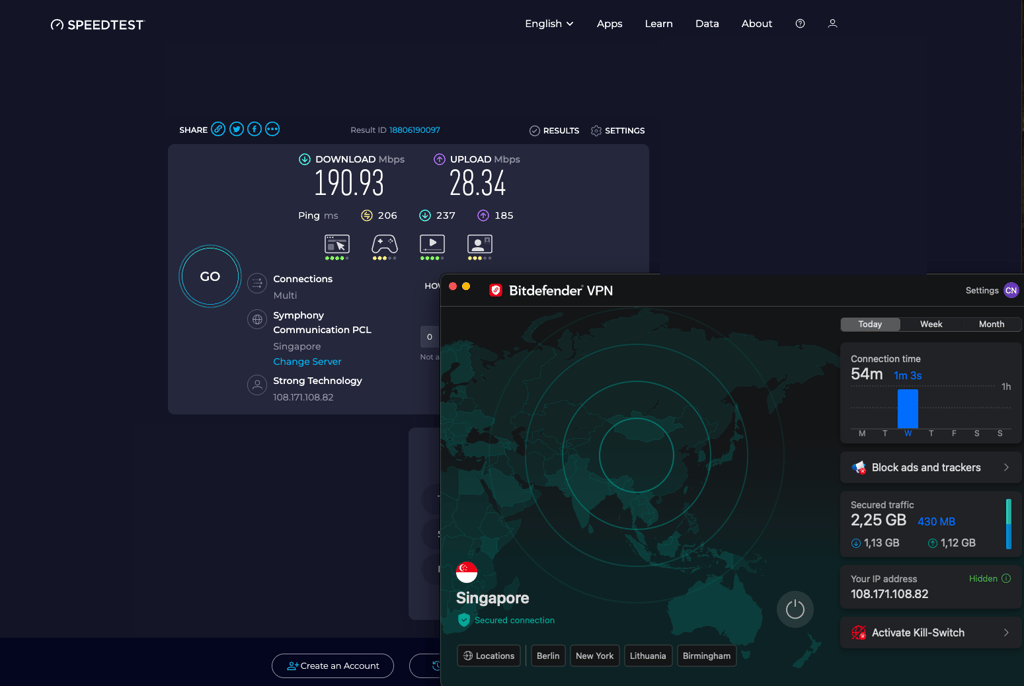
| Singapore | 191 | 28 | 206 | 88 |
| Perth | 180 | 72 | 31 | 83 |
The New York server delivered one of the strongest results. Download retention exceeded 90%, and upload speeds also remained high despite increased latency. The New York server delivered one of the strongest results. Download retention exceeded 90%, and upload speeds also remained high despite increased latency. This makes it well suited for streaming, browsing, and even gaming, with only minor responsiveness loss.
Berlin showed low latency compared to other international servers, but download performance dropped sharply, retaining only about 27% of the baseline. However, upload speeds remained strong. This setup works for browsing and video calls but is less ideal for large downloads or high-quality streaming.
As a distant server, Singapore introduced higher latency, but download performance remained surprisingly strong at over 88% retention. Upload speeds dropped significantly, which may affect file sharing or cloud backups, but streaming and browsing remain smooth.
Perth had the highest latency in our test, which is expected due to distance. Still, download retention stayed above 80%, making it usable for streaming and general browsing. Higher ping may impact online gaming or real-time applications.
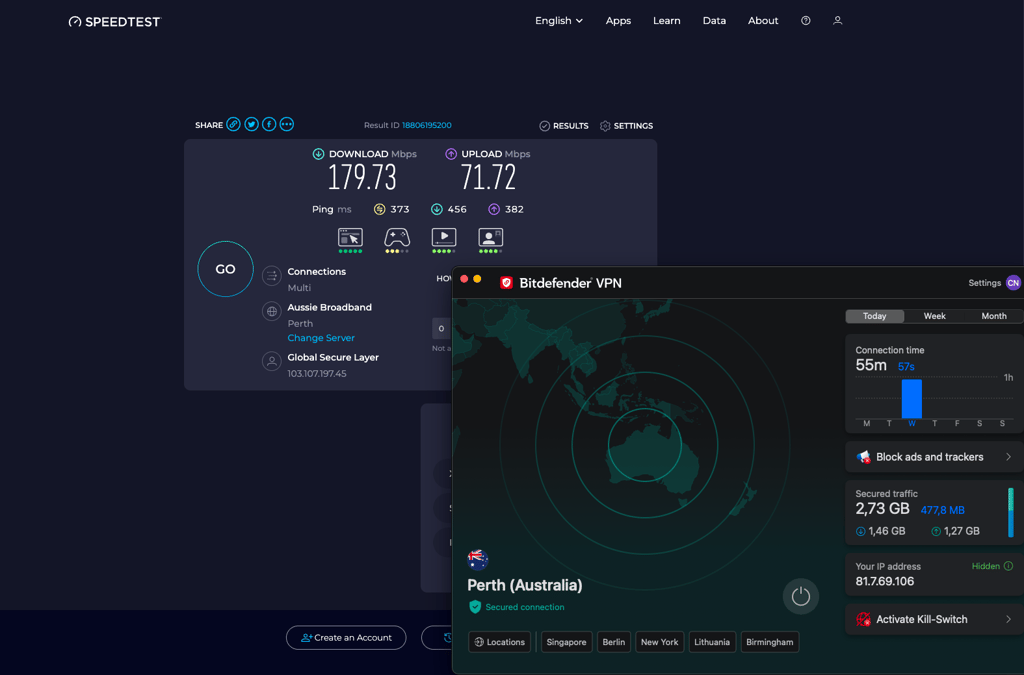
Overall, this VPN handles long-distance connections well for streaming and browsing, while latency and upload drops are the main limitations for gaming and heavy file uploads.
Bitdefender Premium VPN compatibility and interface
While Bitdefender Premium VPN doesn’t support Linux, it works on other main operating systems – Windows, macOS, Android, and iOS. You need a Bitdefender Central account to manage settings and subscription details, regardless of whether you only use its VPN or antivirus as well.
In my experience, the apps are easy to use and beginner-friendly, with a clean and compact design. While consistent overall, minor differences exist between platforms.
| Platform | Ease of use |
| Windows | User-friendly, sleek interface with easy server selection and clear status indicators. Offers a full feature set, including split tunneling, an ad blocker, an anti-tracker, a kill switch, and multiple protocols. Stable performance. |
| macOS | Clean, intuitive interface similar to Windows. Most features are available, including split tunneling (but only for websites, not apps) and an ad blocker. Slightly fewer customization options than Windows. |
| Android | Streamlined mobile app, easy to navigate. Supports split tunneling, an ad blocker, an anti-tracker, and a kill switch. Fast and stable, with customizable connection rules. |
| iOS | Simple, consistent design with other platforms. Features include an ad blocker, an anti-tracker, and a kill switch. Reliable connections, though some features are less customizable than on Android. Split tunneling is available, but limited. |
Windows
In reality, Bitdefender Premium VPN is Hotspot Shield's white-label product, leading to many similarities between the products. The similarities range from features to UI element placement.
As you can see in the screenshot below, the Bitdefender Premium VPN Windows app shows a world map in the center with helpful stats surrounding it. Disappointingly, you can’t use the map to select your server location, leaving me wondering about its purpose.
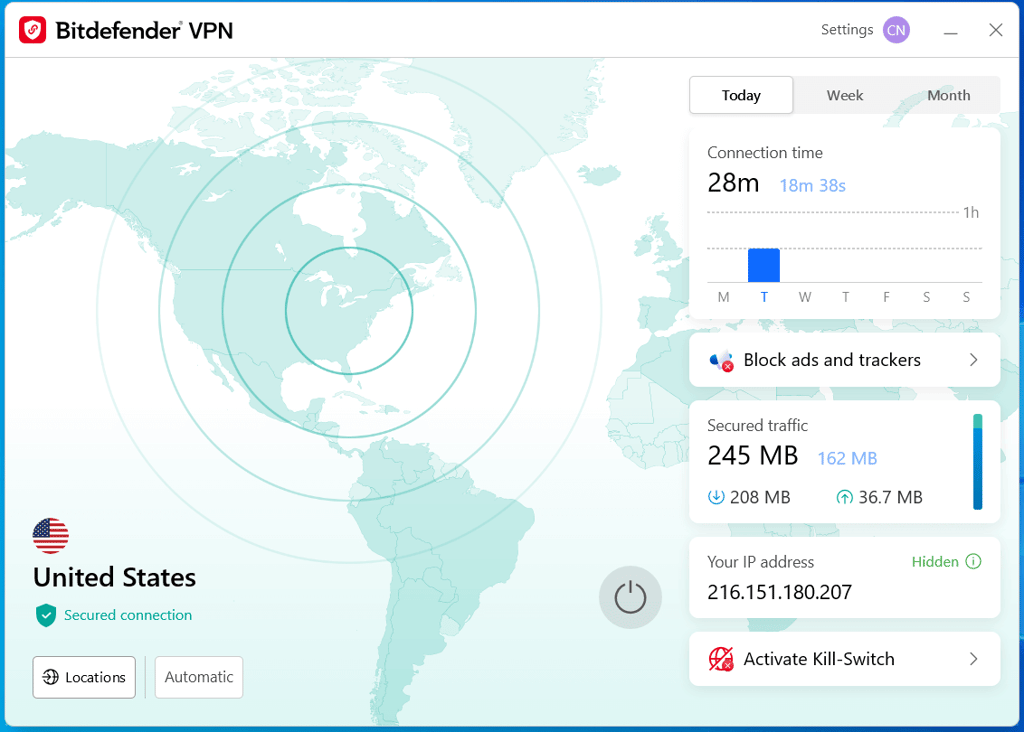
Regarding features, the software includes a kill switch, an ad blocker, an anti-tracker, and split tunneling. Additionally, it has Double Hop, which can be automatically configured to connect under certain circumstances or when visiting a certain website category. All that, with either the Wireguard or the OpenVPN (UDP/TCP) protocol, delivers a great overall experience.
macOS
The macOS Bitdefender Premium VPN version is practically the same as Windows in terms of interface and features. To be precise, Mac users can enable split tunneling, auto-connect, and an ad blocker, and customize open-on-startup settings. Most importantly, you can switch between WireGuard and OpenVPN protocols for optimal connectivity.

Android
Android apps usually have the most in common with desktop apps, particularly Windows. While the auto-connect feature has been reduced, it's still there. There's even split tunneling – one of the most useful VPN features overall.

In addition, Android gets extra features that aren't available on any other platform. The mobile app can block local network traffic, making your phone invisible to other devices connected to the same Wi-Fi. This can potentially repel some attackers lurking in public hotspots.
There aren't many visual differences between the Android app and its desktop counterparts. So, it's easy to switch platforms and still know where everything is placed.
iOS
Traditionally, iOS apps are the ones that lack the most features. Strict Apple policies can be problematic when adding features, so most providers focus elsewhere.
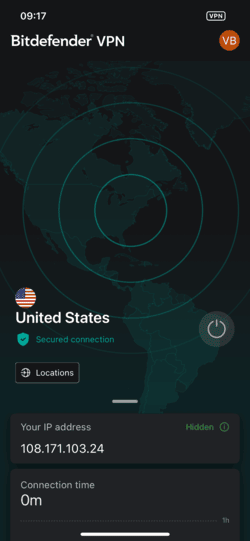
Auto-connect made its way to iOS, but it's only limited to unsecured networks. There is a kill switch, which is something that even some dedicated VPN providers haven't added to their iOS apps. To top it off, the app actually includes split tunneling. This has to be one of the few cases when it's included in iOS. But it only works with websites and not apps.
Customer support
Bitdefender VPN offers responsive customer support with multiple contact options, including live chat and email. While agents are polite and reply quickly, answers can be inconsistent, especially from AI support. Escalation to technical teams is relatively fast, but, in my experience, initial troubleshooting steps may feel generic or repetitive before you reach helpful resolutions.
| Customer support channel | Bitdefender Premium VPN |
| 24/7 live chat | ✅ Yes |
| ✅ Yes | |
| Phone line | ✅ Yes |
| Guides or articles | ✅ Yes |
| FAQ | ✅ Yes |
During my customer support reevaluation, I first interacted with Bitdefender’s AI chatbot, which provided accurate answers to questions about P2P optimization. However, the AI offered inconsistent information when starting a new conversation with similar queries.
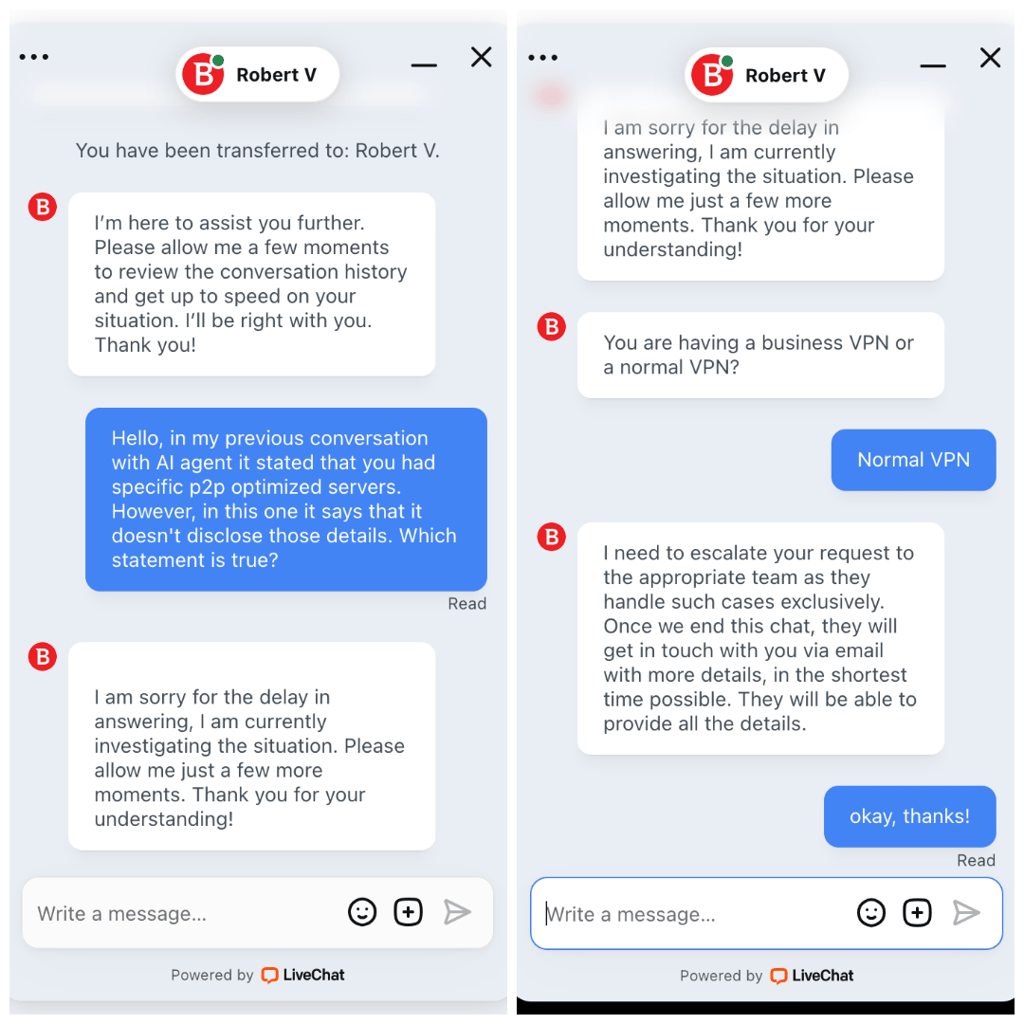
After a couple of follow-up requests (about two minutes), I was transferred to a live agent. The agent promptly informed me that my request would require additional time and would be escalated to a specialized team. The final response, delivered via email, arrived in about 13 minutes from the initial contact. Throughout the process, I was kept informed about the expected wait and the status of my inquiry.
Overall, while the AI responses had some inconsistencies, the transition to human support was smooth, and communication remained clear and transparent until the issue was resolved.
Final verdict on Bitdefender Premium VPN 2026
In 2026, Bitdefender Premium VPN remains a solid option for simple privacy protection, bundled with a trusted security suite. Our recent testing shows clear progress compared to last year, including faster speeds and noticeably better access to streaming content for everyday use.
I found this VPN best for general privacy, secure browsing, and light streaming, especially if you’re already using Bitdefender antivirus. I like that it has generous simultaneous connections, so you can use it for multiple devices. That said, it isn’t built for power users. If you’re looking for advanced VPN features, audited no-logs policy, specialty servers, or strong censorship bypass, it falls short. In those cases, a strong VPN like NordVPN is a better choice.
FAQ
Can Bitdefender VPN be trusted?
Bitdefender VPN is a secure, reliable choice with strong encryption and a verified no-logs policy. Bundled with its antivirus service, it’s a great solution for users seeking integrated cybersecurity. However, if you need maximum anonymity or extensive independent audits, you may prefer alternatives like NordVPN or Surfshark.
What are the limitations or drawbacks of using Bitdefender VPN?
Bitdefender VPN has several drawbacks: it struggles to bypass censorship in restrictive countries, lacks support for platforms beyond Windows, macOS, Android, and iOS, has a vague privacy policy with limited independent audits, and only allows up to 10 simultaneous device connections.
How does Bitdefender VPN compare to NordVPN?
Compared to Bitdefender VPN, NordVPN offers stronger security, faster speeds, and more features, including advanced protocols and specialty servers. On the other hand, Bitdefender VPN is more affordable and integrates well with its antivirus, so it’s better suited for basic privacy needs and casual browsing.
How much does Bitdefender VPN cost per year?
Bitdefender VPN costs $29.99 for the first year (about $2.50/month) when billed annually. After the first year, the annual renewal price increases to $69.99. The subscription includes a 30-day money-back guarantee.
Can I watch Netflix with Bitdefender VPN?
Yes, you can watch Netflix with Bitdefender VPN. While it wasn’t as reliable as some other streaming VPNs before , it has since improved its ability to bypass geo-restrictions. Still, if your primary goal is reliable access to Netflix and other streaming platforms, you might want to consider a VPN known for its strong streaming capabilities or one that even offers special servers for streaming.