What is a VPN kill switch, and how does it work?
Our in-house cybersecurity experts and journalists, renowned for major reports like The Mother of All Breaches, conduct transparent, unbiased VPN testing and in-depth analysis.
With 750+ articles crafted based on real-world research, we empower readers to make informed purchasing decisions through first-hand expertise.
Learn more

A VPN kill switch is a security feature that automatically blocks your internet connection if the VPN unexpectedly disconnects. This prevents your real IP address and other sensitive data from being exposed while you’re online.
When enabled, the kill switch stops all internet traffic until the VPN connection is restored. Some VPNs also let you limit this protection to specific apps instead of your entire device. While many providers offer a kill switch, it isn’t always enabled by default, so it’s worth checking your settings.
For anyone relying on a VPN for privacy or security, a kill switch is an essential safeguard against accidental data leaks.

How does a VPN kill switch work?
A VPN kill switch works by constantly monitoring your connection, detecting issues, blocking your access to the internet, and restoring your connection as soon as it’s safe.
Here’s a more detailed breakdown on how VPN kill switches work:
- Monitoring. A VPN kill switch continuously monitors your connection to your VPN server by scanning for changes in status or IP address.
- Detecting. The VPN kill switch will then instantly detect any changes that could prevent your VPN from working properly.
- Blocking. Depending on what type of VPN you’re using (more on that a bit further down), your VPN kill switch will either block certain apps or your entire device from accessing the internet.
- Restoring. As soon as the issue is resolved, your VPN kill switch will restore your internet connection without you having to do anything.
It's worth noting that while some VPNs include a kill switch, the feature might not always be good or work as it's supposed to. That's why it's important to find VPNs with a kill switch feature that do the job well.
When does a VPN kill switch activate?
A VPN kill switch will kick in as soon as it detects that your VPN connection has gone down.
Here are a few examples of when this might happen:
- If your internet is disconnected from your VPN server because it’s struggling with connectivity issues.
- If you decide to switch VPN servers.
- If you experience unreliable network connections, such as using public Wi-Fi.
- If your computer does an update overnight and then reconnects to the internet without opening your VPN.
- If you start using a new firewall and forget to add an exception for your VPN, meaning that the firewall then blocks your VPN.
- If someone borrows your device and they restart it without switching your VPN back on.
Types of VPN kill switches
There are two different types of VPN kill switches: system-level VPN kill switch and application-level VPN kill switch.
1. System-level VPN kill switch
A system-level VPN kill switch notes when you’re disconnected from the VPN service. It then sends that information to your device to prevent it from connecting to the internet via your Wi-Fi or mobile data.
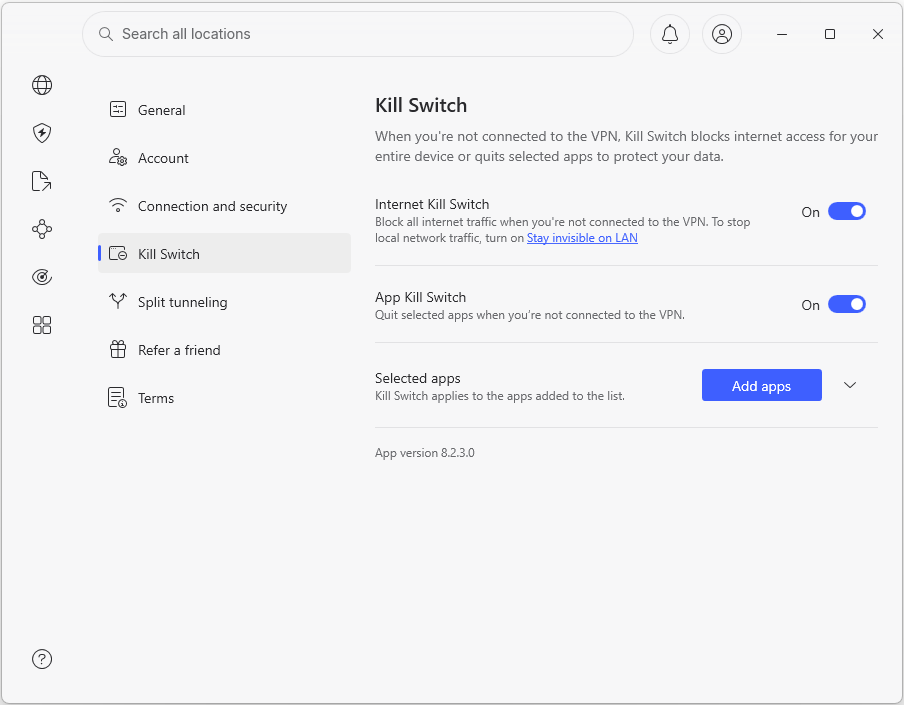
When it’s enabled, a system-level VPN kill switch completely blocks your internet connection to your computer until the VPN connection is restored or by resetting the network adapter. This makes it very effective at avoiding IP leaks.
It’s really easy to set up an active VPN kill switch. If it’s not already switched on by default, all you’ll probably need to do is select a checkbox on your VPN.
2. Application-level VPN kill switch
An application-level kill switch protocol may not sound as safe as a system-level kill switch, but it’s arguably the better option of the two, as it’s limited to the applications you choose.
It works by letting you choose the specific apps you want to stop from connecting to the internet when the kill switch activates. Whichever apps you’ve selected will then stop working in the event of a VPN connection failure to protect your data. This is very handy if you want to hide your IP address while using certain apps.
It’s more flexible than the active VPN kill switch because it gives you more control over how the switch operates.
The most common apps for an application-level VPN kill switch include:
- Browsers, such as Chrome or Firefox
- Email apps, such as Gmail and Outlook
- Video calling apps, such as WhatsApp
- Torrent client, such as uTorrent and Vuze
Why should you use a VPN kill switch?
Even the most reliable VPNs experience occasional drops in connectivity. And if you’re relying on a VPN to keep your sensitive information secure, you’ll likely want an extra safety measure to protect your data in case your VPN fails. This will guarantee that you’ll get the level of security and privacy you want at all times.
A VPN kill switch is your last line of defense to make sure that your IP address is never uncovered. It also makes sure no one can access your unencrypted data if your VPN goes down.
Try NordVPNWho should use a VPN kill switch?
While an occasional drop in connectivity of your VPN may not be the end of the world for most people, there are certain groups of people who need this level of privacy at all times. And those who definitely need to use a VPN kill switch include:
- Activists and journalists who don’t want to be tracked down.
- Users of peer-to-peer transfer software who need to mask their IP addresses.
- Anyone holding confidential documents who can’t afford to have their security compromised, such as lawyers or social workers handling incredibly sensitive data.
- Torrent users who wish to remain anonymous.
Risks of using a VPN without a kill switch
Using a VPN is a great way to keep your online activity private and secure. But VPNs aren’t foolproof. As mentioned earlier, there are times when your VPN connection might drop, leaving your IP address and sensitive data exposed.
Here are some of the biggest risks of using a VPN without a kill switch:
- It leaves you vulnerable if your VPN connection drops, meaning that your ISP (and thus the government in some cases) can see what you’re up to online or access your IP address until your VPN is back up and running.
- Using free Wi-Fi can be dangerous, as it’s often insecure. Wi-Fi hotspots and public connections at cafes, hotels, and stations are easy targets for malicious hackers. And if your VPN drops while you’re connected to an unsecured network, your data will be particularly vulnerable.
- Your public IP address would give your location away, so it can be used to pinpoint where you are. This is more of a problem if you’re an activist, journalist, or blogger. Without a VPN kill switch, your location could be traced if your VPN connection drops.
- Your online activity could become traceable, meaning that advertisers and businesses can use your IP address to develop a profile on you. If your VPN cuts out and you don’t have a kill switch enabled, third parties can start to build up information on you.
How to choose the right kill switch VPN?
While loads of VPNs offer a kill switch feature as part of their service, having one doesn’t do much good if the quality of the VPN is bad. After all, you don’t want your data to be leaked because of a faulty service that you actually paid money for.
So, when looking for the right VPN provider, here are a few things to consider:
- Reliable and customizable kill switch
- No visible impact on device performance
- Top-quality security features
- Audited no-logs policy
- Compatibility with major operating systems
And to make it easier for you, I made a list of the best VPN service providers on the market:
- NordVPN – best VPN with a specific-app and system-wide kill switch
- Surfshark – affordable and speedy VPN with a reliable kill switch
- IPVanish – best VPN with a customizable kill switch
Conclusion
A VPN kill switch automatically disconnects from the internet if your VPN connection suddenly drops. The feature is an extra security layer that protects your data and keeps you anonymous even if the VPN turns off.
Once you turn on the kill switch, it continuously monitors your VPN connection, detecting any changes that could affect it. It then blocks specific apps or the whole system from accessing the internet and restores the connection once the VPN is back up and running.
If you care about your online privacy, you’ll need a VPN that provides comprehensive security. Choosing one with a reliable kill switch is crucial, as it’s the last resort that keeps your IP address and unencrypted data away from prying eyes. NordVPN is an ideal choice with two types of kill switches.
Thinking of trying out a VPN service? Read one of our VPN guides or reviews
FAQ
How do you test a VPN kill switch?
It’s really easy to test if your VPN kill switch works. Just follow this step-by-step guide:
1. Run your VPN and connect to a server.
2. Use the internet by going on websites, sending emails, or torrenting.
3. Block the VPN app using your firewall, but don’t stop your online activity.
4. If your internet no longer works, you’ll know that the kill switch is working as it should.
Can you disable a VPN kill switch?
Yes. Many VPN kill switches are enabled by default. But if you want to disable it, all you need to do is go to the settings in your VPN app, find the kill switch or network lock button, and switch it off.
How reliable is a kill switch for a quality VPN?
There are many ways in which kill switches are implemented. It could be done via a rule in the firewall or with a driver and priorities. The failure rate will depend on the implementation more than anything else, so you should look for a VPN service provider with well-made software.
Is it bad to always leave a kill switch on?
No, it's not. In fact, it's the only way to ensure none of your traffic ever goes through insecure tunnels. However, this also means your internet connection will greatly depend on your VPN service provider's uptime.