How to get a NordVPN free trial in 2026
Our in-house cybersecurity experts and journalists, renowned for major reports like The Mother of All Breaches, conduct transparent, unbiased VPN testing and in-depth analysis.
With 750+ articles crafted based on real-world research, we empower readers to make informed purchasing decisions through first-hand expertise.
Learn more
You can get a NordVPN 3-day free trial through the Google Play Store, though you’ll need an Android device to activate it. Once enabled, the trial works across all supported devices, so you can use NordVPN on iOS, Windows, macOS, and more during that period. Combined with the provider’s 30-day money-back guarantee, this gives you up to 33 days to fully test NordVPN risk-free.
Read on for a step-by-step guide on how to activate both options and make the most of your free trial.
How to get the NordVPN 3-day free trial in 2026

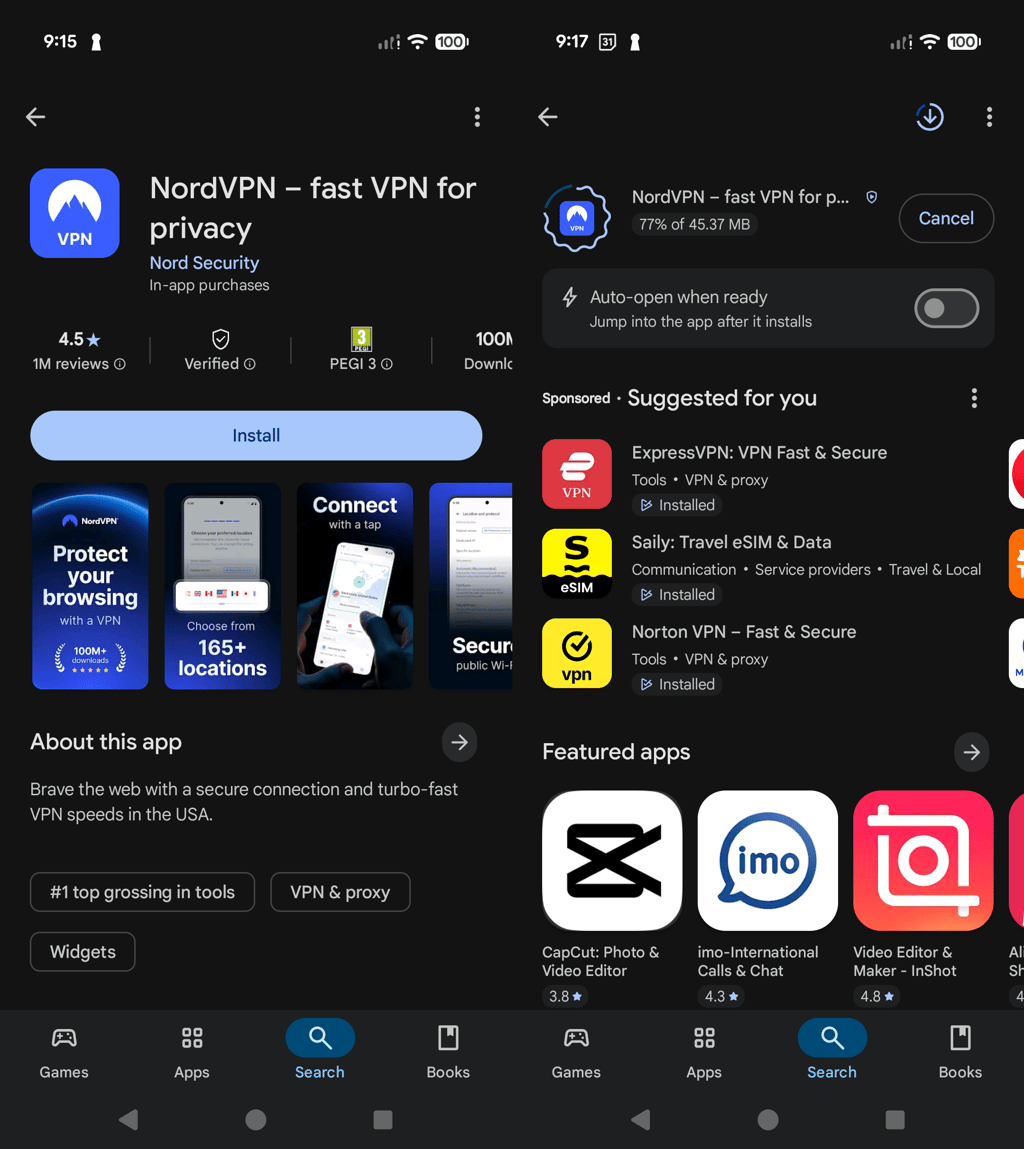
- Open the Google Play Store on your Android device and search for the NordVPN app
- Click Install to download the app
- Launch NordVPN and create an account to access the 3-day free trial
- Click the Try for $0.00 button and enter your payment details (you will not be charged yet)
- Start a 3-day trial and test NordVPN with all the premium features available
While the NordVPN 3-day free trial must be activated on an Android device, the account itself works on all platforms. Simply borrow an Android phone to create your account, then use those login details on your iPhone to enjoy the full trial period.
Note: After the 3-day free trial, NordVPN automatically charges for the Basic subscription plan if you do not cancel the service. Google notifies users about the upcoming expiration date, so you have time to take action. If you wish to continue using the service, you don’t need to do anything. If you don’t wish to continue using NordVPN, make sure to cancel the subscription before the trial ends.




We spare no effort to test the products & their features. All information is gathered by our in-house research team & fact-checked by our team of experts. Discover the ins and outs of our testing procedures.
NordVPN’s free trial policy
NordVPN explains that a free trial is available exclusively to Android users because it’s permitted under Google Play’s Terms of Service. That is, the Android trial is managed entirely by Google Play, not by NordVPN. It also notes that only one free trial is allowed per customer, so users need to log in to their NordVPN account when signing up. To avoid charges after the trial, you must also cancel the subscription through Google Play.

For more information on NordVPN’s free trial, visit its Terms of Service.

How to get the NordVPN free trial on Android: step-by-step guide
NordVPN doesn’t offer a free trial directly on its website, but Android users can still access it easily through the Google Play Store. Here’s how you get started.
Step 1: install NordVPN
Installing NordVPN on your Android device is easy. You just need to go to the Google Play Store, find the NordVPN app, and install it.
Step 2: set up an account to access the free trial
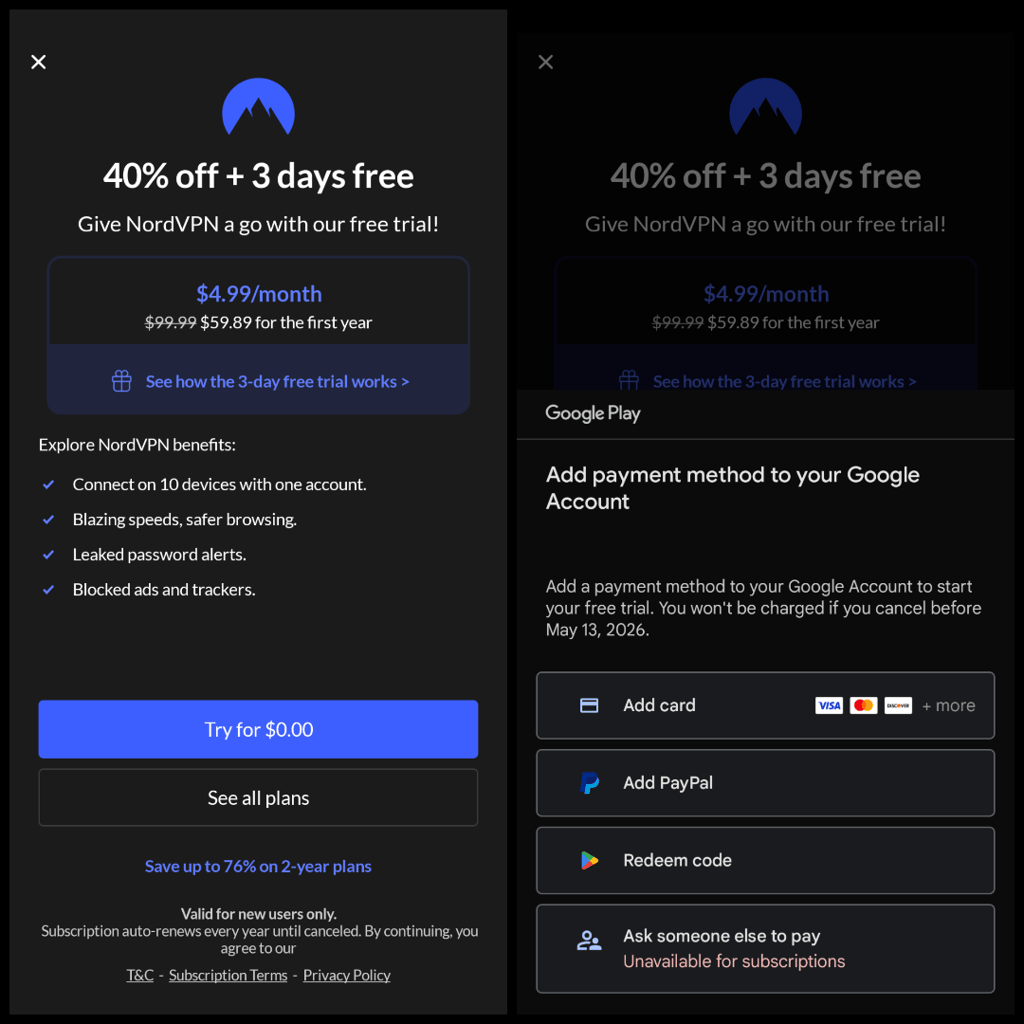
Once the app is installed, just create a new account and click the Try for $0.00 button to get the 3-day free trial.
Step 3: select your payment method
Once you have chosen the free trial option, select your preferred payment method and enter your personal details to claim the free trial. Don’t worry, at this point you won’t be charged.
How to cancel NordVPN's free trial via Google Play
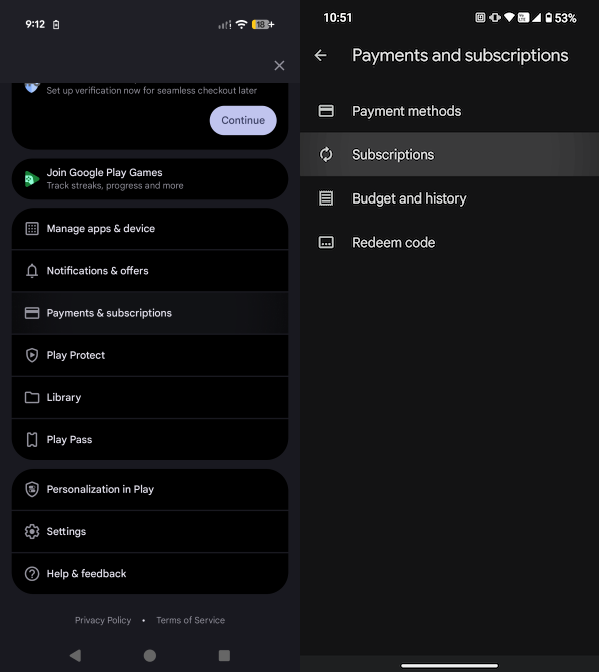
To cancel your 3-day free trial, you have to do so via the Google Play Store. Here’s a quick guide on how to do it.
-
Go to your Google Play account, tap Payments and subscriptions, and then Subscriptions
-
Find NordVPN, click Cancel subscription, select the cancellation reason, and click Continue
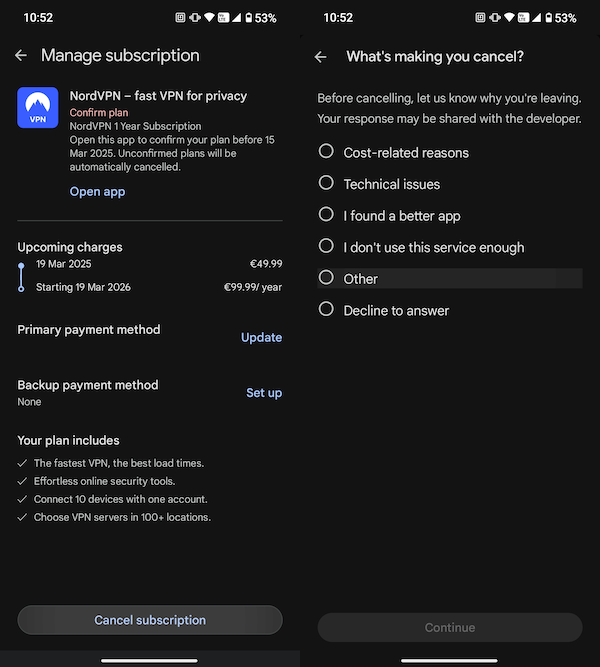
Note: To cancel the free trial successfully, you must do so before the end of the 3-day trial period. If you delay the cancellation, you will be charged for the plan chosen during registration. After that, you are still eligible for a 30-day refund.
Can I get a NordVPN free trial without a credit card?
Yes, you can get a NordVPN free trial without a credit card. The 3-day free trial is available for Android users, so the payments go through the Google Play Store. The platform accepts payment methods such as PayPal, Google Play Balance, Cash App Pay, and mobile phone billing (in the US). However, note that payments in cryptocurrencies or payment methods such as Amazon Pay, Union Pay, and similar are not accepted through Google Play.
To take advantage of the 30-day money-back guarantee, you can also download NordVPN from the official provider’s website. Using this option, you can make payments via PayPal, Google Pay, Amazon Pay, Union Pay, Sofort, or cryptocurrency.
NordVPN’s 30-day money-back guarantee explained
With NordVPN’s 30-day money-back guarantee, you can try any subscription risk-free for a month. This applies to all plans, including monthly, 1-year, and 2-year options, giving you full flexibility to test the service.
Worth knowing that cryptocurrency payments are eligible for refunds, too. They’ll be issued in the same currency used for the purchase, or a different one if the original becomes unavailable or impractical. However, note that you’re unlikely to get a refund after 30 days have passed. Moreover, NordVPN can’t offer a refund if you purchased a subscription from a third-party reseller.
The offer may change over time, so it’s always best to review NordVPN’s terms of service for the latest details. As of May 2026, the agreement claims the following:
“6. AUTOMATIC RENEWAL CANCELLATION AND REFUND POLICY
6.1. Automatic renewal cancellation. You have the right to cancel the automatic renewal of your Subscription for the upcoming Service renewal period. To prevent the auto-renewal and the related charge, please cancel the auto-renewal before the billing date. When you cancel the auto-renewal of your Subscription, you are only canceling future charges associated with this Subscription. You will continue to receive access to the Services until the end of the remaining Subscription period.
Please note that cancelling auto-renewal will stop future charges, but it does not automatically entitle you to a refund of (i) any fees that you have already paid or (ii) any remaining period of your current Subscription, unless the applicable law provides otherwise <...>.”
How to get a refund using the 30-day money-back guarantee
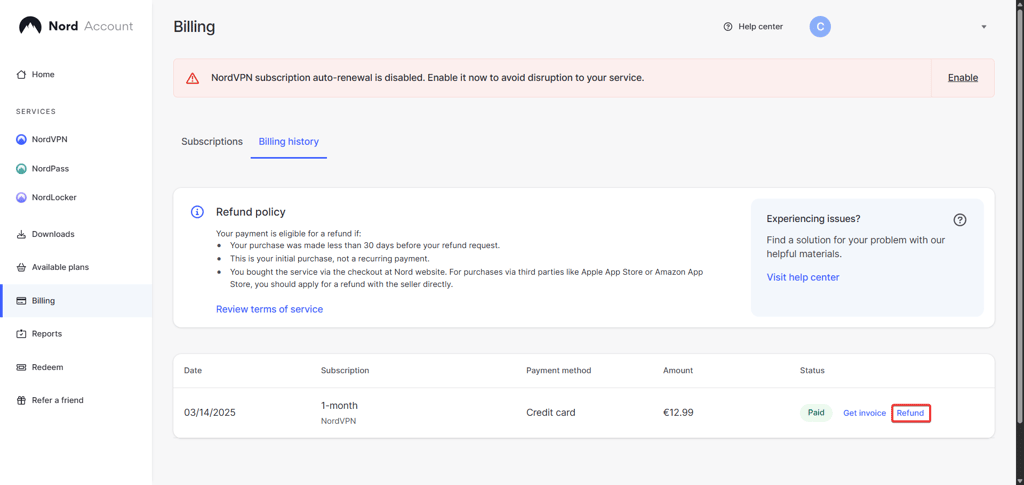
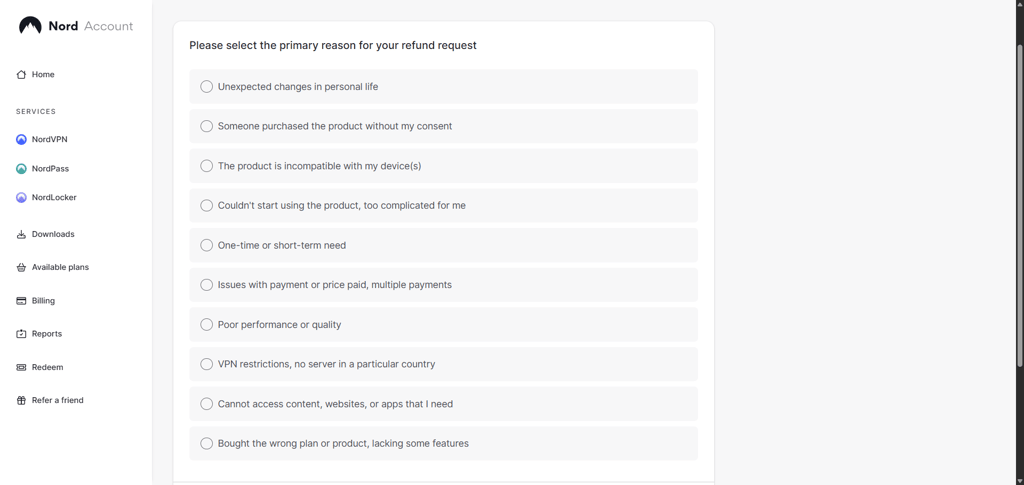
Whether you didn’t cancel the free trial in time or changed your mind during the first month, you can still request a refund. Check this short guide on how to do it:
-
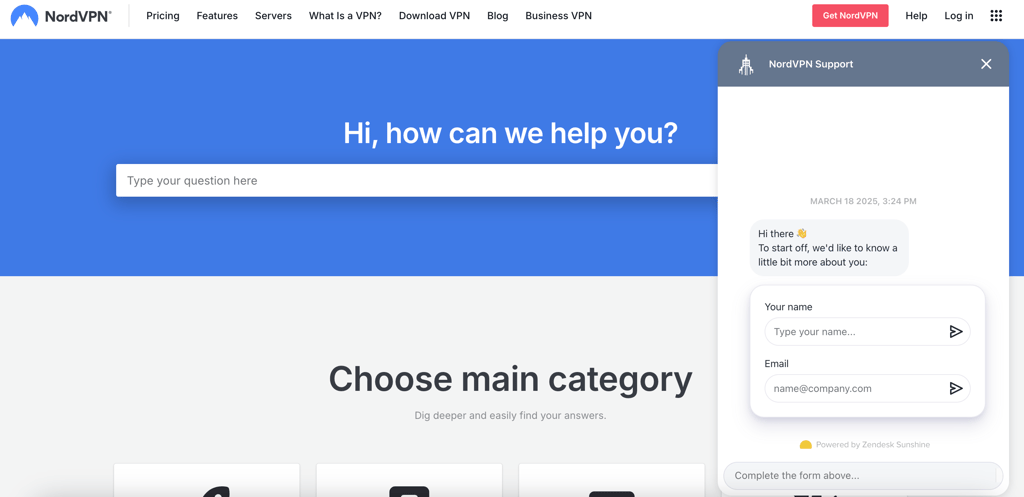
Contact customer support and request a refund
-
Click the link provided by support and select Refund
-
Choose a reason for a refund
-
Review the refund summary, and click Refund
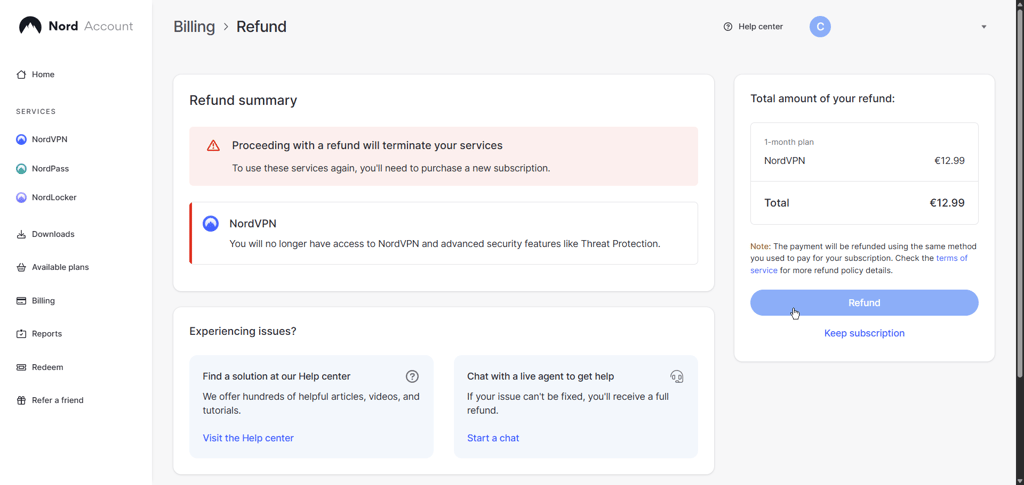
Remember, you must do so within 30 days of the initial payment. You can speak to NordVPN’s live chat team by pressing the bubble icon at the bottom of the screen, or just send an email.
Once you request the refund, you’ll receive a cancellation confirmation, and your refund should be processed shortly thereafter. Note that it can take up to 4 hours for the request to be processed and up to 10 business days for the full refund to be issued.
NordVPN compared to other best VPNs with free trials
NordVPN is my top VPN pick, but it’s not the only premium VPN with a free trial and an extended money-back guarantee. Here’s an overview of the best VPNs with free trials.
| VPN | Rating | Free trial duration | Available on | Money-back guarantee | Price from |
| NordVPN | 3 days | Android* | ✅ Yes, 30 days | $3.49/month (2-year plan) | |
| Surfshark | 7 days | Android, iOS, macOS | ✅ Yes, 30 days | $2.49/month (2-year plan) | |
| ExpressVPN | 3 days | Android and iOS | ✅ Yes, 30 days | $2.99/month (1-year plan) | |
| CyberGhost | 24 hours, 3 or 7 days | Windows and macOS (24 hours), Android (3 days), and iOS (7 days) | ✅ Yes, 45 days | $1.99/month (2-year plan) | |
| Norton VPN | 30 days | All apps | ✅ Yes, 60 days | $3.33/month (1-year plan) |
*NordVPN’s free trial must be registered on Android, but you can log in to your account and use the free service on macOS, iOS, and Windows devices afterward.

What to do after NordVPN's free trial ends
I recommend considering your subscription options well before your NordVPN free trial ends. By default, you’ll be signed up for the Basic plan if you don’t cancel the trial beforehand. However, you can choose from various subscription options if you continue using NordVPN’s services.
Currently, the Basic plan offers three subscription options based on the preferred duration:
- $14.99/month for the monthly plan
- $5.49/month for the 1-year plan
- $3.49/month for the 2-year plan
Additionally, NordVPN subscriptions vary not only by duration but also by the bonus security features they include. For example, the Basic plan only includes the market-leading VPN service, while the Complete option unlocks the NordPass password manager to securely store your sensitive data. The Complete plan also includes scam call protection and 1TB of cloud storage. If that’s not enough, you should get the Prime package, which tops everything off with the Coveron (formerly NordProtect) identity protection.
As for the Coveron tool, it starts at $4.74/month and offers a comprehensive set of identity and cybersecurity protection measures, including home title protection and insurance of up to $2M. However, note that New York and Washington state residents won't be able to use the identity theft recovery, cyber extortion protection, and online fraud coverage perks.
How to make the best out of the free trial
NordVPN’s free trial lets you use all of its premium features, so it’s a great chance to see what it can really do. You can start by testing it out on the devices you use the most – your phone, laptop, tablet, smart TV, or browser. I also recommend checking our NordVPN review, where we tested this VPN's capabilities in full.
Then, you can connect it to different server locations and try streaming from services like Netflix, BBC iPlayer, or Hulu. This helps you see how well NordVPN can unblock content in various regions. You can also test the speed by downloading big files or streaming in 4K using the NordLynx protocol.
Don’t forget to check the extra features you could find useful. The most popular ones include Threat Protection Pro, the kill switch, and split tunneling. If you travel a lot or need to get around geo-blocks, try using obfuscated servers to see if they work in your area.
And if anything doesn’t work as expected or you run into any issues, contact NordVPN’s 24/7 customer support. It’s a good way to find out how helpful they are.
Overall, I think the trial version should be like a test drive – so you can decide if it’s the right fit before choosing a plan.
Video overview
Do you prefer watching and listening over reading? Our team prepared a 2026 overview of NordVPN's free trial for you to check out.
FAQ
How to get NordVPN for free without paying?
The only way to use NordVPN completely free is through its 3-day free trial, available via the Google Play Store. This requires an Android device to activate, but you can later log in to your account on other devices you use. You can extend this free period by using the provider’s 30-day money-back guarantee, giving you up to 33 days to test NordVPN risk-free before paying.
Can I use NordVPN’s free trial more than once?
No, you can only get the NordVPN free trial or money-back guarantee once. However, if you find you really like the service, the prices are very affordable, starting at only $3.49/month.
Can I cancel NordVPN before the free trial ends?
Yes, you can cancel your NordVPN subscription before the free trial ends via the Google Play Store app. You can also cancel your subscription and request a refund within 30 days of your first payment.