HostGator review 2026
Our in-house experts conduct internal independent, hands-on testing and transparent reviews of web hosting providers by using custom-built tools or utilizing industry-recognized tools and methods to ensure impartial and evidence-based assessments.
Using the same criteria for all services, we share our detailed methodologies and practices to help customers make informed hosting decisions.
Learn more

With over 20 years under its belt, HostGator is an established hosting provider known for low prices and user-friendly management, making hosting accessible for even those less tech-savvy.
I’ve been testing HostGator for the past three years, keeping track of how it performs over time. After my most recent round of tests between August and September 2025, I’ve put together a full review to see how it stacks up today.
In this review, I’ll cover pricing, ease of use, performance, security, and customer support – all the key factors you need to know before signing up. My goal is simple: to give you clear, real-world insights so you can decide whether HostGator is the right hosting solution for your website.
HostGator review 2026: the verdict
✅ Choose HostGator if you want a hosting service that’s easy to use. With tools like cPanel, one-click WordPress installs, and 24/7 support, it’s a good option for beginners or anyone who wants a quick setup.
❌ Look at alternatives like IONOS if you need reliable global performance at a lower price. Starting at just $1.00/month and with data centers in both the US and Europe, IONOS is often a better choice for websites that target international visitors.
| My #1 choice | ||
| IONOS | HostGator | |
| ⭐ Rating: | ||
| 💵 Price: | From $1.00/month | From $3.75/month |
| 📑 Uptime guarantee: | 99.99% | 99.9% |
| 🔥 Coupons: | - | HostGator coupon 73% OFF |
| Storage space (from): | 10GB SSD | 10GB SSD |
| ✂️ Free domain (first year): | Yes | Yes |
| 💾 Automated backups: | Yes (daily) | Yes (daily) |
| 💰 Money-back guarantee: | 30-day | 30-day |
| Visit IONOS |




Our in-house research team and expert writers work hand in hand to regularly test hosting services and provide accurate and fact-checked information. Discover the ins and outs of how we test and evaluate website hosting providers.
HostGator's pros and cons
HostGator hosting plans and pricing
HostGator isn’t the cheapest option out there, but it sits comfortably in the middle of the price range. Plans start at $3.75/month, which makes it more affordable than providers like Hostinger ($2.69/month) or GoDaddy ($4.99/month), but not as low as Bluehost ($1.99/month) or IONOS ($1.00/month).
| Type of hosting | Pricing | Best for |
| Shared hosting | From $3.75/month | Very easy to use for small-to-medium websites. |
| WordPress hosting | From $4.50/month | Easy to use and optimized for better performance, it's the best fit for small and medium-size websites. |
| VPS hosting | From $34.99/month | Best fit for online stores and high-traffic websites looking for better performance. Requires some technical skills. |
| Reseller hosting | From $34.99/month | Best for those looking to run their own web hosting business or website designers looking to sell their services. |
| Dedicated hosting | From $141.19/month | Provides complete customization freedom, but explicit technical skills are needed. It is the best fit for enterprises. |
| eCommerce hosting | From $9.95/month | Provides complete customization freedom, but explicit technical skills are needed. It is the best fit for enterprises. |
Even if you pick the most basic plan, there won’t be any further expenses for the first year, as you already get a domain name included. However, it’s good to keep in mind that upon plan renewal, the prices increase significantly. I recommend choosing a long-term plan with introductory discounts, as deals tend to be better with longer subscriptions.
HostGator has a standard 30-day money-back guarantee. The only catch is that if your plan includes a free domain and you cancel within a year, the domain name fee will be deducted from the refund. If you already have a domain, a domain transfer will cost you $7.95.
HostGator falls in the mid-range of hosting providers. Plans start at $3.75/month, cheaper than Hostinger or GoDaddy but more expensive than Bluehost or IONOS. A free domain is included for the first year, though renewal prices increase sharply. Longer-term plans offer the best value, and all packages come with a 30-day money-back guarantee.
HostGator features and hosting management: best for complete beginners
If you’re not tech-savvy but want to try your hand at launching a website, HostGator is a good option. It’s one of the cheapest hosting providers you can find, and it caters to complete beginners.
HostGator covers essential features like free domain (1st year), free migration, SSL, DDoS protection, Cloudflare CDN, and WordPress staging for small websites. However, advanced features such as automatic backups, SEO tools, and premium security need to be purchased separately.
HostGator features
HosGator is a relatively simple hosting solution. It covers the basics you’d need for a small website, but you won’t get much else.
Here’s what you get with any HostGator plan:
- cPanel
- 1 free site migration
- Free domain for the 1st year
- Free professional email for the 1st month
- SSL and DDoS protection
- Cloudflare CDN with Argo routing
- Free malware scanning
It’s worth noting that HostGator’s plans focus mostly on the essentials. While you do get SSL, DDoS protection, and free malware scanning, some advanced features like automatic backups and SEO tools come as paid add-ons rather than being included in the base plan.
I’m also not a fan of how professional email is automatically added to your cart as a free trial. It would be fine if it was just a free trial, but it automatically renews after that initial month, leaving users with additional charges. The good news is you can easily remove it from the cart before checkout if you don’t plan on using it.
All in all, HostGator is a decent hosting option for those on a tight budget. I recommend thoroughly checking your cart to make sure you don’t have any add-ons you don’t plan on using before you make your purchase.
HostGator setup process
Setting up HostGator was fairly simple, particularly with WordPress. Here’s a breakdown of how I did it:
- After purchasing a HostGator subscription, I logged into my HostGator account and went over to Websites or Hosting on the left-hand menu.
-
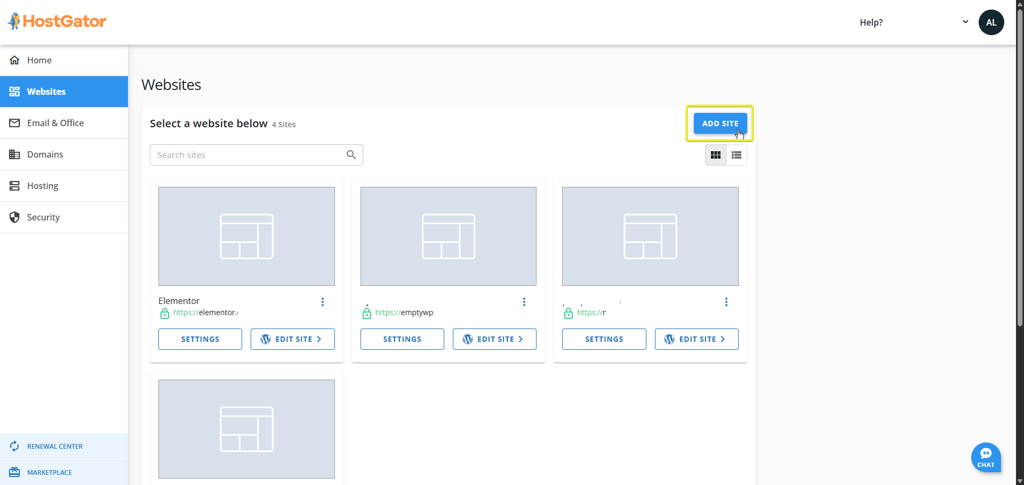
I clicked on the Add Site button on the right.
-
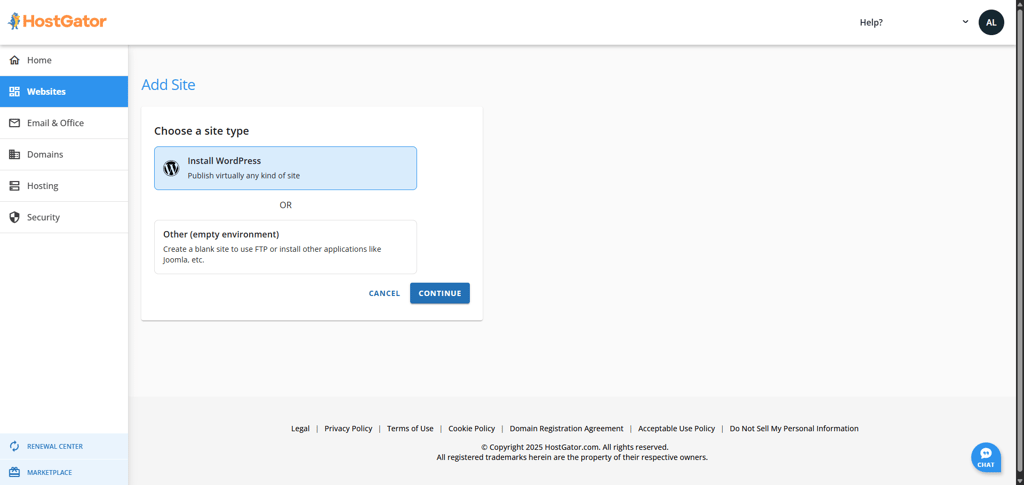
I had to select the site type – I chose WordPress.
-
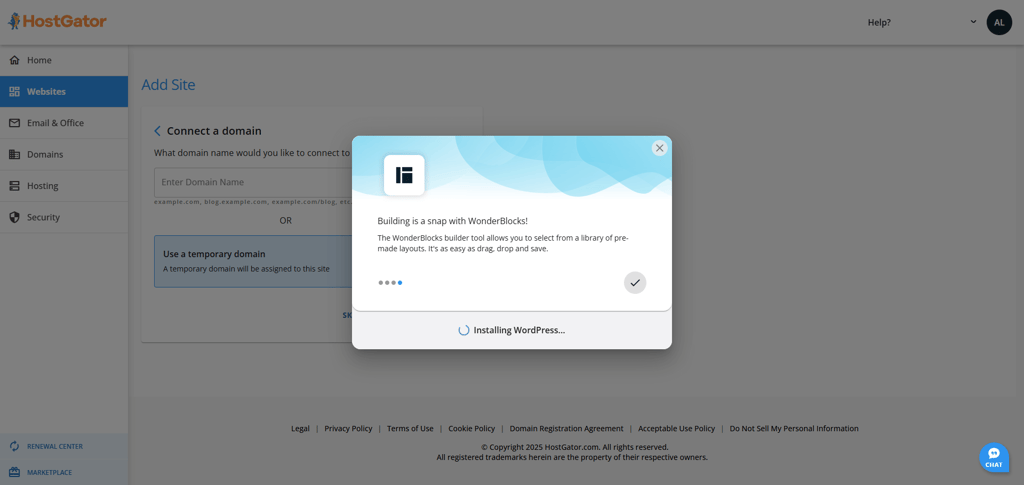
I entered my site’s title and had the choice between connecting an existing domain or using a temporary domain. I chose a temporary one which triggered the WordPress installation process.
- Once WordPress was installed, I logged in and started WordPress onboarding. I confirmed my site title, selected the type of website I was launching, added social media accounts, descriptions, and everything else.
- After setting up WordPress, I was ready to build my website. It allowed me to use a template or build from scratch.
-
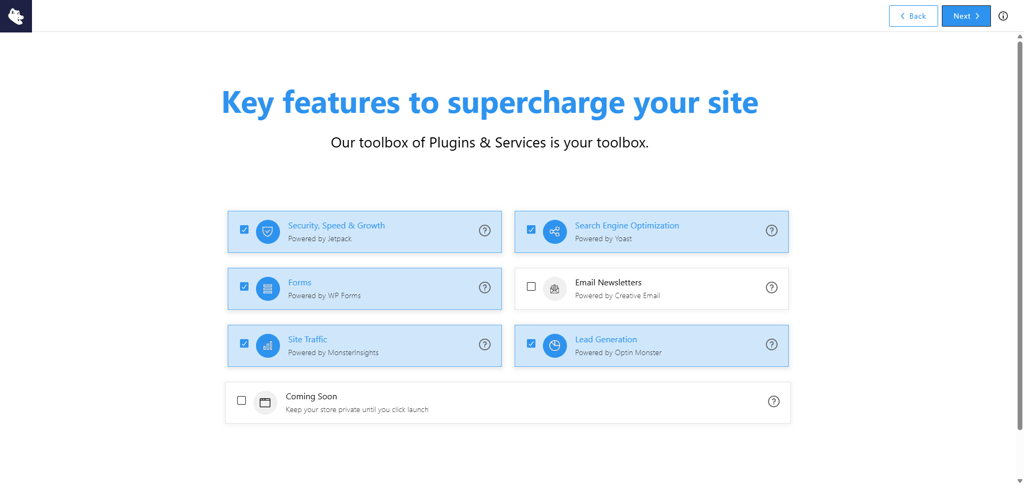
Last but not least, I selected Plugins & Services to boost my website and get better results.
HostGator hosting control panel
HostGator uses a now-standard mix of a customized dashboard and cPanel, which I found quite convenient. The dashboard allows you to use the most basic features, while the more advanced configurations can be found in cPanel.
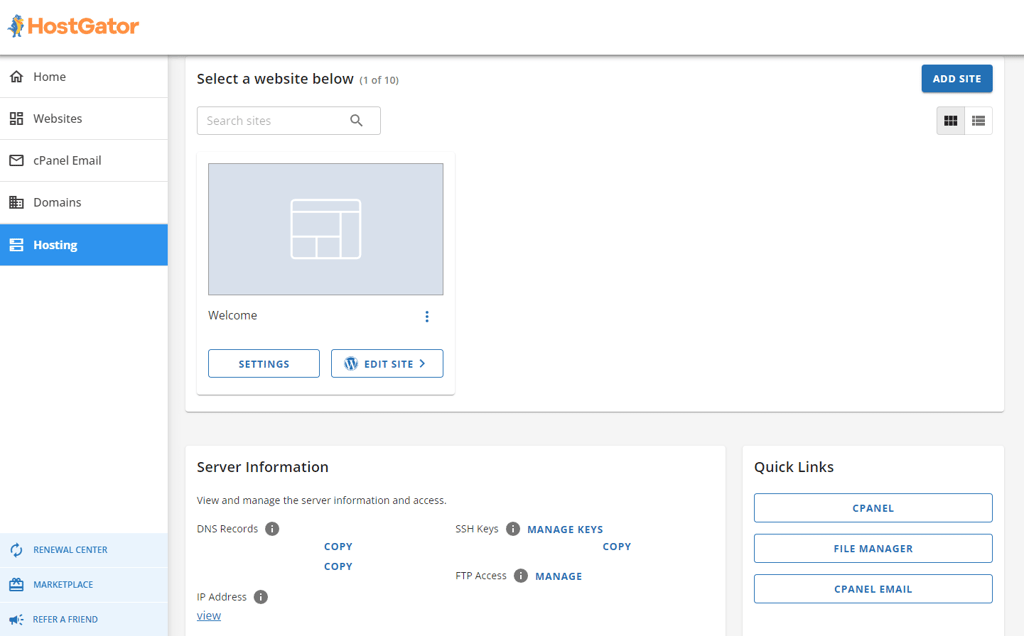
The native dashboard includes SSL management, WordPress installation, Email Accounts, Databases, File Manager, and a convenient button to launch cPanel.
HostGator uses the traditional cPanel, which is what most hosting providers also use. cPanel is popular because of its clean and neatly organized interface that’s easy to navigate. However, some advanced tools, especially for files, databases, and full-feature management, are still handled predominantly inside cPanel, not the native dashboard itself. While cPanel is known as a beginner-friendly control panel, complete beginners may find it a bit confusing. That’s why I prefer Hostinger’s hPanel.
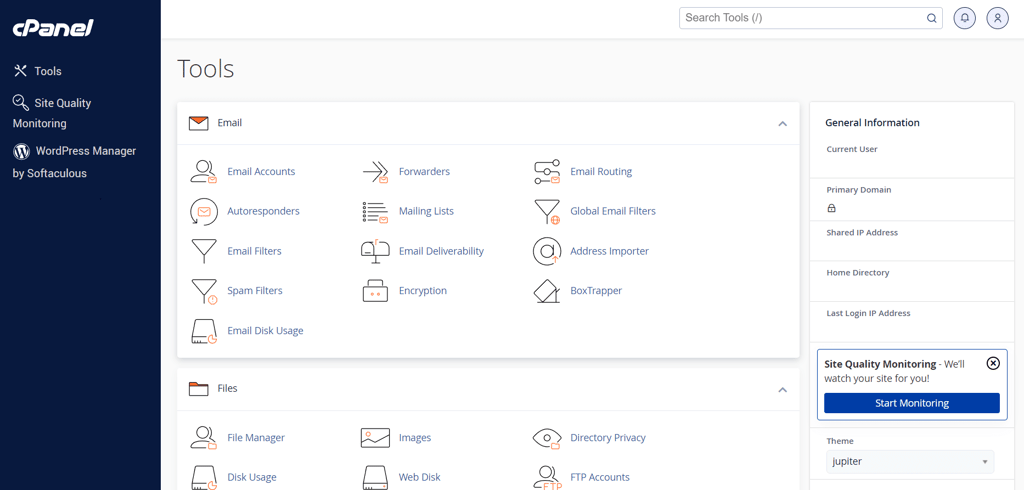
Still, cPanel remains one of users’ favorites for its ease of use. You can easily set up your site using HostGator native hosting management dashboard, but cPanel offers more options for setting up email accounts or managing domains and subdomains. It can also can be very useful if you choose to install any other content management system other than WordPress. Just scroll down to the Softaculous Installer App section and pick.
HostGator for WordPress
HostGator has 4 WordPress-optimized hosting plans – Hatchling, Baby, Business, and Pro – all of which include 1-click installation, free website migration, and cPanel for simplified setup and management.
Installing WordPress with HostGator is very easy. You just need to follow the Install WordPress link that’s directly on your dashboard and fill in the needed information. Each HostGator for WordPress package includes Cloudflare CDN to optimize outbound content and auto-renewed SSL certification for that extra security. You can also install WordPress from the cPanel. To do so, you'll have to click on the WordPress icon located in the software section.
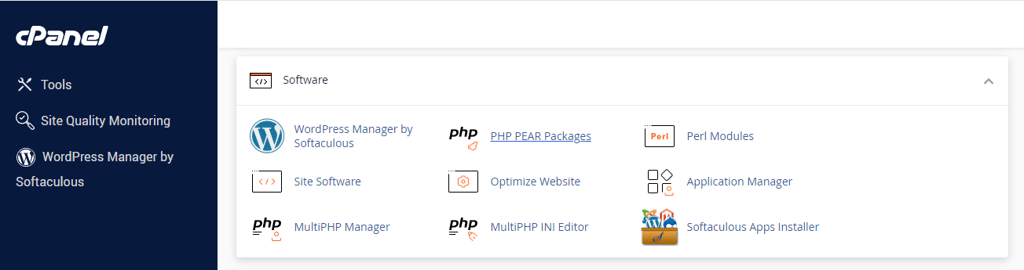
It will redirect you to the Softaculous one-click install option. It also has other apps like Joomla and Drupal, if you’re interested. When you install WordPress, this is what you should be seeing on your screen.

Just click on Install Now and fill out the needed information. That is your domain name, username, password, and any other required information.
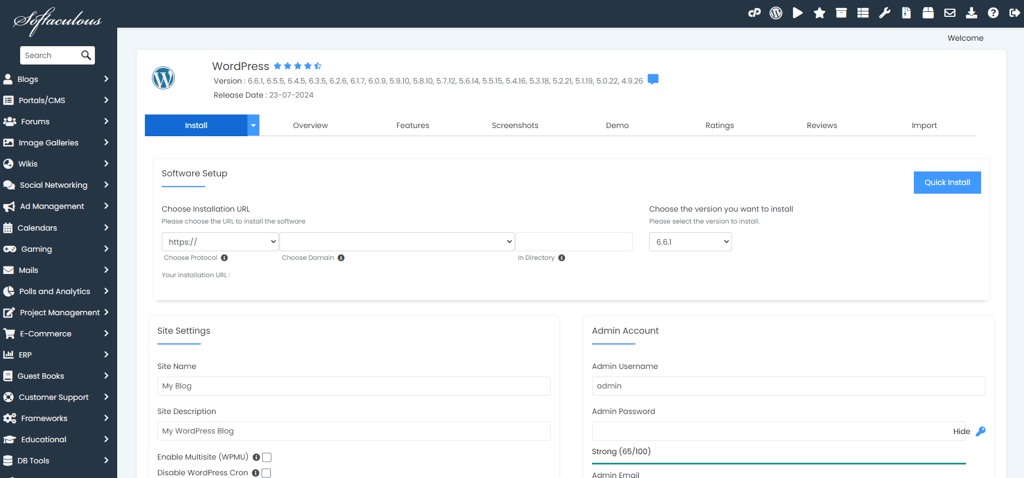
Now, Softaculous will do the rest for you. In less than a couple of minutes, you’ll have your WordPress site ready.
What’s the difference between HostGator shared hosting and WordPress hosting?
HostGator offers shared hosting plans that include 1-click WordPress installations, so if you’re looking to host a simple website using WordPress, a simple shared hosting plan is enough. However, the WordPress hosting plans from HostGator are designed for websites that rely on WordPress functionalities quite heavily. If you choose a HostGator WordPress plan (Pro shared hosting plan), you can expect more resources such as up to 100 websites, 100GB storage, daily website backups, and domain privacy for free for the 1st year.
Can I set up a professional email with HostGator?
No matter which shared hosting plan you choose, HostGator will give you unlimited email accounts for free for one month. However, it is up to you to set up the email client. The setup process is easy, even for beginners, and it takes only a few minutes.
To set up an email client with HostGator, you can simply click on the Email Accounts button on your HostGator dashboard. Alternatively, you can reach that from the cPanel by clicking the Email Account icon in the Email section.
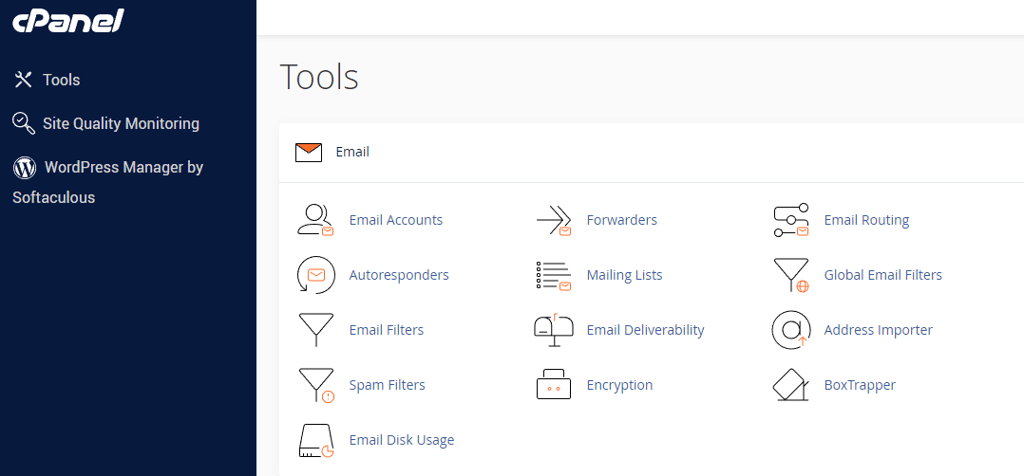
Regardless, it will lead you straight to the email account management area. Simply click Create and this is the form you should see on your screen:
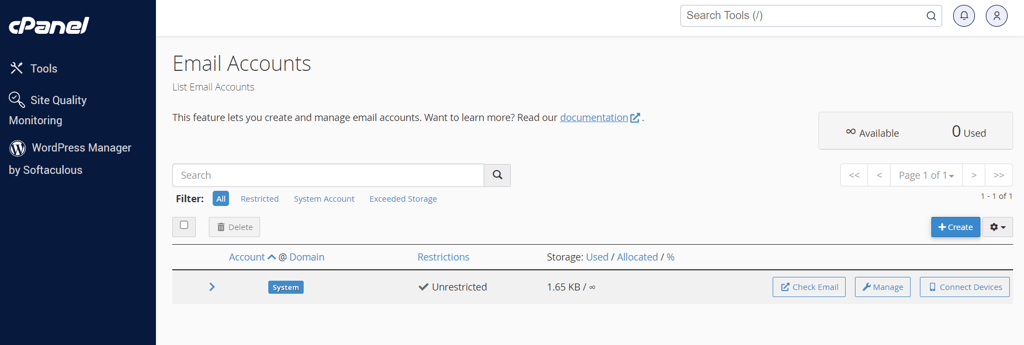
Fill in the required information like the mailbox name and new password. You can also set a storage limit or keep it unlimited. Then, you can use your email by clicking Webmail on your main dashboard.
However, HostGator uses Horde and RoundCube email clients. They are pretty basic, plus hosted on the same server as your website. This means that they are good to use for casual mailing, but not for large volumes of outbound emails. If you’re hoping to use your email for big marketing campaigns, I recommend choosing a paid email client that won’t be hosted on your server.
HostGator offers three WordPress hosting plans with 1-click installs, free migration, SSL, and Cloudflare CDN. Setup takes just minutes via the dashboard or cPanel. Shared hosting works for simple sites, but WordPress plans add more resources, daily backups, and domain privacy. Email accounts are included for the first month, though the built-in clients are quite basic.
HostGator’s performance: surprisingly fast and reliable
To see what kind of performance you can expect, I have put HostGator through a few speed and stability-related tests. Throughout the testing period for 2 weeks between August-September, the provider was very stable, the uptime was much better than guaranteed, and the website’s loading speed was very fast. For more details, let’s look at these tests individually.
HostGator uptime and response time
For this review, I monitored HostGator for about a month. During that time, there were no errors or downtime, resulting in 100% uptime and 99.73% reachability. The average response time came up to 112.04ms, which is below the market average and thus considered very good.
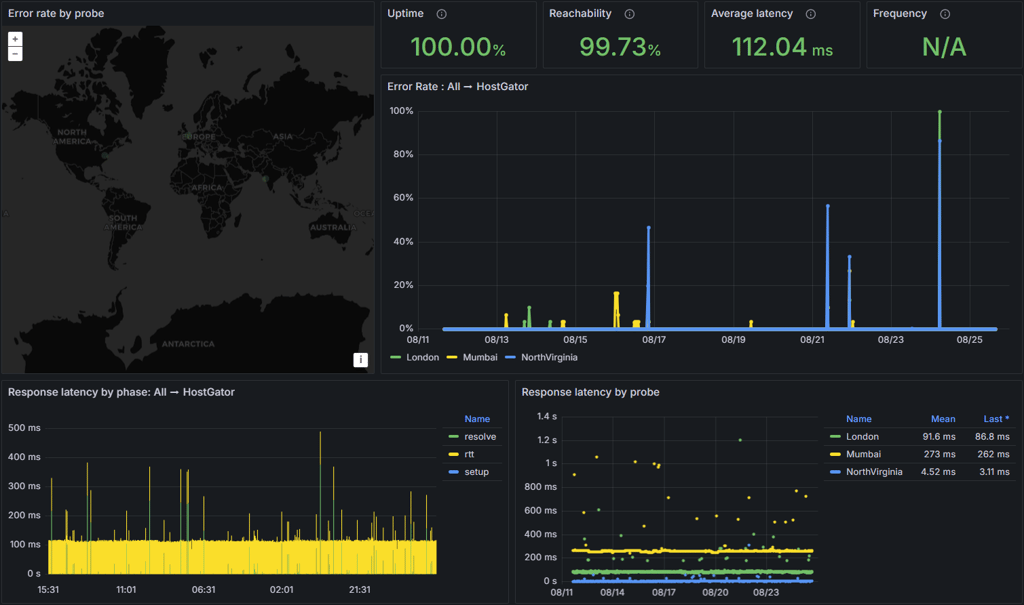
All things considered, HostGator presented great results. It proved to be very, and I mean very reliable in terms of uptime, and the response time was really good.
HostGator speed
My website is hosted in a US-based data center, so the quickest load time was in the US. HostGator’s Largest Contentful Paint (LCP) came in at 0.793s, which is a strong result compared to competitors like IONOS.
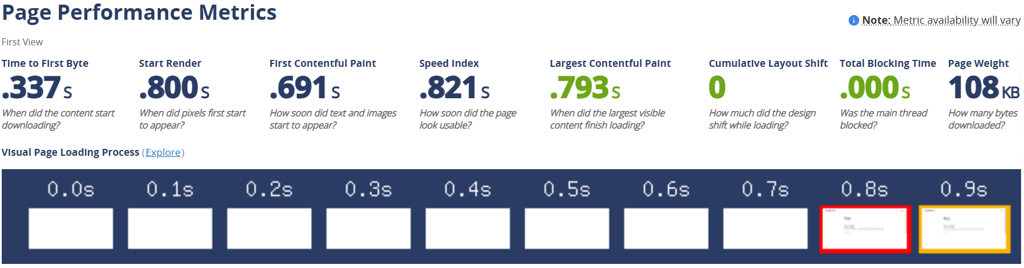
LCP is one of the measures used by Google when ranking websites on its search result page. It states that if your page’s LCP is lower than 2.5s your site has a good chance of ranking higher within the search results.
However, there’s another measure that matters a lot. It's the time that it takes for the visitor to be able to interact with a fully loaded site, or fully loaded time (speed index). For best website ranking results and visitor satisfaction, it is best to keep this time under 3 seconds. HostGator showed a fully loaded time of 0.821s.
HostGator stress testing
For this test, I sent 50 virtual visitors to my site. These 50 users are on the website at the same time, for an extended time. This puts a lot of pressure on the server, as there are thousands of requests coming in. This could slow down the server or overwhelm it entirely.
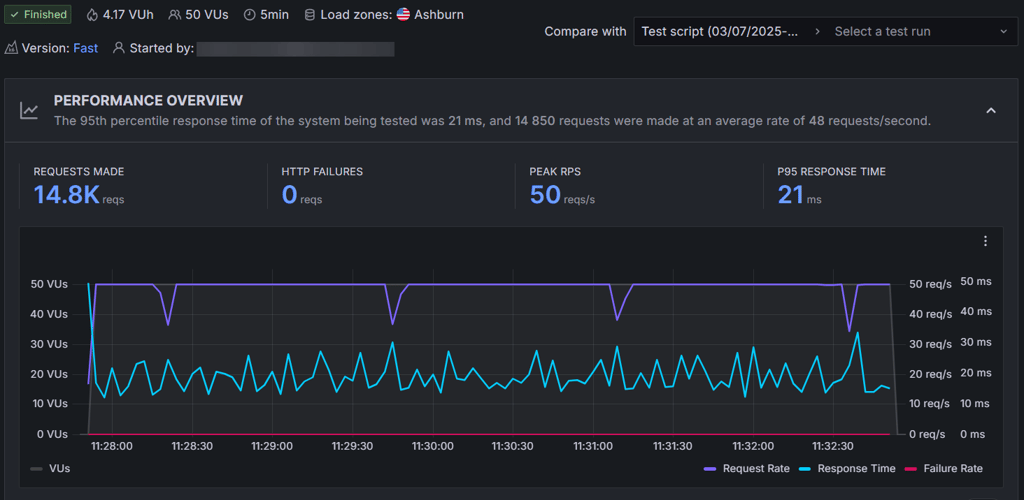
HostGator handled 50 virtual users with no failures, and maintained the response time at 21ms, below the 2s threshold. This means that HostGator’s servers are well-equipped to handle sudden traffic increases. This is a good result for small-to-medium-sized websites or small online stores.
HostGator's performance is impressive. The website won’t have any issues regarding outages, and the fast loading speed is something that was not promised but is very welcome. It is very well suited for small-to-medium-sized websites that get occasional traffic increases.
HostGator delivered 100% uptime and an average response time of 112.04 ms, making it very reliable. In speed tests, it showed an LCP of 0.793s and a fully loaded time of 0.821s, both excellent for SEO and user experience. Even with 50 simultaneous users, performance stayed stable, proving it’s well-suited for small to medium websites.
HostGator security: basic security with paid add-ons
On the security front, HostGator tends to be on the basic side. You do get the ultimate essentials such as SSL and a server-level firewall. However, if you want an additional layer of security, you’ll have to pay extra.
If you took the free domain from HostGator, your SSL certificate should be ready and active. You can check this in the Site Settings. Most of the time, the certificate will be activated automatically. However, if your domain is hosted at another registrar, the HostGator tool may not be able to activate the SSL automatically all the time. If that’s the case, your certificate status will be Pending rather than Active. To solve that, you can contact HostGator’s support team, and they will do it manually for you.
You’ll also get a server-level firewall that can protect your website(s) against unwanted or even malicious traffic. HostGator has an extensive set of rules to protect its servers from all kinds of cyberattacks. Plus, its data centers have restricted access and can enable network-level flood protection if HostGator’s servers experience heavy flooding.
HostGator takes the security of its servers quite seriously but you have options to enhance it. There are multiple other security features that you can get for your website:
- Positive SSL upgrade for $39.96/year. In the checkout cart, it seems like a necessity, but if you read the fine print, you’ll see that it’s just an upgrade, and a free SSL is already included. I’m skipping on this as it’s only useful for websites that operate tons of transactions or sensitive data. By the way, the Business plan will get you this upgrade for free.
- SiteLock Essentials costs $7.99/month. It checks your website for malware and signs of hacking. Keep in mind that some providers can offer the same security package cheaper. For example, with Web.com, you can get the same SiteLock security for $6.99/month.
- Automatic backups cost $2.99/month. Problems can arise at any time, and it gives you a certain level of comfort to know that you can just restore your website with one click. So if you want to have that peace of mind, you can add this feature to your website.
The bottom line is that when it comes to security, HostGator does a pretty good job. However, if you want that extra layer of security, you’ll have to pay for it. There are certain security packages that other providers offer for a bit cheaper, but HostGator’s prices are not that outrageous compared to the quality service it provides.
HostGator’s security is decent, but it leans toward the basics. You get essentials like a free SSL certificate and a firewall that blocks malicious traffic, which is generally enough for personal sites or small projects. However, if you’re running a business site or handling sensitive data, you’ll likely want more than the default setup. Features like SiteLock malware scanning, automatic backups, and upgraded SSL are available, but they come at an added cost. While some competitors bundle these into their plans, HostGator keeps them optional — which means you only pay for what you truly need.
Customer support – are there any complaints?
| Support | HostGator |
| 24/7 live chat | ✅ Yes |
| ❌ No | |
| Ticketing system | ❌ No |
| Phone line | ✅ Yes |
| Knowledge base | ✅ Yes |
For support, HostGator offers a 24/7 live chat, phone support, and an extensive knowledge base with guides, video tutorials, and other detailed articles. A ticketing system is not available by default, but it can be in particular circumstances. For instance, if an issue is too complicated, a ticket can be opened for senior members to solve. Additionally, entry plans such as Hatchling and Baby only provide access to chat support – some users might find that inconvenient.
However, my personal favorite method of contacting the support team is via live chat. Every time you access HostGator’s website, you can see the button in the lower right corner. The same goes for your dashboard. For this HostGator review, I contacted the support several times. Each time, I was pretty happy with the results. The waiting time was minimal and the agents were helpful.
The first time I tried the chat, I asked an agent to help me locate the nameservers. Usually, providers use the same nameservers for all shared hosting accounts but that’s not the case with HostGator. Each account gets its nameservers. The agent took a couple of minutes to find my name servers, my problem was gone in 9 minutes.
I also had an issue with my dashboard: for some reason, I had two hosting plans, although I only paid for one. I asked the agent to resolve this, and they did. The agent even offered to activate the domain I got with HostGator, as I wasn’t using it.
While I had a great experience, user reviews reflect the opposite. HostGator users report that they’ve been left hanging and that customer support agents can’t handle simple tasks like website recovery. It seems like customer support can be a hit or miss, and depends on the support agent you get.
All in all, my personal experience with HostGator support was excellent with quick answers and productive problem-solving. As an alternative to live chat or phone support, you can also use a knowledge base. HostGator has a ton of articles and even videos on almost every topic. Everything is neatly organized so finding what you need is easy. Or you can simply use the search bar at the top.
HostGator review – final thoughts
My testing shows that HostGator is a cheap hosting solution for small websites or personal projects that don’t require a whole lot of resources. It performed surprisingly well, but could run into issues with higher traffic or a more resource-demanding website. HostGator is beginner-friendly with step-by-step instructions to guide you through the entire process from setup to launch. However, I still prefer Hostinger’s hPanel for those who have never worked with websites before.
| Feature | Cheap and fast hosting provider | |
| Pricing | HostGator is on the affordable side with shared hosting starting at $3.75/month. The renewals will be pricier, but that’s nothing unusual. The good thing is that most of the essentials are already included, and no other investments may be needed. | |
| Ease of Use | HostGator is incredibly easy to use. You can set up a professional website without even reaching the cPanel. However, it is also available for more advanced customizations. The only drawback is that some tools can be a little glitchy but customer support should be able to help you. | |
| Performance | HostGator’s performance was great. The site outperformed the promised 99.9% uptime by a long shot with 100%. The host proved to be fast and trustworthy. Also, a big traffic surge was handled just fine. | |
| Security | Unfortunately, security is HostGator’s weak side. It includes free SSL certificates and a server-level firewall integrated with all plans, but other tools cost extra. That’s just one step behind what other providers are doing. | |
| Support | My experience with HostGator’s support via live chat was great. They were quick and helpful, but I’d keep in mind that my request was rather simple. There are many HostGator reviews stating otherwise so truly it’s a hit or miss. Alongside that, they offer support 24/7 via phone, and an extensive knowledge base is available. |
Who do I recommend HostGator to?
HostGator is an affordable option for beginner users. It is incredibly easy to use. Plans are powerful and equipped enough for almost any kind of website. It’s also very fast, so you won’t have problems hosting anything from blogs and portfolios to business websites or small online stores.
Video review
For a slightly different perspective or simply if you prefer watching over reading, our team prepared this video review of HostGator:
FAQ
Is HostGator legit?
Yes, HostGator is a reliable web host. Talking about performance, HostGator's servers stay up >99.99% of the time. Meanwhile, as a company, it has been in the web hosting industry for more than a decade and is still thriving, which makes it a trustworthy provider.
Do I get a free domain with HostGator?
Yes, all shared hosting, WordPress, and Cloud hosting plans include a free domain. For that, you must sign up for a 12, 24, or 36-month billing period. If at some point you choose to cancel your plan, a non-refundable fee of $17.99 will be applied for the domain name.
What is HostGator's money-back guarantee?
HostGator offers a standard 30-day money-back guarantee for first-time users. Keep in mind that the domain is non-refundable – the cost will be deducted, but you'll get to keep your website's name.
Is HostGator secure?
Yes, HostGator covers security basics as it offers a free SSL certificate and a server-level firewall. Any other security measure costs extra.
Is HostGator good for beginners?
Yes, HostGator is very beginner-friendly. The host offers inclusive packages and easy-to-manage control panels to appeal to first-time users.
Does HostGator provide free website migration?
Yes, HostGator provides free website migration for new users with VPS or Dedicated hosting plans.
How much does HostGator cost after the first term?
HostGator’s cheapest plan, Hatchling, renews at $10.99/month after the first term.