Maximize Your Virtual Collaboration: Best Zoom Apps and Integrations


 Follow us
Virtual collaboration tools have become essential in connecting with colleagues and clients because of the increasing popularity of remote work. Zoom is one of the best virtual communication platforms out there that offers a plethora of useful features.
But you can further enhance the functionality of this tool using Zoom integrations and apps. With so many options available on the Zoom apps marketplace, selecting the best tools can be overwhelming.
That’s where this guide comes in as it contains the best apps for Zoom that will help you maximize your virtual collaboration and improve productivity.
Best Zoom Apps and Integrations: Our detailed list
If you work remotely and use Zoom for virtual communication, you don’t need to limit yourself to the default features of this tool. All you need to do is to go to the Zoom app marketplace and install tools that suit your needs the best.
To help you find the best tools and integrations, here’s a detailed list that we’ve compiled.
Google Drive

| Category: | Productivity and collaboration |
| Best for: | Sharing documents during meetings from cloud storage |
Google Drive is one of the best zoom apps that allows you to streamline collaboration within your team. It allows you to link your Google Drive to your Zoom account to access data stored on your cloud storage.
This functionality helps you share documents and files with other team members during meetings without needing to switch between applications. The integration also helps you create new Google Docs, Sheets, or Slides quickly and set sharing permissions on the go.
The following are some of the best features that Google Drive for Zoom brings to the table:
- Share files from Google Drive during Zoom meetings
- Quick creation of Google documents
- Set sharing permissions on documents that you’re sharing with the team
- Quick access to your Google Drive using the slash command
Google Drive for Zoom app is an essential integration for professionals who want to maximize their collaboration efforts and simplify the process of file sharing within Zoom.
ONLYOFFICE DocSpace
| Category: | Productivity, file management |
| Best for: | Co-authoring and managing office files within the Zoom app |
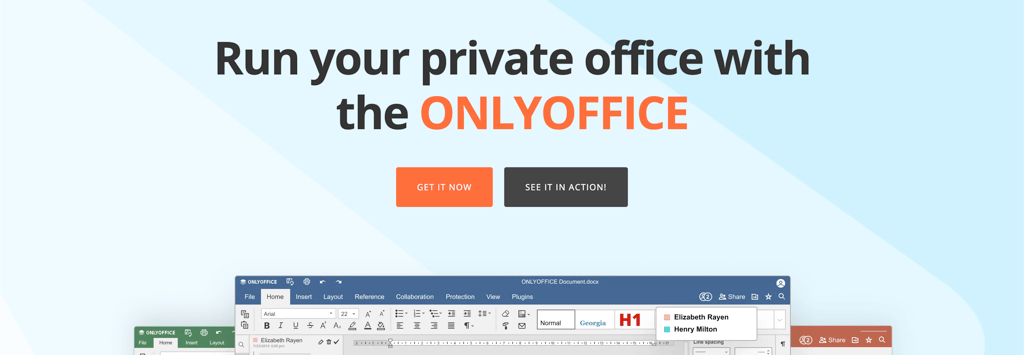
ONLYOFFICE is an all-in-one office suite and ecosystem of collaborative applications designed to help businesses with document and team management. It comes with feature-rich online editors that allow you to create and edit different types of documents and files, such as text documents, presentations, spreadsheets, forms, and PDFs.
The tool also enables you to share documents and collaborate on them via an internet connection from any location. One of the standout features of ONLYOFFICE is its integration with Zoom. It provides you with DocSpace, which essentially creates a room-based environment within Zoom for efficient document collaboration.
It allows you to co-author office files and share them with other team members during Zoom meetings. You can invite teammates to join in on document editing, leave comments, track changes, and observe the editing process in real-time through screen sharing. It helps you make sure that all meeting participants are on the same page and can contribute to the document simultaneously.
DocSpace also allows you and other meeting participants to continue working on the document independently or in collaboration with others even after the meeting has ended.
Additionally, you can access ONLYOFFICE DocSpace directly within Zoom whenever needed. Whether it's editing text documents, analyzing spreadsheets, creating presentations, or filling out forms, it provides you with tools to manage your documents effectively within Zoom.
- Comprehensive document management within Zoom
- Real-time collaboration, comments, tracking
- Access changes after meetings
- Standalone DocSpace for custom rooms
- Support for all types of files and documents
DocSpace is a comprehensive office solution for collaborative document creation and editing during and after Zoom meetings.
OneStream Live

| Category: | Live streaming |
| Best for: | Multistreaming Zoom meetings on multiple social media platforms at once |
OneStream Live integrates with Zoom to help you live stream your meetings on multiple social media platforms and the web simultaneously. You can use this tool to simulcast your meetings on more than 40 social channels, including Facebook, YouTube, Instagram, TikTok, Twitter, and Twitch, and also embed them on your website.
The best feature of OneStream Live is the ability to create professional live streams with several branding options, including customized logos, backgrounds, banners and tickers, intros and outros, and other visual effects.
You can also use this tool to download your Zoom meetings directly to OneStream's video storage and schedule them to go live on the desired platforms on the preferred date and time. All you need to do is schedule a date and time for the recording and set it to go live.
Here’s a list of features that OneStream Live offers:
- Ability to live stream Zoom meetings on multiple social media platforms at once
- Download Zoom recordings to OneStream's video storage directly
- Schedule recordings to go live on more than 40 social media platforms
OneStream Live is a powerful tool for businesses looking to expand their reach through multistreaming and repurpose their Zoom recordings across multiple social media platforms and the web simultaneously.
2meetup

| Category: | Event Management, human resources, and scheduling |
| Best for: | Scheduling meetings for Zoom |
2meetup is an excellent app that simplifies the process of setting up and managing virtual meetings. It eliminates the need to enter conferencing details before entering a Zoom meeting.
It offers several useful features, including automatic link generation to join meetings, SMS and email reminders for members, and automatic time zone adjustments. The app also has a user-friendly interface, making it easy to manage and keep track of all your virtual conferences.
Another excellent feature of 2meetup is the ability to add a personalized link to your website, social network page, or email signature. It allows customers to schedule a meeting with you directly without needing to create a Zoom conference manually.
Here’s a list of features that 2meetup offers:
- Automatic link generation for meetings
- Automatic time zone adjustments
- SMS, Whatsapp, Telegram, phone call and email reminders for invitees
- Personalized for customers to schedule meetings
2meetup is a useful tool for businesses looking to streamline their virtual meeting scheduling process and make it easier for customers to schedule meetings with them.
Zoom Meeting for Ohmni Robot
| Category: | Collaboration |
| Best for: | In-person collaboration experience |
Zoom Meeting for Ohmni Robot is a unique app that simplifies the virtual meeting experience. It allows you to start or join a Zoom meeting with an Ohmni Robot and engage in virtual meetings as if you were physically present.
Once installed, the app enables the robot to join any existing Zoom meeting or start a new one while in an active Ohmni Robot session. The robot joins the meeting as a participant, allowing members to see its video and audio.
Another notable feature of the app is the ability to schedule Ohmni and Zoom sessions directly from the Ohmni Web Application. It makes it easy for you to schedule meetings and manage them efficiently.
The following are some unique features of Zoom Meeting for Ohmni Robot:
- Join or start Zoom meetings from Ohmni robot and share video/audio
- Schedule Ohmni and Zoom sessions using Ohmni Web Application
- Allow Ohmni robot to join in meetings as a participant
- Control the Ohmni robot's movements, audio, and view remotely
- Unique virtual meeting experience that feels like in-person
Zoom Meeting for Ohmni Robot is a great app for anyone who wants to enjoy a more immersive virtual meeting experience.
Leadmonk

| Category: | Sales, scheduling, workflow automation |
| Best for: | Automating the appointment booking process |
Leadmonk is a mobile-first scheduling app that simplifies appointment bookings for businesses and individuals. It offers a range of features, including flexible booking options and automated reminders to streamline the meeting scheduling process.
The platform is designed to reduce booking friction by allowing customers to book appointments using their mobile number or email address. It eliminates the need for back-and-forth emails or messages and saves time.
Leadmonk is ideal for customer-facing teams such as marketing, customer success, and sales. It’s built to support a wide range of prospect and customer scheduling scenarios and integrates seamlessly with Zapier and a wide range of other tools.
The Zoom integration allows you to embed Zoom online links directly into your scheduled meetings. Plus, it also allows you to create a variety of appointment types, including group meetings, one-on-one meetings, and round-robin appointments.
The following are the key features of Leadmonk:
- Mobile-first scheduling platform
- Flexible booking options
- Automated reminders
- Supports multiple types of appointments
Leadmonk is perfect for anyone looking to streamline their appointment booking process. It allows businesses and individuals to focus on what really matters while saving time and reducing booking friction.
Spiti

| Category: | Recordings and collaboration |
| Best for: | Storing and managing meetings in a playlist format |
Spiti provides an intuitive way to store and manage your Zoom meeting recordings (and other videos) in the form of a playlist. It allows you to share these recordings and videos securely and easily with anyone you want.
The main idea behind this app is to help businesses share learning content, such as employee onboarding videos, architecture overviews, database schema explainers, product demos, and code walkthroughs.
The app also supports commenting and conversation threads for each video/recording. This feature is particularly useful for teams to engage in conversations about specific topics covered in the videos.
Another standout feature of Spiti is the ability to collaborate securely with people outside an organization through Spiti Connect. The app's native screen recorder allows users to quickly record a video with their screens and share it with anyone, making it an excellent tool for remote teams.
Here are some unique features that Spiti offers:
- Secure internal video library for teams
- Easy to create playlists using videos and recordings
- Seamless integration with Zoom
- Native screen recorder to quickly record and share videos
- Commenting and conversation threads for each video
Spiti is an excellent app for teams that want to share and learn from each other in a more organized and efficient manner.
Rehab Guru

| Category: | Healthcare and Health & Wellness |
| Best for: | Conducting telehealth calls |
Rehab Guru is an innovative web-based platform designed to simplify patient care management for healthcare practitioners. It comes with a user-friendly interface and allows practitioners to create customized exercise plans, track patient progress, and communicate with them in real time.
Rehab Guru also offers seamless integration with Zoom, which allows you (healthcare professionals) to schedule and manage Telehealth calls and provide quality care remotely. Once the integration process is complete, Zoom will become your default video meeting platform for all patient appointments.
It’ll allow your patients to use the video conferencing platform they’re familiar with while also taking advantage of the enhanced security and performance of the Zoom network. This integration also provides practitioners with real-time updates on meeting changes and cancellations for seamless patient care management.
Here’s a list of features that Rehab Guru offers.
- Automatic creation of video meetings for client appointments
- Seamless scheduling and management of Telehealth appointments through Zoom integration
- Updates and deletions of meetings based on changes to appointments
- Familiar and secure experience for patients and clients
Rehab Guru is an excellent Zoom integration designed for healthcare professionals. It allows them to turn Zoom into their virtual medical consultation platform.
BarRaiser Interview Assistant

| Category: | Human resources, learning & development, and recordings |
| Best for: | HR teams |
BarRaiser Interview Assistant is a Zoom app designed to streamline the interviewing process for hiring managers, recruiters, and interviewers. It helps interviewers during the interview to conduct high quality interviews by providing Interview guidance, sample questions and it also helps them in filling the feedback on Zoom app itself.
BarRaiser AI records and analyzes the interview to generate interview quality score which can be used to train the interviewers. AI-generated highlights help hiring managers to understand more about the candidate and help in hiring decision.
Here are some unique features of the BarRaiser Interview Assistant Zoom app:
- Access candidate profiles
- Control interview flow
- Advanced feedback-capturing mechanisms
- Interview recording and highlights generation
- Interview quality measurement
- Seamless integration with Zoom
Overall, BarRaiser is a great app for Zoom that HR teams can use to simplify the interviewing process and make it time-efficient.
Firmao

| Category: | Productivity, customer management |
| Best for: | Small businesses to manage tasks, projects, and customer base |
Firmao is a comprehensive web-based business management tool that allows you to manage your company's processes from anywhere in the world. It offers multiple solutions, including project and task management, ERP, CRM, invoicing, and time tracking.
One of the best features of Firmao is that its CRM module can integrate with VOIP to help you manage your customer relationships efficiently. You can integrate it with Zoom to prepare and launch meetings equipped with the right information, which provides your teams with the right information about your customers, subscribers, and leads during the call.
You’d already know that it’s difficult to remember all the details of your meetings with customers. The Zoom integration with Firmao allows you to sync customer meetings with their records in the CRM. It’ll help your teams get a refresher before sending follow-ups to customers and prospects to provide them with all the information they need.
- Cloud-based business management software
- All-in-one solution for managing the company's processes
- CRM module with VOIP integration
- Zoom integration for efficient meetings and enriched lead data
- Improved follow-ups with prospects and customers.
Polly

| Category: | Productivity, collaboration, and surveys and Polls |
| Best for: | Making Zoom meetings interactive and fun to keep attendees engaged |
Polly is a meeting engagement app that helps teams connect in a more meaningful way during Zoom meetings. It offers several features that aim to make meetings more productive and engaging for all participants.
It allows you to send icebreaker questions during meetings to break the awkward silence. It also encourages team members to engage with each other in a more relaxed environment.
The app also enables live Q&A sessions during virtual conferences, with question moderation to keep the discussion on track. The audience can upvote questions to amplify diverse voices, and moderators can choose to display questions on the screen for everyone to see.
Lastly, Polly also allows participants to respond anonymously, which puts them at ease and encourages candid responses.
Here are some great features that Polly offers:
- Icebreaker questions to get the team talking
- Live Q&A sessions to keep everyone engaged
- Anonymous responses to promote candid feedback
- Instant feedback tools
- Pre-meeting Polls for scheduled meetings
- Customizable Polly Groups for common meeting types.
Polly is a powerful tool for teams looking to drive meaningful connections during meetings and create a more engaging and productive atmosphere.
Calendly for Zoom

| Category: | Scheduling |
| Best for: | Scheduling Zoom meetings on the go |
Calendly for Zoom is a scheduling app designed to simplify the process of setting up and managing virtual meetings. It allows you to avoid the hassle of manually entering conferencing details for every meeting.
One of the most notable features of this app is that it automatically generates unique Zoom conference details for every scheduled meeting, which saves time and effort.
Another useful feature of Calendly for Zoom is that it automatically includes Zoom details in confirmation notifications and calendar events sent to invitees. It ensures that all invitees have access to the necessary Zoom information.
Here are some unique features of Calendly for Zoom:
- Elimination of manual conferencing details entry
- Automatic generation of unique Zoom conference details for every meeting scheduled
- Automatic addition of Zoom details to confirmation notifications and calendar events
- Streamlined scheduling process
Calendly for Zoom is an excellent tool for users who frequently schedule virtual meetings using Zoom quickly and efficiently.
DocuSign eSignature

| Category: | Financial Services and productivity |
| Best for: | Presenting, signing, and completing agreements securely |
DocuSign eSignature allows you to present agreements and get them signed by attendees right from the Zoom platform. It’s designed to help you streamline your agreement signing process and save effort and time.
One of the best features of DocuSign eSignature is that it stores a detailed audit trail for each agreement, providing peace of mind to all parties involved.
The following are the features that this app offers:
- Enable live signing using Zoom's remote-control feature
- Present agreements to people during meetings in a few clicks
- Generate and store detailed audit trails of agreements automatically
DocuSign eSignature is a useful app for businesses looking to simplify and streamline their signing process while maintaining a high level of security.
Slack

| Category: | Collaboration |
| Best for: | Streamlining team collaboration and communication |
Slack is one of the most popular team collaboration platforms that allows you to talk to your colleagues/employees in real-time and share files. One of the key features of Slack is its ability to integrate Zoom, which allows you to create a virtual meeting directly using Slack.
It provides you with real-time notifications when someone joins or leaves a meeting. In addition, you can access meeting summaries and recordings within Slack.
The Zoom integration also supports the sharing of Zoom Whiteboard, allowing users to collaborate on visual content in real-time.
The following are some unique features of the Slack app for Zoom:
- Start or join Zoom Meetings with one click
- See the real-time duration of Zoom Meetings
- Receive notifications of who joins or leaves your Zoom meeting
- View meeting summaries and recordings
- Make Zoom Phone calls from Slack
- Share Zoom Whiteboards in Slack
- Easily grant access to others to view Whiteboards
Slack's Zoom integration provides you with a seamless and streamlined experience for managing Zoom meetings and calls. It makes collaboration and communication easy within your team or organization.
Best Zoom Apps And Integrations: Final recommendations
We’ve discussed the best Zoom apps that you can use to enhance the functionality of this video conferencing tool. Here’s a quick rundown of these apps and integrations, which will help you narrow down your research.
- Google Drive – a cloud-based storage app that allows you to create and share Google Docs, Slides, and Sheets with others during Zoom meetings.
- ONLYOFFICE – a collaborative office suite that integrates seamlessly with Zoom and allows for real-time document collaboration during and after meetings.
- OneStream Live – a powerful Zoom app that allows you to stream pre-recorded and/or live videos on multiple social media platforms.
- 2meetup – a simple and user-friendly tool to schedule Zoom meetings without needing to manually enter meeting details.
- Zoom Meeting for Ohmni Robot – a unique app that allows you to remotely control and participate in Zoom meetings using Ohmni Robot and share your audio and/or video as if you were there yourself.
- Leadmonk – a cloud-based appointment scheduling app that provides tools for businesses to simplify the process of scheduling meetings on Zoom with customers, prospects, and other stakeholders.
- Spiti – an app that allows you to create playlists using your recorded Zoom meetings or videos to share them with your customers/employees.
- Rehab Guru – a user-friendly Zoom app for healthcare practitioners to use Zoom as their virtual medical consultation platform and enhance patient care management.
- BarRaiser Interview Assistant – an excellent Zoom app for the human resource department to conduct interviews efficiently by saving time and effort.
- Firmao – a cloud-based business management software that syncs with Zoom to improve customer relationship management.
- Polly – a survey and polling app that integrates with Zoom and allows you to conduct live polls during virtual meetings and webinars to keep the attendees engaged.
- Calendly for Zoom – a meeting scheduling tool for Zoom that enables you to schedule and manage Zoom meetings directly from their Calendly calendar.
- DocuSign eSignature – an electronic signature app that you can use to present and get agreements signed during Zoom meetings.
- Slack – a communication platform that integrates with Zoom to allow you to start or join Zoom meetings, see real-time meeting updates, and share recordings and whiteboards.
Best Zoom Apps And Integrations – FAQ
What is a Zoom integration?
A Zoom integration is a third-party software tool that can be used to enhance the functionality of the Zoom virtual meeting platform.
How to use Zoom apps?
To use apps on Zoom, go to the Zoom Marketplace and open the app’s page that you want to use. Next, click on the “Add” button located right next to the app’s name. It’ll add the app to your Zoom application, and you’ll be able to use it.
Are Zoom apps and integrations secure?
Yes, Zoom apps and integrations are generally secure, but it is important to only install the ones offered by trusted sources. In addition, you should also carefully review the permissions that the app or integration requires before installing.