How one person’s personal information can put the whole family at risk

In December 2019, a mysterious hacker’s voice started following a 13-year-old kid from room to room through his own family’s Ring cameras in Staten Island. Ring investigated and found no breach on its end. Turns out, the username and password used to break in had been stolen from a completely unrelated site months earlier, then simply reused on the family’s Ring account. Someone, somewhere, had just reused a password, and that was enough to turn every camera in their home against the whole family.
What this example tells us is simple: if one family member is careless with their data and cybersecurity, the whole family is put at risk. It’s important to remember that a household is made up of a shared network of Wi-Fi, devices, saved passwords, linked accounts, and shared photos. A breach anywhere in that chain can impact everyone, from a parent managing the family bank account to a kid who just wants to play games in their bedroom.
Your family’s digital footprint is more connected than you might realize. In this article, I break down exactly how one weak link or poor cybersecurity habit can compromise an entire household, the most common mistakes that create that weak link, and what exactly you can do to close the gaps before they turn into a shared crisis.

The domino effect: how one weak link compromises the whole household
In many cases, hackers can access all of your family’s devices through one person’s account, and it usually doesn’t take much effort on their end. All it takes is one simple misstep – reusing passwords.
Surveys show that people admit to reusing passwords, and most of them use the same password on at least three accounts. In a family, those accounts are rarely kept separate. The same login might unlock a shared streaming service, a joint banking app, and the family email account that every password reset flows through.
Once one of those credentials leaks in a breach, an attacker doesn’t need to go the extra mile to harass your family. All they have to do is just try that same password everywhere it might work.
Shared home networks widen the problem further. Every device connected to your Wi-Fi, from a laptop to a smart TV to a video doorbell to a kid’s gaming console, is a potential entry point. A compromised smart device on the same network as your work laptop or banking app isn’t a separate problem, it’s just the same problem with more doors.
If you want to actually find your family’s weakest link, map out your digital dependency chain:
- List every account that shares a password with another account
- Note which devices are logged into your family email, since email resets almost everything else
- Add every smart home device connected to your Wi-Fi
- Identify which family member’s phone or tablet hasn’t been updated in months
Whatever shows up connected to the most other things on that list is your weakest link, and it’s usually not the account you’d have guessed
10 common mistakes that expose your family to scammers and malware
Most household security gaps come down to a small, repeatable set of mistakes. Here’s what you should NOT do if you want to protect your family from scams and malware:
- Reusing the same password across multiple family or shared accounts. If one account leaks, whoever has that password can use it to breach every other account with the same password.
- Oversharing personal details on social media, especially by kids and teens. School names, location tags, and birthdays handed out publicly give scammers everything they need to impersonate a family member convincingly.
- Using unsecured or default-password home Wi-Fi networks. A router with its factory password is an open door, and anyone within range can potentially see or intercept what’s happening on your network.
- Downloading unverified apps or browser extensions onto shared or hand-me-down devices. Old family phones and tablets tend to accumulate apps nobody remembers installing. Some of them could be built specifically to harvest data quietly in the background.
- Clicking phishing links or fake delivery and bank alert texts sent to any family member. It only takes one person, on one device, clicking one bad link to hand over credentials that unlock shared accounts.
- Storing passwords or sensitive documents in unprotected notes apps or spreadsheets. A plain text file of passwords is convenient until the device it’s on is lost, stolen, or compromised.
- Skipping software and firmware updates on old phones, tablets, or smart-home gadgets. Unpatched devices keep known vulnerabilities open indefinitely, and hand-me-down devices are the most likely to be forgotten.
- Failing to monitor a child’s Social Security number, which is rarely checked for fraud. Kids are more likely to have their identity stolen than adults, largely because nobody checks a child’s credit file until they’re applying for their first credit card.
- Connecting to public Wi-Fi without a VPN while accessing family cloud accounts. Public networks make it easier for someone else on the same connection to intercept unencrypted traffic. That includes login credentials for shared family accounts.
- Not using multi-factor authentication (MFA) on shared or high-value accounts. A password alone is one barrier. MFA adds a second one that a stolen password can’t get past on its own, on the accounts that matter most.
The most common ways personal information leaks within a family
The biggest cybersecurity mistakes families make at home trace back to a handful of behavioral and generational patterns that repeat in almost every household.
Kids and teens oversharing on social media
If you want to protect your family from targeted social engineering, start with what your kids are posting. Location tags, school names, and daily routines shared publicly give scammers and predators the exact raw material they need to build a convincing impersonation.
Malicious actors may pose as classmates, coaches, or even family members. A scammer who knows your child’s school, teammates, and daily schedule can craft a message that looks legitimate enough to fool the rest of the family too.
Data breaches at third-party retailers and services
You don’t have to make a mistake yourself to be exposed. A single data breach notification from a retailer, an app, or a service you signed up for years ago can expose an email and password combination that gets reused across your family’s shared accounts.
If that combination matches your family’s email or banking login, one retailer’s breach becomes an entry point into everything connected to it. That is exactly the domino effect that can be set in motion in no time.
Older relatives and phishing vulnerability
Grandparents and less tech-savvy relatives are disproportionately targeted by phishing emails and scam calls. It’s not because they’re careless, it’s because scammers specifically target them.
Seniors are seen as having more stable savings, they live independently, and they’re less familiar with the latest scam tactics. That combination makes an older relative’s inbox or phone a common entry point scammers use to reach the rest of the family, especially if that relative has access to shared family accounts or photos.
Identity theft’s ripple effect: when a child’s or parent’s data is stolen
Can identity theft affect the rest of your family financially? Yes, and it happens often in ways that surface years after the actual theft happened.
Child identity theft: the silent, long-term threat
A child’s Social Security number is uniquely valuable to identity thieves because it’s clean and unmonitored. Since nobody really checks a child’s credit file the way adults check their own, this kind of fraud can go undetected for an average of 12 years.
This sort of theft often only surfaces when that child applies for their first credit card, car loan, or student loan and discovers a credit history full of accounts they never opened. Unfortunately, in most of these cases, the person responsible is someone the child already knows.
Warning signs across every family member’s profile
Identity theft rarely announces itself. It shows up as small, easy-to-dismiss signals. Therefore, it’s worth checking for these across every family member’s profile, not just whoever manages the family finances.
| Family member | Warning sign to watch for | What to do |
| Any adult | Denied credit applications or unexpected drops in credit score | Pull a free credit report from Experian, Equifax, or TransUnion and review every open account |
| Children | Mail addressed to your child from lenders, collections, or the IRS | Request a credit freeze or report for your child through the credit bureaus, since they shouldn’t have a credit file yet |
| Any family member | Collection calls for accounts you don’t recognize | Contact the creditor directly and file a report at IdentityTheft.gov |
| Older relatives | Unfamiliar accounts or subscriptions on a bank statement | Review statements together periodically, since this age group is less likely to check for lingering fraud alone |
How to keep your family safe online: a step-by-step action plan
It’s crucial to adopt and teach the best home cybersecurity practices for families. Here’s a practical plan that moves from your devices, to your accounts, to the people using them:
- Secure every shared device. Give every family member their own user profile on shared computers and tablets, instead of using one login. Set unique passwords per person, keep software and firmware updated automatically where possible. Plus, turn on device-level parental controls for any shared tablet, computer, or hand-me-down phone a kid is using.
- Lock down accounts with unique passwords and MFA. If you want to protect your family’s accounts from a single leaked password, use a password manager for the whole household so nobody has to reuse credentials just to remember them. Give every account its own unique password, and turn on MFA for every email, banking, and cloud storage account shared by more than one person.
- Secure the home network and smart devices. Change your router’s default password the day you set it up. Set up a separate guest network for visitors and smart-home devices like TVs, doorbells, and speakers. Keep your router’s firmware updated, since this closes a network-level gap that individual antivirus software on your devices simply can’t reach.
- Monitor identity and credit for every family member, including kids. Set up proactive dark web and credit monitoring for every person in the household, including children who don’t have credit yet.
- Build a family cybersecurity culture. Technology alone can’t fix human error, and every family member – from kids to grandparents – needs some baseline cyber awareness. Teach younger kids the basics of stranger danger online. Help teens recognize social engineering tactics like a pretend-friend asking for money or gift cards. Walk older relatives through what a real bank alert looks like versus a scam text, since this is the group most targeted by phishing.
How Bitdefender helps keep your entire family safe online
Bitdefender Ultimate Security Plus Family is the best all-in-one plan, providing protection from almost every angle. If you go for the standard version ($179.99/year), you can benefit from reliable anti-malware, cryptomining, scam, and email protection as well as a password manager, unlimited VPN, ad-blocker, and anti-tracker. Plus, you get up to $1M identity theft insurance, an SSN tracker, stolen wallet protection, parental controls, and credit monitoring from 1 bureau.
The extended version of Bitdefender Ultimate Security Plus Family ($199.99/year) expands identity theft coverage to $2M and offers credit monitoring from 3 major bureaus. Plus, you can take advantage of social engineering and ransomware resolutions, investment account alerts, and court credit monitoring.
Both the standard and the extended version covers up to 5 accounts and 25 devices. So, it’s not just your phone and laptop that get covered, but the devices you’d never think of as targets too. Also, all of your family members can be protected under one subscription.
Usually, you’d need a dozen separate services to cover all of this. Bitdefender’s edge is that it bundles everything into one package, monitoring every cybersecurity aspect from a single dashboard. There’s nothing to juggle between countless apps, different products and providers, or logins.
Below, I break down how each part of the plan actually holds up for a family specifically.
Parental Control
I tested Bitdefender’s parental controls by setting up a profile for a child and installing the Parental Control app on a separate device. From one dashboard, I could set daily internet time limits, filter content by category, check daily usage at a glance, and track location if it’s enabled on the child’s device.
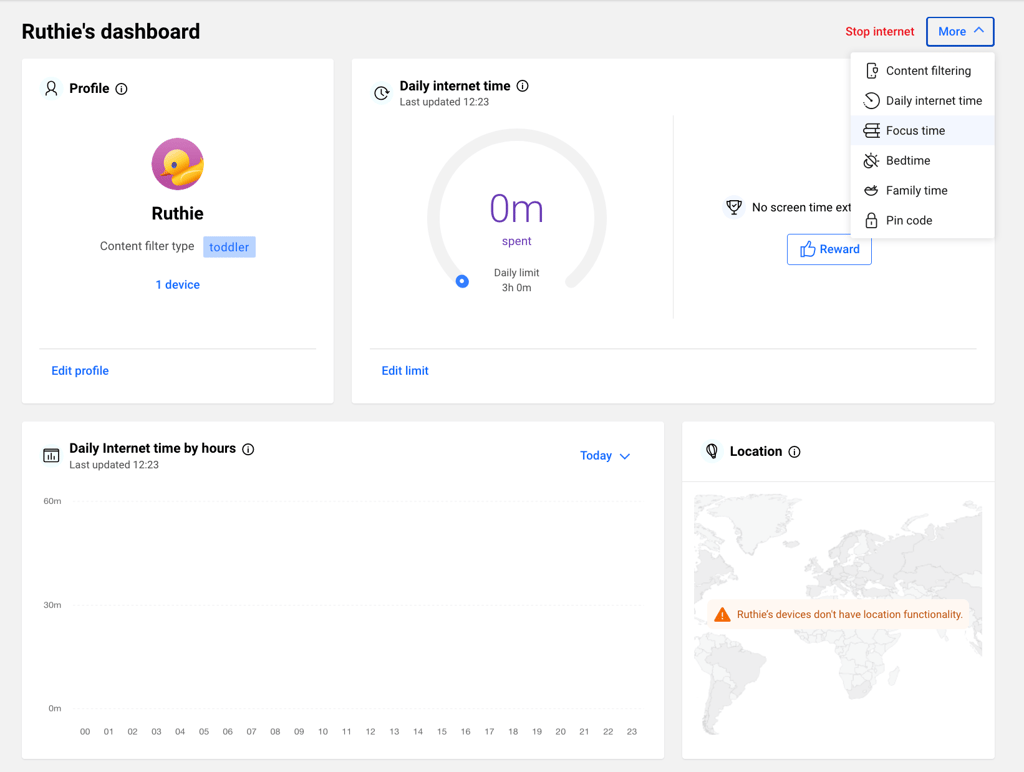
What I liked most is that Bitdefender automatically adjusts content filtering based on the age you assign to a profile. In my case, it defaulted to a toddler filter and blocked 32 categories outright. You can still fine-tune exactly what’s allowed or blocked from there if the defaults don’t fit your kid.
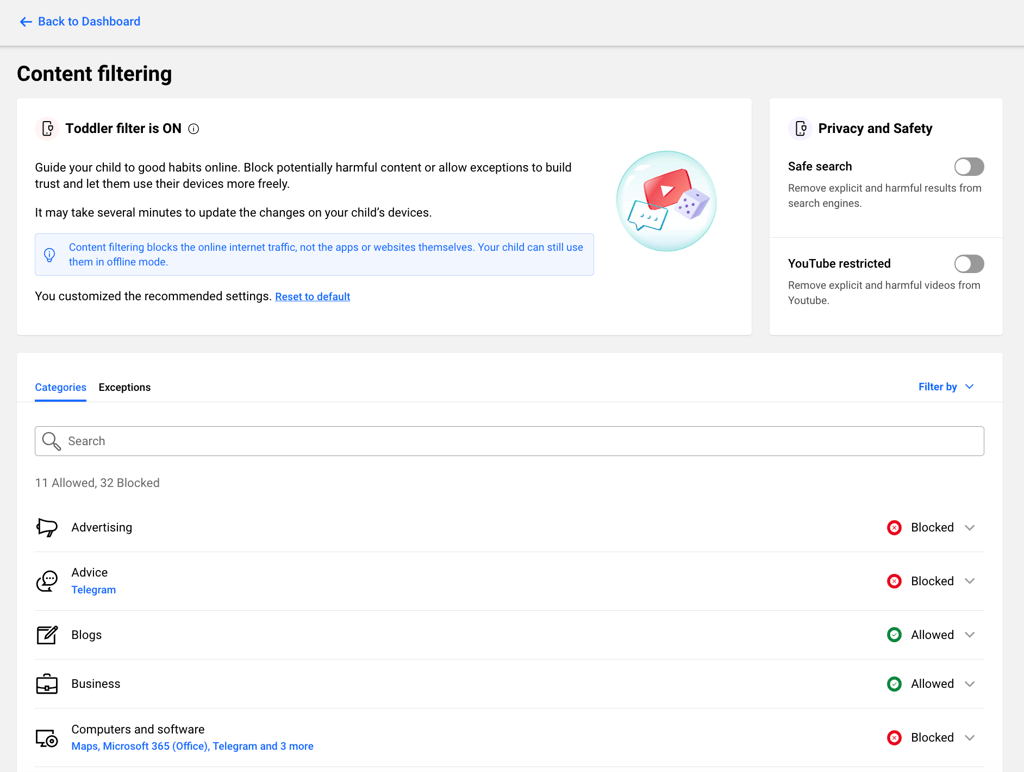
There’s no limit on how many kids’ devices you can cover under the plan, just install the Parental Control app on each one and grant it the permissions it asks for.
This matters for the entire family because kids are often the entry point scammers count on most. Parental Control closes that gap before it becomes a household-wide problem, without you having to hover over every device yourself.
Digital Identity Protection
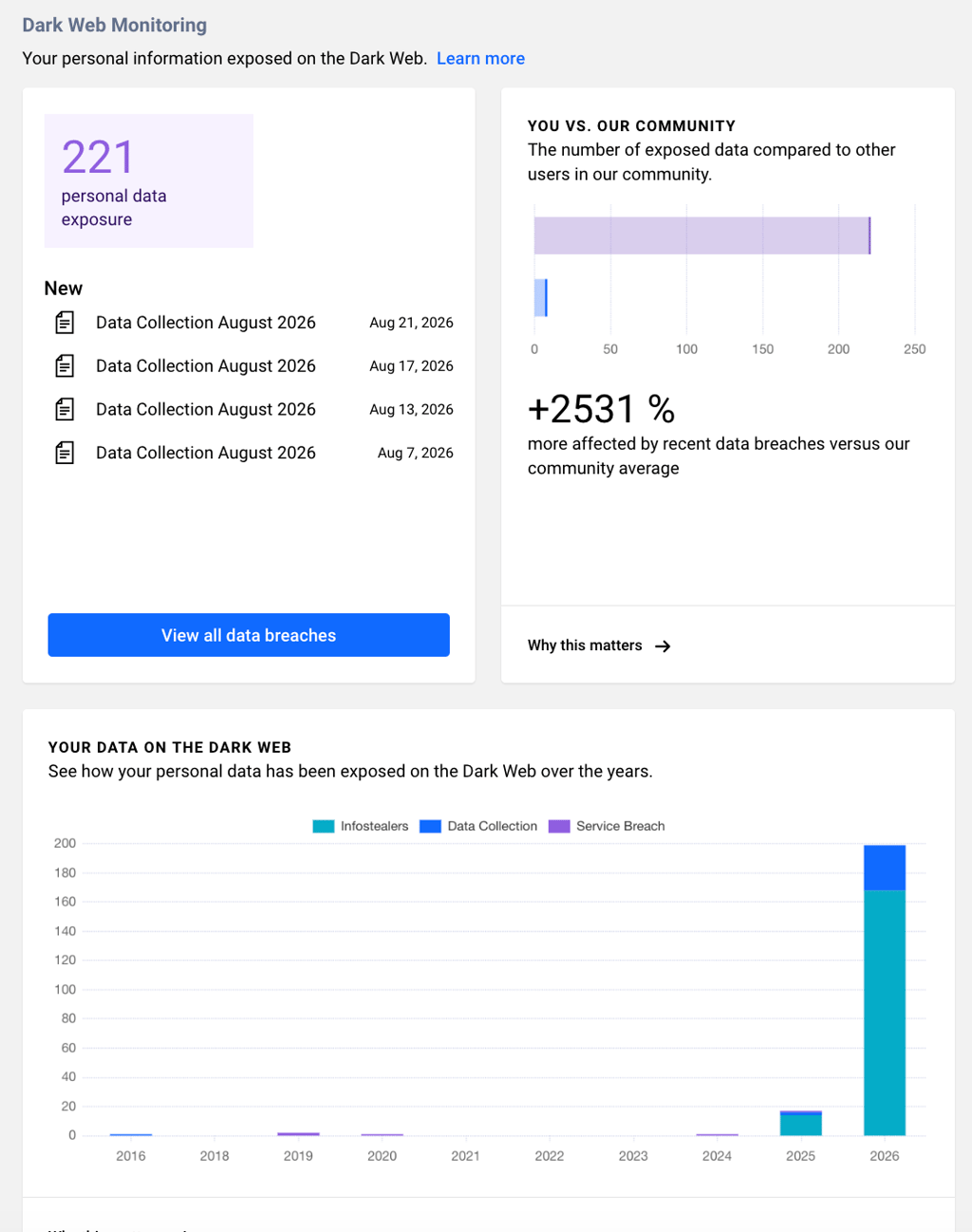
Bitdefender Digital Identity Protection monitors up to 10 email addresses and 5 phone numbers per account, scanning the open web and dark web 24/7 for data breaches or other exposed personal data. After adding a few of my family members’ emails to the scan, Bitdefender flagged some as high risk almost immediately.
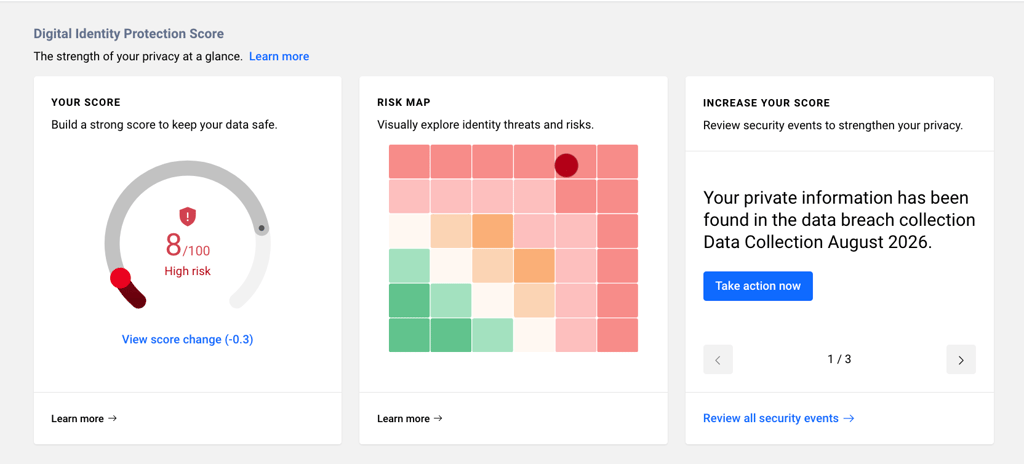
It also broke the exposure down by year, showing exactly when and how the data leaked, whether through infostealers, a service breach, or a broader data collection incident.
I also tested Bitdefender TrafficLight, the free browser extension bundled into the plan, by browsing a mix of safe and known-risky pages, and it flagged the dangerous ones directly in search results before I ever clicked through. That kind of automatic protection matters most for the family members least likely to double-check a link before clicking it.
Security
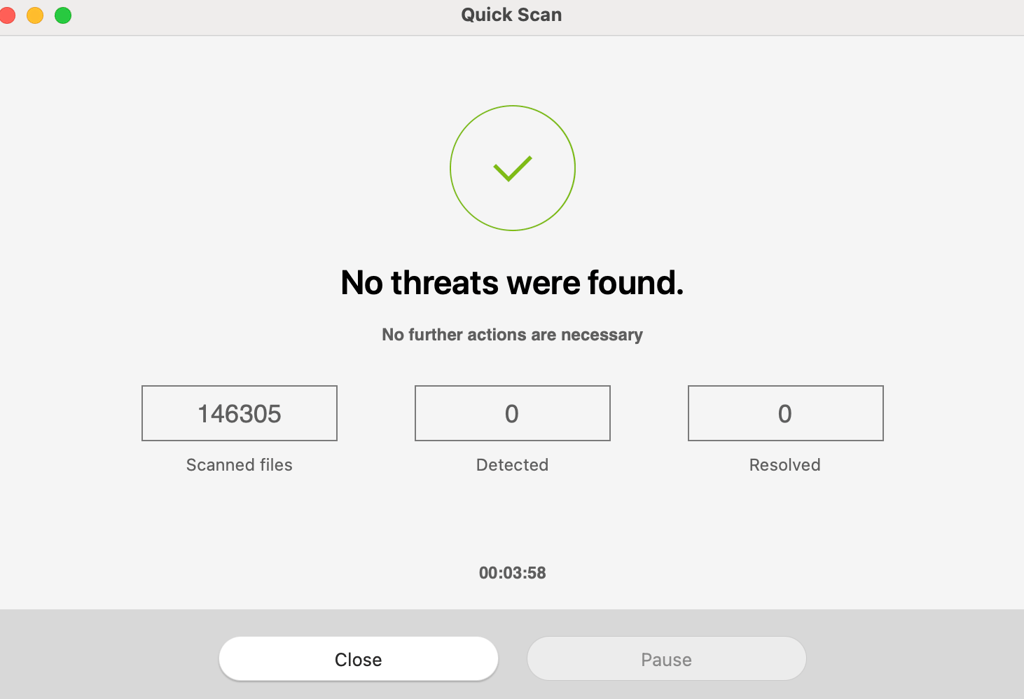
The core Bitdefender Antivirus suite gives you Quick Scan, System Scan, and Custom Scan options. Running one across every device matters more for a family than it might for a single user, since one infected hand-me-down tablet or old laptop can sit quietly on the same network as a device someone uses for banking.
Plus, Scam Protection Pro runs its own activity dashboard, showing exactly how many messages, emails, and links were verified, how many potential scams were caught, and how many phishing emails or malicious links were blocked outright.
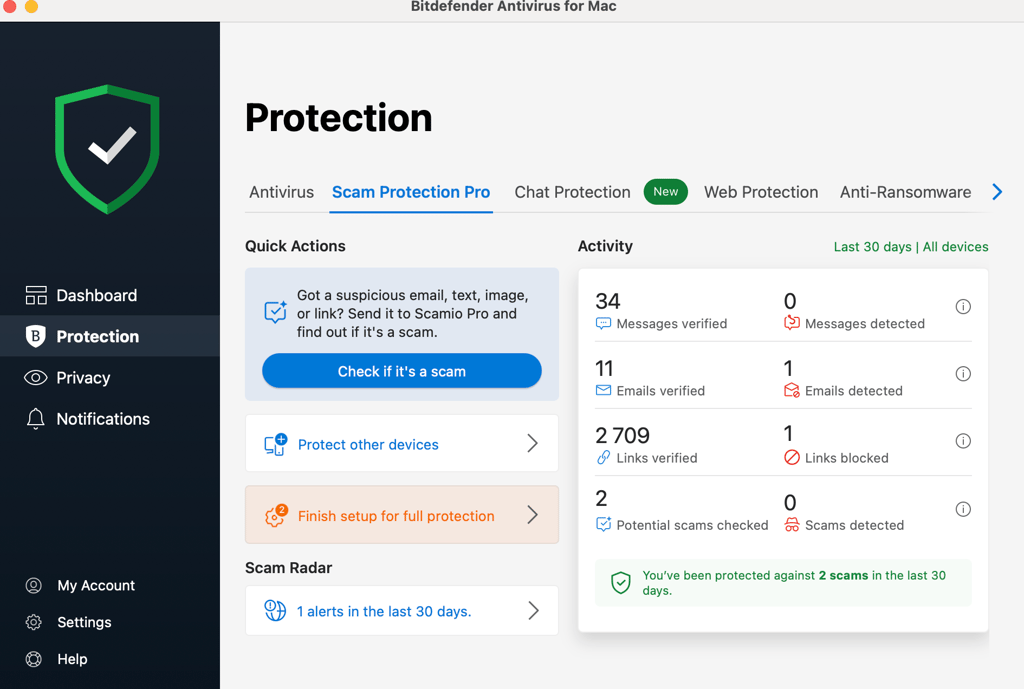
For a family, this is the difference between hoping everyone caught the scam and actually knowing they didn’t have to. Two scams blocked in 30 days on just one device are two chances nobody in the house had to gamble on spotting it themselves.
Bitdefender Premium VPN
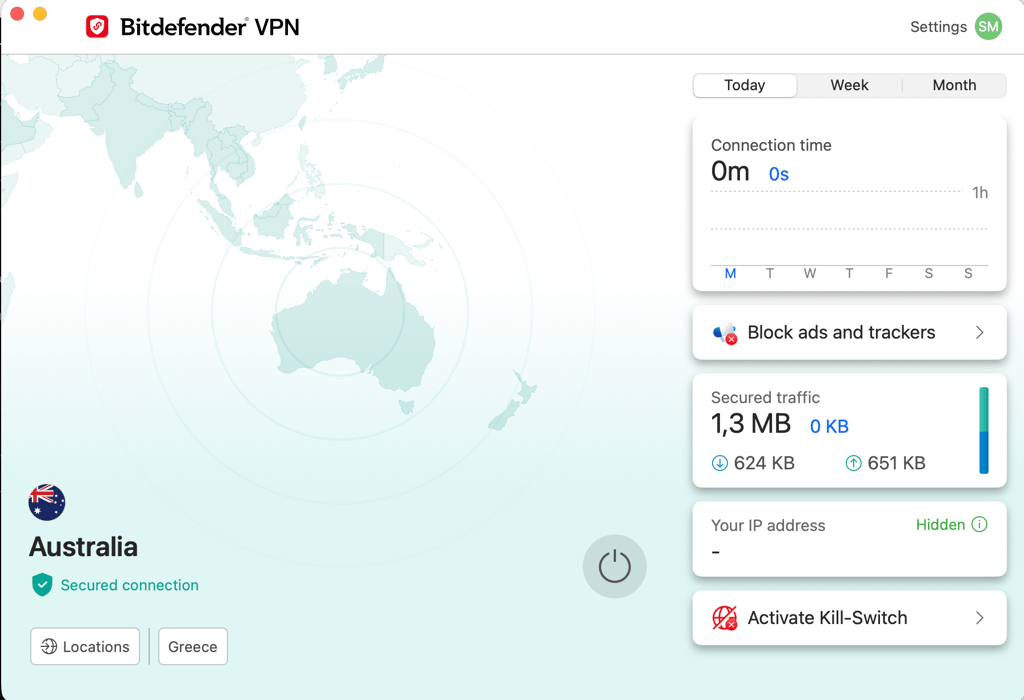
Bitdefender VPN protection, which is included in the Bitdefender Ultimate Security Plus plans, is the piece that covers your shared Wi-Fi and every connected smart-home device. It closes the router-level gap that individual antivirus software on any single device was never built to reach.
That matters for a family specifically because a breach doesn’t need to hit your laptop directly, it just needs to hit anything else sitting on the same network.
I tested it by connecting on a laptop and a phone at the same time, and setup took less than a minute on both. In my opinion, the dashboard is simple enough that a less tech-savvy family member could turn it on without help, yet it still encrypts traffic.
Financial Fraud Protection
Sometimes, accidents happen, and that’s inevitable. That’s exactly what Bitdefender’s identity theft insurance is built for, and how much you get depends on the tier you pick.
With the extended version of the Ultimate Security Plus Family plan for 199.99/year, you are guarded by $2M identity theft insurance, credit monitoring from all 3 bureaus, social engineering resolution and refund, ransomware resolution and refund, bank, credit card, and investment account alerts, change of address monitoring, and court records monitoring.
This matters for a family because identity theft doesn’t stay contained to the original victim. A stolen SSN, a drained account, or a fraudulent loan taken out in a parent’s or child’s name can ripple through the whole household’s finances and credit for years, and recovering from it alone means hours of paperwork, calls, and disputes per victim.
Conclusion
In 2026, cybersecurity is no longer an individual responsibility. Since all families share passwords, devices, and a home network, one misstep can put every person in your household at risk, from young kids to grandparents. The fix isn’t reacting after something goes wrong. Instead, it’s treating your family’s digital safety as a shared project from the start.
With so many services available out there, it can get confusing how to pick the best ones and not get lost in the abyss of countless apps, dashboards, and more importantly, bills. Bitdefender Ultimate Security Plus Family ticks all the boxes for a family who cares about their cybersecurity. It’s an all-in-one security suite, providing protection from all angles, and tackling problems you may never even think about in the first place. Plus, it’s budget-friendly, considering how many services you get just from one subscription.
Under one dashboard, it covers 5 accounts and 25 devices with real-time malware and ransomware protection, Scam Protection Pro to catch phishing before anyone in the family clicks, Digital Identity Protection to monitor your family members’ emails for dark web exposure, and Parental Control to manage what your kids can access and how much time they spend online.
FAQ
Can one family member’s data breach really affect everyone else?
Can one family member’s data breach really affect everyone else?Yes, one family member’s data breach can affect everyone else in the household. Shared accounts, reused passwords, and linked devices mean a breach in one person’s login can unlock everyone else’s data too. If your family email, banking login, or cloud storage password is reused anywhere else, one leak becomes a household-wide problem.
How do I protect my family’s personal information online?
Use unique passwords for every account, turn on MFA for anything important, and set up identity monitoring for every family member, not just whoever manages the finances. A family-friendly tool like Bitdefender covers all of this under one subscription instead of leaving it to chance.
Should I monitor my child’s identity even though they don’t have credit yet?
Yes, you should monitor your child’s identity. A clean, unused Social Security number is exactly what makes a child’s identity so valuable to thieves. Fraud using a child’s SSN can go undetected for an average of 12 years, so monitoring it early catches problems long before your child ever applies for credit themselves.
What’s the difference between individual and family cybersecurity plans?
Individual plans protect a single device or user in isolation, while family plans cover multiple devices and people in the household under one account with centralized visibility. That matters because one unprotected device or account can put everyone else at risk regardless of how well-protected the rest of the family is.
How often should my family update passwords and check for breaches?
Update your family’s passwords at least twice a year, and immediately after any breach notification involving an account you use. Continuous breach monitoring is more reliable because it flags exposure the moment it happens instead of months later.
Can grandparents or less tech-savvy relatives be protected too?
Yes, grandparents and less tech-savvy relatives can and should be protected too. This is where protection matters most, since older relatives are disproportionately targeted by phishing and scam calls. Services provided by Bitdefender, such as Scam Protection Pro, Web Protection, or Chat Protection work passively in the background by flagging suspicious links and messages without requiring any technical know-how from the person using them.