Hostinger OpenClaw coupon code October 2026
If you’re looking to save on OpenClaw hosting with Hostinger, you’re in the right place. You can get an additional 10% OFF Hostinger OpenClaw VPS plans on top of the ongoing sale.
💡 Additional 10% OFF with coupon code CNHOSTVPS for OpenClaw hosting plans
✅ The coupon code is verified and active for October 2026

Unlock an extra 10% price drop on top of already active Hostinger OpenClaw VPS sale. Just enter the code CNHOSTVPS at checkout. The coupon code is active as of October 2026.
Is it worth getting Hostinger OpenClaw hosting?
Hostinger makes OpenClaw hosting fast, reliable, and easy to manage, which is why it’s our top pick for best OpenClaw hosting. Here is why it’s worth considering:
- 1-click deployment. Launch your OpenClaw instance instantly without configuring Docker or running commands manually.
- Reliable VPS infrastructure. KVM virtualization provides dedicated CPU, RAM, and storage for consistent performance.
- Scalable resources. Start with a small plan and upgrade as your email automation grows.
- Self-hosted control. Maintain full control over your OpenClaw environment and sensitive business data.
Starting plans include 2 vCPU, 8GB RAM, and 100GB NVMe storage, which is sufficient for a reliable OpenClaw deployment.
How to use Hostinger OpenClaw hosting coupon code (step-by-step guide)
Applying the Hostinger OpenClaw coupon is simple. Follow these steps:
- Redeem the coupon. Click Redeem, and you’ll be taken to Hostinger’s official website.
-
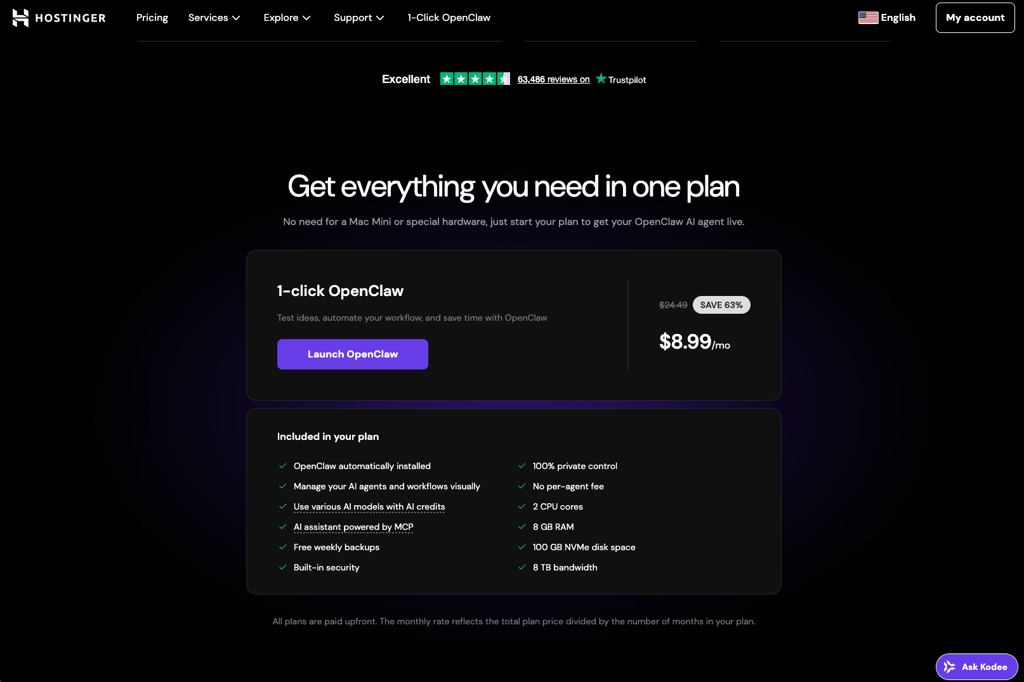
Launch your OpenClaw plan. Click Launch OpenClaw to be directed straight to your cart.
-
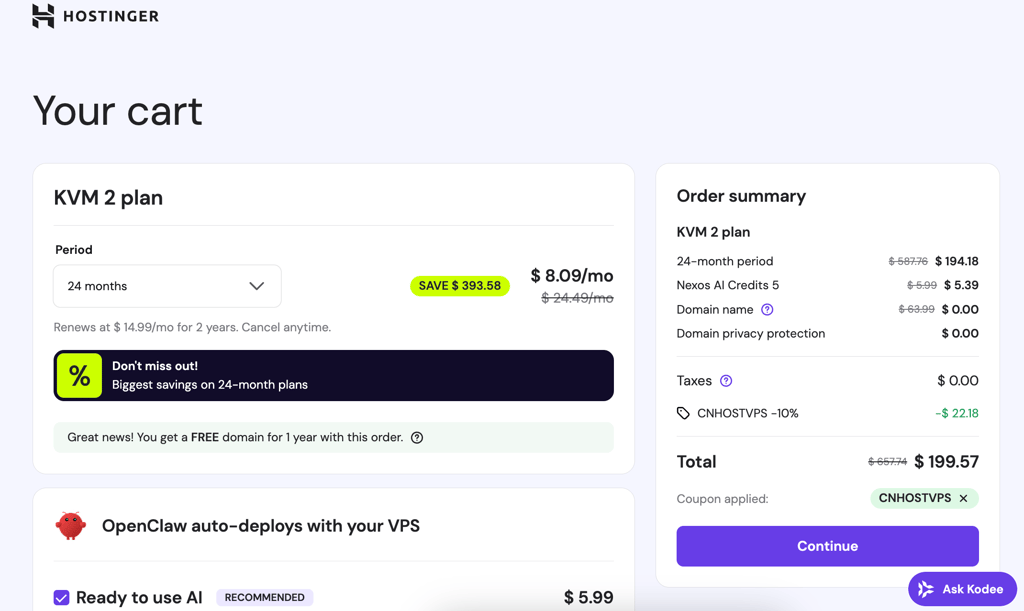
Check your cart. Review your order and apply the coupon code CNHOSTVPS. You’ll see an extra 10% off for OpenClaw hosting plans.
- Create your account. Sign up or log in, then complete your purchase.
Disclaimer: Prices and availability may vary. Always check the exact terms on Hostinger’s website before finalizing your order.
How to set up OpenClaw on Hostinger VPS
Setting up OpenClaw on Hostinger is straightforward thanks to its preconfigured Docker template. Unlike many other providers that require manual command-line installation and dependency management, Hostinger automatically installs OpenClaw along with all required Docker components.
To get started, go to the Hostinger OpenClaw VPS page, select your preferred VPS plan, billing period, and server location. You can also add Nexos AI credits, which let you connect to major LLM providers without configuring separate API keys.
After completing your purchase, Hostinger generates a gateway token. Copy this token and enter your messaging channel details, such as WhatsApp number. Hostinger then automatically deploys OpenClaw to your VPS.
Once deployment is complete, open Docker Manager in hPanel, access your OpenClaw project, paste the gateway token into the web interface, and complete the post-configuration steps. If you already have a Hostinger VPS, simply switch your server to the Docker operating system template and deploy OpenClaw directly from Docker Manager.
How we source Hostinger OpenClaw hosting deals
We work directly with Hostinger and other hosting providers to be the first to notify you about verified and exclusive deals. Our team tests each coupon code regularly to ensure it’s active and working.
Weekly, we update our listings to highlight the best OpenClaw VPS hosting discounts, so you can quickly find the most cost-effective option without having to search multiple sources.
FAQ
What is the coupon code for Hostinger OpenClaw hosting?
The CNHOSTVPS coupon code gives you an additional 10% off Hostinger OpenClaw hosting plans during an ongoing sale. Keep in mind that the coupon applies only to 12-month, 24-month, and 48-month billing terms.
What is the coupon code for Hostinger OpenClaw hosting with the biggest discount?
Currently, 10% off is the highest coupon discount available for OpenClaw hosting. You may find different coupon codes online, usually ranging from 5% to 10% off, but the highest discount is still 10%.
Why is my Hostinger OpenClaw coupon code not working?
The coupon may have expired, you may be trying to use it on a 1-month billing term, or you may be applying it to the wrong hosting plan. The coupon works only on eligible 12-month, 24-month, and 48-month billing terms.
Do Hostinger coupon codes work on OpenClaw hosting renewals?
Usually, Hostinger coupon codes are meant for new hosting purchases, not renewals. However, you can create a new Hostinger account and buy OpenClaw hosting with the coupon code as your first purchase.
Is Hostinger’s OpenClaw hosting really one-click setup?
Yes, Hostinger provides a preconfigured Docker template for OpenClaw that installs automatically, saving you from manual command-line setup.
Can I run OpenClaw on Hostinger VPS plans?
Yes, OpenClaw runs on Hostinger’s KVM VPS plans, giving you full control over resources, environment variables, and Docker dependencies.
Is the Hostinger OpenClaw coupon valid for all VPS plans?
Yes, the CNHOSTVPS coupon applies to Hostinger VPS plans that support OpenClaw deployment. Always check the offer details before checkout.
Does the coupon include one-click OpenClaw setup?
Yes, using CNHOSTVPS for eligible plans gives you both the discount and the one-click OpenClaw deployment.