Kamatera OpenClaw coupons October 2026
If you’re looking for affordable OpenClaw hosting, Kamatera is worth considering. With our Kamatera OpenClaw coupon, you can get OpenClaw hosting from $4.00/month. There’s no coupon code to enter – simply click the coupon link and choose your preferred Kamatera plan.
💡 Get Kamatera OpenClaw hosting from $4.000/month
✅ The deal is verified and active for August 2026.

Get Kamatera OpenClaw hosting from $4.00/month. No coupon code is required – click the coupon link to access the offer. Prices and availability may vary.
Is it worth getting Kamatera OpenClaw hosting?
Kamatera offers flexible cloud VPS hosting that can be configured to match your OpenClaw workload. It’s a good choice if you want control over your server resources and the flexibility to scale your environment as your needs grow.
Here’s why Kamatera is worth considering:
- Flexible cloud VPS configurations. Choose the CPU, RAM, storage, and other resources that fit your OpenClaw deployment.
- Scalable resources. Increase or decrease your server resources as your OpenClaw workload changes.
- Full root access. Get control over your server environment and configure OpenClaw according to your needs.
- Global data centers. Choose from multiple server locations to deploy your OpenClaw instance closer to your users.
- Customizable hosting. Build a VPS configuration without paying for resources you don’t need.
- Affordable starting price. Kamatera OpenClaw hosting starts from $4.00/month, making it accessible for smaller deployments.
How to use Kamatera OpenClaw coupon (step-by-step guide)
Using the Kamatera OpenClaw coupon is straightforward. No coupon code is required – just access Kamatera through our coupon link and select your preferred configuration.
- Redeem the coupon. Click Redeem above to visit Kamatera’s official website.
- Configure your server. Choose your preferred CPU, RAM, storage, data center location, operating system, and other available resources, and click Get Started.
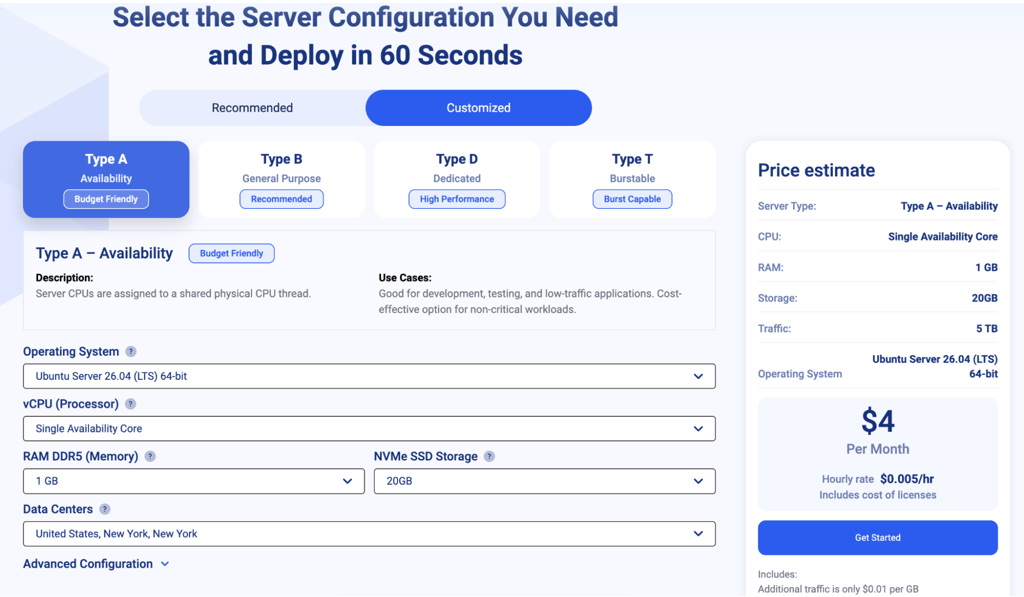
- Create or log in to your Kamatera account. Enter your account and personal information to proceed.
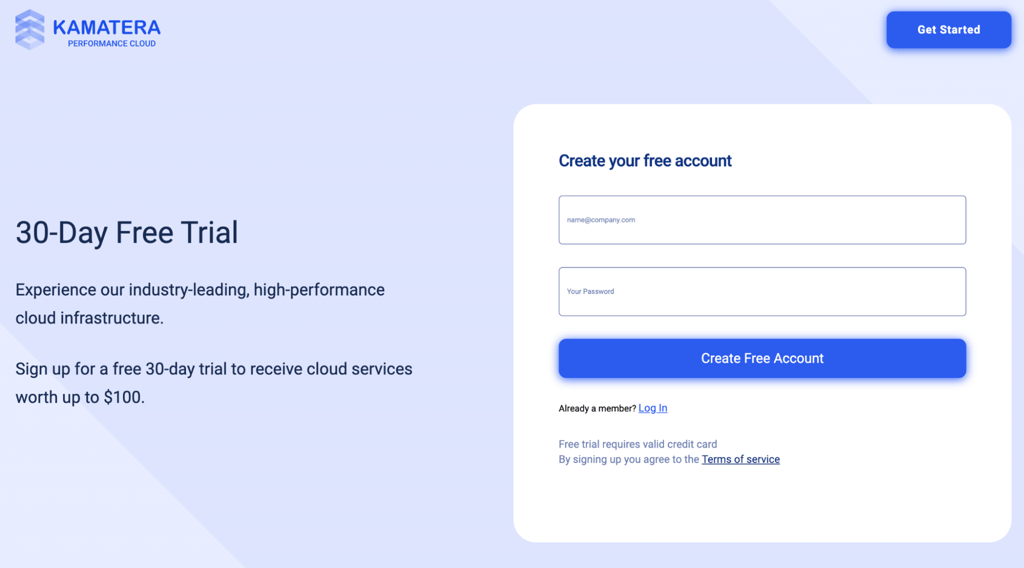
- Complete your purchase. Review the final price and configuration, then complete your Kamatera order.
Disclaimer: Prices, configurations, and availability may vary. Always check Kamatera’s website for the latest pricing and terms before completing your purchase.
How to set up OpenClaw on Kamatera VPS
After purchasing your Kamatera VPS, you can prepare the server environment for your OpenClaw deployment. Since Kamatera provides customizable cloud VPS infrastructure, you can select the resources and operating system that best fit your setup.
Once your server is ready, connect to it using the available remote access tools and install the dependencies required by OpenClaw. You can then deploy OpenClaw, configure your preferred messaging channels, and add any required API keys or credentials.
Because you have control over your VPS environment, you can adjust your server resources as your OpenClaw workload grows. Make sure you keep your server updated and secure, particularly when storing API keys and other sensitive credentials.
How we source Kamatera OpenClaw hosting deals
We work with Kamatera and other hosting providers to find relevant and verified hosting deals. Our team regularly checks coupon links and pricing information to make sure the offers we feature are current.
We also update our listings to highlight the latest OpenClaw hosting deals, making it easier to compare affordable VPS options without searching across multiple sources.
FAQ
What is the coupon code for Kamatera OpenClaw hosting?
There is no coupon code required for the Kamatera OpenClaw deal. Simply click the coupon link above to visit Kamatera and access the available offer.
How much does Kamatera OpenClaw hosting cost?
Kamatera OpenClaw hosting starts from $4.00/month. The final price depends on the VPS configuration, including the amount of CPU, RAM, storage, and other resources you choose.
Why is my Kamatera OpenClaw coupon not working?
Make sure you accessed Kamatera through the coupon link above and check the selected VPS configuration and current pricing before completing your purchase.
Can I run OpenClaw on Kamatera VPS plans?
Yes. Kamatera’s customizable cloud VPS infrastructure can be used to host OpenClaw. You can select the CPU, RAM, storage, and other resources according to your deployment needs.
Is the Kamatera OpenClaw coupon available without a promo code?
No promo code is needed. Click the coupon link above and choose your preferred Kamatera VPS configuration.
How much is the cheapest Kamatera OpenClaw hosting?
Kamatera OpenClaw hosting starts from $4.00/month. Keep in mind that the final price can vary depending on the resources and configuration you select.
Does Kamatera offer scalable hosting for OpenClaw?
Yes. Kamatera lets you customize and scale your VPS resources, making it possible to adjust your OpenClaw hosting environment as your workload changes.
Does the Kamatera OpenClaw coupon include a code?
No. This offer does not require a separate coupon code. The deal is accessed through the coupon link provided above.