How to check if a domain name is available
Our in-house research team evaluates domain registrars by reviewing industry data, pricing structures, and feature availability across different providers.
We focus on factors such as the range of available TLDs, pricing transparency, renewal costs, domain management features, and WHOIS privacy options. By combining data-driven research with hands-on testing, we provide clear and reliable recommendations on the best domain registrars.
Learn more

The best way to check if a domain name is available is to type the exact term you want into a domain search tool. If it’s taken, you can run a WHOIS lookup to find the owner's contact information and potentially buy the domain from them. Or, you can choose one of the suggested alternative domains instead and get your site up and running fast.
A domain name availability check isn’t something you can skip, since it’s not uncommon for users to plan their entire online business only to find their preferred name is already taken, forcing them to go back to the drawing board.
In this guide, I show you how to check if a domain name is available using Wix in a simple five-step process. I also teach you about WHOIS domain lookup tools, which you can use to find website registration details and, when possible, identify the owner.
Step-by-step: how to check domain name availability
Domains get snatched up fast, so it’s best to check domain name availability as soon as you have an idea for a site. In the steps below, I explain in detail how to do that and cover your options in case your first choice doesn’t work out as planned.
Step 1. Start with the exact domain name you want
A good domain name is short, easy to remember, simple to type accurately, and clearly linked to your brand. So, take as much time as you need to come up with one that ticks all these boxes. This is your ideal domain and should be your starting point before you make any compromises.
That said, your first pick will often already belong to someone else, so write down a few alternatives as well. These could be domain names with synonymous words or newly coined phrases, as well as variations of your brand name.
Your domain extension, formally known as a top-level domain (TLD), also plays a key role here. This is the part of the name that follows the dot, such as .com or .co.uk. And while .com is the default and most sought-after option here because people trust it most, you should also consider alternatives like .org, .net, and .online.
Niche extensions are also a good idea. For example, an online store can have a .store or .shop TLD, while a photography business can use something like .studio or .space.
Step 2. Use a domain availability checker
Once you have a preferred name and a few alternatives ready, you’re ready to check for domain name availability. As long as you’re using a reputable domain registrar, this should be a quick and straightforward step where you just need to type in the name you want for your website.
Wix Domain Search is a prime example here, and an exceptionally fast one at that. The moment you hit the Search button, the tool immediately queries countless global domain registries and checks millions of active records in just a few seconds.
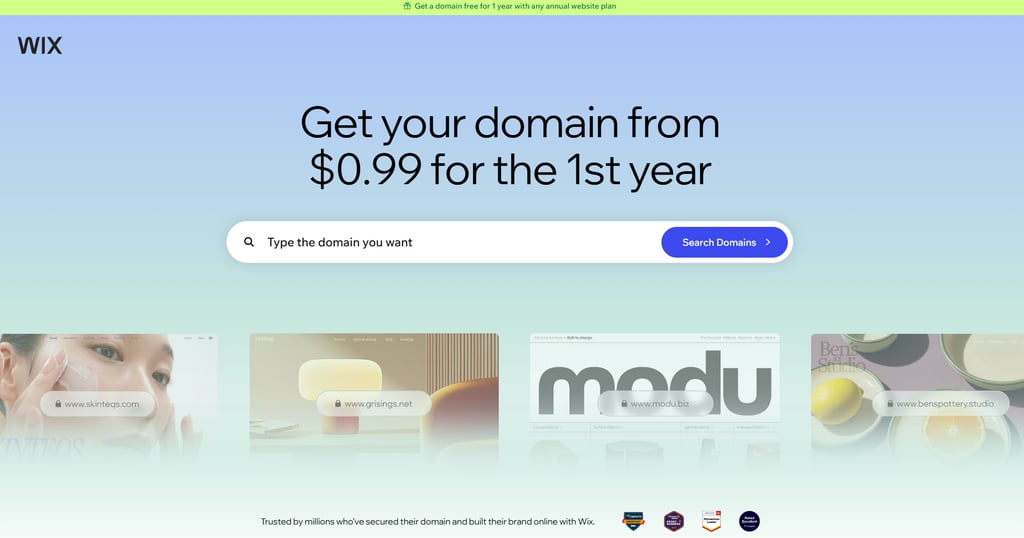
The result? A near-instant answer on whether your preferred domain name is available, along with a few brand-name and TLD alternatives you can explore. And if the site you want is already registered, Wix Domain Search will also suggest best-match and recommended options.
Step 3. Review the result carefully
When you check to see if a domain name is available with Wix, you get more than a simple confirmation. The Domain Search tool returns several key pieces of information, which you should know more about before you pull the trigger on any specific domain.
Best-case scenario, you’ll use the website to check the domain name and get an exact match with an Available now status. This is a standard unclaimed domain, meaning no one has registered it yet, and you can make it yours for the price listed next to it.
If you’re unlucky, you’ll get a message that the domain you want is already registered, which means another person or company already owns it. However, Wix Domain Search will also offer multiple alternatives to explore, including ones with extra words in the name or with a different TLD than the one you want, such as .online or .ai.
In some cases, you’ll also come across premium domains. These are often short, catchy names built on in-demand extensions like .com, .net, or .org. They may also include a popular keyword or have higher commercial value, which is why they cost more than regular available domains.
Step 4. If the domain is taken, use a WHOIS lookup to check the details
Odds are that your preferred domain won’t be available, especially if it’s a shorter name using the popular .com or .org TLDs. And while hitting a wall on your first choice is undoubtedly frustrating, that doesn’t mean your research should end here or that you should give up.
In most cases, a taken domain means another person or company has already registered it and may be using it. So, your next step should always be to run a WHOIS query and find out who took it.
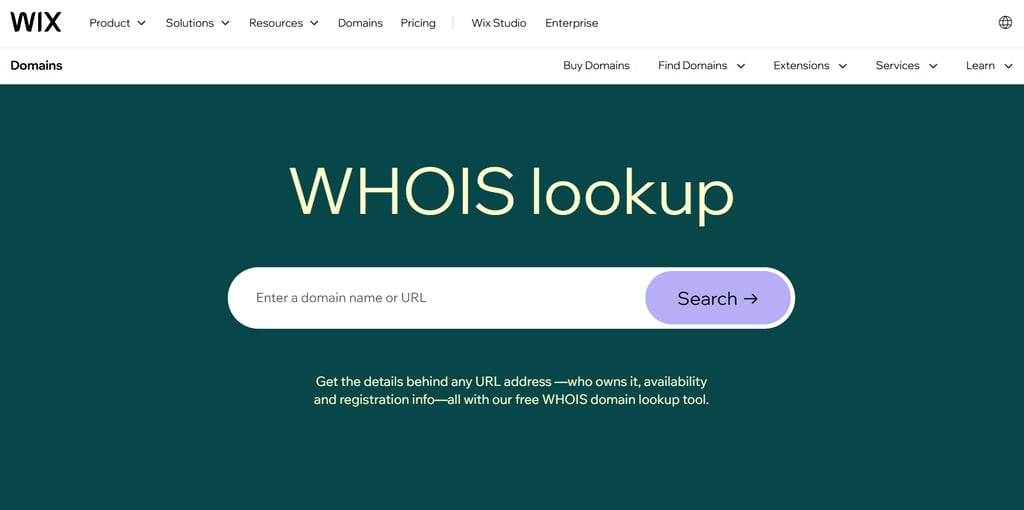
That’s precisely where a reputable tool like Wix WHOIS Lookup comes in handy. With it, you can just type in a domain name or site URL and find a wealth of registration details. That typically includes when the domain was registered, when the information was last updated, when the registration expires, and, potentially, who the owner is.That last piece of information is particularly important, as it essentially lets you check the domain name owner, find their contact details, and potentially negotiate the purchase of the domain you want for your website.
But do keep in mind that this information isn’t always available. A WHOIS lookup can return no names or contact details like email addresses, and that’s completely normal. After all, many domain owners choose to hide their personal data, and laws like the GDPR protect their privacy.
Step 5. Decide whether to choose an alternative or keep researching
Even if you check the availability of a domain name and get a message that it’s already registered, or a WHOIS lookup points to an owner, you still have moves to play. In this case, your options are:
- Using another domain extension. Even if an exact-match domain is unavailable, you’ll likely have several other options with different TLDs like .ai, .shop, .store, .studio, or even .xyz. This lets you keep your original website name mostly as is, since it only changes the part after the dot.
- Choosing a different variation. If you’re flexible on the name and want to keep a trusted TLD such as .com or .org, you could slightly modify your site’s name by either coining a new term, adding an extra word, or even putting the location right into the name. Just make sure it’s still easy to type in and sounds natural when you say it aloud.
- Purchasing the domain from the owner. Sometimes, you can find the domain owner's contact details and negotiate to buy it from them. Keep in mind that this option is often the most expensive of the bunch, and it’s only ever recommended when you absolutely have to use that exact domain for your business.
- Monitoring the domain using WHOIS lookups. Just because a domain is taken right now doesn’t mean it’s completely off the table. Some owners choose to let go of domains they don’t use, while others simply forget to renew the registration. In any case, that’s your chance to snatch a name that perfectly fits your business.
What does domain availability actually mean?
Domain availability refers to whether a specific name is open for registration or already owned by someone else. But it’s not just about whether a domain is available or unavailable; it’s often more nuanced than that.
Let’s say you type a specific name into your browser’s address bar and no websites pop up. Unfortunately, that doesn’t automatically mean the domain is available. In fact, for a domain name to be available, it must be both unregistered and purchasable. And in this particular case, the domain is still registered, even if it’s not actively being used.
In other words, a domain name can be taken, even if there’s no website. After all, a person or company that owns the domain could be saving it for a future project or simply paying for it to keep a competitor from using it. They could also have a basic website set up to redirect traffic to their main online business.
That’s precisely why URLs themselves aren’t enough for a domain name availability check; you need a dedicated domain search tool like Wix.
Where to check if a domain name is available
Now that you know how to check for domain name availability, we should also discuss where you can do that.
The Internet Corporation for Assigned Names and Numbers (ICANN) lookup tool is often the first thing that comes to mind, and for good reason. It’s an official registry database tool where you can see if a specific domain is registered and view public contact or expiration data.
That said, the Wix Domain Search is an even better all-in-one option. This beginner-friendly tool doesn’t just let you look up domains; it offers several alternatives and details on specific extension builds and the quality of the name itself. You also get access to practical domain and registration guides, all within the same platform and just a few clicks away.
What to do if your domain name is not available
A backup site name isn’t necessarily a downgrade. So, if you’ve run into a wall with your initial idea, you can always go back to those alternatives you wrote down before checking for domain name availability. Here’s what you can try from there:
- Different TLD. Switching your domain extension is often the quickest, easiest site-name change you can make. If .com isn’t available, you can always try alternative TLDs like .co, .org, .tech, .ai, and .store.
- Shorter version. Trimming a longer brand name into one or two stronger words makes it easier for users to remember and type into the address bar.
- Added word. Placing a prefix before your brand is another popular idea. In fact, both "getX" and "tryY" variations often sound punchier than just "X" or "Y".
- Location tag. Adding a location word to your brand name also works and can even be beneficial for local businesses. For example, you could do "Maple Bakery Toronto" instead of going with just "Maple Bakery".
Just as there are good ideas for backup site names, there are also a few practices you should avoid:
- Long names. While a long domain name can match a long company name, it risks being harder to remember and more likely to cause spelling errors. So, unless you absolutely need a domain with four or more words and 15+ characters, keep it short.
- Complex terms. If you say your website name out loud and it doesn’t pass the radio test, it’s probably too complicated for readers as well and will likely lead to spelling errors, especially on mobile devices.
- Special characters. A hyphen is sometimes a necessary compromise, but it can also add complexity, as you need to mention it explicitly. That alone affects your domain’s practicality, so you should avoid it if possible.
- Added numbers. Users can get confused by brand names that include numbers, and for good reason. If you’ve only heard the name in passing, you can’t know whether to spell out five or use the numeral 5, so it’s best to steer clear.
Conclusion
Your domain name is the first thing people see of your business online, so you shouldn’t treat it as an afterthought. Whether you’re just brainstorming ideas or already have a site type and structure in mind, you should do a domain name availability check before you build anything.
This process starts with entering the exact term into a dedicated domain search tool, and Wix Domain Search is a great example. With it, you can check if a domain name is available in just a few seconds and get several great alternatives if your first choice is already taken.
If your ideal domain name isn't available, you can quickly switch to the Wix WHOIS Lookup tool in a few clicks and review registration information. In some cases, you can find the owner’s contact details and potentially purchase the domain from them. Being able to do all that on the same platform is precisely what makes Wix a top choice.
FAQ
How do I check if a domain name is available?
You can check domain name availability by entering the exact name into a dedicated tool like Wix Domain Search. This will tell you whether your preferred name for a website is available to purchase and register or if it’s already taken by another person or company.
How do I check if a domain name is taken?
The fastest way to see if a domain is already owned by someone else is to use a domain checker like Wix Domain Search. You can then run a WHOIS lookup to find registration information like the domain’s expiration date and, potentially, ownership.
How do I check if a domain name is registered?
While a domain search tool tells you whether a name is available, you’ll need a WHOIS lookup to confirm whether the taken domain is registered and by whom. The Wix WHOIS Lookup is the most practical choice here, as it sits on the same platform as the Wix Domain Search.
Can I check who owns a domain name?
Yes, you can find out who’s behind a domain registration with a quick WHOIS lookup, though this information isn’t always available. Many owners intentionally hide their contact details to protect their privacy, avoid spam messages, and automatically refuse domain purchase offers.
What should I do if my ideal domain is not available?
If your preferred name is unavailable, your primary option is to use an alternative TLD like .org or .store instead of .com. You can also modify the name by coining a new term or adding a prefix or a location tag. Alternatively, attempt to buy the domain from the current owner.