How much eSIM data do I need for a 1-week trip?
Our in-house expert researchers and journalists conduct independent, unbiased testing of eSIM services, assessing their real-life effectiveness and usability.
By staying current with industry developments and openly sharing our transparent testing methodologies, we ensure readers receive accurate, up-to-date insights so they can make informed choices about eSIM solutions.
Learn more

In 2026, most travelers need somewhere between 3GB and 10GB of eSIM data for a one-week trip. Very light users who stay on Wi-Fi most of the day can get by with 1GB to 3GB, while heavy users who stream, take video calls, or share a connection with a laptop often need 10GB or more.
The amount of eSIM data you need depends on what you do on your phone, not on how long your trip lasts. For instance, streaming a show burns through more in an hour than a full day of messaging. Meanwhile, maps, social media, browsing, and hotspot use all fall somewhere in between.
That’s why in this guide, I break down usage by traveler type, show you which activities consume the most data, and walk you through picking the right plan so you never have to think about it mid-trip.

The quick answer: how many GB do you need for a week of travel?
Most one-week travelers fall into one of four eSIM data usage profiles. Find yours to get a realistic GB number:
- Light use: 1–3GB. You are on Wi-Fi most of the day, send mostly messages, and check maps now and then.
- Average use: 3–5GB. You navigate daily, search for restaurants and attractions, scroll social media, and watch the occasional short video.
- Active use: 5–10GB. You are out all day with maps running, posting regularly, taking video calls, and streaming music on the go.
- Heavy use: 10GB or more. You stream video in the evenings, work from your phone or a tethered laptop, back up photos automatically, and upload a lot of media.
In my experience, travelers who overestimate usually forget how much Wi-Fi they will actually have, since hotels, cafés, and rentals cover a large part of most trips. Meanwhile, travelers who underestimate usually forget about uploads and video, which quietly use several times more data than reading or messaging.
For most leisure travelers, I’d say that 5GB eSIM data is a comfortable middle ground for a week-long trip. It leaves room for daily navigation and normal browsing without forcing you to constantly check your usage.
In my opinion, the best way to choose the correct eSIM data plan for a one-week trip is to look at what you do on your phone on a normal day at home, then adjust for travel.
Light, average, and heavy traveler examples
How much travel data you need depends less on the length of your trip and more on how you use your phone when you’re away. These examples can help you determine whether a small plan will do the job or if you’ll need more room for maps, social media, streaming, and hotspot use.
- The light traveler. You stay somewhere with solid Wi-Fi and use it for anything big. Out of the hotel, you send a few WhatsApp messages, pull up a map to find a street, and look up a restaurant before dinner. You rarely upload photos until you are back on Wi-Fi in the evening. For you, mobile data is a backup, not your main connection, and 1–3GB usually covers the week.
- The average traveler. You use maps most of the day, order the occasional ride, check Instagram in queues, search for things to do, translate a menu, and watch a short video. This is where most vacationers land, and 3–5GB fits it comfortably.
- The heavy traveler. You take video calls, tether a laptop to answer emails, let your photos back up automatically, share videos with family as you go, and put something on in the background at night. Do not try to squeeze this into a small plan to save a few dollars. You need 10GB or more – and the peace of mind that comes with it.
What affects how much eSIM data you need?
One traveler can burn more data in two days than another uses in a full week, and the difference comes down to trip style.
A regular city break with strong Wi-Fi in hotels and cafés keeps mobile usage low, because you are only online in short bursts between places. A road trip is the opposite: navigation runs for hours at a time, and there is no Wi-Fi in the car. A beach holiday often uses the least, because the phone stays in the bag. Meanwhile, a work trip uses the most, since email, calls, and file syncing run constantly whether you think about them or not.
Your daily phone habits matter more than trip length
Travel data is just behavior data. How often you navigate, watch videos, scroll, sync, or tether matters far more than the number of days on your calendar.
Think about a normal travel day. You walk to a museum with Google Maps open, check Instagram or TikTok while waiting in line, send WhatsApp voice notes and photos to friends at home, order a ride back to the hotel, point your camera at a menu to translate it, and check email a few times.
Most of those are small. The exceptions are video and uploads. Someone who watches a couple of episodes in bed each night or sends batches of photos and clips daily will use several times more data than someone doing the same trip with messaging and maps alone.
Wi-Fi access, downloads, and background usage
Wi-Fi completely changes the math outlined above. Hotels, rentals, cafés, airports, and coworking spaces cover a lot of ground. If you are connected most evenings and mornings, your mobile data only needs to cover the hours you are out.
There is a hidden side to this, though. Your phone does not stop working when you leave Wi-Fi. Photo backups, app updates, cloud syncing, autoplaying video in your feeds, and automatic media downloads in group chats all keep running on mobile data unless you set them not to. Plenty of travelers lose a chunk of their plan this way without opening a single app.
The simple fix is to front-load anything big. Download offline maps for your destination, save playlists and a few shows, and grab your boarding passes and booking confirmations while you are still on Wi-Fi. Plus, adjusting your settings to reduce any background activity is important, too.
How much data common travel activities use
Every activity on your phone carries a rough data cost. Knowing which ones are expensive turns a guess into an estimate. The groups outlined below cover almost everything you will do in a week abroad.
Treat the numbers below as realistic ranges rather than fixed promises, since video quality, autoplay settings, and how much you upload all move them. If your week sits mostly in the first two groups, a smaller plan will hold up fine, and if the third shows up daily, size up.
- Low-data activities. Text messages, WhatsApp chats, emails without attachments, checking a booking confirmation, and browsing lightweight pages all use very little. A full day of messaging and email typically lands under 50MB. You would struggle to exhaust even a 1GB plan doing only these things.
- Moderate-data activities. Navigation uses roughly 5–10MB/hour, which is small on its own but adds up when maps run all day. Ride-hailing apps, translation tools, and restaurant searches are similarly light per use and heavy by repetition. Social media is the big variable here: scrolling through text and photos is moderate, but video-heavy feeds like TikTok or Instagram Reels can reach 100–200MB in half an hour.
- High-data activities. Music streaming runs about 50–150MB/hour, depending on quality. Video calls use roughly 200–400MB/hour, and HD calls on platforms like Zoom can exceed 1GB. Streaming video is the fastest way to empty a plan, at around 0.7GB/hour in standard definition and up to 3GB/hour in HD. Automatic photo backups and hotspotting a laptop belong in this group too, since both run in the background and both scale fast.
How to choose the right eSIM plan for a 1-week trip
In my experience, buying the absolute minimum tends to backfire. Running out on day five means scrambling to top up in an unfamiliar place, or worse, rationing your phone exactly when you need it for directions or a booking. The money saved is small, and the hassle is not.
Buying far more than you need is unnecessary, too. A one-week trip rarely justifies a large long-stay package, and unused data usually just expires. The goal is a modest safety buffer, not the biggest plan on the list.
In practice, most travelers end up comparing 3GB, 5GB, and 10GB options and matching one to their habits. This is where picking a provider that lets you choose by destination and data amount helps.
Nomad eSIM, for example, is one of the best eSIM data providers that travelers use to compare plan sizes for a specific country rather than defaulting to roaming charges from their home carrier.
When 3GB is enough, when 5GB is safer, and when to go above 10GB
3GB works if you rely heavily on Wi-Fi and mainly need maps, messages, and light browsing on the go. It suits city breaks where you are back at the hotel each evening.
5GB is the safer pick for the average traveler. It covers daily navigation, regular searches, moderate social use, and the occasional video, without requiring you to check your usage every day. If you are unsure which group you fall into, start here.
10GB or more makes sense for remote workers, hotspot users, anyone who streams regularly, and travelers who simply do not want to think about data at all. If your trip involves working from a laptop, this is not optional.
Tips to make your eSIM data last all week
Most travelers blow through an eSIM data plan without doing anything memorable with it. The GBs go to background syncs, autoplaying video, and cloud backups firing off while your phone sits in your pocket, not to the map you actually needed.
Your eSIM data plan is fixed. So, every MB or GB spent on meaningless content consumption is one you cannot spend on the important aspects of your trip – directions, translation, or a call home. Ten minutes of setup before you land changes what a plan can carry.
- Download offline maps for your destination before you leave Wi-Fi. This alone removes one of the most constant drains on your plan.
- Lower video quality in your streaming and social apps. Most let you cap playback quality or restrict autoplay to Wi-Fi only.
- Turn off background app refresh. This way, apps stop updating themselves while sitting closed in your pocket.
- Disable automatic photo and cloud backups on mobile data. Let them run overnight on hotel Wi-Fi instead.
- Stop app updates on mobile data. A few large updates can cost you a GB without warning.
- Save uploads for Wi-Fi. Post your photos and videos in the evening rather than as you go.
eSIM data providers like Nomad eSIM let you see what is left on your plan in the app, so you can adjust in the middle of the trip instead of guessing.
Why Nomad eSIM can be a practical option for 1-week travelers
The hardest part of buying eSIM data for a short trip is landing on a plan that feels neither too small nor wasteful. Traditional roaming rarely solves this, since it charges by the day or by the MB regardless of how much you actually use.
With Nomad eSIM, you pick the destination first and the data size second, and the full cost, allowance, and validity period appear before you pay.
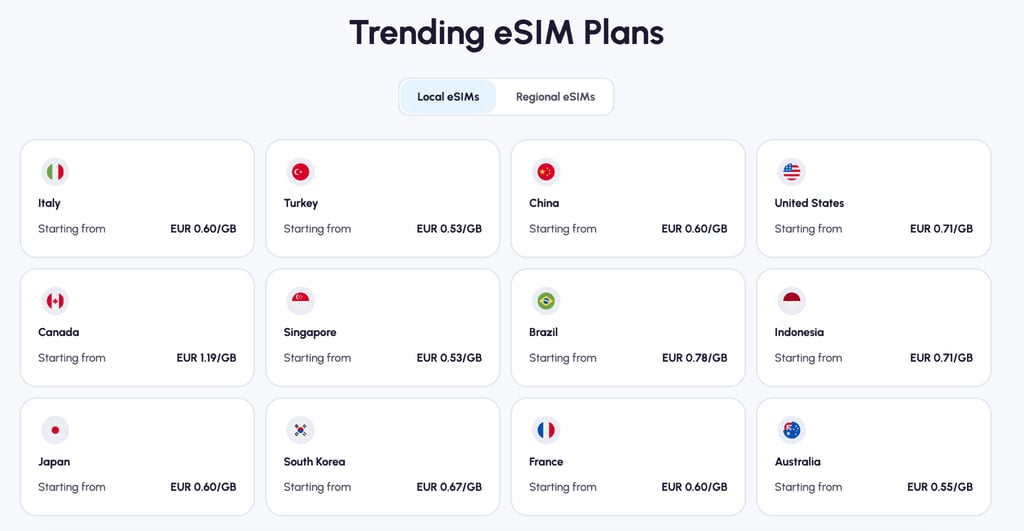
Nomad eSIM covers 200+ destinations, with single-country plans for one stop and regional plans if your week crosses a few borders. That turns the 3GB, 5GB, and 10GB comparison into a concrete decision, since you can see what each size actually costs for Japan or Italy and weigh it against how you use your phone.
Validity also starts when you activate the eSIM rather than when you buy it, so you can install it at home the week before you fly without burning days off a seven-day plan.
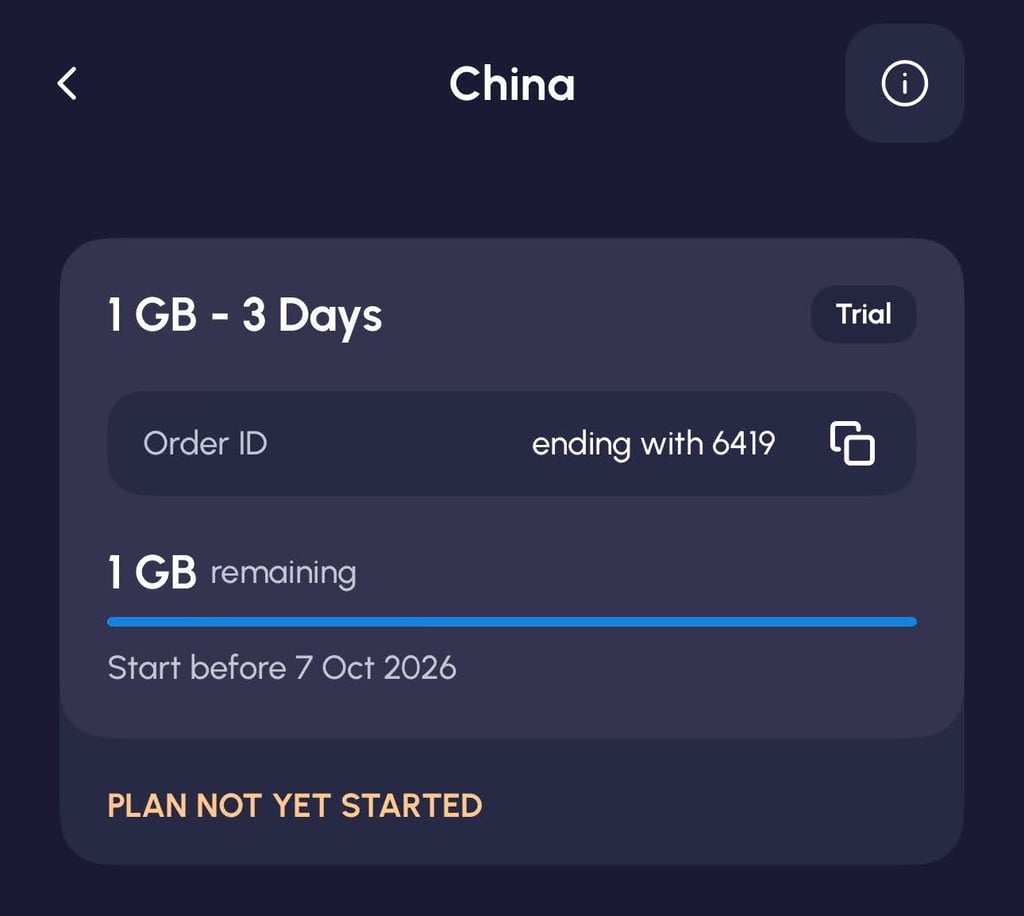
That safety net changes how you size the plan. If you are torn between 3GB and 5GB, start smaller. Nomad eSIM notifies you when your data runs low and lets you buy an add-on in the app that attaches to the same eSIM, so there is no second plan to install or QR code to scan mid-trip.
Hotspot and tethering work if you end up tethering a laptop, and new users can claim a free 1GB across 76 destinations, which is enough to test coverage before committing to a size at all.
Conclusion
For a one-week trip, most travelers land somewhere between 3GB and 5GB. Lighter users who stay on Wi-Fi can manage with less, and heavier users who stream, take video calls, or tether a laptop should plan for 10GB or more.
The right number depends on your habits, how much Wi-Fi you expect to use, the style of the trip you are taking, and whether you want a small buffer so you never have to check. Estimate generously, add a little room, and you will have this sorted in five minutes.
Nomad eSIM makes the guess low-stakes: plans start small, it covers 200+ destinations, and you can top up in the app mid-trip if you misread your usage. Pick the size that matches your week, not the one that covers your worst-case day.
FAQ
Is 1GB enough for a week abroad?
It depends. In my experience, 1GB is enough for a week abroad only if you are on Wi-Fi almost all the time and use mobile data purely as a backup for maps and messages. However, for most travelers, 1GB usually runs out within a few days.
Is 3GB enough for a 1-week trip?
Yes, 3GB can be enough for a 1-week trip for light-to-moderate users with reliable Wi-Fi at their accommodation. It covers daily maps, messaging, searches, and light browsing, but not regular streaming or video calls.
Is 5GB enough for a week of travel?
Yes, 5GB eSIM data can be enough for most leisure travelers. 5GB comfortably handles daily navigation, social media, searches, and occasional video without close monitoring. It is the safest default if you are unsure.
What uses the most eSIM data while traveling?
While traveling, video streaming, video calls, hotspotting a laptop, and automatic photo backups use the most eSIM data. For example, a single hour of HD streaming can use more data than a full day of messaging and using maps.
Should I buy more data than I think I need?
A modest buffer is wise, but there is no need to double your estimate. Adding a couple of GB above your expected usage covers surprises without paying for data that expires unused.
Can I top up if I run out?
Usually, yes. Most eSIM providers, Nomad eSIM included, let you add data mid-trip through their app, though it depends on the provider you’re using.