9Proxy review (2026): pricing, performance, and proxies tested


Most residential proxy providers bill by the gigabyte, and gigabytes disappear fast once you're scraping at scale, running dozens of social accounts, or streaming through a residential IP all day. From my experience, this pricing model punishes exactly the use cases proxies are supposed to enable.
9Proxy takes a different approach by selling two versions of its residential proxies: one billed by bandwidth (GB), and one billed by IP credits with unlimited bandwidth attached to each one. The second option is the one drawing most attention – it's part of why 9Proxy has picked up as a budget alternative for people who used to rely on 911.re before its recent shutdown. Nonetheless, which billing option makes sense depends heavily on your use case.
To find out whether it’s all real, I’ve spent time testing 9Proxy’s residential proxy network, its desktop client, and analyzing pricing tiers. In this review, I present the full picture: who is 9Proxy for, the IP pool quality, protocol support, the desktop app, pricing, how it stacks up against the Pia S5 Proxy and Lunaproxy, and where it may fall short.
What is 9Proxy?
9Proxy is a residential SOCKS5 proxy network built around a pool of 20+ million rotating IP addresses spread across 90+ countries. It's operated by ConnectWise Limited, a Hong Kong-registered company.
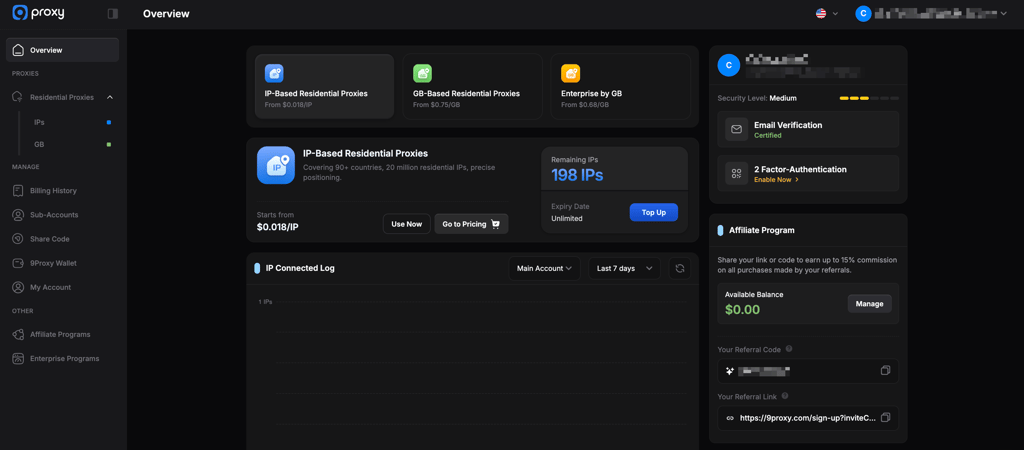
Its target audience is fairly specific: affiliate marketers, social media managers running multiple accounts through anti-detect browsers, and scrapers who want to avoid watching a bandwidth meter.
9Proxy offers two billing models: pay by IP or pay by data. In my opinion, the IP-based option is the most distinctive. You buy a batch of IP credits, each one comes with unlimited bandwidth attached, and you only burn a credit when you successfully connect to that IP.
Meanwhile, 9Proxy’s GB-based option works the more conventional way, billing by data transferred instead. Combined with SOCKS5, HTTP, and HTTPS protocol support, both give you a fairly flexible base layer for scraping, multi-accounting, or geo-unblocking..
The core strengths: what 9Proxy does well
A few features genuinely set 9Proxy apart from bigger, more expensive competitors, and they're worth taking at face value:
- Pay-per-IP billing with unlimited bandwidth. Rather than paying per gigabyte, which can spiral quickly during heavy scraping or long streaming sessions, you buy IP credits upfront. Each activated IP comes with no data cap, so a single credit can be used for hours of scraping or downloading without triggering extra charges. For anyone whose workload is bandwidth-heavy but doesn't need thousands of unique IPs, this flips the usual proxy economics in their favor.
- Flexible GB-based billing for high-IP-count workflows. For workloads that need constant IP rotation rather than sustained bandwidth on a few IPs, 9Proxy also offers a standard pay-per-GB plan alongside the IP-credit option. Having both billing models under one account means you’re not locked into a pricing structure that fights your use case. Instead, you pick whichever one matches how you actually employ proxies, rather than paying a premium for flexibility you don’t need.
- Granular geo-targeting. 9Proxy lets you filter proxies down to country, state, city, ZIP code, and even ISP. That's useful for anything that depends on precise location matching, from regional ad verification to hyper-local SEO tracking, and it puts 9Proxy on par with far larger providers on this specific metric.
- Today's List. Every IP you've actively forwarded or used in the past 24 hours gets stored in a Today's List, and you can reconnect to any of them for free as long as they're still active, without spending another credit. A small detail that rewards short-session, repeat-connection workflows like account checking or scheduled monitoring.
Performance testing: success rate and speed
To see how 9Proxy holds up, I ran a controlled batch of 100 sequential requests through 9Proxy's residential network to see how the proxies actually performed rather than relying on marketing claims. Every single request went through.
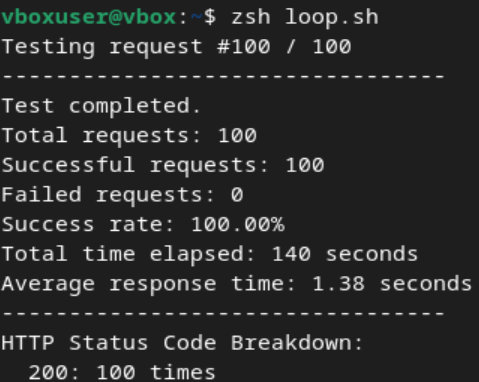
A few things stand out in the numbers themselves. The 140-second total across 100 requests works out to roughly 1.4s/request, which lines up almost exactly with the reported 1.38-second average.
I consider that a sign the connection stayed consistent throughout the run rather than starting fast and degrading, or vice versa. Every one of the 100 requests came back with a clean HTTP 200, with no retries, timeouts, or partial failures logged anywhere in the run.
A 100% success rate with no failed connections is a genuinely strong result, on par with what we've measured from far larger, more established providers. Taken purely as a network performance snapshot, 9Proxy's proxies work, and they work quickly
Ease of use and the dashboard
The 9Proxy dashboard is organized into four sections of Overview, Proxies, Manage, and Other. It covers virtually everything, from residential IP and GB packages to billing history, sub-accounts, share codes, and the affiliate program.
It's a clean, modern interface, and once you understand the account-identifier and session-ID system used to control sticky sessions and rotation, day-to-day use is straightforward.
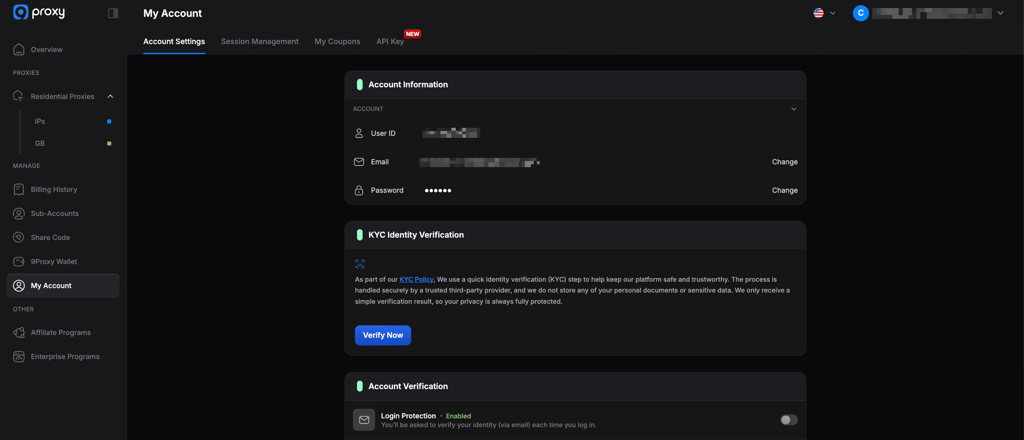
Setup relies on username/password authentication rather than a fully guided onboarding flow, and 9Proxy also ships its own desktop app (9Proxy Manager) to handle proxy lists, port forwarding, and rotation settings outside the browser dashboard. For technical users, that’s a manageable and workable combination.
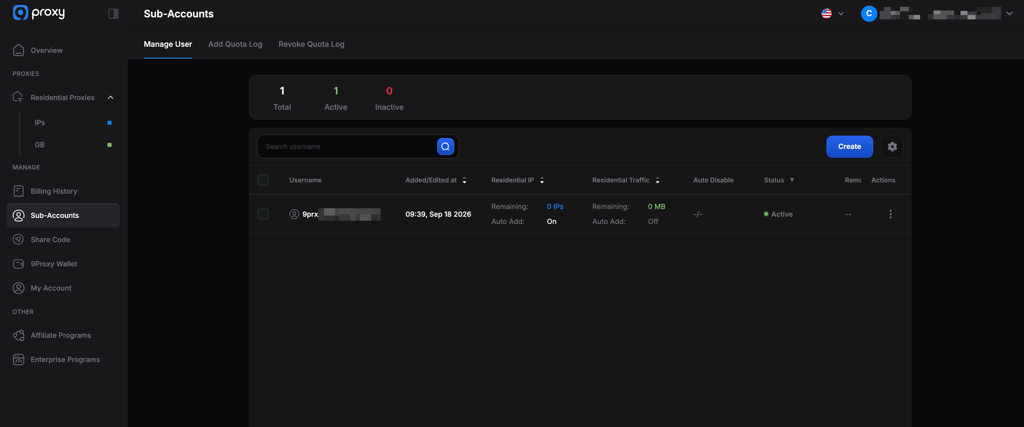
9Proxy plans and pricing tiers
9Proxy runs three separate pricing structures, and the same principle applies across all of them: the more you commit to upfront, the cheaper each unit gets.
IP-based plans
IP credits are 9Proxy's core product: unlimited bandwidth per IP, and credits that don't expire. You only spend a credit once you successfully connect to that IP. Here’s a breakdown of the IP-based plans:
| Package | Tier | Total Price | Price per IP |
| 100 IPs | Regular | $24.00 | $0.24 |
| 500 IPs | Regular | $72.00 | $0.144 |
| 1000 + 500 IPs (bonus) | Regular | $126.00 | $0.084 |
| 2500 IPs | Regular | $210.00 | $0.084 |
| 5000 IPs | Regular | $360.00 | $0.072 |
| 15,000 IPs | Regular | $720.00 | $0.048 |
| 25,000 IPs | Regular | $863.00 | $0.035 |
| 50,000 IPs | Regular | $1438.00 | $0.029 |
| 100,000 IPs | Enterprise | $2300.00 | $0.023 |
| 200,000 IPs | Enterprise | $4140.00 | $0.021 |
| 500,000 IPs | Enterprise | $8625.00 | $0.018 |
9Proxy’s homepage advertises a headline rate of $0.018/IP, but that price only applies at the very top of the Enterprise tier: a 500,000-IP purchase costing $8625.00.
For most buyers, the realistic starting price is $0.24/IP (the 100-IP package, $24.00 total), dropping to $0.029/IP at the largest Regular tier (50,000 IPs for $1438.00). Larger custom deals below $0.018/IP are available by contacting sales directly.
Bandwidth-based (GB) plans
For workflows built around rapid IP rotation rather than long sessions per IP, 9Proxy also offers pay-per-GB plans. Pricing starts at $3.00/GB for the smallest 5 GB package and scales down to $0.68/GB at the top Enterprise tier (10,000 GB for $6800.00).
Here’s a full breakdown of the GB-based plans.
| Package | Tier | Total Price | Price per GB | Validity |
| 5 GB | Regular | $15.00 | $3.00 | 180 days |
| 50 + 5 GB (bonus) | Regular | $105.00 | $2.10 | 180 days |
| 100 GB | Regular | $150.00 | $1.50 | 180 days |
| 200 GB | Regular | $200.00 | $1.00 | 180 days |
| 1000 GB | Regular | $800.00 | $0.80 | 180 days |
| 2000 GB | Regular | $1500.00 | $0.75 | 180 days |
| 3000 GB | Enterprise | $2160.00 | $0.72 | Unlimited |
| 6000 GB | Enterprise | $4200.00 | $0.70 | Unlimited |
| 10,000 GB | Enterprise | $6800.00 | $0.68 | Unlimited |
Regular GB packages carry a 180-day validity window, while Enterprise GB packages are unlimited. Custom deals below $0.68/GB are available for volumes beyond 10,000 GB.
Bundle plans
9Proxy’s bundle packages combine an IP allotment with a GB allowance at a discount versus buying each separately. There are three tiers, all carrying a 180-day traffic validity window.
| Bundle | Total Price | List Price |
| 100 IPs + 5 GB | $30.00 | $39.00 |
| 1500 IPs + 50 GB | $180.00 | $230.00 |
| 5000 IPs + 500 GB | $720.00 | $860.00 |
The 9Proxy desktop manager and browser integrations
Getting proxies working through 9Proxy means downloading its desktop client, available for Windows, macOS, and Linux. Once it's installed, the client becomes the actual control center for day-to-day use, while the web dashboard handles billing and IP purchases.
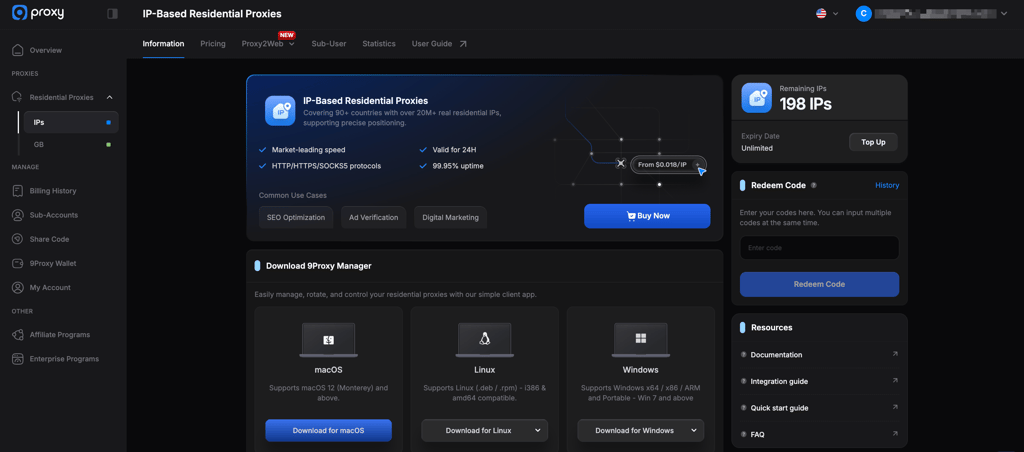
The tradeoff is that 9Proxy isn't a pure API-and-dashboard product: you're expected to install and run a native client, learn its port and rule-based configuration model, and manage refresh and rotation settings yourself.
That's a meaningfully steeper setup than browser-only or API-first competitors like Lunaproxy, and it puts more of the operational decision-making – refresh delays, rotation windows, per-app rules – on the user rather than the provider.
Here’s what you can expect from 9Proxy Manager:
- Port forwarding and the Forwarding List. The core mechanic is binding a proxy (say, a US residential IP) to a local port on your machine. The Forwarding List shows every configured port (20 by default), whether it's free or in use, which IP is bound to it, and its live status, with a one-click Bind action and a Test button to confirm a port is actually working. Any tool that can point at a local SOCKS5 or HTTP proxy – a browser, a scraper, an anti-detect profile – talks to that port, and 9Proxy Manager handles routing to the real residential IP behind the scenes.
- Auto Refresh vs Auto Rotation. 9Proxy separates two related but distinct actions. Auto Refresh Proxy is reactive: it only swaps in a new IP once the current one goes offline, with a configurable delay (300 seconds by default) before forwarding the replacement, and a cap on how many refreshes a single port can go through (120 by default). Auto Rotation Proxy is proactive: it rotates the IP on a port automatically after a set duration of use, regardless of whether the old IP still works, which suits scraping or session-based anonymity better than long-lived account logins. Both can be scoped to every active port or only to the ones you've explicitly opted in.
- Proxy Program (per-app routing rules). Beyond browser profiles, 9Proxy Manager includes a Proxy Program panel for creating rules that route a specific desktop application through a chosen proxy address, protocol, target hosts, and target ports, instead of changing your system-wide proxy settings. That's useful if you only want one specific app tunneled through 9Proxy while everything else on your machine uses your normal connection. However, it means defining a rule per application rather than flipping one switch.
- ProxyHub Pro vs ProxyHub Lite. ProxyHub splits into two tools depending on what you’re managing. ProxyHub Lite is the mobile side: it lets you get and use proxies directly from a phone, aimed at anyone who needs proxy access on the go rather than at a desk. Meanwhile, ProxyHub Pro is built for scale instead, letting you organize devices into groups and track connection type, proxy IP, country, and status for each one from a single device list, with its own auto-refresh settings layered on top. Between the two, ProxyHub covers everything from a single mobile session to agencies and teams juggling fleets of devices or VMs.
- Engine protocol and connection format. In Settings, you can choose between two proprietary transport options: 9Proxy calls them the Qux protocol (optimized to reduce ping) and the Mux protocol (optimized for bandwidth), along with the local proxy connection string format (host:port:username:password by default) and whether local ports require username/password authentication at all. There's also a toggle for duplicate-proxy handling: keep reissuing the same IPs, or exclude any IP you've already been assigned within a set window (2 hours by default).
The local port forwarding is also what makes 9Proxy compatible with anti-detect browsers like AdsPower, Multilogin, Dolphin{anty}, and Linken Sphere. Each browser profile just points at a local port, and the desktop client routes it through the correct residential IP behind the scenes. For anyone managing multiple social media or marketplace accounts, this integration is arguably more important than the raw IP pool size, since it's what actually prevents fingerprint overlap between profiles.
Who is 9Proxy for, and who isn't it for?
No two proxy buyers have the same priorities, so here's a quick gut-check on whether 9Proxy actually fits yours.
9Proxy could be worth considering if:
- You manage multiple social media or e-commerce accounts through anti-detect browsers and want native port-forwarding support
- Your workload is bandwidth-heavy rather than IP-hungry, and you want to avoid per-GB charges eating your budget
- You want a flexible, pay-as-you-go model without a recurring subscription, and you're prepared to treat any purchase as an experiment rather than a long-term commitment
Look elsewhere if:
- You need dedicated, static residential IPs that stay reliably online for months at a time
- Data privacy and vendor transparency are non-negotiable for your use case
9Proxy vs Pia S5 Proxy vs Lunaproxy
9Proxy, Pia S5 Proxy, and Lunaproxy are all known names in the residential proxy space, and each has carved out its own reputation for a reason: cheap credits, SOCKS5 depth, or sheer pool size. But established isn't the same as interchangeable, and the differences between them show up fast once you line up their billing models, protocols, and track records side by side.
In the table below, I compare the three providers.
| Aspect | 9Proxy | Pia S5 Proxy | Lunaproxy |
| Primary billing | Pay-per-IP and pay-per-GB (can be bundled) | Pay-per-IP | Mostly pay-per-GB |
| SOCKS5 support | Full native SOCKS5 | Full native SOCKS5 | Limited SOCKS5 support |
| IP credit expiry | No expiration (IP credits only) | No expiration | Typically expires in 30 days |
| Targeting depth | Country, state, city, ZIP, ISP | Country, city, ISP | Country, city only |
| Client software | Lightweight desktop app | Desktop app | Web dashboard / API only |
| Reputation and transparency | Undisclosed ownership | Also criticized over sourcing practices | Criticized for inflated pool claims |
As you can see at first glance, on pure mechanics, 9Proxy's non-expiring IP credits are genuinely better than what Lunaproxy offers, and its geo-targeting depth edges out both competitors.
That said, it would be inaccurate to call 9Proxy the clear winner overall: Pia S5 Proxy’s sourcing criticisms are well documented, and Lunaproxy’s 30-day expirations are a real downside, but neither of those changes the fact that 9Proxy has its own unresolved reputation and transparency problems.
This is closer to pick-your-tradeoff than a clean win for any one provider.
9Proxy pros and cons
Verdict: is 9Proxy worth it in 2026?
To put it simply, 9Proxy works and it’s worth it. My testing showed a 100% success rate, fast response times, real SOCKS5 support, and a pricing structure – particularly its IP-credit option – that genuinely solves a problem most competitors don't. If you only looked at the feature list, it would be easy to call this one of the more practical budget options for social media automation and multi-accounting in 2026.
That said, a feature list isn't the whole picture: undisclosed company ownership and a privacy policy that undercuts its own no-log marketing are real red flags that weaken the case for 9Proxy regardless of how the network performs on paper.
There’s room for improvement in terms of vendor transparency, long-term IP stability, or strict data-handling standards. For those needs, established providers with published ownership and audited sourcing remain the safer choice, even at a higher price. However, in my opinion, 9Proxy is worth testing cautiously, provided the pricing model fits your workload and you're comfortable treating any purchase as a trial rather than a commitment.
FAQ
Does 9Proxy charge for bandwidth?
No, 9Proxy doesn’t charge for bandwidth on its core plans. 9Proxy’s primary billing model charges per IP credit, with unlimited bandwidth attached to each activated IP. It also offers separate pay-per-GB plans for workloads built around high-volume scraping rather than long sessions.
Do my purchased 9Proxy credits expire?
IP-based 9Proxy credits don't have an expiration date, per 9Proxy’s own materials. Regular GB-based and all bundle plan allowances expire after 180 days. Meanwhile, the Enterprise-tier GB packages carry unlimited validity.
Which protocols does 9Proxy support?
9Proxy supports SOCKS5, HTTP, and HTTPS, covering most scraping tools, browsers, and bots.
Can I target specific locations with 9Proxy?
Yes, you can target specific locations with 9Proxy. You can filter proxies down to country, state, city, ZIP code, and ISP.
Does 9Proxy require software installation?
No, not strictly. While you need the desktop client for local port forwarding and advanced app routing, 9Proxy offers Proxy2Web. This feature allows IP plan users to manage proxies and generate standard login credentials directly inside the web dashboard without downloading any software, as the proxy runs on 9Proxy's infrastructure instead of your device.
Is 9Proxy compatible with anti-detect browsers?
Yes, 9Proxy is compatible with anti-detect browsers. It integrates via local port forwarding with AdsPower, Multilogin, Dolphin{anty}, and Linken Sphere.
Is 9Proxy the same as 911.re?
No. 911.re shut down permanently in 2022. 9Proxy is an independent, more recent service that markets itself as filling the gap 911.re left behind, though it is a separate company with its own track record.