How to scrape data from a website


Humans, along with AI, generated almost 150 zetabytes (ZB) of data in 2024 alone. That’s about 400 million terabytes (TB) per day! Such a massive number primarily reveals our dependence on data, but it also presents an opportunity, as this readily available information can be turned into insights.
But, before you can do that, you’ll first need to extract said data.
That’s precisely where a website scraper comes in, and in this guide, I’ll discuss how you could take advantage of one. More importantly, I’ll show you how to scrape data from a website with a step-by-step Python guide and teach you the responsible way to go about it.
What is web scraping?
Web scraping refers to the process of pulling valuable information from websites. It relies on automated tools, which help users quickly gather vast amounts of data in a short period.
These tools, known as web scrapers, essentially ask sites to download their HTML. However, it’s crucial to limit the number of sent requests. After all, too many of these could easily overwhelm the servers that host the sites.
Once a webscraper acquires the site’s raw code, it parses it into actually understandable information, such as product names and prices, for example. The data is then stored in CSV or JSON files, the two most commonly used formats.
Marketers can then analyze the processed information to understand current trends and peek into competitors’ products, services, and prices. From there, the web-scraped data becomes incredibly valuable for optimizing strategies and making better business decisions.
Why use proxies in web scraping?
Websites quickly grew tired of automated tools sending thousands of requests. These web scrapers would put massive loads on servers and even temporarily shut them down. So, the sites fought back and added various detection and blocking features.
With these countermeasures at their disposal, websites could easily flag repeated requests from the same IP address as suspicious activity. What’s more, getting flagged a few times would, in most cases, lead to permanent bans.
That’s what proxies aim to resolve. By giving you multiple IP addresses to rotate between, these tools make your requests appear as if they’re coming from several locations. They also help access geo-restricted data by providing IPs from locations where the site’s content is available.
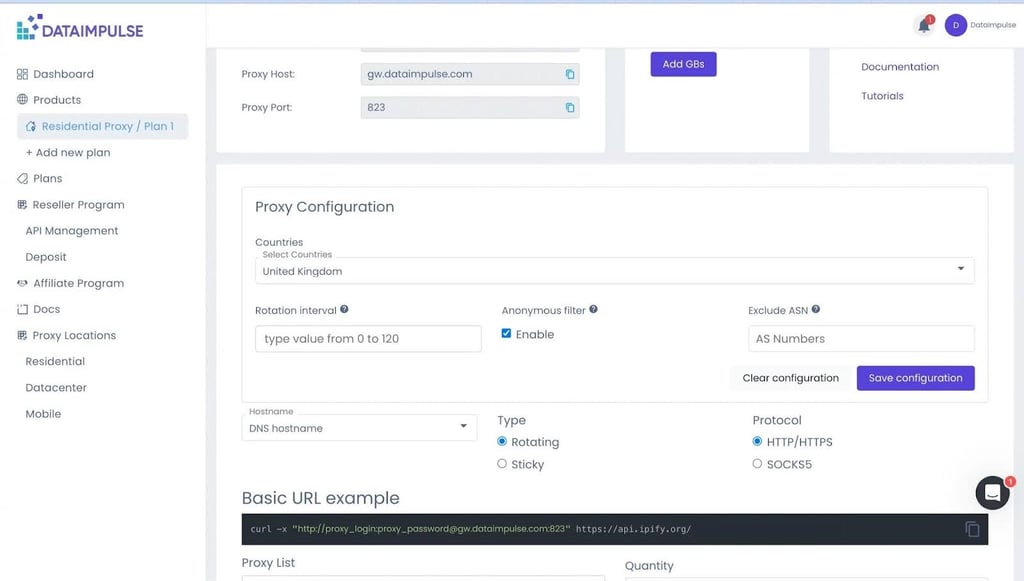
One example of such a service is DataImpulse, a trustworthy provider whose affordable custom residential proxies offer global coverage. But, more important than cost-effectiveness and reliability are DataImpulse’s ethical scraping practices, which don’t overwhelm websites.
How to scrape a website with Python
Now that you understand what web scraping is, we can move on to scraping data from websites in practice. Below is an exhaustive guide on using Python scripts to efficiently extract info from web pages:
Step 1: setting up your environment
Before scraping a website with Python, you’ll first need to download the app and create a designated space to install the required libraries. Once that's done, you can run the following code to handle the rest:
python -m venv scraper.venv

.venv\scripts\activate

pip install requests beautifulsoup4
These three commands will first create a virtual environment called scraper. Then, they’ll ensure it’s active, so the packages like requests and beautifulsoup4 install inside it. Keep in mind that installing an editor like VS Code can help with these lines.
Step 2: making your first request
With the virtual environment ready, you can send out your first web scraping Python request. That’s where Python’s requests library comes in, allowing you to interact with websites and make HTTP requests. Here’s how:
import requests

url = “https://examplewebsite.com”
response = requests.get(url)
print(response.text)
Such a simple Python script for web scraping is all you need to get the site’s raw code. Keep in mind that you’ll need to adjust the URL.
Step 3: parsing the HTML
Once you have the code, you’ll have to parse it to extract specific information. That’s an aspect BeautifulSoup handles, so let’s see it in action:
from bs4 import BeautifulSoup

soup = BeautifulSoup(response.text, “html.parser”)

for link in soup.find_all("a"):
    print(link.get("href"))
The code sequence above tells Python to loop through < a > tags, which hold links in HTML. As such, it’ll obtain link targets.
Step 4: handling dynamic content
Unfortunately for scrapers, some websites rely on JavaScript to display data. This makes their dynamic content much harder to capture. And if you come across such a site, you’ll need to use Selenium, as Python’s regular requests library won’t do the trick:
from selenium import webdriver

driver = webdriver.Chrome()
driver.get(“https://examplewebsite.com”)
print(driver.page_source)
driver.quit()
The code above assumes you’re using Google Chrome, and it also scrapes from websites that rely on JavaScript. Although this will take more time than your regular Python web scraper, it’s necessary for handling dynamic content.
Step 5: storing the data
One-time scraping of a website won’t do much; you’ll have to save the acquired data to analyze it in the future. Python has a few built-in features that can help, and here’s how you can take advantage of them to store said info in a CSV file:
import csv

with open(“data.csv”, “w”, newline=””) as file:
    writer = csv.writer(file)
    writer.writerow([“Title”])
    writer.writerow([“Example Title”])
Most tools also work well with the JSON format, and in that case, the code would go like this:
import json

data = {“title”: “Example Title”}
with open(“data.json”, “w”) as file:
    json.dump(data, file)
Step 6: implementing proxies
As you know by now, sending multiple HTML scraping requests to the same site from one IP address can lead to being flagged for suspicious activity. Keep doing it and, chances are, your IP will also get banned by the website.
To prevent that, you’ll need to add proxies to your Python web scraping script.
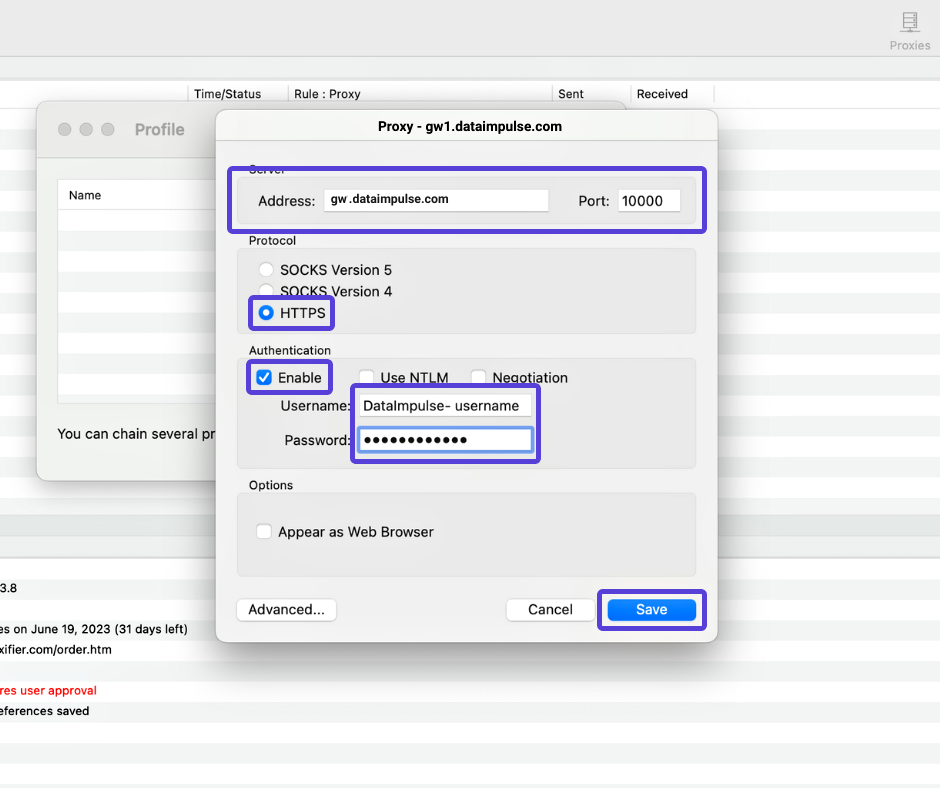
Rotating proxies, in particular, can work wonders here, and DataImpulse is a prime example. As their name suggests, these proxies rotate between multiple IP addresses as you send webpage scraping requests, which essentially makes the site view you as multiple regular users.
Here’s a quick way to see if your proxy-imbued HTML web scraper Python code works:
proxies = {
    “http”: “http://username:[email protected]:10000”,
    “https”: “http://username:[email protected]:10000”,
}

response = requests.get(“https://examplewebsite.com”, proxies=proxies)
print(response.status_code)
Of course, you’ll first have to get a residential DataImpulse proxy. You can then replace your username, password, and site URL in the code.
Easy scraper tools and alternatives
If you’re just getting started, the Python code blocks above probably look confusing. Fortunately, there are a few other beginner-friendly ways to scrape website content:
- ParseHub. This well-known platform offers a user-friendly interface for simultaneously managing multiple web scraping tasks.
- Apify. Known for its Actors, Apify is one of the biggest cloud-based website data scraping services available today. You can also order a custom web scraper application.
- Octoparse. If you’d prefer a web scraper program instead, Octoparse provides comparable no-coding functionality on your desktop.
- WebHarvy. As a visual web scraping program, WebHarvy makes it easy to scrape HTML, URLs, and images, as well as handle bare text scraping.
- Data Miner. Web scraping solutions like Data Miner are extensions that work with Chrome and Edge and provide one-click web data scraping.
Best practices for ethical scraping
While web data scraping can provide countless insights with all kinds of benefits, doing it the right way is vital. That means following ethical practices to prevent server overload and avoid potential legal issues. Here’s how:
- Understand the site’s scraping rules. Most websites have a robots.txt file in their root directory, which instructs your tools on how to scrape data off a website and which areas to avoid. It also tells you to avoid personal data and only webscrape public information.
- Add request delays to mimic human browsing. Sending out too many HTML web scraping requests is a good way to get banned, as some sites can flag multiple IPs at once. So, keep it on the down low by limiting your request frequency.
- Use proxies responsibly. With high-quality residential proxies like DataImpulse at your disposal, web scraping data will be a breeze. However, you should still be responsible when it comes to site scraping. So, don’t overwhelm the site and exploit the services unless you’re ready to handle potential legal problems.
Conclusion: next steps
Automated web scrapers make collecting sites' data far easier than it used to be just a few short years ago. Learning how to scrape websites with these tools can also be quite beneficial. It essentially allows you to turn the readily available information into insights for individual and business purposes.
A good way to learn web scraping is to start simple. To begin with, you can practice with static pages. And if you’re new to coding, AI-generated Python scripts for web scraping will do just fine.
Once you get the hang of it, you’ll be able to scale your website scrapers to handle larger datasets. You’ll also learn to bypass site CAPTCHA and integrate APIs for efficiency. Just remember that ethical practices are still crucial, even at this level of custom web scraping.