Kamatera pricing 2026: everything you need to know
Our in-house experts conduct internal independent, hands-on testing and transparent reviews of web hosting providers by using custom-built tools or utilizing industry-recognized tools and methods to ensure impartial and evidence-based assessments.
Using the same criteria for all services, we share our detailed methodologies and practices to help customers make informed hosting decisions.
Learn more
Kamatera offers many different cloud hosting solutions (such as cloud servers, VPS hosting, virtual desktops, virtual machine hosting), but in essence it is all the same cloud hosting infrastructure. So how does Kamatera pricing work?
In this article, I explain and review Kamatera’s pre-configured plan pricing, and explain how custom server pricing works.
Kamatera pricing 2026: overview
- Preconfigured cloud VPS servers, starting at $4.00/month – perfect for projects with established resource requirements, personal websites
- Customizable cloud VPS servers, starting at $4.00/month – ideal for growing projects, complex OS and resource requirements, developers
Kamatera hosting plans and prices explained
The key difference in Kamatera’s pricing plans is that you can either purchase a subscription for a pre-configured cloud server for a set monthly price, or configure your own server according to your specific requirements. The latter option is available both as a monthly and as an hourly (billed by minutes) subscription.
Preconfigured Kamatera server pricing
The preconfigured Kamatera servers have a fixed amount of resources for a monthly price. Here are the three plans you can choose from:
| Plan | 1 month |
| Basic | $4.00/month |
| Standard | $25.00/month |
| Pro | $39.00/month |
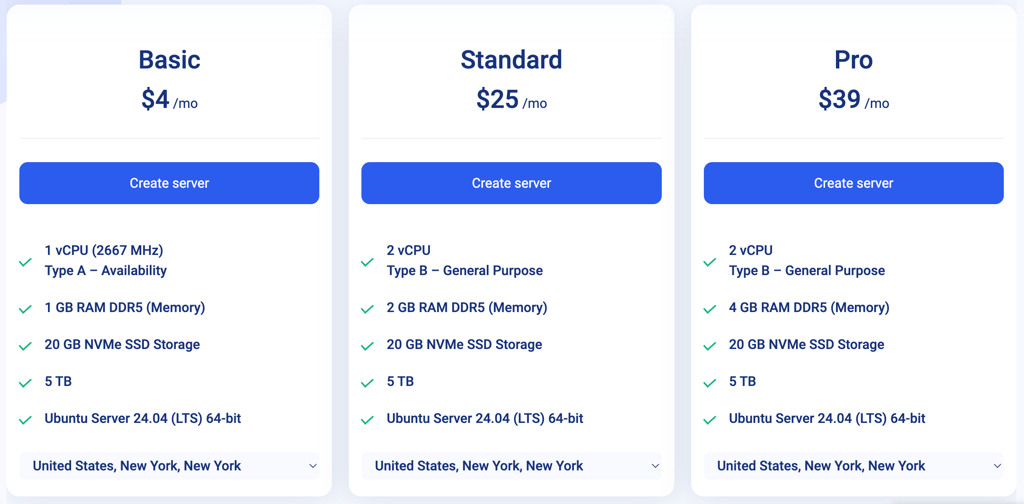
You might notice that the price jump from Basic to Standard is quite high. This is because the Basic plan vCPU is availability-based, which means resources are allocated based on the real-time idle capacity of the CPU. They are not guaranteed. Meanwhile the Standard plan CPU thread is dedicated, which results in guaranteed resources.
The preconfigured Kamatera plans are best for users looking for a reliable VPS server without long-term commitments and predictable monthly pricing. However, if you have specific server requirements in terms of operating system, resources, and addons, configuring a server from scratch might be a better idea.
Customizable Kamatera server pricing
Kamatera offers four customizable server configurations, based on the type of CPU threads and whether resources are shared and/or guaranteed. Each configuration type has a baseline monthly and baseline hourly rate. The baseline server configuration includes:
- A single vCPU core (availability, general, dedicated, or burstable, depending on the server type)
- 256MB–1GB RAM (depending on the server type)
- 20GB NVMe SSD storage
- 5TB traffic
- Ubuntu or custom OS (bring-your-own-license, non-Windows)
| Server | Baseline monthly rate | Baseline hourly rate |
| Type A – Availability | $4.00/month | $0.005/h |
| Type B – General purpose | $9.00/month | $0.012/h |
| Type D – Dedicated | $19.00/month | $0.026/h |
| Type T – Burstable | - | $0.005/h |
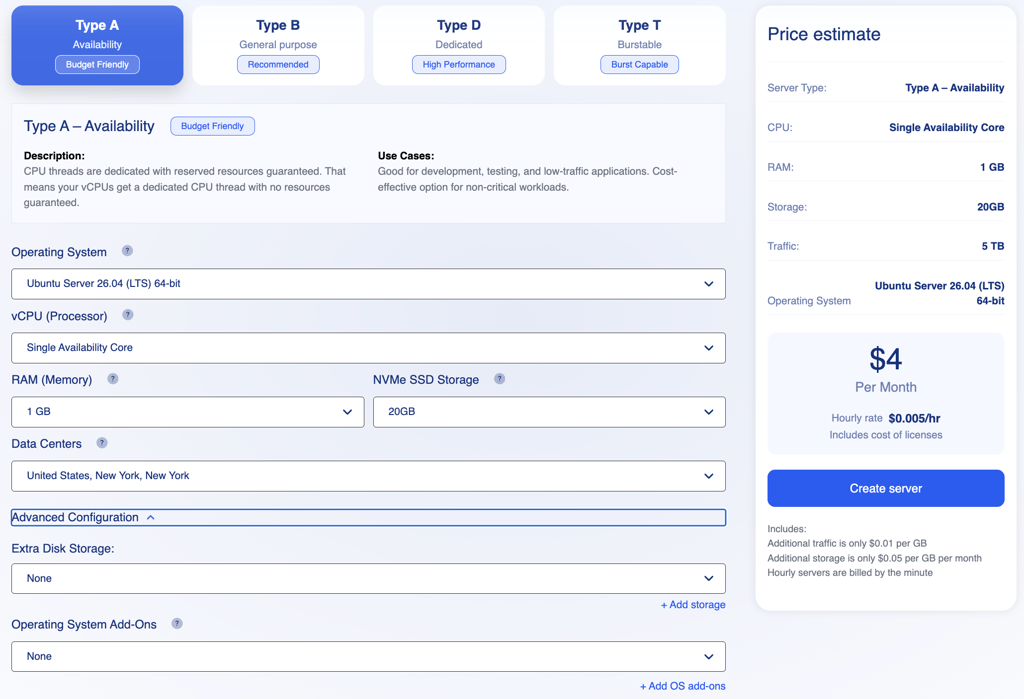
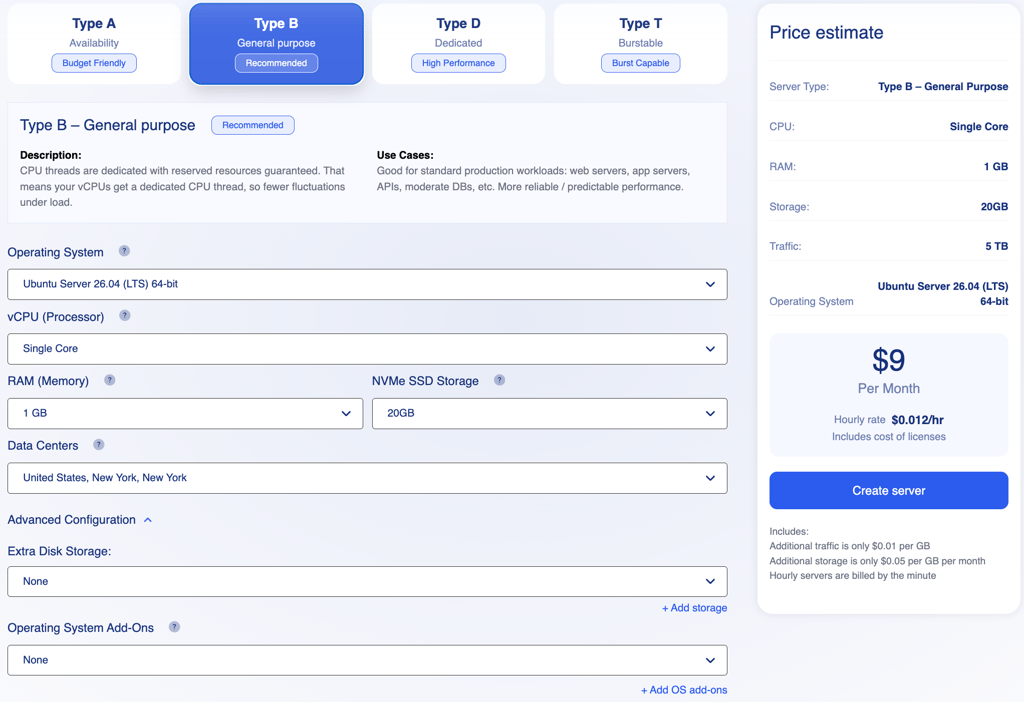
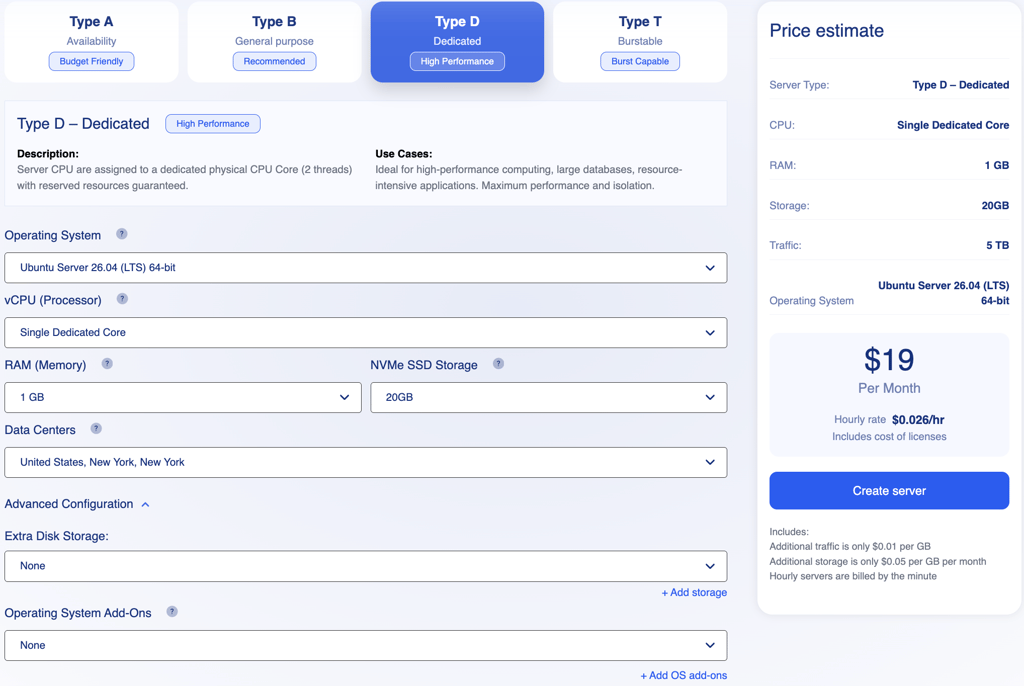
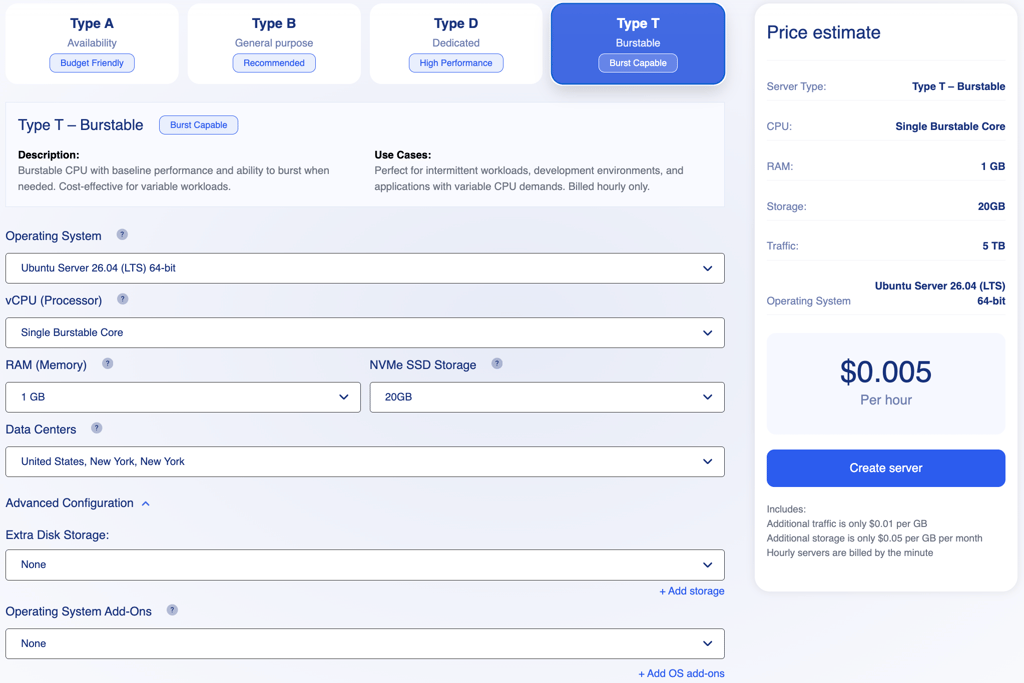
Each server type is fully customizable. You can add more vCPU cores, more RAM, and more storage. Further, the advanced configurations tab includes options for extra disk storage and operating system add-ons.
Here’s a rough breakdown of additional resource costs:
- Additional 10GB NVMe SSD storage is $2.00/month ($0.003/h)
- Additional 1GB RAM is $2.00/month ($0.003/h)
- Additional cores varies per server type from $4.00/core/month ($0.011/core/h) to $25.00/core/month
- Extra disc storage is $0.25/month ($0.001/h) for every 5GB increase Pros
- Operating system addons are from $22.00/month for Plesk licenses, and from $35.00/month for cPanel licenses
Generally, Kamatera’s customizable servers are a great solution for users looking for very specific requirements for their projects. Plus, the hourly pricing option allows for some flexibility with your budget – and you only pay for what you actually use.
Which hosting type you should choose
Other Kamatera services and their pricing
In addition to servers, Kamatera offers a lot of additional networking, security, and storage services and products:
- Load balancers (starting at $19.00) – for distributing traffic to not overwhelm the server
- Cloud firewall (starting at $6.00/month) – for advanced server protection
- Block storage (starting at $0.05/GB/month) – in case the storage on your server is not enough
- Disaster recovery (starting at $12.00/month) – choose from three disaster recovery providers to insure your projects
- Backups (starting at $0.05/hour, ~$3.00/month) – your server images stored on Kamatera’s cloud servers
- Software licensing (pricing depends on software) – Microsoft starting from $0.7/user/month, cPanel starting from $35.00/server/month, Plesk starting from $22.00/server/month, and any Microsoft Windows server starting from $10.00/server/month.
- Diagonal scaling (quote-based) – horizontal and vertical scaling combined for cost efficiency and performance
Kamatera refund policy
Instead of a standard 30-day money-back guarantee, Kamatera offers a 30-day free trial. The free trial is worth up to $100 of services for one Kamatera server and 1TB of traffic.
Kamatera doesn’t offer refunds for prepaid services and licenses once they are charged. This applies both to monthly and hourly services. For hourly services, you only pay for what you use until you terminate the server. Any refunds will be considered only if the uptime falls below the service level agreement (SLA) guarantee.
Final thoughts
Kamatera offers a highly flexible cloud infrastructure suitable for various needs, from simple personal websites to complex projects requiring custom configurations. Users can choose between pre-configured cloud VPS plans for predictable monthly pricing or fully customizable servers that allow you to pay only for the resources you use, often with hourly billing options.
Kamatera also provides scalability services, and additional products like load balancers, firewalls, software licensing, and disaster recovery. However, note that Kamatera does not offer traditional refunds for prepaid services. Instead, you can use the 30-day free trial worth up to $100 to test Kamatera’s servers.
FAQ
Is Kamatera worth it?
Yes, Kamatera is a strong option for users who need a highly customizable cloud infrastructure and flexible, pay-as-you-go pricing. It is particularly well-suited for developers and projects with specific resource requirements, provided you understand their billing model and reliance on a free trial rather than a standard refund policy.
How much does Kamatera cost?
Pricing varies significantly based on your needs. Pre-configured cloud VPS servers start at $4.00/month. Customizable servers’ baseline rates start at $4.00/month for availability-based types, while dedicated types begin at $19.00/month. Additional resources like RAM, storage, and specialized OS licenses incur extra costs.
How can I pay for Kamatera?
Kamatera accepts all major credit and debit cards, including virtual and prepaid options. Additionally, you can make prepaid deposits to your account using either a credit card or PayPal.
Do you pay monthly for Kamatera?
Yes, you can pay on a monthly subscription basis for both pre-configured and customizable servers. Additionally, customizable servers offer an hourly billing option, allowing you to pay only for the time resources are actually used.
Is Kamatera a one-time payment?
No, Kamatera operates on a monthly subscription model rather than a one-time payment structure.