DataImpulse review – are these proxies good?


DataImpulse provides a broad selection of residential, mobile, and datacenter proxies designed for web scraping, testing, automation, and brand protection. Its emphasis on both performance and affordability makes it a reliable option for individuals and businesses seeking efficient and hard-to-detect proxies.
Because it doesn’t rely on third-party resellers, DataImpulse is able to offer high-quality service at some of the most competitive prices available. With coverage spanning 195 locations, flexible pay-as-you-go plans, and round-the-clock human support, it clearly warrants a detailed review.
Below, I'll evaluate its packages, features, and overall value. I'll also share my review results and final verdict.
Key features of DataImpulse proxy services
No matter what you need proxies for, DataImpulse seems to have a solution with its cost-effective plans and worldwide reach. They currently offer three pay-per-traffic options designed for different requirements. Here’s a closer look at their proxies and the key features that stand out.
Residential proxies
DataImpulse has 16M+ ethically sourced unique IPs in 195 locations worldwide. You can choose between rotating and sticky sessions, which can be set to last up to 120 minute. The dashboard also lets you see how many proxies are available in each location.
DataImpulse proxies start at just $1 per GB, which makes it one of the most affordable providers on the market.
For authentication, you can choose between user-pass login or IP whitelisting. DataImpulse supports SOCKS5 and HTTP(S) protocols to stay compatible with various apps and platforms. A one-second response time and high success rates also contribute to its overall reliability.
The dashboard comes with default targeting, which lets you pick or exclude countries. More advanced target filters allow you to narrow down by specific countries, cities, ZIP codes, and ASNs, though using them consumes roughly twice the amount of traffic.
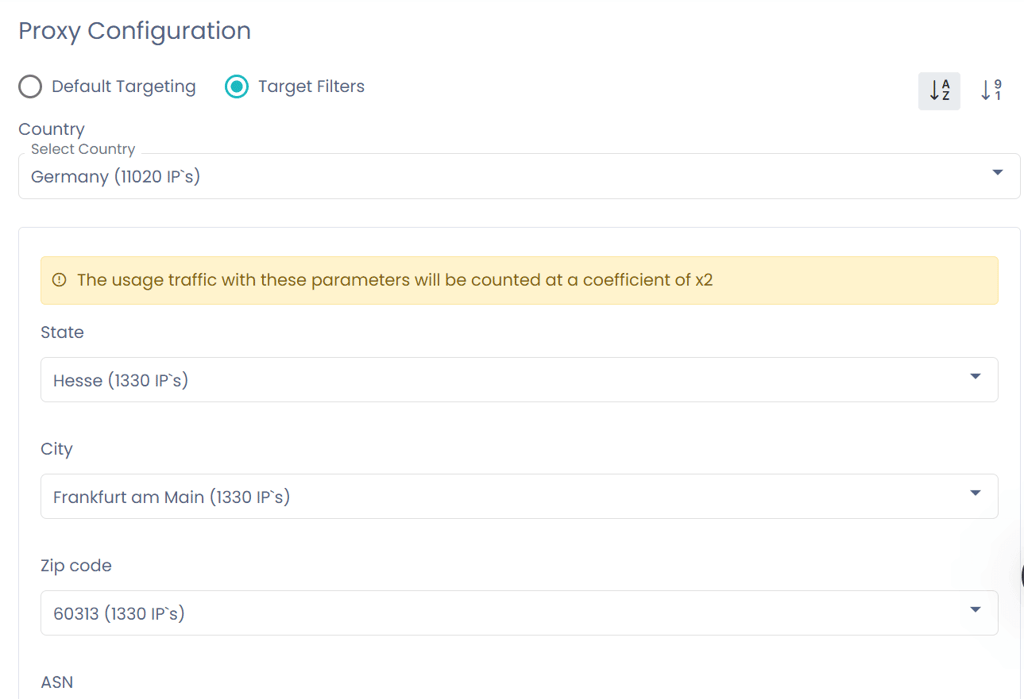
During my research, I found that DataImpulse residential proxies are most useful for market research, data scraping, SEO monitoring, eCommerce, social media management, and access to geo-blocked content.
Datacenter proxies
Datacenter proxies provide 99.99% uptime, low latency, and randomized locations to help prevent subnet blocks. They are generally faster and more consistent than residential proxies, but since they aren’t linked to actual households, they are more easily identified.
Datacenter proxies are perfect for large-scale scraping and automation projects. Their user-friendly API allows you to seamlessly integrate them into your systems and applications, streamlining your workflow. In my experience, they work particularly well for market research, tracking prices, monitoring reviews, and detecting changes on websites.
Mobile proxies
Mobile proxies are a type of residential proxy that use IPs from a premium residential mobile network pool, making it appear as if you’re browsing the internet directly from a phone.
They support 3G, 4G, 5G, and LTE connectivity, as well as rotating and sticky sessions. They are highly unlikely to get flagged and blocked, but they cost more than "regular" residential proxies and their availability can be somewhat limited.
Pricing plans: understanding the costs
DataImpulse offers some of the most competitive prices in the market. Residential proxies on a pay-as-you-go plan start at just $1 per GB, which is extremely affordable compared with typical market rates of $4–$7 per GB. If you purchase 1000 GB or more, you also receive a 20% discount.

Datacenter and mobile proxies start at $0.5/GB and $2/GB, respectively. Although you can buy as many GBs as you want in your dashboard, the minimum payment for any purchase is $5.
If you already know how much traffic you’ll need, DataImpulse makes it easy with convenient proxy packages. If you go for one of the higher-tier plans, you’ll get perks like a dedicated account manager and customizable features, including extra pool options, thread limits, and price management. And if you’re a top-tier customer, the team can even work with you to add additional personalized features tailored to your needs.
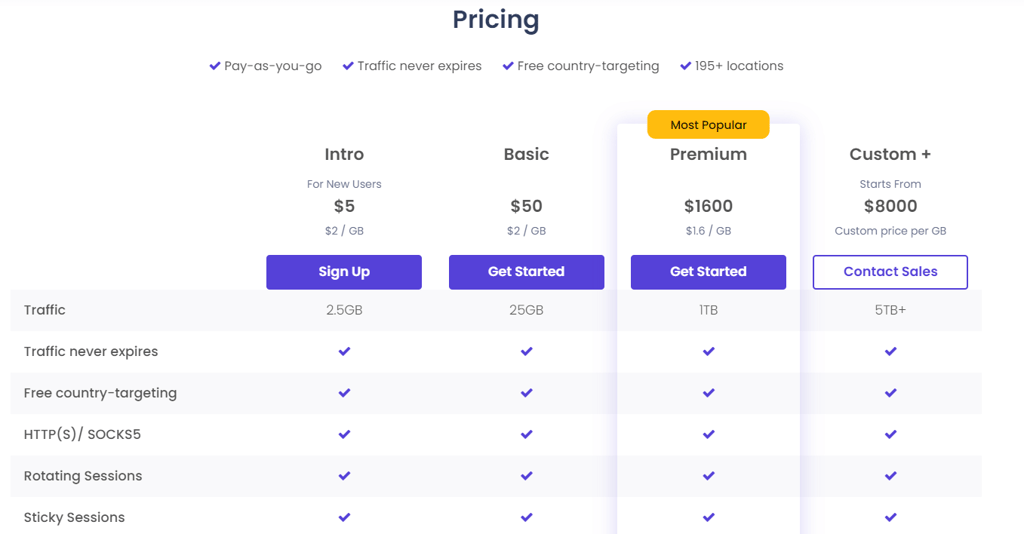
The Intro plan includes a 7-day money-back guarantee if you don’t pay with crypto. Other plans are non-refundable. Payment options are extensive, including major credit cards, PayPal, wire transfers, crypto, Alipay, Apple Pay, and Google Pay (availability may vary depending on your location).
Performance benchmarks
Two essential aspects of any proxy service are speed and reliability. Residential proxies depend on the internet speed of their assigned IPs, so they’re usually a bit slower than datacenter proxies. That said, I was impressed by the results I got during my DataImpulse speed testing.
Proxies also have to provide stable connectivity since disconnects can reveal your true IP and interrupt your operation. Unstable connections defeat the very purpose of using a proxy. With that in mind, here's my experience with DataImpulse.
Speed
I’ve reviewed DataImpulse proxies and IPs across various locations. Here's a brief snapshot of my results.
| Download | Upload | Ping | |
| No proxy | 123.2Mbps | 59Mbps | 13ms |
| Canada | 121.3Mbps | 64Mbps | 177ms |
| The UK | 117Mbps | 65Mbps | 37ms |
| Germany | 122.5Mbps | 69Mbps | 79ms |
| Australia | 114Mbps | 64Mbps | 28ms |
DataImpulse proxies delivered strong speeds throughout my testing. I didn’t notice any significant speed drops, no matter the location, and upload regularly went up. Keep in mind that servers farther away can increase your ping, so if you’re planning on bandwidth-heavy online gaming, it’s best to stick to nearby locations.
I could also access geo-restricted platforms such as Hulu and BBC iPlayer without any problems. Throughout my testing, I didn’t encounter any proxy errors or connection interruptions.
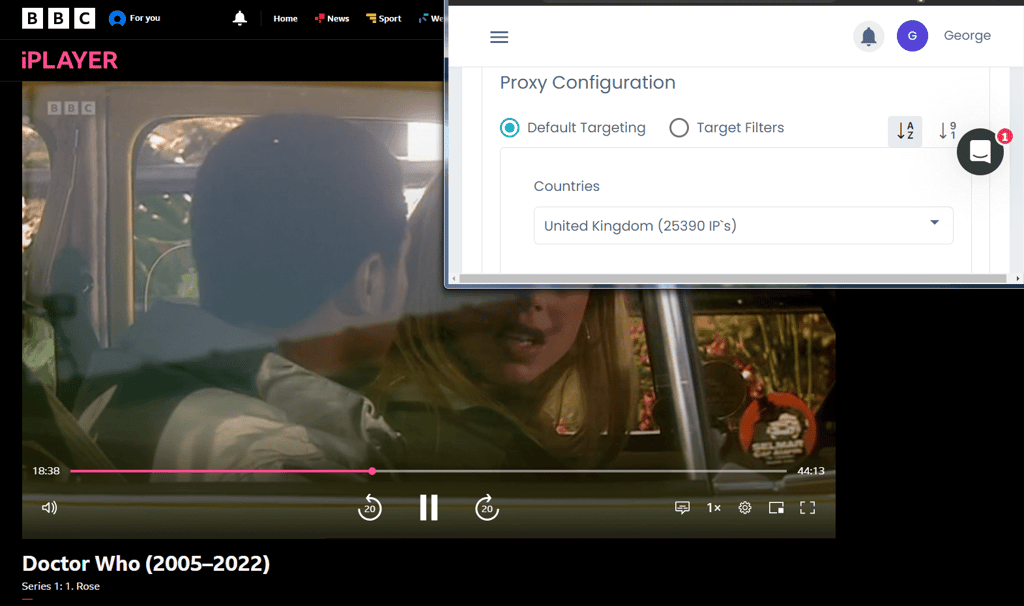
Overall, DataImpulse's promise of high speed held up during my testing circuit. The connection remained stable throughout without any spikes or sudden disconnects.
US speed testing
Because the US has so many geo-restricted websites and services, I spent a large part of my speed testing there. Some of DataImpulse’s US servers delivered excellent performance, while others showed noticeable slowdowns. As I mentioned earlier, you’ll need to try different locations to find the fastest options for your needs.
Seattle servers dished out the best performance while Sherwood wasn't as kind to me. Most of the servers kept the pings within a reasonable range, with a few exceptions like Denver and Hutchinson, which went too high for comfort.

That said, I was able to access anything from streaming services and news outlets to betting sites and educational resources.
Here's a brief snapshot of my results from the US on DataImpulse US servers:
| Download | Upload | Ping | |
| No proxy | 233.52Mbps | 171.5Mbps | 36ms |
| Sherwood, OR | 13.91Mbps | 19.55Mbps | 91ms |
| Portland, OR | 66.49Mbps | 18.16Mbps | 110ms |
| Stayton, OR | 18.95Mbps | 14.97Mbps | 137ms |
| Seattle, WA | 230.61Mbps | 166.07Mbps | 108ms |
| Hutchinson, KS | 95.87Mbps | 76.24Mbps | 160ms |
| Denver, CO | 23.24Mbps | 22.86Mbps | 185ms |
| Alma, GA | 30.79Mbps | 6.42Mbps | 73ms |
Reliability
DataImpulse promises 99.99% uptime with minimal interruptions, and my testing confirmed this – none of my speed tests failed. Their high-quality IPs also make it much less likely that you’ll run into IP bans.
I tried multiple IPs across different locations and was able to access international social media, forums, streaming services, and e-commerce sites without any issues. I had a 100% success rate in all these cases. When checking the residential proxies, I consistently got real residential addresses from recognized ISPs.
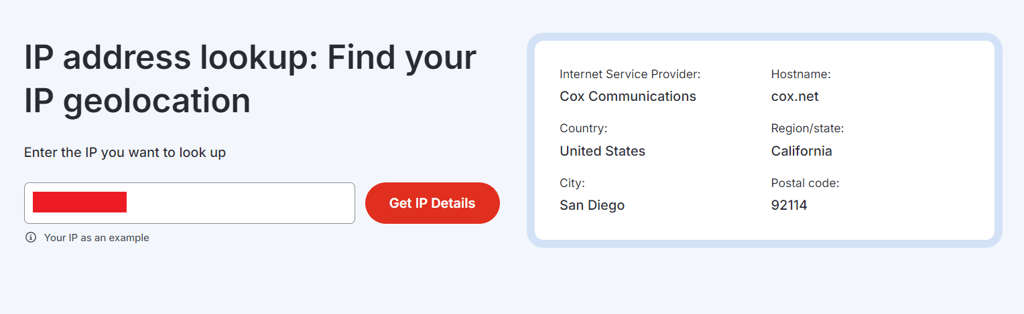
I didn’t encounter any errors, but it’s reassuring to know that DataImpulse offers 24/7 human customer support (with no bots). When I reached out during testing, I was connected with a real agent in less than a minute, ready to help with any issue you might face.
User experience and ease of use
The official website and dashboard are clean, intuitive, and easy to navigate. You’ll also find plenty of guides and FAQ sections to help you get started smoothly after signing up.
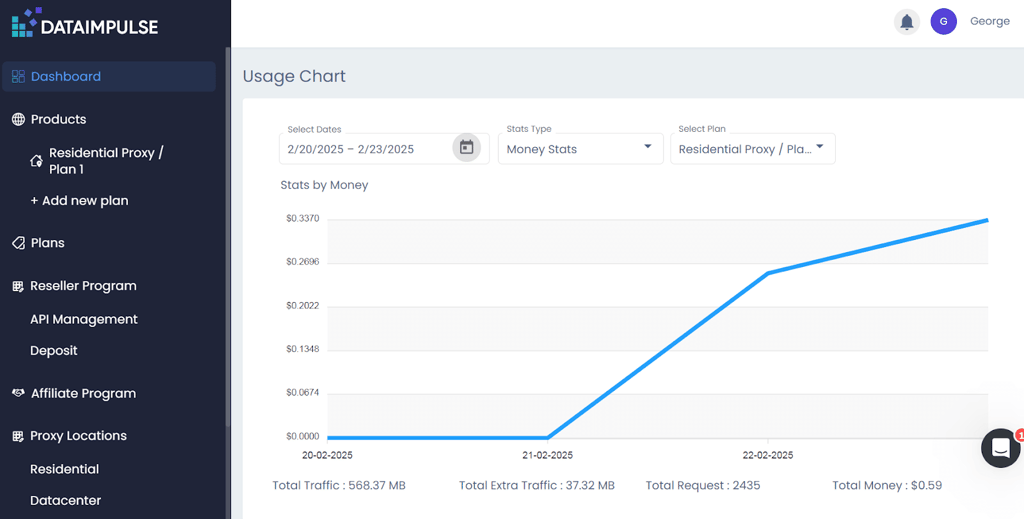
Your dashboard gives you all the information and setup options you need. I had no trouble finding my way around or customizing my experience. You can track your bandwidth usage and other key stats, like traffic, requests, and spending. Plus, the DataImpulse dashboard works perfectly on mobile devices, so you can manage your proxies on the go.
If you want automated, scalable, and flexible proxy management, you can use DataImpulse’s API to connect proxies directly with your bots, scraping tools, or data-collection workflows. The API is easy to implement thanks to clear documentation, and it offers plenty of flexibility to fit a variety of use cases.
Final thoughts
DataImpulse is an affordable, high-performance proxy service with 195 locations, excellent speeds, and a beginner-friendly interface. Unlike some providers, they don’t resell proxies from other suppliers, which helps maintain strong performance at low prices. Residential proxies start at $1/GB, and you get a 20% discount when purchasing over 1000GB.
You can check the number of proxies for each location, enjoy pay-as-you-go billing without an expiration, and choose between rotating and sticky sessions for residential and mobile proxies. If you run into any issues or need guidance, DataImpulse has a capable 24/7 human support team.
After putting it through extensive testing, I can confidently recommend DataImpulse to anyone – whether you’re a business or an individual – looking for a reliable, efficient, and cost-effective proxy solution.