LogoAI review 2026

The global adoption of AI tools has surged, with over 40% of businesses worldwide using AI in some form, and this number is expected to exceed 75% only in 2026.
Among the top contenders in this space, LogoAI has emerged as a leading platform for automated logo creation, providing businesses, freelancers, and entrepreneurs with an intuitive way to generate professional branding materials.
Thanks to its AI-driven approach, LogoAI simplifies the logo design process by generating high-quality, customizable logos in minutes, which makes it a preferred choice for those seeking efficiency and affordability.
This LogoAI review is based on an in-depth evaluation conducted by the Cybernews research team and yours truly to deliver a comprehensive analysis of its capabilities. I will examine its key features, pricing, usability, and how it compares to other AI-powered design tools.
Whether you’re a startup or a seasoned business owner, this report will help you determine if LogoAI is the right solution for your branding needs.
Quick overview of LogoAI
| Overall rating: | 4.1/5 |
| Brief description: | LogoAI is an AI-powered logo design and branding platform that instantly generates professional logos, automates brand identity creation, and offers customizable marketing assets. |
| Pricing: | The Basic plan starts at $29, the Pro plan costs $59, and the Brand plan is priced at $99 |
What is LogoAI?
LogoAI is an AI logo creation tool that simplifies and automates branding for businesses, entrepreneurs, and creative professionals. As one of the best AI for logo design, it enables users to generate high-quality logos and complete brand identities in minutes without requiring any design skills.
Unlike traditional logo-making software, which demands extensive graphic design knowledge, LogoAI leverages artificial intelligence to analyze brand names, industries, and style preferences to generate visually appealing logos tailored to each user’s needs. This tool's capabilities extend beyond logo creation, as it also offers brand automation features such as social media content design, business card generation, and marketing material customization.
Compared to other AI-driven design tools, LogoAI stands out for its focus on branding and for delivering consistent, professional-grade visual assets that align with a company’s identity. This makes it an excellent choice for startups, small businesses, freelancers, and marketing teams looking for a cost-effective and efficient branding solution.
While free logo makers exist, LogoAI’s AI-driven precision and extensive customization options make it a superior choice for users who want a polished and cohesive brand image. With its intuitive interface and powerful automation, LogoAI is revolutionizing the way brands establish their visual presence in the digital age.
What is LogoAI used for?
As I already mentioned, LogoAI is a versatile AI-powered logo maker that helps businesses and individuals quickly create professional logos and matching branding materials. Primarily, it is used to generate unique logos tailored to a business’s industry, preferences, and style. Considering it has a user-friendly interface and a library of over 3.5 million logo ideas, LogoAI stands out as one of the best logo generator AI available.
In addition to logo creation, it offers various design tools for other essential branding assets, including business cards, social media posts, product photos, and profile pictures. This makes it a one-stop solution for startups, small businesses, eCommerce stores, freelancers, and creative professionals who need fast and affordable design solutions.
LogoAI's quick logo generation enables freelancers and marketing teams to deliver high-quality designs quickly. The platform also supports the creation of mockups and promotional materials, which helps maintain brand consistency. Therefore, LogoAI has become an indispensable tool for small business owners looking to build their brand identity and designers needing to streamline the creative process.
Pros and cons of LogoAI
In this AI logo review, I have also covered the key advantages and limitations of the tool to ensure users understand its strengths and weaknesses before making a decision.
LogoAI key features
LogoAI is an innovative platform that simplifies content and SEO workflows while providing cutting-edge logo design capabilities. Below, I inspect its standout features, which make it one of the best AI for logo platforms.
LogoAI generation
One of LogoAI's most prominent features is its AI logo generation, which is at the platform's core. Unlike traditional logo design methods, which require extensive manual input and graphic design expertise, LogoAI’s advanced AI engine streamlines the process by analyzing a business’s industry, name, and style requirements.
This allows the platform to instantly generate high-quality, industry-relevant logo designs that adhere to proven design principles. By eliminating the complexities of traditional design workflows, LogoAI ensures that businesses of all sizes can access professional branding solutions without requiring prior design experience. This intelligent automation makes it one of the best logo generator AI solutions available today.
AI-powered logo maker
In addition to AI-driven logo creation, LogoAI enhances the user experience with its AI-powered logo maker, which automates the entire creation process. Users simply input their brand details and select an industry, and the AI quickly generates multiple logo concepts within seconds. This feature significantly reduces the time and effort required to create a professional logo and guarantees that each design maintains a polished and unique appearance.
Additionally, the platform provides an easy-to-use editor that allows users to refine their logo designs and adjust colors, fonts, and layouts to achieve a truly customized final product. This combination of automation and customization makes LogoAI a top contender for businesses looking for the best AI logo creation tool.
Logo ideas
To help businesses find their design direction, LogoAI offers an innovative Logo Ideas feature that provides access to millions of creative logo inspirations. Rather than starting from scratch, users can explore a vast library of professionally crafted designs and select and refine templates that align with their brand vision.
This feature is especially valuable for startups and entrepreneurs who may not have a clear concept in mind but want a strong visual identity. By offering an extensive collection of logo templates and design inspirations, LogoAI ensures that users are never limited to generic, uninspired branding options.
Matching stationery
A strong brand identity goes beyond just a logo, which is why LogoAI extends its functionality with the matching stationery feature. This tool allows businesses to create a full suite of branding materials, including business cards, letterheads, and other promotional assets that maintain a cohesive visual theme.
With just a few clicks, they can generate high-quality stationery that complements their logo and reinforces brand consistency across digital and print mediums. This comprehensive approach makes LogoAI an all-in-one branding solution for businesses looking to establish a professional and unified brand presence.
AI designer
One of LogoAI’s most impressive features is its AI designer, which offers advanced customization and branding capabilities. This tool allows users to visualize their logo in real-world applications, such as storefront signs, product packaging, advertisements, and digital platforms. The built-in mockup generator provides realistic previews that permit businesses to see how their logo will look on different materials before committing to a final design.
Additionally, the AI designer supports high-resolution exports in multiple formats, including PNG, SVG, and PDF. This allows logos to be used across various marketing channels without compromising quality. Businesses can also use animated logo options for dynamic branding elements in digital campaigns.
LogoAI pricing and plans
In the table below, I have included everything you need to know about LogoAI pricing plans before you make a decision.
| Plan | Starting price | Free version | Design edits | Logo animation | Logo resolution | Templates | Transparent PNG | Vector files |
| Basic | $29 | No | Yes | No | 800x600px | Yes | Yes | No |
| Pro | $59 | No | Yes | No | High-resolution | Yes | Yes | Yes |
| Brand | $99 | No | Yes | Yes | High-resolution | Yes | Yes | Yes |
LogoAI offers three pricing plans tailored to different business needs – Basic, Pro, and Brand.
- Basic plan: It costs $29 and provides essential logo files, which is why it is ideal for startups and small businesses needing an affordable yet professional logo design.
- Pro plan: This plan is priced at $59, and it includes high-resolution files, vector formats, and branding elements to ensure businesses receive scalable designs for print and digital use.
- Brand plan: Although the most expensive plan costs $99, it delivers a complete branding package, including social media kits, business cards, and marketing materials. This makes it perfect for companies that require a full identity suite.
Compared to competitors like Looka, which charges $65 for a premium logo package and up to $96 for complete branding kits, or getimg.ai, which requires recurring fees for AI design tools, LogoAI offers a one-time purchase model, making it a cost-effective alternative.
It’s worth noting that you can’t get LogoAI free of charge. However, new users can benefit from exclusive coupon codes to lower their initial costs. Returning customers enjoy at least a 40% discount with the code LOGOPRO, and the more they purchase, the higher the discount. For instance, LogoAI offers 50% off for your 6th to 10th logo purchase and 60% off for buying 11 or more logos.
LogoAI customer reviews
LogoAI has received mixed feedback from users, with many highlighting its ease of use, fast logo generation, and customization features. Several users have praised the platform's user-friendly interface, which allows them to create professional logos in minutes. The wide range of customizable templates, color schemes, fonts, and design options helps users find the perfect match for their brand identity.
Some also appreciated additional features like social media post generation and the ability to create business card mockups quickly. For example, one user had this to say on the Trustpilot platform:
"I was able to generate an eye-catching logo in minutes, and the platform offers a wide array of customizable templates, allowing me to find the perfect match for my brand’s personality and vision."
However, a few logo maker reviews have pointed out concerns about misleading advertising. Some users have reported frustration with the platform’s claim of offering free logo generation, only to find that downloading the logo requires payment.
These reviews claim that LogoAI’s pricing is steep compared to other free AI logo generators, which leads to dissatisfaction. Despite these complaints, LogoAI’s website clearly states that while users can design logos for free, downloading them requires a paid plan.
In addition, some have raised concerns over customer support, mentioning delayed responses and unresolved issues with canceled memberships still being charged. Nonetheless, many find the platform’s speed, ease of use, and diverse features significant benefits.
Overall, LogoAI.com offers a valuable tool for businesses and entrepreneurs seeking quick and affordable logo design solutions despite the occasional criticism of its pricing and support issues.
How to use LogoAI?
Considering that LogoAI is created with the user in mind, it is accessible to everyone, even beginners. With it, you can create any logo in no time; just follow my step-by-step guide:
1. Sign up and create an account
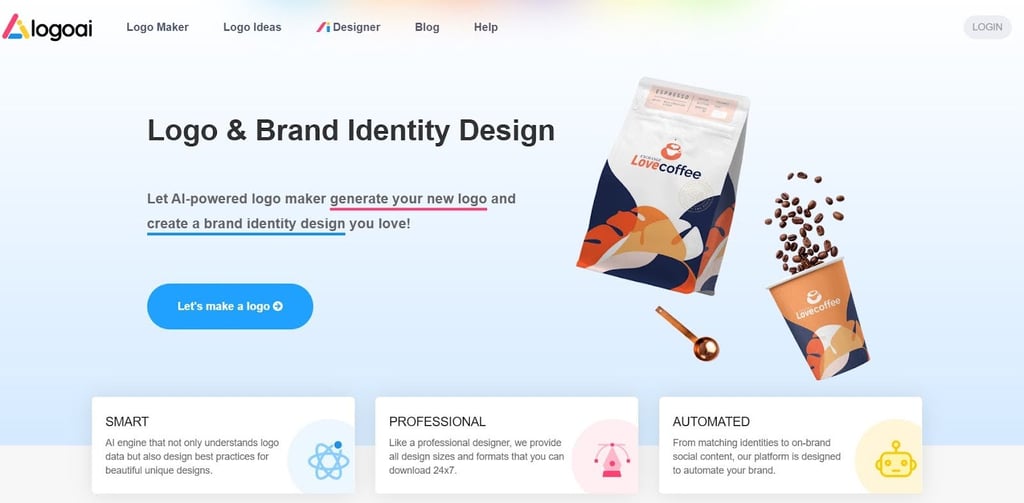
Open the LogoAI official website and click the Login button in the upper right corner. You will be asked to provide your email, and the software will send you a login link. Click it, and your account is created.
2. Start your first logo project
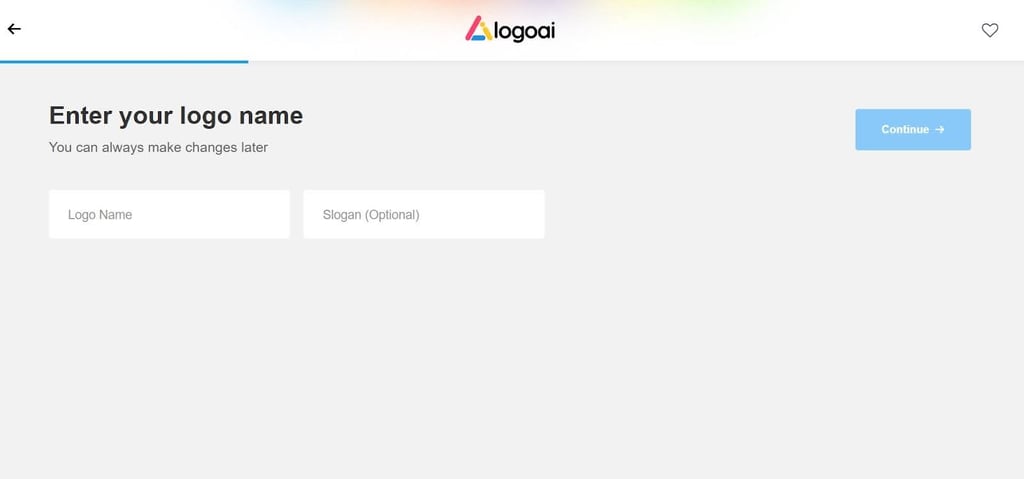
Now, you are ready to design your first logo. Go to Logo Maker, located in the top bar, and press Start on the next page. The software will then ask you to insert your company name and slogan (optional). When finished, click the Continue button.
3. Customize your logo design
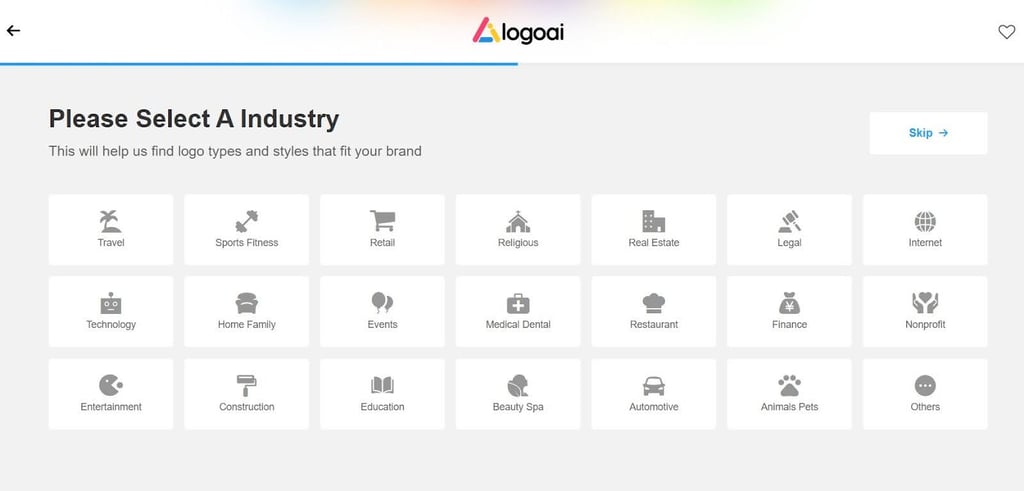
The next step requires you to choose your industry. Once done, you must pick a color from a color theme that resonates with your brand’s vision. After that, you will be asked to select the font you like. Edit your logo if you change your mind about the color, font, or style. Then, click the Buy button.
4. Finalize and purchase your logo
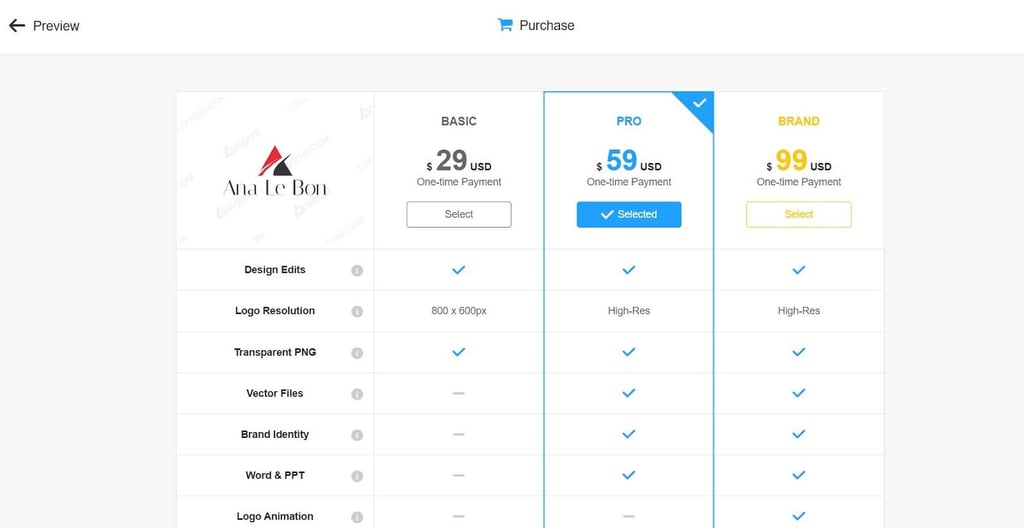
Choose the plan that matches your budget, decide whether to pay by credit card or via PayPal and apply the promo code. If you choose a Pro or Brand plan, you can also tick the Designer Fix box, which allows you to ask LogoAI designers directly to make up to three changes to your design. Remember that this costs an additional $40.
5. Download and use your logo
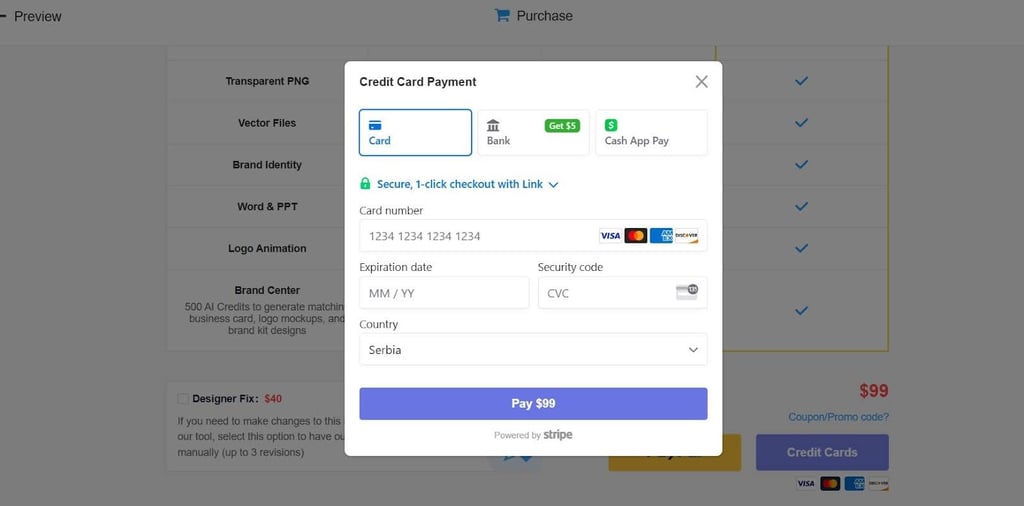
After you complete the purchase, you can download the logo to your device. Remember that you can edit it up to three times directly on the LogoAI site.
LogoAI alternatives
When selecting an AI-based logo creation and branding tool, I suggest researching various options to ensure you find the best fit for your needs. While LogoAI is a solid choice for AI-driven logo creation, alternative platforms like Jasper, getimg.ai, and Looka offer unique features that may align better with specific preferences and requirements.
By comparing these platforms, businesses and entrepreneurs can make an informed decision when selecting a brand LogoAI solution. Here are a few natural alternatives to LogoAI:
- Jasper: This generative AI platform primarily focuses on content creation rather than logo design. It helps businesses create marketing materials, blog posts, video scripts, and other branded content en masse. Unlike LogoAI, which specializes in logo generation, Jasper is an all-in-one AI content generator that can assist in crafting compelling brand messaging. However, Jasper does offer AI-generated design elements for social media posts and marketing visuals. In terms of pricing, Jasper’s plans start at $49/month, so it is significantly more expensive than LogoAI, which has a one-time fee starting at $29. While Jasper is an excellent tool for businesses seeking content automation, it lacks the dedicated logo creation and branding kit features found in LogoAI.
- getimg.ai: This versatile AI image generation tool allows users to create custom visuals from text descriptions. While it’s not a dedicated logo design tool like the LogoAI app, getimg.ai’s AI-powered image generation capabilities can produce unique visual assets for brands. Unlike LogoAI, which offers structured logo templates, getimg.ai focuses on generating high-quality digital illustrations, paintings, and photos. One advantage of getimg.ai is its free AI image generation, which allows users to experiment before committing to a paid plan. While LogoAI provides vector files and branding kits tailored for businesses, getimg.ai is ideal for those seeking broader image creation tools beyond logos. However, for users who are solely focused on logo design, LogoAI remains the more suitable choice.
- Looka: One of the most well-known AI logo generators offers a seamless and intuitive logo creation process. Like LogoAI, Looka blends AI-driven design elements with user preferences to produce professional logos. Looka ai generated website reviews often highlight its ability to create logos quickly based on industry and design preferences. However, LogoAI stands out by offering more customization options post-purchase, allowing users to edit their logos for up to three days. Additionally, LogoAI provides multiple high-resolution download formats, including vector files, Word, and PPT formats, which Looka lacks. Although Looka’s basic logo package starts at just $20, it only includes a low-resolution PNG file, whereas LogoAI ensures transparency and better resolution for long-term branding needs. Moreover, Looka offers additional branding assets like business cards and social media kits, making it an excellent choice for a complete branding solution. Still, LogoAI remains a strong contender for a more cost-effective and flexible logo design experience.
Final thoughts on LogoAI review
After my thorough LogoAI review, it’s clear that this AI-driven tool is an excellent solution for businesses searching for an easy and efficient way to create professional logos. Its intuitive interface, extensive design options, and branding features make it a valuable asset for startups, entrepreneurs, and small businesses that require a quick branding solution.
The platform’s affordability, customization capabilities, and additional tools like matching stationery further enhance its appeal. However, limitations such as restricted advanced design control and the lack of a free plan may hinder users seeking more creative flexibility.
Overall, LogoAI is worth investing in for those needing a budget-friendly, AI-powered logo maker that simplifies branding. It’s ideal for companies that prioritize speed, convenience, and professional-quality designs without hiring a designer.
FAQ
Is LogoAI legit?
Yes, LogoAI is a legitimate platform used by over 2.5M businesses. It provides AI-powered logo design and branding solutions and delivers professional results with a user-friendly interface. It is trusted by startups, small businesses, and freelancers, who praise it as a reliable and cost-effective tool for creating high-quality logos and branding assets.
Is LogoAI worth it?
Yes, LogoAI is worth it for businesses, freelancers, and startups who search for affordable and professional logo design. With its AI-driven process, customizable templates, and additional branding tools, LogoAI saves time and money and delivers high-quality logos and marketing assets. This makes it a valuable investment for establishing a strong brand identity.
How does the LogoAI work?
LogoAI uses artificial intelligence to generate logos based on your business name, industry, and style preferences. All you have to do is enter your details, and the AI suggests multiple logo designs. Then, you can customize fonts, colors, and layouts and further design matching branding assets like business cards and social media posts.
Is LogoAI free to use?
LogoAI offers free access to its logo creation tool and allows you to explore design options. However, you’ll need to purchase one of their paid plans to download high-resolution logos and access additional branding features. This ensures you get professional-quality logos and branding assets for your business.
Can you modify the logo generated by LogoAI after purchase?
Yes, LogoAI allows you to modify your logo after purchasing it, and you can find it in the My Logos section. The platform provides customization options and lets you adjust fonts, colors, layouts, and other design elements. This flexibility guarantees your logo aligns perfectly with your brand vision and delivers a personalized touch post-purchase.