1Password vs LastPass comparison in 2026

-
1Password is a better password manager than LastPass based on my testing, especially in terms of security and ease of use. It offers stronger account protection with its unique Secret Key, more polished apps, and useful features like Watchtower and Travel Mode. It also delivers a smoother experience across desktop, mobile, and browser extensions. 1Password is available from $2.99/month.
-
LastPass is worth considering if you want a free password manager or a budget-friendly option for your family. It covers the basics, including password storage, password generation, and autofill. However, its past security breaches and less polished apps make 1Password the stronger choice for users who value security and a better user experience. LastPass is available from $3.00/month.
My 1Password vs LastPass comparison showed that 1Password is the better password manager overall. It offers stronger security, easy-to-use apps, and useful premium features. LastPass is worth considering if you want a free plan or a lower-cost family option.
To find the best password manager, I tested 1Password vs LastPass side by side with the Cybernews research team. We compared their security, features, pricing, ease of use, and customer support. We also looked at how well each service works in everyday use.
Keep reading to find out how 1Password and LastPass compare in 2026. I’ll share our test results and explain the key similarities and differences. By the end, you’ll know which password manager best fits your needs and budget.
1Password vs LastPass – quick look
1Password and LastPass are well-established password managers, but they are different in key areas like security, features, and usability. 1Password is significantly more secure and offers a clean interface that’s both easy to use and filled with useful features. However, it’s more expensive. LastPass, on the other hand, is less polished, but comes with a solid free version and affordable family plans. Yet, its reputation took a hit after a few data breaches in the past.
Below is a quick breakdown of how 1Password and LastPass compare.
| 1Password | LastPass | |
| ⭐ Rating: | ||
| 🥇 Overall rank: | #2 out of #20 | #14 out of #20 |
| 🔥 Coupons: | 1Password coupon 50% OFF | LastPass coupon for $3.00/month |
| 💵 Price: | From $2.99/month | From $3.00/month |
| ✂️ Free version: | 14-day trial | Yes, plus 30-day free trial |
| 🔒 Encryption: | AES-256 | AES-256 |
| 🖥️ Platforms: | Windows, macOS, Linux, Android, iOS | Windows, macOS, Linux, Android, iOS |
| 🌐 Browser extensions: | Chrome, Firefox, Edge, Brave, Safari | Chrome, Firefox, Opera, Safari, Edge |

Recent Updates
1Password vs LastPass: key differences
1Password and LastPass both cover the basics, including password storage, autofill, and cross-device syncing with their paid plans. In my testing, though, 1Password felt more secure and polished, while LastPass stood out for its lower starting price and free tier. That makes the choice pretty clear depending on whether you value stronger protection or better budget flexibility.
Choose 1Password if
- You want stronger security and a cleaner track record. 1Password uses zero-knowledge architecture, AES-256 encryption, and a unique Secret Key, which adds another layer of protection if someone gets hold of your master password.
- You want more useful premium features. 1Password includes Travel Mode and Watchtower, which help protect your data when you travel, spot weak passwords, and shop online more safely. These extras make 1Password feel more complete in daily use.
- You want a better app experience across devices. 1Password has polished apps for Windows, macOS, Linux, iOS, and Android, plus broad browser extension support. During our testing, the interface felt smoother and easier to navigate than LastPass.
Check out our full 1Password review for the complete breakdown of its security, features, and usability.
Choose LastPass if
- You want a free password manager. LastPass offers an indefinite free plan, which makes it a practical choice for basic password storage without paying upfront. Just keep in mind that it's limited to one device. On the other hand, 1Password does not have a free version, so LastPass is the easier pick for no-cost use.
- You want lower-cost family pricing. LastPass tends to be cheaper for households, especially if you just need a simple shared plan for several users. That makes it a stronger value pick for budget-conscious families.
- You want a simple option with the essentials. LastPass still gives you password generation, autofill, and secure vault storage across major platforms. It does not feel as refined as 1Password, but it covers the core tasks most users need.
Read our LastPass review for the full test results and see whether its free plan and lower price are enough for your needs.
Similar price, but LastPass offers a free tier
1Password and LastPass are similarly priced, offering unlimited passwords, 1GB of secure document storage, and two-factor authentication. 1Password starts at $2.99/month, while LastPass costs $3.00/month – a minor difference.
| Version | 1Password | LastPass |
| Free | ❌ No | ✅ Yes |
| Personal/Premium | $2.99/month | $3.00/month |
| Families | $4.49/month | $4.00/month |
| Business | $8.99/month per user | $7.00/month per user |
| Check pricing | Check pricing |

LastPass stands out with a free version and a longer 30-day trial, compared to 1Password’s 14-day trial. LastPass also allows more users on its family plan, which starts at $4.00/month (vs 1Password’s $4.49/month).
Although 1Password includes a few extra features, LastPass gives you more freedom to try the service risk-free and better value for families or users looking for a no-cost option.
1Password vs LastPass for business
While both 1Password and LastPass offer similar business features, giving you access to most of the things you’d expect from a password manager for teams, there are a few key differences.
| Feature | 1Password | LastPass |
|---|---|---|
| Price | From $2.49/month/user; Business from $8.99/month/user | From $4.25/month/user |
| Multi-factor authentication | ✅ Yes | ✅ Yes |
| SSO | ✅ Yes (Business) | ✅ Yes (depending on the plan) |
| Role-based access | ✅ Granular permissions for shared vaults | ✅ Shared folders with customizable user permissions |
| Admin controls | ✅ Custom policies, roles, and granular admin controls | ✅ Admin policies and user/group management; options vary by plan |
| Password sharing | ✅ Yes – vault, guest, and secure item sharing options | ✅ Yes – individual items and shared folders |
| Live support | ✅ 24/7 support; additional support options vary by plan | ✅ Customer support available; support options vary by plan |
Both 1Password and LastPass offer several options for teams and businesses of different sizes. Their business plans combine password management with admin controls, secure sharing, and tools for managing users and access.
1Password’s plans for businesses start at $2.49/month/user with a minimum of 10 users or for $8.99/month/user, depending on your business needs. Both are billed annually, but there’s a more expensive monthly billing option as well. Larger organizations can also contact 1Password for customized enterprise solutions and pricing.
LastPass business plans include Teams, starting at $4.25/month/user, Business at $7.00/month/user, and Business Max at $11.00/month/user. Higher tiers add more security policies and user-management capabilities, while Business Max expands the package with features such as unlimited SSO apps, advanced MFA, and SaaS monitoring and protection.
1Password offers better security
1Password has an edge in security thanks to its dual-key encryption model, strong security track record, and extensive independent auditing. It uses zero-knowledge architecture and top-grade encryption and adds an extra layer of protection with a unique, 34-character Secret Key, which helps keep your account safe. It’s also regularly audited by independent security experts, building trust in handling your data.
LastPass also uses strong encryption and supports multi-factor authentication. However, LastPass doesn't use an equivalent to 1Password's additional Secret Key. It gives 1Password additional protection against server-side and offline cracking attempts because an attacker would need both the account password and Secret Key to decrypt vault data. Because LastPass has experienced several security breaches and hasn’t had the same level of outside audits, those past incidents give 1Password an advantage when comparing the providers' security track records.
| 1Password | LastPass | |
| Encryption protocol | AES-256 | AES-256 |
| Zero-knowledge architecture | ✅ Yes | ✅ Yes |
| Multi-factor authentication | ✅ Yes | ✅ Yes |
| Biometric authentication | ✅ Yes (facial, iris, or fingerprint recognition) | ✅ Yes – device-dependent |
| Security audits | ✅ Yes, audited by ISE, Onica, Secfault Security, Recurity Labs, and Cure53 | ✅ Yes, although no reports are available publicly |
| Secret key | ✅ Yes | ❌ No equivalent |
1Password has more unique features
1Password and LastPass both offer standard password manager features like password generators that help users create strong passwords, sharing options, password importing, vaults, and password recovery. However, each has some unique features as well.
For example, 1Password offers Watchtower for monitoring compromised passwords and other security issues, along with Travel Mode, which can temporarily remove sensitive vaults from your devices while you're traveling. Eligible US users can also connect 1Password with Privacy to create virtual payment cards, set spending limits, and avoid exposing their actual card details when shopping online.
LastPass has some useful extras of its own. For example, it lets you restrict the countries from which your account can be accessed, adding another layer of control over suspicious login attempts. Both LastPass and 1Password also support one-time passwords, so this isn't a differentiating feature between them.
| 1Password | LastPass | |
| Password generator | ✅ Yes | ✅ Yes |
| Account and password recovery | ✅ Yes | ✅ Yes |
| Password sharing | ✅ Yes | ✅ Yes |
| Password importing | ✅ Yes | ✅ Yes |
| Autofill | ✅ Yes | ✅ Yes |
| Password vault | ✅ Yes | ✅ Yes |
| Data breach monitoring | ✅ Yes | ✅ Yes |
| Password security audits | ✅ Yes | ✅ Yes |
| One-time passwords | ✅ Yes | ✅ Yes |
| Country restrictions | ❌ No equivalent | ✅ Yes |
| Payment card autofill | ✅ Yes | ✅ Yes |
| Travel Mode | ✅ Yes | ❌ No equivalent |
| Privacy Cards | ✅ Yes | ❌ No equivalent |
Ease of use and app comparison
Both 1Password and LastPass support multiple platforms and browsers, which is a great choice for users with multiple devices. You can see how they compare here:
| 1Password | LastPass | |
| Supported OS | Windows, macOS, Linux | Windows, macOS; browser-based access on Linux |
| Mobile support | Android, iOS | Android, iOS |
| Browser extensions | Chrome, Firefox, Edge, Brave, Safari | Chrome, Firefox, Edge, Opera, Safari |
Desktop apps
Both 1Password and LastPass make it easy to access your vault from a computer, but their desktop experiences differ. In my testing, 1Password felt more polished and consistent across platforms, with dedicated apps for Windows, macOS, and Linux and close integration between its desktop apps and browser extensions. LastPass works well for everyday password management but relies more heavily on its browser extensions.
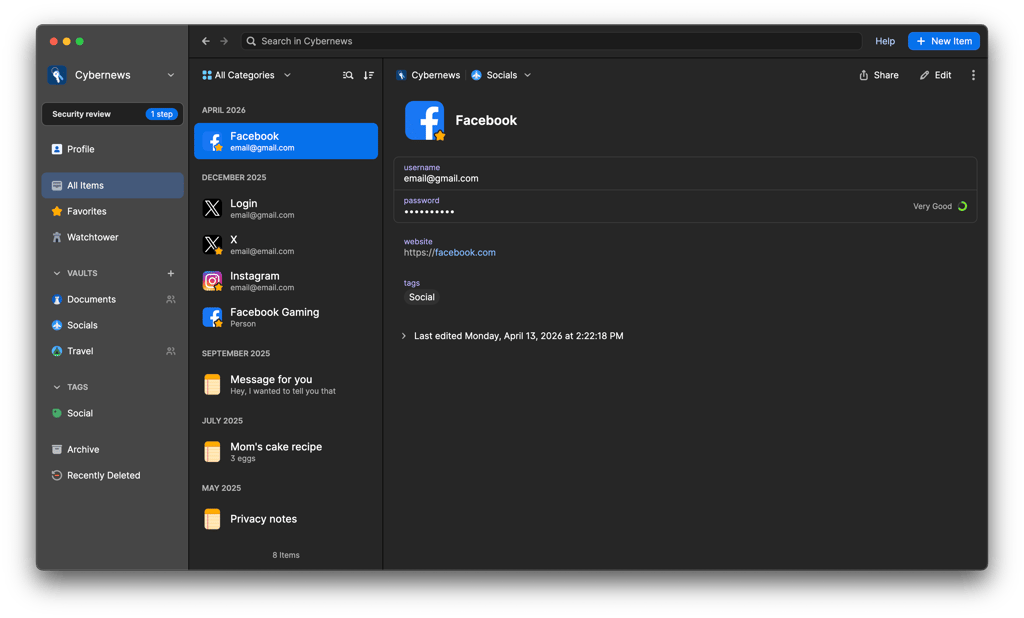
1Password provides a consistent experience across its Mac and Windows apps, with straightforward setup and similar navigation and core features. It also stands out by offering a dedicated graphical Linux app, giving Linux users a more complete desktop experience instead of relying solely on a browser extension.
The 1Password desktop apps include core tools such as Watchtower, multiple vaults, password generation, and secure item management. The desktop apps also integrate closely with 1Password's browser extension, making it easy to save, fill, and manage credentials while browsing. Some account-level settings are managed through 1Password.com rather than directly in the desktop app.
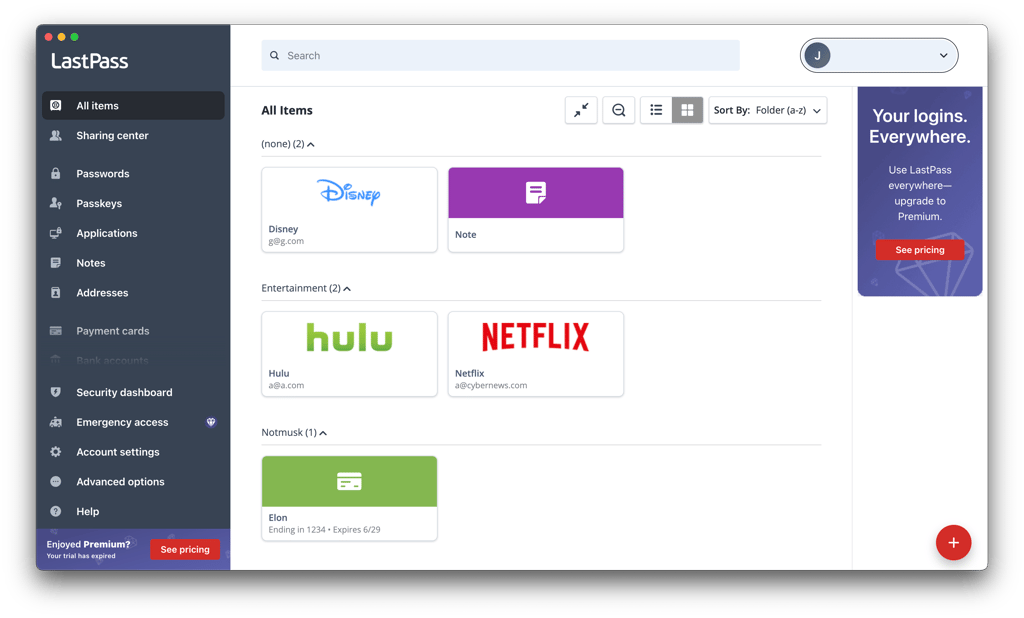
By contrast, the LastPass desktop app is nearly identical to the web client. When testing the applications, I realized that the web client is way more convenient to use than the desktop app, as it allows for better multi-factor authentication management and allows you to switch to different subscription plans easily.
Browser extensions
Both password managers offer browser extensions for various browsers, including Chrome, Safari, Edge, and Firefox. 1Password also offers an extension for Brave, while LastPass is available on Opera.
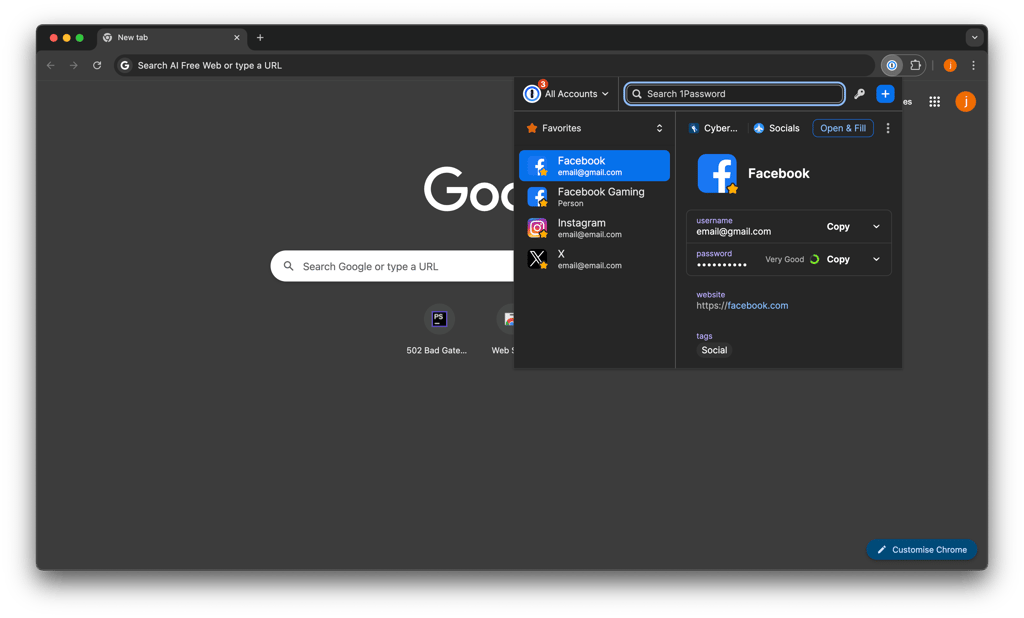
The 1Password browser extension is one of the better password manager extensions I've used. It handles the essentials well, letting you save and autofill passwords, generate strong credentials, fill payment cards and addresses, and manage one-time passwords without leaving your browser. I also liked how closely it integrates with the 1Password desktop app, making it easier to unlock and access your vault while browsing.
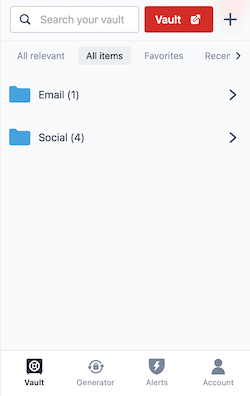
The LastPass browser extension is straightforward and covers the main tools I expect from a password manager. During my testing, I could save and autofill credentials and manage my vault without much friction. The interface isn't as polished as 1Password's, but I found it easy enough to navigate for everyday password management.
Mobile apps
In my testing, 1Password provided the better mobile experience overall. Its iOS and Android apps felt consistent and easy to navigate, while features such as autofill, passkey support, biometric unlocking, and Apple Watch integration make it particularly well integrated with modern mobile devices.
1Password has apps for both iOS and Android, with a largely consistent interface and core feature set across the two platforms. You can use 1Password to autofill passwords and passkeys in supported apps and websites, so you don't need to open the password manager every time you sign in.
Setup is straightforward on iOS – you can select 1Password as your password and passkey autofill provider from the system settings. Android offers similar autofill functionality, although exact behavior can vary depending on your Android version and browser. The current 1Password 8 app requires Android 12 or later.
One useful extra for Apple users is 1Password's Apple Watch support. You can add selected vault items to your watch and quickly access information such as passwords, one-time codes, credit card details, and secure notes without reaching for your phone. The items are transferred using an end-to-end encrypted connection and can only be viewed while your Apple Watch is unlocked.
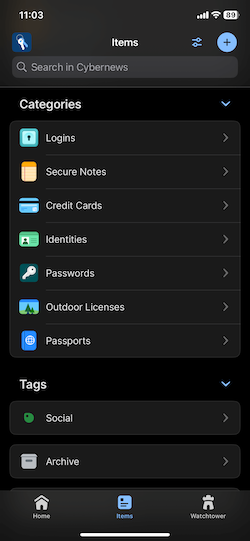
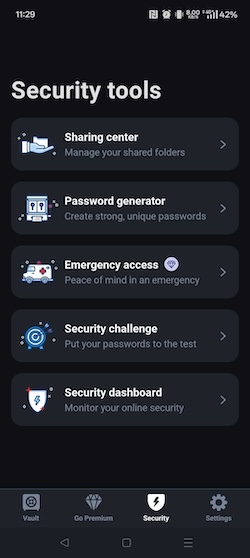
LastPass also offers mobile apps for Android and iOS, with autofill for passwords and other saved information across supported apps and browsers. During my testing, the apps covered the essentials well, and I could access my vault, generate passwords, and manage saved items without much friction. LastPass also supports biometric unlocking on compatible devices, letting you use your fingerprint or facial recognition instead of entering your master password every time. However, I found the overall mobile experience less polished and intuitive than 1Password.
Web client
During my testing, 1Password's web interface felt familiar after using the desktop app, with a similar layout and straightforward navigation. After creating my account, 1Password generated a unique Secret Key that works alongside my account password to protect my vault. When I returned using the same authorized browser, I only needed my account password to unlock it.
The web interface covers the main vault-management tasks, so I could easily access and manage my saved information without opening the desktop app. I also liked that 1Password supports QR-code sign-in for new devices, which makes setting up your account elsewhere much more convenient.
LastPass' web vault also gives you access to the core tools you need to manage your passwords and other saved information. Because it runs in a browser, it's a convenient option when you don't want to rely on a dedicated desktop app. During my testing, I found the interface straightforward and familiar, although I still preferred 1Password's more polished overall experience.
Customer support
Customer support is crucial for getting help when needed. Here's an overview of what 1Password and LastPass offer in terms of customer support:
| 1Password | LastPass | |
| Email support | ✅ Yes | ✅ Yes |
| 24/7 live chat | ❌ No, only a chatbot | ❌ No, only a chatbot |
| Phone support | ✅ Yes, for all business plan users | ✅ Yes, only Business and Business Max users |
| Support community (forum) | ✅ Yes | ✅ Yes |
| Knowledge base | ✅ Yes | ✅ Yes |
| Social media support | ✅ Yes | ❌ No |
1Password offers several ways to get help, including email support, an AI-assisted chatbot, the 1Password Support Community, and support through X. During my testing, I found its support resources straightforward to navigate, although there's no 24/7 human live chat. Business customers can also get additional support options depending on their plan and account.
LastPass also provides several support options, although what you get depends on your plan. Free users can turn to its self-service Support Center and LastPass Community for help, while paid plans include personal support from the LastPass customer care team. Business and Business Max customers may also get access to a dedicated customer success manager, depending on the account.
1Password vs LastPass: which one is better?
Overall, 1Password and LastPass are both good password managers, but they suit different needs. After comparing their security, features, pricing, and ease of use, I recommend 1Password for most users looking for a secure and easy-to-use password manager. LastPass is still a good option if you want a free plan or to store your whole household’s credentials for a lower price.
1Password stood out in my testing with stronger security, more polished apps, and advanced features. Its unique Secret Key adds another layer of protection, while Watchtower helps you spot weak or exposed passwords. Travel Mode can also help protect your sensitive data when you travel.
Meanwhile, LastPass is a good option for its free version and cheaper family plan. It also includes the core tools most users need, such as password storage, password generation, and autofill. Its free plan is limited to one device, but it can still work well if you need basic password management without a paid subscription.

Check out more guides from Cybernews
NordPass vs 1Password: Premium vs Premium
1Password vs Bitwarden: Premium vs Budget
1Password vs Dashlane: Premium vs Premium
NordPass vs LastPass: Premium vs Premium
1Password vs RoboForm: Premium vs Budget
FAQ
Is 1Password any better than LastPass?
Yes, 1Password is better than LastPass based on my hands-on testing. It stands out with its unique Secret Key, strong security track record, useful security features, and a more polished experience across apps and browser extensions.
Can 1Password import from LastPass?
Yes, you can import passwords from LastPass into 1Password. First, export your passwords from LastPass and then import the file into 1Password using its import tools. Check the imported credentials before deleting anything from your old vault and keep the exported file secure because it might contain readable passwords.
What data does not transfer from LastPass to 1Password?
Passkeys can’t be transferred from LastPass to 1Password, and some password history and shared items have limits. Other than that, most passwords and saved items can be moved. Review your new vault after importing and check that important credentials have been transferred.
Which is better for business: 1Password or LastPass?
1Password is the better choice for businesses that prioritize granular access controls, security, and a polished team experience. LastPass can be more affordable, with Teams starting at $4.25/user/month, and its higher tiers add features such as SSO, advanced MFA, and SaaS monitoring. The better option ultimately depends on your team size, budget, and required security features.
Should I switch from LastPass to 1Password?
1Password is worth switching to if you want a stronger security architecture and a more polished overall experience. Its unique Secret Key provides an additional layer of protection, while its security track record also gives it an advantage over LastPass. However, LastPass may still suit you better if its free tier or lower-cost plans are important to you.
Is LastPass safe to use after its security breaches?
LastPass has improved its security in recent years and offers important features like encryption and multifactor authentication, but its past breaches remain an important concern. Consider your personal risk level before using it.