Best VPS for Hermes Agent in 2026
Our in-house experts conduct independent, hands-on testing and transparent reviews of VPS hosting providers by using real server environments, and industry-recognized benchmarking methods to ensure impartial and evidence-based assessments
Using the same criteria for all VPS services, we share our detailed methodologies and testing practices to help customers compare performance, reliability, scalability, and overall value before choosing a virtual private server.
Learn more
Whether you’re a developer, a data engineer, or an indie AI startup founder looking for the best way to host Hermes Agent, you are in the right place. The Cybernews research team and I evaluated and ranked the 11 best VPS for Hermes Agent hosting that are easy to set up, provide reliable performance, and are cost-efficient.
11 best VPS for Hermes Agent hosting (in short)
- Bluehost – best overall Hermes Agent VPS hosting
- Contabo – best value Hermes Agent hosting for full server control
- Hostinger – best managed hosting for Hermes Agent
- DigitalOcean – Hermes Agent VPS for developers
- IONOS – cheapest VPS starting plan for Hermes Agent
- DreamHost – Hermes Agent VPS with quick setup
- Vultr – best VPS for local model scaling
- InterServer – best slice-based VPS
- Kamatera – Hermes Agent VPS with granular resource customization
- OVHCloud – best for enterprise-grade security
- Hetzner – most powerful hardware for Hermes Agent
Not sure which Hermes Agent VPS hosting provider to choose? Answer 3 quick questions, and we’ll help you find the best fit from our tested providers.


Find VPS hosting match
Three simple questions. We’ll point you the right pick. No email, no sign up.
What will you use your VPS for?
What matters most to you?
How experienced are you with VPS hosting?
Best VPS pick for your needs
Hostinger VPS
Get your VPS up and running quickly with an easy-to-use control panel, one-click apps, and beginner-friendly management. A strong fit for automation tools, AI apps, and users who want less manual setup.
Best VPS pick for your needs

Contabo
Get more server resources for your money, with flexible VPS configurations suited to demanding workloads. A good choice for game servers, larger projects, and experienced users who want more control.
Best VPS pick for your needs

Bluehost VPS
Run websites, web apps, and AI projects on a straightforward VPS setup without unnecessary complexity. It works well for users who are comfortable managing a VPS but still want a relatively simple hosting experience.
What is a Hermes Agent, and why do you need hosting for it?
Hermes Agent is a self-improving AI agent that can create and update its own skills based on previous executions. It evaluates what worked, extracts useful information, and refines its approach, meaning that it can improve the longer you use it. You can run it on your own computer, but using a VPS has a few practical advantages:
- 24/7 availability. A VPS keeps your Hermes Agent running even when your computer is turned off. This is useful for scheduled tasks, browser automation, and workflows that may take longer to finish.
- Better isolation. A VPS provides Hermes Agent with its own environment rather than running it directly on your computer. This limits the agent's access to your main system and can reduce the security and other potential risks.
- Dedicated resources. A VPS gives Hermes Agent its own allocated CPU, RAM, and storage. With enough resources, its workloads won’t have to compete with other apps and tasks running on your computer.
- Easy scaling. You can increase your VPS resources as your Hermes Agent workloads grow. This lets you handle more demanding tasks without having to replace or upgrade your computer.
Best hosting for Hermes Agent 2026 – detailed reviews
The Cybernews research team reviewed and evaluated a number of VPS and cloud hosting providers for Hermes Agent. The providers ranked below all offer significant advantages, ranging from easy and fast setup with templates or 1-click installations, good price-to-value ratio, easy resource scalability, and suitability for different users – from individuals to businesses.
1. Bluehost – overall best Hermes Agent hosting

| Rating: | |
| Setup time: | 20–25 minutes |
| Starting price: | From $4.69/month |
| Money-back guarantee: | Yes, 30-day days |
| Special deal: | Get Bluehost VPS with 55% OFF |
Bluehost is my top for Hermes Agent VPS hosting because it offers one-click Hermes Agent deployment on its self-managed VPS plans. The setup includes the Hermes Agent environment, persistent storage, SSL, Nginx, and automatic updates, while you still get full control over the VPS. Here are some other reasons why I chose Bluehost:
- One-click Hermes Agent deployment means you don’t have to install and configure Hermes Agent manually. Bluehost handles the initial setup, so it’s much easier to get started.
- Setup took me around 25 minutes due to a 15-minute resource provisioning time. Once the VPS was ready, the Hermes Agent setup itself was quick and straightforward.
- Docker-ready VPS plans make Bluehost a practical option for running containerized AI workloads. Depending on the plan, you can also have resources available for running additional applications alongside the agent.
- Persistent runtime keeps scheduled tasks, browser automation, and longer workflows. In our stress tests, the agent stayed running without shutting down, while persistent memory and reusable skills help maintain continuity between tasks.
- Full root access gives you the flexibility to configure model providers, APIs, custom skills, and sandbox backends however you need.
- Fixed monthly price ensures you don’t go over budget. Plus, Bluehost Hermes Agent plans are relatively affordable and offer good resources – the recommended NVMe 4 plan with 2 vCPU cores, 4GB RAM, and 100GB of storage costs $9.49/month, while the entry plan starts at only $4.69/month.
2. Contabo – best value Hermes Agent hosting for full server control
| Rating: | |
| Setup time: | 10–25 minutes |
| Starting price: | From $5.28/month |
| Money-back guarantee: | Yes, 14 days |
| Special deal: | Get Contabo for just $5.28/month! |
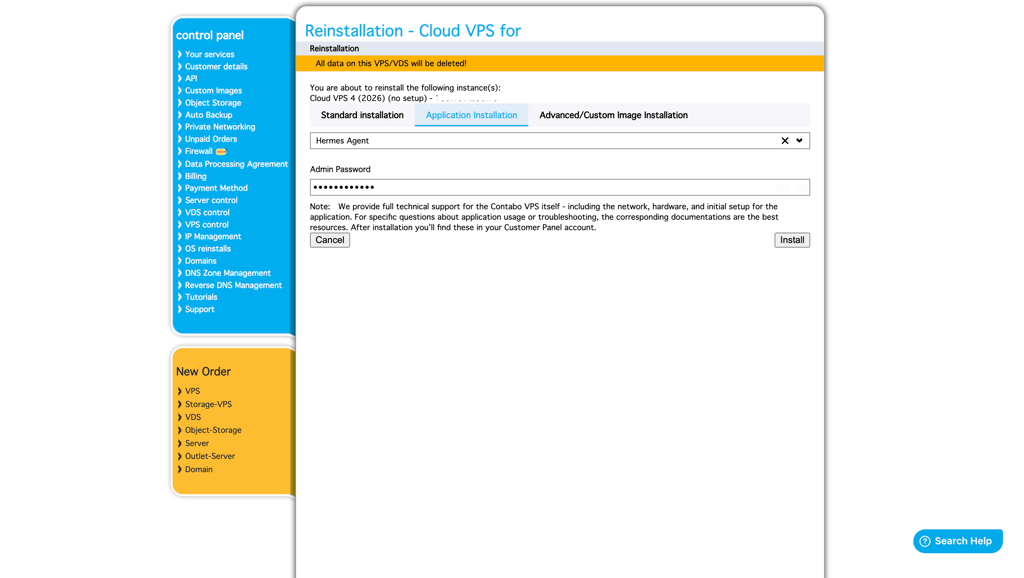
Contabo offers a genuine middle ground on this list: a 1-click Hermes Agent installer built right into the Customer Control Panel, paired with some of the most generous specs per dollar among providers here. Here are some other reasons why I chose Contabo:
- 1-click Hermes Agent deployment via the Control Panel's Application Installation menu: pick the app, set a password, and the server reinstalls with Hermes Agent ready to configure over SSH.
- Strong specs for the price: Contabo's entry-level Hermes-suitable VPS plan offers around 8GB of RAM and NVMe storage for $5.28/month, comfortably covering small-to-medium Hermes deployments (including local 8B-parameter model hosting, which typically requires 16GB+ on larger tiers).
- Full root access, so once the agent is installed, you can configure the messaging gateway (Telegram, Discord, Slack, and others), Dockerize it, or run it as a systemd service exactly how you want.
- DDoS protection is included on all plans at no extra cost.
- Easy scaling lets you move to a larger VPS as your workloads grow, so you can add more CPU and RAM without switching providers.
3. Hostinger – best managed Hermes Agent hosting

| Rating: | |
| Setup time: | 10–25 minutes |
| Starting price: | From $5.84/month |
| Money-back guarantee: | Yes, 30 days |
| Special deal: | Get up to 73% OFF Hostinger VPS |
Hostinger is a user-friendly VPS and cloud hosting provider for Hermes Agent. It's on my list mainly because of the Hermes Agent template in Docker, which makes the setup extremely fast and easy. But that’s not all. Here are some other reasons why I chose Hostinger:
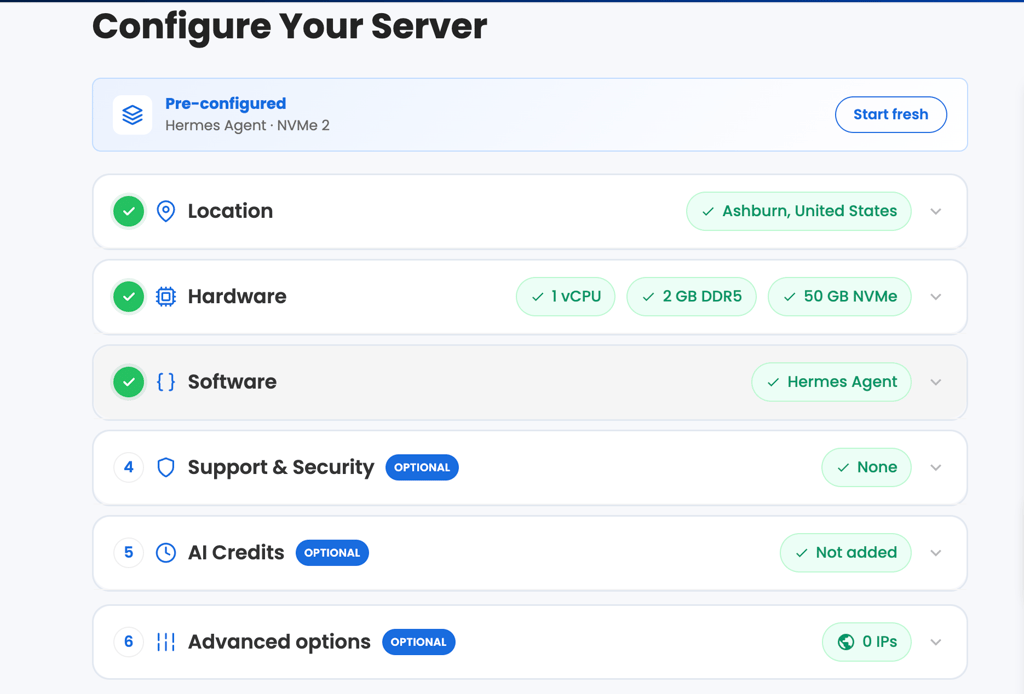
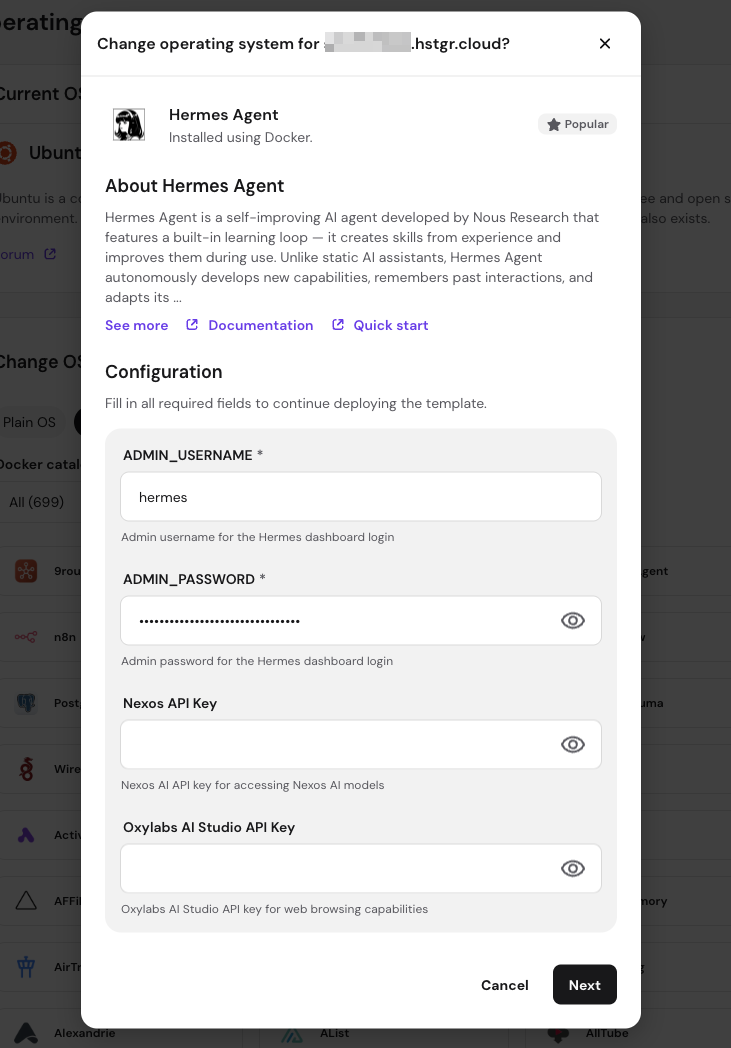
- 1-click Hermes Agent deploy with a preconfigured setup, a browser-based admin panel, security features, and nexos.ai credits. You can also add 1,000 free Oxylabs credits for web browsing if you choose that option.
- Hermes Agent installation through the Hostinger VPS Application Catalog uses Docker, so you don't have to handle the initial container setup yourself. Hostinger provides the Docker environment, while you still have control over your VPS.
- Full root access and multiple Linux OS templates give you more control over your VPS setup. You can also choose a Docker-enabled Ubuntu template if you want to manage containers yourself.
- AMD EPYC processors and NVMe SSD storage for fast and reliable processing time. Hostinger's current plans offer up to 8 vCPU cores, 32GB RAM, and 400GB NVMe storage.
- Docker manager environment for easy application and agent management, with easily accessible container logs.
4. DigitalOcean – best for developers
| Rating: | |
| Setup time: | 15–20 minutes |
| Starting price: | From $6.00/month |
| Money-back guarantee: | No |
| Special deal: | Available now for only $4.00! |
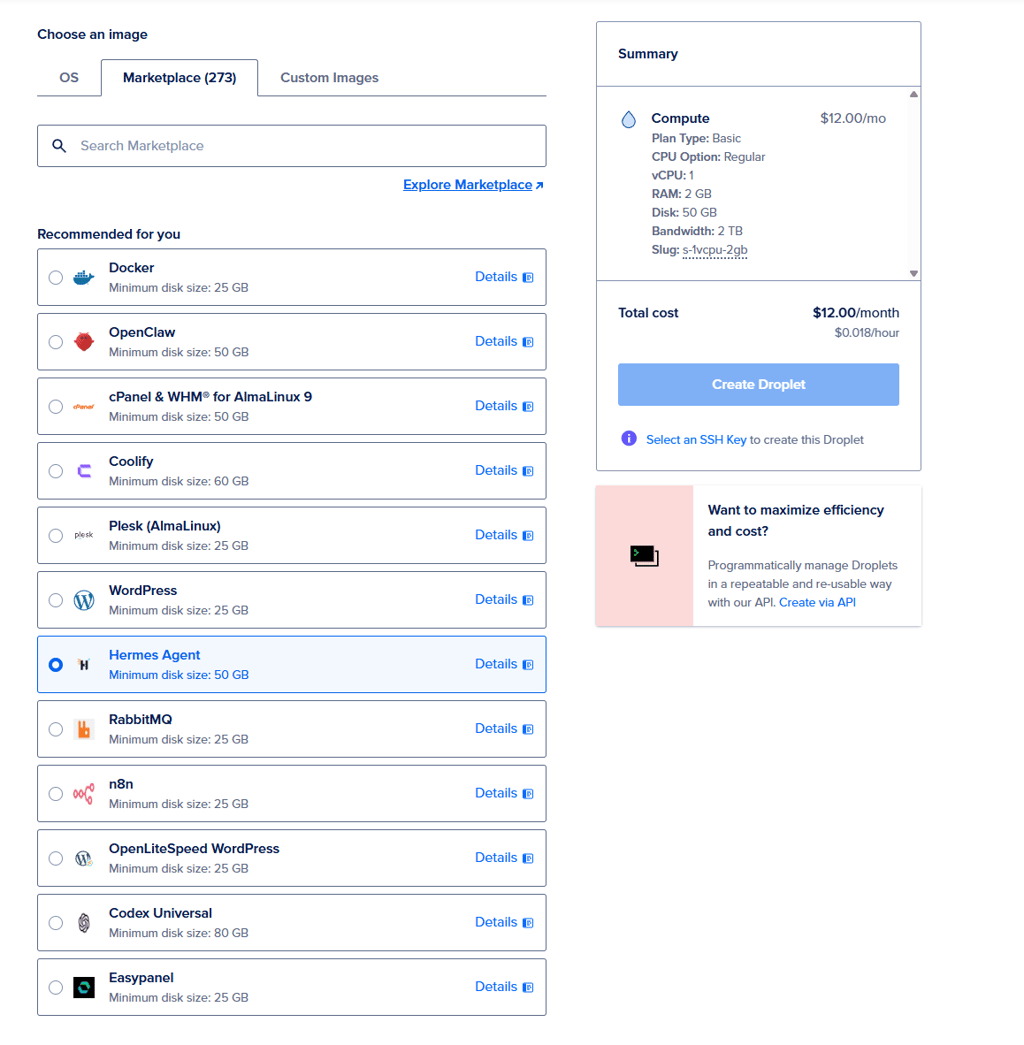
DigitalOcean is a customizable VPS provider with easy Hermes Agent setup options. You can deploy Hermes Agent with one click via the Marketplace, then finish the setup through SSH and the CLI. The setup should be finished via CLI by you, so some CLI and SSH knowledge is required. Here are more reasons why I liked DigitalOcean for Hermes Agent:
- Whole Hermes Agent setup takes around 20 minutes. This includes configuring the Droplet, installing the agent, and finishing up the setup.
- DigitalOcean offers easily customizable VPS instances – you can set them up with the exact resources you need. However, the Hermes Agent requires plans with at least 50GB of storage, which automatically also increases RAM and bandwidth. This may lead to higher expenses than expected.
- Easy Hermes Agent installation options via the Marketplace 1-Click. After deployment, you connect through SSH and complete the Hermes setup wizard.
- Requires know-how with the CLI, so it's a good solution for developers and experienced users.
5. IONOS – lowest starting plan

| Rating: | |
| Setup time: | 15–20 minutes |
| Starting price: | From $2.00/month |
| Money-back guarantee: | Yes, 30 days |
| Special deal: | Get up to 94% OFF IONOS |
IONOS is a budget-friendly VPS provider with a very low introductory price for Hermes Agent: $2.00/month for 1 CPU, 2GB RAM, and 60GB NVMe storage. I like that you can select Hermes Agent during the VPS setup, which automatically configures Docker and the agent's admin panel for you. Here are some other reasons why I chose IONOS:
- Hermes Agent is available during VPS setup. You can select it when ordering your server without having to install it manually. IONOS handles the initial Docker and admin panel configuration for you.
- Setup took me around 15–20 minutes, including the VPS provisioning and Hermes Agent configuration.
- Very low introductory price makes it easy to get started. Plans start from $2.00/month and include enough resources for a basic Hermes Agent setup: 1 CPU, 2GB RAM, and 60GB NVMe.
- Unlimited traffic and a 1Gbps connection give you plenty of bandwidth for Hermes Agent workloads.
6. DreamHost – best for quick Hermes Agent setup

| Rating: | |
| Setup time: | 10–15 minutes |
| Starting price: | From $5.99/month |
| Money-back guarantee: | Yes, 30 days |
| Special deal: | Get DreamHost, now 83% OFF |
What I like about DreamHost is how quick the setup is. Hermes Agent comes pre-installed on every VPS plan and is ready to use as soon as your server starts, with a web dashboard and automatic HTTPS already configured. Here are some other reasons why I chose DigitalOcean:
- Pre-installed Hermes Agent means that you can skip the manual installation process and start using it through the web dashboard.
- Fast setup with automatic HTTPS minimizes the configuration steps you would normally need to handle yourself. You’ll only need to connect your API key and complete the initial setup before using the agent.
- Unmetered bandwidth and full root access give you room to run Hermes Agent continuously while maintaining control over the server and its configuration.
- DDoS protection and 24/7 support add extra coverage if you run Hermes Agent as an always-on service.
7. Vultr – best for scaling local models

| Rating: | |
| Setup time: | 10–20 minutes |
| Starting price: | From $10.00/month |
| Money-back guarantee: | No |
Vultr is a great cloud hosting provider for seamless resource scaling options without any data loss, and its GPU hosting options are excellent for heavy processing. It is a heavy-duty provider and requires some security and API integration know-how. Therefore, I recommend it more for advanced users and businesses than beginners.
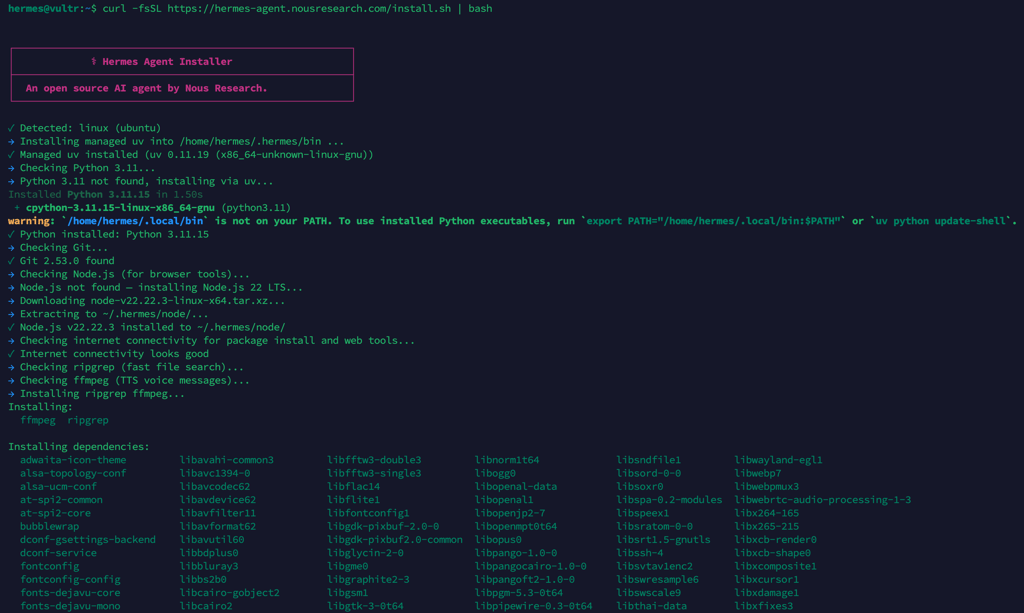
- It took me only 20 minutes to install Hermes Agent via CLI.
- 100% customizable with options to configure security, APIs, or local LLM hosting requirements exactly how you need to. I found the flexibility of Vultr to be unmatched by any provider on this list. However, it might be intimidating for beginner users.
- Optimized Cloud Compute plans offer dedicated resources and predictable monthly or hourly pricing. I recommend going with the 2 vCPU plan, since it includes 50GB storage, which is optimal for successful Hermes Agent hosting.
8. InterServer – best for predictable VPS scaling

| Rating: | |
| Setup time: | 15–20 minutes |
| Starting price: | From $3.00/month |
| Money-back guarantee: | Yes, 30 days |
| Special deal: | Get Interserver VPS for just $3.00/month |
While InterServer supports only manual Hermes Agent installation, its main advantage is its straightforward slice-based VPS scaling. Its VPS plans start at only $3.00/month for 1 slice, which includes 1 CPU core, 2GB RAM, and 40GB storage. Each additional slice adds more CPU, RAM, storage, and bandwidth, so you can increase your resources as your workloads grow. Here are some other reasons why I chose InterServer:
- It took me only 20 minutes to set up Hermes Agent. InterServer’s strength is its quick provisioning of server resources, which means I could start Hermes Agent installation and setup in no time.
- Full Hermes Agent hosting resources cost from $3.00/month. This is the cheapest VPS plan from InterServer that includes enough resources for small Hermes Agent deployments.
9. Kamatera – best for resource scaling

| Rating: | |
| Setup time: | 10–15 minutes |
| Starting price: | From $6.00/month |
| Money-back guarantee: | No |
| Special deal: | Get Kamatera now, starting at only $4.00/month |
Kamatera offers VPS and dedicated server hosting, known for its easy resource customization. Granular resource customization and provisioning make it a great provider for easy project scaling, such as adapting to local LLM requirements. The Hermes Agent installation and setup are done through CLI. Here are some other reasons why I chose Kamatera:
- Resource provisioning and setup in record time. Kamatera resource provisioning took only 2 minutes, and setting up Hermes Agent via the CLI took only 15 minutes.
- Granular resource customization makes it easy to adjust the VPS plans for your exact needs and scale any project without incurring unnecessary costs from unused resources.
- Offers flexible hourly and monthly billing, which goes well with resource customization – you only pay for what you use.
10. OVHcloud – best for enterprise-grade security

| Rating: | |
| Setup time: | 10–15 minutes |
| Starting price: | From $4.54/month |
| Money-back guarantee: | Yes, 14 days |
| Special deal: | Get OVHCloud for just $4.54/month! |
OVHcloud is the most secure provider you could choose for your Hermes Agent hosting. While the overall agent installation and setup is manual and done through CLI, the provider offers infrastructure-level security that you won’t have to worry about. Here’s why I would choose OVHcloud for Hermes Agent hosting:
- Hardware-level anti-DDoS protection. Hermes Agent requires an internet connection to work properly, which means that all web activity can leave your VPS vulnerable to attacks. OVHcloud ensures proper agent gateway protection to prevent malicious traffic spikes.
- The CLI setup takes only 15 minutes – you can start using Hermes Agent right away, with no resource provisioning delays.
11. Hetzner – best for powerful hardware
| Rating: | |
| Setup time: | 15–20 minutes |
| Starting price: | From $23.59/month |
| Money-back guarantee: | Yes, 14 days |
| Special deal: | Available now for only €1.60! |
Hetzner offers VPS plans with dedicated vCPU resources and the latest generation processors from AMD and Intel. This makes it an ideal choice for users looking for consistent and powerful performance. Here are some other reasons why I chose Hetzner:
- Instant VPS resource provision and an initial 15-minute-long Hermes Agent setup mean that you can start working immediately.
- Hourly billing with a maximum monthly price cap. This means that your expenses will never exceed the maximum price, and if you delete your server, you will only be billed the hourly price. This removes some pricing uncertainty that comes with hourly pricing models.
- Dedicated vCPU resources and the latest generation processors ensure consistent and reliable performance for overnight or otherwise continued Hermes Agent runtime.



Our in-house VPS research team and expert writers work together to regularly test VPS hosting services across different use cases and provide accurate, up-to-date insights. Learn more about how we test and evaluate virtual private servers.
What kind of resources does a Hermes Agent need?
The resources and system requirements needed for a Hermes Agent depend on the size of your deployment. What I mean by size is more or less related to what kind of and how many tasks you want the agent to execute. For this reason, I break down the requirements for small, medium, and large deployments below.
Small Hermes Agent deployments
Small deployments typically involve low usage and light computational demands. This includes using Hermes for testing, internal tools, proofs of concept, or serving a small number of users.
Recommended VPS specifications:
- 1 to 2 vCPUs
- 2 to 4GB RAM
- 20 to 50GB SSD storage
Small deployments are the most budget-friendly option, often costing $4.00–15.00/month depending on your provider. However, budget VPS tiers may have shared CPU resources, variable performance, slower storage, or less reliable network conditions. This is acceptable for non-production use, but you do need to keep in mind some occasional slowness.
Medium Hermes Agent deployments
Medium deployments are production-grade workloads with steady traffic, moderate concurrency, multiple integrations, and a real expectation of reliability and performance.
Recommended VPS specifications:
- 2 to 4 vCPUs
- 4 to 8GB RAM
- 60 to 160GB SSD storage
Medium deployments typically cost $20.00–60.00/month. However, for reliable production, you will also need to consider automated backups and snapshots, monitoring and alerting systems, dedicated CPU resources, and DDoS protection. I also recommend choosing faster NVMe storage if possible.
Large Hermes Agent deployments
Large deployments handle high concurrency, complex workflows, and business-critical operations. These often process significant amounts of data and run computationally intensive tasks.
Recommended VPS specifications:
- 4 to >8 vCPUs
- 8 to >32GB RAM
- >160GB NVMe storage
A single large VPS can cost anywhere between $100.00/month to >$300.00/month, but total infrastructure costs may extend beyond that. For example, you need to consider managed databases, CDN and DDoS protection, log aggregation and analysis tools, and load balancers.
Here, you also need to be careful about cheap VPS offerings. Usually, these can become more expensive in the long run due to the need for constant upgrades for reliable performance, operational and downtime costs, or the general need for updates due to poor reliability. I recommend investing in better infrastructure from the start to avoid increasing costs later on.
Deploying Hermes Agent on VPS vs cloud vs dedicated hosting
Generally, Hermes Agent is okay to deploy on both VPS, cloud instances, and dedicated servers. What is best for you or your business depends on your budget, pricing models you are comfortable with, and the levels of flexibility in server configuration you want to have.
Deploying Hermes Agent on a VPS comes with budget and customization advantages. Most VPS hosting providers offer fixed monthly pricing for a set of resources, which makes it easy to predict and plan your budget. This also means no additional costs incurred from running the agent 24/7.
Another advantage is root access, which means that you can pretty much configure your virtual server however you like. This is also the most recommended option on forums like Reddit.
A cloud instance for Hermes Agent deployment is useful if you prefer a pay-per-hour pricing model. However, this introduces some unpredictability, and the costs can quickly add up if you decide to run the agent continuously. On the other hand, cloud hosting is easier to scale than VPS – you can add and subtract resources as needed. Plus, if you opt for a managed solution, you won’t need to worry about setup and configurations.
Finally, deploying Hermes Agent on dedicated hosting combines the best of VPS and cloud hosting – a great amount of resources with full customization that comes with renting a whole physical server. However, this is a more costly solution than either of the two above. Dedicated hosting is expensive, so I recommend it as the best option for large businesses and enterprises.
Final thoughts
Choosing the right Hermes Agent hosting provider depends largely on your specific needs, such as technical expertise, budget, and project scale. Based on our testing, Bluehost offers the best balance of ease of setup and reliable performance at an affordable price.
Users requiring full root access and server and resource customization would benefit from Contabo or DigitalOcean. Regardless of the provider you choose, prioritizing a solution that offers sufficient resources and scalability will ensure your Hermes Agent operates efficiently and securely 24/7.
Here’s a final top Hermes agent VPS recommendation list based on the best use case and your unique needs:
- Beginner-friendly Hermes Agent VPS – Bluehost
- Best Hermes Agent VPS for value – Contabo
- Best managed VPS for Hermes Agent – Hostinger
Best Hermes Agent hosting FAQ
Can I host Hermes Agent on a VPS?
Yes, a VPS is one of the best places to host Hermes Agent because it offers a perfect balance of predictable fixed pricing, full root access for custom configurations, and resource isolation for improved security and stability.
Is it better to use dedicated hosting or shared hosting for Hermes Agent?
For Hermes Agent, VPS hosting is better than shared hosting because it gives you more control over the environment and allocated resources. Dedicated hosting can provide even more resources, but it may be unnecessary unless you’re running particularly demanding workloads.
Which hosting providers are best suited for running Hermes Agent reliably?
Bluehost, Contabo, and Hostinger are well-suited for running Hermes Agent, with VPS plans that provide the resources and control you need. The right option depends on your budget, workload, and resource requirements.
How much RAM does Hermes Agent need?
It depends on your deployment scale. Small setups generally require 2–4GB RAM, while medium production workloads need 4–8GB. Large, complex deployments often require 8GB to 32GB or more of RAM for optimal performance.
Can I self-host Hermes Agent?
Yes, you can self-host Hermes Agent on local hardware. However, it is generally not recommended for long-term use due to resource limitations and security risks.
Does Hermes Agent work on shared hosting?
No, shared hosting is not suitable for Hermes Agent. The agent requires consistent computational resources and specific system configurations, such as root access, which shared hosting environments lack. Hosting Hermes Agent on shared hosting can lead to very slow performance and stability issues.
Is cloud hosting better than VPS hosting for Hermes Agent?
It depends on your goals. Cloud hosting is good if you need pay-per-hour flexibility and instant scalability. However, VPS is generally the better choice for Hermes Agent because of its predictable monthly pricing and better environment customization options.
What operating system is best for Hermes Agent hosting?
Linux distributions, such as Ubuntu or Debian, are the standard choice for hosting Hermes Agent. They provide the stability, robust security features, and extensive package support needed to run complex AI environments on virtual servers.