McAfee antivirus review 2026
Backed by leading cybersecurity experts and investigative journalists, we deliver independent, real-world antivirus testing and analysis, guaranteeing objective evaluations without undue influence or bias from outside parties.
Our transparent and consistent methodologies ensure objective, up-to-date reviews, empowering readers to make well-informed decisions.
Learn more

McAfee is one of the longest‑running online security brands and is still a major player in the antivirus market today. Its current plans aim to be an all‑in‑one protection suite, combining malware defense with extras like identity monitoring, a VPN, and a password manager.
In this McAfee review, I draw on hands‑on testing to show you what it actually does well, where it falls short, and whether it’s worth your money. Read on to see if McAfee is the right fit for how you use your devices.
McAfee is best for people who want a simple, set‑and‑forget security bundle: non‑technical users, families with multiple devices, and anyone who values extras like identity protection and a built‑in VPN more than having the very fastest or cheapest antivirus. It’s less ideal for strict budget shoppers and power users who prefer to mix and match best‑in‑class tools for each task.
| ⭐ Rating: | |
| 🥇 Overall rank: | #10 out of #30 |
| 💵 Price: | From $49.99/year |
| ✂️ Free version: | Yes (Android, iOS) |
| 🖥️ Platforms: | Windows, Mac, Android, iOS |
| 🔥 Coupons: | McAfee Antivirus coupon 67% OFF |
McAfee antivirus pros and cons




Our team of researchers thoroughly tests antivirus software following a well-established testing process. In unison, our experts combine in-house and independent testing lab findings with first-hand experience to help you make informed decisions about each product. Learn how we test antivirus software.

McAfee antivirus features
McAfee offers a well-rounded security suite that provides robust protection against malware, ransomware, and cryptojacking. In addition to the antivirus protection, McAfee includes some helpful extras. I really liked its File Shredder feature, which permanently deletes sensitive files, preventing unauthorized access. McAfee also includes a firewall to monitor your incoming and outgoing traffic, and McAfee WebAdvisor for increased protection against malware and phishing attacks while you browse.
Beyond antivirus protection, the provider offers a handy VPN that secures your connection when using public Wi-Fi networks, a password manager, and identity monitoring with $1M to $2M coverage in the event of identity theft.
| Feature | What it does |
|---|---|
| Firewall | Monitors and controls incoming and outgoing network traffic to block unauthorized access |
| File Shredder | Permanently deletes sensitive files, ensuring they cannot be recovered or accessed by unauthorized users |
| McAfee WebAdvisor | Protects against malware and phishing attacks while browsing |
| Password manager | Securely stores and manages your passwords |
| VPN | Secures your online activities and keeps you anonymous while browsing |
| Identity Monitoring | Protects identity with monitoring, data cleanup, and theft coverage up to $2M |
McAfee packs enough features – like strong lab-tested malware protection, a solid VPN, and a password manager – to cover everyday browsing needs for most home users. It's a sufficient all-in-one solution for basic security without needing extras. For more advanced tools without recent feature cuts (like patch detection or PC optimization), Norton 360 stands out as a richer alternative.
McAfee antivirus plans and pricing
McAfee antivirus offers a wide range of plans. You can choose from 4 individual plans and 3 family plans.
| Essential (individual) | Premium (individual) | Advanced (individual) | Ultimate (individual) | Premium (family) | |
| Starting price | $39.99/year | $44.99/year | $89.99/year | $199.99/year | $49.99year |
| Price after 1st year | $119.99/year | $149.99/year | $199.99/year | $279.99/year | $169.99/year |
| Device coverage | 5 | Unlimited | Unlimited | Unlimited | Unlimited |
| Platforms | Windows PC, Android, and iOS | Windows PC, Android, and iOS | Windows PC, Android, and iOS | Windows PC, Android, and iOS | Windows PC, Android, and iOS |
| Notable features | Scam detector, identity monitoring, password manager, and tracker remover | Social privacy manager, personal data cleanup, and unlimited devices | $1M identity theft coverage, lost wallet support, 1 bureau credit monitoring, and identity monitoring | $2M identity theft coverage, credit monitoring, $25K ransomware coverage, and daily credit score reports | Family member protection, scam detector, parental controls, and social privacy manager |
| Best for | Basic protection against malware | Protecting unlimited devices and safeguarding your personal information | Protection against identity theft and overall enhanced privacy | Most comprehensive data and identity protection | Protecting family members’ online privacy and personal information on computers and phones |
McAfee’s pricing starts at $39.99/year for its most basic plan and $69.99/year for its cheapest family plan. These are introductory prices, but renewal rates are much higher.
If you need an antivirus to protect a single user, I recommend the Essential plan ($39.99/year). It includes general antivirus protection, a scam detector, a VPN, a password manager, and supports 5 devices. If you want additional security features, opt for the Premium plan for individuals ($49.99/year) instead. It offers everything the Essential plan does, plus extra privacy features, including personal data and online account cleanups, and supports unlimited devices.
For families, I recommend the Family Premium plan ($69.99/year), which offers antivirus and additional privacy and security features for unlimited devices at a reasonable price. It covers 2 accounts for adults and 4 for children and, in addition to antivirus protection, includes identity monitoring, a password manager, a VPN, parent controls, and other useful privacy features.
Compared to other popular providers, McAfee is on the expensive side. To compare, Norton 360 starts at $29.99/month, TotalAV at $19.00/month, and Bitdefender at just $12.99/month. While McAfee includes features like identity monitoring and personal data cleanup, other providers offer similar security at a lower cost, sometimes even for free.
Does McAfee antivirus have a free plan?
No, McAfee does not offer a permanent free antivirus plan. However, it provides a 30-day free trial of its full Total Protection suite (covering Windows, Mac, Android, and iOS), plus limited free tools like a malware scanner and web advisor. Mobile apps for Android and iOS have basic free versions indefinitely, though they're lighter on features. Still, full real-time protection requires a paid subscription after that.
There’s also a 30-day money-back guarantee, which makes it easy to try before committing. Since renewal prices are significantly higher, it’s important to test the service, check the long-term costs, and compare alternatives before deciding.
After reviewing all the plans, I can say that McAfee’s Individual Premium plan offers the best value. It includes comprehensive security and privacy features and supports an unlimited number of devices at a reasonable price.
Installation and setup
Various antivirus providers have different installation processes. Although installing and setting up McAfee is a smooth process, I have prepared a short instruction to guide you through every step of the way.
McAfee Total Protection is available on Windows, macOS, Android, iOS, and Chrome OS, protecting a variety of devices you may have. I installed it on my Windows 11 test machine, and while the process took around 3 minutes – a bit longer than I expected – it was smooth and required minimal input from me.
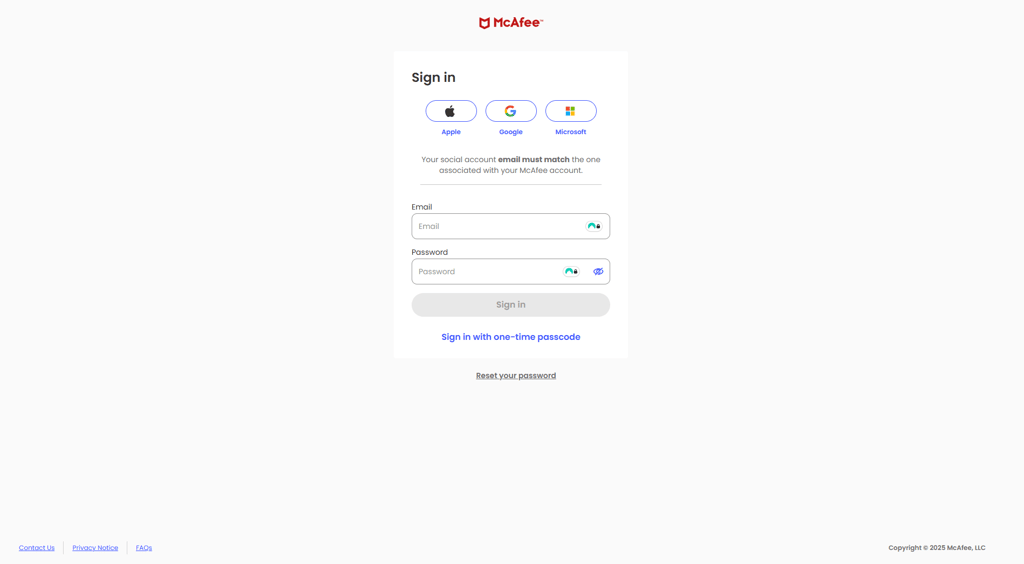
First, I downloaded a McAfee security app. Next, I had to sign in to my McAfee account. There are several ways to do this: you can use your Apple, Gmail, or Microsoft account.
Once I launched the app, I immediately noticed how clean and well-organized the dashboard looked. Right away, I could see my device status, confirming that the antivirus and the Advanced Firewall were active. Below that, McAfee offers shortcut tiles for essential security features, including Secure VPN, Antivirus, Tracker Remover, and Web Protection.

I appreciated how visually intuitive everything was – each feature had an on/off status, making it easy to see which was running and which needed attention. Adjusting settings or launching scans was simple, thanks to the shortcut tiles that kept everything within reach. The left sidebar houses more security settings, but I didn’t need to dig too deep to access the important stuff.

Compared to Norton 360, I found McAfee’s design more modern and less cluttered, which I liked. However, Avast still offers a slightly faster workflow, with fewer clicks needed to perform specific actions. On the other hand, TotalAV remains the most straightforward and beginner-friendly antivirus in terms of layout.
Overall, McAfee Total Protection made a solid first impression. The installation was slightly slower than some competitors, but once set up, the interface felt intuitive and easy to navigate. I liked how everything I needed was accessible at a glance, and I didn’t have to spend time searching for key security tools. If you're looking for a simple, visually clear antivirus experience, McAfee does a great job balancing security and usability.
McAfee mobile apps
McAfee’s mobile apps for Android and iOS provide really quick, simple virus protection for your phone. There’s a free McAfee antivirus version for both Android and iPhone devices.

McAfee’s mobile app feels lightweight and easy to navigate, with a clean dashboard that puts essential security tools front and center. The Home screen displays key features like Secure VPN, Antivirus Scan, Safe Browsing, Wi-Fi Scan, and a Text Scam Detector, each in its own tile with clear on/off indicators and quick-action buttons. Some features, like Safe Browsing, require manual activation, while the VPN is turned off by default and needs extra steps to enable.
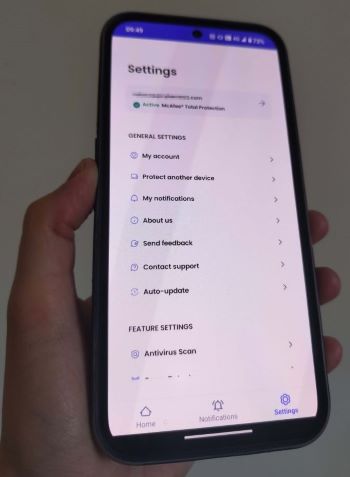
The Settings menu is just as simple, listing account details, notifications, auto-updates, and support options. I liked that my McAfee Total Protection subscription status was immediately visible, along with quick access to key security settings.
Security and performance
To give a detailed evaluation of McAfee’s performance, I compared insights from independent labs and our in-house test results. Below, I share a comprehensive summary of how McAfee balances security and system resource usage.
Antivirus lab test results
In recent evaluations by independent testing organizations, McAfee has demonstrated exceptional performance in both protection and system efficiency.
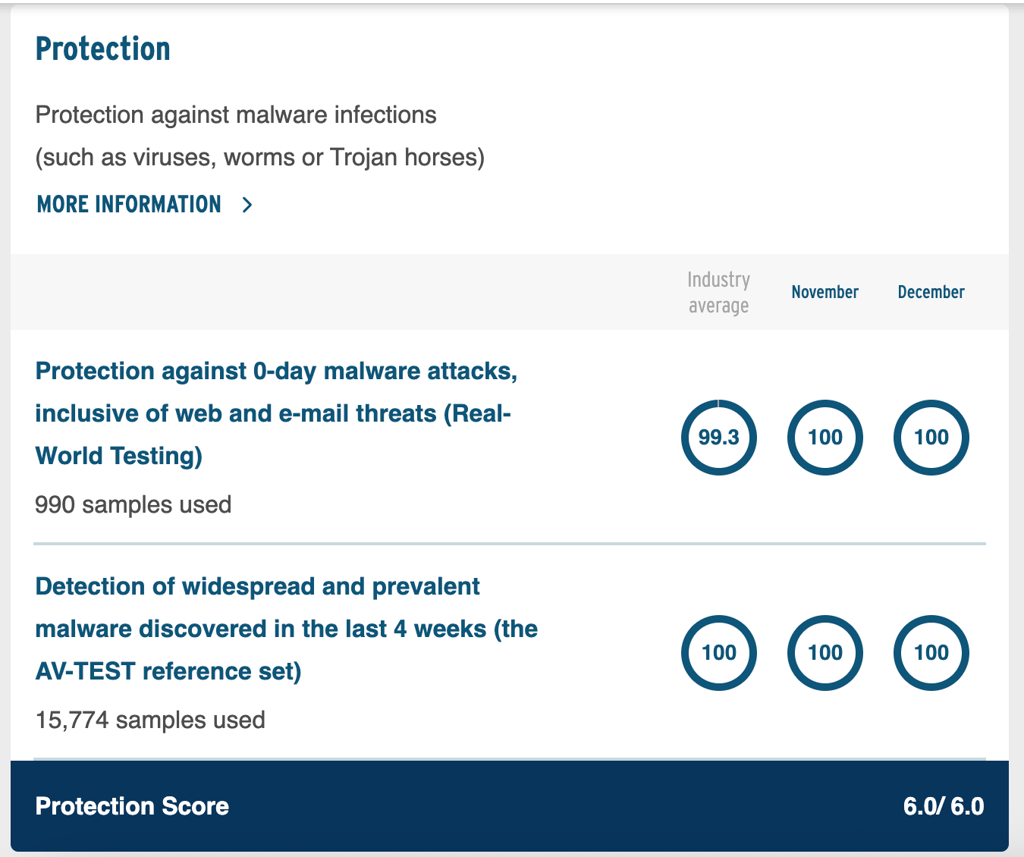
According to AV-TEST’s November-December 2025 assessment, McAfee achieved a perfect score across all categories: protection, performance, and usability. These results confirm McAfee’s ability to provide strong malware defense while maintaining smooth system performance and an excellent user experience.

Beyond AV-TEST’s recognition, AV-Comparatives also crowned McAfee as a leader in security and speed for 2024. The company also earned the highest possible rating, ADVANCED+, with a 99.5% protection rate, in the Real-World Protection Test in November 2025.
Impact on performance
McAfee provides three types of scans: Quick, Full, and Custom, which allows checking specific files and folders. The Quick Scan is supposed to take between 5 to 10 minutes, while the Full Scan can last around 30 minutes. To see how well McAfee holds up to these claims, we tested both scanning options on a Windows 11 virtual machine with a 3.99 GHz 4-core CPU and 20GB of RAM.

For the Quick Scan, McAfee focused on the areas most vulnerable to malware, scanning around 4000 files in 5 minutes and 19 seconds. It detected 82% of malware samples, which isn’t good enough for me. The best part is that CPU usage peaked at only 35%, so I barely noticed any slowdowns while running other tasks.
The Full Scan with real-time protection turned off was much more thorough, checking nearly 285,333 files in 1 hour, 4 minutes, and 3 seconds. McAfee caught 136 of 150 malware samples we planted, which is impressive, but CPU load occasionally spiked to 50-100%. At times, I could feel the system struggling to keep up.
One useful addition I found was the Secure Apps feature, which alerts me when any of my apps need security updates to reduce the risk of cyberattacks. While it’s a nice touch, McAfee’s scans can be time-consuming and sometimes resource-intensive. If speed is a priority, Norton completed a full scan in just 23 minutes and 6 seconds, with CPU usage ranging from 23% to 95%.

Overall, McAfee’s scans are solid but require some patience. I still recommend opting for a Full Scan to catch as many threats as possible – just don’t expect to multitask seamlessly while it runs.
In-house McAfee antivirus testing results
While independent lab results highlight McAfee’s strong performance, with the help of the Cybernews research team, I conducted hands-on tests to assess its real-world protection against malware, ransomware, and phishing attacks. All tests were performed on a MacBook Air M2 (8GB RAM, macOS Sonoma 14.6) and Windows 10 i7-7500U (16GB RAM) to ensure a balanced evaluation across different systems.

Malware detection test
To test McAfee’s ability to detect malware, we gathered 150 malware samples, including keyloggers, RATs, miners, and stealers, with varying file types and release dates. I ran a full system scan on both macOS and Windows, tracking how many threats McAfee successfully identified and removed.
As already mentioned, McAfee detected 136of 150 threats during in-house testing with real-time protection turned off, which is a solid result. However, when real-time protection was enabled, McAfee detected 0 out of 150 malware samples, which is disappointing. In recent September 2025 independent evaluations, AV-Comparatives recorded a 99.3% malware online detection rate, but awarded it the lowest – TESTED – score due to a high number of false alarms – 46.
Ransomware test
To assess McAfee’s ability to stop ransomware, we planted 10 ransomware samples, including screen-lockers, file-encrypting ransomware, spyware-based ransomware, and dropper variants. These files also varied in format (.dll, .exe, and .msi) and age, ranging from recent threats to those that have been active for over a year. After launching them, I ran a full scan to determine how effectively McAfee could neutralize them before any files were compromised.
McAfee delivered a 100% success rate, detecting and eliminating all ransomware samples before they could encrypt or damage any files. This confirms its strong built-in ransomware defenses.
Phishing test
To evaluate McAfee’s effectiveness against phishing attacks, we used 10 newly reported phishing links targeting financial fraud, credential theft, and malware distribution. These included different URL structures, such as domain-based, subdomain-based, and IP-address-hosted phishing pages. Using McAfee’s Safe Browsing feature, I attempted to access each link to see if the antivirus would prevent the connection.
McAfee blocked 80% of phishing attempts during our test. While this is a good result, it shows some room for improvement compared to its top-tier malware and ransomware protection.
Customer support
When choosing an antivirus tool for your devices, consider customer support as well. For this reason, I tested McAfee Antivirus’ customer support myself and shared my experience below.
| Type of support | Experience |
| 24/7 live chat | Overall positive experience, the agent was polite and responsive |
| AI Chatbot | Slow responses with a lot of redirections |
| 24/7 phone line | The agent was polite and helpful |
I found the process of reaching a live agent quite annoying. First, I was connected to a bot, which soon offered to connect me to the real agent. But before I was actually connected to the agent, I had to answer several screening questions and provide my email address. However, after I finally got through to the agent, the responses were fast, and the communication was polite.
The experience of chatting with McAfee Digital Assistant was underwhelming. It kept displaying options for categories I didn't want help with. However, after one such screening, followed by multiple others, I felt like it was going nowhere. In the end, I received a link to a guide that helped with my issue, but I felt I could have found it faster on my own.
McAfee also has a dedicated customer support page with plenty of helpful guides and answers to frequently asked questions, so you can resolve issues independently.
User reviews
McAfee gets mixed feedback across platforms. On Capterra, it holds a solid 4.2 average score from verified business users who value its reliability and feature set.
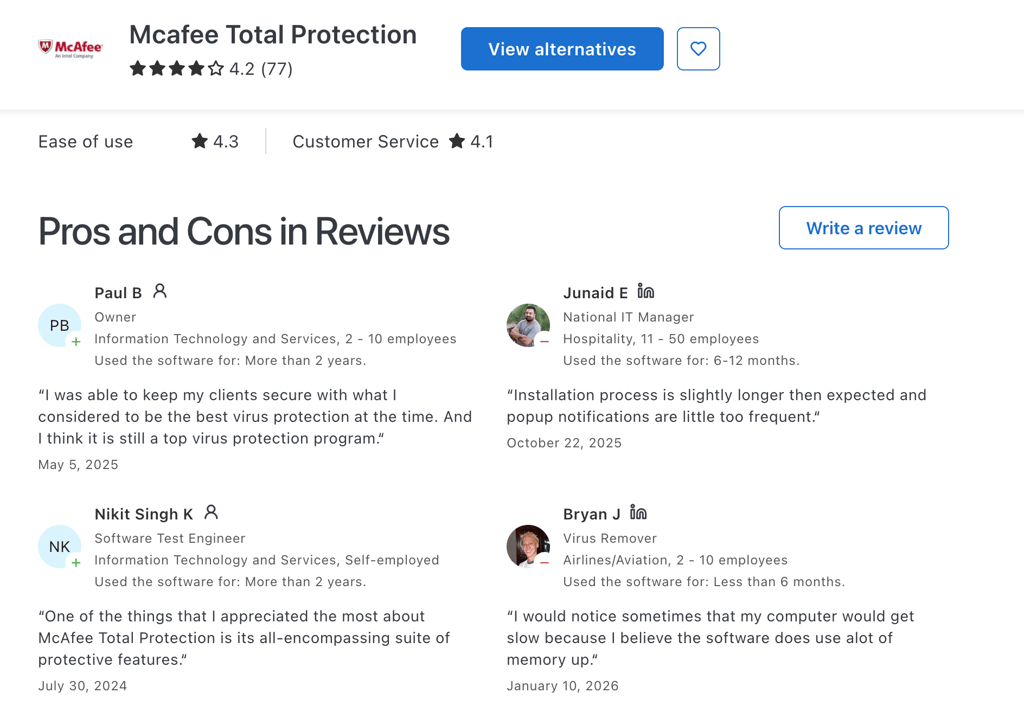
However, Trustpilot tells a different story with ratings around 1.5–2 stars from thousands of consumer reviews, driven by billing frustrations, difficult cancellations, and poor customer service. Reddit users often complain about intrusive pop‑ups, performance slowdowns during scans, and aggressive upsells, though some appreciate the malware protection and VPN extras.
Overall, McAfee performs well technically for many but loses points on user experience and support, creating a polarized reputation.
McAfee video review
Get a look from the inside – we tested McAfee and shared our insights in the video below:
Is McAfee worth it?
Overall, I was satisfied with McAfee’s performance, as it offers sufficient antivirus protection, backed by strong independent lab test results, and high malware detection rates. During in-house McAfee testing, it detected 90.67% of malware and successfully blocked all ransomware attempts. Key features include a VPN, a password manager, and identity protection.
However, McAfee's entry-level plans are more expensive than many competitors’, like TotalAV, and its real-time protection could be improved, as it detected 0 samples during our testing.
Overall, McAfee provides decent protection and offers useful extra features. While it may not be the most budget-friendly option, it’s worth considering for those seeking comprehensive security.
FAQ
Is McAfee a good antivirus program?
Yes, McAfee is a good antivirus and is worth the investment. It offers an extensive security suite that will keep your computer safe from malware and other online threats. Also, it works well on Windows, Android, macOS, and iOS, and the McAfee Ultimate plan supports an unlimited number of personal devices. McAfee’s security software is available as a web app, mobile app, and browser extension.
Is Norton Antivirus better than McAfee?
Although both offer excellent antivirus protection, Norton provides better speeds, security, pricing, and overall performance. It has more security features than McAfee and is more effective at protecting against malware and other online threats. For more information, read our McAfee vs Norton comparison.
Do I need to buy McAfee every year?
No, you don't need to buy McAfee antivirus every year, since the subscription auto-renews every 12 months. You can also opt for a 2-year plan. No matter which plan you select, your payment card is charged automatically upon renewal. Please note that renewal prices are higher than the first-time subscription prices for all plans.
Does McAfee actually stop viruses?
Yes, McAfee can stop viruses, as it has a high malware detection rate. Our in-house test revealed a 90.67% success rate, while during AV-TEST testing, the antivirus was 100% successful, and during AV-Comparatives independent testing, it blocked malware with a 99.3% success rate.
What are the disadvantages of McAfee?
The main disadvantages of McAfee are its slow full-scan speeds, limited macOS features, and lack of optimization tools. Slower scan speeds can lead to longer wait times, while the absence of built-in optimization tools might force users to resort to third-party tools to maintain system performance.
Why is my McAfee renewal so expensive?
McAfee renewal prices are often higher due to introductory discounts expiring, expanded security features, and standard industry pricing strategies. To reduce costs, consider multi-year plans, promotional offers, or switching to a different provider. Checking for discounts before renewal can also help lower the price.