Bitdefender SecurePass password manager review 2026

Bitdefender SecurePass offers great fundamentals – solid AES-256 encryption, a genuinely zero-knowledge architecture, and autofill that just works – without burying you under systems that you'll never use. What's more, if you're already using Bitdefender antivirus software, you likely already have access to the password manager since it comes with the premium plans.
But the app's simplicity is also where it shows its limits. There's no standalone desktop app (it runs as a browser extension instead), no family or shared plans if you need to cover more than one person, and no free tier beyond a 30-day trial. For anyone who wants a no-nonsense password manager and nothing more, that trade-off might be perfectly fine. For anyone who wants the fuller feature set, like dark web monitoring or dedicated apps, it's worth knowing upfront that SecurePass isn't built for that. Here's what I found after testing it hands-on.

Bitdefender SecurePass – at a glance
Bitdefender SecurePass doesn’t appear on many lists of the best password managers because it focuses mostly on the basics. While it offers strong encryption, reliable autofill, and an easy-to-use interface, it lacks more advanced features like dedicated dark web monitoring, family plans, dedicated desktop apps, and broader ecosystem integrations.
Because of that, it’s better suited for users who want a simple password manager rather than a feature-packed security tool.
| ⭐ Rating: | |
| 🥇 Overall rank: | #10 out of #20 |
| 💵 Price: | From $2.50/month |
| ✂️ Free version: | 30-day money-back guarantee |
| 🌐 Browser extensions: | Chrome, Edge, Firefox, Safari |
| 🔥 Coupons: | Bitdefender Password Manager coupon starting at $2.50/month! |
Bitdefender SecurePass pros and cons
My testing showed Bitdefender SecurePass to be a solid yet somewhat basic password management tool. Here is a list of pros and cons I found during testing:
Who I recommend Bitdefender SecurePass to
Bitdefender SecurePass is best suited for users who want a straightforward password manager without having to deal with too many advanced settings or features. Here’s who would benefit the most from it:
- Individuals looking for an easy way to store, generate, and autofill passwords across multiple devices while keeping their accounts protected with strong encryption.
- Existing Bitdefender users who want a password manager that integrates well with the provider’s broader security ecosystem.
Bitdefender SecurePass pricing
Bitdefender SecurePass currently offers only one plan with monthly or yearly payments. The Individual plan supports one user. There used to be shared plans, but they're not available at the moment.
| Bitdefender Individual | |
| Price | $2.50/month |
| Number of users | 1 |
| Password generator | ✅ Yes |
| Automatic saving | ✅ Yes |
| Intelligent autofill | ✅ Yes |
| Quality check | ✅ Yes |
| Duplicate monitoring | ✅ Yes |
| Multiplatform synchronization | ✅ Yes |
| Account recovery | ✅ Yes |
| Password leak alert | ✅ Yes |
| Identities management | ✅ Yes |
| Secure notes | ✅ Yes |
| Credit card management | ✅ Yes |
| Password export/import | ✅ Yes |
| Current deal | Get Bitdefender Password Manager, starting at $2.50/month! |
Bitdefender SecurePass Individual plan
The Individual plan offers everything you need in a basic password manager. It's an affordable package that lets you generate and store strong passwords for your online accounts. The quality checker analyzes your existing passwords for potential weaknesses. You can monitor for duplicates and sync your passwords across all browsers and mobile devices.
Bitdefender SecurePass will warn you of any password leaks to avoid identity theft and other criminal acts against you. You can also create and save separate identities for easier logins.
Unfortunately, Bitdefender SecurePass doesn't have accounts for multiple users, so if you need to secure your household, I recommend looking at other password managers for families.
Subscriptions and refund policy
Bitdefender SecurePass has monthly and yearly subscriptions for the Individual plan. It supports all major credit cards, PayPal, and wire transfers. If you opt for the annual plan, you'll get an email alert with a handy cancellation link 30 days before your subscription auto-renews. You can also cancel anytime through your Bitdefender Central hub or at [email protected]. As a new user, you'll get a 30-day money-back guarantee. Here's how to request a refund:
- Go to Bitdefender's Consumer Support Center and then Contact Bitdefender Support
- Find and click Purchase & Manage Subscription
- Select Refund
- Find and click Bitdefender SecurePass
- Choose the reason for the refund from a list of options
- Provide the required information and submit
Alternatively, you can email at [email protected]. While there's no free tier, you can activate a 30-day free trial after creating an account to try out the password risk-free.
Security overview
Password manager security is important, as it stores some of our most valuable data. Bitdefender SecurePass is safe to use because it follows industry-standard security measures, including zero-knowledge architecture and AES-256 encryption. Its main features are backed by a number of top-tier security measures, such as end-to-end encryption and a zero-knowledge approach. Let's see how these safety mechanisms help protect your passwords and other sensitive data.
Encryption
Bitdefender SecurePass uses end-to-end encryption to secure your data. The encryption key is generated locally on your device and never shared with the server. This means that no one can access your data, including Bitdefender. Like every other reputable password manager, Bitdefender SecurePass uses AES-256 encryption algorithm.
Here's how end-to-end encryption works with Bitdefender SecurePass:
- Local encryption. When you save a password, it gets scrambled with an encryption key that never leaves your device.
- Data transmission. The encrypted data is sent to Bitdefender for storage. Since it's already encrypted, the server will only get ciphertext (unreadable data).
- Data storage. Bitdefender will store your data on its server but can't ever decrypt it since only you have the key.
- Decryption. When you retrieve one of your saved passwords, the encrypted data is sent back to your device and decrypted using your key. The decryption process also requires your master password as an extra layer of security.
Simply put, it protects your data from prying eyes but also man-in-the-middle attacks. It can't be brute forced with current technology, so the only way to steal your data is by infecting your device with malware (most likely spyware).
Zero-knowledge principle
Usual end-to-end encryption scenarios include two-way communication where both sides can decrypt the scrambled data. Messaging apps like WhatsApp are a perfect example – both sides need access to decrypted content to hold a conversation.
However, in password managers, this setup is one-sided. The encryption key stays with you and is never transmitted to Bitdefender. Since there's no key exchange, Bitdefender couldn’t decrypt your data even if it wanted to.
These principles are the cornerstones of the zero-knowledge architecture implemented by Bitdefender. So, even if hackers breach their servers, they'll only get useless ciphertext. In other words, your security relies on impenetrable encryption rather than Bitdefender's policies and security practices.
Security features
Bitdefender SecurePass offers a wide range of security features to ensure your safety and privacy. Here's a brief overview:
| Feature | What does it do? |
| Password generator | Helps you create unique, complex, and secure passwords |
| Security Report | Monitors for breached, weak, old, and duplicate passwords |
| Lock account | Locks your Bitdefender SecurePass account and terminates all active sessions |
| Identities management | Stores multiple identities and autofills your details during online shopping |
| Credit card management | Stores and protects your credit card details for effortless online shopping |
| Secure notes | Provides a safe space for your sensitive data |
| Safe export/import | Allows you to keep the encryption when sharing data (depends on the import/export format) |
Below, I'll analyze the essential features and explain their purpose and benefits for you as an end user.
Password generator
This feature helps you create strong and unique passwords for each of your accounts. The customization options include password length, upper/lowercase letters, numbers, and special characters. After creating a password, you can copy it with a single click for easy pasting.
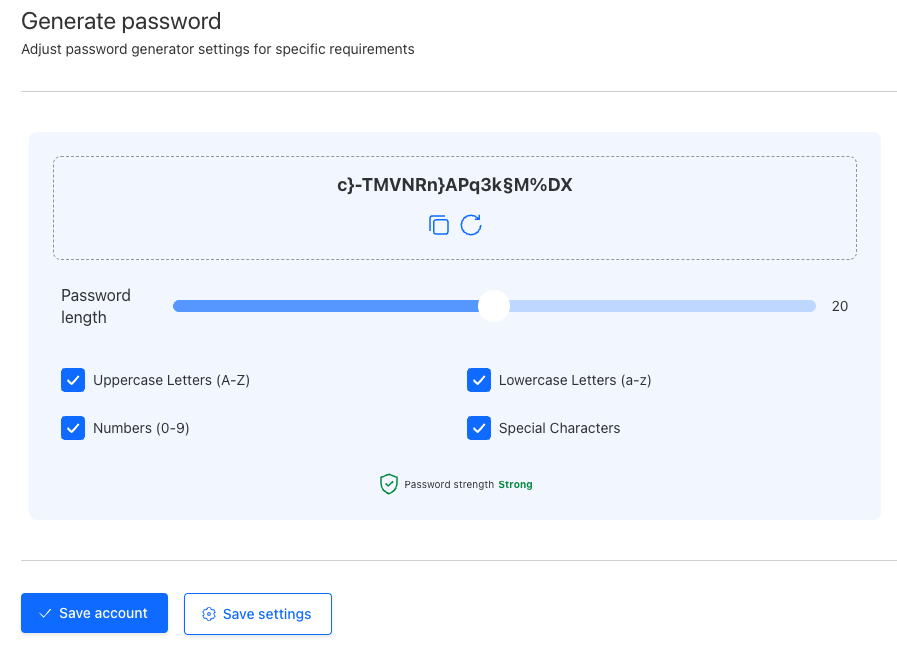
During my testing, the generator worked well and created truly convoluted and unguessable passwords. Overall, having access to a good password generator saves a lot of time and keeps your accounts safer from brute force attacks.
Security Report
Bitdefender's Security Report runs a security scan to identify breached, weak, old, and duplicate passwords. I suggest running a scan as soon as you install Bitdefender SecurePass and optimizing based on the results.
This feature is essential for maintaining your password health and account security. Weak, reused, or compromised passwords are significant security risks that leave your accounts vulnerable to unauthorized access and account takeover.
Lock account
This feature allows you to lock your account and end all current sessions with a single click. You'll have to re-enter your master password to get back in.
Lock account prevents unauthorized access to your vault, reduces the risk of breaches, and provides peace of mind. It's especially useful if you're working in crowded office spaces or like to take your work to a local café. Another use case would be using your password manager on someone else's device and forgetting to log out.
Apps and ease of use
I tested Bitdefender SecurePass across various devices, including a Windows 11 PC, a Mac with Sequoia, an iPhone running iOS 14, and a Samsung Galaxy on Android 12. The setup process is similar for related devices since we don't have desktop apps.
Below, I'll explain how to set up Bitdefender SecurePass on desktop and mobile devices.
Bitdefender SecurePass setup
Here's how I installed Bitdefender SecurePass on a Windows device using Chrome:
-
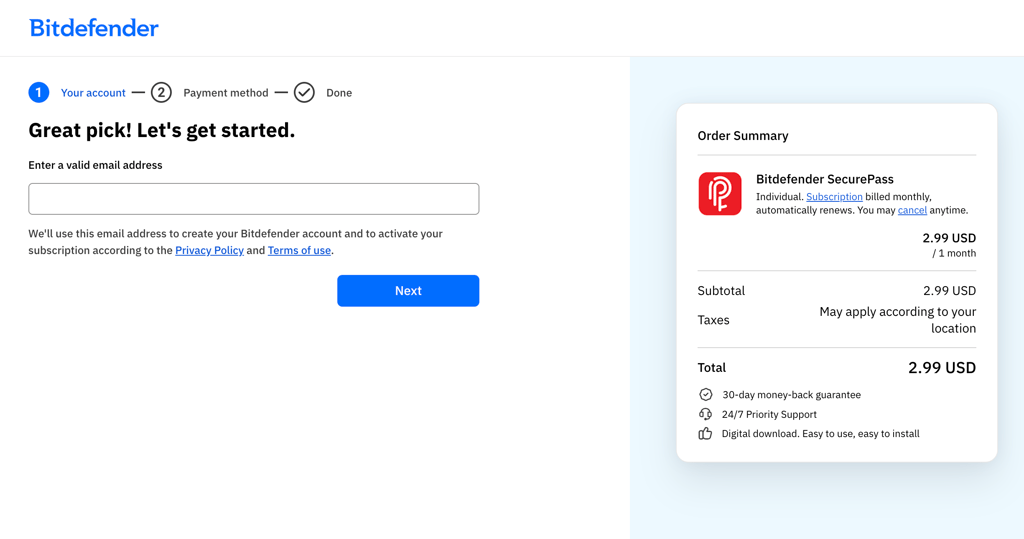
I signed up and bought a monthly subscription. If you go for the annual plan, you can save $10 for your first year
-
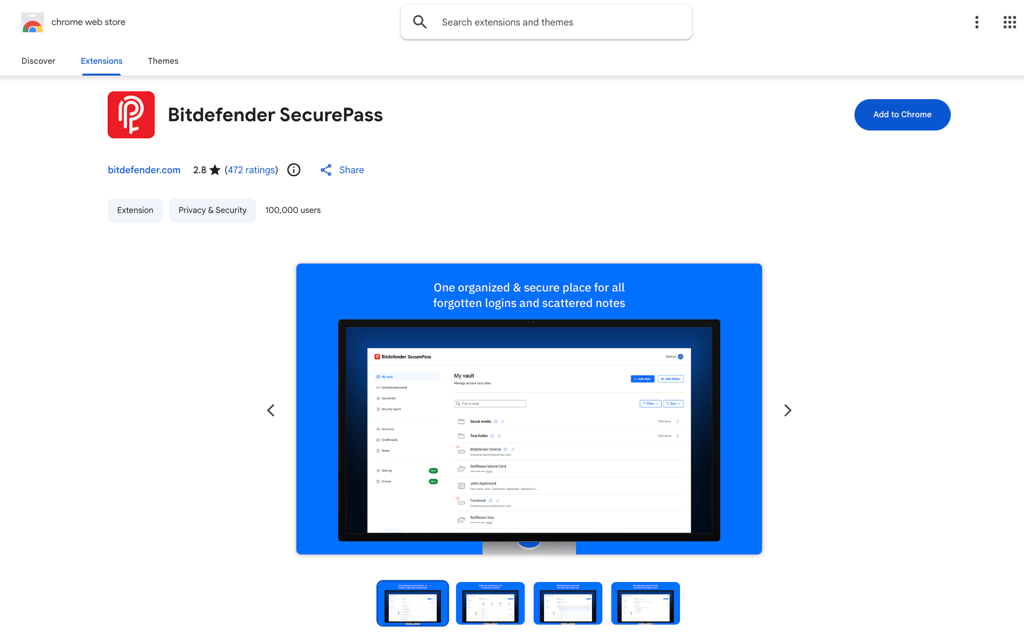
I located the Bitdefender SecurePass extension on the Chrome Web Store
-
I clicked Add to Chrome and then Add Extension to install it

-
After installation, I logged in when prompted

- Once I accessed the extension, I was prompted to create my master password and store my recovery key. After that, I could easily import passwords from my other managers or add new entries to my vault
If you want to get more information, read our article on how password managers work.
Installing Bitdefender SecurePass on mobile devices is as simple as downloading an app from their respective app stores. After installation, you'll be prompted to create your master password and save your recovery key.
Bitdefender SecurePass apps
| Browser extensions | Bitdefender SecurePass browser extensions are minimalistic, clean, and easy to navigate. They're ideal if you've never used a password manager before. |
| Mobile apps | After my testing, I realized that mobile apps mirror the functionality of the extensions, which is quite rare. Naturally, they're a bit more cluttered as well. |
In my experience, Bitdefender SecurePass mobile apps offer the same features as its browser extensions. The installation was simple, and I got step-by-step tutorial for the entire setup process.
With so many features, some clutter is inevitable, but I liked the overall design. Generating secure passwords was simple, and I had no trouble locating and using the rest of the features.

The browser extension mirrors the user-friendliness of the mobile apps. However, they look neater since there's more room to space things out.
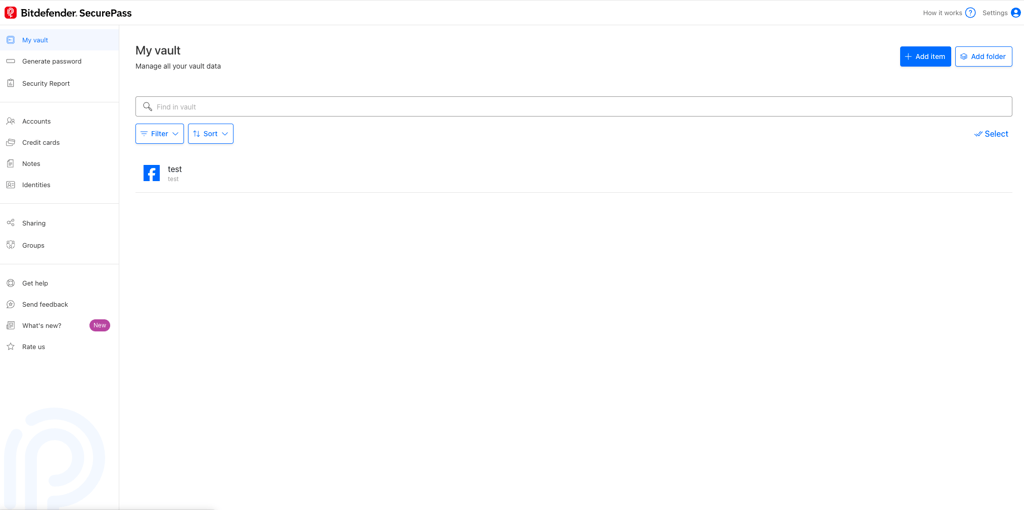
The menu on the left provides easy access to all the features, and I had no issues during my testing. Everything was easy to find and evaluate, which confirms that Bitdefender SecurePass is a solid password manager for iOS, Android, and other operating systems.
Customer support
| Option | Availability |
| 24/7 live chat | ✅ Yes |
| Email support | ✅ Yes |
| Knowledge base | ✅ Yes |
| Video tutorials | ✅ Yes |
| Phone support | ✅ Yes |
| User community | ✅ Yes |
Bitdefender offers 24/7 customer support to assist you with issues and respond to your questions. During my testing, the live chat team was very responsive and willing to help. They answered all my questions and provided information about some dead ends I had hit during my research.

Some of the answers were too ambiguous for me, but I understand that customer support agents have to follow certain rules about disclosure.
Apart from the live chat, you can call the support team by phone or send them an email. There's also an impressive knowledge base on the website featuring countless guides, FAQs, and video tutorials.
Final thoughts
To wrap up this Bitdefender SecurePass review, I can confidently say that it’s a reliable choice for basic password management needs. It provides strong security, easy-to-use apps, and seamless syncing across devices, making it a solid contender in the password manager market. However, it does fall short in offering some advanced features like deeper sharing capabilities and enhanced integrations.
If you’re seeking a more robust tool with premium features, I’d recommend NordPass as an alternative. NordPass excels in areas like biometric authentication, dark web monitoring, and a highly intuitive interface. While Bitdefender gets the job done for simple tasks, NordPass provides a more comprehensive solution for anyone serious about securing their digital life.
FAQ
Is it safe to use Bitdefender password manager?
Yes, Bitdefender password manager is completely safe to use. It employs numerous safety measures to guarantee the privacy of its users. Some of them include impenetrable end-to-end encryption and zero-knowledge architecture.
Does Bitdefender password manager generate passwords?
Yes, Bitdefender Password Manager can generate unique and strong passwords. Its password generator lets you customize the password length and usage of upper/lowercase letters, numbers, and special characters.
What is the difference between Bitdefender Wallet and password manager?
Bitdefender Wallet was a basic password management tool integrated into the Bitdefender Security Suites. It was never a standalone product and was discontinued on April 5, 2023. It was replaced by Bitdefender password manager, a standalone product with advanced password management features.
Can multiple people use Bitdefender password manager?
No, Bitdefender password manager only has an Individual plan that’s limited to one person and one device.