Best VPNs for business in 2026
Our in-house cybersecurity experts and journalists, renowned for major reports like The Mother of All Breaches, conduct transparent, unbiased VPN testing and in-depth analysis.
With 750+ articles crafted based on real-world research, we empower readers to make informed purchasing decisions through first-hand expertise.
Learn more

When I revisited the best VPNs for business in April 2025, NordLayer quickly stood out as my top pick. It’s designed to scale with your company, whether you're running a small startup or managing a large enterprise. Thanks to features like dedicated servers, site-to-site tunneling, and centralized access controls that make everything easier to manage, I found it especially handy for securing remote work setups. If you’re after a reliable, easy-to-use VPN that keeps your team and data protected without the usual hassle, NordLayer is a fantastic choice.
Cybersecurity risks are constantly growing, with businesses relying more than ever on digital tools and remote teams. Data breaches, leaks of sensitive client information, and network vulnerabilities can quickly turn into major financial and reputational damage.
That’s where enterprise VPNs come in. These tools create encrypted tunnels for online activity and shield internal systems. VPNs also give employees secure access to company resources, no matter where they work.
With over 5 years of hands-on experience testing VPNs for all types of use cases, our Cybernews research team compiled a list of the best VPNs for business in 2026. Each service meets our security, scalability, and ease of use standards.
Best enterprise VPNs – at a glance
- NordLayer – best overall VPN for business in 2026
- Proton VPN business – privacy-focused VPN for companies
- Check Point's SASE – corporate VPN with full cloud integration
- PureDome – dependable VPN built for remote collaboration
- Twingate – budget-friendly VPN for growing teams
Best VPNs for businesses – detailed list
Below, you’ll find our updated list of the 5 best business VPNs for both small teams and large enterprises. I carefully ranked each service based on privacy features, pricing, ease of use, and valuable extras.
1. NordLayer – best overall VPN in 2026 for business

| Business pricing: | From $6.00/user/month |
| Jurisdiction: | USA |
| Minimum users: | 5 |
| Current deal: | Now up to 22% OFF! |
NordLayer overview
NordLayer is our top pick for businesses in 2026. It offers flexible pricing, excellent speeds, and strong security built on NordLynx, NordVPN’s in-house protocol. It also supports IKEv2 and OpenVPN (UDP/TCP), all protected with AES-256 or ChaCha20 encryption. A built-in kill switch adds an extra layer of protection by cutting internet access if the VPN connection drops.
As highlighted in the NordLayer review, it includes business-ready tools like IP whitelisting, deep packet inspection, and user provisioning via SCIM. Features like activity monitoring, custom private gateways, and SSO access help simplify management and boost network control across distributed teams
Hands-on with NordLayer
NordLayer is clearly built with businesses in mind. One feature I found especially useful is the ability to set up virtual private gateways on dedicated servers. These come with fixed IP addresses, which makes remote team access feel more secure and reliable.
I also appreciated the built-in cloud firewall, allowing admins control over incoming and outgoing traffic. Paired with device posture checks, it ensures that only trusted and compliant devices can connect. In my experience, this adds a strong layer of confidence when managing a distributed team. Meanwhile, the ThreatBlock feature does a solid job of preventing access to malicious websites – it quietly works in the background without being intrusive.
For secure logins, NordLayer supports multi-factor authentication, including face and fingerprint recognition. You can also integrate single sign-on (SSO) using services like Google, Azure AD, Okta, OneLogin, or JumpCloud. This means your team can use their usual work credentials, making access easier to manage and reducing the need to remember multiple passwords.
The NordLayer app is simple to use and available across all major platforms – Windows, macOS, Linux, Android, and iOS. I tested the browser extensions for Chrome and Firefox, which let you choose which websites go through the VPN and which don’t. This is a helpful feature for those balancing security with speed. Plus, each user can connect up to 6 devices, which I found generous compared to other business VPNs.
It allows only verified IP addresses to access your network. This means outsiders can't connect unless their IP is approved, giving you tight control over who gets in.
DPI blocks specific ports and protocols, helping you filter out risky or unwanted traffic. It’s a practical way to prevent threats and ensure your team uses the network securely.
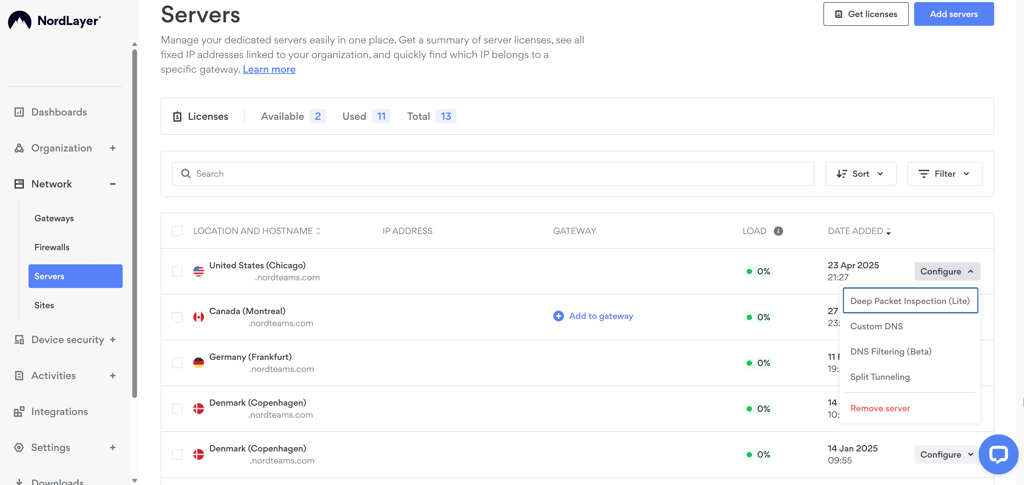
SCIM integration lets you automate how users are added or removed from the system. It’s a time-saver for IT teams and ensures employees get access quickly and securely.
You can track how users interact with your VPN across different gateways. This helps spot unusual behavior early and provides better visibility into how your network is used.
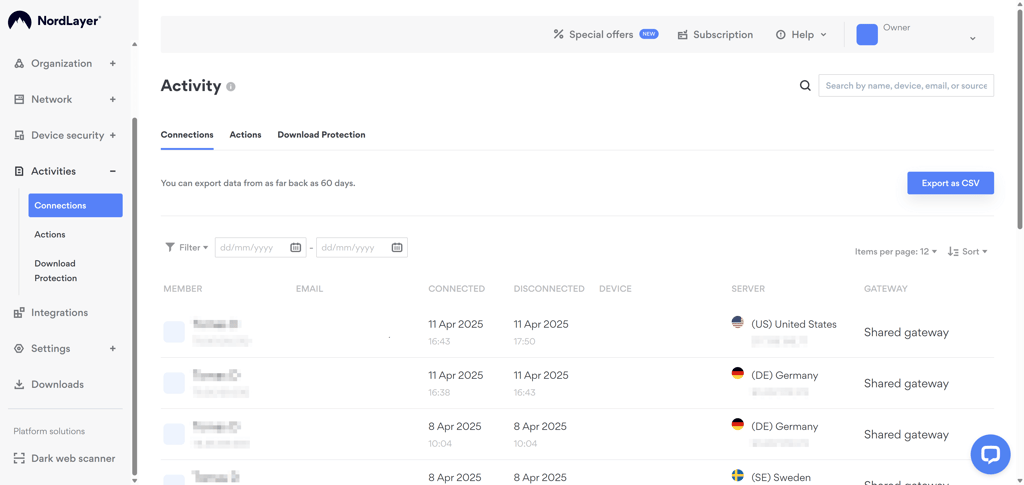
You can create private VPN tunnels with fixed IPs, custom DNS settings, and advanced filtering. It’s ideal for companies needing more access control and security rules.
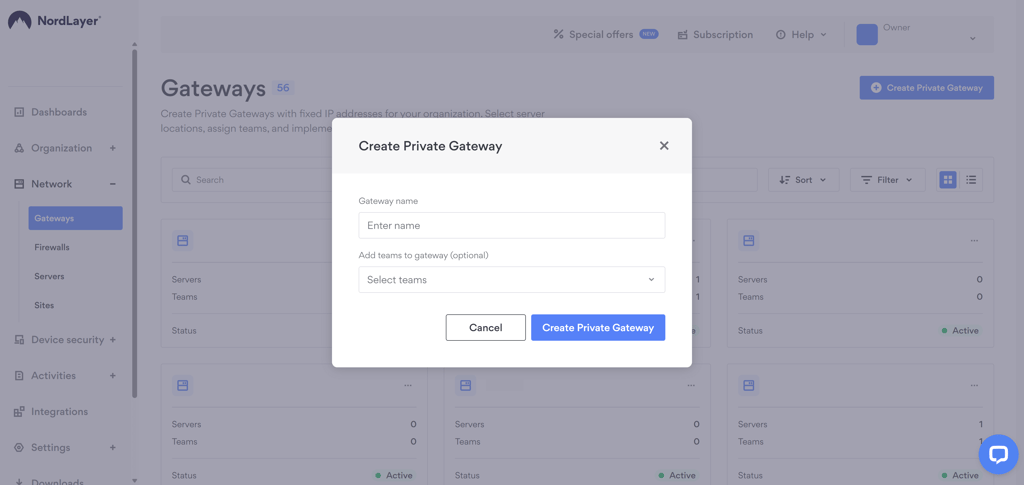
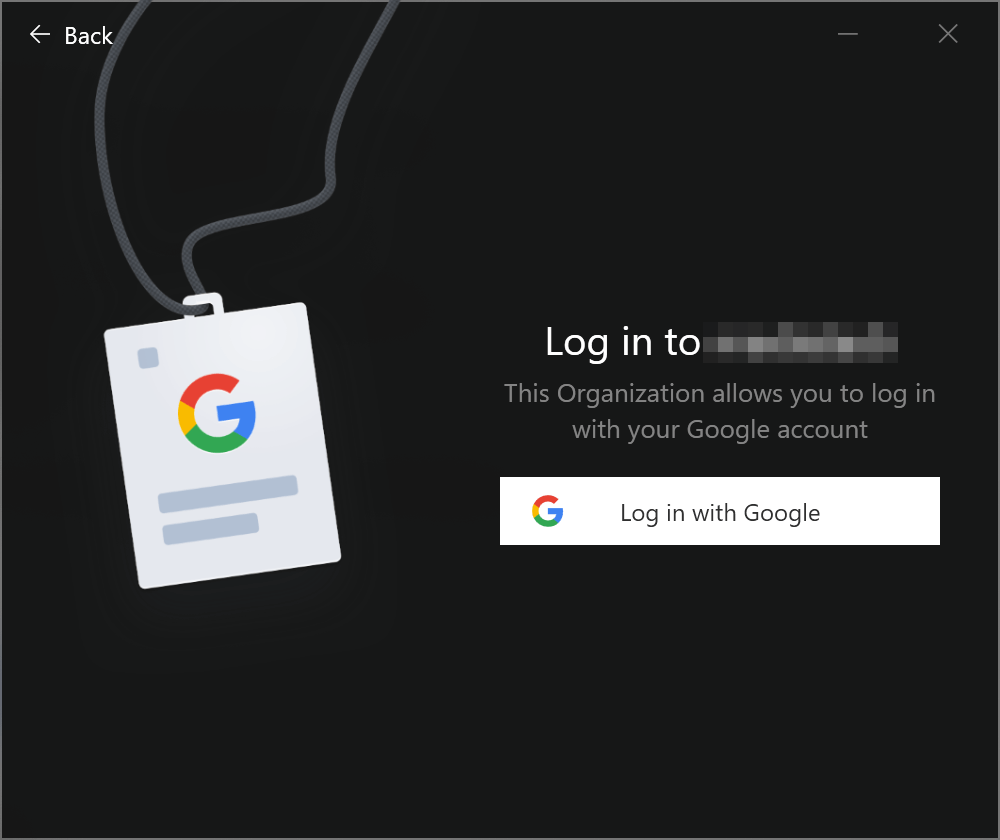
Employees can log in using their existing email or work account (Google, Azure AD, etc.). This simplifies access and reduces password-related issues.
NordLayer pricing and plans
NordLayer’s pricing starts at $6.00/user/month for the Lite plan (billed annually). It’s a solid entry point for smaller teams that only need the basics. The Core and Premium plans cost $11.00 and $14.00/user/month, respectively, and add features like threat blocking, user provisioning, and private gateways. For larger organizations, the Enterprise plan drops to $7.00/user/month (annual billing) but requires at least 50 users.
All plans can also be billed monthly, though the rates are higher. If you're unsure which option best suits your team, try a demo or rely on the 14-day money-back guarantee. You can also request a custom-fit solution for specific business needs.
| NordLayer plans | Lite | Core | Premium | Enterprise |
| Yearly | $8.00/user/month | $11.00/user/month | $14.00/user/month | $7.00/user/month |
| Monthly | $10.00/month | $14.00/month | $18.00/month | $10.00/month |
| Minimum number of users | 5 | 5 | 5 | 50 |
2. Proton VPN for business – privacy-oriented VPN for businesses

| Business pricing: | From $6.99/user/month |
| Jurisdiction: | Switzerland |
| Minimum users: | No minimum |
| Current deal: | Get up to 22% OFF Proton VPN for business |
Proton VPN overview
Proton VPN for Business is a reliable choice for companies prioritizing privacy. It uses the fast and secure WireGuard protocol and AES-256 and ChaCha20 encryption. Proton’s own VPN Accelerator helps improve speeds, especially over long distances, and a built-in kill switch protects user data if the connection drops.
Proton VPN is compatible with all major platforms – Windows, macOS, Linux, iOS, Android, Chromebook, and even Android TV – making setup easy across teams. Businesses also get access to dedicated servers and IPs, SSO login options, and an admin console for managing users and network assets. There's also protection against MITM attacks, keeping internal traffic safe from interception.
Hands-on with Proton VPN
During Proton VPN testing, I was especially impressed with its Stealth protocol, which helps bypass censorship and VPN blocks – a valuable feature for remote teams working across restrictive regions. There's also the NetShield feature, which blocks malware and ads at the DNS level, improving both security and browsing speed.
The Always-on VPN and Auto-connect options made a difference, too. They keep devices protected automatically, even after network disruptions or restarts – something I think IT admins will appreciate in dynamic work environments. With dedicated servers available in 21 locations, businesses can better control latency and availability for teams in different countries.
For security management, Proton VPN includes SSO access and an admin console, which allows assigning user roles and permissions and managing access to network assets. This setup, combined with dedicated IPs and encryption designed to prevent MITM attacks, makes it feel purpose-built for secure team use.
Proton VPN gives your business private VPN access points with fixed IPs. This improves connection stability and lets you control who can access specific resources.
Employees can log in using their existing email or work accounts (like Google or Microsoft). This makes access simpler and reduces the need to manage separate passwords.
Proton VPN encrypts traffic to prevent cybercriminals from intercepting communications between users and services – a key safeguard for remote teams.
Proton VPN provides centralized control over users, roles, and access. Admins can manage network assets and permissions easily from one place.
Proton VPN pricing and plans
Proton VPN offers three fixed business plans, with pricing starting at $6.99/user/month for the Essentials plan, $9.99/user/month for the Professional tier, and $12.99/user/month for the Business Suite. Monthly billing is also available at a higher rate. Also, all plans come with a 30-day money-back guarantee.
| Proton VPN plans | Essentials | Professional | Business suite |
| Yearly | $6.99/user/month | $9.99/user/month | $12.99/user/month |
| Monthly | $8.99/user/month | $11.99/user/month | $14.99/user/month |
| Minimum number of users | N/A | N/A | N/A |
3. Check Point's SASE – excellent VPN for corporate with full cloud integration
| Business pricing: | From $8.00/user/month |
| Jurisdiction: | Israel |
| Minimum users: | 10 |
| Current deal: | Now up to 20% OFF on Check Point's SASE |
Check Point's SASE overview
Check Point’s SASE is a fast, secure VPN built for businesses of all sizes. It runs on the WireGuard protocol and uses AES-256 and ChaCha20 encryption to ensure strong protection without slowing performance.
While it lacks a traditional kill switch, its Automatic Wi-Fi security helps keep connections protected on public networks. As highlighted in Check Point’s SASE review, it supports major platforms, including Chromebooks, and offers SSO integration with providers like Google Workspace, Azure AD, and Auth0. It's a solid pick for managing complex IT environments with features like activity monitoring, cloud network management, and role-based access control.
Hands-on with Check Point's SASE
From the start, Check Point’s SASE felt built for visibility and control. The cloud-based control panel gives you a central place to monitor network activity, which I found helpful for observing usage across teams. Alongside that, there’s a cloud firewall and DNS filtering, both working in the background to block unwanted traffic and apply custom security rules.
The device posture check verifies if devices meet security requirements before connecting – a great addition for teams working across different environments. I also liked that Check Point’s SASE offers an always-on VPN, so protection stays active no matter where or how users connect.
Thanks to IdP integration, admins can fine-tune access using role-based controls. Check Point’s SASE also integrates with cloud platforms like Azure, AWS, and Google Cloud, which I found useful if your team relies on these environments for daily operations. For login security, multi-factor authentication is available through SMS codes, Google Authenticator, and DUO, offering flexibility based on your setup.
Check Point’s SASE provides a centralized dashboard for tracking user activity in near real time. This helps IT teams stay informed and quickly detect any unusual behavior.
It allows admins to manage VPN settings, users, and traffic from one place. It’s especially useful for maintaining large or distributed networks.
It easily connects with services like Azure, AWS, and Google Cloud, making it easier to secure access to the cloud infrastructure your team already relies on.
It lets you sync user roles from identity providers. This enables secure, role-based access control and streamlines login management across your organization.
Check Point's SASE pricing and plans
Check Point’s SASE is designed for teams and charges separately for each user and for each VPN gateway. The Essentials plan starts at $8.00/month/user (billed annually), while Premium and Premium Plus add features like DNS filtering and Always-On VPN, starting from $12.00/month/user and $16.00/month/user, respectively.
The Enterprise tier offers custom features for large organizations, but pricing is available only upon request. At the time of writing, Check Point’s SASE didn’t display prices publicly and required a business email to create an account, and I wasn’t able to reach support to confirm current rates.
All plans include a 30-day money-back guarantee, which lets businesses test the service risk-free before making a commitment.
| Check Point's SASE plans | Essentials | Premium | ||
| Yearly | $8.00/month/user | $12.00/month/user | $16.00/month/user | Pricing available upon request |
| Monthly | $10.00/month/user | $15.00/month/user | $20.00/month/user | Pricing available upon request |
| Minimum number of users | 5 | 10 | 20 | 50 |
4. PureDome – trustworthy VPN built for remote company collaboration

| Business pricing: | $6.75/user/month |
| Jurisdiction: | British Virgin Islands |
| Minimum users: | 5 |
| Current deal: | Get PureDome today! |
PureDome overview
PureDome is a reliable business VPN designed to help remote teams work securely and stay connected. It uses the WireGuard protocol for optimal speed and supports IKEv2 and OpenVPN for flexibility. All traffic is encrypted with AES-256 or ChaCha20, and a kill switch prevents accidental exposure if the connection drops.
Built for business, PureDome includes a centralized dashboard for managing users, licenses, and gateways. You can set up custom gateways with dedicated IPs, automate user onboarding, and restrict access to approved devices and IPs – ideal for companies prioritizing control and simplicity.
Hands-on with PureDome
I found the PureDome admin dashboard easy to navigate, with all the key tools for managing users, licenses, and gateways in one place. Setting up dedicated gateways with static IPs was straightforward and worked well for segmenting access between different teams.
I also tried out the device and IP whitelisting, which helps ensure that only trusted devices can connect. Combined with zero-trust access policies, this adds a strong layer of control – every connection attempt is limited to approved resources, and logs give admins visibility into who accessed what.
Support-wise, PureDome includes 24/7 live chat and a dedicated account manager, which made the setup process go smoothly on my end.
You can set up dedicated VPN gateways with fixed IPs for your teams. This helps control access and adds an extra layer of security for remote workers.
It lets you manage users, licenses, and gateways from a single dashboard. It keeps everything organized and makes it easier to scale your setup.
Only approved devices and IP addresses can connect to your network, adding strong protection against unauthorized access.
This allows you to add or remove users with automated provisioning tools quickly. It’s efficient for growing teams and helps avoid manual setup errors.
PureDome pricing and plans
PureDome’s plans start at $6.76/user/month with the Basic tier (billed annually), making it one of the more affordable options for businesses. The Professional plan goes up to $9.00/user/month, while Enterprise starts at $13.45/user/month. Monthly billing is available too, though at slightly higher rates. Every plan comes with a minimum of 5 users, and there's a 30-day free trial if you'd like to try the service before committing.
| PureDome plans | Basic | Professional | Enterprise |
| Yearly | $6.76/user/month | $9.00/user/month | $13.45/user/month |
| Monthly | $8.85/user/month | $10.00/user/month | $14.95/user/month |
| Minimum number of users | 5 | 5 | 5 |
5. Twingate – budget-friendly VPN for expanding teams
| Business pricing: | From $5.00/user/month |
| Jurisdiction: | USA |
| Minimum users: | 5 |
| Current deal: | Now up to 15% OFF! |
Twingate overview
Twingate is a business-oriented solution that follows a zero-trust approach rather than a traditional VPN setup. It creates secure, direct connections between users and specific company resources, verifying identity and device before granting access.
Twingate is compatible with Windows, macOS, Linux, ChromeOS, iOS, and Android, and works well across cloud environments like AWS, Azure, and Google Cloud. Twingate also supports SSO, MFA, and automated user provisioning through SCIM, making it a practical option for growing teams that need flexible and secure remote access.
Hands-on with Twingate
I liked how everything was managed through a central admin panel. It’s where you keep track of user activity, manage who gets access to what, and set up security rules.
One thing that stood out to me was how flexible the access controls are. You can restrict access based on identity, device type, or even the user’s current location. Multi-factor authentication is built in too, and you can use it with things like biometrics or app-generated codes. It’s also easy to onboard new users with platforms like Okta or Google Workspace doing the heavy lifting.
Unlike most VPNs, Twingate routes traffic directly to the apps or services each user needs. That means better performance and less risk from unnecessary exposure. You also get full control over routing with options like custom DNS and split tunneling.
These make it easy to manage user access through platforms like Okta, Google Workspace, or Azure AD. Great for automating logins and streamlining onboarding.
This adds a strong layer of identity protection with options like biometrics, TOTP apps, security keys, or SSH authentication.
Twingate lets you limit access based on user identity, device status, or even location. This is helpful for enforcing security policies across different teams.
A central dashboard allows monitoring usage, managing permissions, and seeing who’s accessing what – in real time.
You can get started quickly without overhauling your current setup. This is especially useful for remote or hybrid teams needing a fast solution.
Twingate pricing and plans
Twingate stands out with its free Starter plan, covering teams of up to 5 users. If you need more, the Teams plan starts at $5.00/user/month (billed yearly), supporting up to 100 users. For larger groups, the Business plan goes up to 500 users and costs $10.00/user/month annually. Monthly billing is also available but comes at a slightly higher rate. Every paid plan includes a 14-day free trial to test things out first.
| Twingate plans | Starter | Teams | Business |
| Yearly | Free | $6/user/month | $12/user/month |
| Monthly | Free | $5/user/month | $10/user/month |
| Minimum number of users | Up to 5 | Up to 100 | Up to 500 |
Best VPNs for business compared
Below, you’ll find a side-by-side comparison of the top business VPNs reviewed, highlighting their key features, pricing, and standout tools.
| Starting price | Jurisdiction | Minimum users | SSO | Cloud VPN | |
| NordLayer | $6.00/user/month | USA | 5 | ✅ Yes | ✅ Yes |
| Check Point's SASE | $8.00/user/month | Israel | 10 | ✅ Yes | ✅ Yes |
| Proton VPN for business | $6.99/user/month | Switzerland | None | ✅ Yes | N/A |
| PureDome | $6.75/user/month | British Virgin Islands | 5 | ✅ Yes | ✅ Yes |
| Twingate | From $5.00/user/month | USA | 5 | ✅ Yes | N/A |
How we ranked business VPNs
With the help of the Cybernews research team, I tested 41 VPN services to find the best business options in 2026. My evaluation combined real-world use and technical analysis across Windows and macOS devices. I looked at both administrator and user experiences to ensure the services are practical for teams of all sizes.
Here’s how I ranked the top business VPNs:
- Privacy and security (30%). I reviewed no-logs policies, encryption, and security audits. I also tested the kill switch and DNS/IP leak protection.
- Speed and performance (25%). Each VPN was tested across multiple global locations to ensure stable and fast connections.
- Ease of use (15%). I evaluated how simple it is for users and IT admins to set up and manage the VPN.
- Business features (15%). I looked at tools like team management, centralized billing, split tunneling, and IP allowlisting.
- Customer support (10%). I tested how quickly support teams respond via chat, email, and onboarding help.
- Pricing and value (5%). I considered how flexible and cost-effective each service is for teams of various sizes.
What is the difference between a consumer VPN and a company VPN?
While personal VPNs like NordVPN or Surfshark are designed to protect individual users, business VPNs are built specifically for teams and organizations. They have added tools for managing users, securing remote access, and protecting sensitive company data. Below is a quick breakdown of how the two compare.
| Consumer VPN | Company VPN |
|
|
While both consumer and business VPNs share core security features, they serve different purposes. Consumer VPNs are designed to hide your IP and change your virtual location – great for privacy, accessing content, and bypassing geo-restrictions. Many providers also add extra features like ad blocking, malware protection, or support for streaming platforms like Netflix.
In contrast, business VPNs are built to give teams secure access to a company’s internal network, often across multiple locations. These solutions typically include dedicated IPs or servers, advanced access controls like two-factor authentication (2FA) or single sign-on (SSO), and tools to manage multiple users. The focus is on privacy, secure communication, and preventing unauthorized access within a business environment.
Does my business need a VPN?
While not every business is legally required to use a VPN, having one in place is a smart move for protecting your company’s data and digital infrastructure. A business VPN encrypts connections and shields internal systems, making it far harder for cybercriminals to breach your network.
It also protects remote employees on public Wi-Fi by encrypting their traffic and reducing the risk of data leaks. While a VPN alone won’t block phishing or malicious downloads, it works best when combined with security tools like antivirus software, firewalls, and email protection. A business VPN also enables secure access to company resources from anywhere – a must-have for organizations with remote or hybrid teams.
Best enterprise VPNs: final thoughts
Every business, big or small, can benefit from a company VPN to enhance data security, enable safe remote access, and meet compliance requirements. It helps protect sensitive operations from cyberthreats and unauthorized access.
After thorough testing, NordLayer stood out as the best business VPN overall. While it’s not the lowest-priced option, it offers top-tier security, excellent connection speeds with its NordLynx protocol, and a user-friendly interface that works for both tech-savvy teams and beginners.
FAQ
What is a business VPN?
A business VPN is a tool that helps companies protect their online activity. It encrypts internet traffic and hides IP addresses so employees can securely access work tools and data, whether they're in the office or working remotely.
What VPN should I use for my business?
For most businesses, NordLayer is a top choice. It’s secure, easy to set up, and designed to scale with your team. You’ll get powerful features like threat protection, dedicated servers, and centralized management – all while keeping employee connections fast and safe, no matter where they work.
Can a company monitor activity through a VPN?
Yes, a company can typically monitor activity when connected to its business VPN, especially if you're using a work device. This can include tracking which apps you use, files you access, and other activity within the company network.
Is it safe to use a VPN for business?
Yes, a VPN for business is a safe and effective way to protect your company’s data. It encrypts employee connections and shields your internal network from outside threats. NordLayer is one of the top business VPNs for strong security and reliable performance.