5 best Texas VPNs in 2026
Our in-house cybersecurity experts and journalists, renowned for major reports like The Mother of All Breaches, conduct transparent, unbiased VPN testing and in-depth analysis.
With 750+ articles crafted based on real-world research, we empower readers to make informed purchasing decisions through first-hand expertise.
Learn more

Picking the best Texas VPN isn’t always easy. At first glance, most VPNs appear identical – they all promise secure encryption and safe browsing. But when you dig deeper, you quickly notice that each provider offers different features, performance levels, and trade-offs. That’s where things can get tricky.
To make your decision easier, I teamed up with Cybernews experts to test the leading VPNs with servers in Texas, comparing their strengths and weaknesses. Here are my top Texas VPN picks for 2026.
Top 5 best VPNs for Texas – shortlist
- NordVPN – best Texas VPN for streaming sports
- Surfshark – cheap and fast VPN with Houston servers
- IPVanish – reliable VPN to get a Texas IP address
- ExpressVPN – secure VPN with Dallas servers
- CyberGhost – Texas VPN with dedicated servers
Why would you need a Texas VPN?
There are many reasons why one would need a Texas VPN. Here are some of them:
- Access geo-blocked content. When you’re outside Texas, geo-blocks make it difficult to keep up with things like your favorite show from back home or a blacked-out Texas Rangers game. But if you use a VPN to connect to a server within Texas, you’ll get a Texas IP address to access the blocked content.
- Bypass Texas state geo-restrictions. Some geographical restrictions are targeted at Texas due to its specific state laws. For example, Texans need a VPN to access Pornhub and other adult sites because access to them is restricted in states that require ID verification. Other potential restrictions include gambling sites, local sporting event blackouts, and more.
- Access local services. Banks and government portals may red-flag and block accounts as a safety precaution if a foreign IP address tries to access them. So, if you’re outside of Texas, a Texas IP address helps to smooth out these stumbling blocks.
- Security. Public Wi-Fi might be convenient, but it leaves you vulnerable to cyberthreats. With a Texas VPN, you can protect yourself while keeping your real IP address hidden when using public Wi-Fi.
- Privacy. A Texas VPN makes it much more difficult for the government, ISPs, and other prying third parties to track your online activity. That means they won’t see what files you’re downloading and what websites you’re visiting.
On the flip side, some services aren’t available in Texas. That includes poker sites 888Poker, PokerStars, and PartyPoker. However, you can get access if you use a VPN to change your Texas IP address to one from an approved location. Just make sure that you check the legalities of these services beforehand.
Top 5 best Texas VPNs – detailed list
In my search for the best VPN for Texas, I first reviewed 41 providers before picking the top 5 that hit the mark regarding server availability, security, speed, pricing, and more. Let’s see what these VPNs bring to the table.
1. NordVPN – top VPN for Texas in 2026

| Servers/countries: | 8,000+ servers in 149 countries |
| Texas server locations: | Dallas, Houston, McAllen |
| Streaming sites: | Netflix, Hulu, BBC iPlayer, Disney+, and more |
| Current deal: | Get 75% OFF NordVPN + 3 months free |
NordVPN is the best VPN for Texas thanks to its massive server fleet, ironclad security, excellent speeds, and well-rounded features. And, all at a very competitive price.
Servers. NordVPN has 8,000+ servers in 149 countries – including servers in Dallas, Houston, and McAllen – so you have plenty of options. Its geographically diverse servers also mean you can access a broader range of content and sites, including various Netflix libraries.
Security. NordVPN’s comprehensive security suite includes AES-256 and RAM-only servers that erase data after each reboot. Meanwhile, its audited no-logs policy guarantees maximum privacy. Our full NordVPN review offers a more comprehensive view of why that’s important.
Features. Part of NordVPN’s impressive set of features is a kill switch that acts as a fail-safe mechanism. Meanwhile, its multi-functional next-gen antivirus (formerly Threat Protection) protects against trackers, malware, and other threats. It’s vital to note that these features aren’t enabled by default, although the app’s home page recommends turning them on. Other features include split tunneling and specialty servers.
Speed. NordVPN is one of the fastest VPNs around. Its proprietary NordLynx protocol is lightning-fast and perfect for keeping up with the Dallas Cowboys. While I was using this VPN, it retained around 80% of my original connection speed – a great result.
Pricing. Prices start from $3.49/month and include a 30-day money-back guarantee in case you’re unsatisfied with the product. All you have to do is contact customer support agents and let them know you want a refund. NordVPN also has a 3-day free trial for Android devices.
2. Surfshark – Texas VPN with unlimited simultaneous connections

| Servers/countries: | 4,500+ servers in 100 countries |
| Texas server locations: | Dallas and Houston |
| Streaming sites: | Netflix, Disney+, Amazon Prime Video, Hulu, and more |
| Current deal: | Now up to 85% OFF Surfshark + 3 months FREE |
Surfshark VPN is among my top choices for Texas because of its vast server network, excellent security, and feature abundance. It offers servers in two Texas cities – fewer than NordVPN – but is the cheaper option. Plus, with the Surfshark discount code: OFFCN, you can get an even better deal.
Servers. Surfshark offers 80 servers in two Texas cities: Dallas and Houston. It also has 4,500+ servers in 100 countries. So, you can bypass geo-restrictions no matter where you are.
Security. Whether using a public Wi-Fi connection in Texas or streaming a Houston Rockets match abroad, Surfshark protects you with 256-bit AES encryption, RAM-only servers, and an independently audited no-logs policy.
Features. Key Surfshark features like a kill switch and split tunneling are always included in Surfshark’s subscriptions. You also get sophisticated features like NoBorders Mode, Smart DNS, and GPS spoofing.
Speed. High up on the list of the fastest VPNs, Surfshark uses the high-speed WireGuard protocol. The provider retained around 81% of my initial connection speed during in-house tests.
Pricing. Plans start from just $2.49/month and include unlimited simultaneous connections. There’s also a 7-day free trial for Android and iOS mobile devices. Besides that, you can use the 30-day money-back guarantee for an easy refund.
3. IPVanish – budget-friendly VPN with servers in two Texas cities

| Servers/countries: | 3,400+ servers in 112 countries |
| Texas server locations: | Dallas and Houston |
| Streaming sites: | Netflix, BBC iPlayer, YouTube, Disney+, Hulu, and more |
| Current deal: | Now up to 84% OFF IPVanish |
The US-based IPVanish is a great Texas VPN, too. Strong security, a solid server network, robust features, and excellent speed – IPVanish offers it all.
Servers. IPVanish has servers in two major Texas cities: Dallas and Houston. And, while its global server fleet of 3,400+ servers is on the smaller side, you’ll still have ample options to unblock geo-restricted content worldwide.
Security. IPVanish uses the advanced AES-256 encryption alongside SHA-512 hash functions. Additionally, as detailed in the IPVanish review, its independently verified no-logs policy ensures that your online activity remains private.
Features. IPVanish offers many features to cater to your VPN needs. It has all the bases covered with a kill switch that protects your IP address, split tunneling, obfuscation, and a SOCKS5 proxy for anonymous torrenting.
Speed. With WireGuard in its arsenal, IPVanish demonstrates decent speeds whether you’re streaming, torrenting, gaming, or browsing. While using this VPN, I experienced an average of 63% of my original speed. Not the best result, but I could still use a Texas-based server without noticeable connection problems.
Pricing. IPVanish prices start from $2.39/month for unlimited devices and come with a 30-day money-back guarantee. My team had no trouble getting a refund simply by using the provider’s website.
4. ExpressVPN – security-first Texas VPN

| Servers/countries: | Servers in 113 countries |
| Texas server locations: | Dallas and Houston |
| Streaming sites: | Netflix, Hulu, BBC iPlayer, Disney+, and more |
| Current deal: | Now up to 80% OFF ExpressVPN + 4 months FREE |
ExpressVPN is a strong choice for those seeking a Texas IP address. It charms with its outstanding security, solid server network, and excellent speed.
Servers. ExpressVPN doesn’t share its total server count anymore, but its servers cover 113 countries. For a TX IP address, you can connect to its servers in Dallas and Houston.
Security. Secured with an AES 256-GCM cipher, ExpressVPN ensures that your data is safe from even the most skilled cybercriminals. Meanwhile, its Lightway protocol uses the equally secure ChaCha20/Poly1305 instead. Either way, you’ll also benefit from its RAM-only servers and verified no-logs policy.
Features. Essential safeguards like a kill switch and split tunneling are included. You also get advanced perks like MediaStreamer, Threat Manager, and obfuscated servers. For more information about the features, check out our ExpressVPN review.
Speed. With ExpressVPN’s proprietary Lightway protocol, you can expect decent speeds in Texas or abroad. My tests with this service yielded an average speed retention of roughly 61%.
Pricing. Plans start from $2.99/month. Although ExpressVPN doesn't have a free trial, it offers a 30-day money-back guarantee for testing it.
5. CyberGhost – Texas VPN with specialty servers

| Servers/countries: | Servers in 100 countries |
| Texas server locations: | Dallas |
| Streaming sites: | Netflix, Hulu, BBC iPlayer, Disney+ |
| Current deal: | Watch Live Sports Securely, now with 83% OFF CyberGhost + 2 months FREE |
CyberGhost makes for a good and affordable Texas VPN. Its main appeals lie in its servers specifically dedicated to streaming, torrenting, and gaming, top-notch security, and generous features.
Servers. Like ExpressVPN, CyberGhost doesn’t reveal the actual number of servers it has in 100 countries, but it does offer servers in Dallas. You won’t have a problem finding a server that guarantees a Texan IP address.
Security. CyberGhost employs AES-256 to encrypt your data and has a strict verified no-logs policy for utmost privacy. Meanwhile, its RAM-only servers wipe all data after each reboot. Our CyberGhost review sheds more light on the VPN’s security perks.
Features. CyberGhost is very generous with features like an automatic kill switch, DNS, and IP leak protection. Plus, you also get specialized servers for streaming, torrenting, and gaming. A dedicated IP address, an ad-blocker, and Smart rules to automate specific tasks are included, too.
Speed. CyberGhost uses the WireGuard tunneling protocol, ensuring a smooth streaming and browsing experience. With it, my speed retention rate was around 78% during extended tests.
Pricing. Plans start from $2.19/month and come with a generous 45-day money-back guarantee. As expected, you only need to contact customer service via live chat to request a refund if you want one.
Best Texas VPNs compared
Using a VPN is vital in Texas to safeguard your internet traffic from ISPs’ speed throttling and snooping. My top 3 providers (NordVPN, Surfshark, IPVanish) offer Texans plans with features like obfuscated servers, NoBorders Mode, and OpenVPN Scramble to mask their online traffic effectively.
Cybernews experts recommend NordVPN for its servers optimized for Texans, ensuring seamless internet access while thwarting unwanted surveillance. Using a VPN in Texas is crucial because ISPs often slow your speeds and threaten your privacy, making NordVPN a preferred VPN for Texans to maintain anonymity and secure browsing.
| Rating | Servers | Server locations in Texas | Verified no-logs policy | RAM-only servers | Price (lowest price per month) | |
| 1. NordVPN | 8,000+ servers in 149 countries | Dallas, Houston, McAllen | Verified 5 times by PwC and Deloitte | ✅ Yes | $3.49/month | |
| 2. Surfshark | 4,500+ servers in 100 countries | Dallas, Houston | Verified by Deloitte |
✅ Yes
| $2.49/month | |
| 3. IPVanish | 3,400+ servers in 112 countries | Dallas, Houston | Verified by Leviathan | ❌ No | $2.39/month | |
| 4. ExpressVPN | Servers in 113 countries | Dallas, Houston | Verified by PwC |
✅ Yes
| $2.99/month | |
| 5. CyberGhost | Servers in 100 countries | Dallas | Verified by Deloitte |
✅ Yes
| $2.19/month |

How to get a Texas IP address with a VPN
-
Pick a capable VPN with servers in Texas – I recommend NordVPN, now 75% OFF

-
Download and install the VPN

-
Enable the kill switch via the VPN settings

-
Connect to a Texas server
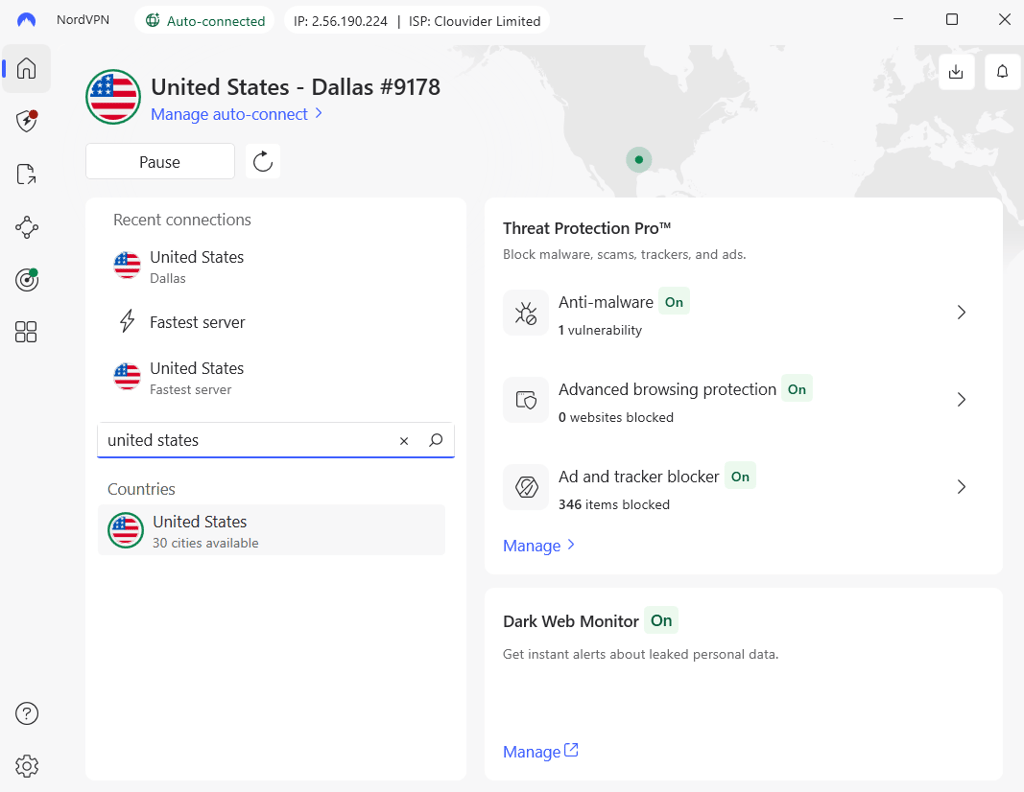
- That’s it – you can now unblock geo-restricted sites using your new Texas IP address
Best VPN for Texas – video review
Check out our video for a condensed version on how to bypass geo-restrictions with a Texas VPN.
Can I use a free VPN for Texas?
Using a free Texas VPN to change your IP address to a Texas IP might be tempting, but I advise against it. Free VPNs often have poor quality and struggle to bypass geo-blocks. Plus, their weak security, lackluster features, and slow performance are an issue, too.
A better alternative would be using a freemium VPN like Proton VPN. These reputable providers offer free introductory plans in addition to their paid ones. However, the best option, in my opinion, is making the most out of a paid VPN’s free trial and money-back guarantee. Here are the top options:
- NordVPN – a first-rate Texas VPN with a 3-day free trial for Android devices and a 30-day money-back guarantee. Paid plans start from $3.49/month.
- Surfshark – top-notch Texas VPN with servers in Dallas and Houston. It has a 30-day money-back guarantee and a free 7-day trial for Android and iOS. Prices start from $2.49/month.
Final thoughts
Whether you need a VPN with servers in Texas to strengthen your security, bypass blackouts, or access local content while away, there are plenty of options to choose from. Of course, they aren’t all the same, and picking the right VPN can be more challenging than first expected.
After thoroughly researching and testing the top options on the market, I can confidently recommend NordVPN as the best Texas VPN in 2026. It offers servers in 3 Texas locations, has a vast global server network, demonstrates consistently great speeds, offers a wide array of useful features, and is overall the best value for your money. Of course, all the VPNs discussed in this guide can be trusted to provide great service.
FAQ
How do I set up a VPN in Texas?
To set up a VPN in Texas, download and install a VPN with abundant servers in the state – I recommend NordVPN. Then, pick a server located in Texas and connect. Your newly acquired Texas IP address can now be used to access geo-blocked sites, services, and content.
Can I use a VPN for a specific state?
Yes, you can use a VPN for a specific state. All you need to do is find a VPN with servers in that particular state so that you can change your IP address.