CLDY hosting review 2026: my genuine thoughts
Our in-house experts conduct internal independent, hands-on testing and transparent reviews of web hosting providers by using custom-built tools or utilizing industry-recognized tools and methods to ensure impartial and evidence-based assessments.
Using the same criteria for all services, we share our detailed methodologies and practices to help customers make informed hosting decisions.
Learn more

CLDY is a Singaporean web hosting company founded in 2021, which has been gaining traction in Southeast Asia and worldwide. With its C3.Gen platform, which promises 500% faster performance and 200% uptime, it’s slowly but surely gaining traction among developers and SMEs. But with many established hosting options already available, I wanted to see if CLDY can stand out in the crowded hosting market.
I registered, created a live test site, and spent more than two weeks testing its features and performance in real-world settings. In this CLDY 2026 review, I’m sharing my first-hand observations, so you get an expert insight.
CLDY overview: my verdict
With CLDY’s C3.Gen platform, which is focused on the speed, security, and stability trio, and its customer-focused approach, CLDY really stands out in the crowd. I’d recommend it for developers who appreciate support and performance.
| 💵Price: | From $7.40/month |
| 📑Uptime guarantee: | 99.99% |
| ⚙️Hosting types: | Shared, WordPress, Business and Shopify email, VPS, cloud, managed AWS, GCP, Digital Ocean, and Linode hosting |
| 🌏Server locations: | Singapore, Australia (shared hosting), global (VPS hosting via 5 cloud providers) |
CLDY wouldn’t be your best match, though, if you're eyeing low hosting costs or niche server locations.




Our in-house research team and expert writers work hand in hand to regularly test hosting services and provide accurate and fact-checked information. Discover the ins and outs of how we test and evaluate website hosting providers.
CLDY pros and cons
CLDY plans and pricing
CLDY used to have global hosting plans, but now it hosts only users in Singapore and Australia. International customers (including US customers) can no longer sign up or view the billing website. To have a clear comparison, we’ll take a look at pricing CLDY lists, with the current SGD and AUD equivalents where available.
CLDY shared web hosting starts at $7.40/month (SGD $10 / AUD $10) if you sign up for at least a year. That’s higher than entry-level providers like Bluehost or Hostinger, but it comes with worthwhile advantages: automatic backups, SSL, free business email, and CLDY's C3.Gen platform, optimized for speed, uptime, and security. You also get cPanel on all plans.
The provider also offers bespoke managed cloud hosting via services like AWS, Google Cloud, DigitalOcean, Oracle, and Vultr – at a custom cost.
| Hosting type | Starting price in USD (12-month contract) | Best for |
| Shared hosting | $7.40/month (SGD $10/month, AUD $10/month) | Small websites, blogs, startups |
| WordPress hosting | $2.33/month (SGD $2.99/month, AUD $2.99/month) | WordPress users who require extra optimization |
| Email hosting | $2.22/month (SGD $1/month, AUD $1/month) | Professional email for teams (or Shopify hosting for Shopify users) |
| Managed VPS and cloud hosting | $132/month (SGD $169/month, AUD $169/month) | Devs, SaaS, high-traffic businesses |
| Managed AWS/GCP/DO/Vultr/Linode hosting | Custom pricing | Advanced users who require cloud flexibility |
You still get a 30-day money-back guarantee, and there’s no renewal price jump like with IONOS ($1 to $10+) or Bluehost ($2.95 to $11.99).
I’d say CLDY still provides excellent value for Australia and Singapore-based users with quick, secure, managed hosting with local support, even though access is now restricted for global users.
CLDY web hosting features and management
CLDY keeps it nice and simple, from installation to day-to-day operation. In this section, I'll walk you through the entire process: registering, the setup process, creating a site, navigating the control panel, and exploring more features.
CLDY setup process
We now know what CLDY offers, but I had to see if it actually excels in real-world situations. For this, I tested CLDY's WordPress hosting plan and will walk you through my experience of the whole setup. Just a heads up – the setup was straightforward.
After selecting the plan, I completed a simple, distraction-free checkout with no aggressive upsells or deceptive add-ons. The account came online in just a few minutes, and I was provided with access credentials and DNS details almost instantly.
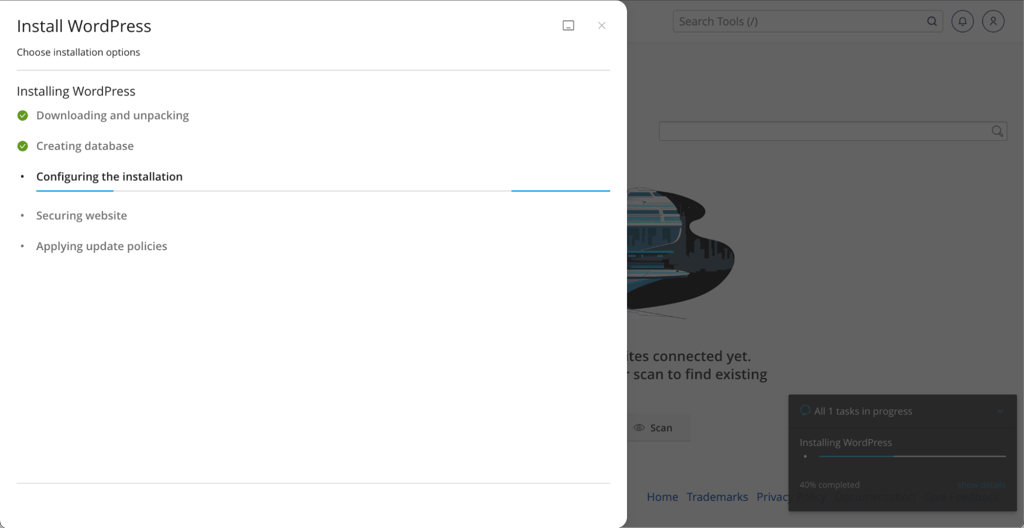
The dashboard was minimalist and yet efficient. For a minimalist like myself, I totally love this. Then I could log in to cPanel to manage the site, where WordPress installation was just one click away. SSL was pre-installed, and nightly automatic backups were already enabled, removing the usual config agony.
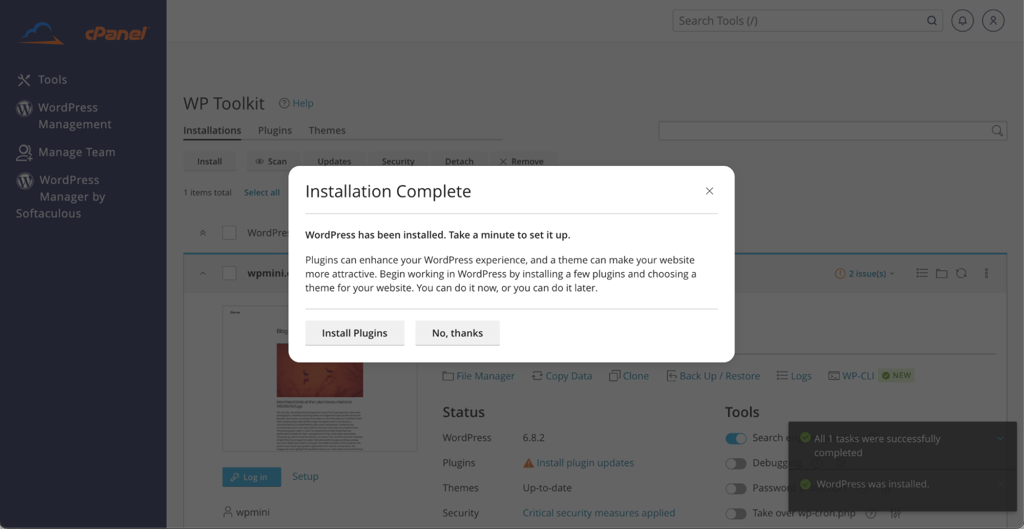
What I was also surprised by was the human touch: within minutes of installation, a support rep messaged via WhatsApp to offer a hand. It wasn't obtrusive, but it did bring a bit of personality you don't find with larger hosting players.
Installing CLDY's WordPress hosting in general was effortless and intuitive for newbies. It’s definitely great if you need to get up and running fast without navigating dozens of setup steps.
Creating a website with CLDY
Building a site on CLDY's WordPress hosting seemed effortless from the start. Once WordPress was installed through cPanel, I logged in and found all things pre-configured. SSL was activated, file permissions were in order, and caching was set up. That alone saved me a huge amount of setup time.
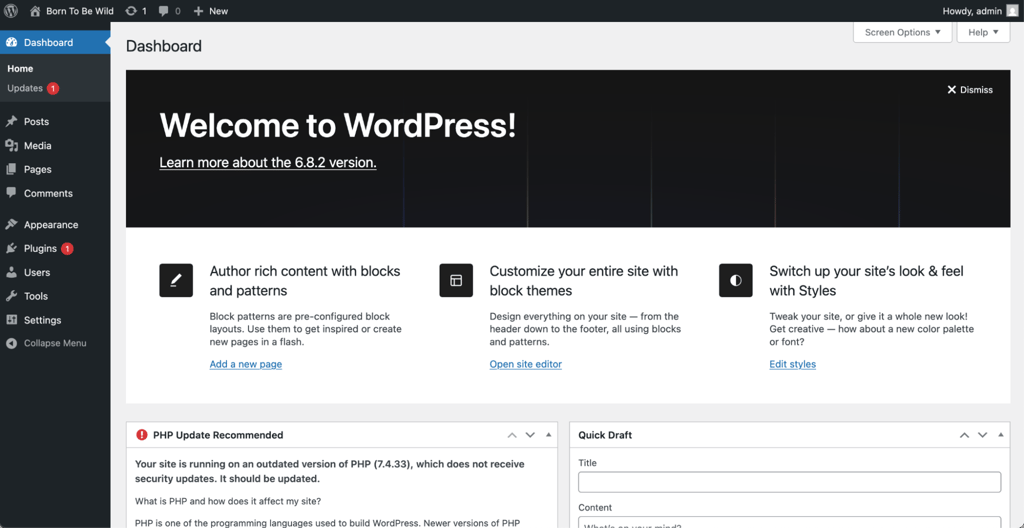
I didn’t need to tweak performance options or play around with security plugins at once, which shows that CLDY takes care of the behind-the-scenes basics. The backend was fast, and there were no delays in installing themes or plugins. Even in uploading larger media files, the response time was consistent.
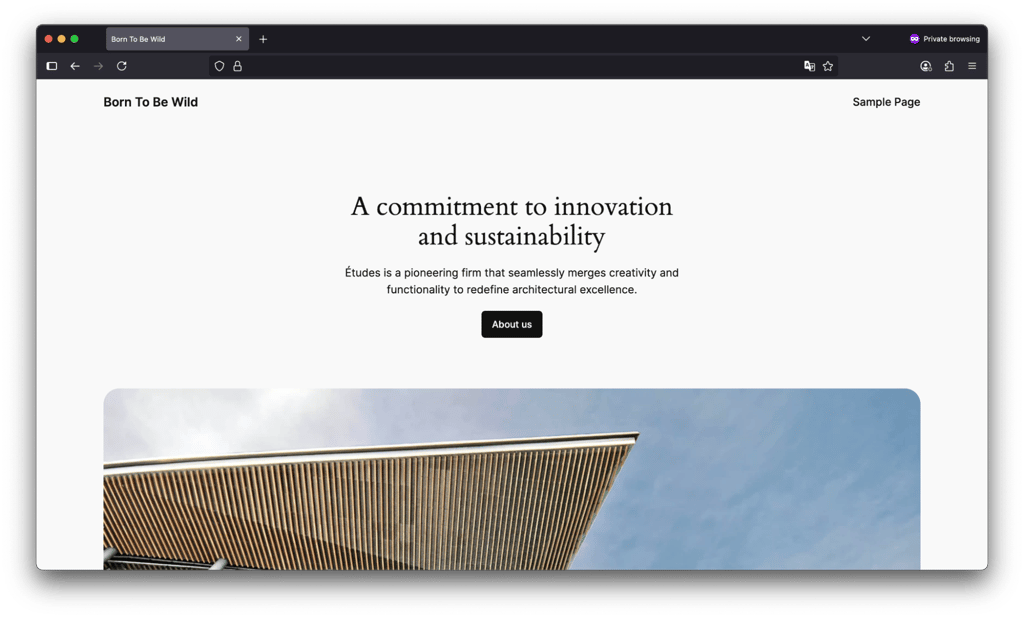
I liked that there was minimal friction: no annoying errors, no server hiccup, and no nasty file permissions mess that some low-cost hosts can unleash upon you.
CLDY control panel
CLDY takes advantage of the friendly cPanel control interface to access hosting, and it's accessible right within its customer control panel in a single click.
While cPanel itself has hardly changed over the years and does appear a bit old-fashioned, it's still one of the most convenient control panels out there. So, I liked that CLDY didn't try to reinvent the wheel here.
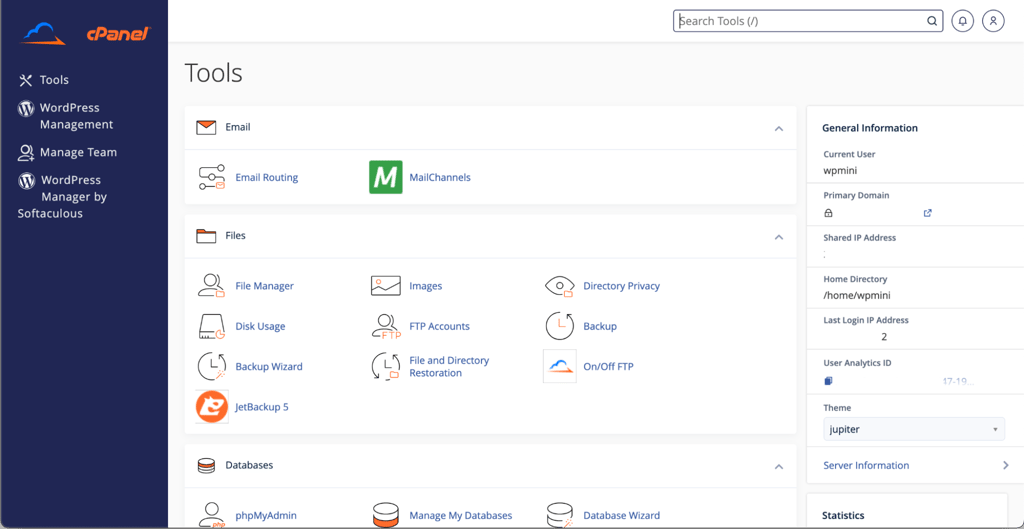
Its cPanel is subtly branded with the CLDY logo and includes essentials like Softaculous Apps Installer to install WordPress or other CMS systems in a snap. It also comes with some heavy-hitting features like Imunify360, WP Scan, WordPress 2FA Manager, and Website Security Headers. I’d say it’s a solid package if you care about website security.
As for CLDY’s custom account dashboard, it sits somewhere between minimal and mildly outdated. It’s not flashy, but it gets the job done.
Business email hosting with built-in protection
CLDY's business email hosting isn't an afterthought. I’d say it's the heart of its service for professionals and eCommerce users. The setup in our test was already a part of the dashboard and required minimal effort to integrate into our domain. It had:
- Always-on anti-spam filtering
- SSL encryption
- Email authentication practices like SPF, DKIM, and DMARC are all automatically configured.
Performance was great with no evident delay or bounce rate issue. What I’m impressed about is how hands-off the experience felt. With multiple accounts, the service could cope with sending limits and deliverability monitoring without endless adjustments.
CLDY is a good choice for those requiring business email hosting without requiring G Suite or Microsoft 365, especially if you want to be more in charge of IP health and inbox visibility.
Website migration support
CLDY offers free site migration with new clients, and it's far more customized than many hosts. When I inquired about a migration, the team reached out directly to plan it and asked me questions in advance to avoid surprise. They migrated website files and email as well, checked DNS settings, and offered me advice on when to safely drop the original host.
While others outsource this to scripts, CLDY does it as a white-glove service. I never experienced any downtime or loss of data, and everything was live on their platform within 48 hours. They also provided a post-migration checklist to make sure that all was working correctly.
This level of focus isn't typical for hosts. It's an especially valuable perk if you're not tech-savvy or if you have a live business website where even momentary interruptions matter.
CLDY performance
Performance is where CLDY understates that it's more than just another generic host. Here, I'm going to walk you through how it performed in the 3 critical areas we tested it: uptime, speed, and stress test. I also reviewed server coverage to illustrate its geographical comparison.
So, what did we find after our 2-week testing process? CLDY performed almost flawless uptime, rapid visual load time, and extremely stable stress-testing results. This isn’t a cheap host cutting corners on functionality. CLDY’s C3.Gen platform proved to hold up under stress. Here are the test results in brief:
| Metric | Result |
| Uptime | 100% uptime, 99.92% reachability |
| Average latency | 800 ms |
| Speed index | 2.06 s |
| Largest contentful paint (LCP) | 2.01 s |
| Stress test | 8,400 requests, 27 failures (low failure rate) |
| Server locations | Shared: Singapore, Australia; VPS: global via AWS, GCP, Vultr, and other cloud platforms |
My short verdict on CLDY performance: the host isn't claiming speed. It's backed by consistent, measurable performance. If you need hosting that performs consistently in the real world, this one does.
CLDY server locations
While CLDY was built on a global-first mindset, its shared hosting is currently limited to Australia and Singapore. That means if you plan to target Asia-Pacific clients, you’ll see good regional performance.
On the other hand, CLDY offers VPS and managed cloud hosting through major providers like AWS, Google Cloud, DigitalOcean, Oracle, and Vultr, giving you a broader global footprint, but only through custom cloud setups.
Compared to global hosts like Hostinger, which has data centers in the US, UK, Europe, and Asia, or SiteGround, which offers 6 global server locations by default, CLDY's shared hosting is a bit limited. However, its flexible cloud integrations still make it a good choice for developers and businesses that want to have control over where their sites are hosted.
Uptime and latency
To evaluate CLDY's reliability, our Cybernews research team conducted uptime and latency tests using Grafana with five-minute monitoring intervals. This gave us close to real-time availability, response time, and SSL validity over an extended period.
CLDY registered 100% uptime with a 99.92% reachability rating, meaning the server wasn't just up but fully accessible throughout testing. Average latency was 800ms, and while not our lowest to date, it's still in a responsive and acceptable range, especially for users located in or near its Singapore and Australian server points.

For context, hosts like Bluehost and GoDaddy tend to hit an average of 99.9% uptime, but can have more significant spikes in latency. Overall, I’d say CLDY's uptime is rock-solid, given its regional focus.
Speed
To see how fast CLDY is, I used webpagetest.org on a brand new WordPress install, and bluntly, the results were impressive. The Time to First Byte (1.264s) was good, and the site began visually rendering at approximately 2 seconds, with the First Contentful Paint at 1.9s. Everything was responsive, even before I touched any optimization plugins.
The 2.06s Speed Index explains that the visitors would be able to see a working site very quickly, and as there was no block time or layout shift, the experience was smooth right from the start. That's not a typical experience I have with default setups on mid-range hosts.

In contrast to budget hosts I've worked with, Namecheap or GoDaddy, for example, CLDY was more responsive straight out of the gate. It's not fire-cracker fast like SiteGround's turbo-charged options, but it does a great job and obviously prioritizes performance in the background.
Stress testing
We also carried out a load test using Grafana k6, simulating real-world conditions. It processed 8,400 requests and saw only 27 HTTP failures, a very low failure rate. It reached a high of 35.33 RPS, with an average of 27 RPS, while maintaining 40-45 virtual users.
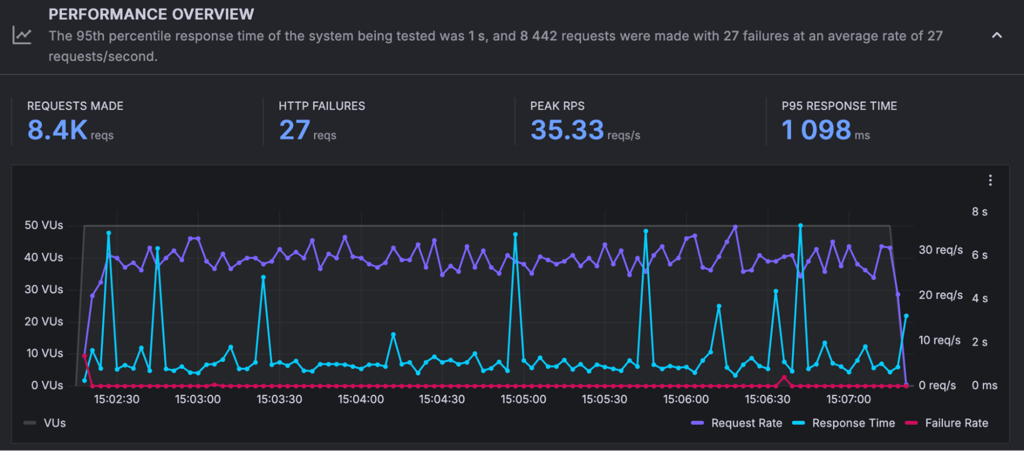
The 95th percentile response time (P95) of 1,098ms shows 95% of the requests being completed in just more than a second. Peaks in response time were experienced during the top load but didn’t cause extra hiccups.
I came away impressed with these results. This only shows that the C3.Gen platform delivers what it says it will: speed and reliability, no matter how stressed.
CLDY security
CLDY offers a robust array of security features at no additional expense. Free SSL, a Web Application Firewall (WAF), daily backups, and malware protection are included with most plans. Along with spam filtering through SpamShield and domain reputation monitoring, you also get WordPress security tools like WP Scan and 2FA.
CLDY offers more by default than providers like Bluehost or Hostinger, where sophisticated tools are frequently more expensive. Although I noticed it lacks compliance-grade features, the protection is more than adequate for the majority of small businesses and eCommerce websites. And no unstated security costs.
CLDY customer support
CLDY's customer support comes in the primary form of WhatsApp messages, backed up by email for non-urgent questions. After signing up, a representative usually reaches out to you via WhatsApp to deal with onboarding, migration, you name it. Let’s review the most common support options offered:
| 24/7 live chat | ✅Yes |
| ✅Yes | |
| Tickets | ✅Yes |
| Phone support | ✅Yes |
| Knowledge base | ✅Yes |
From my experience, the support staff were prompt and polite. If I asked questions during setup and testing, someone answered in minutes, sometimes even outside regular business hours. However, having to exit the dashboard and switch platforms to get assistance isn't ideal.
But if you don’t mind using WhatsApp and prefer one-on-one attention, I’d say CLDY customer support is great.
Should I choose CLDY over bigger names like Bluehost or Hostinger?
Based on my personal testing, I would say, if you're based in Singapore or Australia and value support and performance over low prices, go with CLDY. Although Bluehost and Hostinger entice with low-cost promotional offers, I've discovered that their entry plans are overburdened and their support can be patchy.
CLDY has great support – I was able to talk to a human within minutes when I had questions, and the platform was quicker to set up. Bigger providers might still make more sense if you're outside of Asia-Pacific or simply need the cheapest hosting available. However, CLDY can be solid if you prefer quality to gimmicks.
Is CLDY a good option for you?
Having put CLDY through its paces, I can tell you it's a solid, performance-oriented hosting provider, particularly if you're located in Australia or Singapore. It's not the cheapest option out there, but it delivers good value through stability, security, and hands-on support.
If you're launching a business website or expanding a project and are worried about speed, uptime, and support from real people, not bots, CLDY is well worth a look.
| Feature | Rating | Review |
| Pricing | ★★★★☆ | A little more costly than entry-level hosts (cheapest plan is $7.40/month), but if performance is your goal, the extras make the difference. |
| Ease of use | ★★★★☆ | Setup is easy, with pre-optimized WordPress. Beginners can find cPanel a bit dated. |
| Performance | ★★★★☆ | CLDY's C3.Gen platform lives up to its promises of high speed, excellent uptime, and stability under load. |
| Security | ★★★★★ | CLDY excels in security and delivers SSL certificates, a disaster recovery plan, anti-spam solution, and anti-spoofing tools |
| Support | ★★★★☆ | Fast, personalized 24/7 support via WhatsApp, email, phone, informative knowledge base. |
CLDY review FAQ
Is CLDY.com legit and safe to use in 2026?
Yes, CLDY is a legitimate hosting company and is safe to use in 2026. It has strong built-in security features like compliance with regulatory standards, WAF, and patch management, with stable uptime and open infrastructure backed by reliable cloud providers.
Who is CLDY.com best suited for?
CLDY is best for small to medium-sized companies, developers, and eCommerce users who need fast, safe, and reliable hosting with managed cloud options and on-site support. If you put performance over low prices, CLDY would be a great match for you.
What kind of hosting does CLDY offer?
CLDY rolls out shared and WordPress hosting, managed cloud hosting in AWS, Google Cloud, DigitalOcean, Vultr, and Oracle. There are also Business and Shopify email hosting, coupled with top-of-the-line security and backup features.
Is CLDY good for email hosting?
Yes, CLDY.com excels in business email hosting. It includes built-in anti-spam functionality (SpamShield), IP reputation management, encrypted IMAP/SMTP, and email authentication (SPF, DKIM, DMARC) for solid security.
Can I migrate my website to CLDY easily?
Yes. CLDY offers a free, professionally managed migration service with scheduling, data integrity checks, and little downtime when transferring WordPress or cPanel websites (along with email).