Cloudways vs Bluehost: which one is better for you?
Our in-house experts conduct internal independent, hands-on testing and transparent reviews of web hosting providers by using custom-built tools or utilizing industry-recognized tools and methods to ensure impartial and evidence-based assessments.
Using the same criteria for all services, we share our detailed methodologies and practices to help customers make informed hosting decisions.
Learn more

If you are searching for a reliable VPS hosting provider with strong performance, you probably already come across the names of Cloudways and Bluehost.
From my personal experience, I know that picking a hosting provider is not an easy task. So, to make the matter simpler, I wrote a detailed Cloudways vs Bluehost comparison. With the assistance of the Cybernews research team, I compared their ease of use, performance, security, pricing, and customer support so you can determine which host is better for your needs.
Cloudways vs Bluehost 2026: overview
| Bluehost | Cloudways | |
| ⭐ Rating: | ||
| 💵 Price: | From $1.99/month | From $6.60/month |
| 📑 Uptime guarantee: | 99.9% | 99.99% |
| 🔥 Coupons: | Bluehost coupon 78% OFF | Cloudways coupon 40% OFF! |
| Storage space (from): | 10GB SSD | 25 GB SSD |
| ✂️ Free domain (first year): | Yes | No |
| 🔒 Free SSL certificate: | Yes | Yes |
| ➡️ Site migration: | Free WordPress migration | Free first any site migration and a WordPress Migrator plugin |
| 💾 Automated backups: | Free automatic weekly backups | Yes |
| 📧 Email accounts: | Free (up to 100MB of storage) | No |
| 👨💻 24/7 live support: | Yes | Yes |
| 💰 Money-back guarantee: | 30-day | Free 3-day trial |





Our in-house research team and expert writers work hand in hand to regularly test hosting services and provide accurate and fact-checked information. Discover the ins and outs of how we test and evaluate website hosting providers.
Pricing comparison: Bluehost offers better value for money
As a VPS solution, Bluehost is the cheaper option in this Bluehost vs Cloudways pricing comparison. Cloudway’s plans start at $6.60/month, while Bluehost’s plans for VPS start at $2.09/month.
| Plans | Bluehost | Cloudways |
| NVMe 2 vs Cloudways 1GB RAM and 1 core processor plan | From $2.09/month | From $6.60/month |
| NVMe 4 vs Cloudways 4GB RAM and 2 core processor plan | From $4.18/month |
From $32.40/month
|
| NVMe 8 vs Cloudways 8GB RAM and 4 core processor plan | From $8.36/month | From $59.40/month |
| NVMe 16 vs Cloudways 16GB RAM and 8 core processor plan | From $49.99/month | From $102.00/month |
Both Bluehost and Cloudways offer VPS and cloud hosting solutions. Bluehost is the cheaper option, and its starter plan also offers more. Cloudways’ entry plan ($6.60/month) comes with 25GB of storage, 1TB of bandwidth, 1GB RAM, and 1 core processor.
On the other hand, Bluehost’s entry plan is equipped with 50GB NVMe storage, unmetered bandwidth, 2GB RAM, and dedicated IPs. While it costs considerably less – $2.09/month – it also offers much more resources.
Comparing the providers’ more premium plans, this is where Bluehost is also a cheaper option. For example, its NVMe 8 plan comes with 4 CPU cores, 8GB RAM, and 200GB NVMe storage and costs $8.36/month. A similar Cloudways plan with 4 core processors, 8GB RAM, and 160GB storage costs $59.40/month. To learn more about pricing, read our full Cloudways review.
Therefore, as a provider for more premium hosting solutions, Bluehost has a better offer for what it charges. Check our full Bluehost review to learn more.
Cloudways vs Bluehost performance
When comparing Cloudways and Bluehost performance, Cloudways emerges as the winner. While Bluehost demonstrated good results, it didn’t do so well in stress testing and has longer response time.
In terms of uptime, speed, and response time Cloudways showed better results, but Bluehost was faster.
| Brand | Uptime guarantee | Speed | Response time |
| Cloudways | 99.99% | 1.347s | 778.71ms |
| Bluehost | 99.9% | 0.955s | 783.02ms |
Next, I review Bluehost’s and Cloudways’ uptime, response time, speed, and stress testing results in more detail.
Uptime and response time
Together with the Cybernews research team, I monitored Cloudways’ and Bluehost’s uptime and response time over a span of four weeks. As a result, I was able to fairly compare both providers based on their performance.
Throughout these weeks of testing, Cloudways maintained a perfect 100% uptime with zero outages, exceeding its 99.99% uptime guarantee. As for the response time, Cloudways averaged 778.7ms, which is slightly above the industry average of around 600ms. However, it didn’t noticeably impact my experience using Cloudways.

During the testing period, Bluehost also maintained 100% uptime. However, it was slightly slower in response time, averaging 783.02ms.

Website speed
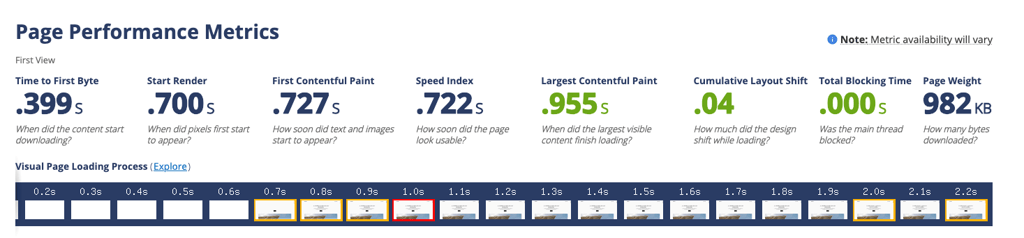
When testing website speed, I focused on the Largest Contentful Paint (LCP), a measure that identifies how fast the page loads. For a site to have a high rank on search engine results, it should be under 2.5s.
Bluehost’s LCP was 0.955s, which is below the 2.5s benchmark.
During testing, Cloudways also demonstrated good results. Its LCP was 1.347s. However, it was lower compared to Bluehost's result.
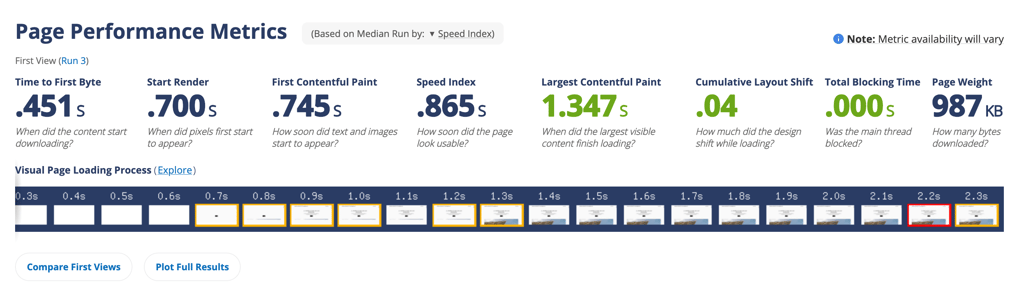
While both of the providers demonstrated great speed results in my tests, it’s worth mentioning that results may vary depending on the locations of your server and target audience. So keep in mind that choosing a server closest to your audience for optimal load time is important.
Cloudways has 65+ server locations in America, Europe, Australia, and Asia. On the other hand, Bluehost doesn’t disclose its server location.
Stress testing results
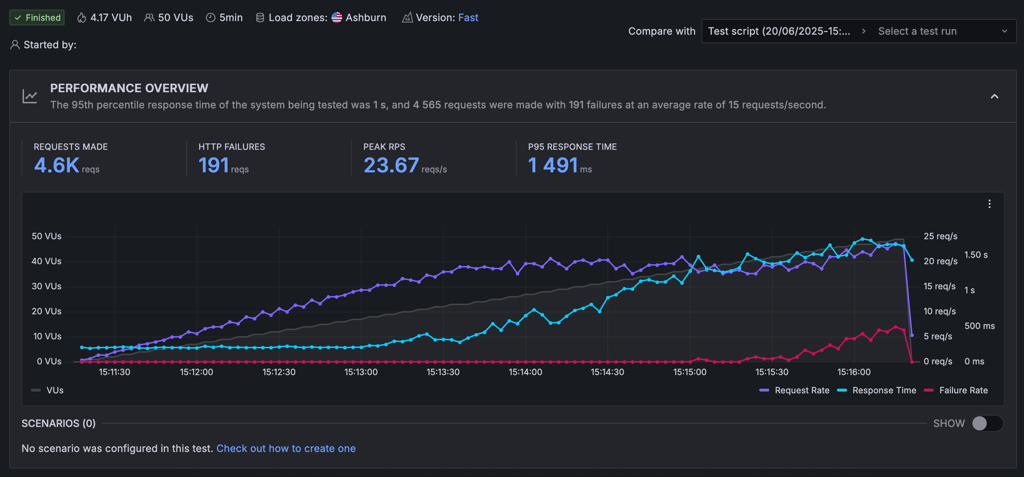
To see how well they handle intense traffic surges, we sent 50 virtual users (equal to 50,000 monthly visitors) to each provider’s website. Ideally, the blue line (speed) should stay flat and stable as the purple line (number of visitors) increases. The red line (failures) should always remain at zero.
Cloudways passed the test without any issues. Its response time remained almost perfectly flat without any signs of failure.

Bluehost performed worse than Cloudways. With the number of visitors increasing, the speed line started curving. While the system was able to maintain performance under a moderate load, once the request rate increased, it resulted in a failure.
Therefore, Bluehost is only capable of handling moderate traffic, but is not suitable for heavier traffic.

Hosting features and ease of use: Bluehost is more user-friendly
VPS management is more complex compared to other hosting solutions like shared hosting. So, you might need some technical skills to manage your site. However, both Bluehost and Cloudways put effort into making their dashboards accessible to users of various levels.
It’s noteworthy that each of the providers have their unique approach to control panels. Bluehost uses its custom dashboard for account management and WHM (Web Hosting Manager) as a control panel. Meanwhile, Cloudways exclusively uses its own in-house developed panel for both.
Account management dashboard
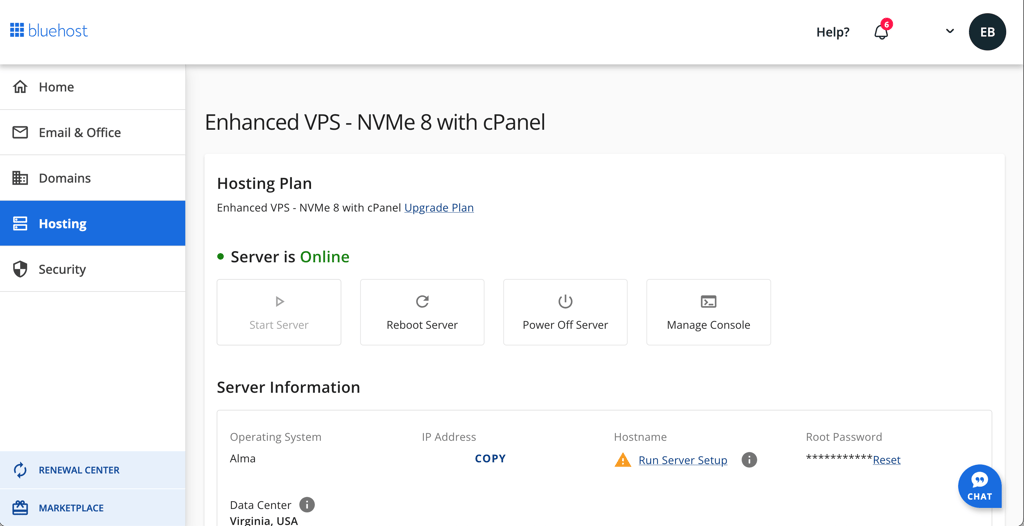
For account management, Bluehost uses its custom dashboard. It is easy to navigate, and, I think, even less experienced users won’t have difficulties.
The account management dashboard gives you access to domains, security settings, and subscription renewals.
In contrast, Cloudways uses its own panel to manage the servers and applications. The panel is clean and organized. Since it uses its proprietary dashboard as management and control panel, it has quite a few options on the side menu. Despite that, it wasn’t difficult to locate the section where I could manage my account.
Control panel comparison
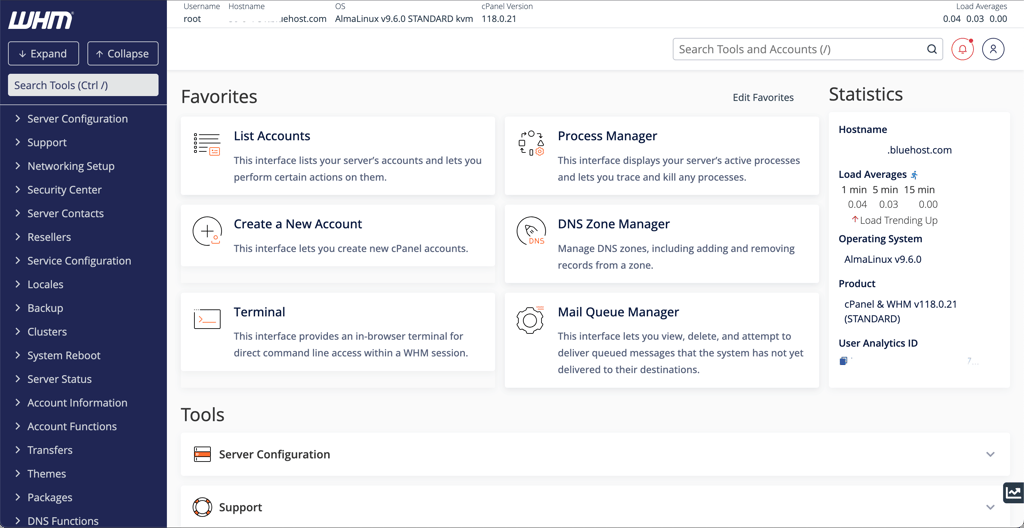
For a control panel, Bluehost uses Web Hosting Manager. If you haven’t dealt with web hosting before, the dashboard can seem overwhelming at first. However, you can see that despite the scary appearance, the dashboard is user-friendly. The menu items come with short descriptions that are very helpful while learning a new dashboard.
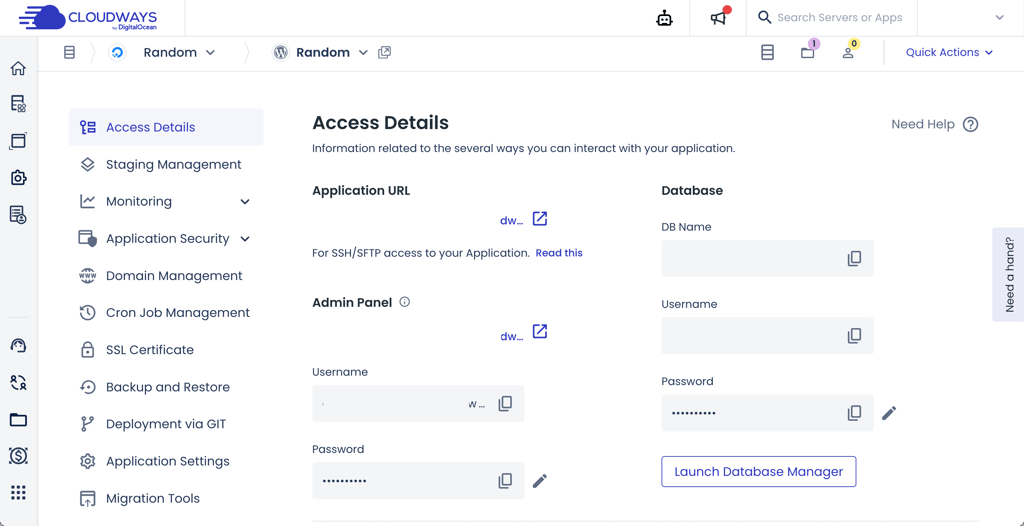
In comparison, Cloudways uses its own developed control panel. The panel is clean, functional, and easy to navigate. So, setting up the website and installing SSL certificates won’t cause you any difficulties.

On the right side menu, you can find everything from account management to adding applications. The WordPress is already pre-installed under the Applications, which makes the setup quick and easy. Due to its straightforward interface, Cloudways is a good choice for less experienced users. It takes less time to familiarize yourself with this dashboard than Bluehost’s WHM.
WordPress features comparison
Bluehost and Cloudways generally offer similar WordPress features. Both include automated backups, free migration, website staging, free SSL, and firewalls. The main difference between the providers is that Bluehost includes a website builder and AI site creation tools, while Cloudways doesn’t.
Here’s how both of the providers compare in terms of WordPress features:
- WordPress migration. Both Cloudways and Bluehost include free WordPress migration for 1 website.
- Website builder. Bluehost is better equipped to accommodate more versatile needs of its users. It not only provides hosting but also includes a website builder, making it a good affordable all-in-all solution. In contrast, Cloudways doesn’t offer such elaborate service and mainly focuses on hosting.
- AI tools. Another standout feature of Bluehost in comparison to Cloudways, is its AI tools. Bluehost’s AI Site Creation tools serve well for beginners, assisting with website building.
Cloudways and Bluehost security: Cloudways is more secure
In terms of security, Cloudways offers more advanced features compared to Bluehost. Also, you don’t need to pay extra as they are included in all Cloudways plans. Bluehost includes rather basic security into its plans and advanced features come with extra cost.
Here’s what you get from Cloudways and Bluehost:
- SSL certificates. Both Cloudways and Bluehost include free SSL certificates in all their plans.
- DDoS protection. Much as Cloudways, Bluehost provides protection against DDoS. However, Cloudways uses a Cloudflare Enterprise add-on, which prioritizes routing for enterprise-grade mitigation of DDoS attacks in under 3s, against layers 3,4, and 7.
- Firewalls. Bluehost uses IP Tables on its VPS plans and if you want an easier solution, Bluehost offers a firewall as an add-on for additional cost. In contrast, Cloudways includes 2 types of firewalls in its plans: dedicated and web application firewall.
- Backups. Bluehost gives you regular offsite backups while Cloudways offers automated backups. So, you can rest assured that both providers focus on protecting your data against loss and corruption.
Additionally some features are exclusive to Cloudways. It also includes IP whitelisting and application isolation for more control over the security of your websites.
Customer support: Cloudways is more helpful
Cloudways and Bluehost provide their users with a range of support options. Cloudways offers assistance via 24/7 live chat, phone line, email, Slack, and knowledge base. Meanwhile, Bluehost offers slightly fewer options.
| Bluehost | Cloudways | |
| 24/7 live chat | ✅ Yes | ✅ Yes |
| Phone line | ✅ Yes | ✅ Yes |
| ❌ No | ✅ Yes | |
| Knowledge base | ✅ Yes | ✅ Yes |
Cloudways’ main support options are 24/7 live chat and online ticketing. However, additional options are available with advance or premium support add-on, allowing you to connect with support via Slack and phone. Besides these options, Cloudways has an extensive knowledge base and a community forum.
Cloudways’ live chat is the fastest way to get support. However, to chat with a human agent, first you need to chat with a bot. This could be somewhat annoying if you want an immediate fix for your issues. Unfortunately, regarding more technical issues, the experience could be improved.
In contrast, Bluehost is more limited when it comes to customer support solutions. But it’s not a big shortcoming, as it only lacks email support. However, its live chat support is average. Agents’ communication didn’t feel professional and the answers were vague. Which, in turn, made me resort to the knowledge base and browsing to find answers I needed.
Both providers offer similar customer support solutions. You can connect to either one’s live chat and get assistance from bots or human agents, depending on the severity of your issue. Yet, both Bluehost and Cloudways could improve the communication and efficiency of their agents.
Cloudways vs Bluehost: final recommendations
To sum up, in this Cloudways vs Bluehost comparison, both providers were worthy of each other's competition. However, Bluehost did slightly better and is a winner of this comparison.
Bluehost offers better value for your money and ease of use. It stands out with its generous VPS hosting plans, user-friendly control panel, and fast speeds. However, it's not suitable for heavy traffic and has average customer support.
I recommend choosing Cloudways if you’re looking for a provider that can easily handle heavy traffic and well-rounded customer support. While its premium plans are more expensive, it’s worth consideration for those who plan to host sites with high numbers of monthly visitors and appreciate advanced security.
FAQ
What is the maximum storage for Bluehost?
Bluehost’s storage options depend on the selected plan. It varies between 100GB NVMe to 450GB NVMe storage for its VPS hosting plans.
Which is better for WordPress, Cloudways or Bluehost?
Bluehost is a better opinion for WordPress hosting for users that have little experience and look for budget-friendly options. It includes useful features like AI site creation tools, SEO, and marketing tools.