I tested Cloudways: my genuine review for 2026
Our in-house experts conduct internal independent, hands-on testing and transparent reviews of web hosting providers by using custom-built tools or utilizing industry-recognized tools and methods to ensure impartial and evidence-based assessments.
Using the same criteria for all services, we share our detailed methodologies and practices to help customers make informed hosting decisions.
Learn more

Cloudways is a managed cloud hosting platform designed to simplify the whole process of running websites. It handles all the technical aspects of hosting, including server setup, security, and performance optimization, so you can focus on growing your business rather than the technical aspects. All the server-side work — security patches, caching, server configuration — is managed for you.
For this Cloudways review, I spent a month with Cloudways to see how it performs in real life. Below, you’ll find a summary of my findings including setup, server speed, uptime, security tools and support, so you can decide if it’s the right fit for you.

Cloudways review 2026: my verdict
Cloudways is a scalable managed cloud hosting service that delivers fast performance and high uptime without requiring deep technical skills. It’s ideal for small businesses, growing sites, and basically anyone who wants cloud infrastructure with a simple dashboard and useful management tools.
However, it costs more than basic web hosting and doesn’t include a free domain or email hosting. Plus, its security features aren’t too impressive compared to other options on the market.
✅ Choose Cloudways if you need performance and flexibility
❌ Skip Cloudways if you want the cheapest, all-in-one hosting setup
| ⭐ Rating: | |
| 💵 Price: | From $6.60/month |
| 📑 Uptime guarantee: | 99.99% |
| ⚙️ Hosting types: | Managed cloud hosting |
| 🌎 Server locations: | Depends on cloud hosting plan |
| 👨💻 24/7 live support: | Yes |
| 🔥 Coupons: | Cloudways coupon 40% OFF! |
Pros and cons of Cloudways




Our in-house research team and expert writers work hand in hand to regularly test hosting services and provide accurate and fact-checked information. Discover the ins and outs of how we test and evaluate website hosting providers.
Cloudways pricing
Cloudways offered plans start at $6.60/month and can go as high as thousands of dollars a month. While it's a huge gap, it can be explained by the different amounts of disk space, bandwidth, CPU, and RAM each service provider includes.
Each hosting solution has its own pricing but the base features in the basic plans are the same – SSLs are free, unlimited daily backups, and you can host unlimited websites or apps.
| Server providers | Data centers | Specifications | Price |
| DigitalOcean | 8 locations | 1 Core Processor, 1GB RAM, 25GB SSD, 1TB bandwidth. | $6.60/month |
| Google Cloud | 18 locations | 1vCPU Processor, 3.75GB RAM, 20GB SSD, 2GB bandwidth. | $63.09/month |
| AWS | 20 locations | 1vCPU Processor, 2GB RAM, 20GB SSD, 2GB bandwidth. | $15.42/month |
As you can see, the main difference is the server location, but the base resources are quite similar for each provider. Also, features like basic security measures, customer service, or unlimited application installation are included in all plans no matter the provider.
Now the main question is, what is the difference between the original providers’ price and Cloudways? The same base resources with DigitalOcean would be noticeably cheaper than with Cloudways. However, the higher cost comes from added convenience – Cloudways sets up and deploys the server for you. You also get a control panel with numerous useful tools. So in my opinion, it looks like a good option so far.
Talking about premium solutions, the Google Cloud Platform and AWS tend to be even pricier, so if you wish to find something similar for less, check out our lists of AWS alternatives and the best cheap hosting providers.
Now when you make the purchase, you get to choose a server provider, the server’s location, and your server size. No extra stuff in your cart, just the price you see at the bottom.
If you need a little bit more power for a couple of days, you can scale up for that period. Once you don’t need the additional resources, you can go back to the regular plan. At the end of the month, you’ll be charged for what you’ve used – extra resources will only be added for the time that you’ve used them.
Now that we are on this topic, I think that such billing is super budget-friendly.
- You don’t need to pre-pay – no huge stress on your bank account initially
- You always know what you’re paying for
- If a busy period comes, you can instantly increase your server resources and decrease them just as quickly after
More so, Cloudways offers a 3-day free trial that does not require credit card details. It's a convenient and risk-free way to test if the provider meets your expectations.
Honestly, the pricing department is the strength of Cloudways. They do charge more for added simplicity, but the billing system and the possibility to scale up and down whenever is super convenient. Not to mention the free 3-day trial.
Hosting management – Is Cloudways easy to use?
Cloudways hosting uses its own in-house developed panel to manage the servers/applications. The panel itself is clean and comprehensive. Plus, the setting up of the website and installation of SSL certificates is beyond easy. The only thing that may be a little tricky – especially for beginners – is pointing your domain to the server.
What does the Cloudways control panel look like?
Once you are done with verification, this is what the main dashboard looks like:
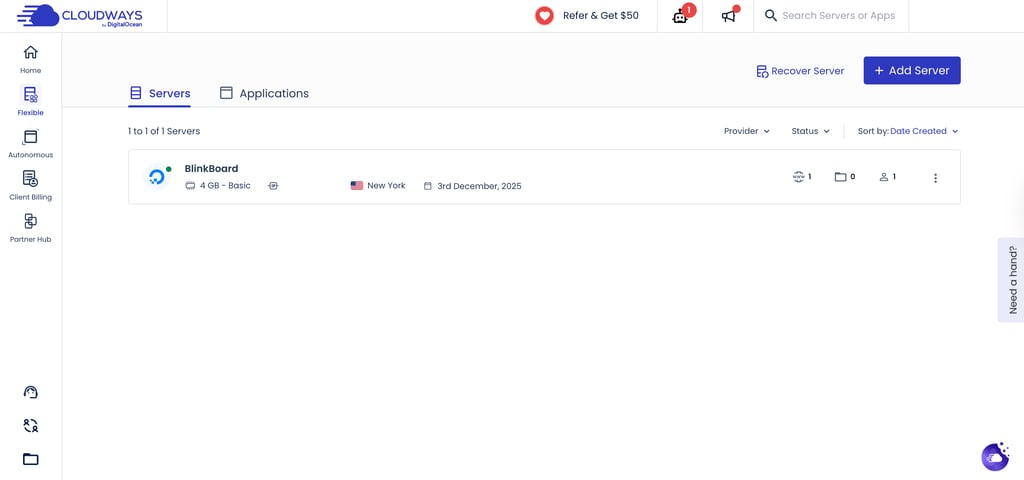
You do have to wait a few minutes for your server to be added. In my case, I waited around 7-8 minutes.
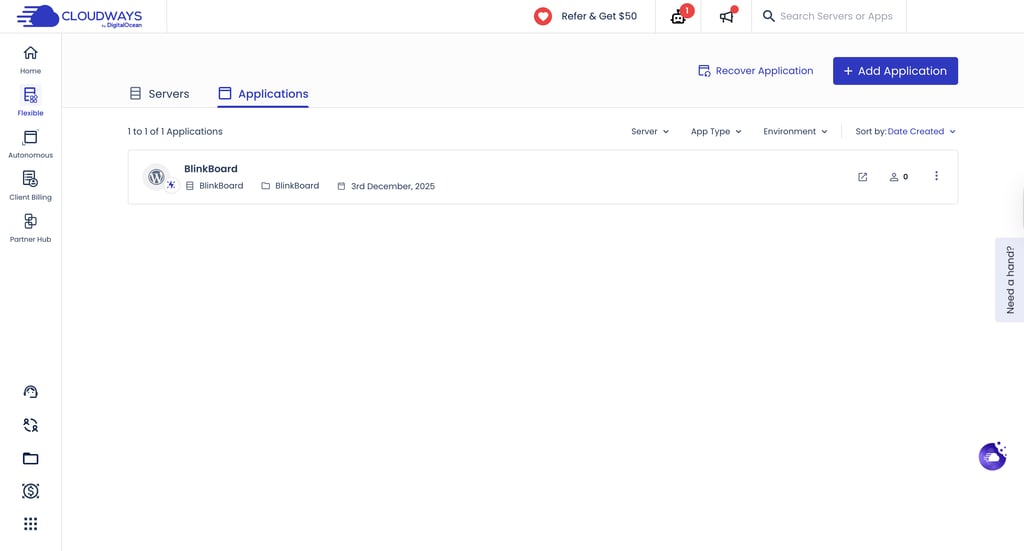
But this is one of the interfaces you’ll be working with. And it’s straightforward. There’s a flick at the top where you can see either your server(s) or applications.
I can even see WordPress pre-installed for me in the Applications window, as I have selected it during the purchase.
But you might want to have more than one site, and there are other steps involved in setting up a professional website. So let’s quickly go through installing an app, setting up a domain name, installing SSL, and creating a professional email account.
How to install WordPress on Cloudways?
While not strictly one-click, the process of installing a new application like WordPress is one that you can do even while being blindfolded.
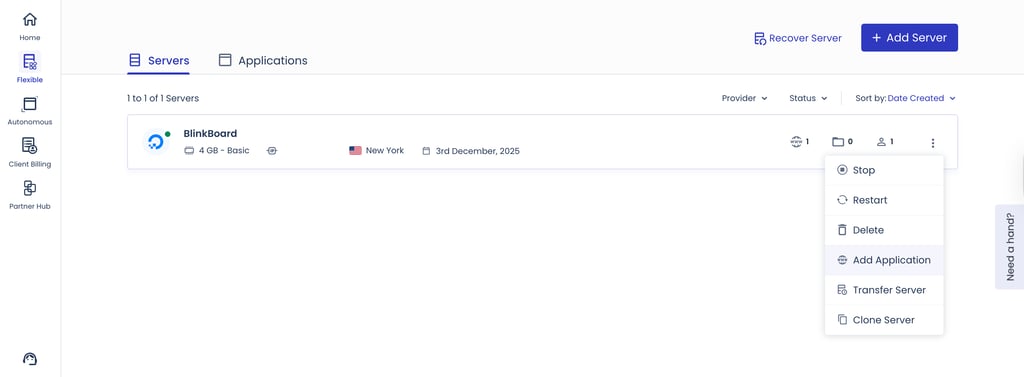
You can select WordPress right when creating a new server, or add it later by clicking the three dots next to your server and choosing Add Application. From there, Cloudways lets you choose between two WordPress options — the optimized build for better performance, or the basic installation if you prefer a simpler setup. Once selected, Cloudways handles the deployment automatically, and your WordPress site is ready to configure within minutes.
The list of applications is quite limited – WordPress, Optimized WordPress, Basic WordPress, WordPress+WooCommerce, WooCommerce, Magento, Laravel, and “custom PHP app.” The last one means that you can install any PHP-based app, but you’ll have to do that manually. For me, it looks like an unfinished tool as other hosting providers are capable of offering hundreds of apps automatically.
Thankfully, WordPress is there, and it is the primary choice for many users.
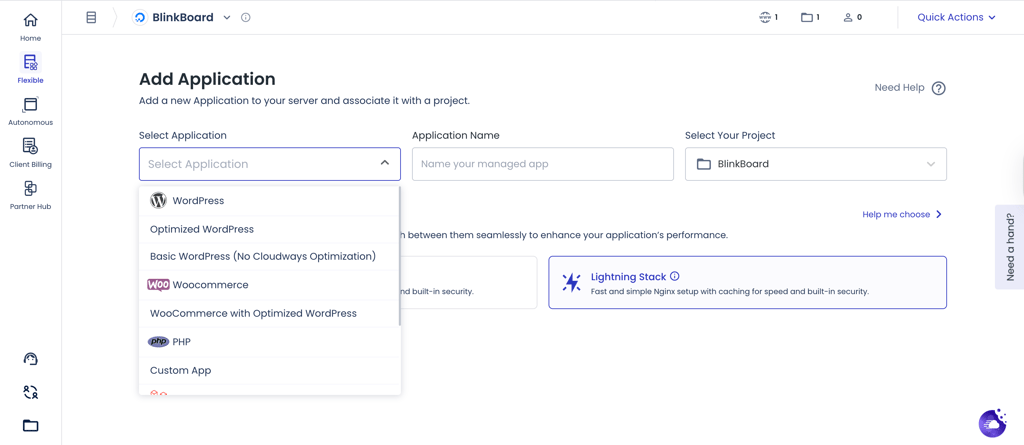
In any case, just choose the wanted application from the list and it will be installed and will appear in the “Applications” section.
Cloudways WordPress features
If you’re a WordPress user, Cloudways has something for you too. Here’s an overview of its’ WordPress features:
-
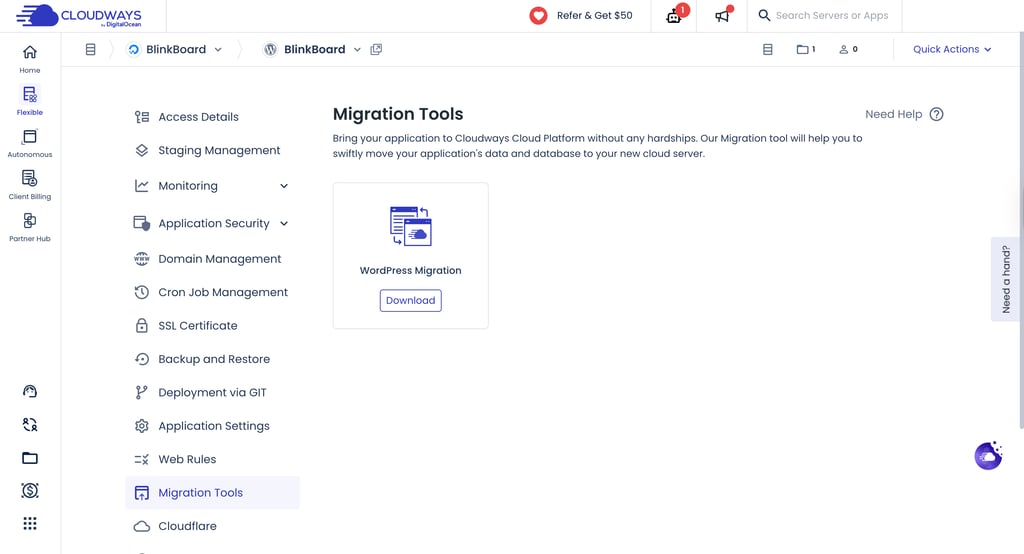
Migration tool. Easily transfer your WordPress site and database from your current host to Cloudways without any technical hassle.
-
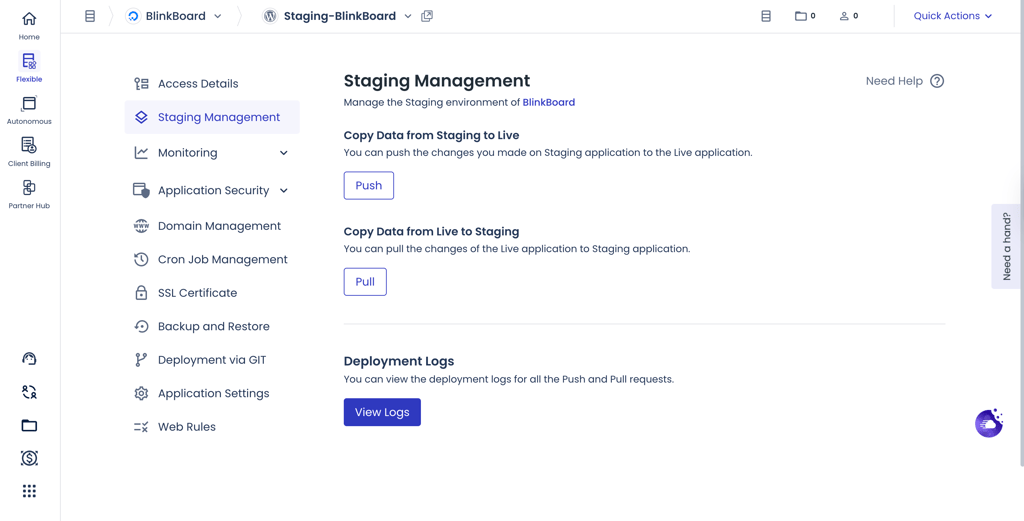
Staging URLs. Create staging environments to test updates, redesigns, or plugins before pushing them to your live site.
- Automatic updates. Keeps your WordPress core, themes, and plugins up to date to improve security and compatibility.
-
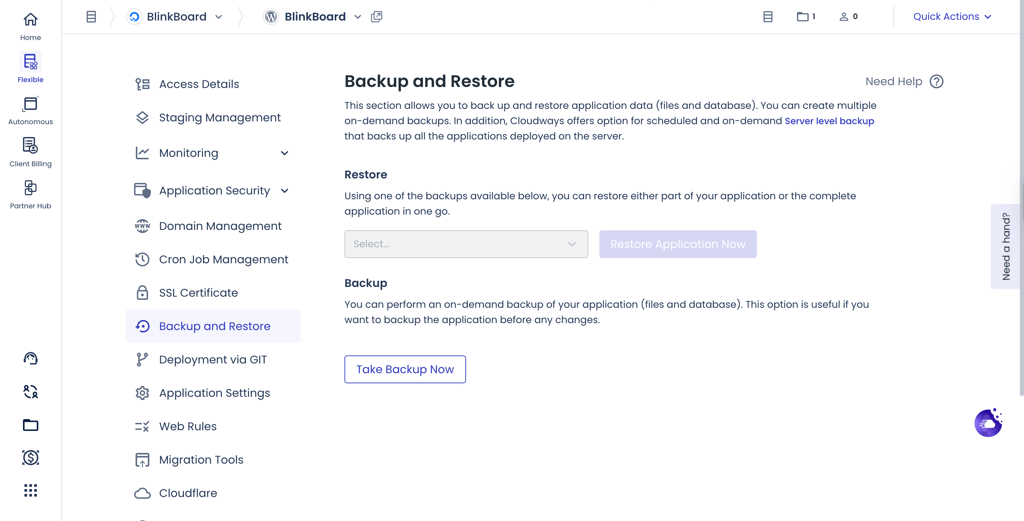
Backup and restore. Make on-demand backups of files and databases, plus schedule automatic server-level backups covering all applications.
- WP-CLI Support. Access the WordPress command-line interface for faster, more advanced site management.
Performance – is Cloudways fast?
I can confidently say that Cloudways has great performance, especially considering the price that you pay. It aced all the tests I’ve put it through – reliability, speed, and stress. The provider's stability, speed, and ability to handle traffic spikes are exactly what you'd expect cloud hosting to deliver. For my tests, I was using the cheapest DigitalOcean server.
Server locations
Cloudways has great global coverage with over 65 locations to choose from. So you’re sure to find a server that fits your needs best. Here’s a quick rundown:
- Americas – Atlanta, California, Chicago, Dallas, Fremont, Iowa, Las Vegas, Los Angeles, Mexico City, Miami, Montreal, North Virginia, New York, Newark, Ohio, Oregon, Paris, South Carolina, San Francisco, Sao Paolo, Seattle, Silicon Valley, Toronto, Santiago.
- Europe – the Netherlands, Belgium, Finland, Germany, Ireland, Italy, Sweden, Switzerland, Poland, Spain.
- Asia – Bahrain, India, Hong Kong, South Korea, Singapore, China, Japan, Israel, Indonesia
- Australia – Sydney.
This is a great selection, with servers in almost every part of the world.
Cloudways uptime and response time
Cloudways delivers impressive reliability, with uptime hitting a flawless 100%, ensuring that websites hosted on the platform remain accessible at all times. Reachability was also excellent, at 99.93%, meaning nearly every connection attempt succeeded, and minor drops were too brief to impact real-world usage.
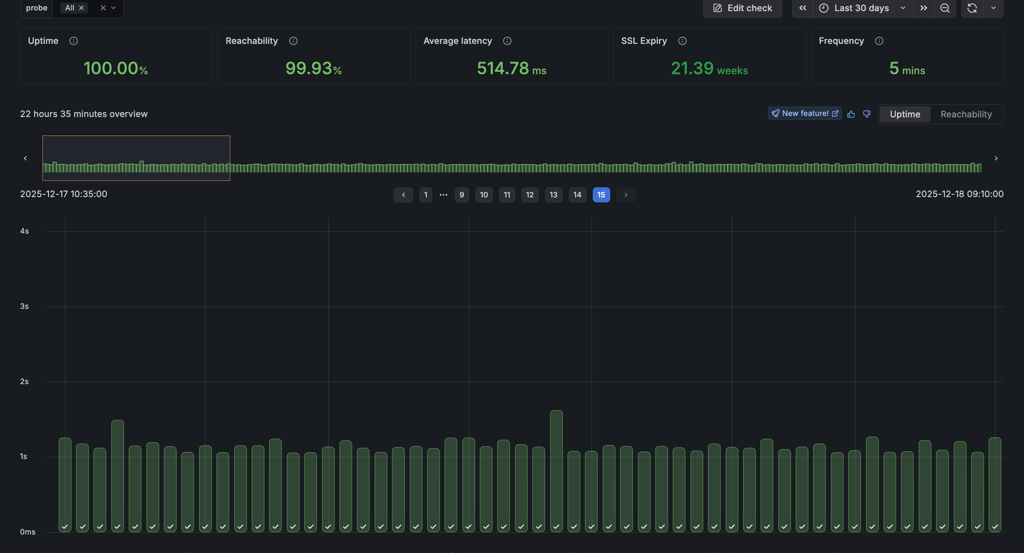
Response times averaged around 515 ms, showing stable and predictable performance. While not the absolute fastest in the market, these response times are more than adequate for most websites, supporting smooth browsing, moderate traffic spikes, and standard web applications without noticeable delays.
Cloudways speed
When talking about speed, Cloudways demonstrated very, and I mean very good results. When tested from the US, where my server resides, the site loaded in 0.461s (Largest Contentful Paint). That’s a pretty good result.Based on Google’s recommendations of keeping sites LCP lower than 2.5s, this site is doing beyond okay.

For the same price range, you usually get 0.5s or 0.6s at best with performance-focused shared hosting providers. This shows that virtual private servers can beat shared hosting any day of the week.
When I installed my regular demo website content and ran GTmetrix again, Cloudways kept on impressing me further. Even though LCP increased to 598ms, the Fully Loaded Time is just 0.8s. For best user experience, this time should be under 3 seconds. Cloudways barely needed a 1/3 of that.
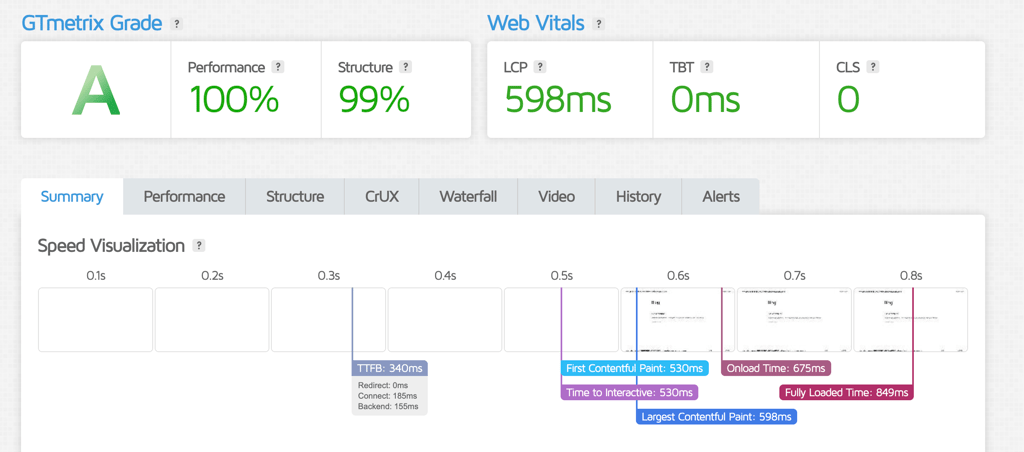
Realistically speaking, if your site is on the smaller end, you could get quite similar results with shared hosting plans. An example of that could be Hostinger, which offers a plan for as low as $2.24/month. So why would I pay $11 for Cloudways to offer something only slightly better?
But the reason behind this is actually way more logical than you’d think. Cloudways simply does not have as many tools built-in to optimize websites. Meanwhile, Hostinger adds a bunch of stuff to spin them faster. So Cloudways is a fast hosting by default and you can make it even faster by turning on the caching and activating other speed optimization features. Just imagine the speed then...
Cloudways stress testing
To test how well Cloudways can handle surges in traffic, I sent 50 virtual visitors to the testing site. My website, hosted on Cloudways, handled it pretty well.
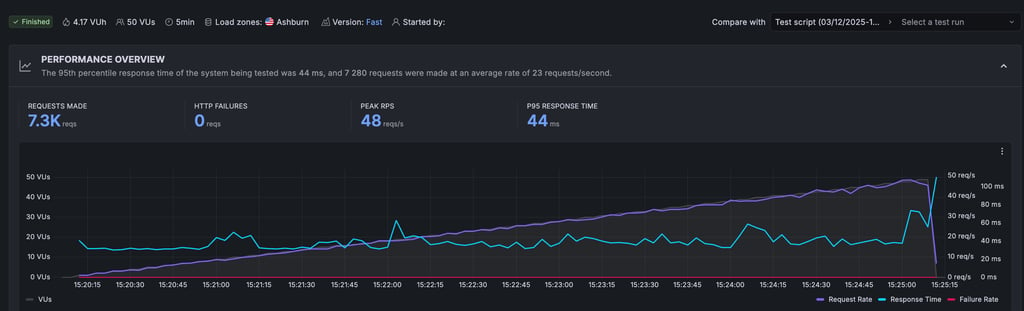
Throughout the 5-minute test, the server successfully processed 7,280 requests with zero HTTP failures. That means no crashes and no timeouts for your visitors – perfect when traffic spikes suddenly.
All in all, Cloudways’ performance is as stable and fast as you would expect from the VPS server. It is very fast by default and with few additional tools can be made even faster.
What makes Cloudways fast?
One of the main reasons that make Cloudways fast is that they use VPS from top providers in the industry. But that’s just part of the story, and it is possible to make Cloudways even faster.
- One immediate VPS advantage over shared hosting is that you get dedicated resources. Using advanced virtualization processes, the server is cut into virtual pieces. It’s like getting a dedicated server, but much cheaper. This maximizes the potential and performance of your server.
- As Cloudways uses the servers from different providers, you get to make a choice on where you’d like your server to be located. Each provider has at least 8 locations all across the globe so you can get as close to your visitors as possible.
- Together with server location choice, you can also opt-in for Content Delivery Network services. If your visitors are scattered across the globe, CDN will cache your website’s content across different servers around the world. Cloudways CDN costs $1 per 25GB.
- The company offers Breeze – a free in-house caching plugin. This plugin is developed to optimize WordPress websites. It is pre-configured on your WordPress website and is activated automatically on your WordPress. Alongside standard caching, you can also configure it to minify and group files to reduce file size.
Altogether, Cloudways' performance is top-notch. Well, that’s mostly thanks to the providers that Cloudways is partnering with. Nonetheless, you’ll get exceptional reliability and speed for your website.
Security – is Cloudways secure?
When it comes to security, Cloudways isn’t the most bulletproof provider. Although it does come with some extremely practical security features like SSL certificates, firewalls, automatic backups, two-factor authentication, and bot protection.
- SSL certificates. Every one of Cloudways’ plans comes with a free Let’s Encrypt SSL certificate and a Let’s Encrypt Wildcard SSL certificate. Firewall. All of Cloudways’ servers are protected by OS-level firewalls, which filter out malicious traffic and keep out intruders.
- Bot protection. Bot protection aims to identify and block all suspicious or malicious traffic like Brute Force, Dictionary attacks, and DDoS to the site and even helps reduce server resource usage.
- Automatic backups. Cloudways performs automatic backups at no extra charge. Plus, on-demand backups are available, too.
- Two-factor authentication. Two-factor authentication is crucial for your website's security – it guarantees that whoever is trying to access your site will be met with an additional layer of authentication.
All things considered, Cloudways does seem to take security seriously. It offers quite a range of security options to protect the website against the most common threats. Just don’t expect anything too fancy.
Will Cloudways customer support help me?
Cloudways offers several support options, the main ones being 24/7 live chat and online ticketing. If you have an advanced or premium support add-on, you can also contact it through the 24/7 Slack channel and phone. Besides that, Cloudways also has a rich knowledge base and a community forum.
| 24/7 live chat | ✅ Yes |
| ✅ Yes | |
| Phone line | ❌ No |
| Priority support (paid) | ✅ Yes |
| Knowledge base | ✅ Yes |
You can quite easily get in touch with customer support by clicking on the “Need a Hand?” box on the right of any page in your control panel. However, before you can chat with a human customer support agent, you will first need to chat with a bot. When you want/need to immediately fix your issues, this is a tad bit annoying. But oh well. Welcome to the future!
In fact, if the chatbot has the option “Guide Me,” and with that you can even get instructions on how to perform a certain task right on the live chat window.

Helpful? Yes, for simple tasks it can be more efficient than scrolling through a vast knowledge base.
But I had more questions and desperately wanted to talk to some real people. After seeing a ton of Cloudways reviews that say how AMAZING the support is, I wanted to experience it firsthand.
And my experience was bittersweet.
The agent joined in a couple of minutes, which is great. To begin with, the interaction went amazingly well. We got through some pleasantries, and I got an answer to a simple question about SSLs. Then I wanted to know more about vertical scaling.

I got a very vague answer, something about cloning. I asked for more details.
The agent took their time and provided me with an elaborate answer. Well, they are not writers, so I won’t judge coherency there. So I decided to dig deeper. And bumped my head into a wall.

After asking a billing-related question that I thought was easy, the agent did not answer. They just suggested that I transfer to the billing department.
So it’s bittersweet. I kind of got my initial questions answered, although it did feel like I was bothering the agent. Then they took the first opportunity to get rid of me. The agent was polite and all that. But it definitely isn’t the experience described in all those Cloudways reviews. Which makes me question if they are legit.
Anyway, you’ll get help from Cloudways, but don’t expect it to be this super-friendly-amazing experience where they do all the stuff for you. Uh-uh, for that, go to Hostinger.
By the way, live chat or tickets are not the only options. You can also use the knowledge base or community forum.

The knowledge base is just great. It covers many topics from getting started to more advanced stuff. Tutorials there are easy to follow.
The community forum has some interesting topics as well, although it’s not super active. I guess, it will get so once more users start using Cloudways.
As a whole, Cloudways’ customer support is okay. Agents are helpful and polite but they won’t go out of their way to help you and more than likely use the first opportunity to say goodbye. However, the knowledge base is seriously good and you’ll find most of your answers there.
Cloudways review – the final verdict
It’s obvious from this Cloudways review that it certainly has a lot to offer. It’s a provider like you’ve never seen before, and it comes with a ton of fun features as well as great server performance. But at the end of the day, it’s not their own servers they are using.
So is this the next generation web hosting we should all use or… It’s not the time for that yet?
| Feature | Easy-to-use and fast managed cloud hosting | |
| Pricing | Cloudways can be both affordable and expensive, which depends on your needs. However, it will be more expensive than simply buying cloud hosting directly from a supplier. But in return, Cloudways will take care of server management, and you’ll get an intuitive interface to work with. Plus a ton of useful features. | |
| Ease of Use | The main product Cloudways is selling is the ease of use for VPS. And it’s the thing it does exceptionally well. The interface is as easy to use as any shared hosting and requires no technical knowledge. | |
| Performance | As Cloudways uses the servers from top industry suppliers, the performance is also of premium quality. However, the provider does not do much beyond that – you’ll have to take care of optimizations yourself. You don’t have to, but that’ll make the site even faster. | |
| Security | Cloudways does offer quite a lot of security measures. It includes a free SSL certificate, server-level firewalls, daily backups, and bot protection that you can set up. Beyond that – it’s your responsibility. | |
| Support | The support department of Cloudways is okay – live chat is quite fast and agents polite. However, they are not too eager to help. Meanwhile, the knowledge base is excellent. |
So, who do I recommend Cloudways to?
Considering the ease of use, it’s a great option for small business owners or popular bloggers that need powerful hosting without the complexity of it. It’s also an amazing option for freelancers and agencies that collaborate with multiple people to design and develop websites.
Cloudways FAQs
How good is Cloudways at troubleshooting errors?
Cloudways is good at troubleshooting. If something goes wrong, 24/7 live chat support is available, and the team generally responds quickly with clear steps to resolve the problem.
What is Cloudways used for?
Cloudways is used for managed cloud hosting. It provides the speed and power of cloud hosting with an easy, beginner-friendly control panel.
How does Cloudways work?
Cloudways works by providing users with the ability to launch applications on different cloud servers immediately and offering in-house tools as well as top-level management.
Which hosting providers’ servers can I use with Cloudways?
You can use these hosting providers’ servers with Cloudways: DigitalOcean, Amazon Web Services, and Google Cloud.
Is Cloudways a reseller?
Not entirely. Cloudways does resell VPS services from the original providers. However, it also offers extra features like an easy-to-use control panel and server operating for you. Therefore, you can buy VPS from the original provider, Cloudways adds useful features.