HostGator vs GoDaddy: is there a clear winner?
Our in-house experts conduct internal independent, hands-on testing and transparent reviews of web hosting providers by using custom-built tools or utilizing industry-recognized tools and methods to ensure impartial and evidence-based assessments.
Using the same criteria for all services, we share our detailed methodologies and practices to help customers make informed hosting decisions.
Learn more

GoDaddy and HostGator — two names you’ve probably come across if you’ve ever looked into websites or hosting. GoDaddy is huge in the domain world, and HostGator has built quite a reputation as a beginner-friendly hosting choice.
In my case, I’ve actually used GoDaddy for one of my personal projects for over a year, so I’ve seen how it holds up beyond the shiny promo offers. With HostGator, I signed up recently just to test it out and see if it really lives up to the hype.
In this HostGator vs GoDaddy comparison, I’m going to walk you through my first-hand experience with both in terms of ease of use, speed, and overall value. I’ll break down where they overlap, where they feel completely different, and most importantly – which provider makes sense depending on your needs. Whether you’re starting a small personal site, a blog, or something more serious, by the end, you’ll know which one is the better fit for you.
HostGator vs GoDaddy 2026: the verdict
HostGator and GoDaddy have a lot in common — they’re both well-known, beginner-friendly, and give you everything you need to get a site online without much hassle. But once you dig a little deeper, some clear differences show up.
- Choose HostGator if you want budget-friendly plans with all the essentials included.
- Choose GoDaddy if you’re a business-focused user who values extra tools and doesn’t mind paying more.
I’ll walk you through both so you can see exactly which one fits your goals best.
| HostGator | GoDaddy hosting | |
| ⭐ Rating: | ||
| 💵 Price: | From $3.75/month | From $4.99/month |
| 📑 Uptime guarantee: | 99.9% | 99.9% |
| 🔥 Coupons: | HostGator coupon 73% OFF | GoDaddy coupon 66% OFF |
| Storage space (from): | 10GB SSD | 25GB SSD |
| ✂️ Free domain (first year): | Yes | Yes |
| 🔒 Free SSL certificate: | Yes | Yes (only 1 year with Economy plan) |
| ➡️ Site migration: | Free HostGator’s Site Migration Tool | Free GoDaddy's automated hosting migration tool |
| 💾 Automated backups: | Yes (daily) | Yes (daily) |
| 📧 Email accounts: | Yes (unlimited accounts) | Free (first 3 months) |
| 👨💻 24/7 live support: | Yes | Yes |
| 💰 Money-back guarantee: | 30-day | 30-day |





Our in-house research team and expert writers work hand in hand to regularly test hosting services and provide accurate and fact-checked information. Discover the ins and outs of how we test and evaluate website hosting providers.
Pricing: HostGator is much cheaper than GoDaddy
HostGator is a cheaper option than GoDaddy, with shared hosting plans starting at $3.75/month and including 10GB of SSD storage and support for 10 websites. Meanwhile, the more expensive GoDaddy’s shared hosting packages start at $4.99/month, with 25GB NVMe storage but only 1 website. GoDaddy’s shared hosting prices go as high as $21.99/month for the most expensive plan, while HostGator stops at $11.70/month for its most inclusive plan.
Let’s compare both providers’ offered hosting types and their starting prices as well:
| Hosting type | HostGator | GoDaddy |
| Shared hosting | ✅ Yes, from $3.75/month | ✅ Yes, from $4.99/month |
| WordPress hosting | ✅ Yes, from $4.50/month | ✅ Yes, from $7.99/month |
| WooCommerce hosting | ❌ No | ✅ Yes, from $24.99/month |
| Cloud hosting | ❌ No | ❌ No |
| VPS hosting | ✅ Yes, from $34.99/month | ✅ Yes, from $8.99/month |
| Dedicated hosting | ✅ Yes, from $141.19/month | ❌ No |
When it comes to pricing, HostGator is generally the cheaper option across most shared hosting plans. What surprised me, though, is that the lower price doesn’t mean you’re getting fewer features — in fact, HostGator plans usually include more, like free SSL certificates and unlimited email accounts from the start.
Conversely, GoDaddy tends to charge more while limiting certain basics, which makes it feel less competitive for everyday users. That said, GoDaddy can sometimes pull ahead in the very short term with aggressive discounts, especially if you just want to test hosting for a year.
Both providers back their plans with a 30‑day money‑back guarantee, but there’s a small catch. HostGator applies it only to shared hosting, and GoDaddy requires you to manually contact support for a refund. In both cases, domain name fees are non‑refundable.
Ease of use: HostGator is more modern and easier to use
Comparing HostGator vs GoDaddy's ease of use, there aren’t many differences. Both providers have custom dashboards for setting up the most important settings. cPanel interfaces are also available for more advanced customizations. Also, both used to include modern and intuitive in-house website builders, but HostGator no longer offers its website builder for new signups.
Ease of use is important, as you want to spend as little time as possible setting up the basics. This allows focusing on the actual website development. Because of this, I decided to compare HostGator vs GoDaddy in terms of their functionality and ease of use first.
Let’s have a look at what I discovered, and see which host guarantees a better user experience.
Account management dashboard
HostGator and GoDaddy both use beginner-friendly default user interfaces. Both providers give access to quite a few management tools from their main dashboards.
To begin with, I've examined HostGator’s user interface. It includes links to a selection of useful tools. You can find SSL management, WordPress installation, and email accounts right there, on your dashboard. Users can also access most other basic tools via the menu on the left of the screen. More so, a quick cPanel link is provided for more advanced management.
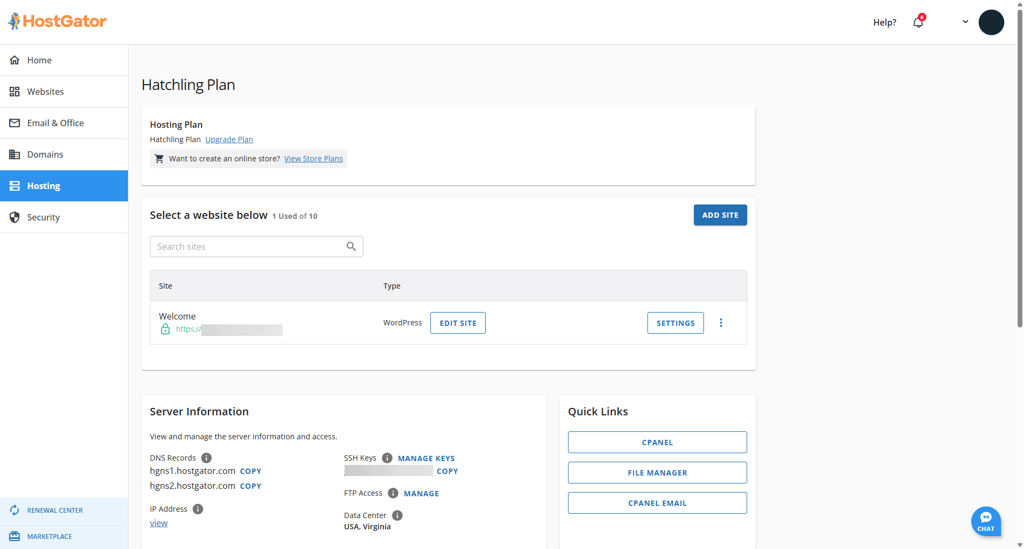
This user dashboard allows you to quickly set up the key things for your website – install WordPress, create a professional email, and secure everything with an SSL.
In saying that, GoDaddy’s user interface is just as impressive. It’s set up a little differently, and the main dashboard lists the products and services you’ve signed up for.
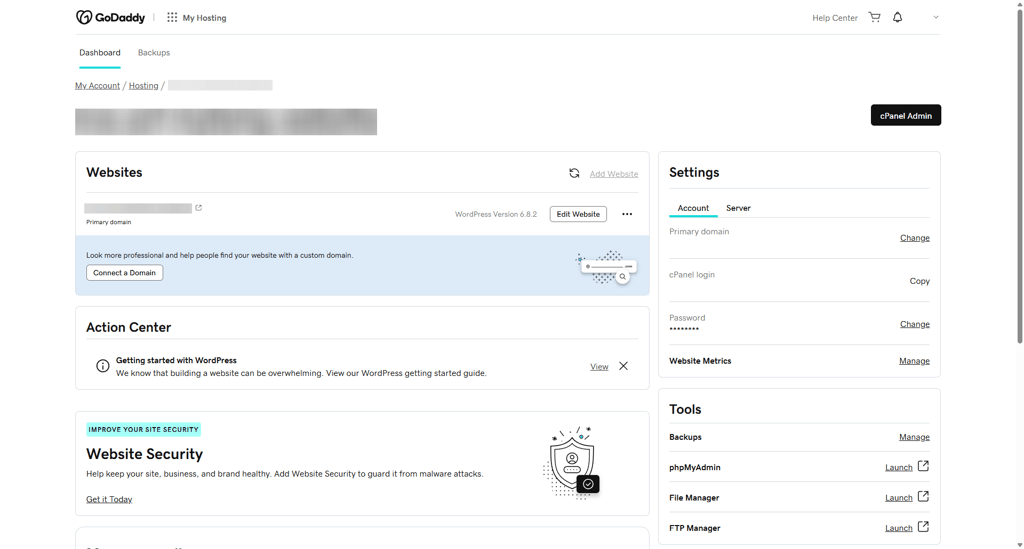
From here, you can easily set up your whole website, too. The first time you log in to your account, GoDaddy will make sure that you install WordPress and have a working domain. After that, it works as the hub to navigate your account.
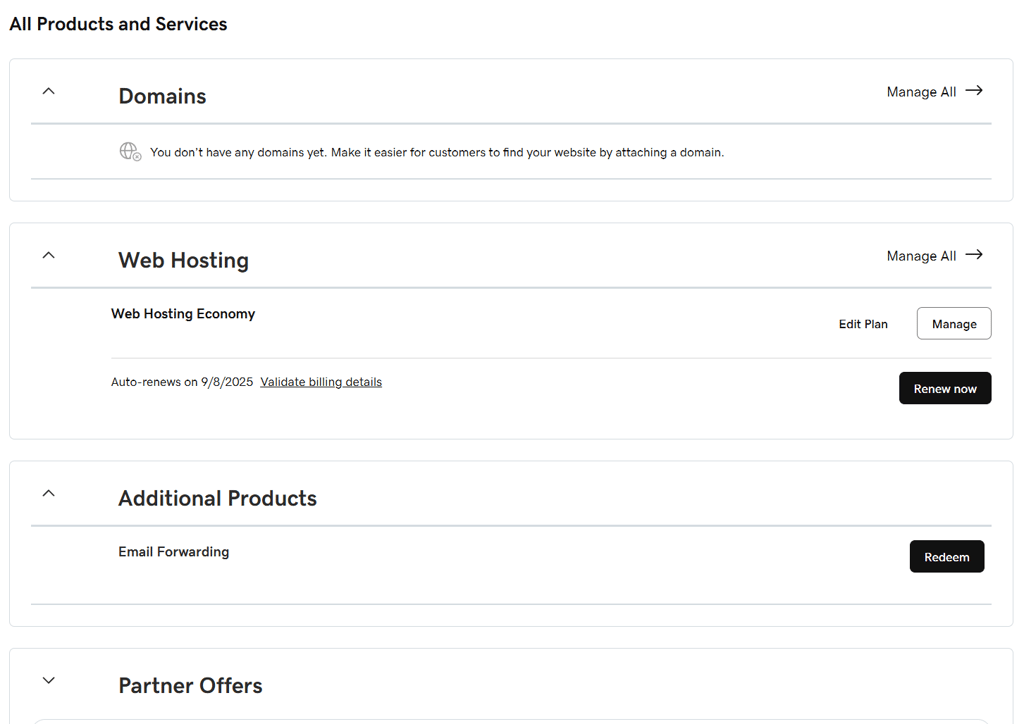
Let's say, you wanted to manage your hosting package and websites. Simply click on the Manage button on the Web Hosting tab. It will open a new interface.
Once there, you get to manage your files and PHP settings and view server and account information. Also, this is where you'll get the cPanel login button.
All in all, both hosts offer very intuitive and easy-to-use user dashboards. GoDaddy requires some more clicking around, but it really comes down to a personal preference rather than a difference in functionality when choosing between the two.
Let’s see if their control panels prove to be a significant point of difference.
Control panel comparison
Both HostGator and GoDaddy rely on the classic cPanel, and these days they look almost identical. HostGator used to experiment with slight customizations, but now its cPanel is back to the standard version with the usual color scheme. In practice, there’s virtually no difference between the two — if you know how to use one, you’ll feel right at home with the other.
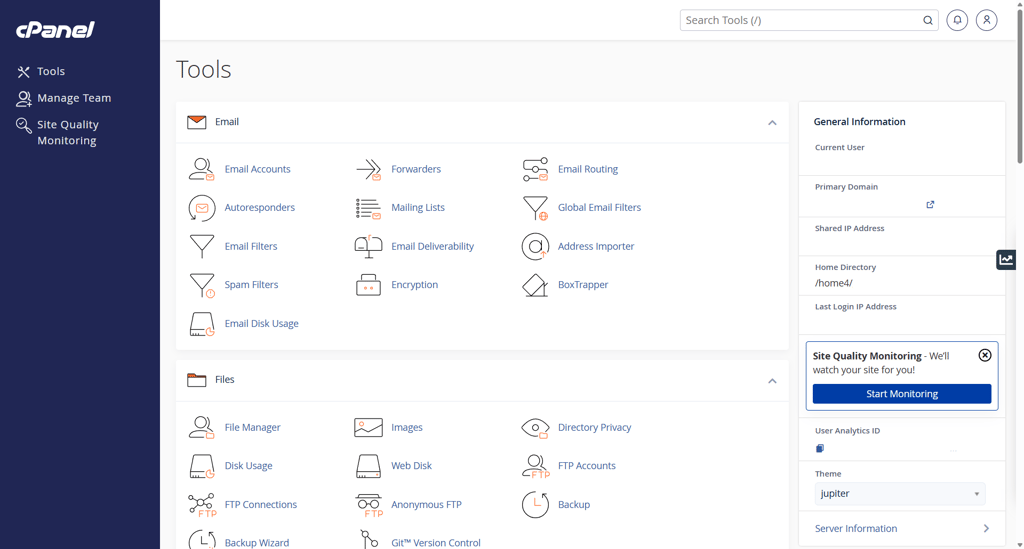
GoDaddy’s cPanel is quite the same. All the necessary tools are available, including a file manager, email, and domain management. Just like with HostGator, you can also monitor basic server information via the panel on the left of the screen.
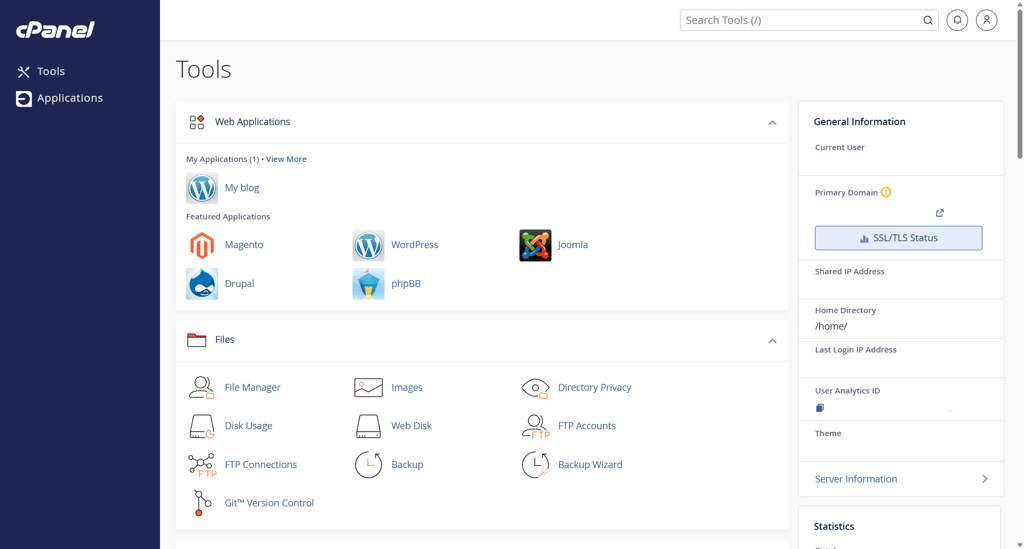
Overall, HostGator's and GoDaddy’s cPanels are very easy to use and navigate. It's handy if you'd like to install any other content management system other than WordPress or set up and manage your email accounts.
Website migration
When it comes to website transferring, both HostGator and GoDaddy offer website migration. But one makes it a little easier than the other. If you’re a first-time user, you can expect HostGator to migrate your website free of charge. With GoDaddy, this service should be paid for.
Talking about HostGator, it makes the migration process pretty easy. You can find the link to the migration form right there in your main dashboard by clicking the Request Migration under the Quick Links section.
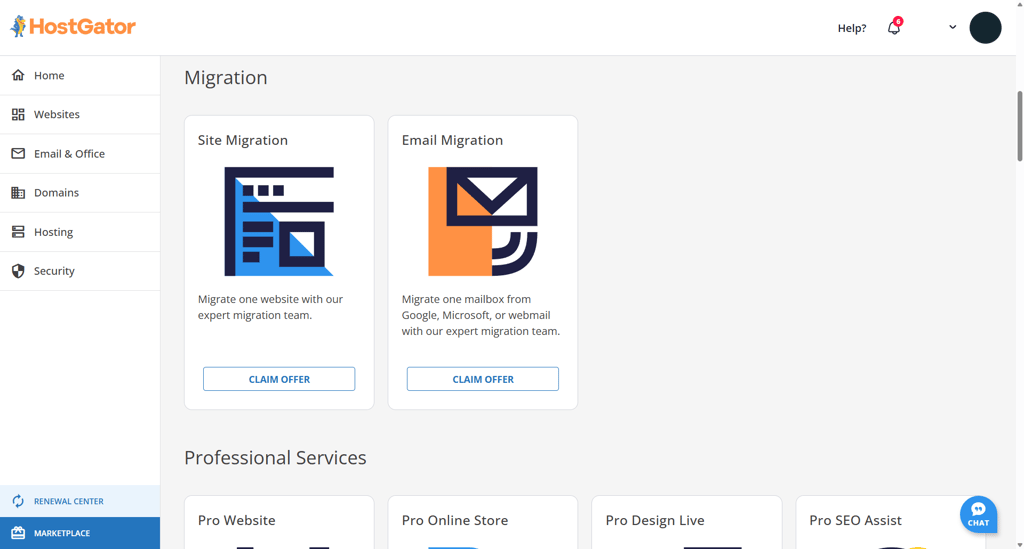
All you have to do is fill out a form, and you’re good to go. HostGator can take care of WordPress migrations for you.
Now, looking at GoDaddy, it is a little trickier. GoDaddy doesn’t have an option for you just to fill out a form, as you’d do with HostGator.
As the provider is not very vocal about its website migration requirements, you will have to contact customer support to get the specifics. The agent will introduce you to rules and regulations, as well as the fee (around $99.00 or more, depending on the complexity) that awaits the migration.
In short, both hosting services offer website migration. HostGator just does it for free, while GoDaddy's service is paid.
Performance: HostGator outperforms GoDaddy in stress testing
In terms of performance, the GoDaddy vs HostGator battle was quite neck-to-neck. Both providers are highly reliable and have demonstrated very fast site load times. The biggest difference was in the response times, with HostGator being at 112.04ms, while GoDaddy’s was 166.80ms.
I got these results by building a basic website with both providers and running tests over a two-month-long period, continually monitoring the results.
Uptime and response time
As you can see, HostGator’s uptime is as close as it gets to perfect. My server was online across the entire two months for an impressive 100% uptime. HostGator does provide a 99.9% uptime guarantee, but you shouldn’t have to worry about it getting this low.
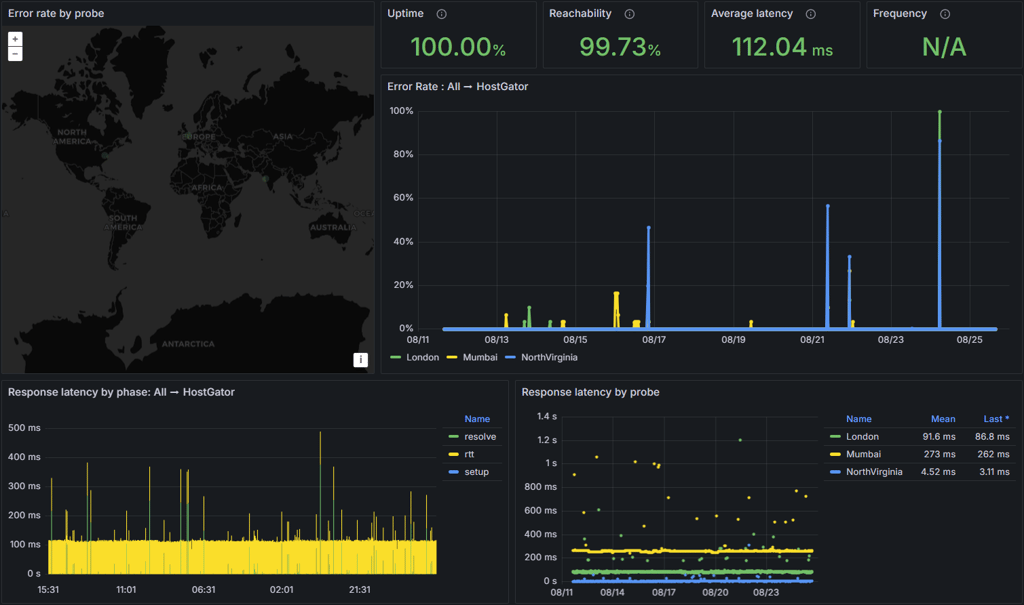
HostGator’s 112.04ms average response time is certainly on the lower side, which is much better than the 525ms it showed in my older tests.
On the other side of the equation, GoDaddy’s 100% uptime is just as good, too. This site also had no downtime in the most recent in-house tests. This is a significant improvement from the previously spotted 3 outages, which resulted in a total of 16 minutes of downtime. The provider does offer the same 99.9% uptime guarantee as HostGator, and it seems that’s not a point of concern either.
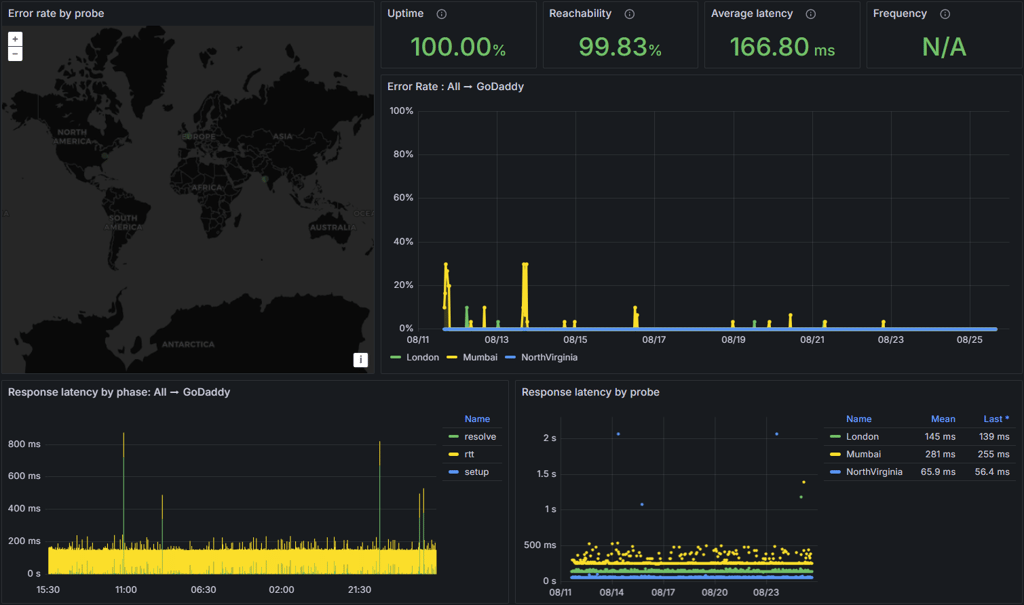
Luckily, my GoDaddy server also had an excellent average response time of 166.80ms. These results are great and have gone a long way toward enhancing my confidence in GoDaddy.
So, both HostGator and GoDaddy seem to be very reliable and deliver even higher than promised uptime rates. However, HostGator did have a better average response time – 112.04ms compared to GoDaddy's 166.80ms.
Website speed
What’s just as important as uptime and response time is the loading speed. Site visitors expect websites to load within 3 seconds. If not, the site’s bounce rate increases significantly with each additional second.
So, to see how fast these two are, I compared GoDaddy vs HostGator fully built WordPress websites’ load speeds. I used the default Twenty Twenty-Four theme on each, so the results would be as accurate as possible. I specifically went with this theme because heavy, design-rich templates can skew performance results, making the comparison less precise.
To better understand the results, keep your eye out for a few measures:
- Largest Contentful Paint (LCP). The time at which the biggest piece of content (image or text) is loaded. Best if this time is less than 2.5 seconds.
- TTFB (time to first byte). This metric shows the time it takes for the server to react to the visitor’s request to open the page. Best if this time is around 200ms.
- Speed Index (Fully Loaded Time). A time mark at which the site is fully loaded and interactive. Best if this time is under 3 seconds.
You see, we pay extra attention to LCP and TTFB here. These measures are a few of the many that Google considers when ranking a site on the search results page. It’s simple, really: the better the results are, the greater your chances of ranking higher.
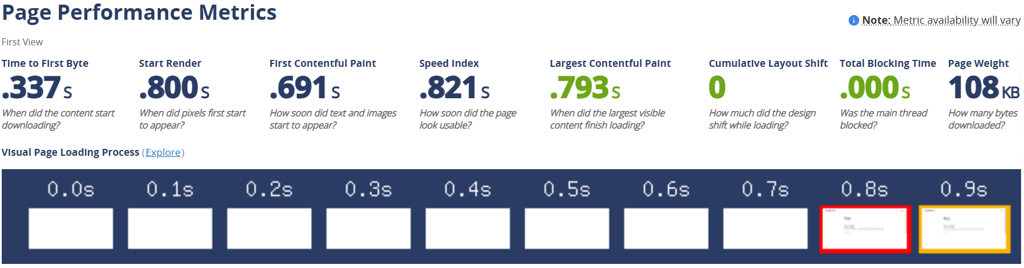
So, keeping that in mind, HostGator demonstrated some speed for sure. Its Largest Contentful Paint was 0.793s, and the Speed Index was 0.821s.
Alternatively, GoDaddy was a close runner-up. The Largest Contentful Paint with GoDaddy was 0.845s, and the Speed Index (Fully Loaded Time) was almost the same at 0.840s.
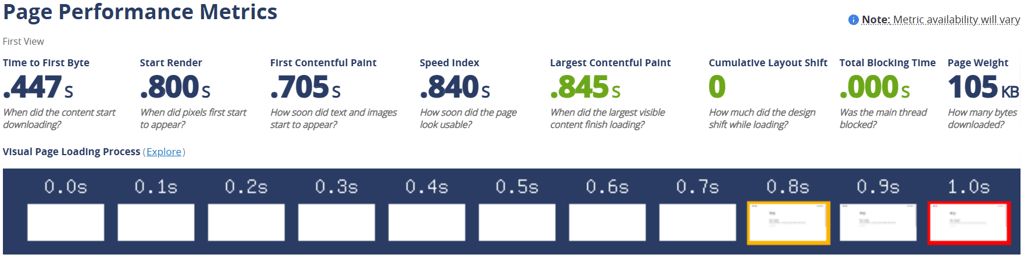
So when it comes to loading speed, both providers are excellent. With 0.821s and 0.840s Speed Indexes, HostGator and GoDaddy have enough wiggle room not to overpass the 3-second benchmark.
Their TTFBs were a little more apart, with HostGator being 337ms and GoDaddy at 447ms. Regardless of the difference, it seems that servers with either of the providers are very capable and well.
As such, it’s hard to label either provider as better than the other in the website speed category.
Stress testing results
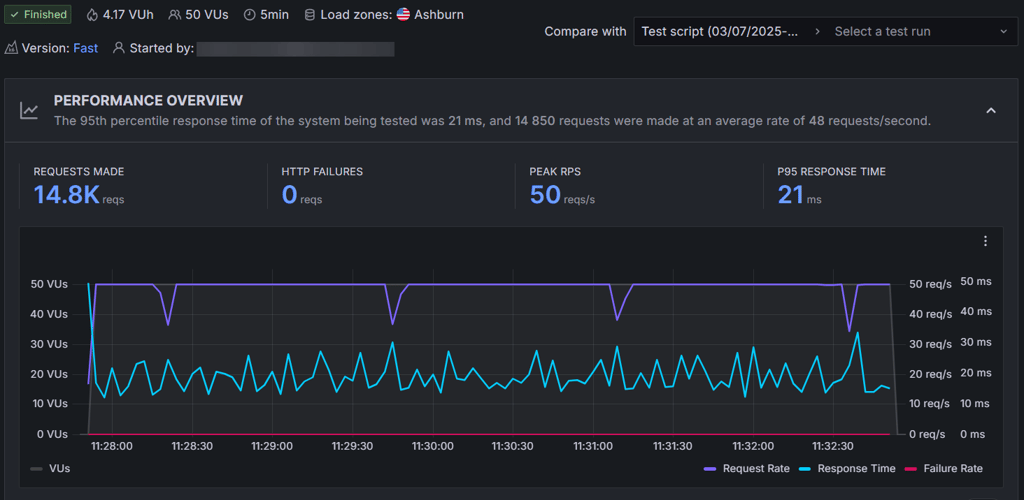
As the final nail in the coffin, I wanted to see what kind of traffic each provider can handle. As a starting point, I’ve sent 50 virtual visitors to each site.
That is pretty intense traffic, as 50 bots roam around your site all at once. That could pretty easily slow down or even overwhelm a less powerful server. So how did these two cope?
HostGator had no issue handling such traffic. I even think it might have not realized a difference between one visitor or 50. That’s pretty clear from just looking at the graph. The blue line (response time) was very stable, and it did not change as the number of visitors increased.
Just like with the speed test, GoDaddy is a close second. But still a second. It did not pass the test with 50 visitors, so to find its limits, I decreased the number by 10 and ran the test again several times. The first pass was with 10 visitors.
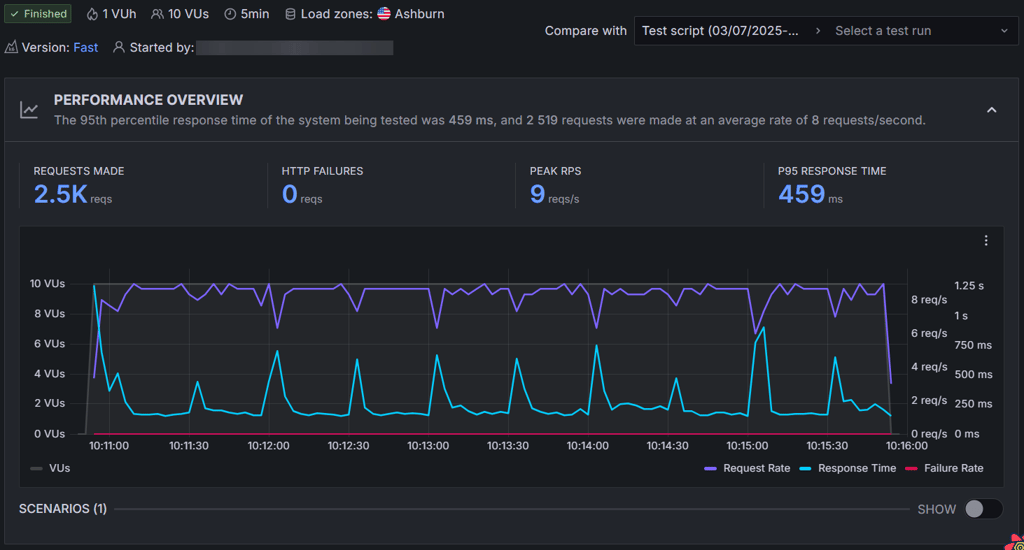
GoDaddy struggled quite a bit during the stress test. It was only able to handle around 10 virtual users before performance started to drop, which is a pretty underwhelming outcome for a hosting provider of its size. Anything beyond that, and the site response times became unstable — not what I’d call reliable under even moderate traffic.
Even with 10 visitors, the server was quite slow and responded in 459ms on average. That becomes very clear when you look at the response time (light blue line). It occasionally spiked, which means it had slight trouble handling even 10 virtual users/visitors.
Considering GoDaddy’s poor and slow results, HostGator did win the competition with flying colors, no questions asked.
Website security: HostGator is stronger overall
When it comes to security, both HostGator and GoDaddy cover the basics, but in slightly different ways:
- SSL certificates. Both providers now include free SSL with all shared hosting plans. The only catch is that GoDaddy’s Economy plan renews the SSL every year for a steep $119.99, while the higher-tier plans include unlimited SSL for all sites at no extra cost. HostGator, on the other hand, provides free SSL across all its shared hosting plans without tricky renewal terms.
- Backups. GoDaddy offers automatic daily backups with one‑click recovery. HostGator also creates daily, weekly, and monthly backups, though only for accounts under 20GB/100,000 inodes.
- Firewall and extras. Every GoDaddy plan comes with a one‑month Website Application Firewall (WAF) trial, while HostGator includes a basic server‑level firewall by default.
Customer support: HostGator provides fast and reliable answers
Talking about customer support options, both providers offer the same 24/7 live chat and phone support. HostGator’s agents seem to be much more professional, while GoDaddy has a very active community forum.
In the table below, I compared available customer support options offered by HostGator and GoDaddy.
| HostGator | GoDaddy | |
| 24/7 live chat | ✅ Yes | ✅ Yes |
| Phone support | ✅ Yes, US and international | ✅ Yes, 31 countries |
| Email support | ✅ Yes | ❌ No |
| Knowledge base/Help center | ✅ Yes | ✅ Yes |
| Community forum | ✅ Yes | ✅ Yes |
From my own experience, HostGator’s live chat is quick and reliable – I usually got connected to an agent in under a minute. Having a direct email support option is also handy, though it’s not widely advertised. On the downside, HostGator no longer offers ticket support, which used to be great for complex issues.
GoDaddy, on the other hand, stands out with its global reach for phone support across 31 countries. I also found GoDaddy’s 24/7 text support line to be a surprisingly convenient alternative when I didn’t feel like waiting on hold. But GoDaddy doesn’t offer email support, which can be frustrating if you prefer handling things in writing.
HostGator vs GoDaddy: final recommendations
In this HostGator vs GoDaddy comparison, we’ve seen that HostGator offers better value for money, better reliability, and more professional customer support. GoDaddy also provides solid performance, but its poor customer service, slow stress testing results, and relatively high prices let it down.
| Feature | HostGator | GoDaddy | Verdict |
| Pricing | HostGator is more affordable with prices starting at $3.75/month, while GoDaddy’s prices start at $4.99/month (occasional discounts are available). | ||
| Ease of use | Both providers offer a combination of native user interface and cPanel, which is very easy to use. | ||
| Performance | Both providers had an uptime of 100% in the most recent in-house tests. The average response was on HostGator’s side – 112.04ms in comparison to GoDaddy's 166.80ms. | ||
| Security | Both providers lack free security options, with many tools being expensive. While both offer an SSL certificate, HostGator includes a basic server-level firewall, regardless of the plan. | ||
| Support | HostGator’s customer support was better. Its live chat was quick, and its team was helpful. On the other hand, GoDaddy’s provides a convenient 24/7 text support alternative. |
Ultimately, HostGator comes out ahead of or equal to GoDaddy at every step of the comparison. It should be easy to see that it’s a better provider for almost all users simply because it offers better value for money, better customer service, and a slightly faster website loading time.
However, GoDaddy is a great option if you’re a first-time user looking to explore the web hosting world for cheap. The $5.00/month discount for the first year on the cheapest GoDaddy web hosting plan makes it competitive with HostGator.
Alternatives to HostGator and GoDaddy
Although HostGator and GoDaddy are two of the biggest players in the web hosting world, there are numerous alternatives available for those looking for something a little different:
- Bluehost is a great beginner-friendly option
- InMotion Hosting is a similar provider offering great scalability
- Hostinger is a much cheaper alternative for those who want budget-shared hosting
Hostinger
Hostinger sits at the other end of the spectrum with its affordable shared hosting. It’s a great alternative to HostGator and GoDaddy if you’re looking for the best value for money.
With Hostinger, a basic shared hosting plan will cost you just $2.69/month. And the features on offer are certainly comparable to both HostGator’s and GoDaddy’s entry plans.
If you're looking for a cheap and performance-oriented provider, Hostinger might be it for you.
Bluehost
Bluehost's prices sit just in the middle of HostGator's and GoDaddy's. The cheapest shared hosting plan starts at $1.99/month.
Bluehost mainly focuses on WordPress hosting. It offers a very easy-to-use hosting management panel and many great tools for scaling, including staging. It's a great option, no matter your level of experience in the hosting world. If you're looking to run a business site or a personal blog, this provider delivers.
InMotion Hosting
InMotion Hosting is a great alternative if you’re looking for a provider with professional service and scalability options.
The cheapest shared hosting plan with InMotion starts from $4.59/month – even lower than HostGator’s $3.75 and GoDaddy’s $4.99 monthly prices. And for that price, you get great features, including a powerful security suite and free SSL.
If you’re looking for a more advanced solution, VPS hosting starts at $14.99/month, and dedicated servers costs start at $35.00/month.
More HostGator comparisons you might want to read
- Namecheap vs HostGator
- Bluehost vs HostGator
- SiteGround vs HostGator
- DreamHost vs HostGator
- Hostinger vs HostGator
- Wix vs HostGator
- HostGator vs InMotion Hosting
- 1&1 IONOS vs HostGator
- HostGator vs Squarespace
More GoDaddy comparisons for you to check out
FAQ
HostGator vs GoDaddy – which is better for beginners?
HostGator is better for beginners. Although both HostGator and GoDaddy are beginner-friendly options, I would always recommend HostGator due to its more inclusive plans and a slightly more advanced website builder.
Which host is better for registering a domain?
GoDaddy offers the best domain registration services. As one of the world’s leading domain registrars, it provides a wide range of tools. However, it is a little expensive. HostGator offers much cheaper domain registrations, but its extra features are somewhat limited.
Which host is better for business websites?
GoDaddy is the best choice for business websites, if you don’t mind paying more. However, the lack of free security tools can make it less appealing. Alternatively, HostGator provides very reliable service with great uptime. Additionally, it offers a selection of great scalability options you can take advantage of when your website grows.
HostGator vs GoDaddy – which is better for managed WordPress hosting?
GoDaddy is better for managed WordPress hosting. Both providers offer simple, semi-managed solutions. Despite being slightly more expensive, GoDaddy’s plans include much better WordPress-specific tools and features.