Bluehost vs GoDaddy: which one is better in 2026?
Our in-house experts conduct internal independent, hands-on testing and transparent reviews of web hosting providers by using custom-built tools or utilizing industry-recognized tools and methods to ensure impartial and evidence-based assessments.
Using the same criteria for all services, we share our detailed methodologies and practices to help customers make informed hosting decisions.
Learn more
Choosing the right web hosting can be tricky, especially with so many options out there. Does a lower price mean slower performance? Is a higher fee really worth it for better features and security?
In this article, we’re comparing two major hosting providers – Bluehost and GoDaddy. Bluehost is a popular choice for WordPress users, while GoDaddy is known for its all-in-one website solutions. We’ll break down their pricing, ease of use, performance, security, and more to help you decide which one is the better fit for your needs.
Bluehost vs GoDaddy: general information
When it comes to choosing between Bluehost and GoDaddy, Bluehost takes the lead as the better option. While GoDaddy offers a wide range of website services, it falls short in hosting performance, ease of use, and overall value. Bluehost, on the other hand, delivers a more seamless experience, especially for WordPress users, with better reliability and a more intuitive control panel.
| Bluehost | GoDaddy hosting | |
| ⭐ Rating: | ||
| 💵 Price: | From $1.99/month | From $4.99/month |
| 📑 Uptime guarantee: | 99.9% | 99.9% |
| 🔥 Coupons: | Bluehost coupon 78% OFF | GoDaddy coupon 66% OFF |
| Storage space (from): | 10GB SSD | 25GB SSD |
| ✂️ Free domain (first year): | Yes | Yes |
| 💾 Automated backups: | Free automatic weekly backups | Yes (daily) |
| 💰 Money-back guarantee: | 30-day | 30-day |





Our in-house research team and expert writers work hand in hand to regularly test hosting services and provide accurate and fact-checked information. Discover the ins and outs of how we test and evaluate website hosting providers.
Ease of use – why Bluehost is simpler
Both Bluehost and GoDaddy combine two ways of managing your hosting account: a proprietary dashboard and a classic cPanel. In all honesty, not many differences can be found – the dashboard in both cases is used for the essentials, such as app installation, while cPanel is reserved for more advanced management. On the other hand, Bluehost might prove to be more functional with additional features offered.
Account management dashboard
Whether you choose Bluehost or GoDaddy, the process of setting up a website once you log in is very similar. Both providers will guide you through the necessary steps to have WordPress installed and the domain working.
With Bluehost, the first thing you see is the setup wizard. By going through a couple of easy steps, answering a few basic questions, and picking a theme, you can basically create a 1-click WordPress website.

Of course, if WordPress is not your primary choice, you can skip the setup altogether and go straight to the dashboard. In the middle, there’s a step-by-step interactive guide for beginners. It teaches you how to create WordPress pages, add posts, and customize settings.

More importantly, on the left, there’s a menu with the main management modules.
You can reach all of your websites in the My Sites area, while Marketplace has a variety of options for other content management systems and additional services. Domains allow you to add new domains or purchase them as well as create subdomains. The email section is reserved for paid email options such as Microsoft 365. Finally, Advanced takes you to cPanel.
When it comes to GoDaddy web hosting, the configuration is pretty straightforward and begins with a setup wizard as well. By clicking Set up in the Hosting tab, you’ll prompt a setup wizard similar to Bluehost’s.

By the end of all questions, you’ll have a WordPress website ready.
Again, you can choose not to install WordPress, and pick another content management system later.
By clicking Manage, you can reach the main hosting management area.

Here, GoDaddy lists your websites and server information.
The area is not as functional as Bluehost’s, and it appears to help with navigation rather than management.
At the top, you can find cPanel shortcuts to phpMyManager, File Manager, FTP, and GoDaddy Analytics. The cPanel Admin button is also conveniently available just below.
Altogether, Bluehost and GoDaddy both have clean and intuitive dashboards. However, Bluehost has more management tools, while GoDaddy keeps its interface more minimal.
Control panel comparison
Both Bluehost vs GoDaddy use cPanel integration. At the same time, Bluehost tweaked a couple of things, while GoDaddy stayed true to the classics.
Bluehost’s cPanel matches the provider’s branding.

Additionally, the provider emitted some of the modules. For example, you won’t find domain management in Bluehost’s cPanel anymore. That’s because the Domains tab is integrated into the main dashboard.
Overall, cPanel’s domain management is very straightforward. Plus, Bluehost has all the standard functionalities such as file manager, phpMyAdmin, emails, and more.
GoDaddy’s cPanel is completely standard, straight from the factory.

The provider has kept all the standard management modules. You’ll find domains, databases, software, and other tabs. The cPanel can be found in the Advanced tab because it’s so rarely needed while all essentials are in the main dashboard. Meanwhile, GoDaddy uses cPanel the way it was created.
Extra website management tools
When it comes to extra features, Bluehost comes out on top with a WordPress management interface and staging. Meanwhile, GoDaddy provides a bunch of premium themes to jump-start your WordPress website.
When it comes to Bluehost, there are a lot of features this host includes with all plans. All are meant to make website management easier.
For starters, My Sites lists all of your created websites, and you can find individual management areas for each of them.

This interface has dedicated settings for marketing, security, and performance. The more general Settings let you put the website in maintenance mode (Coming Soon Page), which makes it unavailable for search engines and visitors while you are building it. It also includes additional settings for updates and comments.
It’s a really convenient hub from which a lot of website-management-related tasks can be completed.
Another feature is staging, which is integrated directly into WordPress.

In a few clicks, you can create a copy of your website and use it for testing changes or fixing bugs. Then, in a few clicks, you can publish those changes to the live version. Staging is definitely one of the most useful tools to have. It’s rarely available on shared hosting.
GoDaddy’s features are a little more limited. The first time you enter your WordPress Admin panel, you are asked to choose one of GoDaddy’s templates.

These templates are not otherwise available on WordPress, but they are beautiful and well-designed. Choosing one will set a layout for your website with all the demo content.
If you’re in a hurry to create a website or don’t really know how to do that – this can be a lifesaver. You simply switch GoDaddy’s content into your own and have a professionally designed website ready.
So while Bluehost has more comprehensive features that help you manage the website, GoDaddy’s templates are also very useful.
All in all, I have to give the win for Bluehost in the ease of use comparison. It’s simply more functional than GoDaddy, with many tools to help you out. GoDaddy is also very easy to use, but its feature toolkit is not as elaborate.
Pricing: Bluehost comes out on top
In general, Bluehost is cheaper than GoDaddy. Bluehost’s Starter plan starts at $1.99/month and includes a 30-day money-back guarantee, while GoDaddy’s Web Hosting Economy plan costs $4.99/month with the same 30-day money-back guarantee.

However, Bluehost supports fewer payment methods, such as credit cards and PayPal, while GoDaddy accepts a broader range of payment options, including credit cards, PayPal, and bank transfers.
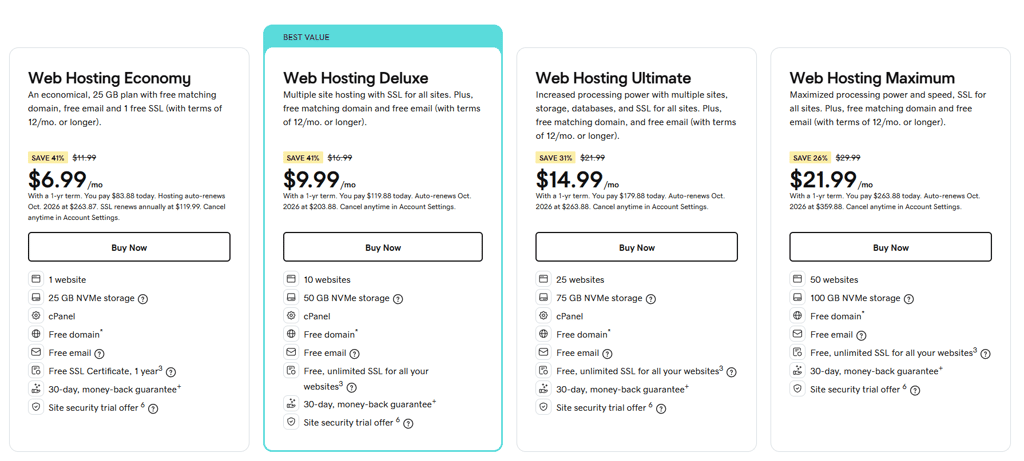
Altogether, Bluehost’s plans and pricing are more comprehensive. Especially if you’re looking for a long-term option.

Performance – GoDaddy takes the lead
To find out which provider is more reliable, faster, and stronger, I and the research team performed tests for 2 months and then compared the performance results. Turns out, both hosts are almost on the same level.
Uptime and response time
In 2 months, Bluehost had 6 outages that resulted in 11 minutes of downtime and 99.99% uptime. This is an aspiration for many providers as the standard uptime guarantee is 99.9%.

The response time is also way better than the industry’s statistics (~600ms), averaging at 361ms.
As for GoDaddy, in a similar period, it had 3 outages, but they were slightly longer, totaling 16 minutes of downtime. That puts the uptime result at 99.98%.

Response time was equally as impressive, averaging at 341ms.
Overall, looking at long-term monitoring, both providers are almost the same. They both are showing excellent uptime results and even better response times.
Website speed
For website speed comparison, the research team created 2 identical websites and put them through the speed test. Here are the key metrics:
- Largest Contentful Paint – should be kept under 2.5 seconds
- TTFB – the initial server reaction shouldn’t be longer than 200ms
- Fully Loaded Time – if it’s more than 3 seconds, visitors are likely to leave the site
Bluehost’s Largest Contentful Paint was loaded in 1.8 seconds, and there was no further delay until Fully Loaded. This means that the provider fits in the recommended time frame. Although this result is not the best you can get.

Unfortunately, the TTFB was 1 second, which is 5 times more than the recommended 200ms. In conclusion, Bluehost’s server took a while to respond, slowing down the whole loading process.
Meanwhile, GoDaddy loaded the Largest Contentful Paint in 1.5 seconds, and there was no delay until Fully Loaded. That is slightly better than Bluehost’s result.

Additionally, GoDaddy’s 224ms TTFB is just above the recommended 200ms number, which gives it an upper hand when comparing Bluehost vs GoDaddy performance.
Nonetheless, loading speeds are quite similar. A human eye won’t really know the difference. And to have your site loaded in less than 2 seconds is a great result.
Stress testing
In the final test, we checked how much traffic each provider could handle over a very short time. We started at 50 Virtual Users (bots) and decreased the number if needed.
For reference, 50VUs is about the maximum we’d expect from mid- or high-end shared hosting plans to handle. That would add up to at least 50,000 monthly visits.
During our tests, Bluehost handled 15 VUs.

In this graph, the blue line represents the response time and the grey line – the number of visitors.
As you can see, with the growing number of visitors, the response time increases. This shows that the provider slowed down a little. On the other hand, the red line, which would represent failures, is nowhere to be found.
So while Bluehost accommodated the traffic by slowing down a little, it did pass the test just fine. In the meantime, GoDaddy handled 30 visitors.

In this case, the slowdown is barely noticeable, although it is there. The blue line went up a tiny bit when the number of visitors reached 20. To sum up, GoDaddy is capable of handling twice as many visitors, indicating more power within its servers.
Altogether, both Bluehost and GoDaddy are solid providers when it comes to performance. The reliability is excellent, the page loading time is great, and both can handle quite a lot of traffic. On the other hand, GoDaddy takes the win as it was at least a tiny bit better in most of the tests.

Other Bluehost and GoDaddy features compared
While Bluehost and GoDaddy proved to be easy to use, other features also play a big role. Whether you want to use a specific app for your project, migrate a website, run email campaigns, or use a website builder, you want features that make it all possible.
| Apps and installation | Website migration | Email hosting | Website builders | Hosting support | |
| Bluehost | Focuses on WordPress but also offers 1-click installs for Joomla, Drupal, and OpenCart. | Free WordPress websites migration tool included. | Free professional email for 1 year, which renews at $2.99/month. | Integrated AI-powered website builder, free with all plans, easily convertible to WordPress. | Shared, WordPress, WooCommerce, cPanel, VPS, and Dedicated hosting. |
| GoDaddy | Known for domains but supports easy installs for various CMS and e-commerce apps. | Free WordPress migration tool included with all hosting plans. | Offers its own webmail and a free Microsoft 365 email plan for the first year. | WYSIWYG builder with business-focused templates; limited customization but clean designs. | Shared, WordPress, WooCommerce, cPanel, VPS, and Dedicated hosting. |
When it comes to extra features, Bluehost and GoDaddy are pretty similar. However, Bluehost offers a more advanced website builder with AI capabilities.
Security – both providers stand strong
Security is the area where both providers could step up a little, but when it comes to the basics – SSL certificates, site backups, and basic server monitoring – both Bluehost and GoDaddy offer pretty much the standard security features.
| Security features | Bluehost | GoDaddy |
| Free SSL | ✅ Yes | ✅ Yes (only first year with Web Hosting Economy plan) |
| Website backups | ✅ Yes | ✅ Yes |
| SSH Secure Shell Access | ✅ Yes | ✅ Yes |
| DDoS protection | ✅ Yes | ✅ Yes |
| Server monitoring | ✅ Yes | ✅ Yes |
Here the the security basics covered by Bluehost:
- Free SSLs with all plans on unlimited domains
- DDoS protection via Cloudflare that you can set up from the dashboard
- Basic server monitoring
This is the minimum that all providers offer. However, extra services have to be purchased separately. Daily backups cost $2.99/month, and malware removal is an additional $2.99/month, too.
Here the the security basics covered by GoDaddy:
- Free SSLs with all plans on unlimited domains
- Server monitoring for fraud, virus, and DDoS
- Email and privacy protection with 256-bit encryption
To get a more comprehensive security package, that includes a web application firewall and malware removal, you will need to pay $4.75/month extra.
All things considered, neither of the providers is brilliant in the security department. To get all-rounded security, you’ll need to take additional steps yourself.
Customer support
Every hosting provider must offer comprehensive customer support. Website hosting isn’t the most straightforward process, even if Bluehost and GoDaddy have proven to offer user-friendly setups.
During our tests, we assessed what types of customer support options are available to the users of both providers. Here are the results:
| Customer support solution | Bluehost | GoDaddy |
| 24/7 live chat | ✅ Yes | ✅ Yes |
| Phone call | ✅ Yes | ✅ Yes |
| Text | ❌ No | ✅ Yes |
| ✅ Yes | ❌ No | |
| FAQ | ✅ Yes | ❌ No |
| Knowledge base | ✅ Yes | ✅ Yes |
| Community forum | ❌ No | ✅ Yes |
To get some help, you can reach both Bluehost and GoDaddy via 24/7 live chat and phone. Also, there are knowledge bases, and GoDaddy steps up by offering text support and a community forum too. Although it’s not very active.
Live chat is the main way for users to get help, so I contacted the agents of both providers with some questions about security.
Bluehost’s agent replied instantly. The answers were friendly and informative.

Sure, the agent recommended sticking to the paid options, but that’s how Bluehost works. Altogether, I got the questions answered in a quick 5-minute interaction.
As for GoDaddy, you first have to use the chatbot. So it takes longer to get connected to an agent. Altogether, the waiting time was 11 minutes before I was connected to an agent.

The agent was friendly and tried their best to help. I was even offered a discount on an SSL certificate purchase once I asked if free versions were available.
Overall, our experiences with both providers were great, and picking one over the other is simply not possible here.
Additionally, both Bluehost and GoDaddy have big collections of articles and tutorials that cover documentation for their services as well as general knowledge about web hosting.
All in all, both Bluehost and GoDaddy have great customer support. You can expect instant answers. Additionally, there are knowledge bases you can use to solve problems independently.
Bluehost vs GoDaddy: final recommendations
To compare Bluehost vs Godaddy in 2026, we assessed how each provider fairs in such categories as pricing, ease of use, performance, security, and customer support. Overall, both providers have their strengths and weaknesses. For example, while Bluehost offers better prices and more resourceful plans overall, GoDaddy performs better.
Here’s the summary of our Bluehost vs GoDaddy comparison:
| Feature | Bluehost | GoDaddy | Verdict |
| Pricing | Bluehost has more affordable prices overall, starting at $1.99/month. | ||
| Ease of use | Both providers use intuitive interfaces with cPanel integration, but Bluehost’s dashboard is more functional with additional tools such as staging. | ||
| Performance | Both providers were equally reliable, even though GoDaddy was able to handle a little more traffic and deliver faster page loading times. | ||
| Security | Bluehost and GoDaddy both offer basic security, and both could step up to offer more security features. | ||
| Support | 24/7 live chat and phone support with both providers is quick and efficient. Knowledge bases are available too. GoDaddy includes a community forum and text support, while Bluehost offers email support and FAQ. |
Although both Bluehost and Godaddy ensure top performance, are user-friendly, and provide various support channels, both fall short when it comes to comprehensive security. Overall, based on our extensive in-house tests, Bluehost is marginally superior to GoDaddy. Whether you want to host a personal website or a small business website, Bluehost can offer you the basics even on the lower-tier plans.
However, I must praise GoDaddy’s performance results and supporting users who need to host more websites.
Bluehost vs GoDaddy FAQ
Is Bluehost cheaper than GoDaddy?
Yes, when comparing plans with similar features, Bluehost tends to be more affordable than GoDaddy, though it occasionally lacks some options that GoDaddy provides.
Do Bluehost and GoDaddy give free domain names?
Yes, both Bluehost and GoDaddy offer free domain names with their hosting plans. Bluehost provides a free domain for the first year with any hosting plan, while GoDaddy includes a free domain with its hosting plans and offers domain registrations starting as low as $0.99.
GoDaddy vs Bluehost for Wordpress. Which one is better?
It depends. GoDaddy’s WordPress-optimized managed hosting offers superior speed with next-gen Ceph storage for fast load times. On the other hand, Bluehost is ideal for beginners and small businesses, offering a range of features to help you build and expand your online presence.
Who wins in the Bluehost vs GoDaddy comparison?
It depends. In the Bluehost vs GoDaddy comparison, Bluehost often comes out on top for beginners and small businesses due to its user-friendly features, affordable pricing, and strong WordPress integration. However, GoDaddy excels in speed and performance, especially with its WordPress-optimized hosting, making it a solid choice for users prioritizing fast load times. Ultimately, the winner depends on your specific needs and priorities.