InMotion Hosting review: not only business hosting?
Our in-house experts conduct internal independent, hands-on testing and transparent reviews of web hosting providers by using custom-built tools or utilizing industry-recognized tools and methods to ensure impartial and evidence-based assessments.
Using the same criteria for all services, we share our detailed methodologies and practices to help customers make informed hosting decisions.
Learn more

InMotion Hosting, active since 2001, has steadily enhanced its hosting services, with a strong focus on VPS, dedicated, and cloud hosting solutions. It recently even introduced an AI Website Builder to complement its hosting plans, making site creation easier.
I have used and reviewed InMotion regularly since 2022. In this InMotion Hosting review, updated in September 2025, I cover pricing, performance, features, security, and customer support to present to you both strengths and drawbacks.
InMotion Hosting review: my verdict
✅ Choose InMotion Hosting if you’re looking for scalable, enterprise-level hosting with advanced features and more control over server configuration. What surprised me most was the excellent uptime and strong security with SSL, malware defense, and DDoS protection.
❌ Avoid InMotion Hosting if you need a beginner-friendly, small business, or budget-oriented solution. In that case, I'd recommend providers like Hostinger or IONOS.
| Hostinger | InMotion | |
| ⭐ Rating: | ||
| 💵 Price: | From $2.69/month | From $4.59/month |
| 📑 Uptime guarantee: | 99.9% | 99.9% |
| 🔥 Coupons: | Hostinger coupon 81% OFF | InMotion Hosting coupon 71% OFF! |
| Storage space (from): | 20GB SSD | 100 GB SSD |
| ✂️ Free domain (first year): | Yes | Yes |
| 💾 Automated backups: | Free (weekly) | For an extra fee |
| 💰 Money-back guarantee: | 30-day | 90-day |
Pros and cons of InMotion Hosting




Our in-house research team and expert writers work hand in hand to regularly test hosting services and provide accurate and fact-checked information. Discover the ins and outs of how we test and evaluate website hosting providers.
InMotion Hosting pricing
When looking at InMotion’s pricing, shared hosting starts at just $4.59/month, which is one of the lowest entry points in the market. It also has WordPress plans, VPS, reseller hosting, and dedicated servers.
By comparison, Hostinger is on par at $2.69/month, but you get up to 25 websites instead of 1. Bluehost, on the other hand, starts at $1.99/month and is tightly integrated with WordPress, though renewal costs climb higher.
| InMotion hosting types | Starting price | Best for |
| Shared hosting | $4.59/month | For portfolios, startups, small businesses, and low-traffic websites |
| WordPress hosting | $3.29/month | Any small or medium WordPress business website. |
| WooCommerce hosting | $9.99/month | Online retail businesses, from newly emerging to well-established |
| Cloud hosting | $9.99/month | Larger enterprises, particularly those with heavy website traffic, or anyone seeking improved security and stability |
| VPS hosting | $9.99/month | Websites with moderate to heavy traffic that need to fulfill the needs of bigger companies |
| Dedicated hosting | $29.99/month | High-performance needs, extensive websites, or complete server management control |
| Reseller hosting | $0.99/month | Entrepreneurs who are starting hosting businesses, small agencies, or freelancers |
The InMotion hosting plans vary in hosting capabilities. Shared hosting is the cheapest option and is suitable for small projects. For larger websites, dedicated server hosting would be an ideal option.
Unlike Hostinger, Bluehost, or GoDaddy, InMotion also offers reseller hosting, giving extra flexibility for freelancers or agencies. That said, similarly to other providers, InMotion increases the prices upon renewal considerably.
In terms of payment, InMotion doesn’t allow cryptocurrency payments. However, it does offer payment through PayPal, Discover, American Express, MasterCard, and Visa.
InMotion, in my opinion, is quite generous, as it provides a 90-day refund for contracts exceeding 6 months and a 30-day refund period for a single-month plan. From my experience, this is enough to explore its resources without being concerned about any financial risks. However, particular purchases, such as domain registrations and setup fees, are not eligible for a refund, which is standard across many hosting providers.
InMotion ease of use: clear, but not seamless
Although InMotion Hosting is not my favorite, it is simple to use. It uses a combination of the native Account Management Panel (AMP) and cPanel to make the user experience easier. However, I did run into situations where these two seem to contradict each other. Moreover, for a better experience, a couple of UX choices could be improved.
Regardless, both control panels are well structured and easy to use. Just keep in mind that even if they look similar, they're not entirely the same.
Now, every time you log into your account, you’ll be directed to the native AMP.
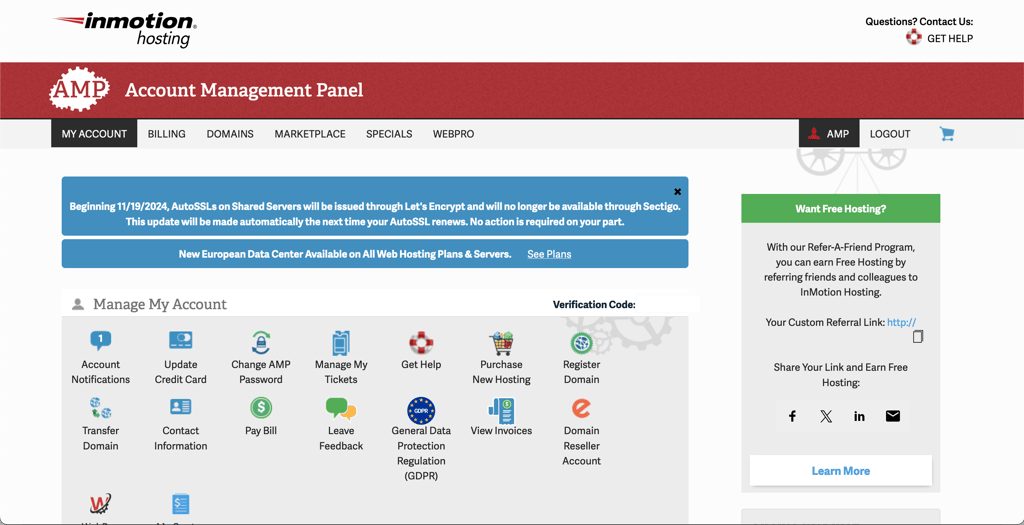
You might have guessed that InMotion Hosting’s native AMP looks quite similar to cPanel. But this is not cPanel just yet. I had to click the orange cPanel button to reach it.
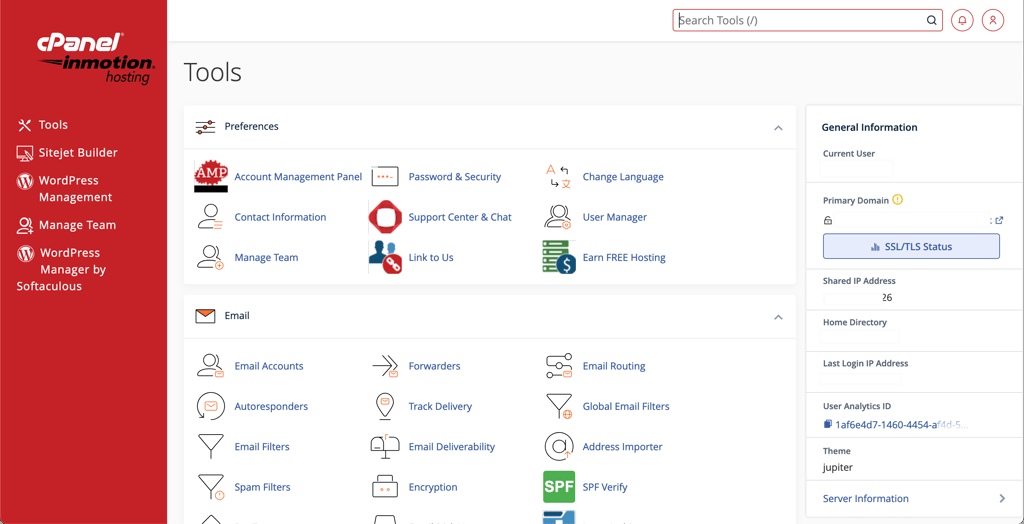
As you can see, InMotion's cPanel uses a custom design, so it blends into the interface seamlessly. But this is exactly where the UX issues come into play.
AMP is supposed to be used for account management. Usually, that’s things like billing, domains, and account details.
However, InMotion Hosting has introduced a couple of hosting management features into the AMP. So not only can you conveniently reach cPanel from there, but you can also find some of the cPanel modules like Softaculous, Email, or SSL management. It might be convenient, but some things you’d normally go to cPanel for are now only available from the AMP. I didn’t like it when I wanted to activate my SSL.
SSLs are normally activated automatically through cPanel. But mine happened to be self-signed, so I searched cPanel but couldn’t find any SSL-related settings.
When I contacted support, they redirected me to the AMP, where their SSL tools were located. I had no issues activating it from there on.
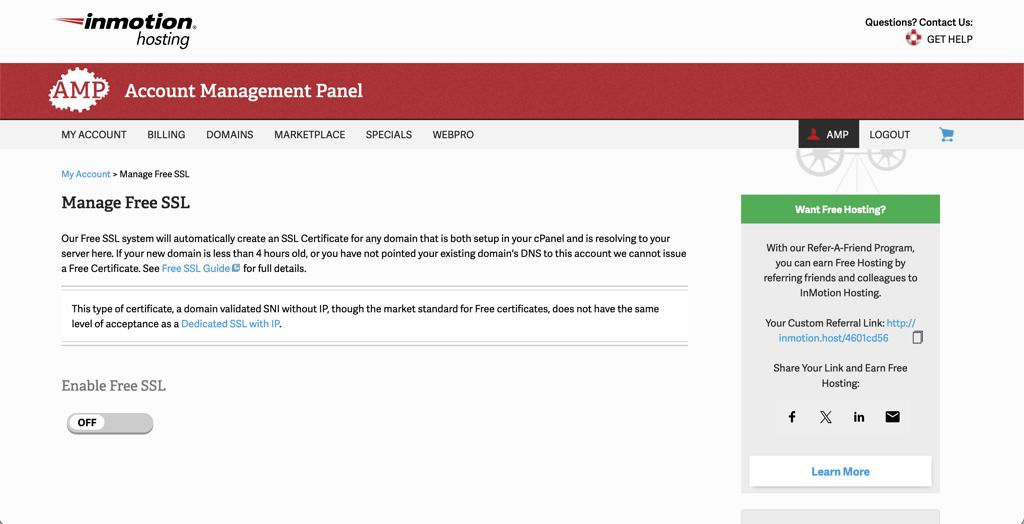
In any case, a couple of UX glitches don’t make InMotion Hosting much less intuitive. cPanel is still a standard control panel model in the hosting industry, and it really makes things like installing WordPress or creating an email account easy.
Installing WordPress with InMotion Hosting
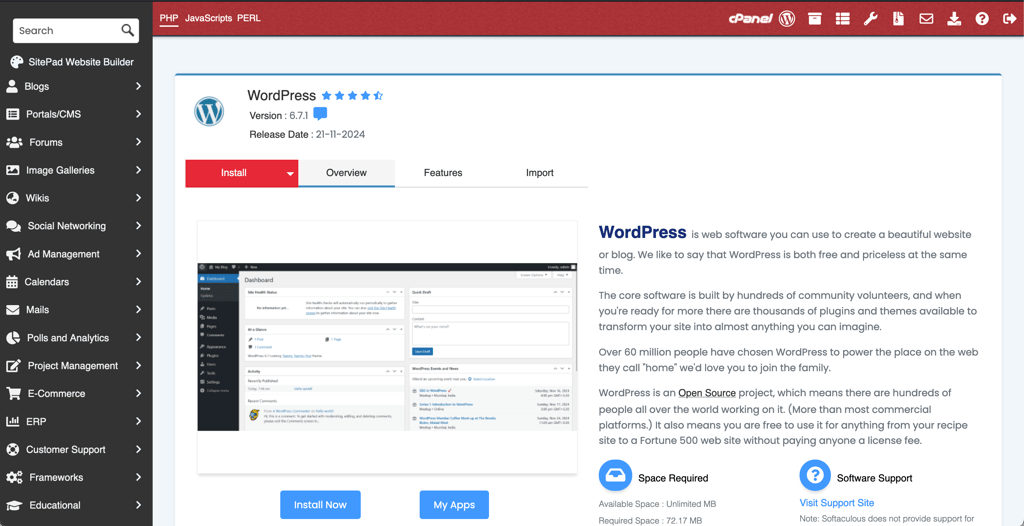
InMotion Hosting uses the standard Softaculous app installer for any installation, including WordPress. It’s really easy to use, whether you’re creating your first website or countless others.
In any case, you need to find the Softaculous icon. You can do that either in the AMP or the cPanel. Alternatively, you can just click on the WordPress icon in the cPanel under the Top Applications section as well.
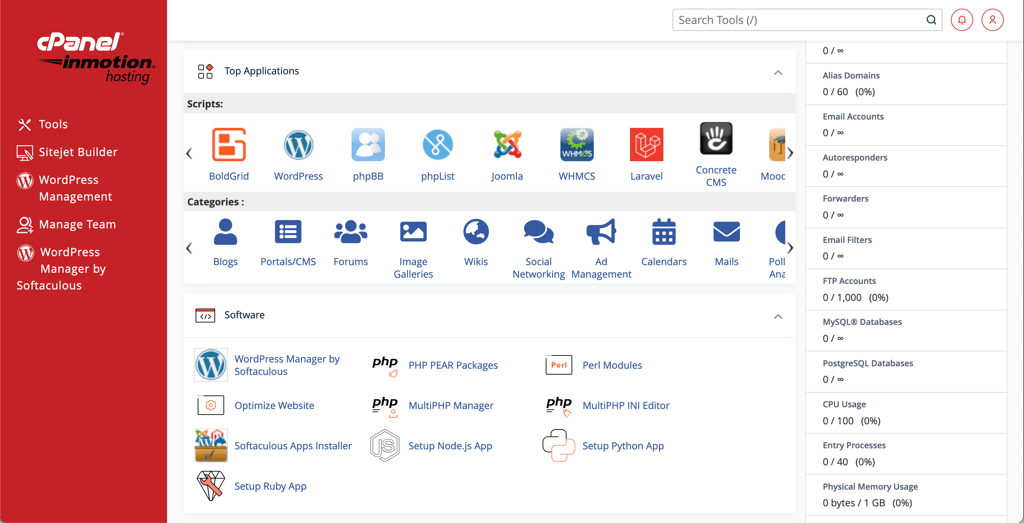
After any of these steps, you end up in the Softaculous interface where you can install WordPress or any other app your website needs.
For the installation, you need to create a username and password and think of a website title. Note that you can change all these later if needed.
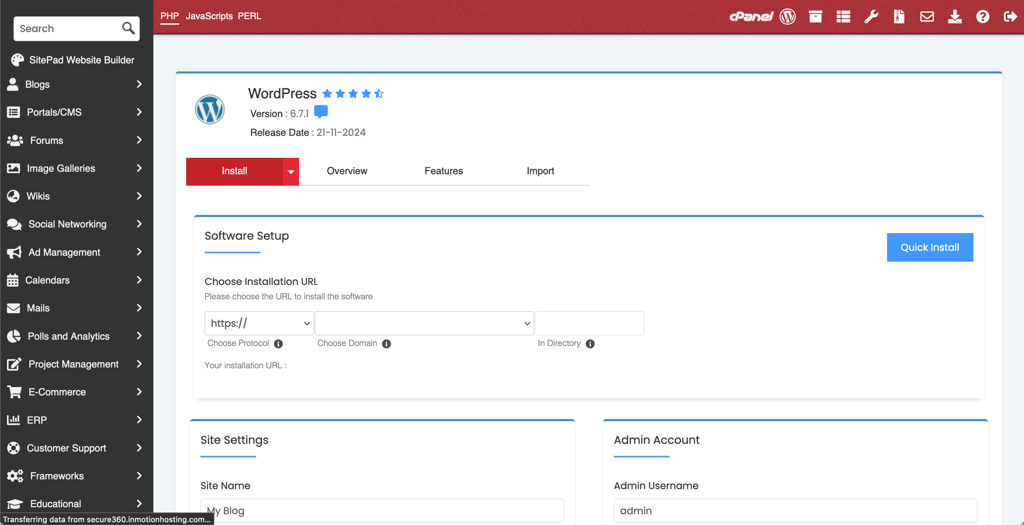
After clicking the Install button, the software does everything for you. It should take no more than a couple of minutes.
You can now reach your WordPress management panel by going to yourdomain.com/wp-admin/ or visiting the Softaculous management area.
WordPress website builder, also known as BoldGrid
One great benefit I found while preparing this InMotion Hosting review is that you get to use the BoldGrid website builder. BoldGrid is a set of WordPress plugins that turn the content management system into a visual website builder. This makes WordPress much easier to use if you want to give it that custom look.
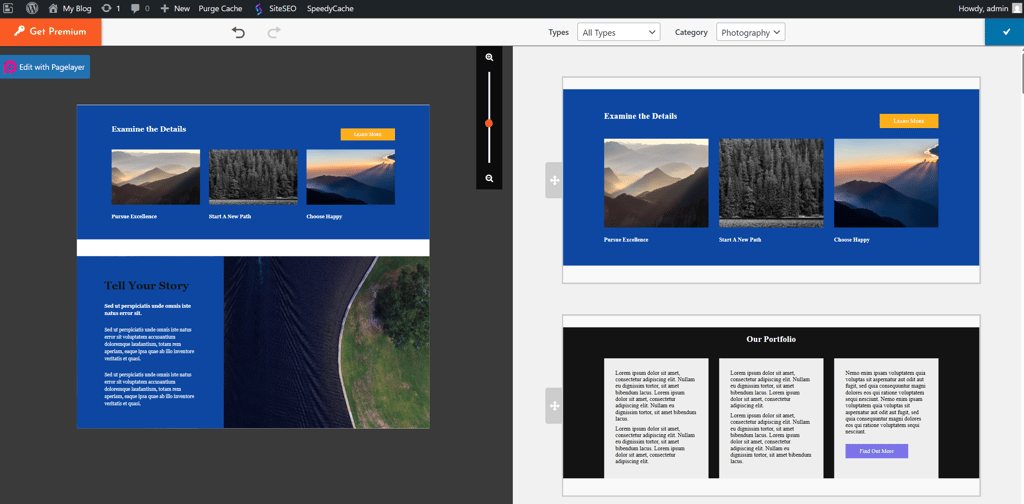
I was super positive about BoldGrid. I had used it before and liked it. Here are some of its best aspects:
- The choice of templates is good, and they are responsive
- The templates can be customized easily
- There’s an array of tools to easily create good-looking pages, posts, and design elements
Best of all, it’s easy to get used to. In very little time, you can create a professional-looking website. All the tools seem to be designed with beginners in mind.
When you first start using it, you can select a template that looks best to you. However, be aware that an AI assistant designed to help with descriptions is still in beta. You can try using AI to draft a site description, but in my experience, it’s unreliable, and it can get stuck.
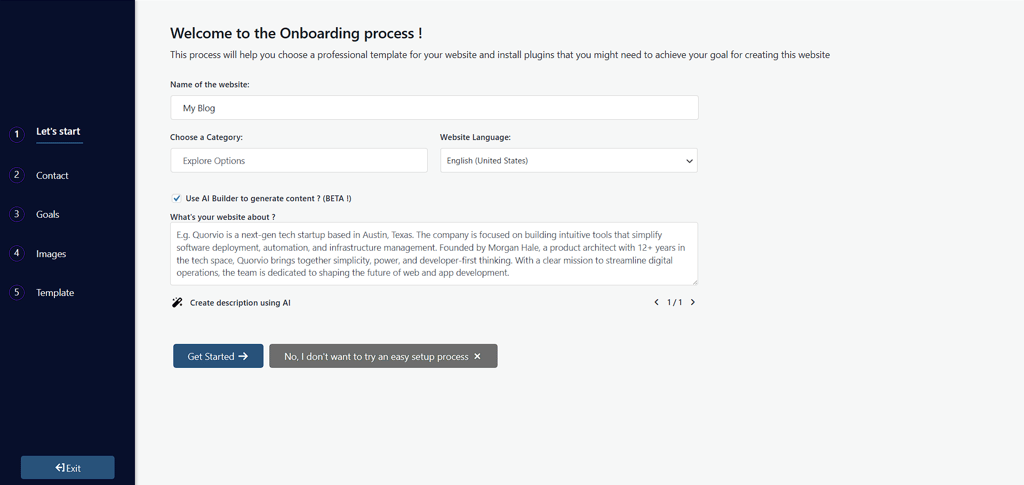
The tool forces you to enter a sufficient description before you can continue, but gives no guidance on what sufficient means. I found that really frustrating. After that, in step 4, you’re required to pick at least 10 images to seed a design template.

Which generated a few templates and, weirdly enough, one build spit out a layout that looked like a knock-off layout of NordVPN website (with the logo itself) for my bike shop. I don’t know whether choosing something like that could expose a business to legal risk, but it’s worth calling out.
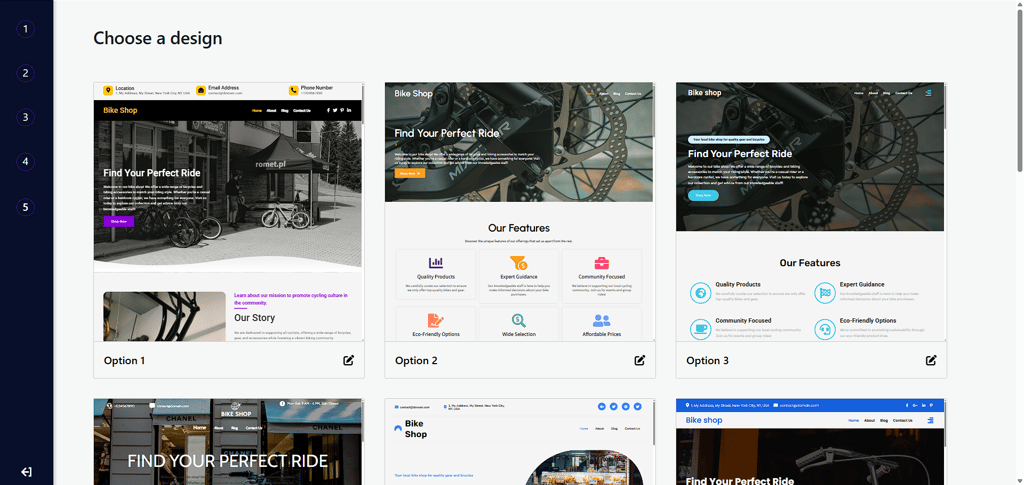
When you activate a template, it imports the pages, layouts, and demo content so you can use it as a starting point. I found this to be the quickest route: replace the demo text and images in the pre-organized layout, and you’re already almost there.
Compared with starting from a blank WordPress install, it’s a decent head start – not a miracle. You’ll still need to fine-tune things in WordPress.
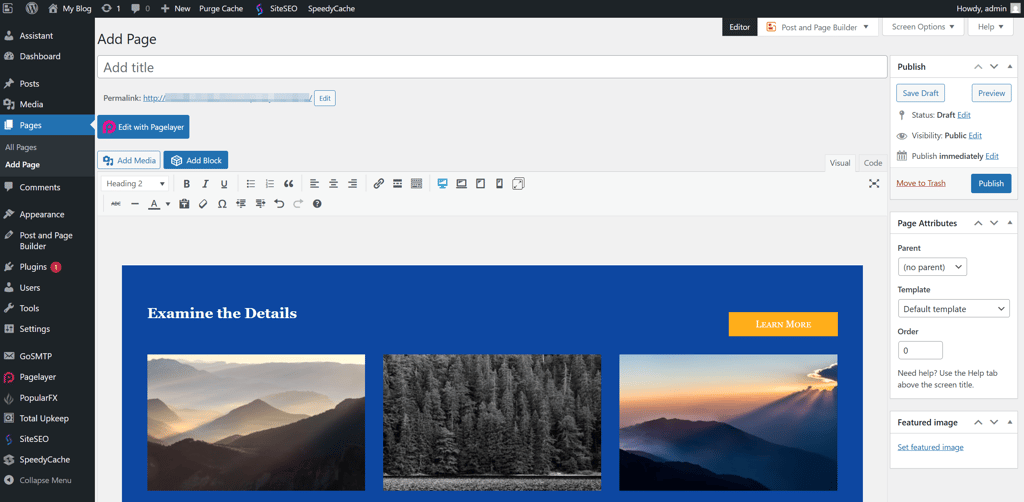
You can edit directly on the page or post you want to change. There are extra plugins, like Post and Page Builder, if you want more control. Drag-and-drop editor lets you make something truly unique, but that takes more time than just swapping demo content.
Overall, BoldGrid is helpful and flexible, especially handy if you want to get a professional-looking site up fast or you’re new to web development. That said, be realistic about its limits. The AI helper is beta and flaky; it’ll give you a running start, but expect to do the finishing work in WordPress.
Adding a professional email with InMotion Hosting
Just like with the WordPress installation, setting up an email account is very straightforward. All you have to do is follow the prompts. However, set your expectations low because its email clients are pretty basic and archaic.
-
Head to the cPanel, find the Email section, and click on Email Accounts.

-
Click Create and fill out some information – create a mailbox name and password and configure some settings if you’d like.
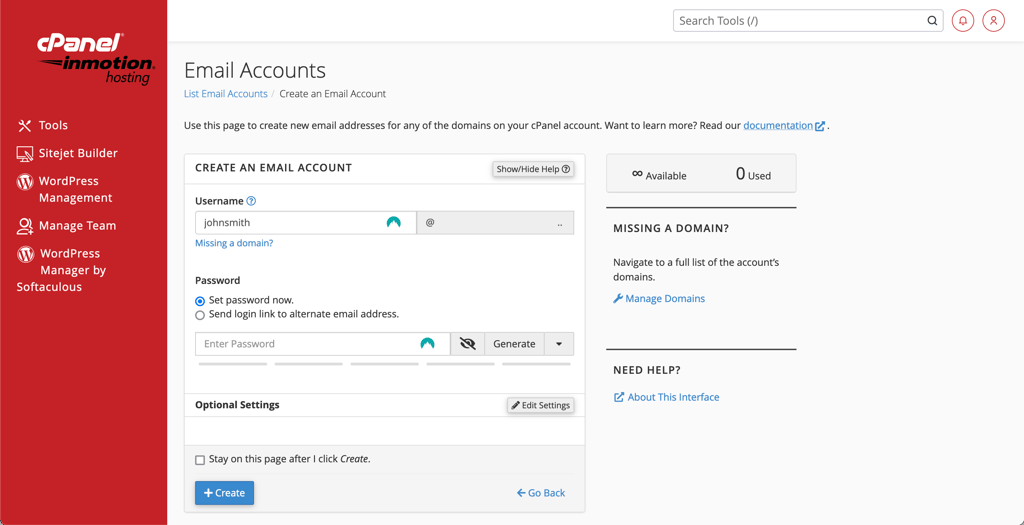
- You can now reach your account through the same Email Accounts icon.
-
When it comes to webmail client choices, you should opt for RoundCube or Horde – both open-source. In this case, I chose to go with RoundCube, as it is a little bit better looking.
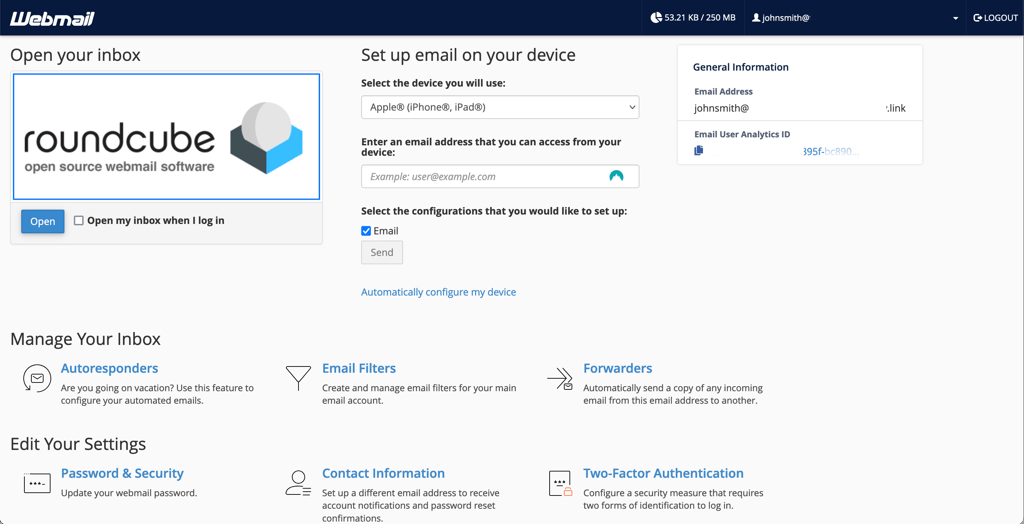
In any case, these two are very much outdated. Also, your email will be hosted on the same server as your website. This means sharing the resources (and reputation) with other users on the server. That could translate into poor speeds and quick use of your website’s resources. More so, if your neighbors are using their email for spam purposes, you could get blocked for spamming too.
InMotion Hosting's email service is good if you want to collect and answer contact form submissions or use it for casual emailing. But if you’re planning big email campaigns, look for paid options outside your server.
InMotion Hosting performance: reliable and stable
InMotion Hosting has always focused on business users, promising them exceptional performance. To find out if that’s true, I ran extensive tests. The provider proved to be reliable and generally fast, though it struggled under very heavy stress.
For everyday use, InMotion’s shared plans are good enough for blogs or small business websites, but enterprises or high-traffic sites should opt for VPS or higher-tier solutions for better stability and performance.
| Test type | InMotion results | Test location |
| Uptime | 100% | Virginia, US |
| Average response time | 85.10ms | New York |
| 19.90ms | London | |
| 156ms | Mumbai | |
| 87.69ms | Tested locations average | |
| Site load speed | Time to first byte: 0.943s Fully built site: 1.620s LCP: 1.640s | Virginia, US |
| Stress test | 50 virtual users failed ❌ 40 virtual users failed ❌ 30 virtual users failed ❌ 20 VUs for 5 min succesful ✅ | - |
InMotion Hosting uptime and response time
During our latest two-week testing period in July 2025, InMotion Hosting showed very good performance, with 100% uptime and no connection issues – meaning the service was always available.
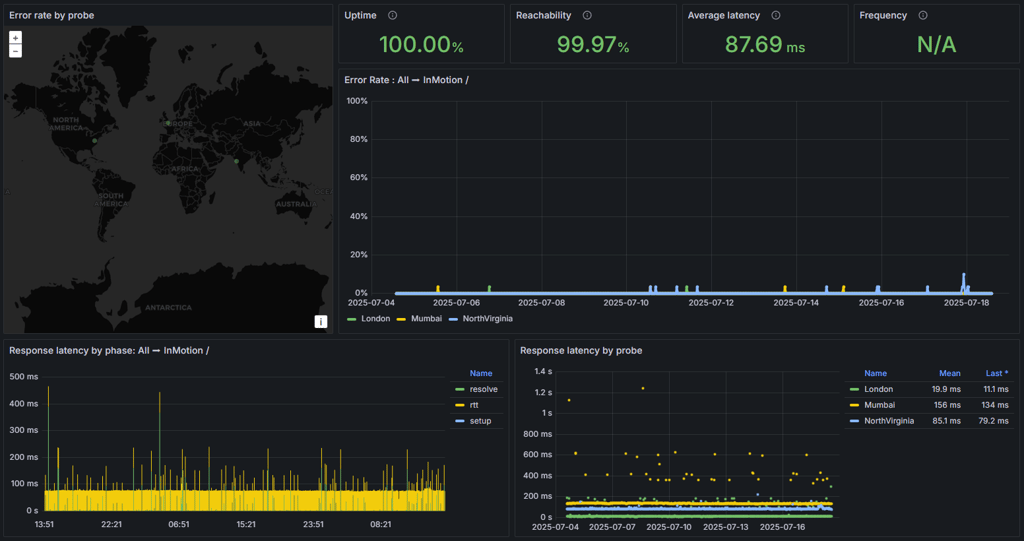
InMotion’s response times averaged 87.69 ms. From New York, the server responded in 85.10ms, which was about what I expected. What really surprised me was London results, where it measured just 19.90ms, much faster than anticipated, while Mumbai was a lot slower at 156ms. Even with small changes in speed here and there.
All in all, InMotion Hosting demonstrated great results in terms of uptime. There were no outages, and performance remained highly stable. However, the response time wasn't anything special.
InMotion Hosting speed
My website is hosted in the US data center, so the best results are expected in the US, with the Largest Contentful Paint (LCP) at only 1.620s It is an okay result, but it’s not the fastest hosting provider. For example, Bluehost and Hostinger both loaded in under a second. hosting.com was also a bit faster than InMotion at around 1.370s.
LCP is important because Google considers it when ranking web pages. That said, InMotion Hosting is still comfortably within Google’s recommended 2.5s range, meaning the site has a solid chance to rank well in search.
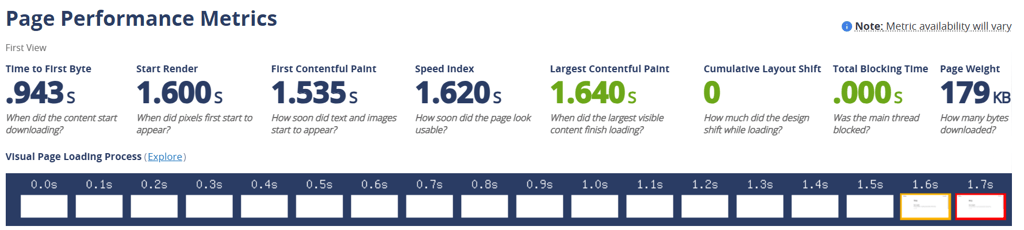
Other metrics tell a similar story: the server took about 0.943s just to start responding, which is a bit on the slow side for a site hosted in the US. By 1.535s, the first text and images appeared, and by around 1.640s, the page looked complete. In practice, visitors would see the page come together fairly quickly, though there’s a slight pause before anything shows up.
Overall, the performance was reliable, but not exceptional for a US-hosted site. It’s fast enough for a smooth browsing experience, but other hosts deliver a snappier, more immediate load.
InMotion Hosting stress testing
I conducted one more test with the Cybernews research team to determine whether InMotion Hosting can handle high traffic.
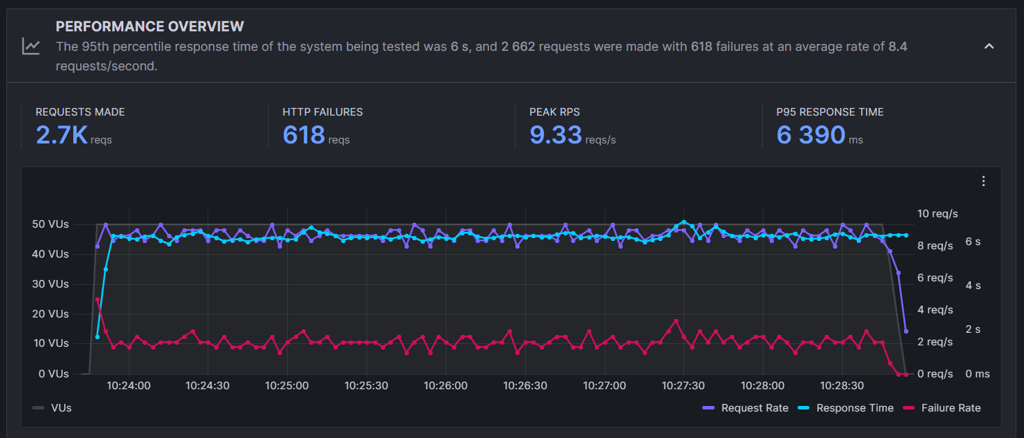
When I pushed it hard with 50, 40, and 30 virtual users, the website struggled badly. Response times spiked and many requests failed, so it clearly wasn’t built to sustain that level of concurrent traffic on a shared plan.
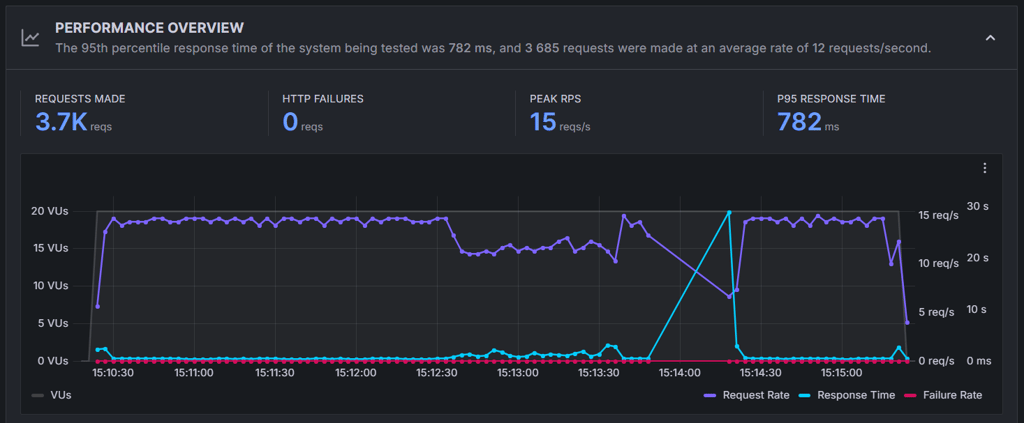
Then I dropped it back to 20 virtual users for five minutes, and things started to look a lot better. The site handled the test run without failures, but still, there were occasional spikes in response time.
All in all, InMotion’s shared plans are fine for modest traffic and short bursts, but they start to fall apart once loads get into the dozens of simultaneous users. If you expect frequent spikes, you should look at higher tiers or other providers. For context, in our tests, Hostinger’s shared plan handled the 50-user run perfectly.
Is InMotion Hosting secure?
When it comes to safety, InMotion has taken numerous steps to make the website as secure as possible. It includes a Security Suite in all of its plans. The suite comes with free SSL, hack and malware protection, and DDoS Protection. Unfortunately, automatic backups cost extra.
You can find all the security-related tools in the cPanel’s Security section.

Now, let’s analyze InMotion offers in its security suite and what each does:
- Free SSL. It's essential, and most web hosting providers give it for free now. SSL encrypts all visitor-server communication, so no third party can access sensitive data. It also gives your website that security lock that can be found by the domain name.
- Hack and malware protection. For all shared hosting plans, you get hack and malware protection for free. However, it can’t be seen from cPanel. It’s an internal server security measure that you have no control over. Therefore, you have to take the provider’s word for it.
- ModSecurity. The ModSecurity module can be enabled and disabled from the cPanel. It’s a web application firewall that filters the traffic, as well as detects and prevents malicious attacks on your website. It’s pretty much a standard to have it activated.
- DDoS protection. Corero provides it, but it cannot be found in the cPanel. However, it’s a real-time automatic DDoS attack protection feature that detects and prevents your server from being overwhelmed by a number of malicious requests. It’s automatically activated and always on. You don’t have to do anything to enable it yourself.
- Two-factor authentication. While InMotion Hosting does not emphasize it, two-factor authentication is also available in cPanel, and I highly recommend using it. It protects your hosting account from being hacked by adding a second layer of security – a code that’s only available to you. Logging in with just a password is not enough anymore.
- Backups. InMotion performs automatic backups every 24-36 hours on shared hosting, retaining them for up to 10 days. However, restoration requires purchasing the Backup Manager add-on, which costs $2.99/month for the first 10GB, with additional fees for more storage.
- Dedicated server protection. If you’re using dedicated servers, advanced server-side protection is included for free. This covers firewalls, PHP protocols, ModSecurity, DDoS defense with Correro, and continuous malware scanning with automatic quarantine and alerts, ensuring solid, proactive protection against server threats. For even stronger, real-time malware defense, you can add Monarx Premium.
InMotion Hosting delivers impressive security with free SSL, malware protection, and Corero DDoS defense included in every plan. While backups cost extra, I was pleasantly surprised by its advanced safeguards, which go far beyond most hosts, even topping competitors like Bluehost.
InMotion Hosting support
Like any reputable hosting provider, InMotion Hosting offers a wide range of customer support options.
| Support option | Availability |
| 24/7 live chat | ✅ Yes |
| Email support | ✅ Yes |
| Ticket support | ✅ Yes |
| Phone support | ✅ Yes |
| Knowledge base | ✅ Yes |
InMotion Hosting offers quite a few customer support options. These include 24/7 live chat, email support, a ticket system, and phone support. Besides that, the provider has a vast collection of articles in its knowledge base and blog. Plus, there’s an active community forum.
For this InMotion Hosting review, I contacted its live chat a couple of times. The responses were almost always immediate. However, once connected to an agent, there was some wait time between the answers.
The first time I used live chat was to contact InMotion’s sales team before making my purchase and ask if my chosen plan suited my website’s needs. The chat went well, but after it ended, I got an unexpected influx of spam emails without an unsubscribe button. So, to avoid the same inconveniences, I recommend that you do not give your primary email address when trying to get help regarding any sales advice.
Contacting tech support was an entirely different story, though. The tech support agent I talked to was very nice and eventually got my problem solved – I couldn’t find where to activate the free SSL certificate. However, the chat did start with a little bit of miscommunication.

The agent explained how to add a paid certificate, and I got a little confused with all the abbreviations at first. But once I specified that I was talking about the free certificate, I quickly got the step-by-step instructions on how to do it.

Disregarding the initial confusion, all was great. Plus, I want to praise InMotion Hosting for not sending the SSL guide from the knowledge base to me first, but actually writing the instructions. Despite all, I still think InMotion customer support is good.
Speaking of the knowledge base, I’m quite impressed by InMotion’s one. The interface is slightly outdated, but the selection of articles and guides is outstanding. Plus, their quality is great.

From what I checked, most articles feature the latest up-to-date information.
An alternative way to get help is a community forum. It’s not super active, but moderators join in on every topic to guide you in the right direction. This is more than you can expect from any hosting provider.
All things considered, I’d say that InMotion Hosting’s customer support is good.
InMotion Hosting review: summary
Most InMotion reviews conclude that this web host is an attractive choice for all users. So, to figure out if that’s the case, I dove deeper than the surface level in this article.
I found that the prices are not the cheapest, with many competitors offering better value. Performance is decent, but it struggles under heavy stress, so it’s not the fastest host. However, what truly stood out was its advanced security features, including free SSL, malware protection, and Corero DDoS defense, which go beyond most competitors. Alongside that, there’s one quite outstanding feature – the BoldGrid website builder.
I combined all my research into the final verdict for InMotion Hosting.
| Feature | Fast, reliable, and beginner-friendly hosting | |
| Pricing | InMotion Hosting has quite high pricing in comparison to the industry average. However, you can get access to the Core plan at $4.59/month, which is affordable. On the other hand, plans are inclusive and offer all that’s needed to start a successful website. | |
| Ease of use | The combination of Account Management Panel and cPanel makes InMotion Hosting very easy to use. There are a couple of glitches, but it's no big deal. The most impressive thing out there is the premium BoldGrid website builder for WordPress. | |
| Performance | InMotion Hosting's performance is reliable with an expected 99.9% uptime. However, the loading speed was average, and its stress test results showed limitations under very heavy traffic. | |
| Security | InMotion Hosting covers all the security basics that are more than enough for small to medium websites. That includes free SSL, malware, hack, and DDoS protection. However, more advanced tools require purchasing. | |
| Support | The customer support department is quite good. Live chat wait times are minimal, and agents are knowledgeable. However, sales agents can get overly pushy. Meanwhile, the knowledge base is a quality option if you want to do some reading on your own. |
InMotion Hosting FAQ
What companies use InMotion Hosting?
InMotion Hosting is used by companies of all sizes, from small businesses to large corporations, looking for trustworthy web hosting services. It offers a wide range of services, such as shared hosting, WordPress hosting, VPS hosting, and dedicated servers, to support the diverse hosting needs of businesses.
Is InMotion Hosting free?
No, InMotion Hosting is not free, but it offers free services like domain names, website migration, a WordPress transfer plugin, and Launch Assist for new accounts.
What is InMotion Hosting used for?
InMotion Hosting provides web hosting and server services, including shared hosting, WordPress hosting, VPS, dedicated servers, hosted private clouds, and eCommerce solutions.
Who owns InMotion Hosting?
InMotion Hosting is a privately owned company, founded by Sunil Saxena and Todd Robinson. The company remains employee-owned and operated.
Does InMotion Hosting allow adult content on its servers?
No, InMotion Hosting doesn’t allow adult content (pornographic, gambling, smoking, or alcohol material) on its servers. It does allow certain types of artistic material – to double-check, you can contact its support team for better clarification.
Is InMotion legit?
Yes, InMotion Hosting is a legitimate and well-established web hosting provider, recognized for reliable services and excellent customer support. It has been in business since 2001, giving it over two decades of experience in the web hosting industry.