Wix vs Bluehost 2026: a web builder versus the web host
Our in-house experts conduct internal independent, hands-on testing and transparent reviews of web hosting providers by using custom-built tools or utilizing industry-recognized tools and methods to ensure impartial and evidence-based assessments.
Using the same criteria for all services, we share our detailed methodologies and practices to help customers make informed hosting decisions.
Learn more

In this Wix vs Bluehost comparison, I’ll look at the two online services giants and find out how they stack up against each other. Here, you’ll find a comparison of Wix and Bluehost pricing, ease of use, extra features, performance, security, and support.
At first glance, this may strike you as strange – comparing two entirely different services.
After all, Wix is a popular website builder that allows you to quickly and easily create eye-catching websites.
Bluehost, on the other hand, is a hosting provider that lets you build a website using the content management system (CMS) of your choice. Though the focus lies on the ever-so-popular WordPress.
Well, it is actually very much possible to compare Wix and Bluehost. In fact, this is a choice many people face when they want to create their first website. Especially considering the popularity of both companies and that both target beginners.
So which one is better? Is there even a better one? There’s only one solution to this: let’s put these two companies to the test.
Wix vs Bluehost: general info
The main difference between these two providers is that Wix is a website builder platform that offers stunning templates to quickly build your site. Bluehost, meanwhile, is a web hosting platform that offers cheap hosting plans with a powerful control panel.
Before we jump into the deep end of things if you’re just looking for the final verdict, here’s your ticket to the conclusion.
| Bluehost | Wix | |
| ⭐ Rating: | ||
| 💵 Price: | From $1.99/month | From $17.00/month |
| 📑 Uptime guarantee: | 99.9% | 99.9% |
| 🔥 Coupons: | Bluehost coupon 78% OFF | Wix coupon 50% OFF |
| Storage space (from): | 10GB SSD | 2GB |
| ✂️ Free domain (first year): | Yes | Yes |
| 🔒 Free SSL certificate: | Yes | Yes |
| ➡️ Site migration: | Free WordPress migration | Free manual migration with the help of third-party apps |
| 💾 Automated backups: | Free automatic weekly backups | Yes |
| 📧 Email accounts: | Free (up to 100MB of storage) | No |
| 👨💻 24/7 live support: | Yes | Yes |
| 💰 Money-back guarantee: | 30-day | 14-day trial period for Premium plans |





Our in-house research team and expert writers work hand in hand to regularly test hosting services and provide accurate and fact-checked information. Discover the ins and outs of how we test and evaluate website hosting providers.
Pricing comparison
When comparing Wix and Bluehost, there’s a clear distinction in their pricing models. Wix’s paid plans range from 17.00/month to $159.00/month, catering to both simple websites and those needing eCommerce functionality. Meanwhile, Bluehost’s shared hosting plans start at just $1.99/month and go up to $9.99/month. Unlike Bluehost, Wix also offers a free plan, though with notable limitations.
To get a better understanding, let’s see how both providers’ cheapest plans stack up against each other.
First, there are a few similarities between the two: both providers offer a free domain and a free SSL certificate and allow hosting one site. That’s where the differences begin:
- Wix Light (17.00) comes with 2GB storage and no Wix ads on the website.
- Bluehost Basic ($1.99/month) comes with 50GB storage and 5 email accounts.
Just by looking at the entry plans, it is clear that Bluehost provides significantly more storage than Wix. However, at the end of the day, you buy just hosting services with Bluehost. With Wix, you get an advanced and modern website builder as well as hosting services.
One more important thing – Wix offers a free plan, but it comes with limitations. You only get 500MB of bandwidth and storage, can’t use a custom domain, and Wix ads will appear on your site. Additionally, you won’t be able to accept payments from customers unless you upgrade to a paid plan. Still, it’s a good way to test the builder without any cost.
When it comes to the renewal, it seems that only Bluehost applies increased rates.
Here’s what the prices would look like:
| Provider | Plan | Billing period | Total initial price | Total renewal price |
| Wix | Light | 1 year | $204 | $204 |
| Bluehost | Basic | 1 year | $35.40 | $107.88 |
Overall, Bluehost is significantly cheaper than Wix for the first term.
Now that we’ve looked at the cheapest plans – let’s see which ones are truly worth your time.
Wix offers a range of plans tailored for different users, from individuals to large businesses. The Free plan (500MB storage/bandwidth) is best for testing the platform but includes Wix ads. The Light plan (2GB storage) is great for small blogs, while the Core plan (50GB storage) adds eCommerce features for small businesses.
Bluehost offers a variety of hosting plans, from affordable shared hosting at $1.99/month to enterprise-level solutions. Shared hosting is ideal for personal blogs and small businesses, while WordPress hosting supports all Bluehost plans. WooCommerce hosting ($12.95/month) caters to eCommerce needs, and Cloud hosting ($75.00/month) is great for high-traffic sites. VPS hosting ($46.99/month) provides enhanced security and performance. All plans come with a 30-day money-back guarantee and support multiple payment options.
Bluehost’s Plus plan offers the best value for money. With an annual billing term, the plan will cost you $6.99/mo or $35.40 in total. The renewal brings it up to $107.88 per annum.
One more thing to mention – both providers also have slightly different money-back guarantees. While Bluehost offers the standard 30-day money-back guarantee, Wix only gives you 14 days to make up your mind. Then again, it does have a free plan for you to test for as long as you wish.
Hosting management: ease of use
In this Wix vs Bluehost comparison, both providers pull through when it comes to ease of use. Wix utilizes a stylish custom-made control panel to let you manage your website. Bluehost, on the other hand, opts to provide its users with a native management area with a customized cPanel integration. Both companies also have tools to easily build websites.
Setting up a website
Both Wix and Bluehost make the website-making process as easy as possible. The two have very automated processes where only in a few clicks you’re able to see your website ready to go live.
Once you sign up for Wix, you’ll have two main options for building your website: Wix ADI (Artificial Design Intelligence) for a guided setup or the drag-and-drop editor for full creative control. Regardless of your choice, Wix is designed to be user-friendly, making it easy for both beginners and experienced users to launch a site quickly.

Wix ADI simplifies the website creation process by asking you a few questions about your business, goals, and target audience. You can skip questions if needed, and once complete, Wix will generate a website layout based on your preferences. You’ll then be introduced to the Wix dashboard, where you can:
- Connect a custom domain
- Set up SEO to help your site rank on Google
- Configure eCommerce and shipping settings (if applicable)
Once your site is generated, you can choose between tweaking the AI-created design or picking a template for manual customization. Wix also provides AI-powered tools like a text generator, image editor, and portfolio creator to further enhance your content.

Wix’s AI tools can seem overwhelming at first, but they prove to be highly effective. When testing its generative AI against competitors, I found that Wix produced more detailed and engaging text. These features make it a strong choice for bloggers, content creators, and copywriters looking to streamline their work.
If you prefer a hands-on approach, you can start with one of 900+ templates and customize it using the drag-and-drop editor. You’ll have access to hundreds of design elements, layout options, and third-party integrations to tailor your site to your needs. While the editor takes a moment to load initially, it runs smoothly once set up.

Overall, Wix provides an extensive set of tools for website creation, whether you rely on AI assistance or prefer full design control. While the vast number of features can feel overwhelming at first, once you familiarize yourself with the interface, everything becomes intuitive.

Setting up a website with Bluehost is quick and beginner-friendly, making it a great option for those who want a hassle-free experience.

Once you log in to your Bluehost account, navigate to the Hosting section of the dashboard. From there, you can:
- Click the New Site button and choose between installing WordPress, transferring an existing WordPress site, or starting from scratch
- Enter your site title and connect a domain name — either a new one or an existing domain
- Once WordPress is installed, click Edit Site to begin customizing your website
At this stage, you can either use the AI Site Creator, follow a step-by-step guide, or import an existing WordPress site. I recommend using the AI Site Creator as it generates a well-structured website with minimal effort, making the setup process even smoother.
Simply put, Wix and Bluehost are very quick and easy to use when it comes to setting the foundation for your site.
Website management area
Now, talking about the service/site management area, both Wix and Bluehost are just as easy to use. Wix is an intuitive builder, and its service management area mostly features your account-related information. Meanwhile, Bluehost combines a custom dashboard with cPanel integration for all hosting management-related settings.
With Wix, the whole site and account management can be found on one page. In the left side menu, you can find tools like Marketing & SEO to set up and manage your advertising campaigns. By choosing Settings, you’ll find the main account information. Here you can also connect your domain.

As for Bluehost, the first thing you see when you log in is an extremely clean and minimalistic setup wizard. To your left, you will see a sidebar with a couple of vital items – site, app, email, and domain management options, as well as the Advanced tab to reach cPanel.

Then, right smack at the center of the page is a to-do list to get you started. This list covers important web-creation steps if you’re using WordPress.
You can manage all your websites in the Websites menu.

However, for more advanced settings, Bluehost has cPanel seamlessly integrated into the native panel. You can find it under Advanced in the side menu.

And it’s really for advanced settings. More simple tools like WordPress installer, or domain management, which are typically in the cPanel, are brought out to the main dashboard. In cPanel, you can create and manage free email accounts, reach databases, or a file manager.
Altogether, there are some similarities between the Wix builder management and Bluehost hosting management, but the concepts are completely different. Wix only provides you with the front-end tools, while Bluehost gives way more control into your hands.
Extra hosting management features
For this part of the Bluehost vs Wix comparison, I reviewed the extra features each provider offers to help you manage your site. Wix has the App market and allows adding different roles to the site management. Alternatively, Bluehost has staging and marketing management to offer.
Wix offers hundreds of apps to add functionalities to your website. These apps cover various categories, including analytics, business tools, events, and online stores. At the bottom of each plan’s icon, you will see a brief description, the rating, and how many times it was downloaded.

Another great function that has been incorporated by Wix is Site Roles.

Here you can invite people to get access to your site’s management and assign them specific roles. Each role also specifies the level of control that person has over your site.
At the same time, Bluehost offers staging. Staging allows you to create a copy of your site where you can test all the changes and updates before you release them to the live site.

You can access this tool from your WordPress admin panel in the Bluehost plugin. To create a copy, all you need is a few clicks. The same applies to punching those changes to the live site.
Bluehost also offers marketing tools like Google My Business and Google Ads. You can easily set up a marketing campaign without leaving the dashboard.

- Google My Business allows your site to appear on Google maps by indirect queries like “best coffee place.”
- Google Ads allows managing the ads.
Overall, Wix and Bluehost have equally useful extra features to enhance your site’s functionality.
Wix vs Bluehost performance
Performance is what can really make or break the site. So to see which one is faster, I’ve put both providers through 3 reliability and speed-related tests. And it seems that both providers are equally reliable. However, while Bluehost was much faster, Wix managed to uphold bigger traffic.
Let’s look at a more detailed breakdown of the results.
Uptime and response time
When it comes to response time, Wix demonstrated a significant advantage. It recorded an exceptionally fast average response time of just 29.03ms, making it one of the quickest providers available.
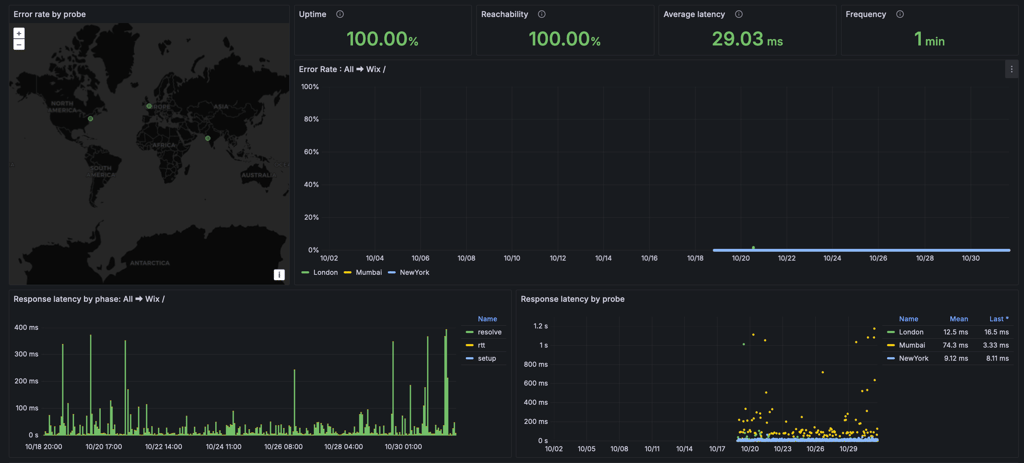
Bluehost, while still impressive, had an average response time of 154.11ms. Compared to previous tests, where Wix had a 99.99% uptime with a 461ms response time and Bluehost showed 99.99% uptime with a 361ms response time, both providers have significantly improved.
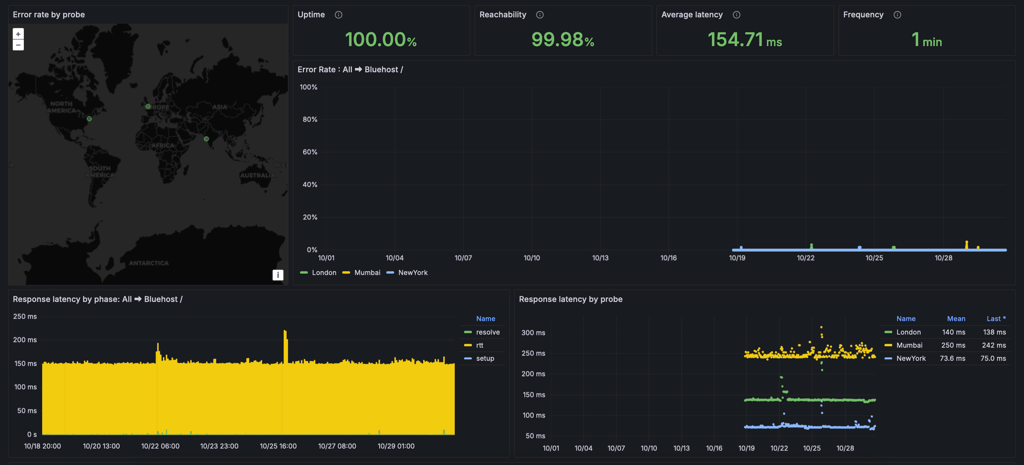
Overall, both Wix and Bluehost offer excellent reliability, but Wix stands out for its remarkably faster response time, making it a great choice for those who prioritize speed.
Website speed
Now it’s time to see how both Wix and Bluehost would perform as fully built websites.
For that, I’ve installed templates and their demo content onto each provider’s website. Of course, since Wix does not use WordPress and Bluehost does, the templates are slightly different.
To create more equal conditions for this Wix vs Bluehost battle, I tested both providers from the US, as both are hosted in the US data centers.
The server location can have an impact on the website’s performance. Bluehost has data centers only in the US. And while Wix has numerous centers in the US and Europe, you don’t get to choose the location.
Now to better read the final results, here are 3 measures I pay the most attention to:
- Largest Contentful Paint (LCP) – time in which the biggest chunk of content is loaded. Best to keep it under 2.5s.
- Fully Loaded Time – any more than 3 seconds to load, and the visitors start to feel a difference.
- TTFB – this shows how fast the server recognizes and reacts to the first request. Best if it’s under 200ms.
Taking this into consideration, Wix may look worse than it really is. It’s no surprise that website builders add many elements to the website, which makes it load longer.
Wix barely surpassed the recommended 2.5s. Its LCP is 2.6s, and that is a very reasonable time for a fancy-looking site.
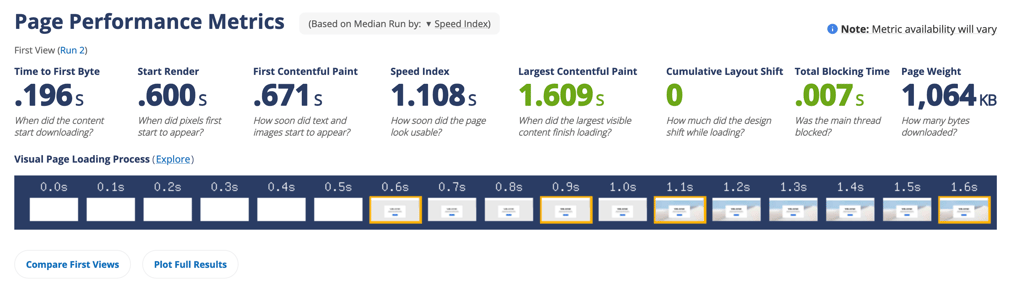
Wix’s Fully Loaded Time is an impressive 1.108s, making it significantly faster than before. More importantly, the website becomes fully interactive almost instantly.
Additionally, its TTFB is just 0.196s, right within the recommended 200ms threshold, ensuring a quick server response and a smooth browsing experience.
Overall, for a website builder using so many design elements, Wix is doing great.
Meanwhile, Bluehost also delivered strong results. Its LCP and Fully Loaded Time were both 1.664s — well within the recommended range for a smooth user experience.
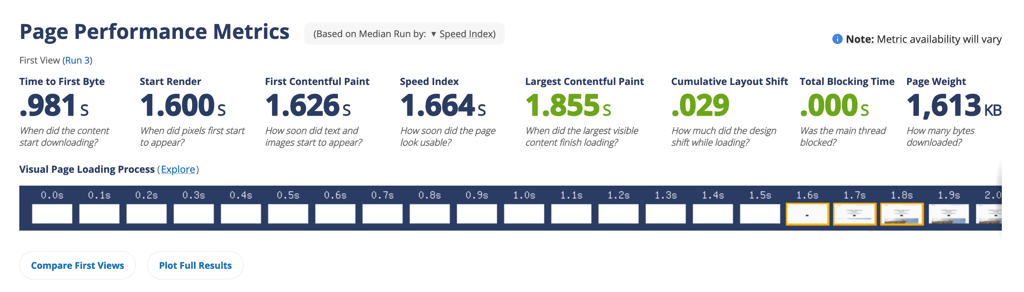
However, its TTFB was 0.981s, which leaves some room for improvement. A faster server response could have further improved loading speeds.
All in all, both providers were quick, yet it is pretty obvious that this Wix vs Bluehost match had a clear winner. Bluehost was faster, yet the server responsiveness was better with Wix.
Stress testing results
The last test examines how well both providers can handle increased traffic on the site. To begin with, I send 50 virtual users (VUs) to each site and let them roam around for 5 minutes.
As 50 visitors is a relatively big number, which could seriously disrupt the server’s work or overwhelm it entirely, I usually have to repeat the test. I drop the number by 5VUs and run the test until I get a pass.
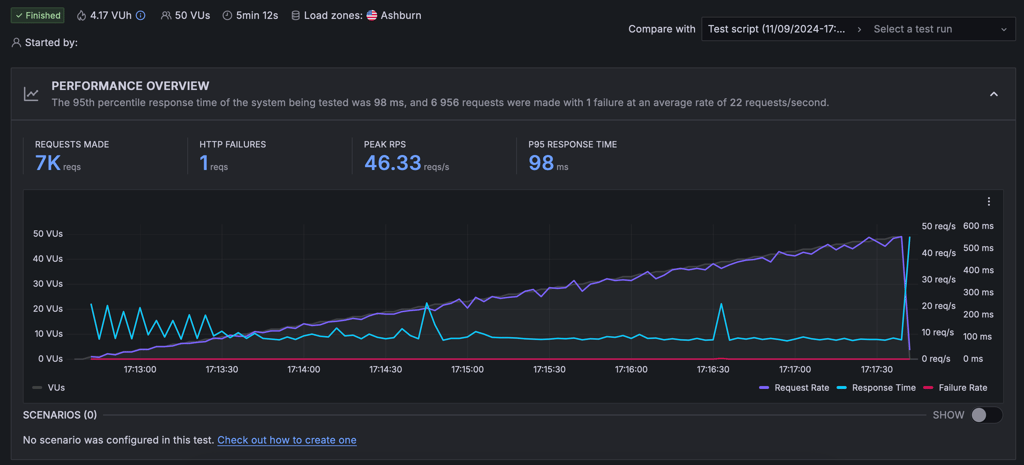
Both Wix and Bluehost managed to handle 50 virtual users, but their performance told a different story. Bluehost processed an impressive 7000 requests with only a single failure. Its peak request rate reached 46.33 requests per second, and the 95th percentile response time was just 98ms. And it seems like that’s the max it can take — while pushing a high volume of traffic, its response times remained consistently low.
Wix, on the other hand, handled 5900 requests without a single failure, which is great. However, its response time fluctuated significantly, with a 95th percentile response time of 442ms. While this is still within an acceptable range, it suggests that the server was struggling to keep up as the load increased. The request rate peaked at 38.33 per second, showing that Wix wasn’t as efficient in handling simultaneous traffic.
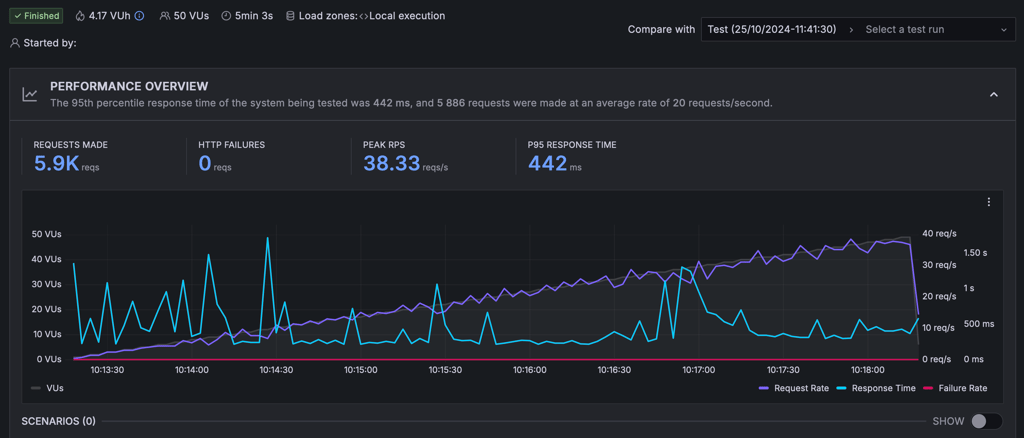
The response (blue line) is far from stable. This means that the response time is very much dependent on the number of visitors (grey line) on the site. A jump in visitors slows down the server.
Website security
When it comes to security, both Wix and Bluehost are quite different. Bluehost, as a hosting provider, allows you to access and manage most of the security measures. However, quite a lot of those features must be purchased separately. Wix, alternatively, has many security features already integrated, yet you have little access to them.
Both Wix and Bluehost include free SSL certificates and DDoS protection.
Wix security features:
- 24/7 website monitoring helps to prevent any malicious attacks on your site.
- PCI compliance allows keeping all the card payment transactions on the site safe.
- 2-Step Verification secures your site with an extra layer of security when logging in.
- Automatic backups work through the Site History feature. You can restore the last version very easily if needed.
Besides the free tools, most other Bluehost security features come for an extra charge:
- To receive backup options with Bluehost, you have to purchase at least Choice Plus or Pro. Otherwise, it costs $2.99/month extra.

Customer support
When it comes to customer support, Wix and Bluehost take different approaches. Wix technically offers 24/7 live chat, but it’s not easily accessible — you have to navigate through the knowledge base and phrase your query just right to reach a real agent. Even then, responses can be slow, and agents aren’t always the most knowledgeable. Wix also provides ticket support and a callback request option.
Meanwhile, Bluehost offers various support options, including 24/7 live chat and phone. Both companies also have a wealth of knowledge base articles on their websites.
To reach Wix's support, you’ll have to chat with a bot before you can submit a ticket or request a callback. Which is not the speediest way to deal with things.

Wix offers customer support in multiple languages, including English, French, Portuguese, and Spanish. However, while it previously provided a callback service, this option is no longer available. Instead, users can reach Customer Care through the Wix app or website. For immediate assistance, live chat and email support are available within your account. You can also visit the Customer Care page for more details on support options.
In contrast, Bluehost is easier to reach and has more support options. Thankfully, it can be contacted via live chat. Even better, there isn’t a long wait time before an agent joins the chat.

The agent was quick and informative. The conversation was no longer than 5 minutes, and I got exactly what I was looking for. However, as these are real people, agents’ knowledge levels may vary greatly.
As for the knowledge base, both Wix and Bluehost offer an extensive library of articles. You will find articles, guides, FAQs, instructions, tutorials, and more.
These articles cover pretty much everything – including getting started, plans available, billing, managing your website, and troubleshooting.
Wix vs Bluehost: final recommendation
When it comes to Wix vs Bluehost, they both are amazing options for beginner users and those with little to no web development experience. But even with that, Wix is much easier to use, while Bluehost can also be employed for advanced projects.
| Feature | Wix | Bluehost | Verdict |
| Price | Bluehost is much more affordable, with prices starting at $1.99/month, compared to Wix at 17.00. Yet Wix has a free plan too. | ||
| Ease of use | Both providers are easy to use in their own industries. Wix is an intuitive website builder, and Bluehost – an easy-to-use hosting provider. | ||
| Performance | Both providers were reliable, with an uptime of 100%. However, Bluehost had a slower average response time – 154.11ms compared to Wix 29.03ms. | ||
| Security | Both providers include a free SSL certificate and DDoS protection in their plans. Yet while Bluehost offers only the basic security tools for free, Wix adds much more security features to your site. | ||
| Support | Wix offers the ticketing option, while Bluehost has 24/7 live chat and phone support available. Both providers also have very detailed and informative knowledge bases. |
Both Wix and Bluehost are clear leaders in the industry. The two are easy to use and powerful. However, if we’re looking from the web hosting perspective, Bluehost was much cheaper and showed better performance results. So it’s the easy web hosting solution I recommend.
At the same time, if you’re looking for a platform to build a site and stick to it, Wix might be exactly that. It makes site building extra easy and provides a ton of tools for that. No matter if you need a portfolio or online store.
Alternatives to Wix and Bluehost
If Wix and Bluehost don’t quite suit your needs, there are always other options on the market. A few great alternatives worth a look at are Hostinger and HostGator.
Hostinger
Popular for its super cheap prices, Hostinger caters mainly to beginners and those who are budget-conscious. It has a simple and clean interface. Additionally, the performance you’ll get will be of top quality.
Hostinger's shared hosting plans range from $2.69/month to $3.59/month.
HostGator
The sister company of Bluehost, HostGator, offers various hosting solutions. In fact, it caters to both newbies and professionals. Plus, HostGator also has its own custom website builder if you want to quickly set up your site. It features a drag-and-drop editor and is very easy to use.
Its prices are rather competitive and range from $3.75/month to $6.25/month for shared hosting. For its website builder, plans start from $3.46/month.
FAQ
Is Bluehost better than Wix?
Bluehost is better than Wix only when it comes to pricing, website speed, and the control it allows its users. In other aspects, Wix is more secure and easier to build a site with.
Which is easier to use, Wix or Bluehost?
Wix is easier to use than Bluehost. It’s a website builder platform that’s designed for beginners. You can create your website using a visual editor by dragging and dropping the design elements where you want them to go.
Can I use Wix for free?
Yes, you can use Wix for free. Wix has a free plan that comes with 500MB bandwidth and 500MB storage.
Can I use Bluehost for free?
No, you cannot use Bluehost for free. On the other hand, if you cancel within 30 days, you will receive a full refund for your hosting service but not for most add-ons. Keep in mind that only credit card purchases are refundable.