Best VPN for BetOnline in 2026
Our in-house cybersecurity experts and journalists, renowned for major reports like The Mother of All Breaches, conduct transparent, unbiased VPN testing and in-depth analysis.
With 750+ articles crafted based on real-world research, we empower readers to make informed purchasing decisions through first-hand expertise.


-
BetOnline is blocked in New Jersey and several other regions, including Australia, Brazil, the United Kingdom, France, and more, due to licensing restrictions.
-
You can access BetOnline's sportsbook, poker room, and casino while traveling outside the US by connecting to a VPN server in a state or country where the platform is available.
-
Based on my tests, NordVPN is the best VPN for BetOnline, as it consistently helped regain access to the platform from restricted regions and delivered fast, consistent performance.
BetOnline is an online sportsbook, poker room, and casino that lets users bet on sports, play real-money poker, and access a full lineup of live casino games through its website and mobile-friendly browser platform. The site is licensed by the Panama Gaming Control Board and operates internationally, while also noting that gambling rules vary by country and US state.
For example, BetOnline doesn’t accept play from certain jurisdictions, including Australia, France, and the United Kingdom, and access is officially restricted in New Jersey, the US. As a result, if you’re in New Jersey or traveling through a restricted country, you may find that you can't log in, place a bet, or even load the BetOnline homepage.
A reliable BetOnline VPN can help by routing your connection through a server in a state or country where the platform is available, allowing you to access your account as though you were browsing from that location.
Important: The purpose of this article is to explain how VPNs can help protect your connection when accessing BetOnline, especially while traveling or using different networks. It is not a recommendation to use gambling services in places where betting is not legally permitted. Always check the rules in your country or region and ensure your activities comply with local laws.
Compare our recommended BetOnline VPNs
| VPN for BetOnline | Rating | Best for | Servers | Starting price |
| 1. NordVPN | Best overall VPN for BetOnline | Thousands of servers in 225 locations | $3.49/month | |
| 2. Surfshark | Fastest VPN for BetOnline | 4,500+ servers in 100 countries | $2.49/month | |
| 3. Proton VPN | Best VPN for privacy | 21,200+ servers in 149 countries | $2.49/month | |
| 4. IPVanish | Budget-friendly VPN | 3,400+ servers in 150 locations | $2.19/month | |
| 5. Norton VPN | Best for ease of use | Undisclosed number of servers in 133+ locations | $3.33/month |




We spare no effort to test the products & their features. All information is gathered by our in-house research team & fact-checked by our team of experts. Discover the ins and outs of our testing procedures.
How to play BetOnline in restricted regions with a VPN

- Choose a VPN that reliably works with BetOnline – I recommend NordVPN for its consistent access and fast speeds
- Download and install the VPN app on your computer, Android, or iPhone
- Connect to a VPN server in a state or country where BetOnline is accessible, such as California or New York
- Visit BetOnline, log in to your account, and regain access
Best VPNs for BetOnline – my detailed list
To use BetOnline securely, choose a gambling VPN with fast, stable speeds for live betting, strong encryption and leak protection, a clear no-logs policy, and easy-to-use apps for your devices.
My research into providers’ performance, reliability, privacy features, server coverage, and ease of use concludes that NordVPN, Surfshark, Proton VPN, IPVanish, and Norton VPN are the best VPNs for BetOnline. They can help protect your connection and support access to the sportsbook, poker room, and casino from available locations and networks.
1. NordVPN – best VPN for BetOnline overall

| Rating: | |
| Based in: | Panama |
| Servers/countries: | Thousands of servers in 225 locations |
| Price: | From $3.49/month |
NordVPN is the best VPN for BetOnline overall, as it combines fast, stable performance for live betting with reliable apps, city-level server choice, and leak protection that helped keep my connection private at all times. Across all five locations I tested, it reached BetOnline without a single failed connection.

NordVPN achieved a 100% success rate, with BetOnline loading successfully on every server. New York delivered the fastest result at 0.9 seconds, while even the slowest tested location loaded in just 2.1 seconds. This is fast enough that browsing markets, opening poker tables, and navigating casino games felt responsive.
| Best NordVPN server locations | Access result | Load time |
| Los Angeles, California | Successful | 1.2 seconds |
| New York, New York | Successful | 0.9 seconds |
| Miami, Florida | Successful | 1.5 seconds |
| Detroit, Michigan | Successful | 1.8 seconds |
| Dallas, Texas | Successful | 2.1 seconds |
When testing NordVPN for BetOnline, the New York and Los Angeles servers gave me the smoothest experience, loading the site without retries or unexpected disconnects. I also ran DNS and WebRTC leak checks after changing between locations and found no leaks, helping prevent my actual IP address from being exposed to my ISP or on the network I was using. Compared with the other providers tested, NordVPN was the most consistent in performance across all locations.
NordVPN is the best VPN for BetOnline if you want consistently fast connections and robust privacy features when using the platform from a permitted location. Plans start at $3.49/month on a long-term offer, and eligible users can test NordVPN free through its 3-day free trial or use its 30-day money-back guarantee before committing.
2. Surfshark – fastest VPN for BetOnline

| Rating: | |
| Based in: | Netherlands |
| Servers/countries: | 4,500+ servers in 100 countries |
| Price: | From $2.49/month |
Surfshark is the best affordable VPN for BetOnline if you want fast page loads, solid privacy protection, and unlimited simultaneous connections. In my testing, just like NordVPN, it delivered the lowest average load time of the five VPNs reviewed, while its city-level servers kept the sportsbook, poker room, and live casino accessible.
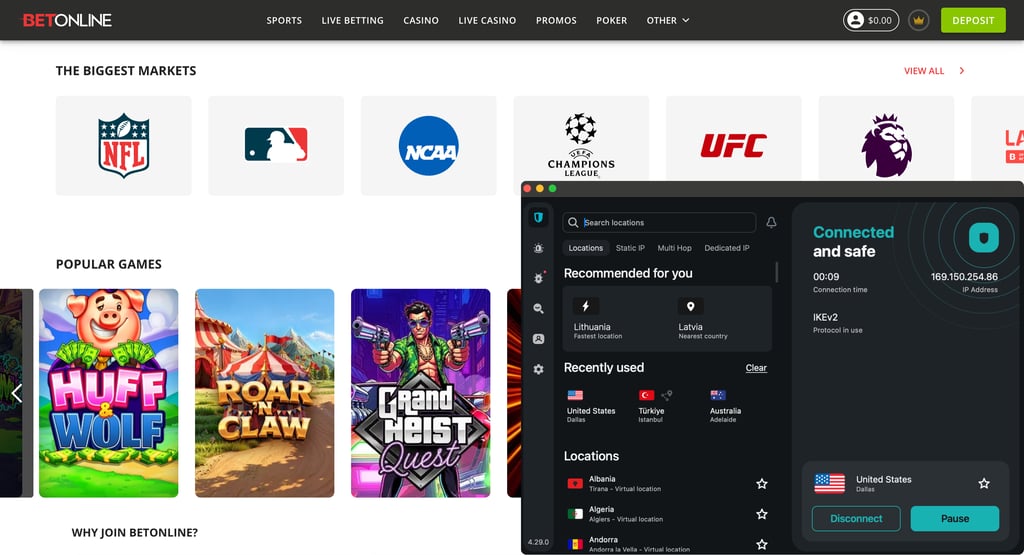
Surfshark also delivered a 100% success rate across all tested server locations. Its New York server was the standout, loading BetOnline in 0.8 seconds, while Detroit and Dallas also delivered quick, smooth access. Across the full test group, Surfshark had the fastest average load time, so odds pages, live casino lobbies, and poker tables opened without noticeable delays.
| Best Surfshark server locations | Access result | Load time |
| Los Angeles, California | Successful | 1.8 seconds |
| Miami, Florida | Successful | 2.0 seconds |
| Detroit, Michigan | Successful | 1.4 seconds |
| Dallas, Texas | Successful | 1.5 seconds |
| New York, New York | Successful | 0.8 seconds |
During Surfshark testing, its kill switch immediately cut my connection when I manually interrupted the VPN, helping prevent my regular IP address from appearing online. I also found no DNS or WebRTC leaks while moving between servers, which kept my browsing activity private from the local network and ISP. Compared with NordVPN, Surfshark was just as fast on average (with an average load time of 1.5 seconds), though faster on New York servers, making it most suitable for users in New Jersey. Still, NordVPN delivered stronger overall consistency across repeated tests.
Surfshark is an affordable VPN for BetOnline, with plans starting at $2.49/month on a long-term plan, unlimited device connections, a 7-day free trial, and a 30-day money-back guarantee. It offers particularly good value if several people or devices need VPN protection. Surfshark is a great VPN for BetOnline because it delivered the fastest average page load times in my testing, letting BetOnline load quickly across every city-level server I tested.
3. Proton VPN – privacy-focused VPN for BetOnline

| Rating: | |
| Based in: | Switzerland |
| Servers/countries: | 21,200+ servers in 149 countries |
| Price: | From $2.49/month |
Proton VPN is a strong privacy-focused VPN for BetOnline, particularly for users who connect through public Wi-Fi or other shared networks. Its apps allow for easy switching between city-level locations during testing, and its privacy safeguards helped keep my regular IP address from being exposed while I browsed BetOnline.

Proton VPN achieved a 100% success rate, connecting successfully on all servers I tested. Miami and Dallas tied for the best result at 1.2 seconds, making them the strongest choices in my tests for quickly checking sportsbook lines or moving between BetOnline’s casino and poker sections. Los Angeles was slower at 2.0 seconds, but in normal browsing, the difference was still minor.
| Best Proton VPN server locations | Access result | Load time |
| Los Angeles, California | Successful | 2.0 seconds |
| Miami, Florida | Successful | 1.2 seconds |
| Detroit, Michigan | Successful | 1.6 seconds |
| Dallas, Texas | Successful | 1.2 seconds |
| New York, New York | Successful | 1.8 seconds |
During testing, I changed server locations repeatedly and found no DNS or WebRTC leaks. This matters when using BetOnline on public Wi-Fi or another shared network because it helps prevent your normal IP address and browsing activity from being exposed to the local network or ISP. Proton VPN’s large server network of 21,200+ servers across 149 countries also gives you plenty of alternative connections when a location is busy or performance drops, although its city-level speed results were slightly less consistent than Surfshark’s.
Proton VPN is a secure VPN for BetOnline if you want dependable access from permitted locations without sacrificing privacy protections. Paid subscriptions start at $2.49/month and include a 30-day money-back guarantee, while its free version is useful for testing the app. It was only marginally behind Surfshark in my speed testing, while its leak-free performance made it a stronger choice for BetOnline users who regularly connect through public or unfamiliar networks.
4. IPVanish – budget-friendly VPN for BetOnline

| Rating: | |
| Based in: | The United States |
| Servers/countries: | 3,400+ servers in 150 locations |
| Price: | From $2.19/month |
IPVanish is a practical budget VPN for BetOnline, especially if you need to secure several devices at once. Its unlimited simultaneous connections make it useful for users switching between a phone, laptop, and tablet.
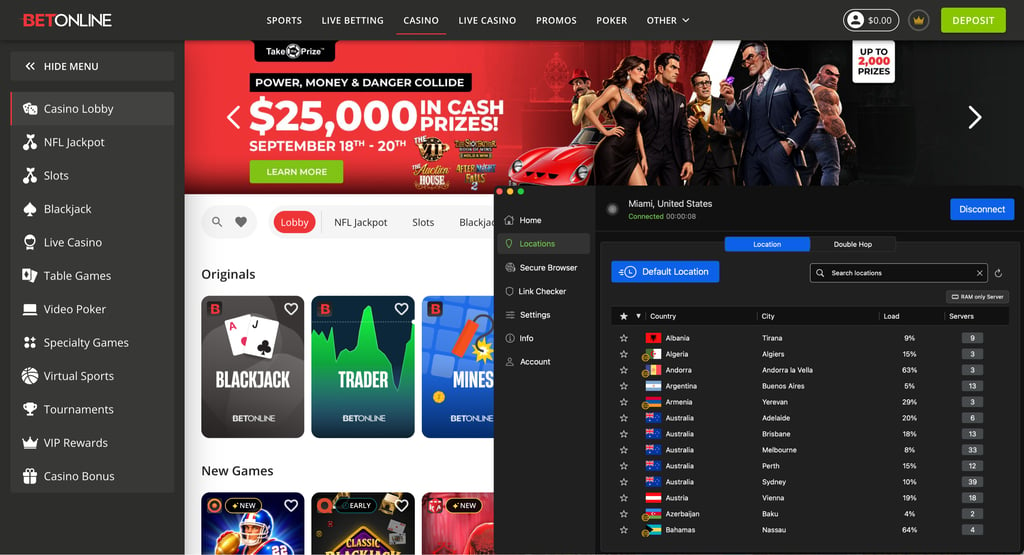
IPVanish got a 100% success rate across the servers I tested, with Detroit being the best location, loading BetOnline in 1.2 seconds. Miami also performed well at 1.8 seconds, but Los Angeles and Dallas were slower by two seconds. Still, the difference isn’t disruptive when checking odds, opening the poker room, or moving through casino categories.
| IPVanish server location | Access result | Load time |
| Los Angeles, California | Successful | 2.0 seconds |
| Miami, Florida | Successful | 1.8 seconds |
| Detroit, Michigan | Successful | 1.2 seconds |
| Dallas, Texas | Successful | 2.0 seconds |
| New York, New York | Successful | 1.9 seconds |
However, it’s important to note that IPVanish offers servers in 18 US states across 23 cities, so its city-level selection is more limited than NordVPN, Surfshark, and Proton VPN, which cover cities in all US states. This didn’t prevent successful connections in my tests, but it gives you fewer alternatives if a nearby server is busy or performs more slowly.
In my leak testing, IPVanish didn’t expose DNS or WebRTC information while I changed locations. Its kill switch also worked when I manually interrupted the VPN connection, preventing my usual IP address from being exposed mid-session. Compared with Surfshark and Proton VPN (1.5 and 1.6 seconds of average load time, respectively), IPVanish had a slower average load time of 1.8 seconds, but it remained dependable across all locations I tested.
IPVanish is a good, cheap VPN for BetOnline if your priority is reliable everyday performance and unlimited device connections rather than the fastest results in the comparison. Starting at $2.19/month, it offers a 7-day free mobile trial and a 30-day money-back guarantee, giving you time to test whether its speeds suit your setup while accessing BetOnline.
5. Norton VPN – beginner-friendly BetOnline VPN

| Rating: | |
| Based in: | The United States |
| Servers/countries: | Undisclosed number of servers in 133+ locations |
| Price: | From $3.33/month |
Norton VPN is a good VPN fit for BetOnline if you prefer simple apps over advanced customization. In my testing, it connected consistently across the city-level locations I tried, making it suitable for basic browsing of sportsbook markets, poker tables, and casino categories at BetOnline.
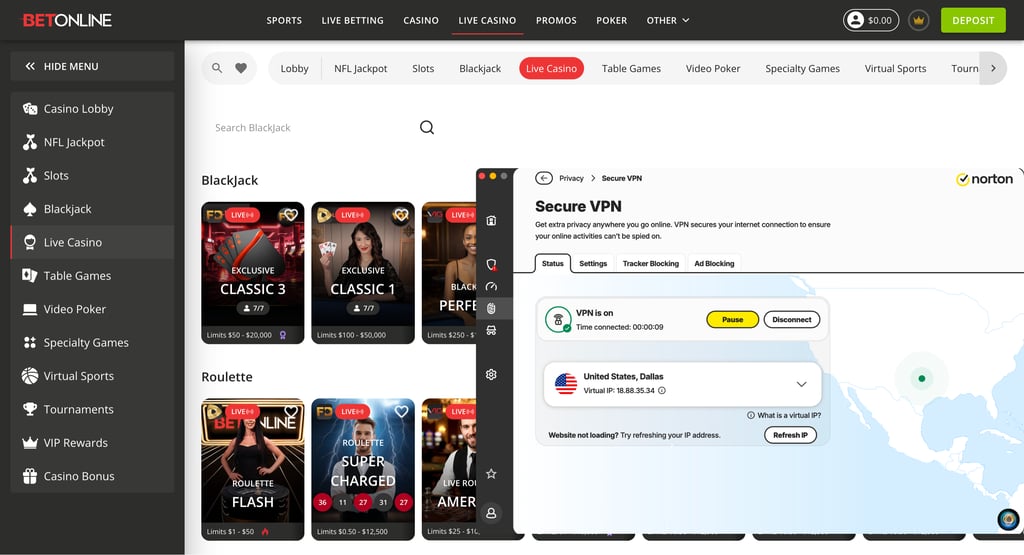
Like all other providers on my list, Norton VPN has a 100% success rate across all five tested locations. Boston was the fastest at 1.3 seconds, followed by New York at 1.5 seconds. Dallas was the slowest at 2.3 seconds, contributing to Norton VPN’s slowest average load time among the five providers.
| Best Norton VPN server locations | Access result | Load time |
| Los Angeles, California | Successful | 1.8 seconds |
| Miami, Florida | Successful | 2.0 seconds |
| Boston, Massachusetts | Successful | 1.3 seconds |
| Dallas, Texas | Successful | 2.3 seconds |
| New York, New York | Successful | 1.5 seconds |
Similar to IPVanish, Norton VPN offers servers in 25 cities across 18 US states and 100 global locations in total. This selection was enough for my tests, but it’s more limited than NordVPN, Surfshark, and Proton VPN, which give users more nearby alternatives when a particular location is congested or slow. While testing Norton VPN, though, I found no DNS leaks while switching locations, helping keep my normal IP address from being exposed on shared networks.
With pricing starting at $3.33/month, Norton VPN is a good BetOnline VPN for beginners who value simple apps, reliable basic performance, and a longer risk-free trial period. It’s not the best-value choice for speed, but its 60-day money-back guarantee gives you more time than most competitors to test it free of financial risk while playing at BetOnline.
Can I use a free VPN for BetOnline?
From my own testing of free and paid VPNs, finding a free VPN that works consistently with BetOnline is difficult. Free services typically rely on heavily shared IP addresses and offer fewer ways to switch locations, which can lead to connection problems or slower page loads.
Proton VPN is the only free VPN I tested that connected to BetOnline with some consistency. However, its free plan assigned me a server automatically instead of letting me select a specific city-level location. I had to reconnect occasionally, and performance was less reliable than with paid providers, so it isn’t an ideal option for checking live odds, playing poker, or loading live casino games.
As such, free VPNs usually involve practical trade-offs:
- Limited server selection. You get fewer locations and less control over which server you use.
- Slower speeds. Congested free servers can delay live odds updates and make casino or poker pages less responsive.
- One connection at a time. Free plans typically support a single device connection, so protecting multiple devices requires manually disconnecting and reconnecting each device.
For these reasons, I recommend choosing a premium VPN with a free trial, such as NordVPN with a 3-day free trial for Android devices or Surfshark with a 7-day free trial, rather than relying on a free VPN for BetOnline. Both offer a 30-day money-back guarantee, so you can test the paid service before deciding whether to keep it.
Where is BetOnline legal?
BetOnline is an offshore online gambling platform offering a sportsbook, poker room, and casino. It is based in Panama City and states that it’s licensed and regulated by Panama’s Ministry of Economy and Finance’s Gaming Control Board. BetOnline also stresses that gambling laws differ by country and US state, so users must check whether online wagering is permitted where they are physically located.
Outside the US, BetOnline restricts registrations from countries where online gambling is prohibited or where the platform doesn't hold a license, including: Afghanistan, Angola, Australia, Brazil, Bulgaria, Central African Republic, Congo, Cote d’Ivoire, Cuba, Eritrea, France, French Guiana, French Polynesia, French Southern Territories, Guinea, Guinea-Bissau, Iran, Iraq, North Korea, South Korea, Lebanon, Liberia, Libya, Mali, Malta, Morocco, Myanmar, Pakistan, Panama, Serbia, Sierra Leone, Slovenia, Somalia, South Africa, Sudan, Syria, the United Kingdom, Yemen, and Zimbabwe.
When trying to access from a restricted location, BetOnline shows an error message saying it’s not available in your region.
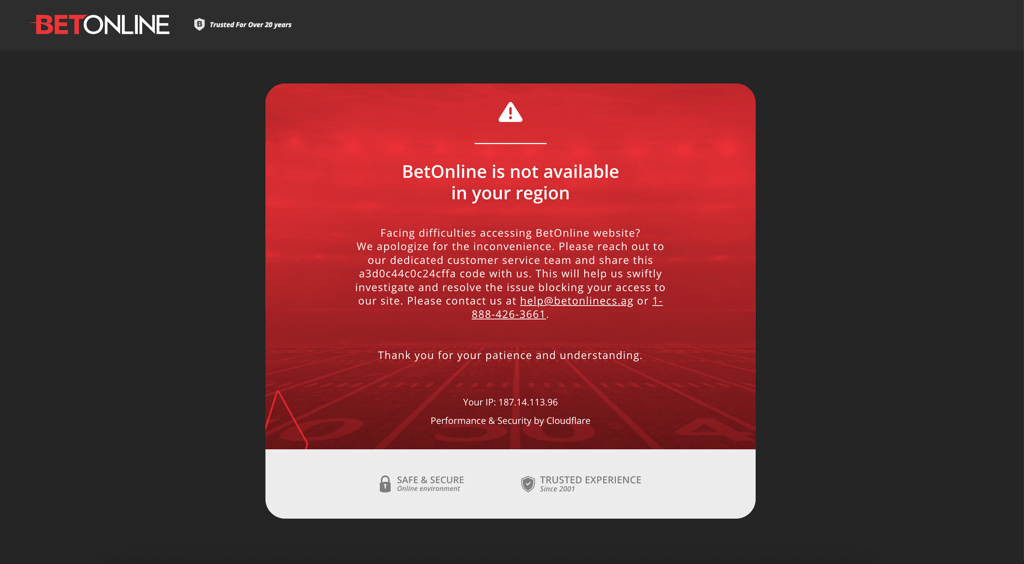
BetOnline isn’t licensed by individual US state gaming commissions either, meaning it doesn’t provide the same state-regulated consumer protections as operators, such as DraftKings or FanDuel. BetOnline accepts players from 49 states, but New Jersey is explicitly excluded – the site blocks new registrations and logins from New Jersey IP addresses.
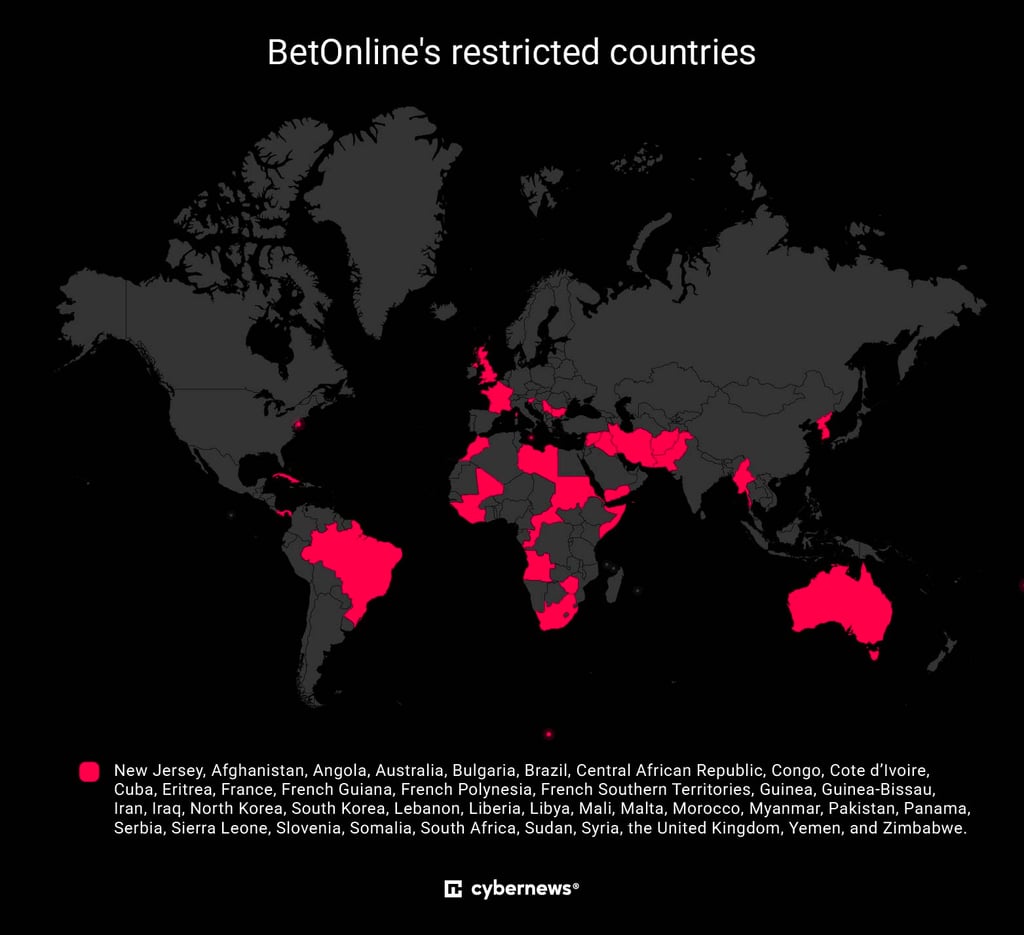
I recommend checking BetOnline’s current terms before opening an account, depositing funds, or wagering, particularly when traveling, as the operator’s list may change.
If you're specifically interested in whether BetOnline is legal in the US for where you live, the safest step is to check your own state's current gambling laws directly, since the regulatory picture shifts fairly often as more states launch licensed sportsbooks of their own.
If you are traveling abroad or situated in a region where BetOnline is restricted, using a reliable VPN allows you to re-establish connection to your existing account by routing your traffic through a server in a supported location. In my tests, services such as Surfshark and NordVPN routinely offered the most consistent results.
🔴 Note: Using a VPN is legal in many countries, but accessing an online gambling platform from a location where it isn't permitted may violate local laws or BetOnline's Terms of Service. This article does not encourage getting around gambling regulations or using a VPN to break the law. Before using a VPN with BetOnline, make sure you understand and comply with the laws in your jurisdiction and the platform's rules.
How to use BetOnline in a restricted location: detailed guide
BetOnline's availability varies by state and country, so access can be restricted depending on where you are. If you're in a location where the platform is permitted but access is limited, a VPN can provide a different IP address and help with privacy while you connect. Always check the gambling laws and BetOnline's terms that apply to your location before using the service.
Step 1. Choose a reliable VPN
Start with a VPN that offers fast connections, strong leak protection, a reliable kill switch, and servers in countries and states where BetOnline is available, such as New York, Texas, or California.
During my testing, NordVPN connected consistently to BetOnline via selected US servers, maintaining fast speeds and providing access to the platform from the first try each time.

Step 2. Download and install the VPN
Once you've subscribed, download the VPN app directly from the official www.nordvpn.com website or your device's official app store. Install the app and sign in using your account credentials.
Always download VPN software from official sources rather than third-party websites to avoid installing a modified or unsafe version of the app.
Step 3. Connect to a server where BetOnline is available
BetOnline accepts players from most US states, except New Jersey. If you’re trying to access the platform from there, turn on your VPN and connect to a server in a state where BetOnline operates to obtain a local IP address before visiting the platform. During my testing, the most reliable servers for BetOnline were in Los Angeles, California, Dallas, Texas, and Miami, Florida.
If you’re trying to connect from a restricted country, US servers are still the most reliable option. However, if you’re connecting from long-distance locations like Australia, I’d recommend choosing a nearby server, e.g., New Zealand.
If your first server triggers a verification prompt or doesn't load the site, simply disconnect and reconnect to another server in the same state. A freshly assigned IP address often resolves the issue.
Step 4. Visit BetOnline and sign in
With the VPN connected, open betonline.ag in your browser and sign in as usual. For the best experience, enable the VPN's kill switch to prevent your real IP address from being exposed and stay connected to the same server throughout your betting session.
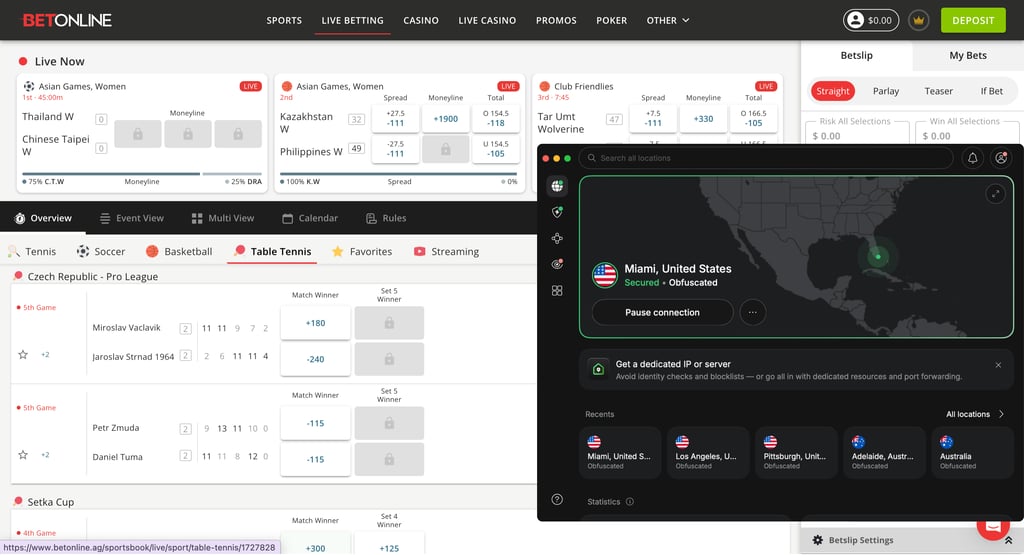
If you encounter verification prompts or a blocked page, switch to another server in the same state rather than disconnecting the VPN completely.
How to use BetOnline with a VPN on iPhone
BetOnline doesn't have a dedicated app on the US App Store, so the easiest way to use it on an iPhone is to use Safari with a VPN connected. Here's how:
- Choose a trusted VPN for BetOnline. Based on my testing, NordVPN provided the most consistent access, including from restricted locations.
- Download NordVPN from the Apple App Store and sign in to your account.
- Connect to a server in a BetOnline-supported state, such as California or Texas.
- Open Safari and visit betonline.ag while the VPN is connected.
- Add BetOnline to your home screen by tapping the share icon in Safari and selecting Add to Home Screen. This creates a shortcut that opens like a native app.
- Open the shortcut and sign in to your BetOnline account. As long as your VPN stays connected, you can use the sportsbook, poker room, and casino just as you would through a dedicated app.
Is it legal to use a VPN on BetOnline?
Yes, using a VPN itself is legal in most countries, and many people use one simply to protect their privacy or secure their connection. Whether it's legal to use a VPN specifically to access BetOnline depends on the gambling laws where you live and BetOnline's own Terms of Service.
If you're in New Jersey or one of the countries where BetOnline doesn't accept registrations, using a VPN to appear as though you're connecting from another location could violate the platform's rules. If BetOnline detects VPN usage or finds an account accessed from a restricted location, it may request additional identity verification, limit account access, or delay withdrawals until your location is confirmed.
Gambling laws differ significantly between US states and between countries. Before using a VPN with BetOnline, verify that online gambling is permitted where you are and that you're in compliance with the platform's terms.
VPN not working with BetOnline: quick troubleshooting tips
A VPN may not work with BetOnline for a few individual reasons, such as the selected server being overloaded, the platform flagging your IP address, or browser cookies and cached location data conflicting with your current connection. An outdated VPN app, DNS or WebRTC leaks, and unstable Wi‑Fi can also prevent pages from loading or trigger verification checks.
If you encounter issues accessing BetOnline while connected to a VPN, try these quick troubleshooting steps to resolve common connection problems:
- Switch server locations. Disconnect and connect to a different server in a supported region, such as California, New York, or Texas. A fresh IP address often bypasses temporary blocks or location verification flags.
- Clear browser cache and cookies. Stored location data or old cookies can reveal your actual location despite an active VPN connection. Clearing your browser data or opening an incognito/private browsing window resolves location mismatches.
- Enable leak protection and kill switch. Verify that your VPN’s kill switch and DNS/WebRTC leak protection settings are enabled. This prevents temporary exposure of your real IP address if the VPN connection momentarily drops.
- Change VPN protocols. If speed or connection stability drops, switch protocols within your VPN app (e.g., from NordVPN’s custom NordLynx to OpenVPN) to improve performance and bypass network restrictions.
- Try a different browser or device. Switch to a clean browser or test access on a mobile device using your VPN app to check whether device-specific browser extensions or settings are interfering with access.
Final tips for using BetOnline with a VPN
Using a VPN with BetOnline can work smoothly, but only if you set it up carefully. Based on my testing, the most important factor is server stability, not just speed. Stick to one reliable location – such as a California or Texas server – rather than constantly switching, since frequent IP address changes can trigger verification checks or temporary access blocks.
It also helps to keep your VPN connection active at all times while using BetOnline. If the connection drops even briefly, your real IP address could be exposed, leading to session interruptions or a forced re-login. That's why enabling the kill switch is essential.
Another useful tip is to clear cookies or use a private browser session if you run into loading issues, since stored location data can sometimes conflict with VPN routing. Based on my testing, NordVPN performed best at maintaining consistent access without repeated verification prompts.
Finally, avoid switching between multiple states or countries too quickly – unusual login patterns can get flagged. A stable, single-server approach is usually the most reliable way to keep uninterrupted access to the sportsbook, poker room, and casino.
FAQ
Is BetOnline legal in the US?
BetOnline operates in a legally gray area in the US, as the platform isn't licensed by any individual US state. Still, it accepts players from the majority of states. New Jersey is the one state where the platform explicitly blocks access. For this reason, always check your own state's current gambling laws.
Is BetOnline legit?
Yes, BetOnline is a legitimate offshore sportsbook, poker room, and casino with a license from the Panama Gaming Control Board and a long operating history dating back to 1991. It has a documented record of paying out winners through crypto and traditional banking methods.
Does BetOnline allow VPNs?
BetOnline doesn't officially endorse VPN use. While many bettors use one to access the platform from a restricted location, doing so may violate the platform's Terms of Service and result in verification requests or account limitations.
What is the best VPN for BetOnline?
Based on our in-house testing, NordVPN is the best VPN for BetOnline because it delivered fast, leak-free performance across servers in different locations.
Can I use a free VPN with BetOnline?
Free VPNs rarely work reliably with BetOnline. Most are blocked due to shared IP addresses and limited infrastructure, and even when they connect, speeds tend to be slow and inconsistent.
Where is BetOnline based?
BetOnline is based in Panama City, Panama, and is licensed by the Panama Gaming Control Board. It isn't regulated by any individual US state gaming commission.
Can I use BetOnline while traveling?
Yes, you can use BetOnline while traveling, but availability depends on where you're traveling. If you're in a country where BetOnline is restricted, such as France, you will need a VPN to reconnect to your account. Always make sure your activities comply with local laws.
Will a VPN slow down BetOnline?
Yes, a VPN can slightly reduce speed due to encryption and rerouting. In our testing, load times ranged from under a second to just over 2.5 seconds, which has no noticeable impact on browsing, betting, or live casino streaming.