How to use 247Bet outside the UK and Ireland with a VPN
Our in-house cybersecurity experts and journalists, renowned for major reports like The Mother of All Breaches, conduct transparent, unbiased VPN testing and in-depth analysis.
With 750+ articles crafted based on real-world research, we empower readers to make informed purchasing decisions through first-hand expertise.


-
Currently, 247Bet is licensed and available only in a couple of countries worldwide, primarily the UK and Ireland
-
If you’re located outside the UK or Ireland, you can use a VPN to change your IP address to access 247Bet
-
Based on my tests, NordVPN is the best VPN for 247Bet, as it offers plenty of UK and Ireland servers, fast connection speeds, and strong privacy features
247Bet is a fairly new online betting platform where users can place bets and play online casino games on its website or mobile app. However, due to licensing and gambling laws, it is currently only available within the UK, Ireland, and a handful of other countries. This means that if you are located outside of the supported regions, you may not be able to create an account, use, or even access 247Bet’s site or app.
Possibly the only way to access 247Bet outside the UK and Ireland is by using a reliable VPN. First, you’ll need to get a reliable VPN, install the app, launch it, and connect to a UK or Ireland server. The server connection will change your IP address, which may allow you to access 247Bet as if you were located in the UK or Ireland. However, a VPN cannot change your GPS location, such as used by smartphones.
⚠️Using a VPN may go against 247Bet’s terms of service and could result in account restrictions or additional verification checks. Although VPNs are legal in most Western countries, you should always check local laws and 247Bet’s rules before using one.
Compare our recommended 247Bet VPNs
| VPN for 247Bet | Rating | Why recommended | Servers | Servers in 247Bet legal countries | Price |
| 1. NordVPN | Best overall 247Bet VPN with the fastest UK servers | Thousands of servers in 225 locations | ✅ Yes, UK, Ireland, Malta, Mexico, Finland, Norway, Greenland, Canada, Kazakhstan | From $3.49/month | |
| 2. Surfshark | Affordable subscriptions and unlimited device connections | 4,500+ servers in 100 countries | ✅ Yes, UK, Ireland, Malta, Mexico, Finland, Norway, Greenland, Canada, Kazakhstan | From $2.49/month | |
| 3. Proton VPN | Strong focus on privacy and security | 21,200+ servers in 149 countries | ✅ Yes, UK, Ireland, Malta, Mexico, Finland, Norway, Greenland, Canada, Kazakhstan | From $2.49/month | |
| 4. IPVanish | Robust 247Bet VPN with extra features | 3,400+ servers in 112 countries | ✅ Yes, UK, Ireland, Mexico, Finland, Norway, Canada, Malta, Kazachstan | From $2.19/month | |
| 5. Norton VPN | Easy-to-use and effective | 2,000+ servers in 65 countries | ✅ Yes, UK, Ireland, Mexico, Finland, Norway, Canada | From $3.33/month |
How to access Bet247 outside the UK and Ireland using a VPN

- Select a reliable VPN. My top choice is NordVPN, now 78% off
- Download and install the VPN app on your device
- Connect to a server where 247Bet is available, such as the UK, Ireland, or Malta
- Head to 247Bet and log in to your account
Best VPNs for Bet247
To access 247Bet from outside the UK and Ireland, choose a gambling VPN with plenty of UK and Ireland servers, fast connection speeds, and strong security features such as AES-256 encryption and a reliable kill switch.
My research concludes that NordVPN, Surfshark, Proton VPN, IPVanish, and Norton VPN are the best VPNs for 247Bet. These VPNs can help you connect to a server in the UK or Ireland.
1. NordVPN – best overall 247Bet VPN with fastest connection speeds

| Rating: | |
| Based in: | Panama |
| Servers/countries: | Thousands of servers in 225 locations |
| Price: | From $3.49/month |
NordVPN is the best VPN for 247Bet, as it offers 440+ servers in the UK where 247Bet is available, fast connection speeds for a smooth platform experience, and strong security features for privacy. Using NordVPN’s UK servers, I could access 247Bet from regions where it was previously unavailable without detection or blocks.
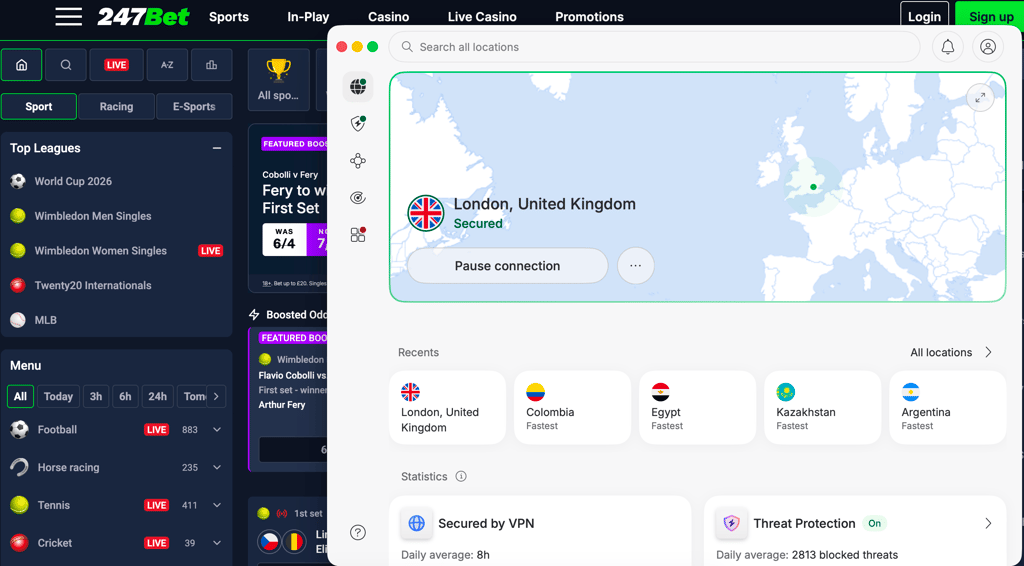
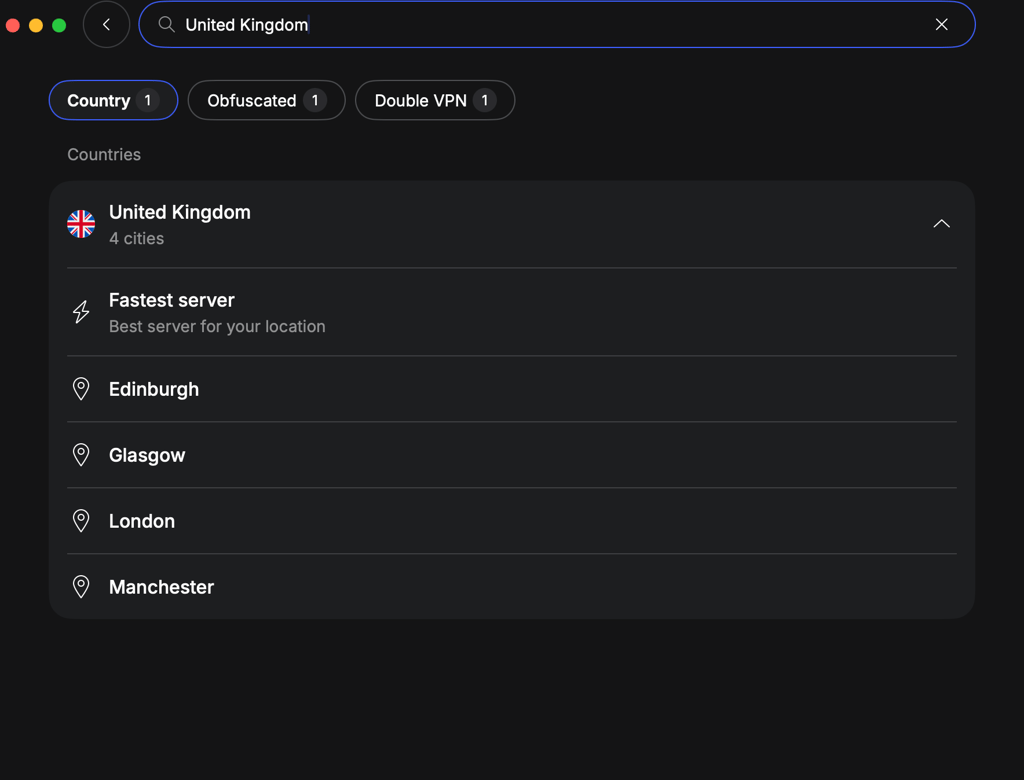
Although NordVPN offers thousands of servers in 225 locations, the most important for 247Bet are its 440+ UK and 50+ Irish servers. You can select servers by city, with locations in Edinburgh, Glasgow, London, and Manchester. For me, London and Manchester proved the most reliable, providing easy access and the fastest speeds. Additionally, NordVPN has servers in other 247Bet available countries, such as Malta, Mexico, Finland, Norway, Greenland, Canada, and Kazakhstan.
Best NordVPN servers for 247Bet:
- The UK, London
- The UK, Manchester
- Ireland, Dublin
- Malta, Luqa
In my tests, NordVPN achieved a 95% success rate when accessing 247Bet across 5 tested servers, though one server took noticeably longer to load. Overall, speeds remained reliable and consistent, with an average drop of only around 12%.
NordVPN uses AES-256 encryption, modern tunneling protocols, and offers a reliable kill switch to prevent accidental IP slips. I found its obfuscated servers particularly useful for masking VPN traffic. Thanks to leak-prevention technology, my data, including DNS and WebRTC, remained safe even when switching servers.
Additionally, I also relied on NordVPN’s proprietary NordWhisper tunneling protocol, which is designed to bypass strict censorship and blocks. It also masks VPN traffic as HTTP traffic, but is much harder to detect than simply using obfuscated servers.
NordVPN is the best VPN for 247Bet overall, and you can purchase it for $3.49/month or try it for free with a 3-day trial on Android devices. NordVPN also offers a risk-free purchase with a 30-day money-back guarantee. Using this VPN, I accessed 257Bet via servers in the UK and enjoyed a smooth browsing experience while my data was protected by an extra layer of security.
2. Surfshark – affordable 247Bet VPN with unlimited device connections

| Rating: | |
| Based in: | Netherlands |
| Servers/countries: | 4,500+ servers in 100 countries |
| Price: | From $2.49/month |
Surfshark is an affordable VPN for 247Bet, with inexpensive subscriptions and unlimited device connections. I used several of its 440+ UK servers for testing and accessed 247Bet without any blocks or loading issues.
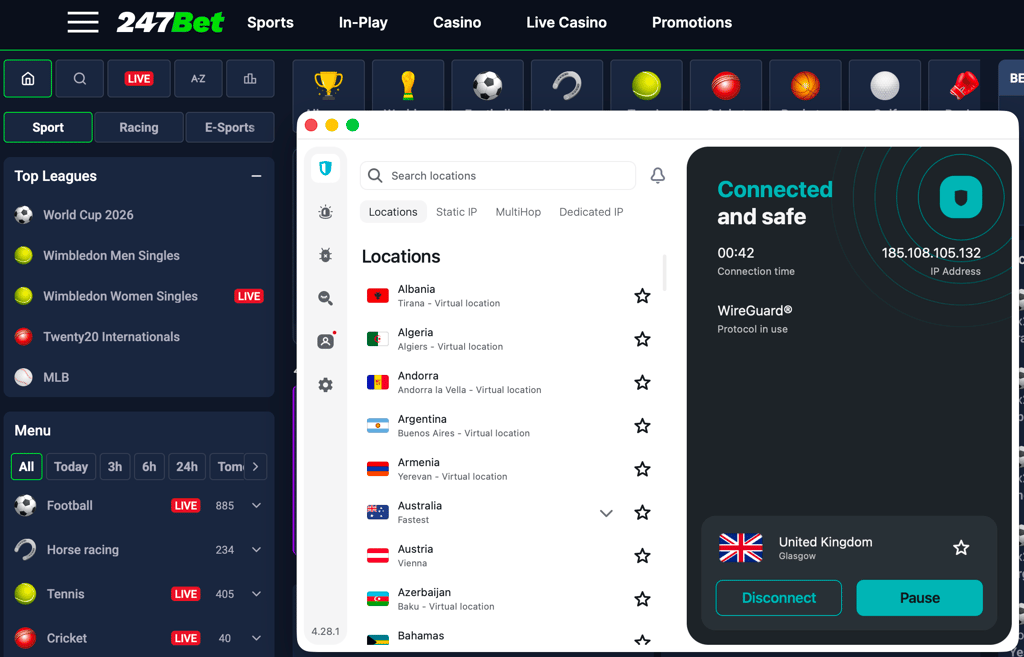
In total, Surfshark has around 4,500+ servers in 100 countries, 440+ of which are located in 4 UK cities. Although servers across all locations were reliable and secure, I mostly used those in London and Edinburgh because they were faster. In addition to the UK servers, Surfshark covers other 247Bet locations, too, including Malta, Mexico, Finland, Norway, Greenland, Canada, and Kazakhstan.
Best Surfshark servers for 247Bet based on my testing:
- The UK, London
- The UK, Edinburgh
- Canada, Toronto
- Mexico, Mexico City
Surfshark achieved a success rate of around 90% as I accessed 247Bet with 4 out of 5 servers I tested. For me, the unsuccessful server was one of the Manchester ones. As for speed, I noticed a drop of about 15%, which was very close to what I got with NordVPN.
In addition to robust encryption, secure tunneling protocols, and a kill switch, Surfshark offers several advanced security features. For example, I used its NoBorders and Camouflage modes to access 247Bet undetected, while the CleanWeb ad blocker prevented trackers from profiling me. Plus, Surfshark offers unlimited device connections, which means I could safely access 247Bet on all my devices.
Surfshark is a reliable and affordable VPN for 247Bet, with subscriptions starting at $2.49/month. You can try it free first with a 7-day free trial or purchase immediately risk-free with the 30-day money-back guarantee. The service helped me access 247Bet thanks to its secure UK servers and use of advanced security features.
3. Proton VPN – privacy-focused VPN for 247Bet

| Rating: | |
| Based in: | Switzerland |
| Servers/countries: | 21,200+ servers in 149 countries |
| Price: | From $2.49/month |
Proton VPN is a privacy-first VPN for 247Bet with a strict no-logs policy and advanced security features. The service easily accesses 247Bet from outside the UK and, thanks to reliable connection speeds, provides a smooth browsing experience.
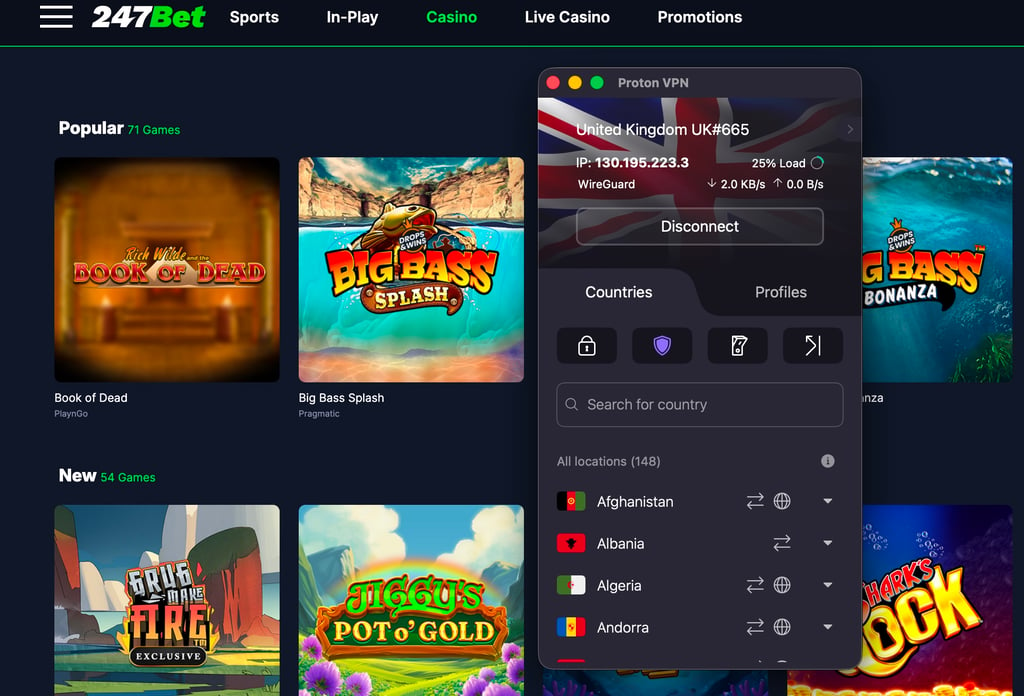
Proton VPN operates a massive fleet with 21,200+ servers in 149 countries. To access 247Bet, I used several of its 780+ UK servers, located in 6 cities: Belfast, Cardiff, Edinburgh, Glasgow, London, and Manchester. For me, servers in London and Cardiff worked the best, providing faster connection speeds and greater consistency. You can also use other Proton VPN servers in 247Bet countries, which include Malta, Mexico, Finland, Norway, Greenland, Canada, and Kazakhstan.
Best Proton VPN servers for 247Bet:
- The UK, London
- The UK, Cardiff
- Ireland, Dublin
- Finland, Helsinki
Proton VPN showed an 84% success rate, unblocking 247Bet on 4 out of 5 servers I used; however, on 2 servers, I experienced significantly longer loading times and a less smooth browsing experience. Proton VPN isn't as fast as Surfshark or NordVPN, and while I didn’t run into major issues, my speed dropped by around 20%, which is still not a big drop and you’d barely notice it.
I was impressed by Proton VPN’s no-logs policy, which is audited annually. To add to it, the company is based in Switzerland and adheres to strict local privacy laws. As for the features, in addition to robust basics, I often used the Secure Core servers to double-route my traffic for greater anonymity, while the Stealth protocol proved effective against deep packet inspection. Overall, this meant both slightly enhanced privacy and a somewhat better chance of accessing 247Bet.
Proton VPN is a private 247Bet VPN with subscriptions starting at $2.49/month and a free version. However, the free version offers only a few server locations and a basic feature set and is not suitable for accessing 247Bet. All Proton VPN subscriptions come with a 30-day money-back guarantee.
4. IPVanish – reliable 247Bet VPN with easy-to-use apps

| Rating: | |
| Based in: | United States |
| Servers/countries: | 3,400+ servers in 112 countries |
| Price: | From: $2.19/month |
IPVanish is a reliable and simple VPN for 247Bet. It offers UK servers for easy IP address changes, advanced security features, and easy access to 2467Bet via city-level servers.
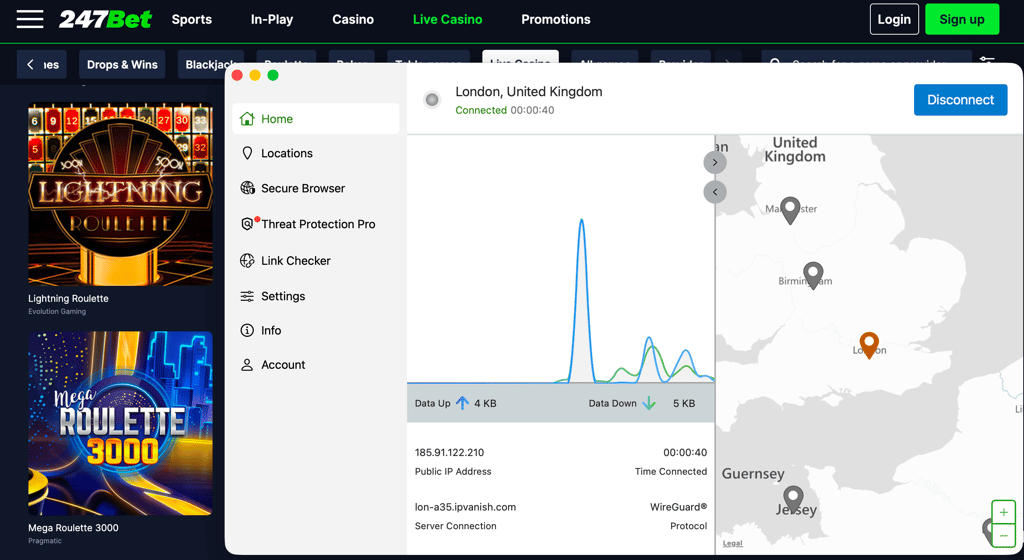
IPVanish has around 3,400+ servers in 112 countries, including an undisclosed number of servers in 3 UK locations. I confirmed the availability and found servers in London, Manchester, and Edinburgh on the server list. I mostly used the London servers, which helped me access 247Bet, albeit not always instantly. Additionally, IPVanish also offers servers in these 247Bet countries: Ireland, Mexico, Finland, Norway, Canada, Malta, and Kazakhstan.
Best IPVanish servers for 247Bet based on my experience:
- The UK, London
- The UK, Manchester
- Ireland, Dublin
During my testing, IPVanish achieved a 79% success rate, opening the 247Bet site with 3 out of 5 servers I used. However, while the access part itself was pretty smooth with no flagged IPs, the speed was a bit disappointing with slowdowns of about 26%, making it the slowest VPN on my list.
IPVanish effectively prevents IP exposure through robust encryption and modern tunneling protocols. As for restriction bypass, I used the OpenVPN Scramble feature, which works similarly to obfuscation masking VPN traffic and making it harder to flag and block. For more privacy, I used the configurable Double Hop feature.
IPVanish is a robust VPN for 247Bet, and you can subscribe for $2.19/month or try it free with a 7-day trial and a 30-day money-back guarantee. If you don’t mind longer load times and prefer a straightforward VPN, IPVanish may be a good choice.
5. Norton VPN – secure VPN for 247Bet bundled with an antivirus

| Rating: | |
| Based in: | United States |
| Servers/countries: | 2,000+ servers in 65 countries |
| Price: | From $3.33/month |
Norton VPN is a secure VPN for 247Bet bundled with an antivirus for an extra layer of privacy. With servers in 5 UK locations, it can help access 247Bet from abroad, although it is not as consistent as NordVPN or Surfshark.
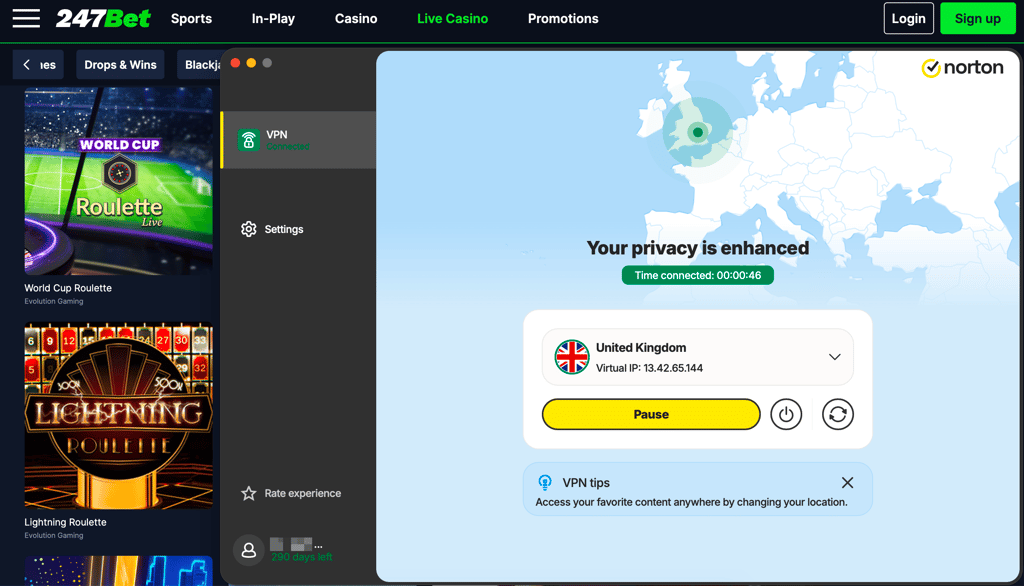
Norton VPN has a somewhat smaller fleet of 2,000+ servers in 65 countries. It also has an undisclosed number of UK servers in London, Manchester, Edinburgh, Glasgow, and Nottingham, which I confirmed on the app’s servers list. Location-wise, all servers worked similarly, but at times I had to switch them around to access 247Bet. Norton VPN also offers servers in these 247Bet countries: Ireland, Mexico, Finland, Norway, and Canada.
Best Norton VPN servers for 247Bet based on my tests:
- The UK, London
- The UK, Manchester
With Norton VPN, I achieved a 78% success rate, accessing 247Bet with 3 out of 5 servers I tried. From my experience, you may need to switch servers in the UK, but after a couple of tries, the site should let you in. As for speed, it’s not as fast as my top VPNs, with around 24% speed drop.
I liked that Norton VPN protects your IP address with automatic IP rotation, which changes your IP every 30 seconds to minimize your online footprint. It’s also a good choice if you want more protection against trackers, as Norton VPN comes bundled with an antivirus. I also used the proprietary Mimic tunneling protocol, which is Norton’s version of obfuscation in case you need to bypass strict censorship.
Norton VPN is a well-rounded 247Bet VPN with subscriptions starting at $3.33/month, a 30-day free trial, and a 60-day money-back guarantee. Although accessing 247Bet with it might take some patience due to occasional IP flagging, it’s still a good choice if you want more cybersecurity protections with your VPN.
Can I use a free VPN to access Bet247?
From my experience, I can say that finding a free VPN that works with 247Bet is close to impossible. 247Bet uses VPN detection methods, such as IP location and specific site plugins, which free VPNs are simply not strong enough to pass, as they often lack strong encryption or obfuscation features.
Besides lacking strong security features, free VPNs often have very small server fleets, frustratingly slow connection speeds, and may even be unsafe to use due to data collection practices.
Instead of relying on a free VPN for 247Bet, choose NordVPN or Surfshark. Both services offer free trials and 30-day money-back guarantees, during which you can use all their premium features and full server fleets risk-free.
Where is 247Bet legal?
247Bet is primarily available in the UK and Ireland. Other verified available countries include Malta, Mexico, Finland, Norway, Greenland, Canada, and Kazakhstan. This means that if you are located outside the country, such as in the US, you won’t be able to register an account, place bets, or, in some cases, access the platform altogether.
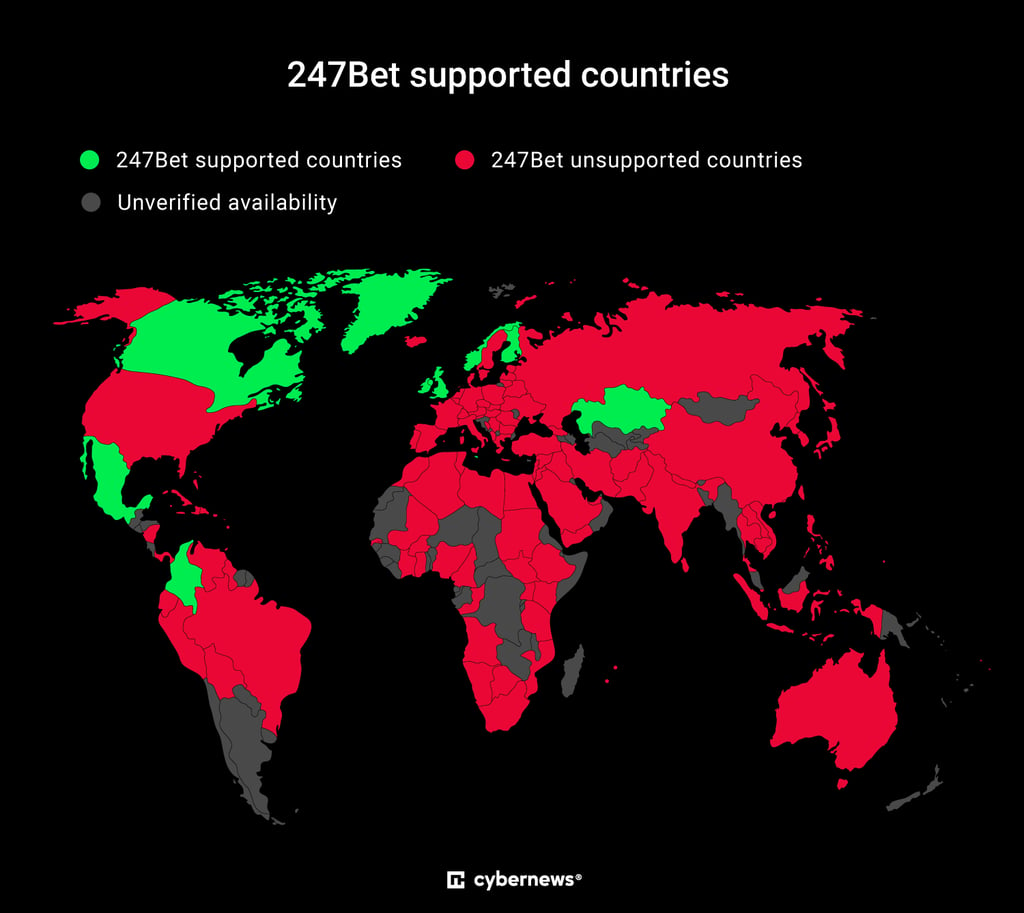
As shown on the map above, 247Bet is verified to be available only in 10 countries worldwide. Visitors from other countries will not be able to use the platform.
Fortunately, a robust 247Bet VPN can help you change your IP address, which may make it easier to access 247Bet from outside the UK, Ireland, and other 247Bet supported countries. However, a VPN will not supply you with an account or a local payment method, which may be needed to fully use the platform.
How to use 247Bet in restricted countries: a detailed guide
257Bet is currently only available in the UK, Ireland, and a handful of other countries, due to the platform’s licensing. That means that using a VPN may be the only way to access 247Bet if you are not currently located in the UK or another 247Bet country.
Here’s how to use a VPN to change your IP address to access 247Bet.
Step 1. Subscribe to a reliable betting VPN
247Bet is only available in the UK, Ireland, and a few other countries, so it is crucial that you choose a top VPN with a good selection of servers in 247Bet countries to change your IP address. Additionally, a 247Bet VPN should offer fast connection speeds for a comfortable experience and strong security features for an added layer of privacy.
Based on my testing, NordVPN is one of the best choices for 247Bet. Using the service’s UK servers, I easily accessed 247Bet from abroad, could comfortably browse on the platform, and did not experience any IP/DNS/WebRTC leaks while using it.

Step 2. Download and install the VPN app
After selecting a plan and subscribing to a service, download the VPN app directly from the official website on an app store. Install the app on your device, allow all permissions if prompted, and sign in using your credentials.
I recommend downloading any VPN app directly from official sources, such as www.nordvpn.com, or from trusted app stores, such as the Apple App Store or the Google Play Store. This way, you will avoid potentially modified or unsafe apps that may harm your device.
Step 3. Connect to a server in 247Bet available location
For now, 247Bet is only available in the UK, Ireland, and a few other countries. Once you launch your VPN, connect to a server where 247Bet is available, such as in the UK, Ireland, Malta, Canada, or Finland. The connection will change your IP address, making it appear as though you are accessing the site from your selected server country.
Step 4. Go to 247Bet
With your VPN securely connected, head to 247Bet. Now, you should be able to access the site from outside the available regions.
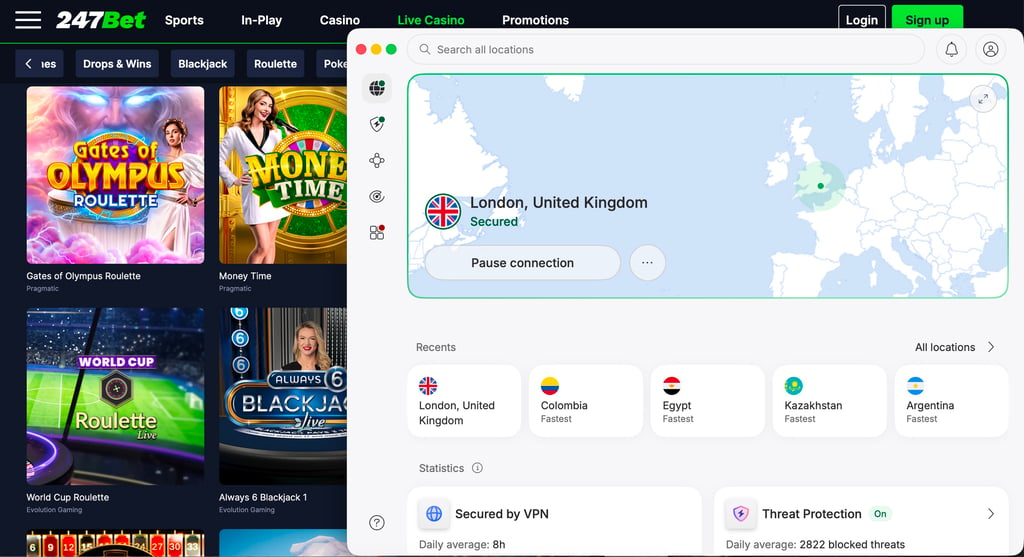
However, remember that a VPN can only change your IP address; it won’t provide you with a 247Bet account or a local payment method, which may be needed to register on the platform.
How to use 247Bet abroad on an iPhone
The 247Bet app may not be available outside the UK or in your specific location. However, you may still be able to add it to your phone as a Progressive Web App.
Here’s what you need to do:
- Subscribe to a reliable 247Bet VPN app. I recommend NordVPN, as it offers servers in all 247Bet locations, needed for IP address change in one of the steps.
- Download and install the VPN app on your iPhone. Make sure to download the app only from official sources, such as the Apple App Store.
- Launch the VPN and connect to a server in a 247Bet location. This can be the UK ,Ireland, Malta, Canada, Mexico, or Norway.
- With the VPN securely connected, open 247Bet in Safari.
- Add 247Bet to your Home Screen by tapping the Share button in Safari and selecting Add to Home Screen. This will install the 247Bet site as a Progressive Web App.
- Open 247Bet from the saved link and sign in to your account. This can allow you to use 247Bet as a regular iPhone app.
VPN not working with 247Bet: troubleshooting guide
A 247Bet VPN might not work due to a poor server connection, an incompatible tunneling protocol, a flagged VPN IP address, or browser cookies and cache that expose your real location. The 247Bet platform may also require additional account, identity, or location verification; a VPN alone cannot solve these issues.
Here’s what you can try if your VPN is not working with 247Bet:
- Check your internet connection. Disconnect the VPN and confirm that your regular connection is working. An unstable network may prevent 247Bet from loading correctly.
- Restart the VPN app. Temporary connection errors may affect VPN performance. Disconnect, close the app completely, reopen it, and reconnect to a server in a 247Bet available location.
- Change the VPN protocol. Some tunneling protocols may perform better on certain networks or devices. Try another option available in your VPN app, such as NordLynx, WireGuard, or OpenVPN.
- Clear cookies and cache. Stored browser data could expose your real location even with a VPN connection. Clear stored data, restart the browser, and try again.
- Update the VPN app. An outdated app may cause compatibility or connection problems. Install the latest version and restart your device.
- Contact VPN support. If none of the above helps, contact your provider’s customer support, as they might help you identify bigger issues preventing your VPN from working with 247Bet.
Is it legal to use a VPN on 247Bet?
Yes, using a VPN with 247Bet is generally legal, as VPN use itself is permitted in most countries. A VPN may help access 247Bet from outside the UK or Ireland while also adding an extra layer of security for your browsing.
However, using a VPN to bypass strict geo-restrictions may violate 247Bet’s terms and conditions and result in account restrictions or suspension. 247Bet may also require users to provide additional personal information and a local payment method during registration and verification
One last thing to remember is that a VPN does not make online betting legal in regions where gambling is restricted or prohibited. So, before you use a VPN with 247Bet, make sure to check local laws and the platform’s terms and conditions.
Final tips for using 247Bet with VPN
247Bet is an online betting and casino platform currently available only in the UK, Ireland, Malta, and a few other select countries. This means that if you are currently located outside the available regions, you may not be able to register, use, or even access the site.
Fortunately, a VPN may help you access 247Bet outside the UK. With a VPN, you can connect to a server in 247Bet available location, which will change your IP address, making it look as though you are browsing from another country. However, while a VPN can help with this, it won’t provide you with a 247Bet account or a local payment method, which may be needed to bet on the platform.
After testing numerous VPN services, I found that NordVPN is the best 247Bet. With fast, secure servers in 247Bet locations, NordVPN can help you access 247Bet from outside the UK or Ireland, while also adding an extra layer of security to your browsing.
FAQ
Is 247Bet legal outside the UK?
Yes, 247Bet is also available in Ireland, Malta, Mexico, Finland, Norway, Greenland, Canada, Kazakhstan. If you are located outside the available countries, you may not be able to register, bet, or, in some cases, access the platform. A VPN, like NordVPN, may help you access 247Bet via a server connection, but it won’t supply you with a 247Bet account or other region-specific details that may be needed to use the platform.
Does 247Bet allow VPNs?
247Bet neither allows or disallows VPN use. Although you can use a VPN when accessing the 247Bet site, it may still flag your traffic as suspicious and block your access. If you attempt to use a VPN on 247Bet, make sure to use only a secure and private service, such as NordVPN, which won’t expose your real location or data to the site.
What is the best VPN for 247Bet?
The best VPN for 247bet is NordVPN. With secure servers in all 247Bet locations, fast connection speeds, and obfuscated servers, it proved to be the most reliable and consistent option for accessing 247Bet from outside the UK and Ireland.
How to access 247Bet outside the UK?
You may use a VPN to try to access 247Bet outside the UK. A VPN can change your IP address to a UK one, which may help you access the platform as if you were located within the country. However, a VPN alone won’t grant you a 247Bet account or provide a local payment method, which may be needed to actually use the platform.
Will a VPN slow down 247Bet?
No, a good quality VPN should not slow down 247Bet. I recommend choosing a VPN with no greater than 20% speed loss. This way, you won’t experience noticeably longer loading times or other interruptions. Good choices include NordVPN, Surfshark, and Proton VPN, as all three offer fast, reliable connections even on distant servers.
Can I use 247Bet while traveling?
Technically, no, you cannot use 247Bet while traveling, as the platform is only available in few select countries. However, you may try to access it from abroad with a VPN. Use a reliable VPN, such as NordVPN, connected to a server in a 247Bet country, such as the UK, Ireland, Malta, or Canada,, and it will change your IP address to that of the server. This way, you may be able to access your 247Bet account from outside the available regions.
What should I do if 247Bet is not working with my VPN?
If 247Bet is not working with your VPN, try switching between the servers, changing tunneling protocols, updating your app, and checking for data leaks. If none of these steps help, contact your provider’s customer support, and they may be able to assist you further.