getimg.ai review 2026


Ever since ChatGPT took the language model sector by storm, consumers have been anticipating software that could do the same for photo and video editing. However, the race for the best AI generator for images does not yet have a clear winner. But, after many flawed tools with poor editing execution and even AI errors, I’ve found a worthy contender: getimg.ai.
Along with my team of experts at Cybernews, I believe it meets the needs of both casual users and those in the photo/video editing business. It offers reasonably affordable pricing plans, a great editing tool that allows the end user to be creative, and even an art generator option.
Where the tool excels, though, is its immense speed and precision editing. getimg.ai allows you to take the driver’s seat and use it according to your preferences instead of relying on a fully automated solution. For instance, you can change image backgrounds or use the In-Paint feature to select an image area you’d like to change and edit with a specific prompt.
It even lets you draw on top of the image, and the tool will recognize what you’re trying to create and generate it. Of course, not everything about getimg.ai is top-notch, so let me fill you in on its benefits, key features, pricing, and alternatives.
Quick overview of getimg.ai
| Overall rating | 4.3 |
| Pricing | Free plan available (100 image generation credits per month); paid plans range from $12/month to $49/month |
| Brief description | AI-powered photo and video generation/editing tool that uses model training, instant generation, and a lossless image format |
What is getimg.ai
getimg.ai is a powerful image generation and editing tool perfect for both casual users and businesses. Thanks to the latest AI model, it allows users to express their imagination in real time by creating their own characters and styles. This is possible via the Model Trainer feature, which few other AI tools offer.
Not only does it handle basic image generation, but it also allows you to fine-tune it through style preferences, content options, and character references. I was also surprised by its precision regarding generation prompts, but it does mix things up a bit sometimes if you’re not clear enough.
Thankfully, it generates new images in seconds, so that won’t be a problem. Thanks to unique features like Image to Prompt and Image to Video, it’s incredibly convenient for video editing companies and social media marketers. It’s one of the best photo generator AI tools and probably the most versatile.
Pros and cons of getimg.ai
While getimg.ai does a lot right, there are some things I’d like to see improved. The best way of comparing it with other photo and video generation tools is to get familiar with its main pros and cons. I’ve thoroughly analyzed how it stacks up against other prominent AI solutions in the same category. These are the results:
Key features of getimg.ai
The main benefit of getimg.ai lies in its wide range of editing and customization features that make it stand out among photo AI tools. Here’s a summary of those I consider the most useful:
AI text-to-image generator
For an AI tool, getimg.ai generates pretty realistic images. You can start with the text-to-image generator and improve the results by using editing features along the way. However, even source images created from prompts can look realistic if you provide a good prompt.
All it takes is to create a prompt, select a style and model, and enter the number of images you wish to generate. Images are usually produced within a few seconds. You can use this function for free for up to 100 images per month.
AI image-to-video generator
While getimg.ai offers the best AI free image generator, its advanced features are only available in paid versions. For one, you can use the image-to-video generator to create short, 5-second animations and videos from any of your getimg.ai-generated pictures.
You can use newly generated images or upload some you previously created with the tool from the gallery. This feature's standout functions include several options for aspect ratios, stunning visual effects, and smooth motion, perfect for social media videos or video-editing projects.
Real-time generation
Another thing that makes getimg.ai the best AI pic generator is its real-time image creation feature. It instantly creates images as you’re working on your prompt, and every time you add something new, the image adapts in less than a second.
It’s the fastest AI tool in this regard, and you won’t have to sacrifice the image quality either. This feature generates 1024x1024 pixel images and even leaves room for editing.
You don’t need to exit real-time mode – simply use the arrow symbols to generate different images based on the same prompt until you hit the spot. You can also upload a source image and use the slider to optimize it however you like.
DreamBooth customization
The DreamBooth feature within getimg.ai has a lot of customization potential. In a nutshell, it lets you create a model by which to mold your subsequent images. The Model Trainer option allows you to save a character or style for future use, and you can upload existing pictures for training purposes.
DreamBooth is perfect for projects requiring a series of images in the same style. It all works on the FLUX.1 AI model, so no prior experience is required.
Diverse AI art styles
I’ve already mentioned how getimg.ai is an equally convenient option for both casual users and video artists, and its diverse AI art styles confirm this. There are more than 80 different AI models for creating distinct art styles for your images.
Some of the features you can use include 3D models, photorealism, cartoonish designs, and lots of other options. The special art AI generator produces up to 10 images in just a few seconds, so all you have to do as a user is focus on defining your art style.
getimg.ai pricing and plans
| Plan name | Pricing | Image generation | Video generation | Image upscaler | Priority support |
| Free version | $0 (Only includes image creation) | ✅ Yes, 16 images | ❌ No | ✅ Yes, 16 images | ❌ No |
| Basic plan | $12/month | ✅ Yes, 500 images | ✅ Yes, 10 videos | ✅ Yes, 500 images | ❌ No |
| Starter plan | $29/month | ✅ Yes, 2000 images | ✅ Yes, 40 videos | ✅ Yes, 2000 images | ❌ No |
| Hobby plan | $49/month | ✅ Yes, 4000 images | ✅ Yes, 80 videos | ✅ Yes, 4000 images | ✅ Yes |
- Free version: The free plan of getimg.ai gives you 100 credits per month, which is enough for 100 separate images or 16 images using the dynamic FLUX 1 AI model. However, it’s mainly aimed at casuals since professionals will miss having all the editing features, image-to-video, and model trainer options.
- Basic plan: If you’re looking to get the best AI images generator at an affordable price, the $12/month Basic plan is the one to go with. It gives you commercial rights over your AI-powered work, a lossless image format, and most of the tool’s editing features. Productivity also goes up with this one, allowing for up to 3000 separate images or 500 images with the DreamBooth FLUX 1 AI model.
- Starter plan: The Starter plan offers 12,000 monthly credits and all the features of the Basic plan. It also provides an increased batch size and up to 20 video creations.
- Hobby plan: The Hobby plan is the go-to option for the most advanced users, featuring 24,000 monthly credits. With it, you can get unlimited storage history, 40 videos, and 100 training images via the model trainer.
How to use getimg.ai?
To show you why getimg.ai is the best AI to generate images, I will lead you through the basic steps of using it. Here’s how to get started with a free plan, which can be upgraded later according to your preference:
-
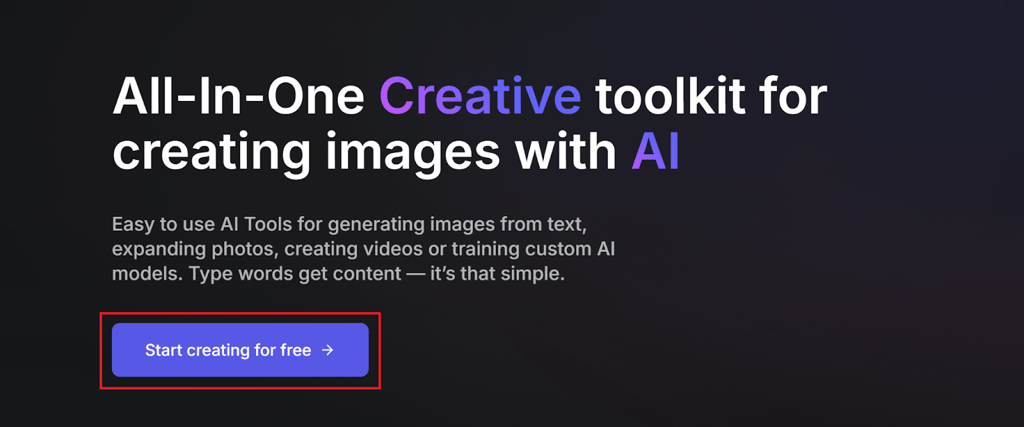
Sign up and create a free account. The first step is to create a new getimg.ai account, which you can do by visiting the main page and clicking the sign-up button. From there, you can join with a Google account or email to receive 100 free monthly credits with the free plan. To receive more credits and unlock all the features, you’ll need to get a paid getimg.ai version.
-
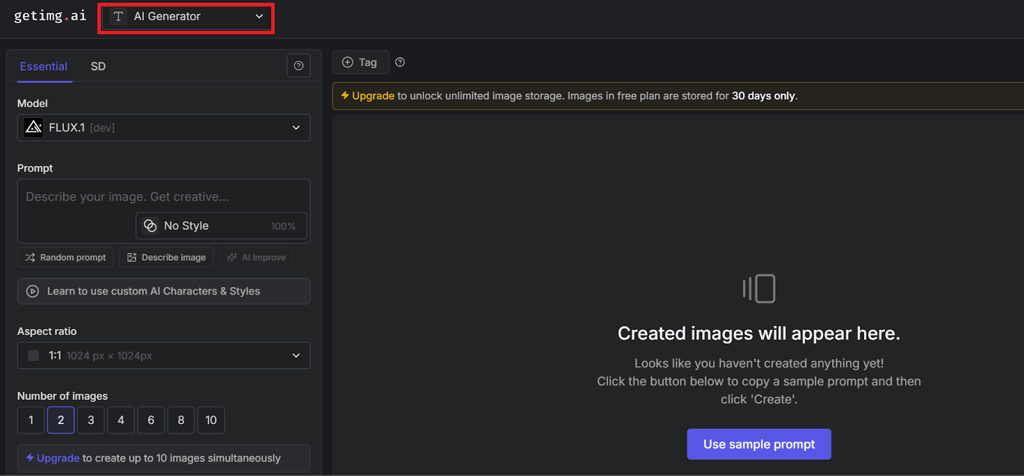
Select the generation tool. Once your account has been created, you can immediately proceed to the getimg.ai image generator page. You’ll see all the functions and options in the top left corner. Click on the icon and toggle between AI generator, resizer, uncrop, background remover, and model trainer features. To start with free image creation, use the AI generator option.
-
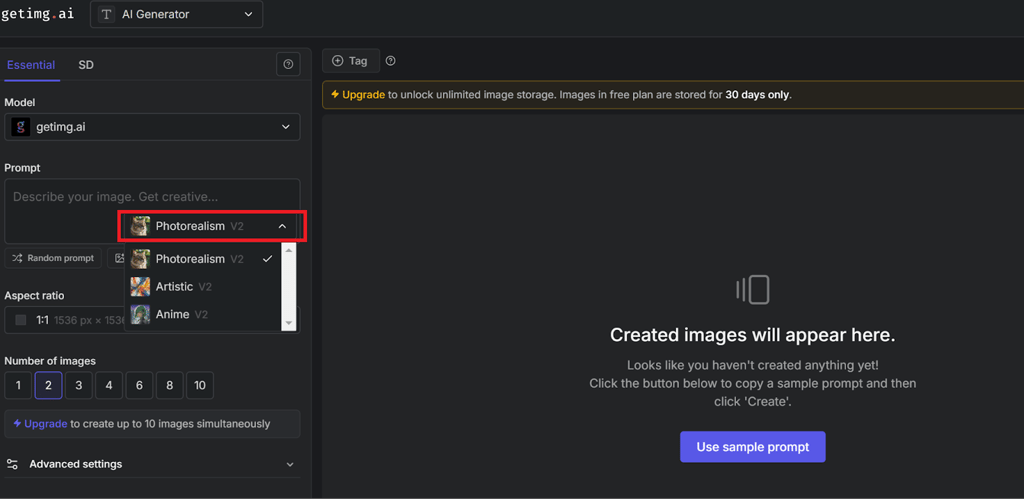
Input prompt details. From there, you can type your instructions in the Prompt section. Ensure that negative prompt information is included to help the tool understand what you wouldn’t like to see as your result.
-
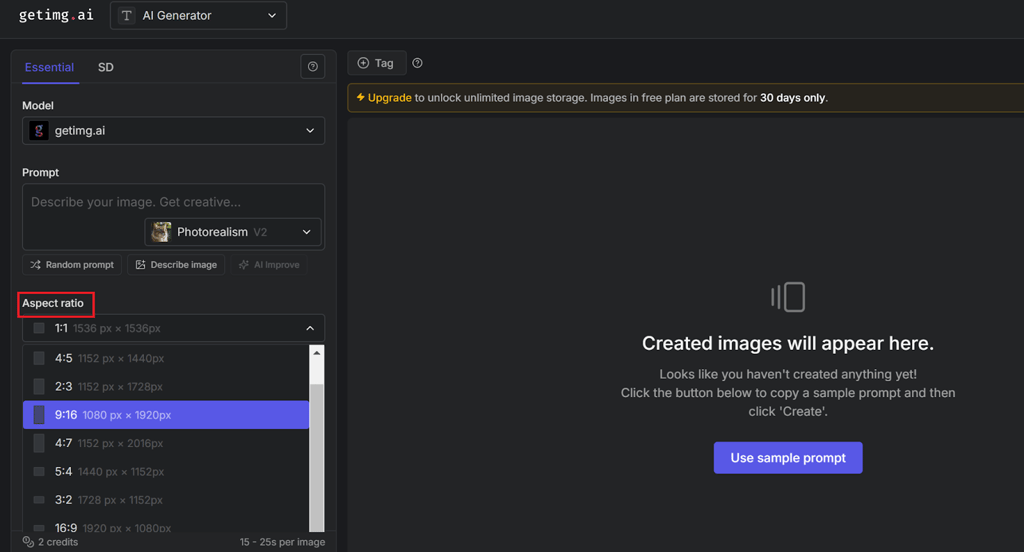
Select the model, aspect ratio, and number of images. After typing in the prompt, you can select a model. Use either the free getimg.ai model or FLUX 1 in versions that offer it. Next, you can click on Aspect Ratio and Number of Images to set up your output details.
-
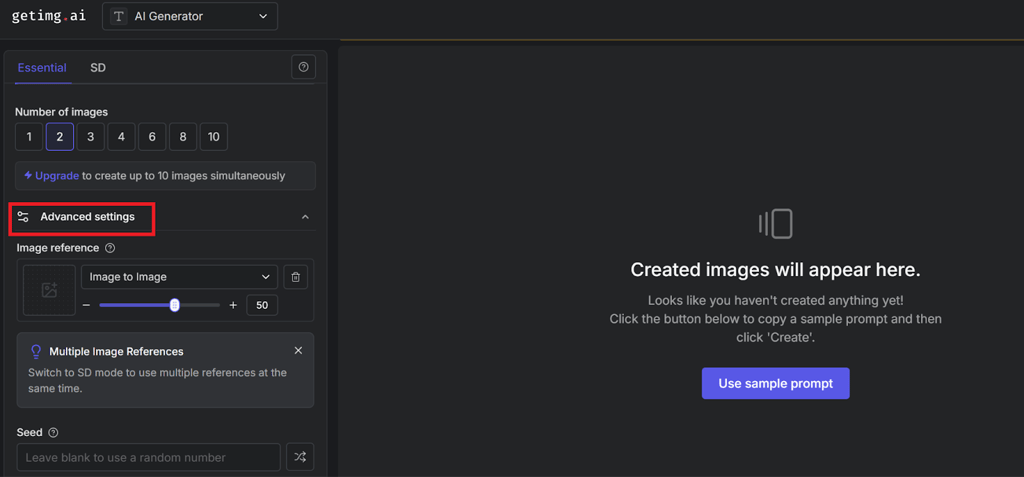
Adjust advanced settings and hit the Create button. It’s smooth sailing from here. You just need to set up additional settings, like image references, for more accurate generation and hit the Create button. Afterward, you will be able to download and save your picture within the getimg.ai gallery.
getimg.ai alternatives
As you can see from my getimg.ai review, it is an excellent tool for image generation, especially for casuals who can use the free version to produce exceptional results. However, not everything is perfect with this tool, so it’s crucial to consider the alternatives.
I’ve compared getimg.ai with its closest competitors among the best image generators below to help with your decision:
- DALL-E: Open AI’s DALL-E model is often compared with getimg.ai’s FLUX 1 when it comes to crafting realistic photos. However, with the latest model upgrades, FLUX 1 is superior in the category of photorealism. It creates more human-like images, while DALL-E still struggles with abstract elements and prompt tracking. Plus, it costs more than the basic FLUX 1, coming at $20/month as part of ChatGPT Plus.
- Shutterstock AI: With powerful stock database integration, Shutterstock AI is a slightly better option for photo editors and users who demand higher-end features. However, it does not offer a free plan like getimg.ai, so the latter is a better option for casual users.
- Leonardo AI: While Leonardo AI offers more specific customization options, it doesn’t have a clear structure for spending available credits. It depends on which features you select, so I prefer getimg.ai with its fixed image generation costs. On the other hand, Leonardo AI also has competitive pricing, and it features slightly more diverse abstract image creation options via the Alchemy tool and prompt magic settings.
Final words on getimg.ai review
The more AI image generator reviews you read, the more you’ll understand which option suits your needs. In this one, I’ve provided all the details to show you whether getimg.ai is a good fit for your needs. To sum up, I think it’s a perfect option for casual users since even the free mode comes with some pretty powerful image generation features.
However, the paid plans and their tools make it a great option even for video editors, social media influencers, and other professionals. The pricing is competitive, although it’s not the cheapest option out there. Compared to alternatives like DALL-E, this one provides more realistic results.
FAQ
Is getimg.ai worth it?
Yes, getimg.ai is the best unfiltered AI image generator, producing realistic AI outputs suitable for both casual and commercial use. Furthermore, the free plan allows you to create up to 100 AI-powered images per month, while paid plans offer more powerful tools like model training and real-time generators at a bargain price.
What is the most realistic AI photo generator?
getimg.ai is among the most realistic AI photo generator tools out there. Compared with some close competitors like Open AI’s DALL-E, it provides more realistic results with abstract image details reduced to the bare minimum for human-like content. Its latest FLUX 1 model follows user prompts as closely as possible.
Which is the best AI image generator?
Deciding on the best photo generator AI depends on your needs, but getimg.ai certainly makes the cut. It’s among the best free options for casual users, as well as one of the most versatile tools for commercial and professional use, thanks to its diverse editing and learning-based generation options and features.
Can getimg.ai be used for commercial use?
Yes, you can use getimg.ai for commercial purposes. However, this is only possible with paid plans, as the free version does not give you ownership rights over the generated photos. All the paid plans, from Basic to Hobby, include commercial rights.
Does getimg.ai require any technical skills?
No, getimg.ai does not require technical skills or even AI tool experience. While it will be more convenient if you have already worked with AI prompts and used similar tools, its intuitive design and user-friendly interface are sufficient to get you started.