Withings Sleep Analyzer review: features, accuracy, and long-term value
Being behind major reports like The Mother of All Breaches and RockYou2024, our in-house cybersecurity experts and journalists provide unbiased, real-world testing and in-depth analysis.
We maintain complete transparency by openly sharing our testing methodologies with our audience.
Learn more

As someone who loves to get detailed sleep insights but hates wearing a device to bed, I was immediately captivated when I first came across the Withings Sleep Analyzer. This under-mattress, contact-free sleep tracker promises to deliver detailed sleep metrics and even clinically validated apnea detection, all without you having to wear a single thing.
I set out with the Cybernews research team to review everything we could about Withings’s bold claims. We analyzed Withing’s own clinical studies, did a deep dive into professional reviews, and went through numerous real-world user feedback to fully understand the device.
In this Withings Sleep Analyzer review, you’ll learn all about its features, metrics, setup, pricing, app, and get to decide whether it’s what you need for your sleep tracking.
Quick overview of the Withings Sleep Analyzer


Our team of in-house researchers, writers and editors reviews and analyzes health tech products using a research-driven approach. We gather data from multiple sources, fact-check all information, and conduct our research based on peer-reviewed studies, expert opinions, consumer ratings, and regulatory approvals.
You can learn more about how we test health tech products here.
Our methodology
At Cybernews, the team and I take a comprehensive approach to make sure our recommendations are both reliable and unbiased. For this Withings Sleep Analyzer 2 review, we carried out an in-depth analysis of user reviews, expert opinions, and manufacturer specs. Here are some of the key factors we considered during the review.
- Sleep tracking metrics and insights (30%). We evaluated the depth, clarity, and usefulness of the data provided, from basic sleep duration to detailed stage breakdowns and apnea risk indicators.
- Accuracy signals (20%). We analyzed the manufacturer's clinical validation materials and also checked if they align with user feedback to better understand how the device performs in real life.
- App experience and integrations (15%). We checked the app's usability, how data is presented, and how smoothly it integrates with ecosystems like Apple Health.
- Setup and reliability(15%). We analyzed widespread user reports concerning the initial setup process, Wi-Fi stability, and ongoing performance without frequent need for troubleshooting.
- Hardware and design practicality (10%). We considered how compatible the device is with different bed types and whether the set-and-forget tag is actually true based on user feedback.
- Price and value (10%). We compared the device’s cost to its features to determine whether it’s worth it now and in the long term.
What is the Withings Sleep Analyzer?
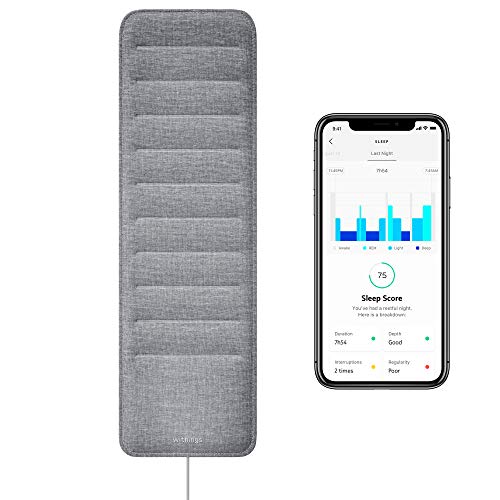
In plain terms, the Withings Sleep Analyzer is a slim, rectangular sensor pad, about the size of a large tablet, that you slide under your mattress. Using a pneumatic sensor and a microphone, it picks up vibrations and sounds from your body to track sleep metrics.
This places the Withings Sleep Analyzer at a unique intersection in the sleep-tech world. You get detailed insights without having to wear anything, but the level of data is still not comparable to what you might get from a formal clinical polysomnogram (PSG) conducted in a sleep lab.
So if you, like me, don’t like wearables but want to understand your snoring patterns, the Withings Sleep Analyzer might be what you’re looking for. It’s also a passive, “install and forget” way to monitor long-term sleep trends, which can be helpful for those who don't want to add another nightly chore to their routine. Just get into bed, and let the mat do the work.
What does the Withings Sleep Analyzer do?
Once the analyzer is installed, it generates a detailed report each morning. The core metrics include:
- Sleep duration and stages. It reports your total sleep time and estimates the time spent in Light, Deep, and REM sleep phases.
- Sleep interruptions. The Withings Sleep Analyzer logs periods of wakefulness during the night.
- Nightly heart rate. The device tracks your heart rate while you sleep.
- Breathing and snoring metrics. A key feature is its analysis of breathing disturbances, providing a summary of detected snoring events.
Interpretation note: Like all consumer sleep tech, the Withings Sleep Analyzer is best used for observing patterns and trends. It can provide valuable insights into your sleep habits, but that doesn’t make it capable of producing a professional medical diagnosis. It’s important to use data from your device as a guide, not as a confirmed clinical report.
Withings Sleep Analyzer: software and features
The thin mat is just the hardware, and the device’s main functionality is delivered through the Withings app. The app splits its features between immediate morning feedback and tools for long-term health tracking.
Each morning, you get:
- Automatic sleep detection. It recognizes when you get into bed and start sleeping, so you don’t have to worry about manual input.
- Sleep score breakdown. Beyond a simple number out of 100, the app breaks down your score into duration, depth, regularity, and interruptions.
- Nightly timeline. A visual graph shows your sleep cycles (light, deep, REM), showing when you woke up and any periods of frequent movement.
For long-term health tracking, you get:
- Comprehensive trend analysis. This is where you can view trends in metrics such as sleep duration, heart rate, snoring, and apnea risk over weeks and months.
- Actionable data export. A standout feature of the Withings app is the ability to generate a clean, shareable PDF sleep report. If you ever consult a doctor about sleep issues, you can give them some real data, instead of just saying you feel tired or don’t sleep well.
- Ecosystem integrations. It seamlessly syncs data with Apple Health, Google Fit, and other apps.
Withings Sleep Analyzer design
The whole point of the Withings Sleep Analyzer’s design is that you don’t see it. The slim mat disappears completely under your mattress, leaving only a thin, 10-foot power cable. This makes it the most discreet sleep tracker you can own, with no lights, no screen, no straps, nothing on your body.
However, there are still some things you need to know about the design and how it works in real life. For one, it must remain plugged in, so being close to a wall outlet is non-negotiable.
Also, while it works with almost any mattress, it requires a solid, flat foundation. If your bed frame is slatted, you’ll need to place a rigid board, such as plywood or cardboard, on the slats to create a stable platform. You can also use the device with adjustable bed bases, but note that built-in vibration or massage features can disrupt its sensitive sensors.
Over the long term, users say it mostly just works. The main complaint I saw is that it can sometimes lose Wi-Fi connection, so your sleep data doesn’t appear in the app until it reconnects. Also, Withings has historically used firmware updates to deliver major new features, like the alleged sleep apnea detection, so you’re likely to get more value from your device over time.
As for multiple users on the same bed, one sensor only tracks one person. The sensor can even differentiate the movement of the person sleeping directly above it from that of another person in the same bed. If you want to track two people's sleep in the same bed, you’ll need a mat for each. You can also link both devices to different profiles within the same Withings account.
Withings Sleep Analyzer sleep tracking and night data
When you open the Withings app in the morning, you’re presented with a detailed visual recap of your night. You get a color-coded hypnogram that shows your estimated journey through the light, deep, and REM sleep stages, with clear bars marking periods when you were awake.
Alongside this, you’ll find key metrics like your total sleep duration, the time it took to fall asleep, and a count of sleep interruptions. The device also provides trends for your average nighttime heart rate and breathing rate on a continuous heart rate graph.
Another notable section is the detailed insights into snoring. The Withings Sleep Analyzer uses algorithms to distinguish your snoring from environmental noise and even from your bed partner's snoring. You then get a graph showing the total number of snoring episodes and their durations.
As I mentioned earlier, this isn’t about medical diagnosis but about recognizing patterns. Seeing that graph might show you that your consistent 11 p.m. bedtime leads to more deep sleep than irregular hours do. Or you might notice that interrupted sleep and snoring typically follow late, heavy meals. This will help you see which of your lifestyle choices affect your sleep quality.
How much does it cost?
You can expect to pay around $130 to $200 for the Withings Sleep Analyzer, depending on where you buy it. The official Withings store lists it at $199.95, but you can find it for less at retail stores, where it often sells for $130-$180.
There’s no monthly fee to access your core sleep data. You get all the sleep staging, heart rate, and breathing analysis without a subscription. There is an optional Withings+ membership at $9.95/month for advanced health insights and ECG-powered cardiologist reviews, but the essential sleep tracking remains entirely free.
If you’re looking for a deal, the price often drops during big sales events like Black Friday and Amazon Prime Day. You won’t notice much movement outside of those periods, so timing your purchase can save you a decent amount.
Setting up and getting started with the Withings Sleep Analyzer
Setting up the Withings Sleep Analyzer is straightforward and only takes a few minutes.
- Place the Pad under the mattress. Slide the sensor mat horizontally between your mattress and your bed base at chest level. The Withings logo side should face upwards.
- Plug in. Connect the power cable to the sensor pad and plug the power adapter into a wall outlet. You should see a blue flashing light on the sensor, which means it’s ready to pair.
- Pair in the app. Go to the App Store or Google Play Store and download the Withings app. Launch it, go to Devices, and select “Install a device” to add your Sleep Analyzer. Simply follow the instructions on the screen, and you’ll pair the device via Bluetooth in no time.
- Connect to Wi-Fi. As you set up the app, you will be prompted to connect the mat to Wi-Fi and select your home network, then enter the password. You need this to sync your data daily.
You might encounter a few issues during setup. First off, the device only supports 2.4GHz Wi-Fi networks. If your home network uses only 5Ghz, you will not be able to connect. You most likely won’t have to worry about this, as most modern routers offer both bands.
There’s also the issue of timeouts during initial pairing, likely because the app takes too long to find the sensor or connect to Wi-Fi. Make sure you’re close to the router and pad when setting up.
We also found complaints from users who said the sensor was not accurately capturing sleep data. In most cases, this is because the device was not placed properly, either too high or too low in the bed, or the mattress thickness was outside the recommended 4-15 inch range. Here are some quick troubleshooting tips:
- Ensure your phone’s Bluetooth is on during setup.
- Connect your phone to the 2.4 GHz Wi-Fi band before starting.
- Use a firm, flat surface like a board under the mat if your bed has slats.
- Restart the device by unplugging the power for 30 seconds to reset the sensor.
Withings Sleep Analyzer app (Health Mate companion app)
The Withings app, formerly known as Health Mate, is your command center for the Sleep Analyzer. It’s where you view your nightly sleep score, detailed sleep stage timeline, and long-term trends for all your metrics.
The app also handles all your account settings, device management, and important integrations, smoothly transferring your sleep data to platforms like Apple Health and Google Fit.
Overall user sentiment is positive. Many commended the clean, easy-to-use layout and noted how easy it is to navigate to their nightly data and weekly trends. There were a few complaints about Wi-Fi connectivity and sync delays, with a night’s data not appearing in the app immediately upon waking. Waiting a little or doing a manual refresh usually resolved this.
How accurate is Withings Sleep Analyzer data?
According to Withings’ 2025 clinical validation, the device shows 87% overall accuracy in classifying sleep versus wakefulness compared to polysomnography, the standard sleep study. It’s also highly sensitive to detecting sleep (93%), but less capable of identifying when you’re actually awake while in bed (73%).
Sleep apnea detection is Withings' standout feature, and a study in the Journal of Clinical Sleep Medicine provided detailed figures. For detecting moderate-to-severe apnea (AHI ≥ 15), the device showed a sensitivity of 88.0% and a specificity of 88.6%, performance comparable to some Type III medical-grade home tests.
In daily use, the consensus from user reports and Withings Sleep Analyzer accuracy review comparisons is that total sleep time is very reliable, as well as sleep apnea and snoring. However, the data isn’t as precise when it comes to specific sleep stages, so you’re better off viewing that graph as a rough estimate of how you sleep to help you spot trends over weeks.
Important context:
- Unlike a sleep lab that uses EEG to measure brain waves directly, Withings Sleep Analyzer data is based on movement, heart rate, and breathing patterns.
- Real-world data accuracy can be reduced by factors such as a mattress thicker than 15 inches, a slatted bed frame without proper support, and even sharing a bed. Yes, the device is designed to isolate a single person's movement, but it might pick up your partner’s movements and heart rate if they get close.
Withings Sleep Analyzer: is it worth it?
After reviewing the Withings Sleep Analyzer and everything it has to offer, here’s my final take on who this device is truly for.
Buy if:
- You hate wearing a device to bed, either a watch or ring, and love the “install and forget” style.
- You care more about seeing how your sleep improves over weeks and months than about getting an exact sleep-stage breakdown every single night.
- You want a clinically validated tool that helps you monitor your risk of moderate-to-severe sleep apnea at home.
Do not buy if:
- You need a medical diagnosis, as this is a screening tool, not a replacement for a professional sleep study conducted in a lab.
- You demand perfect accuracy because sleep stage estimates are helpful for trend analysis, but can’t be taken as definitive figures.
- Your Wi-Fi is unreliable, or you lack patience for setup, as it requires a stable 2.4GHz connection and occasional troubleshooting.
FAQ
Does the Withings Sleep Analyzer require a subscription?
No, all core sleep-tracking features are available at no monthly cost. You can subscribe to Withings+ and get special guidance and advanced health insights, but this is not required to use the device.
Can the Withings Sleep Analyzer detect sleep apnea reliably?
Yes, for screening purposes. It is clinically validated to detect signs of moderate-to-severe obstructive sleep apnea with accuracy comparable to some Type III home sleep tests.
Does it work with all mattress types and bed frames?
Yes, but with some caveats. It works with foam, spring, and hybrid mattresses that are 4 to 15 inches thick. However, it requires a solid, flat surface, so slatted bed frames need a rigid board placed over the slats.
How does it compare to smartwatch sleep tracking?
You get a more comfortable, passive experience since you don’t wear anything, plus more detailed breathing analysis and clinically-validated apnea screening, which most smartwatches lack. However, a smartwatch offers 24/7 heart rate and activity tracking that the Sleep Analyzer does not.
Can two people use one Withings Sleep Analyzer on the same bed?
No. The sensor is designed to track the biometric data of a single person sleeping above it. It can tell when two people are on the same bed and use algorithms to monitor only one person's movement.