EaseUS Data Recovery Wizard Review: Safety, Performance, and Whether It's Worth Paying For


 Follow us
Quick Take
EaseUS Data Recovery Wizard is safe. It does not upload your files. The downloader is clean. For basic recovery—accidental deletion, quick format, simple drive corruption—it works. For failing drives or complex RAID setups, you can also try it. The free version recovers 2GB. EaseUS is very easy to use and now offers disk imaging, unlike previous versions.
Is EaseUS Safe? Three Common Fears Addressed
People ask three things before installing any recovery tool:
- Is the software itself malware?We scanned the installer through VirusTotal (72 engines). Zero detections. Post-install scans with Avast and Windows Defender showed no threats. No unusual background processes or network connections.
- Does EaseUS take my personal data?No. Recovery runs entirely offline. During testing, we observed no file uploads. The privacy policy states they collect telemetry (crash reports, version info, anonymized usage stats) but not your documents, photos, or videos.
- Is the downloader safe?Yes. EaseUS has a normal web installer, which is digitally signed by the company.
Workflow: How EaseUS Data Recovery Wizard Works Step by Step
EaseUS has a workflow like most consumer recovery tools, consisting of three main stages. However, there are some specific behaviors to point out. Here is how we tested it and how it works:
As soon as you open the app, you are presented with a list of connected storage devices. External devices are listed at the top, followed by internal devices. As soon as you click on Search for Lost Data, the scan process begins right away.
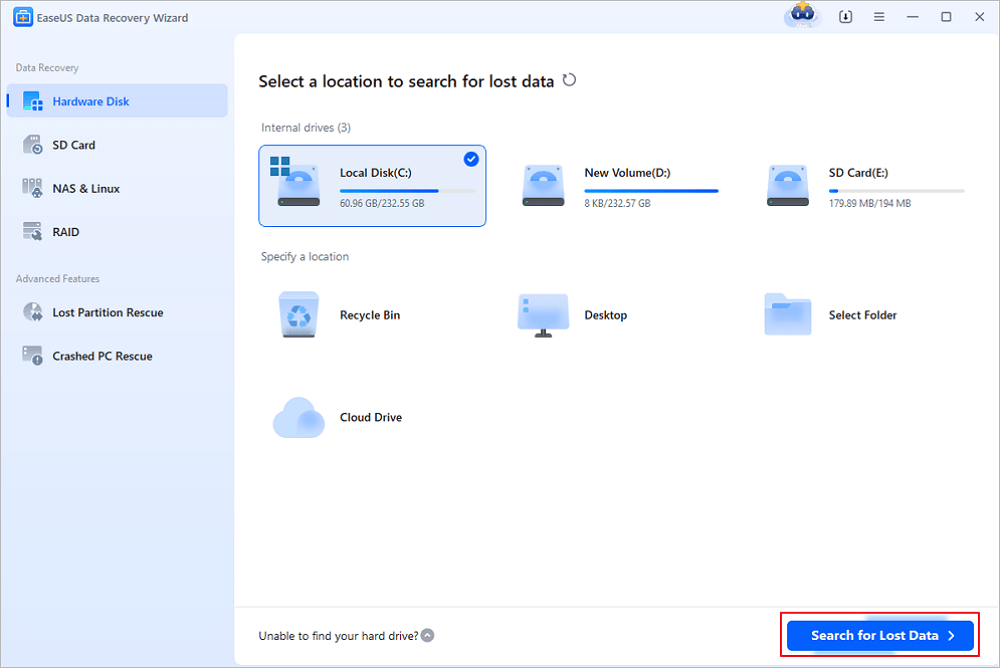
First-time users receive a brief intro with a description of the different UI components via a pop-up window. For instance, “click here to scan” or “icon represents file type.” Useful for newbies.
During the scan, the results will start to appear in real time. A live file counter and percentage indicator will be displayed on the bottom bar. This keeps the user in the loop. You don’t have to wait until the scan process ends. You can start browsing the results immediately.
The user interface is quite easy to use. Files are organized by type or by the original folder structure. You can explore the files by category, such as JPG, PNG, BMP, and GIF.
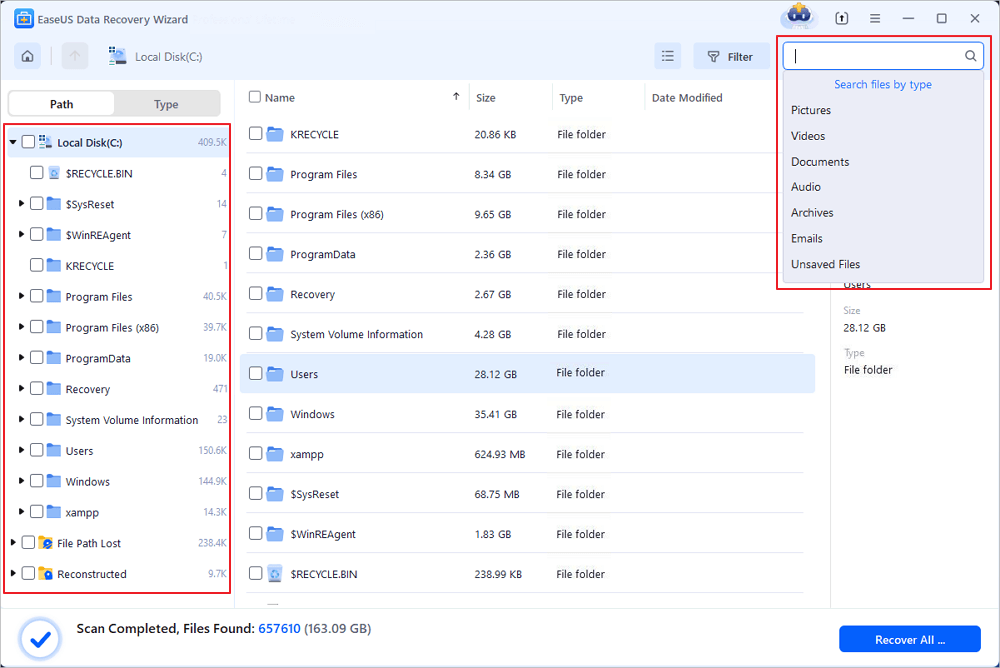
The preview feature has a lot of room for improvement. For instance, the application only allows a few file types. Additionally, the application’s preview feature performs poorly. For instance, we encountered a few “loading, please wait” messages while using the application. Additionally, the application has a size limit for the preview. If you would like to view a large video or a RAW image, forget about it.
Once you have found the files you want to recover, just tap the Recover button and choose a target location. As you can see, there’s absolutely nothing complicated about this. You don’t need to know the first thing about file signatures or partition layouts. If you can navigate folders in your file manager of choice, then you’re already at home.

What the Software Actually Does
EaseUS Data Recovery Wizard runs on Windows (7–11) and macOS. It recovers files from HDDs, SSDs, USB flash drives, memory cards, and basic NAS/RAID 0/1 setups (not RAID 5/6 or complex arrays).
File system support includes NTFS, FAT32, exFAT, ReFS, HFS+, and ext2/3/4.
The scanning process runs two modes in sequence:
- Quick Scan: finds recently deleted files (Recycle Bin, recent formatting)
- Deep Scan: sector-by-sector search for corrupted, RAW, or reformatted drives
You can pause and resume scans. Results appear in real time, grouped by file type or original folder structure.
Missing features compared to higher-end or cheaper rivals:
- Preview is limited, and many formats fail to load
- No hex viewer or manual carving options
Recovery Performance: Three Test Cases
Test environment: clean Windows 11 system, identical drive models, and file sets across all tests. File mix included JPG, CR2, NEF, MP4, MOV, DOCX, PDF, MP3, FLAC, ZIP, EXE.
| Scenario | Drive | Result | Scan Time |
| Shift+delete (1,500+ files) | 1TB HDD (NTFS) | ~90% usable recovery. Folder structure partially preserved. Documents and common photos came back clean. | 21 min |
| RAW microSD (Windows cannot read) | 64GB Samsung EVO Plus | ~82–87% usable. RAW photos recovered better than videos. No original filenames or folders. | 12 min |
| Quick format (exFAT) | 16GB USB flash drive | ~85% usable, but files scattered. Original paths lost. Required heavy filtering by type/date. | 5 min |
Deleted file recovery is strong. While RAW and formatted drives can be challenging for many tools, EaseUS handles them with reliable, consumer-friendly performance—delivering solid results where it counts.
Pricing Breakdown
As of this review (Windows version):
Note: The monthly license is valid for one month after activation, with no renewal fees applicable.
| License | Price | Notes |
| Monthly | $69.95 | Only for one-off emergencies |
| Yearly | $99.95 | Includes upgrades and support for 12 months |
| Lifetime | $149.95 | Best long-term value if used frequently |
| Free | $0 | 2GB recovery cap |
While EaseUS offers a genuinely useful free tier for testing, its paid tiers are worth every penny for anyone who values a clean, intuitive interface and has straightforward recovery needs—delivering a premium experience without unnecessary complexity.
What Users Report (Aggregated from Trustpilot, G2, Reddit)
Positive patterns:
- "Recovered files from a formatted external drive"
- "Easiest recovery tool I've used – no learning curve"
- "Customer support responded quickly via live chat"
Negative patterns:
- "Preview didn't work for my videos, so I paid without knowing if recovery would succeed"
- "Free version is a tease – 2GB is nothing for video recovery"
Overall ratings: 4.4–4.6/5 on Trustpilot and Capterra, but complaints cluster around pricing and preview limitations, not safety or malware.
Final Scores
| Metric | Score (0–10) | Brief |
| Recovery (deleted files) | 8 | Strong on simple cases |
| Recovery (corrupted/RAW) | 8 | Acceptable but messy |
| Ease of use | 9 | Best-in-class for beginners |
| Safety | 8 | No malware, no data theft |
| Value for money | 7 | Not overpriced for what you get |
| Overall | 8 | Safe and easy |
When to Buy and When to Look Elsewhere
Buy EaseUS if:
- You need to recover recently deleted files from a healthy drive
- You want the simplest possible interface
- You already tested the free version and your files preview correctly
Look elsewhere if:
- You need to recover from a physically failing or clicking drive
- You want a reliable preview before paying
- You need to rebuild a RAID array or work with raw disk signatures
One-Sentence Summary
EaseUS Data Recovery Wizard is safe, easy, and works for basic recovery. It would be your go-to solution if you are a computer rookie.