1Password security breach 2026: What do you need to know
Being behind major reports like The Mother of All Breaches and WhatsApp Data Leak, our in-house cybersecurity experts conduct independent, unbiased testing and thorough analysis of password managers, helping users confidently manage their credentials and sensitive information.
We prioritize transparency by openly sharing detailed descriptions of our in-house testing procedures and methodologies.
Learn more
-
On November 25th, 1Password publicly stated that an attacker accessed 1Password’s internal systems and stole account information from some customers, including names and email addresses.
-
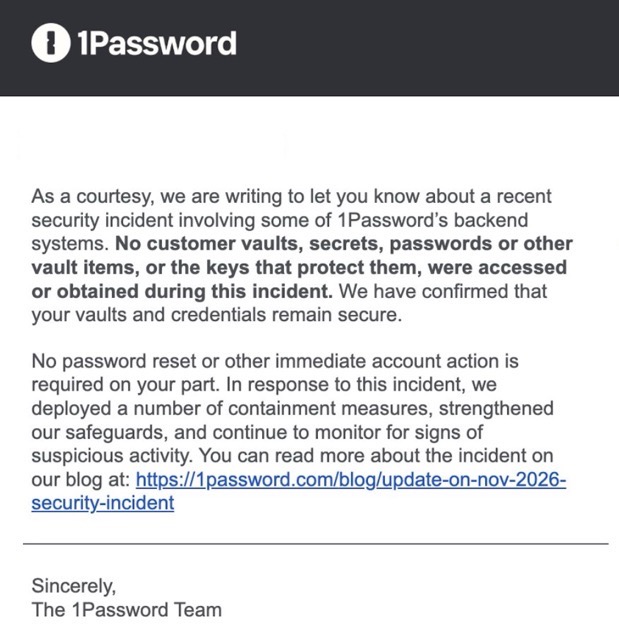
1Password says customer vaults and the passwords stored inside them were not accessed.
-
The stolen information could be used in phishing attempts, such as fake emails asking users to recover their accounts.
-
1Password, one of the biggest names in the password management industry, has suffered a security breach, as communicated publicly on November 25. An attacker managed to access the company’s systems and got hold of account details belonging to some customers. The good news is that (according to 1Password) customer vaults and the passwords inside them were not accessed.
That said, names and email addresses are pretty useful if you’re a scammer. Here’s what actually happened, what the attacker got, and what it means for your account.
What happened in the 1Password breach?
The 1Password security breach resulted from an employee’s work account on GitHub, a platform where companies store and manage their software code. An attacker got into the account and used it to access some of 1Password’s private source code.
While 1Password hasn’t yet explained how the attacker gained access to the employee’s account in the initial 1Password GitHub security breach, 1Password has disclosed that the attacker used the employee’s account to inject malicious code into 1Password’s internal systems.
The code then downloaded account details for some customers. The attacker also copied some of 1Password’s private software code and accessed a system the company uses to build and release its software.
1Password began investigating on November 19, 2026, and publicly disclosed the breach on November 25, but as of November 26th, it hasn’t said exactly when the attacker first gained access or for how long they had access.
What was exposed in the 1Password security incident?
1Password claims customer vaults and the passwords inside them were not affected, it has shared what the attacker managed to steal:
- Names and email addresses
- Account and user IDs, account creation dates, and last sign-in times
- Public keys (which 1Password says are meant to be public)
- Technical sign-in information that 1Password says cannot be used to access an account
- Tokens from some account invitation, setup, and recovery links
- Other internal account details, such as version and file numbers
While 1Password says the public keys are meant to be public, the sign-in information can’t be used to access an account, and customer vaults were not accessed, the attacker still got quite a bit of information to work with.
It’s clear that for the users who got affected, the biggest concern now is phishing. For example, someone with your name and email address can now send a message pretending to be from 1Password, asking you to recover or verify your account.
Even if your information wasn’t exposed in this breach, it’s a good reminder to be careful with unexpected emails. Knowing how to spot phishing messages can help, and it’s also worth considering a security tool that can actively spot the warning signs before you interact with them.
Actions taken by 1Password after the breach
To contain the 1Password breach, it says that the company disabled the employee’s GitHub account, revoked a stolen token, and removed the access the attacker had created. It also restored clean versions of the affected services and replaced or revoked internal credentials that may have been exposed.
1Password says it has strengthened security around GitHub, its software build system, and company devices. It has also added new checks to detect similar attacks.
As a precaution, 1Password also made the codes used with invitation and recovery links harder to guess. Some of those links contained tokens the attacker had obtained, but 1Password says the tokens cannot be used without a separate sign-in or verification code.
The company says it directly notified a small number of users who had certain account setup or recovery requests in progress. It has also brought in independent cybersecurity experts to assess how it contained the breach and secured its systems.
1Password alternatives with no reported customer data breaches
While 1Password says the credentials stored in customer vaults were not affected, it’s understandable if you want to explore some 1Password alternatives. The following providers, as of November 26, 2026, have no publicly reported customer data breaches:
- NordPass encrypts your passwords on your device using XChaCha20 encryption. Its zero-knowledge architecture ensures that even NordPass can’t see what you store in your vault. It also supports two-factor authentication, while paid plans can alert you if your details appear in a data breach. There’s more on its security in our NordPass review.
- RoboForm is one of the most affordable options on the market, with Premium starting at $0.89/month. It uses AES-256 encryption to protect your vault, and its zero-knowledge design also keeps your stored data private from RoboForm. Our RoboForm review covers its features in more detail.