DashOne Pro dash cam review: features, pricing, and what drivers should know

A high-quality camera can capture an act of vandalism at night and be a helpful passenger during the day. Most importantly, dash cams are often the only legal assistance you can rely on in insurance disputes or court cases.
Still, due to their hefty price tags, many drivers believe they’re not worth the investment. As it turns out, most end up regretting that decision in case of a collision or another sort of road trouble.
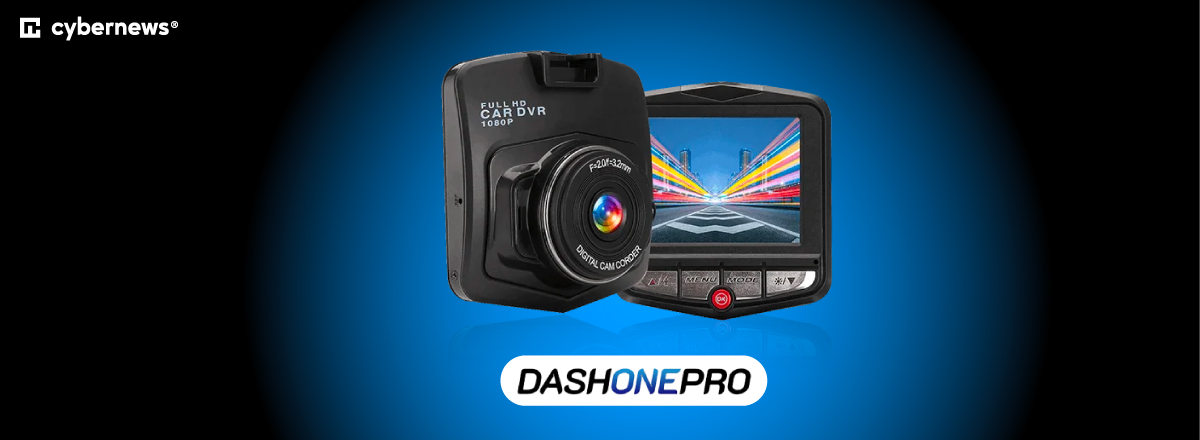
I’d hate to see that happening to you, which is why I made this DashOne Pro dash cam review. Together with the Cybernews research team, I deemed it the best compact, durable, and feature-packed traffic recording solution available at a fraction of the premium cost. The rest of this guide will show you its value, benefits, installation steps, and everything in between.
Quick overview of the DashOne Pro dash cam
First things first, I pulled together all the key info about this dash cam in one place. Here’s what sets it apart from similar products:
| Overall rating | 4.7/5 |
| Brief description | DashOne Pro is a traffic recording camera that mounts directly onto the vehicle’s dashboard. It features Full HD resolution, multi-angle recording, and motion detector sensors in parking mode. |
| Key specs | 170-degree wide-angle front and 140-degree rear recording with a dual setup, a built-in G-sensor, night vision mode, loop recording, time-lapse recording, parking mode, and WiFi connectivity |
| Camera resolution | Full HD (1080p) |
| Return policy | 30-day money-back guarantee |
| Price range | Low |
Our methodology
To properly evaluate this dash cam, I collected information from the brand's main website and from user testimonials on Reddit and review platforms and focused on the following factors:
- Video features and technical specs transparency (30%). I first checked the availability of recording specs on the manufacturer’s website. I then looked at how clearly the brand communicates such key details, mainly regarding sensor quality, bitrate, and overall video specs.
- Usability and installation clarity (15%). To ensure this dash cam can be installed by users with no technical expertise, I reviewed the installation steps and daily operation.
- Safety features (15%). Up next, I assessed the sensitivity of the advertised G-sensor, as well as the functionality of other safety features, like parking mode recording.
- Price and overall value (15%). Comparing the price to those of other affordable dash cams gave me valuable insight into the overall value of the product.
- User sentiment across forums and reviews (15%). I also checked available user reviews and feedback across sites like Reddit and other testing platforms.
- Brand transparency and support information (10%). For the wrap-up, I inspected the brand’s customer support channels, responsiveness, and helpfulness.
What is the DashOne Pro dash camera?
DashOne Pro is a dashboard-mounted traffic recording camera. It’s designed as your safety companion during active driving and parking situations. The wide recording angle also makes it great for damage protection. With it, you can simply rewind the recording and potentially catch other drivers damaging your vehicle while parking or troublemakers scratching your doors with a key.
Here’s a summary of the typical purposes of such cameras:
- Accident documentation. Dash cams provide clear video evidence of the chain of events during collisions or other traffic situations.
- Insurance evidence. If legally obtained, dash cam footage may also be used in court of law, mainly for supporting claims and resolving insurance disputes.
- Monitoring while parked. Dash cam footage can serve as evidence of hit-and-run incidents, vandalism, or theft attempts while your car is parked.
Naturally, legal considerations vary by region. Still, dash cam recordings are legit defense evidence in US courts, and the same goes for many other countries.
How does it work?
It’s rather easy to use this gadget: it attaches to your dashboard via a suction-based mount, and the power connects through your vehicle’s 12V-24V outlet. From there, the camera automatically turns on and starts recording.
You should be able to see the blue LED light while recording is on. As soon as you park and turn off the ignition, the camera feed stops. Still, in case something (or someone) triggers the AI-powered motion-detecting sensor, the recording starts again.
The camera uses loop recording, which means it automatically locks the current footage during an incident. This way, it prevents overwriting, so there’s no risk of losing vital evidence.
One thing worth noting is that, while the parking mode with motion detection makes for a nice touch, you may need to use additional power kits to prevent your car’s battery from draining.
Core features and benefits of the DashOne Pro camera
A wide range of functions is what sets this camera apart from the competition. Here’s a summary of the key features advertised on the official DashOne Pro website:
- Full HD video resolution. DashOne Pro camera uses a Full HD (1080p) video resolution. While sensor quality and bitrate specs aren’t clearly displayed, it’s still enough to zoom in on license plates and road elements.
- Wide-angle lens. Using a 170-degree wide-angle lens, this camera minimizes blind spots and ensures a panoramic coverage of your vehicle’s surroundings.
- Night vision or low-light enhancement. Unlike most other dash cams, this one claims to have high-sensitivity night vision sensors for clear footage in low-light conditions. I couldn’t verify the specs of those sensors, though.
- G-sensor and emergency recording. The built-in G-sensor automatically detects impacts and starts recording to preserve evidence.
- Loop recording. DashOne Pro utilizes loop recording, which means it keeps the feed live without manual file management.
- Memory card support. I couldn’t verify the existence of a memory card slot for this dash cam on the website, but the manufacturer claims it’s still possible to instantly access your footage via Wi-Fi.
DashOne pro pricing
Interestingly, there’s no actual price listed on the DashOne Pro main website, so you’d have to go with the Check Availability option to get a quote.
I verified the price by cross-referencing multiple sources and user reviews, and based on my research, the standard price should be between $49.99 and $69.99. Still, the manufacturer frequently enlists the gadget at a lower price during promotions and discounts. At the time of my research, it offered a massive 70% off coupon.
Also, I found numerous user statements claiming they received far better pricing when ordering multiple cameras, so perhaps that’s something of value for family users.
Considering that most dash cams average at around $100, I’d say it’s a good deal. I’d just point out a few things you should consider before the purchase: always count in the extra costs, like a microSD card or a hardwire kit for the parking mode, and check the warranty terms beforehand.
Real-world use cases scenarios
Here are just some of the common real-world situations where a dash cam like DashOne Pro might prove valuable:
- Accident evidence. Dash cam footage provides clear documentation of the chain of events in collisions, especially when the other party falsely claims they're innocent.
- Insurance claim support. No matter who owns the camera, its recording is viewed as objective footage. That’s what insurers often use to speed up the processing of claims and disputes.
- Hit-and-run documentation. Thanks to the built-in G-sensor, DashOne Pro is capable of recording full vehicles, including license plates, or even driver images in hit-and-run situations.
- Parking surveillance. With the parking mode, this dash cam is fully equipped to record vandalism, theft attempts, or damage caused by another driver’s parking.
- Fleet or rideshare driving. Dash cams especially come in handy for professional drivers as a safeguard against work-related driving incidents.
You have to agree that it all sounds quite positive and promising, but you might need to lower your expectations in some situations, especially hit-and-run incidents, due to the devices' technical limitations, storage limits, and the specific camera angle.
How to install and use the DashOne Pro dash cam?
If you’ve already decided to get this dash cam, check out these installation steps and tips:
- Mounting position. Use the suction mount to securely attach the camera behind the rearview mirror for an ultra-wide recording angle.
- Power connection. Check if the camera is stable before routing its cable to the cigarette lighter. Here’s a pro tip: tuck the cable along the windshield edges.
- Memory card insertion. Insert a memory card if possible. While I wasn’t able to determine exactly which one this device uses, most dash cams are compatible with a microSD card.
- Initial setup and time/date configuration. This next step is important for potential evidence validity: immediately set the correct date and time upon installation and adjust the video quality and loop length via the official companion app.
- Running the first recording test. Check the angle and functionality by taking a test drive.
Safety instructions
There are some post-installation safety considerations you should be aware of:
- Avoid driver’s view obstructions. Make sure to position the camera in a way that doesn’t interfere with your road visibility or visual access to mirrors or dashboard displays.
- Secure cables away from airbags. Loose cables near the airbag zones might quickly turn into a safety hazard in case of deployment, so avoid placing them along those zones in your car.
- Don’t interact with the camera while driving. Refrain from touching the camera while you're driving. If necessary, pull over and adjust it.
- Inquire about the local recording laws. Make sure to check the local laws on evidence admissibility, audio consent, and overall in-traffic recording in your area.
What do users think about the DashOne Pro dash cam?
The website itself claims that the DashOne Pro camera is trusted by "over 2,000 drivers", but I wanted to put that to a real test. That’s why I explored every inch of forum threads like Reddit, as well as app store reviews for the native companion app.
Sure enough, I pinpointed some repeating patterns. For instance, most users report getting their dash cam at a very reasonable price, which is a huge plus. The Full HD claim is also easy to verify, so good job to DashOne on that.
However, not everything is so great, as many users report the lack of a proper community and support as a significant drawback. Still, there’s nothing that indicates that any of the brand’s claims on the main website are fake advertising.
DashOne Pro dash cam vs alternatives
If you’re on the market for a dash cam, you’ll likely be curious about how this one rates against the closest competitors. To avoid overcrowding this DashOne Pro dash cam review with head-to-head comparisons, I put it against three main types of brands and cameras:
- DashOne Pro vs other budget dash cams. Some manufacturers advertise their cameras' video quality as Full HD, only to deliver disappointing footage due to low-sensitivity sensors. When deciding which one to buy, consider actual sample footage posted by verified users, and check SD card stability reports and the warranty beforehand.
- DashOne Pro vs mid-range mainstream brands. Mid-range models from mainstream manufacturers are often on par with, or even well below, DashOne Pro in terms of technical specs. However, these brands communicate technical specs more clearly to potential buyers and often offer more consistent firmware support.
- DashOne Pro vs premium, feature-packed dash cams. Premium models often outperform affordable options like this one in motion-detection sensor quality, dual-channel support, and cloud/LTE upload options. I’d still say that the front + rear recording capability of DashOne Pro comes close to the premium range.
Is the DashOne Pro cam worth it?
Overall, I’d say that DashOne Pro is worth it for drivers looking for decent recording quality at a fairly affordable price. It’s enough for entry-level assistance while driving, and the parking mode provides sufficient hit-and-run protection, assuming you can provide an external power source.
On the flip side, it may not be the best fit if you’re looking for a premium option with extremely sharp video quality and long-term reliability. Either way, it’s like choosing the best GPS trackers for a car: every driver should pick a gadget that ticks their boxes best.
FAQ
Does the DashOne Pro dash cam record while the car is parked?
Yes, DashOne Pro can record while the car is parked. The live feed shuts off at the same time as the engine does, but motion detectors activate the cam in case of suspicious activity.
Does DashOne Pro require a subscription?
No, there’s no subscription necessary to use DashOne Pro. All you need is a Wi-Fi app access and an external memory source.
What memory card works best with DashOne Pro?
In most cases, microSD cards work best for dash cams. For continuous recording, consider 32GB versions.
Is dash cam footage legally admissible in accidents?
In most cases, yes, dash cam footage is legally admissible. However, it depends on your jurisdiction, so make sure to check its legal admissibility in your area before purchase.
Can the DashOne Pro dash cam record at night effectively?
Yes, DashOne Pro can effectively record at night. It’s thanks to high-sensitivity night vision sensors, which allow the camera to clearly display license plates and other nearby items in darkness.