UPS reschedule delivery scam: how to spot the fake message to protect yourself

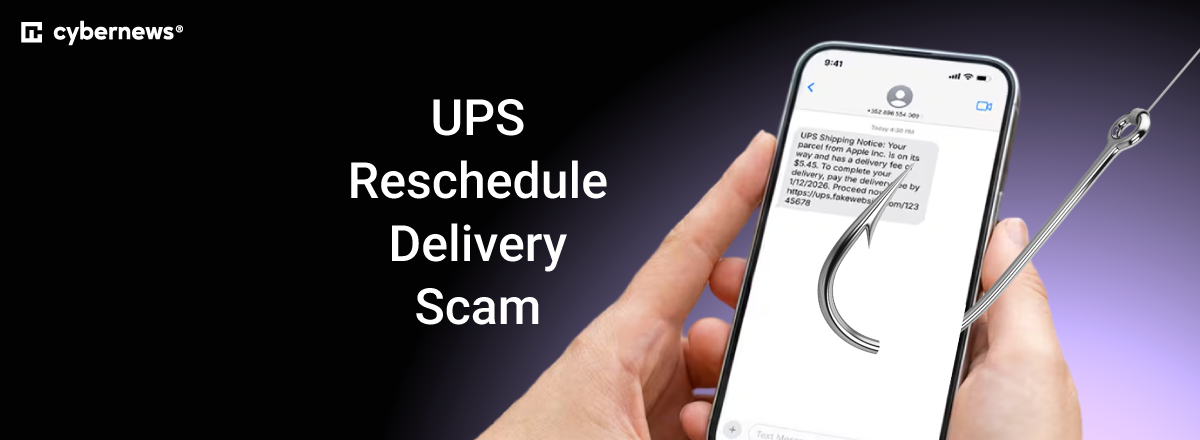
You get a text saying UPS couldn’t deliver your package, and it says you need to update your address or pay a fee to arrange another delivery. It’s easy to be fooled by this because it comes at a time when you’re waiting for an order. That’s the UPS reschedule delivery scam.
Normally, you should open the UPS app or type ups.com into your browser, and check the shipment there. It’s dangerous to click on links in a message regarding a payment or requesting personal information.
In this guide, I’ll explain how this scam works. I’ll tell you about what you should pay attention to in a delivery message and how to arrange a delivery change in a safe way. You’ll also find out what to do if you’ve interacted with such a message and how Bitdefender can help protect you against these scams.

What is the UPS reschedule delivery scam?
This is a scam that starts with someone pretending to be UPS. It’s usually when a message says there’s an issue with a package and afterward directs you to a website to “fix” the problem. Scammers can copy the official UPS logo very closely while harvesting the information you enter.
Bitdefender’s guide to UPS text scams notes fake missed deliveries, address issues, and strange delivery fees among the common things you’ll find. Scammers want to earn your trust. For example, you may encounter something like this: “UPS: Your package could not be delivered due to an incomplete address. Confirm your details and pay $3.99 to reschedule before your parcel is returned.” This small fee makes you think it’s harmless. However, if you enter your bank card details, you’ve given scammers information about the card itself. So, this is a wider risk. This is called social engineering in the cybersecurity industry.
Why the message seems believable
You may have ordered several items recently, and you might not remember which company is delivering each order. A delivery message arrives, while you assume it belongs to one of your many orders.
Also, the request doesn’t seem like a problem. Scammers just ask you to confirm an address, pick another day, or pay an insignificant fee, all of which doesn’t sound like someone’s trying to steal your information.
Don’t make the mistake of falling for social engineering like this. Make sure you always check official shipment details before trusting such a request.
The warning signs of a fake UPS delivery message
Some scam texts are very obvious, while others are almost indistinguishable from the real thing. It’s important to recognize the details so you don’t fall for a scam.
The link is not a UPS link
A UPS logo alone doesn’t tell you who controls the website. Instead, take a look at the address in your address bar. For example, ups.delivery-update.example doesn’t belong to ups.com, even though it starts with the company’s name.
If the link is unfamiliar or shortened, be wary. Don’t click it just to investigate. The same applies to a QR code that supposedly lets you “rearrange delivery.” If you’ve already interacted with a link and now you’ve opened a page, HTTPS encryption in the address bar isn’t proof that this is really UPS.
A scam website can also use encryption. Even a payment form can seem secure while you’ve given over your details to someone who has nothing to do with your delivery.
There’s pressure to act quickly
To make you rush, a typical social engineering tactic is a threat about returning or destroying your package. UPS’ fraud guidance warns about this exact thing.
Real shipments might have a deadline, but verify those directly on UPS’ official website. A legitimate company like UPS doesn’t send customers strange messages telling them there’s little time left to act.
The details don’t match
Check if UPS is handling your delivery. You can establish the tracking number and carrier via your retailer’s order history. A tracking number in a text doesn’t reflect legitimacy.
Check the retailer’s official app or website and find your original order details. Look for the tracking number and delivery company, then compare that data with the message you received.
A page is asking for unrelated information
An address correction shouldn’t require your email or financial account password. It’s especially dangerous if a delivery page is asking for your banking password or a verification code related to another account or a bank payment.
Before you do anything, read any notification to see what the code authorizes. UPS might ask you to sign in to your UPS account or use an email passcode for delivery changes. Only complete those actions via the official UPS app or website.
Don’t trust a familiar sender name
Scammers can display any company name they want. Don’t approve a request based purely on a familiar logo, design, or professional-feeling spelling. Instead of that, go back to your original order information and compare the message you’ve received.
Today, AI allows scammers, even those with a weak grasp of the English language or graphic design, to create professional-looking sites and sophisticated messages.
Does UPS send real texts or charge for delivery changes?
UPS sends an official SMS notification, which is part of a service you can opt into. In this specific case, receiving texts about a shipment is expected. Delivery changes can also genuinely require a payment. For example, in the US, UPS My Choice has a free Basic membership. Some changes require a payment.
Options and costs with a legitimate company depend on the requested change, shipment, and your membership. If you have a free membership, that doesn’t mean your delivery adjustments are free.
UPS itself describes situations where payments may be required. That includes taxes, duties, and collect-on-delivery shipments. What’s important is that UPS actually confirms these charges, confirming that the transaction is official.
It would be incorrect to generalize that UPS never texts customers or that all delivery fees are scams, because legitimate companies do operate this way. The smart move is to open the official app or website yourself and check if that applies to your situation.
How to check the message and reschedule safely
You might feel confused about how to determine if you can safely go ahead. Let’s start with an order you already know about.
1. Find the original tracking information
Open the official service yourself. Find your order and the official tracking number. If someone personally sent you this package, simply ask the person for shipment details via the same contact method you’ve already been using to communicate.
Avoid using a support number included in a questionable message. Doing that could connect you to the scammer behind the fake delivery page.
If you aren’t expecting a package, ask the people in your household about any orders or if they’re expecting gifts. Ask these people on their usual number or contact method to confirm. Don’t fill out a form claiming a mysterious package.
2. Check the package via UPS
Simply enter the number in the UPS app or on the official site: ups.com. Compare the delivery status there with what the message claims. If UPS left a physical delivery notice, that reference number also helps you check the trail.
If the information there doesn’t align with the message, reach out to UPS via its official support channels only. Forget the suspicious link.
3. Stick to UPS delivery options
UPS says that recipients can request changes using Change My Delivery. The guest system might ask for an email passcode. Alternatively, sign in to UPS My Choice, choose the package, and check the delivery options there.
Some shippers restrict changes, while certain shipments might not be eligible. If you can’t change the delivery, contact UPS or the sender. Do not interact with a separate payment page within the unexpected message.
4. Review details before confirming
Before making a change, review the delivery date, location, and any charges. Save the confirmation for later reference. The table below shows where to check some common claims. Use the official service you opened yourself for every check:
| Message claim | What to check |
| Delivery attempt failed | Shipment status and UPS delivery notices |
| Incomplete address | Address on your order and correction options |
| Payment is required | If UPS states such a charge for that shipment or change |
| Package will be returned | Tracking information and UPS instructions |
Save your order confirmations until your packages arrive. Keeping the tracking number and carrier information is important for cross-checking a suspicious message without interacting with it or the links inside.
If you’ve already clicked
It may not be too late if you have already clicked. First, close the page and don’t load it again. What you need to do next depends on your situation.
You just opened the page but didn’t enter anything
Clicking to get to the page doesn’t mean your accounts are compromised. Check for suspicious downloads. Always update your system to the latest version.
If a file did download, don’t open it. If you did interact with the file, use a reputable security tool and scan your system. Never install a “cleaner” recommended by a suspicious page or message.
You entered card details or paid
Reach out to your card issuer using its official channel only. There may be a 24/7 number on your card that you can call. Explain to them that you have entered details on a suspicious page, even if the page claimed payment failed.
Ask the issuer if your card should be blocked or replaced. Once reported, keep a close eye on your transactions. A failed payment message doesn’t mean card details weren’t taken.
You entered a verification code or password
Quickly change whichever password you entered on the suspicious page via the respective website or app. If you used that same password on other accounts, change it there too. Next, sign out of other sessions, check recovery details, and make sure multi-factor authentication is enabled everywhere possible.
An exposed email account can be particularly risky. Check for email forwarding rules you’re not aware of and unfamiliar recovery details. A criminal with access to your inbox might try to switch passwords for your services so you can’t get in. If you can’t sign in to your email, follow your email provider’s recovery instructions.
If you share a banking verification code, contact your bank right away. Describe exactly what you’ve submitted, plus the notification itself. Never approve another request from the same sender to “cancel” the first one.
You shared personal details or installed software
If you’ve given your name, address, or phone number, you might get incoming messages that use that information to gain your trust. Sharing your address alone doesn’t guarantee identity theft, but more than one personally identifiable detail increases the risk.
For identity theft-related suspicions, contact the authority that issued your documents. If you’re in the US can use identitytheft.gov for further guidance.
If you have installed software, check the permissions the software has in your device’s app settings area. Even if you didn’t give it access to your files or sensitive information, you shouldn’t keep the app on your device. If you suspect that your device is compromised, use a separate device for urgent banking communication or password changes. Bitdefender Premium Security also includes Data Breach Detection. It shows which organizations exposed your personal information and gives guidance on what to do about each breach.
How to report a suspicious UPS message
Screenshot the message, sender details, and any links in full if present in the message. Here are more options to help you:
- Report the incident to UPS. Send UPS the screenshot and all other findings. The address is [email protected].
- Report the message. In the US, you can forward suspicious texts to 7726, which spells SPAM, or report junk via your messaging app.
- Report a scam. In the US, you can report via reportfraud.ftc.gov. For the rest of the world, research fraud-reporting services in your country.
- Block the sender. After gathering what you need for reporting, delete the suspicious message. Then, block the sender.
Do not interact with suspected scams in any way. Stay silent. Remember, if money or account access is at risk, first contact the bank or service. You can report the message later.
How Bitdefender protects you against delivery scams
Bitdefender Premium Security includes Scam Protection Pro. Its AI-powered scam protection can help identify a suspicious message or block a scam site before you end up sharing information.
Detecting suspicious texts and websites
Bitdefender has SMS protection for Android and iOS. On Android, its Chat Protection also checks for scams in WhatsApp, Facebook Messenger, Telegram, and Discord.. You need to enable the required permissions and settings for your specific device. Just installing the app without configuring it might miss some crucial steps.
On iOS, SMS filtering applies to supported messages from unknown senders. However, don’t assume protection can scan every conversation in every messaging app.
Web Scam Protection detects and blocks scam websites. If protection stops what seems to be a legitimate UPS page, check your package through UPS directly. Don’t disable protection warnings.
Checking a message you're unsure about
Scamio Pro can check suspicious messages, links, QR codes, and screenshots you submit. You can use it to examine a delivery request before deciding what to do. Leave out passwords, payment details, and unnecessary personal information.
Email Protection also checks connected Gmail and Outlook accounts for phishing and scam emails, which is useful if you’re emailed the delivery notice by someone. You must connect the supported account first for that kind of protection.
These Bitdefender features help fight scams globally. They can't confirm every delivery request is genuine or recover information you've already handed over. Continue checking your shipments independently, even when there’s no warning.
Final word
The UPS reschedule delivery scam is a request for your information, money, or both. On the one hand, stolen information can lead to identity theft. On the other hand, funds can be stolen, and recovery can be difficult. Scammers use familiar logos, small fees, and professional messages to make it feel routine for you.
Before interacting with any unfamiliar messages, check your order through the retailer and UPS first. A delivery change or payment may be needed, so handle it only through the official service you use. If you’ve already entered sensitive details, the “If you’ve already clicked” section tells you exactly what to do.
Bitdefender Premium Security can be a helping hand against the UPS reschedule delivery scam. Its Scam Protection Pro feature protects your messaging apps, browsing activities, and email from all kinds of scams and phishing attempts.
FAQ
How do I know if a UPS reschedule message is real?
You can find out if a UPS reschedule message is real by cross-checking via the tracking number in your original order and through the UPS app or website. Compare the details there with the unfamiliar message you’ve received.
Does UPS charge to reschedule a delivery?
Depending on the requested change, shipment, and your membership, a UPS delivery change can carry fees. Before you pay, check the available UPS options. A message stating you need to pay a small fee may be dangerous.
What happens if I click a fake UPS link?
Just clicking on a fake UPS link doesn’t mean you’ve compromised your device or accounts. Close that page and check for any recent downloads since clicking. If you entered a password, change it where you’ve used it. If you shared card details, contact your issuer right away.
Can scammers send a message while I’m expecting a package?
Yes, scammers can send you a message while you’re expecting a package. The timing of that can be planned or coincidental. Check through your carrier and with your original tracking number on your retailer’s order history. Don’t rely on what’s in the message.
Can Bitdefender identify a fake UPS message?
Yes, Bitdefender Premium Security can help identify fake UPS messages. It includes Scam Protection Pro, which uses AI to help analyze suspicious text, emails, and links for signs of phishing or fraud. It also includes Scamio Pro – an AI assistant you can ask about a message you’re unsure of.